
soth-ai/mcp-reticle
soth-ai/mcp-reticle has 125 GitHub stars and 47 forks. GitHot measured 0 stars in 24 hours. Last checked 2026-11-09 08:38 UTC. Last push 2026-01-06.
Reticle intercepts, visualizes, and profiles JSON-RPC traffic between your LLM and MCP servers in real-time, with zero latency overhead. Stop debugging blind. Start seeing everything.
Measured star growth
- in 24h
- 0
- in 7 days
- Collecting history
- in 15 days
- Collecting history
- in 1 month
- Collecting history
Net star changes over overlapping periods, not daily totals. Missing measurements are left blank. Stars measure attention, not software quality.
README.md
Original

RETICLE
The Wireshark for the Model Context Protocol (MCP)


See what your agent sees.
Reticle intercepts, visualizes, and profiles MCP JSON-RPC traffic in real time — designed for microsecond-level overhead.
Quick start · Install · Docs · Security · Contributing
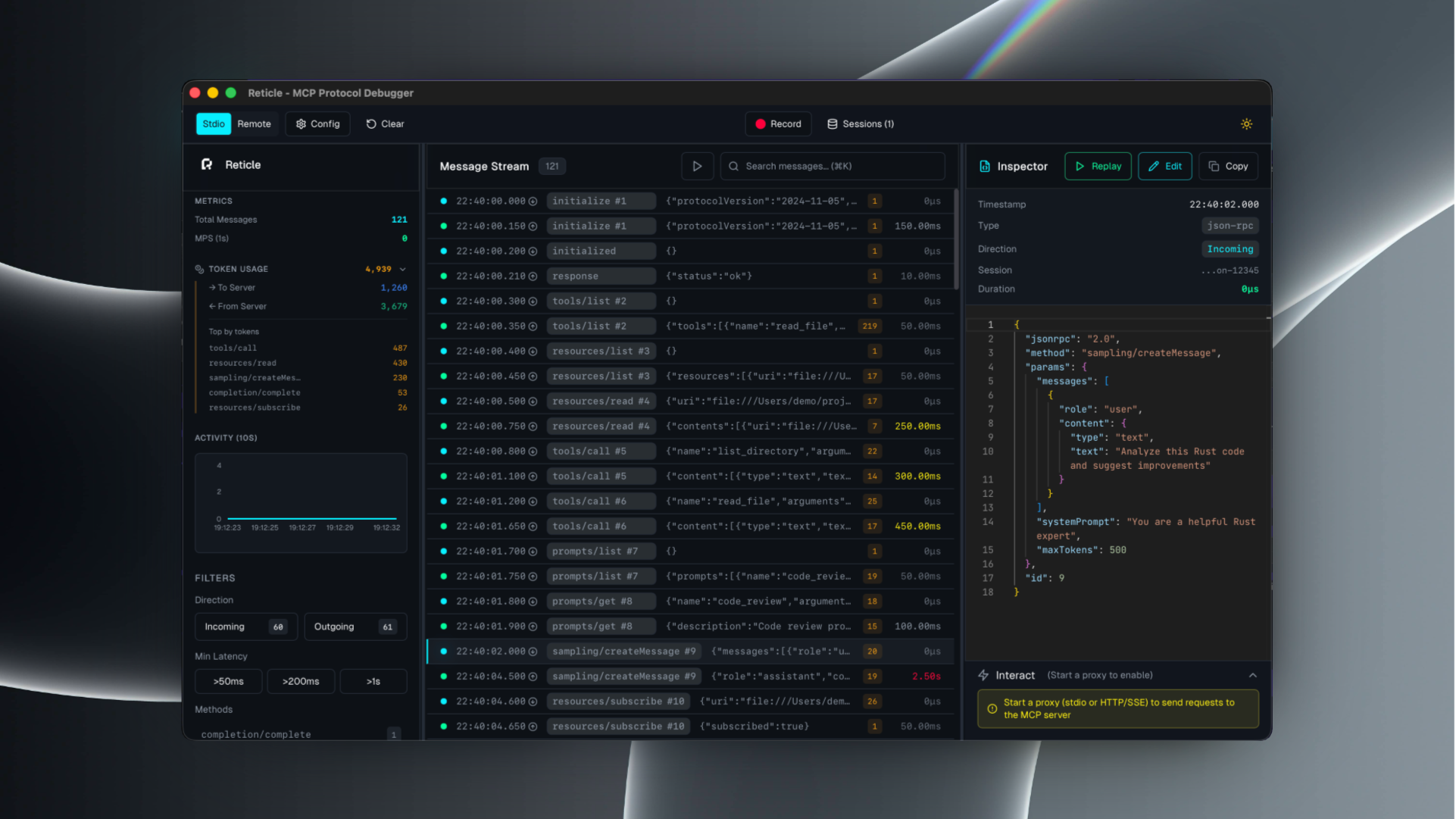
What is Reticle?
Reticle is a proxy + UI for debugging MCP integrations:
- inspect raw JSON-RPC messages (requests / notifications / responses)
- correlate request ↔ response instantly
- profile latency and token estimates
- capture server stderr and crashes
- record sessions and export logs
Supported transports: stdio, Streamable HTTP, WebSocket, HTTP/SSE.
Quick start
1) Install
# npm
npm install -g mcp-reticle

# pip
pip install mcp-reticle

# Homebrew
brew install labterminal/mcp-reticle/mcp-reticle
2) Wrap your MCP server (stdio)
Replace your MCP server command with mcp-reticle run --name <name> -- <command...>.
Example (Claude Desktop-style config):
{
  "mcpServers": {
    "filesystem": {
      "command": "mcp-reticle",
      "args": ["run", "--name", "filesystem", "--", "npx", "-y", "@modelcontextprotocol/server-filesystem", "/Users/me/work"]
    }
  }
}
3) Launch the UI
mcp-reticle ui
Optional: log-only mode (no UI)
mcp-reticle run --log -- npx -y @modelcontextprotocol/server-memory
Optional: proxy an HTTP-based MCP server
mcp-reticle proxy --name api --upstream http://localhost:8080 --listen 3001
Installation
If you prefer building from source:
git clone https://github.com/labterminal/mcp-reticle.git
cd mcp-reticle
just build
Documentation
All guides and deep dives are in the GitHub Wiki:
- Getting started
- CLI reference
- Client configuration
- Troubleshooting
- Architecture
- Security & privacy
- Development
- Exports
CLI overview
| Command | Purpose |
|---|---|
mcp-reticle run |
Wrap stdio MCP servers and inspect traffic |
mcp-reticle proxy |
Reverse proxy HTTP/SSE/WebSocket transports |
mcp-reticle ui |
Launch the desktop UI |
mcp-reticle daemon |
Headless telemetry hub |
Full details: CLI reference
Security & privacy
Reticle can capture tool inputs/outputs and server stderr. Treat recordings and exports as sensitive artifacts.
Recommended reading: Security & privacy
Contributing
- Repo guidelines:
CONTRIBUTING.md - Dev setup and commands: Development guide
License
MIT — see LICENSE.
Explore related projects
Asabeneh/30-Days-Of-Python
The 30 Days of Python programming challenge is a step-by-step guide to learn the Python programming language in 30 days. This challenge may take more than 100 days. Follow your own pace. These videos may help too: https://www.youtube.com/channel/UC7PNRuno1rzYPb1xLa4yktw
78,423 starsgrafana/grafana
The open and composable observability and data visualization platform. Visualize metrics, logs, and traces from multiple sources like Prometheus, Loki, Elasticsearch, InfluxDB, Postgres and many more.
77,763 starsredis/redis
For developers, who are building real-time data-driven applications, Redis is the preferred, fastest, and most feature-rich cache, data structure server, and document and vector query engine.
77,309 starsapache/superset
Apache Superset is a Data Visualization and Data Exploration Platform
75,453 stars