
sorokin-vladimir/tele has 248 GitHub stars and 32 forks. GitHot measured +2 stars in 24 hours and +7 in 7 days. Last checked 2026-11-15 13:55 UTC. Last push 2026-11-13.
What you can do
- Keyboard first. Vim-style navigation and a cursor that steps from message to message. The mouse is optional.
- Notifications with no window open. tele daemon install keeps the account connected from login.
- One account, many windows. A second tele joins the running one instead of connecting again.
- Chats, groups, channels and forums, with folders, replies, reactions, edits, forwards, and drafts synced with Telegram.
Measured star growth
- in 24h
- +2
- in 7 days
- +7
- in 15 days
- Update delayed
- in 1 month
- Update delayed
Net star changes over overlapping periods, not daily totals. Missing measurements are left blank. Stars measure attention, not software quality.
About
Telegram client for the terminal: a keyboard-first TUI, background daemon and a CLI, written in Go
Developer ToolsREADME.md
Originaltele
  _            _
 | |_    ___  | |   ___
 | __|  / _ \ | |  / _ \
 | |_  |  __/ | | |  __/
  \__|  \___| |_|  \___|
A terminal-native Telegram client built for keyboard-driven workflows.




Features • Command line • Installation • Keybindings • Roadmap • Docs
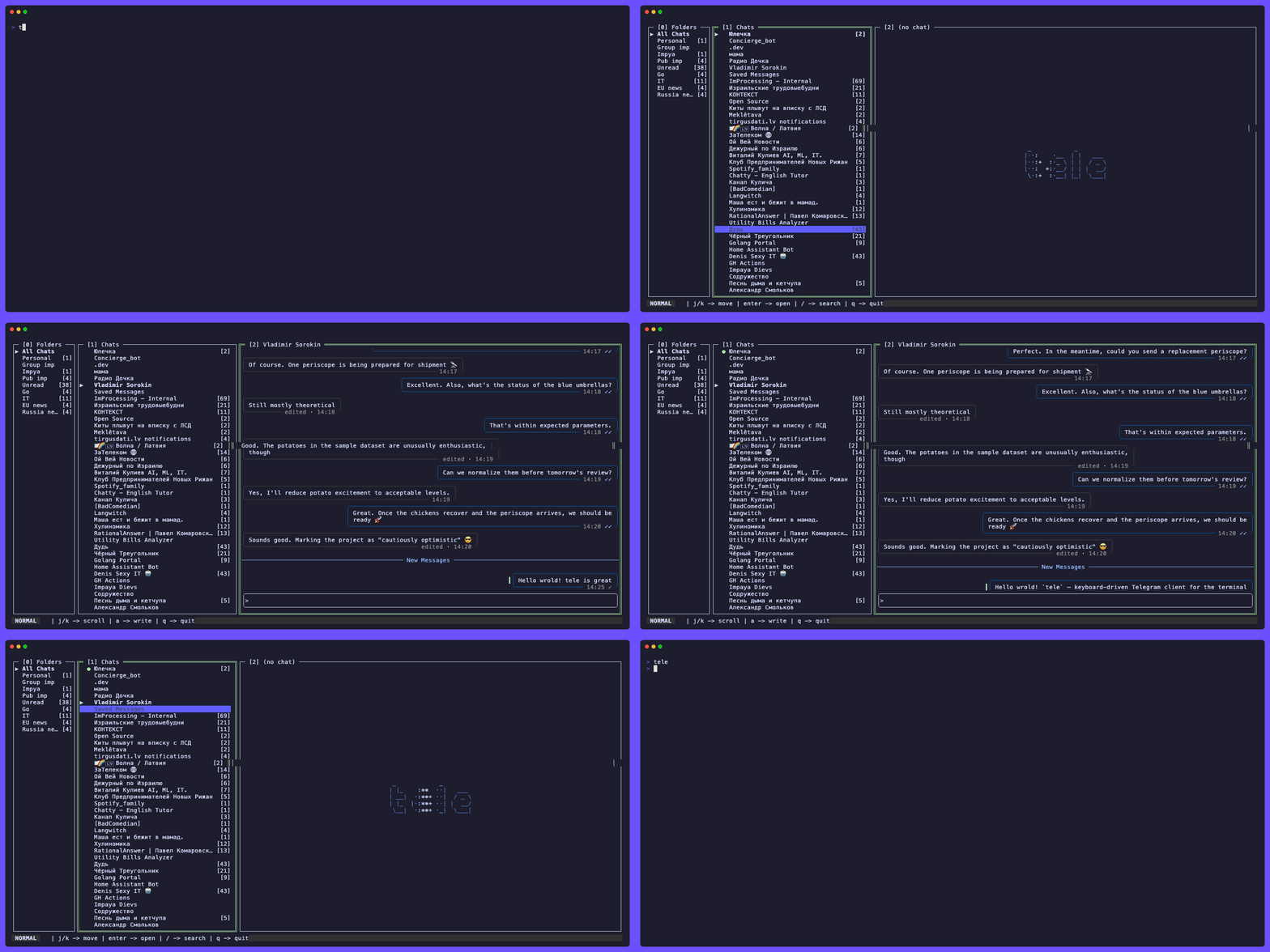
Why tele?
Telegram Desktop, the web client and the mobile apps are built around the mouse. If you live in the terminal, with Neovim, yazi, k9s or tmux, switching to a GUI messenger breaks your flow.
tele keeps Telegram in the terminal.
You drive it from the keyboard the way you drive lazygit, it works over SSH, and it uses about 50 MB of memory at idle, where desktop clients take several hundred.
Its author uses it every day.
The same tele answers on the command line: you, or an AI agent you let run it, can list chats, read one and send a message without opening a window.
Features
- Keyboard first. Vim-style navigation and a cursor that steps from message to message. The mouse is optional.
- Notifications with no window open.
tele daemon installkeeps the account connected from login. - One account, many windows.
A second
telejoins the running one instead of connecting again. - Chats, groups, channels and forums, with folders, replies, reactions, edits, forwards, and drafts synced with Telegram.
- Photos inline at full quality in kitty, Ghostty and iTerm2 3.7.0+, as block art everywhere else.
- Voice messages play in the app, with a waveform and a moving playhead.
- Video, round notes (кружки) and GIFs as inline previews. The selected GIF loops in place.
- Albums.
Stage several files with
uand send them as one album. - Proxies as in the official clients: MTProto, fake-TLS included, or SOCKS5.
- A command line for reading and sending, and a guide for AI agents.
- Themes that switch between dark and light with your terminal. Eight ship in the binary.
- One static binary. No TDLib, no cgo, no runtime to install.
tele does not record voice or video and does not make calls: why.
Every media type in detail: docs/media.md.
Command line and AI agents
Commands work on the account the running tele holds, a window or the service:
tele chats --unread          # the chats with unread messages
tele show me --limit 5       # the newest messages in Saved Messages
tele send me "buy milk"      # send, and wait until Telegram has it
Add --json to any of them for JSON Lines.
Every command: docs/commands.md.
Exit codes and the JSON: docs/cli.md.
tele help agents prints a guide for AI agents, written for the tele you have installed.
The tele skill points an agent to it.
Install the skill
| Agent | Install the skill |
|---|---|
| Claude Code | /plugin install tele --marketplace sorokin-vladimir/tele |
| GitHub Copilot CLI | copilot plugin marketplace add sorokin-vladimir/tele, then copilot plugin install tele@tele |
| OpenAI Codex | npx skills add sorokin-vladimir/tele -a codex |
| Cursor | npx skills add sorokin-vladimir/tele -a cursor |
| Gemini CLI | npx skills add sorokin-vladimir/tele -a gemini-cli |
On a Claude Code older than 2.1.275, add the marketplace first: claude plugin marketplace add sorokin-vladimir/tele, then claude plugin install tele@tele.
npx skills add sorokin-vladimir/tele with no -a asks which of the agents it knows to install into, OpenCode and others among them.
cli.account_commands decides how far commands may go: read lets them read and not send, none keeps them out.
docs/cli.md
Compared to other terminal clients
Nearly every terminal Telegram client is built on TDLib, Telegram's C++ library, linked directly or through Python.
tele speaks MTProto itself via gotd/td and builds without cgo.
tele |
tgt | tg · tuigram | |
|---|---|---|---|
| Telegram backend | gotd/td, MTProto in pure Go | TDLib | TDLib via python-telegram |
| What you install | one static binary | cargo install plus TDLib; CMake for voice notes; chafa for inline images |
Python 3.9+/3.10+ plus TDLib; ffmpeg, terminal-notifier, urlview, ranger/fzf |
| Inline photos | Kitty graphics protocol at full quality, block art | chafa block art, behind an optional build feature |
an external viewer via mailcap |
| With no window | a service from login; notifications with no window open | runs only while its terminal is open | runs only while its terminal is open |
| Windows | binary, Scoop, winget | supported | not practical |
tele also has what none of the three list: reactions, chat folders, album sending, inline previews for video, round notes and GIFs, and voice playback with no external player.
tg and tuigram record voice messages, which tele leaves out (why), and support secret chats, which are on the backlog.
Abandoned projects are left out: TelegramTUI, arigram, tg-tui, Telegram-TUI, tg9 and ithil.
Installation
Any Unix (macOS · Linux · FreeBSD · OpenBSD · NetBSD) - one-liner
curl -sL https://raw.githubusercontent.com/sorokin-vladimir/tele/main/scripts/install.sh | sh
The script detects your OS and architecture and installs the matching binary from the latest release. Options:
# Latest beta (prerelease), installed as `tele-beta` so it coexists with stable:
curl -sL https://raw.githubusercontent.com/sorokin-vladimir/tele/main/scripts/install.sh | sh -s -- --beta

# A specific version, or a custom install directory:
curl -sL .../install.sh | sh -s -- --version v1.9.0
curl -sL .../install.sh | PREFIX="$HOME/.local/bin" sh
On FreeBSD, desktop notifications go through the terminal (supported terminals only), and audio playback needs a running PulseAudio/PipeWire server. Without them, that feature turns itself off without an error.
macOS / Linux - Homebrew
brew install tele # from homebrew/core
Or from tele's own tap:
brew tap sorokin-vladimir/tap
brew trust sorokin-vladimir/tap
brew install sorokin-vladimir/tap/tele
Both formula names are written out in full on purpose.
Once the tap is tapped, a plain brew install tele picks the tap's formula and mentions it only in a Warning: tele shadows homebrew/core/tele line that is easy to scroll past.
The two differ in one way worth knowing about, described in docs/app-key.md.
Beta channel
For the latest merged changes ahead of the weekly stable release, install the beta package from the same tap.
It ships as a separate tele-beta binary with its own config and state (~/.config/tele-beta), so it lives alongside a stable install:
brew tap sorokin-vladimir/tap
brew trust sorokin-vladimir/tap
brew install tele-beta
brew upgrade tele-beta   # pull newer betas as they are cut
Beta builds come from prerelease tags (vX.Y.Z-beta.N) and are published as GitHub prereleases, so they never show up as the "latest" release.
Run it with tele-beta.
Other platforms
Linux - binary
curl -sL https://github.com/sorokin-vladimir/tele/releases/latest/download/tele-linux-amd64 \
  -o ~/.local/bin/tele && chmod +x ~/.local/bin/tele
For arm64: replace amd64 with arm64.
Debian / Ubuntu / Mint - apt
echo 'deb [trusted=yes] https://apt.fury.io/sorokin-vladimir/ /' \
  | sudo tee /etc/apt/sources.list.d/tele.list
sudo apt update && sudo apt install tele
Signed .deb files are also attached to every release.
Fedora / RHEL / openSUSE - dnf / zypper
sudo tee /etc/yum.repos.d/tele.repo <<'EOF'
[tele]
name=tele
baseurl=https://yum.fury.io/sorokin-vladimir/
enabled=1
gpgcheck=0
EOF
sudo dnf install tele   # or: sudo zypper install tele
Signed .rpm files are also attached to every release.
Alpine - apk
echo 'https://alpine.fury.io/sorokin-vladimir/' | sudo tee -a /etc/apk/repositories
sudo apk add --allow-untrusted tele
Windows - Scoop, winget or binary
scoop bucket add tele https://github.com/sorokin-vladimir/scoop-tele
scoop install tele
# or
winget install sorokin-vladimir.tele
Or download the executable with PowerShell (run as your normal user):
$dir = "$Env:LOCALAPPDATA\Programs\tele"
New-Item -ItemType Directory -Force -Path $dir | Out-Null
Invoke-WebRequest `
  -Uri "https://github.com/sorokin-vladimir/tele/releases/latest/download/tele-windows-amd64.exe" `
  -OutFile "$dir\tele.exe"
For arm64: replace amd64 with arm64.
Add $dir to your PATH (or run tele.exe by full path) and launch it from any terminal.
A .zip containing tele.exe (tele_windows_amd64.zip) is also attached to every release.
Photos are block art on Windows for now: docs/media.md.
Nix / NixOS
tele ships a flake.
Try it without installing anything:
nix run github:sorokin-vladimir/tele
Or install it into your profile:
nix profile install github:sorokin-vladimir/tele
To pull it in as an input of your own flake (e.g. a NixOS configuration):
{
  inputs = {
    nixpkgs.url = "github:NixOS/nixpkgs/nixos-unstable";
    tele = {
      url = "github:sorokin-vladimir/tele";
      inputs.nixpkgs.follows = "nixpkgs";
    };
  };
}
Then, in your configuration:
environment.systemPackages = [
  inputs.tele.packages.${pkgs.system}.default
];
AUR and Snap packages are planned but not published yet.
Getting started
Run tele and scan the QR code it shows with Telegram on your phone, or log in with your phone number, the code Telegram sends you and your 2FA password, if you have one.
tele then asks once whether to keep running as a service.
The first launch, the service, the app key and upgrading from 1.11: docs/getting-started.md
Keybindings
| Key | Action |
|---|---|
j / k |
Navigate chats or select next / previous message |
ctrl+j / ctrl+k |
Scroll messages |
i |
Compose message |
r |
Reply |
e / d |
Edit / delete message |
t |
React |
f |
Forward message |
u |
Attach a file to send (repeat to send an album) |
o |
Open / view media (photo in viewer, video inline) |
O |
Open video in the external player |
p |
Play voice message in-app |
s |
Download the selected file |
/ |
Search chats |
space |
Message context menu |
0 / 1 / 2 |
Focus panes |
, |
Settings |
g L |
Log out |
? |
Keyboard shortcuts |
q |
Quit |
Full reference: docs/keybindings.md
Configuration
Everything lives in ~/.config/tele/config.yml.
Press , for the settings overlay: it lists every setting and writes your changes to the same file, keeping your comments.
docs/configuration.md
tele holds a dark and a light theme and switches between them as your terminal background changes.
Eight themes ship in the binary, and your own are files that set only the colours they change.
docs/themes.md
Every key can be rebound per context, chords included, in the keybindings: section of the config.
docs/keybindings.md
Roadmap
Planned work lives on the public project board, grouped into milestones.
Milestones track minor lines (v1.11, v2.0, …); patch releases ship incrementally within a line as fixes land.
| Release | Focus |
|---|---|
v1.11 (done) |
Settings & people: in-app settings overlay, user profile overlay, avatars, themes shipped inside the binary, plus the distribution and audit gaps left behind |
v2.0 (done) |
Single owner of the Telegram connection: windows that join one tele, a service that keeps it running at login, notifications with no window open, one budget for calls to Telegram; in 2.0.1, commands that list chats and topics, read a chat and send to it, and a guide for AI agents |
v2.1 |
Rendering and layout: rich messages (tables, headings, lists), names with emoji drawn at their real width, a focused pane that takes the whole screen, an emoji picker in the composer |
v2.2 |
More of the command line: logging in, search, sending files and reactions, following a chat as messages arrive |
Backlog |
Power-user & platform: search (full-text history, command palette, in-chat grep), scheduled sending, bot commands & inline keyboards, secret chats, polls, extended vim motions, notification click routing |
Work is also categorized by theme (Security & Reliability, Architecture & Performance, Feature Completeness, Power User & Polish) via the board's Theme field.
Build from source
Requires Go 1.26+. The binary this produces carries the shared app key described in docs/app-key.md, so it runs without you registering anything:
git clone https://github.com/sorokin-vladimir/tele
cd tele
go build -o tele ./cmd/tele/
Building with your own app key, the nix develop shell and the flake's vendorHash: docs/development.md
Documentation
- Getting started: the first launch, the service, the app key, upgrading from 1.11
- Commands: every command and its flags
- Command line: what commands exit with, their JSON, and how they are named
- Configuration: the config file, the settings overlay, notifications, photo and avatar caches
- Keybindings: every key by context, and how to rebind them
- Themes: theme slots, writing your own, every color token
- Media: inline photos, voice playback, video, GIFs, sending files
- App key: what it is, and what to do when Telegram blocks it
- Development: building from source, the Nix flake
- Contributing: how to propose a change
License
GPL-3.0: free to use and fork; derivative works must remain open-source.
Built with: