
socatlolmeow/drift has 112 GitHub stars and 10 forks. GitHot measured +2 stars in 24 hours. Last checked 2026-11-17 18:59 UTC. Last push 2026-11-15.
What you can do
- Vim-style keybinds: j/k, gg/ge, counts like 5j, and : for the command line
- Synced lyrics in a side panel or fullscreen, with the current line filled in as it's sung, plus a cover art view with track details and progress
- Queue and playlists. Build a queue, save and reorder playlists, or import any YouTube / YouTube Music playlist by URL
- Listening history: Recently Played and Most Played tabs, with persistent play counts
Measured star growth
- in 24h
- +2
- in 7 days
- Collecting history
- in 15 days
- Collecting history
- in 1 month
- Collecting history
Net star changes over overlapping periods, not daily totals. Missing measurements are left blank. Stars measure attention, not software quality.
About
A minimal, reliable music player using Vim keybinds built in Rust.
Creative & MediaREADME.md
OriginalDrift
A YouTube Music player for your terminal, with Vim keybinds.
Search, queue and play music with no account, no login and no browser.




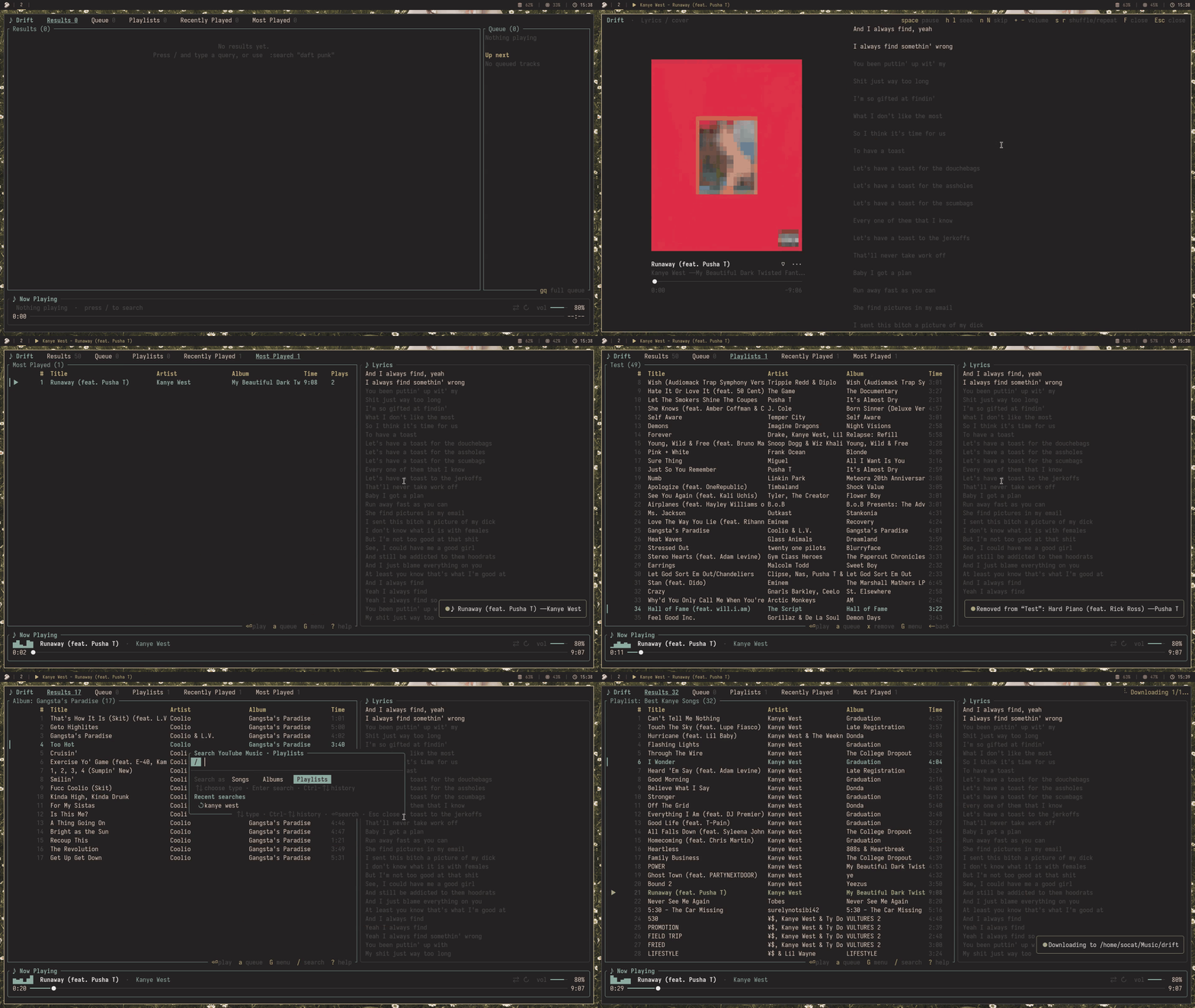
Table of contents
- Features
- Installation
- Usage
- Keybinds
- Commands
- Lyrics
- MPRIS and playerctl
- Configuration
- Troubleshooting
- Contributing
- License
Features
- Vim-style keybinds:
j/k,gg/ge, counts like5j, and:for the command line - Synced lyrics in a side panel or fullscreen, with the current line filled in as it's sung, plus a cover art view with track details and progress
- Queue and playlists. Build a queue, save and reorder playlists, or import any YouTube / YouTube Music playlist by URL
- Listening history: Recently Played and Most Played tabs, with persistent play counts
- Discovery:
gafor an artist's songs,gsfor similar songs,gbfor the album, and:album/:playlistto search for albums and playlists - A song menu (
G) to play a song, queue it, add it to a playlist, jump to the artist or see its info - A command palette (
:search,:seek,:vol,:importand more) with completion and history - Your queue and position are restored the next time you start Drift
- Media keys and
playerctlon Linux (MPRIS), plus optional Discord rich presence - One TOML file for volume, seek step, shuffle/repeat defaults, accent color and custom keybinds, custom audio streaming options, Discord Rich Presence
Installation
Drift needs mpv for playback and yt-dlp to get the audio streams. Run drift --check at any time to see if both are installed.
Arch Linux (AUR)
yay -S driftmusic-git
Any AUR helper works. You can also build it by hand:
git clone https://aur.archlinux.org/driftmusic-git.git
cd driftmusic-git
makepkg -si
mpv and yt-dlp are pulled in automatically.
Install script
Works on Arch, Debian/Ubuntu, Fedora, openSUSE, Void, Alpine and Gentoo. It installs the dependencies and builds Drift with cargo.
git clone https://github.com/socatlolmeow/drift.git
cd drift
./install.sh
From source
Install the dependencies and Rust, then:
git clone https://github.com/socatlolmeow/drift.git
cd drift
cargo install --path .
This puts drift in ~/.cargo/bin/, which is on your $PATH if you installed Rust with rustup.
Nix
The repo has a flake that puts mpv and yt-dlp on Drift's PATH for you:
nix run github:socatlolmeow/drift
Installing mpv and yt-dlp manually
| Platform | Command |
|---|---|
| Debian / Ubuntu | sudo apt install mpv and pipx install yt-dlp |
| macOS | brew install mpv yt-dlp |
| Arch | sudo pacman -S mpv yt-dlp |
| Windows | winget install mpv.net yt-dlp.yt-dlp or scoop install mpv yt-dlp |
Usage
drift                    # start the player
drift "daft punk"        # start with a search
drift --check            # check that mpv and yt-dlp are installed
drift --help
drift --version
Press / to search, Enter to play, a to add a song to the queue and ? for the full list of keybinds. Inside the player, :help lists the commands.
Keybinds
These are the defaults. You can change them, see Custom keys.
| Key | Action |
|---|---|
j k / ↓ ↑ |
move (counts work: 5j) |
gg ge |
jump to top / bottom (5gg goes to row 5) |
Tab Shift-Tab |
cycle Results / Queue / Playlists |
gr gq gp |
jump to Results / Queue / Playlists |
Enter |
play the selected song |
Space |
pause / resume |
n N |
next / previous track |
h l / ← → |
seek back / forward (counts: 6l) |
+ - |
volume up / down |
s r |
toggle shuffle / cycle repeat |
a A P |
queue the song / queue all results / play all results |
dd x |
remove from queue or playlist |
J K |
move a queue or playlist item down / up |
G |
song menu |
ga |
go to the artist |
gs |
see similar songs |
gb |
go to the album |
gB |
save the album as a playlist |
D |
download the current song |
gd |
download the highlighted song |
gD |
download the whole album, playlist, queue or loaded results |
L |
toggle the lyrics panel |
F |
cycle fullscreen lyrics → cover art and lyrics → player |
/ : |
search / command line |
? |
help |
q |
quit |
Commands
Press : to open the command line. Most commands have short aliases (:vol, :sa, :ar and so on).
| Command | Action |
|---|---|
:search "query" |
search YouTube Music |
:play [N] |
play or resume, or play row N |
:pause :resume :toggle :stop |
control playback |
:next :prev |
next / previous track |
:seek 90 1:30 +10 |
absolute or relative seek |
:vol 50 +5 |
set or change the volume |
:shuffle :repeat [off|all|one] |
playback modes |
:add [N] :addall :playall |
queue results |
:download [current|selected|all] |
download audio files (defaults to the current song; alias :dl) |
:remove [N] :clear |
remove from the queue / clear it |
:save name :load name :append name |
work with playlists |
:save! name |
save and overwrite an existing playlist |
:savealbum [name] :saveresults [name] |
save an album or the results directly as a playlist |
:addto name :delpl name |
add a song to / delete a playlist |
:import URL |
import a YouTube / YouTube Music playlist |
:album [query] |
open the selected song's album, or search albums |
:playlist query |
search YouTube Music playlists |
:similar |
songs similar to the selected one (also :radio) |
:artist |
songs by the selected song's artist |
:results :queue :playlists |
switch view |
:lyrics |
toggle the lyrics panel |
:quit |
quit |
:save refuses to overwrite an existing playlist. Use :save! to replace it or :append to add to the end of it.
Lyrics
Press L for a side panel (needs a terminal at least 70 columns wide). Press F to cycle through fullscreen lyrics, cover art and lyrics, and back to the player. Esc, q or L also closes either fullscreen view.
The cover view shows square artwork, the song title, artist and album, and a progress bar with elapsed and remaining time on the left. Lyrics appear on the right, with the current line kept near the middle and surrounding lines fading with distance. This view hides the bottom player bar to give the artwork and lyrics more room.
In both fullscreen views the current line gets bold, white text on a dark neutral band with extra breathing room, while nearby lines fade with distance. It fills in as it's sung. Songs without synced lyrics show plain text that you can scroll with j/k.
Both fullscreen views keep playback controls available: Space to pause or resume, h/l or the arrow keys to seek, n/N to skip tracks, +/- for volume, s for shuffle and r to cycle repeat.
Lyrics come from LRCLIB and are only fetched while the panel or fullscreen view is open.
Artwork comes from YouTube thumbnails and is only fetched when the cover view is open. Drift trims black bars and crops and resizes the image to 1000 × 1000 pixels. Terminals detected as supporting the Kitty or iTerm2 graphics protocol show the image directly; other terminals use colored half blocks for a rough preview. The cover is hidden in very short windows to leave room for track details.
MPRIS and playerctl
Drift registers as an MPRIS player on Linux, so your current song can appear in Waybar, your desktop's media controls and anything else that speaks MPRIS, and you can control playback with playerctl and your media keys.
A step-by-step guide covers setup for Waybar and other status bars, media key bindings and troubleshooting.

Configuration
Settings live in config.toml inside Drift's config directory (~/.config/drift/ on Linux). Drift only reads the file and never rewrites it, so your comments are safe. Restart Drift after editing.
[playback]
volume = 80
shuffle = false
repeat = "off"        # off, all or one
autoplay = false
restore_session = true
seek_step = 5.0
volume_step = 5.0

[artist]
popular_first = false

[ui]
accent = "cyan"       # a color name or a hex value like "#FF8800"

[discord]
client_id = ""        # set this to enable Discord rich presence

[audio]
download = false               # false: stream songs; true: download to the cache first
download_max_minutes = 15      # with download = true, longer songs are still streamed (0 = no limit)
download_dir = "~/Music/drift" # The directory where songs are saved.
cookies_from_browser = ""      # e.g. "firefox" or "chrome"; passed to yt-dlp when YouTube blocks playback
stream_from_client = ""        # e.g "android_vr" - The client that is passed to yt-dlp used to stream the songs

[keys]
quit = "Q"
move_down = ["j", "down", "ctrl+n"]
move_up = ["k", "up", "ctrl+p"]
go_top = ["gg", "home"]
shuffle = []                  # an empty list unbinds the action
If you already have a config.toml from an older version, add the [audio] section by hand, since Drift never rewrites the file.
Streaming or downloading
By default Drift streams songs, so playback starts right away, even for hour-long tracks. With download = true songs are cached on disk first, and the next song in the queue is fetched in the background while the current one plays.
Saving songs permanently
Set download_dir under [audio] in config.toml (default: ~/Music/drift). The directory is created when needed. ~ expands to your home directory; relative paths resolve from the directory where you start Drift. Restart Drift after changing it.
- Press
Dto download the current song, including from fullscreen lyrics or cover art. - Press
gdto download the highlighted song without changing playback. - Press
gDto download all songs in the open album, playlist or queue. On the playlist list, it downloads the highlighted playlist. For search results and history, it downloads all currently loaded songs. - In an album/playlist search picker, press
dto download the entire collection. To download one song instead, pressEnter, highlight the song, then pressgd. - The
Gcontext menu also offersdfor one song andDfor the whole list. - Commands:
:download(current song),:download selected, and:download all.:dlis an alias.
Downloads run in the background, one batch at a time, with progress and a completion summary. Duplicate songs within a batch are downloaded once, existing files are kept, and a failed song does not stop the rest. Keep Drift open until the batch finishes.
Files use the best available audio-only format in its original container, such as .webm or .m4a; no MP3 conversion or ffmpeg is required. Permanent downloads are separate from the playback cache: they work regardless of audio.download or download_max_minutes, use cookies_from_browser when configured, and are never automatically pruned.
Discord rich presence
This is off by default.
- Create an application at https://discord.com/developers/applications.
- Copy the Application ID into
client_idunder[discord]inconfig.toml. - Restart Drift.
Your status then shows the current song with cover art, album, a progress bar and a "Listen Along" button. If Discord isn't running, Drift keeps retrying quietly in the background.
Custom keys
To change keys, add a [keys] section to config.toml. Each line sets an action to one key or a list of keys and replaces that action's default keys. Everything you leave out keeps its default.
[keys]
quit = "Q"
move_down = ["j", "down", "ctrl+n"]
move_up = ["k", "up", "ctrl+p"]
go_top = ["gg", "home"]
shuffle = []                  # an empty list unbinds the action
A key is a character ("x", "G", "/"), a name (space, enter, esc, tab, backtab, backspace, delete, insert, home, end, pageup, pagedown, up, down, left, right, menu, f1 to f12), ctrl+ plus a key, or a sequence like "gg" or "ctrl+x g". Counts (5j) keep working on any binding. If you bind a key that is a default of another action, the other action loses it. A mistake in [keys] shows a message at startup and falls back to the default keys.
| Action | Default keys |
|---|---|
move_down move_up |
j down / k up |
half_page_down half_page_up |
ctrl+d / ctrl+u |
page_down page_up |
ctrl+f pagedown / ctrl+b pageup |
go_top go_bottom |
gg home / ge end |
next_view prev_view |
tab / backtab |
view_results view_queue view_playlists |
gr / gq / gp |
toggle_queue_sidebar |
Q |
activate |
enter |
pause |
space |
next prev |
n > / N < |
seek_back seek_forward |
h left / l right |
volume_up volume_down |
+ = / - _ |
add add_all play_all |
a / A / P |
delete |
x delete dd |
move_item_down move_item_up |
J / K |
shuffle repeat |
s / r |
menu |
G menu |
go_artist go_similar go_album save_album |
ga / gs / gb / gB |
download download_selected download_all |
D / gd / gD |
lyrics_panel lyrics |
L / F |
search command |
/ / : |
help |
? |
quit |
q |
back |
backspace esc |
In the Playlists tab seek_forward opens the selected playlist, and seek_back or back leaves it. Only the main view is remappable. Popups, the command line and fullscreen lyrics keep their own keys, and the in-app help (?) still lists the defaults.
Environment variables
| Variable | What it does |
|---|---|
DRIFT_CONFIG_DIR |
where Drift keeps config.toml and your playlists |
DRIFT_STATE_DIR |
where Drift keeps the saved session |
DRIFT_MPV_ARGS |
extra arguments passed to mpv |
Troubleshooting
Drift says mpv or yt-dlp is missing. Run drift --check to see which one, and install it with the table in Installing mpv and yt-dlp manually.
Playback fails with "Sign in to confirm you're not a bot". YouTube wants a login. Set cookies_from_browser under [audio] to a browser you're logged into YouTube with (for example "firefox"), then restart Drift. Updating yt-dlp also helps, since YouTube changes things often.
The lyrics panel doesn't show up. It needs a terminal at least 70 columns wide. Make the window wider or use F for fullscreen lyrics.
Cover art looks blocky or is missing. Press F twice from the player to open the cover view. A blocky preview means Drift couldn't detect Kitty or iTerm2 graphics support in your terminal. If you see "Cover art unavailable", the YouTube thumbnail couldn't be fetched or decoded. In very short windows, make the terminal taller to show the cover.
drift: command not found. Make sure ~/.cargo/bin is in your $PATH.
gb opens the wrong album. Drift looks albums up by album and artist name, so it can guess wrong, and the song needs album info to begin with. :album <query> lets you search for it yourself.
You can run several Drift windows at once. Only the first one restores and saves the session, and playlists saved from different windows are merged instead of overwritten.
Contributing
Bug reports, ideas and pull requests are welcome. Read CONTRIBUTING.md before you start. To build and run the tests:
cargo build
cargo test
Recent changes are listed in CHANGELOG.md.
License
Drift is free software, released under the GNU General Public License version 3 or later.