
sligter/LandPPT
sligter/LandPPT has 3,642 GitHub stars and 492 forks. GitHot measured -1 stars in 24 hours and +6 in 7 days. Last checked 2026-11-06 16:39 UTC. Last push 2026-11-01.
An LLM-based presentation generation platform that automatically converts document content into professional PowerPoint presentations. Supports multiple AI models and offers a wide range of templates and styles to help users create high-quality presentations.
Measured star growth
- in 24h
- -1
- in 7 days
- +6
- in 15 days
- Collecting history
- in 1 month
- Collecting history
Net star changes over overlapping periods, not daily totals. Missing measurements are left blank. Stars measure attention, not software quality.
README_EN.md
OriginalLandPPT - AI-Powered PPT Generation Platform


English | 中文
Current version: 0.5.1.

Topic / Document → Outline → HTML PPT → Script / Narration / Export
In one line: LandPPT is an LLM-powered presentation platform—turn a topic or uploaded document into an editable professional deck, with speech scripts, narrated video, and multi-format export.
Core capabilities:
| Capability | Description |
|---|---|
| One-click generation | Topic to full PPT, with parallel slide generation |
| Quick mode | AI-written content matched to reusable template package layouts and rendered as SVG |
| Smart images | Local gallery / web stock / AI generation |
| Deep research | Tavily + SearXNG for live web retrieval and summaries |
| Scripts & video | Speech scripts + Edge-TTS per-slide narration; 1080p video export |
| Multi-format export | PDF / HTML / PPTX / images / DOCX / Markdown |
| Automation | OpenAI-compatible API + REST APIs with API-key auth |
Documentation · Docker Hub · Issues
❤️ Sponsors
❤️ Thank you to CrazyToken for sponsoring LandPPT! CrazyToken | Access leading AI models and turn your materials into compelling presentations faster — rates as low as 0.05x, savings of up to 99% CrazyToken offers APIs for leading models including Claude, GPT, Gemini, Kimi, GLM, DeepSeek, Qwen, and Grok, supporting key-point extraction from documents, outline planning, slide-by-slide content generation, and speech writing. From work reports and teaching slides to product presentations, choose the right model for each stage to organize your content more efficiently. 💰 As low as 0.05× to reduce presentation creation costs: Model pricing starts at just 5% of official prices, with transparent, token-level billing you can review. Spend less on organizing long documents, generating multiple slides, and making repeated revisions. ✨ Native access through official channels: No watered-down responses, model mixing, or long-context compression. Get model support for identifying key information, structuring your presentation, and keeping the content coherent. ⚡ Stable, fast, high-concurrency access with no rate limits: Reliable API services for multi-slide content generation and multitasking help reduce waiting time throughout the creation process. 🎁 $20 in free credits for new users: Register through the exclusive link to receive $20 in trial credits, plus additional bonuses when you top up. One-on-one remote setup assistance is also available, with a real person helping you configure your model API. 👉 Try CrazyToken now and get $20 in trial credits |
Table of Contents
- Overview
- Features
- Screenshots
- Dependencies & Scope
- Quick Start
- Usage Guide
- Quick mode & template packages
- Configuration
- FAQ
- Contributing
- License
- Contact
Overview
LandPPT folds outline writing, layout, imagery, speaker notes, and export into one AI workflow:
- Input — topic text, or PDF / Word / Markdown / Excel / PPT documents
- Plan — editable outline; optional deep research for up-to-date context
- Generate — parallel HTML slides with templates and AI-adaptive layouts
- Refine — sidebar AI chat editing, image swap, visual references
- Deliver — multi-format export, or a public share link (with narration and subtitles)
Local default: SQLite + in-memory cache—one command to try, no PostgreSQL / Valkey required.
Production recommended: docker compose with Web + Worker + PostgreSQL + Valkey + MinIO + PPTX renderer.
Features
Multi-AI providers
- OpenAI GPT, Anthropic Claude, Google Gemini, Azure OpenAI
- OpenAI-compatible endpoints (DeepSeek, Moonshot, Qwen, …)
- Ollama local models; per-role routing (outline / slides / editor / template / speech) for cost control
Files & deep research
- Formats: PDF / Word / Markdown / TXT / Excel / PowerPoint
- High-quality parsing via MinerU + MarkItDown
- Multi-engine retrieval with Tavily + SearXNG and web summarization
Smart images
- Three sources: local gallery / Pixabay & Unsplash / DALL·E, SiliconFlow, Pollinations, OpenAI, Gemini
- AI matching; automatic resize, format conversion, quality tuning
- Image service is off by default (
ENABLE_IMAGE_SERVICE)
Templates & projects
- Global master template + scenario templates (general / tourism / education, …)
- Extract layout from uploaded reference PPTX; project-level AI-adaptive templates
- Four-stage workflow: requirements → outline → task tracking → PPT generation
- Stage restart/resume, visual outline editor, one-click public sharing
Quick mode template packages
- A package contains layouts for covers, agendas, content, images, summaries, and more. Content generated by AI is matched to SVG components and bound to their slots.
- Add a built-in package, import a package file, create one from PPTX, or generate one with AI. PPTX import offers visual reconstruction and original-background preservation.
- Edit package names and descriptions; add, duplicate, reorder, or delete pages. The workspace supports AI edits to individual pages and multiple rounds of whole-package editing with streamed replies.
- Publish validated drafts; projects keep the selected version. Editing a published package creates a new draft while existing projects retain their original version.
- Edit structured content, switch layouts, replace images, and lock pages. Layout decisions support Jev / TypeSafe or an OpenAI-compatible endpoint, as well as existing models or rules.
See Quick mode & template packages below and the template package documentation for workflow details and limitations.
Platform & ops
- Single-container Docker or multi-service Compose; async jobs (PDF / PPTX / narration video)
- Local accounts, GitHub / Linux Do OAuth, email verification, registration rate limits
- Optional credits, SMTP / Resend, Cloudflare Turnstile
- CI/CD publishes both application and PPTX renderer images. Helm configures shared storage and renderer network isolation; a full Argo CD sync migrates the database before application rollout.
Screenshots
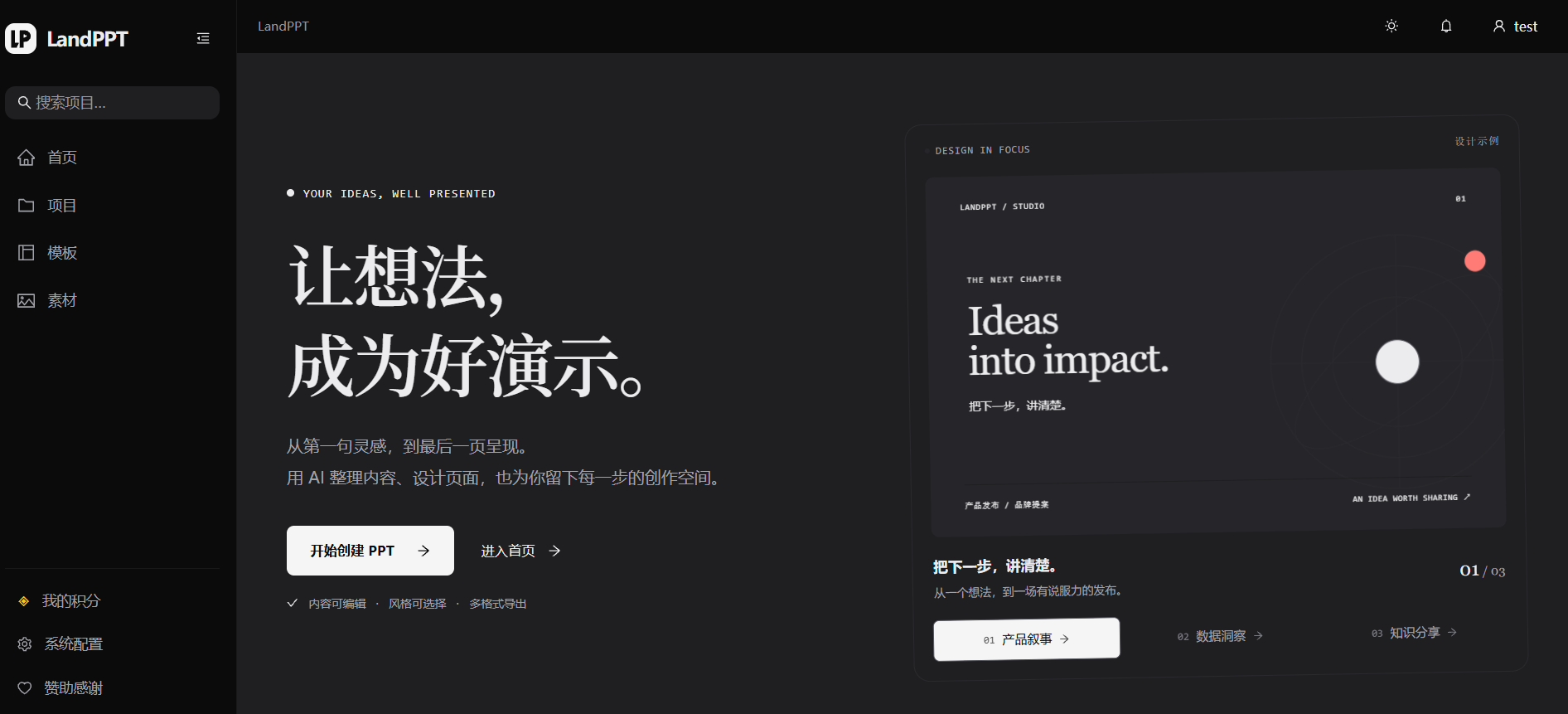
Product homepage
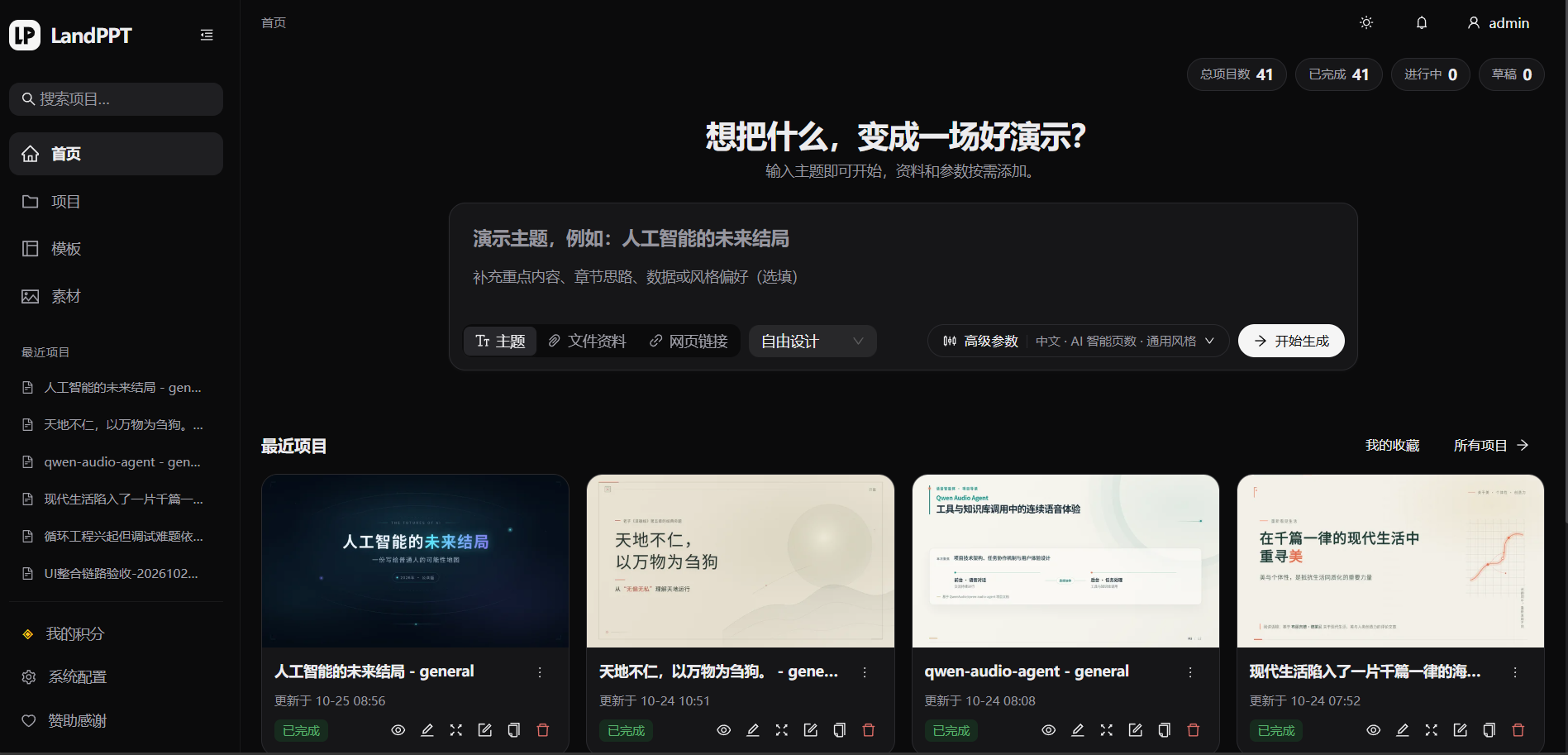
Dashboard & project creation
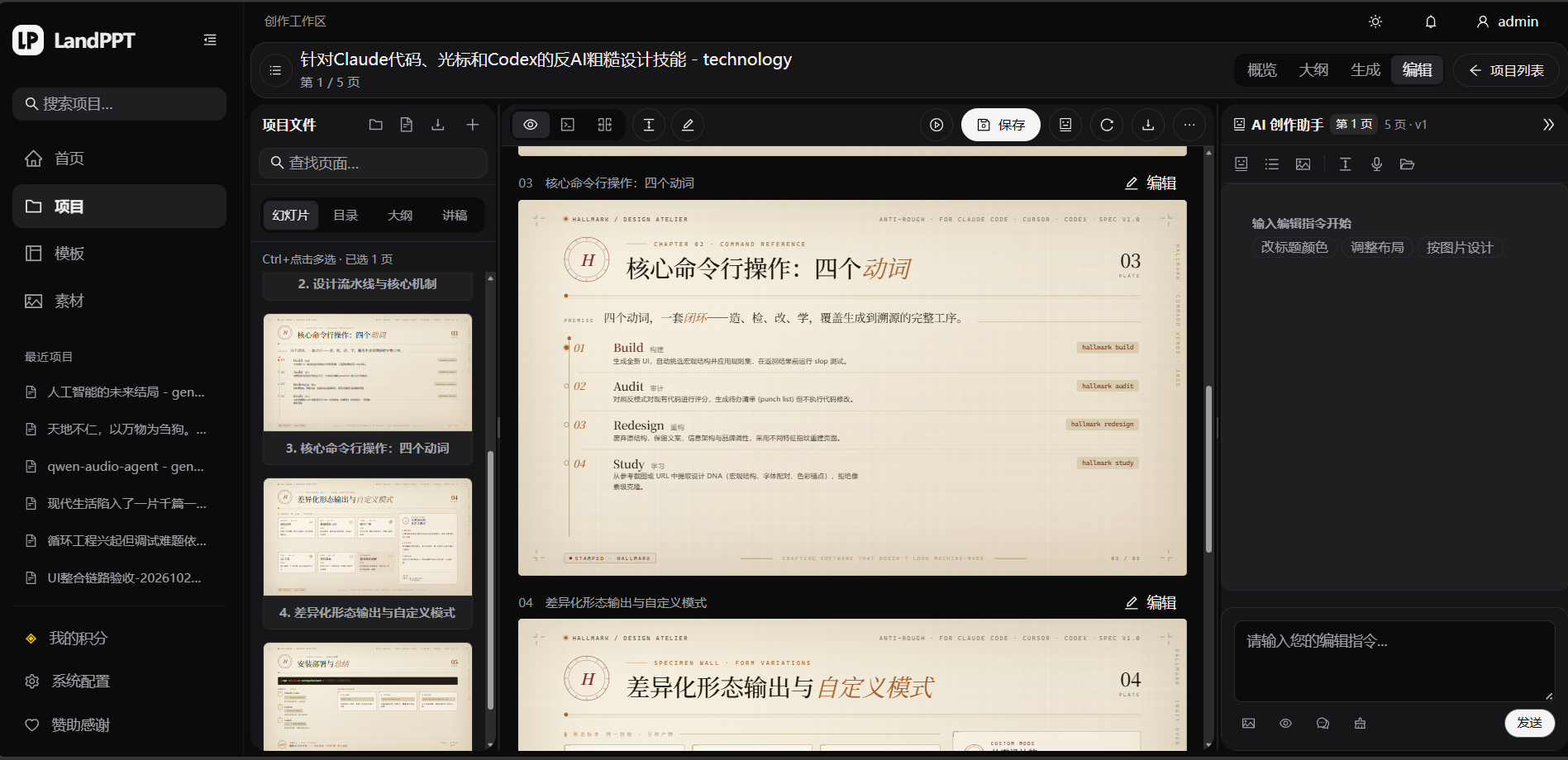
Slide editor & AI assistant
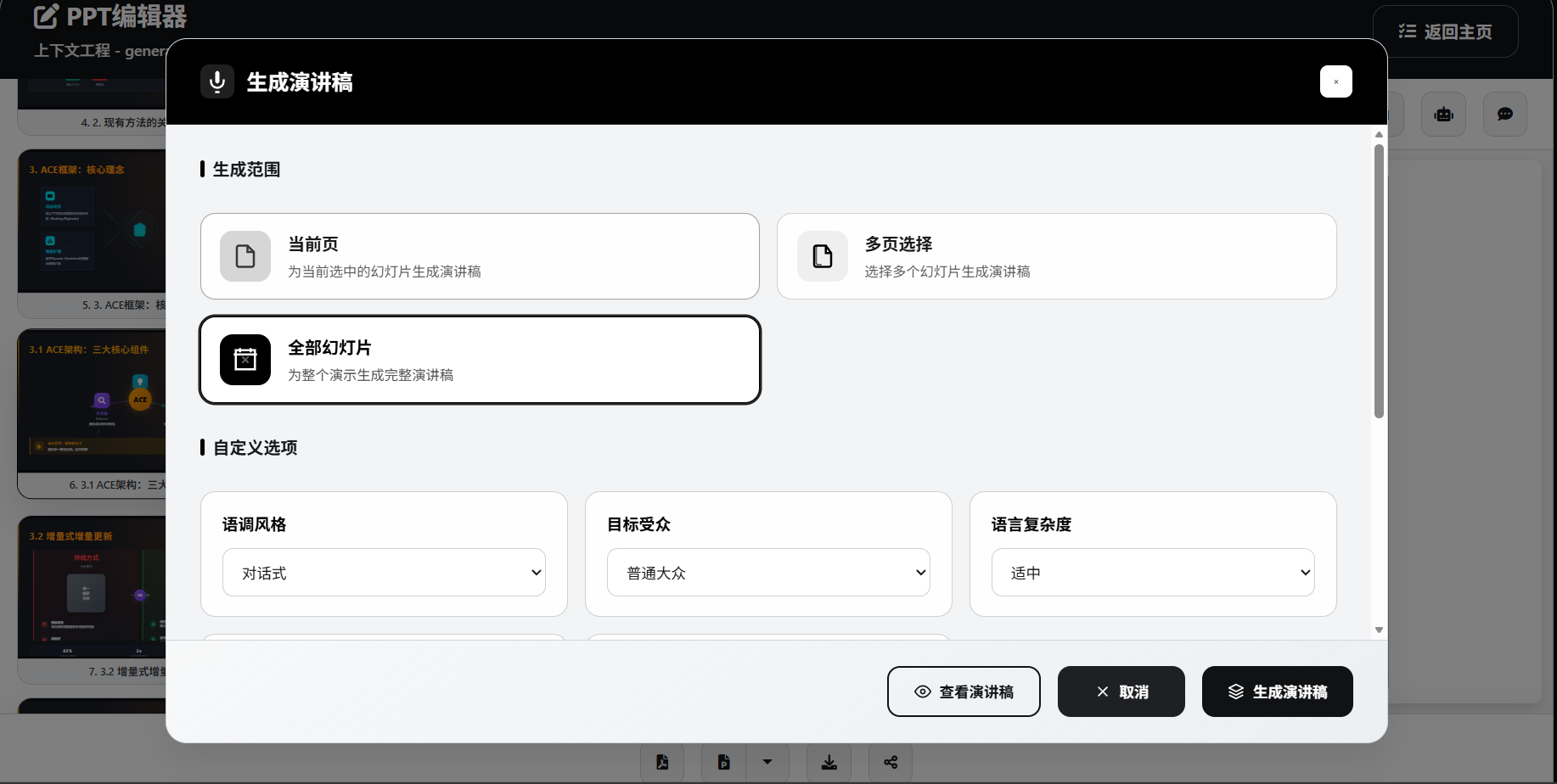
More feature examples (speech)
Speech script
Dependencies & Scope
Separate minimum runnable from full feature set so you are not surprised after first boot.
| Capability | Dependency | Notes |
|---|---|---|
| Core generation (outline / HTML PPT) | At least one AI provider key | Required |
| Local models | Ollama, etc. | Optional offline inference |
| Deep research | TAVILY_API_KEY or SearXNG |
Optional |
| Web / AI images | Gallery or image-gen keys + ENABLE_IMAGE_SERVICE=true |
Optional (off by default) |
| Create template packages from PPTX | Separate LibreOffice renderer + template generation model | Included in Compose; visual reconstruction needs an image-capable model |
| Standard editable PPTX | APRYSE_LICENSE_KEY (commercial) |
Optional, but required for editable PPTX |
| Image-based PPTX | No Apryse | Higher visual fidelity; in-slide elements usually not editable |
| Narration video | ffmpeg; optional ComfyUI TTS |
Optional |
| Multi-user / background jobs | PostgreSQL + Valkey + MinIO + Worker | Prefer Compose |
Production security
- Change
SECRET_KEYand admin password; do not ship defaultadmin/admin123- Production compose disables admin bootstrap by default—enable explicitly on first deploy only
- Use strong random
LANDPPT_API_KEY/LANDPPT_API_KEYS- Never commit real secrets to Git
Quick Start
System requirements
- Python 3.11+
- SQLite 3 (local default)
- ffmpeg (for narration video export)
- Docker (optional)
Database migrations
- Pending migrations run automatically on startup; disable with
LANDPPT_AUTO_MIGRATE_ON_STARTUP=false - Local default is SQLite; set
DATABASE_URLonly when you want PostgreSQL or another external DB - For multi-node shared databases, disable auto-migrate and run a one-off migration job
Upgrading to template packages requires migration 019, which adds the template type column and package tables while preserving existing templates. Creating tables alone does not update columns in existing tables. If startup migration is disabled, run this before starting the new version:
uv run python -m landppt.cli migrate
# For an existing Compose deployment:
# docker compose exec landppt python -m landppt.cli migrate
The bundled Argo CD configuration prepares database dependencies and configuration, runs a migration Job, and then rolls out Web / Worker only after success. Use a full application sync. See the deployment guide for migration troubleshooting and Helm settings.
Option 1: uv (recommended for local)
git clone https://github.com/sligter/LandPPT.git
cd LandPPT

# Install uv if needed
# Windows (PowerShell)
powershell -ExecutionPolicy ByPass -c "irm https://astral.sh/uv/install.ps1 | iex"
# macOS / Linux
curl -LsSf https://astral.sh/uv/install.sh | sh

# Build Ant Design browser assets first (Node.js 22.12+)
npm ci --prefix frontend
npm run build --prefix frontend

uv sync --extra dev
cp .env.example .env
# Edit .env — configure at least one AI API key

# Defaults to :8000 with SQLite + memory cache
uv run python run.py
Option 2: pip
git clone https://github.com/sligter/LandPPT.git
cd LandPPT

python -m venv venv
# Windows: venv\Scripts\activate
# macOS / Linux: source venv/bin/activate

npm ci --prefix frontend
npm run build --prefix frontend
pip install -e .
cp .env.example .env
# Edit .env with AI API keys

python run.py
Option 3: Docker single container
docker pull bradleylzh/landppt:latest

docker run -d \
  --name landppt \
  -p 8000:8000 \
  -v $(pwd)/.env:/app/.env \
  -v landppt_data:/app/data \
  -v landppt_uploads:/app/uploads \
  -v landppt_reports:/app/research_reports \
  -v landppt_cache:/app/temp \
  -v landppt_lib:/app/lib \
  bradleylzh/landppt:latest

docker logs -f landppt
Create and configure
.env(at least one AI API key) before running.
Option 4: Docker Compose (recommended for production)
Bundled docker-compose.yml starts landppt (Web) + worker + PostgreSQL + Valkey + MinIO + pptx-renderer (minio-init creates the bucket). Prefer plain python run.py for a lightweight local trial.
cp .env.example .env
# At minimum: AI keys, SECRET_KEY, POSTGRES_PASSWORD

docker compose up -d
docker compose logs -f landppt
- App:
http://localhost:8000(override withLANDPPT_PORT) - MinIO console:
http://localhost:9001 - Production disables admin auto-bootstrap by default; set
LANDPPT_BOOTSTRAP_ADMIN_ENABLED=trueand admin credentials for first deploy - Default image
bradleylzh/landppt:latest; override withLANDPPT_IMAGE - Override the PPTX renderer with
LANDPPT_PPTX_RENDERER_IMAGE; see the deployment guide for matching image tags and Helm/Argo CD settings.
Web, Worker, and the renderer exchange PPTX rendering jobs through a shared directory; the renderer needs no HTTP port. Production Compose uses published images, while development Compose builds the renderer locally. Source or single-container installations need the standalone renderer, with LANDPPT_PPTX_RENDER_SPOOL pointing to the same directory and matching directory permissions and container users.
Option 5: Development (hot reload)
cp .env.example .env

# Source mounts need locally built browser assets (Node.js 22.12+)
npm ci --prefix frontend
npm run build --prefix frontend
docker compose -f docker-compose-dev.yaml up -d --build
docker compose -f docker-compose-dev.yaml logs -f landppt
Builds from the local Dockerfile, mounts sources, enables hot reload; bootstraps admin / admin123 by default.
Ant Design source lives in frontend/; Vite builds into src/landppt/web/static/antd/. Use npm run dev --prefix frontend to watch and rebuild, then refresh the browser. Generated assets, dependencies, and screenshots are git-ignored. Docker compiles assets in a separate build stage and does not require Node.js at runtime. Build the frontend before publishing Python wheel/sdist packages so they contain the compiled assets.
Browser regressions use isolated API data and do not modify real projects, accounts, or credits. Build the assets and install Chromium before running:
uv run --extra dev python -m playwright install chromium
uv run --extra dev pytest tests/test_app_ui.py tests/test_antd_ui.py tests/test_antd_projects_ui.py tests/test_antd_account_ui.py tests/test_antd_admin_ui.py tests/test_antd_admin_management_ui.py tests/test_antd_community_ui.py tests/test_antd_images_ui.py tests/test_antd_templates_ui.py tests/test_antd_creation_research_ui.py tests/test_antd_home_generator_ui.py tests/test_antd_presentation_ui.py tests/test_antd_todo_ui.py tests/test_antd_editor_ui.py tests/test_antd_remaining_ui.py tests/test_template_package_workspace_ui.py -q
Usage Guide
1. Access the service
| Entry | URL |
|---|---|
| Web UI | http://localhost:8000 |
| API docs | http://localhost:8000/docs |
| Health | http://localhost:8000/health |
Local/dev often bootstraps admin / admin123 via LANDPPT_BOOTSTRAP_ADMIN_*. Always change or disable this in production.
2. Configure AI providers
In the settings UI or .env:
- OpenAI API key (also works with DeepSeek, Moonshot, Qwen, and other OpenAI-compatible APIs)
- Anthropic / Google API keys
- Or local Ollama
3. Create a PPT project
- Requirements — topic, audience, page range, scenario template
- Outline — structured outline with visual editing
- Research (optional) — deep research for fresh context
- Images (optional) — local / web / AI generation
- Generate — HTML presentation from the outline
4. Edit & export
- Sidebar AI chat for content and style; upload images as visual references
- Speech scripts (DOCX / Markdown / PPT notes)
- Per-slide narration: Edge-TTS or ComfyUI Qwen3-TD (reference audio supported)
- Narrated MP4 (1080p, 30/60fps, optional subtitles)
- Export PDF, HTML, standard PPTX, image-based PPTX, scripts, etc.
- One-click public share (share page plays narration and subtitles)
5. Quick mode & template packages
- Open the template management page and select the template packages tab, or visit
/global-master-templates?tab=packages. - Add a built-in package, import an existing package, create one from PPTX, or generate a draft with AI.
- Preview the draft, edit its name and description, adjust pages, or ask AI to edit individual pages or the whole package. Publish after validation succeeds.
- Create a project and confirm its outline. On the template selection page, choose quick mode and a published version, configure images and the image budget, then generate with that package.
- Use “Content & Layout” in the editor to change text, switch components, or replace images, then use the existing export and sharing options.
Visual reconstruction uses AI to rebuild editable layouts from slide images and may adjust crowded content or simplify decorations. Background preservation keeps complex graphics as fixed backgrounds and replaces only confirmed content slots. Both modes depend on extractable editable text and do not guarantee complete OCR for scanned images or embedded charts. Supported files: .pptx / .potx / .ppsx, up to 50 MB and 40 selected slides per import.
6. Automation APIs
- API-key auth for CI, scripts, n8n, custom backends
- OpenAI-compatible:
/v1/chat/completions,/v1/completions,/v1/models - Project-level export / share / speech endpoints for non-browser flows
Configuration
Full list: .env.example. Advanced options: src/landppt/core/config.py. Below is minimum runnable + production must-change only.
Minimum (local)
# At least one AI provider
DEFAULT_AI_PROVIDER=openai
OPENAI_API_KEY=your_openai_api_key_here
# or ANTHROPIC_API_KEY / GOOGLE_API_KEY / local Ollama

HOST=0.0.0.0
PORT=8000

# Local defaults (optional to set)
# DATABASE_URL=sqlite:///./landppt.db
# CACHE_BACKEND=memory
Production must-change
SECRET_KEY=replace-with-long-random-string
POSTGRES_PASSWORD=replace-with-strong-password   # Compose production stack

LANDPPT_BOOTSTRAP_ADMIN_ENABLED=false            # or true + custom credentials
# LANDPPT_BOOTSTRAP_ADMIN_USERNAME=...
# LANDPPT_BOOTSTRAP_ADMIN_PASSWORD=...

LANDPPT_API_KEY=replace-with-strong-random-key
# or multi-key: LANDPPT_API_KEYS=admin:prod-key,robot:n8n-key

# Production storage example
# DATABASE_URL=postgresql://landppt:password@localhost:5432/landppt
# CACHE_BACKEND=valkey
# VALKEY_URL=valkey://localhost:6379
Enable as needed
# Per-role model routing (cost control)
OUTLINE_MODEL_NAME=gpt-4o-mini
SLIDE_GENERATION_MODEL_NAME=gpt-4o
SPEECH_SCRIPT_MODEL_NAME=gpt-4o-mini

# Deep research
TAVILY_API_KEY=...
# SEARXNG_HOST=http://localhost:8888
# RESEARCH_PROVIDER=tavily   # tavily | searxng | both

# Image service (off by default)
ENABLE_IMAGE_SERVICE=true
PIXABAY_API_KEY=...
UNSPLASH_ACCESS_KEY=...
SILICONFLOW_API_KEY=...

# Standard editable PPTX (commercial license)
APRYSE_LICENSE_KEY=...

# Optional ComfyUI TTS
# COMFYUI_BASE_URL=http://127.0.0.1:8188
# COMFYUI_TTS_WORKFLOW_PATH=tests/Qwen3-TD-TTS.json

# Registration / OAuth / email / credits / Turnstile
# ENABLE_USER_REGISTRATION=true
# GITHUB_OAUTH_ENABLED=false
# ENABLE_CREDITS_SYSTEM=false
Notes:
- Standard PPTX needs
APRYSE_LICENSE_KEY. Image-based PPTX (/api/projects/{project_id}/export/pptx-images) does not; better for complex CSS/icons. - If images still point at
localhostbehind a reverse proxy, set BASE_URL in Web “Application Configuration”. See docs/base_url_configuration.md. - Narration video requires
ffmpegon the host/container.
FAQ
Q: Which AI models are supported?
OpenAI GPT (and compatible APIs), Anthropic Claude, Google Gemini, Azure OpenAI, Ollama local models, and more. Switch providers in the config UI.
Q: How do I enable images?
Set ENABLE_IMAGE_SERVICE=true and configure:
- Pixabay:
PIXABAY_API_KEY - Unsplash:
UNSPLASH_ACCESS_KEY - AI generation:
SILICONFLOW_API_KEYorPOLLINATIONS_API_KEY, etc.
Q: Image links break behind Nginx/Apache?
Without a correct BASE_URL, links may still use localhost:8000.
- Open
https://your-domain.com/ai-config - Application Configuration → Base URL
- Save
Q: How does research work?
Configure TAVILY_API_KEY or a SearXNG instance, then enable research when creating a project.
Q: Fully local deployment?
Yes—Docker or source install. Point inference at Ollama if you want no external LLM APIs (research / web images may still need network).
Q: Standard PPTX vs image-based PPTX?
| Type | Dependency | Best for |
|---|---|---|
| Standard PPTX | APRYSE_LICENSE_KEY |
Further editing in PowerPoint |
| Image-based PPTX | No Apryse | Visual fidelity of complex layouts; elements usually not editable |
Q: Does quick mode require Jev?
No. Quick mode still uses your configured AI model to write content; layout selection can use existing models or rules. To use a dedicated decision model, configure its protocol, full endpoint URL, model, and API key in the decision model settings, then test the connection.
Q: Template or package endpoints return 500 after an upgrade?
Check application and migration Job logs, and confirm migration 019 has completed. Missing legacy schema fields such as template_kind break both ordinary template and package queries. Run the steps under Database migrations, then retry. Argo CD deployments require a full sync to execute migration hooks; see the deployment guide for commands.
Q: Public share links?
Use Share in the project editor, or POST /api/projects/{project_id}/share/generate. URL shape: /share/{share_token}. Disable via share/disable.
Q: Production vs development Compose?
- Production:
docker compose up -d(prebuilt images + Web/Worker/Postgres/Valkey/MinIO/PPTX renderer) - Development:
docker compose -f docker-compose-dev.yaml up -d --build(local build + hot reload)
Q: Narration providers?
Edge-TTS by default; optional ComfyUI Qwen3-TD with reference-audio upload.
Q: Does parallel generation hurt quality?
No. Parallelism only changes scheduling; per-slide quality is unchanged. Providers may still rate-limit concurrency.
Contributing
Issues, PRs, and docs improvements are welcome.
- Fork the repo
- Branch:
git checkout -b feature/AmazingFeature - Commit:
git commit -m 'Add some AmazingFeature' - Push and open a Pull Request
Bugs & ideas: Issues
License
Licensed under the Apache License 2.0.
Third-party components such as Apryse (used for standard PPTX export) have their own terms—ensure compliance before use.
Star History
Contact
- Homepage: https://github.com/sligter/LandPPT
- Issues: https://github.com/sligter/LandPPT/issues
- Discussions: https://github.com/sligter/LandPPT/discussions
- Email: [email protected]
If this project helps you, please give it a :star:!
Made with :heart: by the LandPPT Team
Explore related projects
affaan-m/ECC
The agent harness performance optimization system. Skills, instincts, memory, security, and research-first development for Claude Code, Codex, Opencode, Cursor and beyond.
298,556 starsNousResearch/hermes-agent
The agent that grows with you
261,196 starsmultica-ai/andrej-karpathy-skills
A single CLAUDE.md file to improve Claude Code behavior, derived from Andrej Karpathy's observations on LLM coding pitfalls.
230,271 starsfirecrawl/firecrawl
Supercharge your AI agents with data from the web and beyond. Building the library for superintelligence. 🔥
199,027 stars