
sleepinginsummer/agent-database-cli
sleepinginsummer/agent-database-cli has 37 GitHub stars and 5 forks. Star changes are not measured yet. Last checked 2026-11-07 15:07 UTC. Last push 2026-10-30.
A CLI-based multi-database tool that exposes database connections, query execution, metadata inspection, and connection reuse as local commands callable by agents. 基于 CLI 的多数据库操作工具,将常见数据库连接、查询、元信息读取和连接复用能力封装为 Agent 可调用的本地命令。
Measured star growth
- in 24h
- Update delayed
- in 7 days
- Update delayed
- in 15 days
- Update delayed
- in 1 month
- Update delayed
Net star changes over overlapping periods, not daily totals. Missing measurements are left blank. Stars measure attention, not software quality.
README_EN.md
Originalagent-database-cli
A CLI-based multi-database tool that packages common database connection, query, metadata inspection, and connection reuse capabilities as local commands callable by agents.
MySQL · PostgreSQL · Redis · Oracle · MongoDB · Read-only mode · Command blocklist · SQLcl Oracle · Local daemon






AI One-Click Installation · Installation · Configuration · Permission Configuration · Editor · Oracle SQLcl · License · Friendly Links
中文 | English
Introduction
agent-database-cli is a local multi-database CLI tool for Agents, implemented in Rust to provide connection, query, metadata inspection, read-only control, command blocklist, and password encryption capabilities for MySQL, PostgreSQL, Redis, Oracle, and MongoDB.
What it can do:
- List currently supported database types and locally configured connections
- Execute SQL, Redis commands, or MongoDB JSON commands against a specified database
- Query database metadata such as tables, columns, collections, and Redis keys. Redis keys metadata uses cursor-based
SCANinstead of blockingKEYS - Enable read-only mode and command blocklists per database configuration
- Auto-start the local daemon on demand; the daemon exits after
1800idle seconds by default - Keep connections alive through the local daemon; each database connection is released after
180idle seconds by default - Oracle uses SQLcl by default; native
oracle/oracledbdrivers can be selected explicitly when Oracle Instant Client is available - Edit the configuration file visually in a local page, with validation before writing to disk
- Never store or print unmasked passwords, tokens, or secrets
- Use named pipes on Windows and Unix sockets on macOS/Linux for the daemon
Driver configuration table:
| Database | type |
Default driver | Driver switch configuration | Common configuration |
|---|---|---|---|---|
| MySQL | mysql |
Native Rust driver mysql_async |
Not switchable yet | readonly, blacklist, keepAliveSeconds |
| PostgreSQL | postgres |
Native Rust driver tokio-postgres |
Not switchable yet | readonly, blacklist, keepAliveSeconds |
| Redis standalone | redis |
Native Rust driver redis |
Configure url only |
readonly, blacklist, keepAliveSeconds |
| Redis cluster | redis |
Native Rust driver redis |
Configure both url and redisCluster.nodes |
readonly, blacklist, keepAliveSeconds |
| Oracle | oracle |
SQLcl | oracleDriver: "sqlcl" | "oracle" | "oracledb"; defaults to SQLcl when omitted. Native drivers require Oracle Instant Client |
readonly, blacklist, keepAliveSeconds |
| MongoDB | mongodb |
Native Rust driver mongodb |
Not switchable yet; database can be configured as the default database |
readonly, blacklist, keepAliveSeconds |
Installation
Requirements
- Node.js
>= 20 - npm
>= 10 - System support: Windows / macOS / Linux
- The matching Rust binary subpackage is installed automatically for your platform. Supported targets: macOS x64/arm64, Linux x64/arm64, Windows x64
- Local network access to the target database
- Docker and Docker Compose if you run integration tests
- SQLcl and Java installed locally if Oracle uses SQLcl
Supported platform subpackages:
| OS | Architecture | npm subpackage | Rust target |
|---|---|---|---|
| macOS | arm64 | @agent-database-cli/darwin-arm64 |
aarch64-apple-darwin |
| macOS | x64 | @agent-database-cli/darwin-x64 |
x86_64-apple-darwin |
| Linux | arm64 | @agent-database-cli/linux-arm64 |
aarch64-unknown-linux-gnu |
| Linux | x64 | @agent-database-cli/linux-x64 |
x86_64-unknown-linux-gnu |
| Windows | x64 | @agent-database-cli/win32-x64 |
x86_64-pc-windows-msvc |
AI One-Click Installation
Please read https://github.com/sleepinginsummer/agent-database-cli/blob/main/AI_INSTALL.md, install the CLI as instructed, and add `SKILL.md`.
Manual Global Installation
npm install -g agent-database-cli
agent-database-cli --help
If npm package installation is restricted, use the equivalent source installation flow:
git clone https://github.com/sleepinginsummer/agent-database-cli.git
cd agent-database-cli
npm install
npm run build
npm link
agent-database-cli --help
Install/update the Agent skill:
agent-database-cli install-skill --dry-run
agent-database-cli install-skill
Configuration
Default configuration file:
~/.agent-database-cli/config.json
You can override the configuration path with an environment variable:
AGENT_DATABASE_CLI_CONFIG=/path/to/config.json agent-database-cli list
The configuration file is an object. Each key under databases is a database connection name:
Use agent-database-cli list --group production, list --tag app, or combine both filters to select their intersection. Matching is case-sensitive. The result retains the configured name array and adds connections with name, type, group, and tags; uncategorized entries use null and []. No matches produce empty arrays.
The editor switches between all connections, groups, and tags, with collapsible categories and search across connection names, types, URLs, groups, and tags. Enter or select a group and tags in the form; press Enter to add a tag and click × to remove it. Multiple tag entries edit the same connection.
type: Database type, supportsmysql,postgres,redis,oracle, andmongodbgroup: Optional single-level group; omitted or blank values appear under “未分组” (Ungrouped)tags: Optional string array, e.g.["app", "Shanghai"]; trims whitespace, removes empty entries and duplicates, and preserves caseurl: Database connection URL. In Redis standalone mode it is the direct target. In Redis cluster mode it is used as the entry node URLredisCluster: Optional Redis cluster configuration. When configured, cluster mode is usedsshTunnel: Optional SSH tunnel configuration. In standalone mode, the database URL host and port are forwarded through SSH. In Redis cluster mode, a local forwarding port is created for each configured cluster nodedatabase: Optional default MongoDB database namereadonly: Whether read-only mode is enabled, defaulttrue; only explicitly setfalsewhen write access is really requiredblacklist: Command blocklist array, case-insensitivekeepAliveSeconds: Idle release timeout in seconds for a single database connection, default180oracleDriver: Oracle driver, supportssqlcl,oracle, ororacledb; defaults tosqlclwhen omittedsqlclPath: SQLcl executable path, used only whenoracleDriverissqlcljavaHome: OptionalJAVA_HOMEused by SQLcl
redisCluster currently supports:
nodes: Array of Redis cluster node URLs. At least one node is required.redis://andrediss://are supported
Redis cluster notes:
- In the current implementation, Redis cluster mode requires both
urlandredisCluster.nodes urlis used as the cluster entry node. It is recommended to use any stable reachable cluster node URLredisCluster.nodesis used as the cluster node list. With SSH tunneling, it is also used to create per-node local forwarding and address mapping- When
redisCluster.nodesis configured, the client switches to Redis Cluster mode - When
sshTunnelis also configured, the program creates a local forwarded port for each cluster node and uses address mapping for cluster redirects - With SSH tunneling,
redisCluster.nodesshould cover the cluster node addresses that the client may be redirected to
sshTunnel supports password, private key, password plus private key, and passphrase-protected private key authentication:
host: SSH jump host addressport: SSH port, default22username: SSH usernamepassword: Optional SSH passwordpasswordRef: Local encrypted reference for the SSH password. Generated automatically when a plaintextpasswordis first usedprivateKeyPath: Optional private key file path, supports~privateKey: Optional private key content, mutually exclusive withprivateKeyPathpassphrase: Optional private key passphrase, only valid when a private key is configuredpassphraseRef: Local encrypted reference for the private key passphrase. Generated automatically when a plaintextpassphraseis first usedreadyTimeout: Optional SSH connection timeout in milliseconds
Sensitive values are passively encrypted the first time the target connection is used. Plaintext database URL passwords, sshTunnel.password, and sshTunnel.passphrase are stored in secrets.json under the config directory, with a local secret.key; the config is rewritten with the plaintext cleared and the corresponding *Ref populated. Later runs decrypt only in memory. To change a password, write a new plaintext value back into the field and use the connection again.
The blocklist and read-only mode work together with a fixed priority: check the blocklist first, reject immediately on match, and only check read-only mode when no blocklist rule matches.
Read-only mode notes:
- Read-only mode is enabled by default; write operations are still rejected when
readonlyis omitted - It is recommended to keep all database connections read-only by default. When data changes are needed, let AI generate the SQL or command first, then execute it after your confirmation
- Only set
readonly: falseon a specific connection when write access is truly required
Reference configuration:
{
  "databases": {
    "local-mysql": {
      "type": "mysql",
      "url": "mysql://user:password@localhost:3306/app",
      "readonly": true,
      "blacklist": ["drop", "truncate", "delete"],
      "keepAliveSeconds": 180
    },
    "remote-mysql": {
      "type": "mysql",
      "url": "mysql://user:[email protected]:3306/app",
      "sshTunnel": {
        "host": "jump.example.com",
        "port": 22,
        "username": "deploy",
        "privateKeyPath": "~/.ssh/id_rsa",
        "passphrase": "key-passphrase"
      },
      "readonly": true,
      "keepAliveSeconds": 180
    },
    "redis-standalone": {
      "type": "redis",
      "url": "redis://localhost:6379",
      "readonly": false,
      "blacklist": ["flushall", "flushdb"],
      "keepAliveSeconds": 180
    },
    "redis-cluster": {
      "type": "redis",
      "url": "redis://10.0.0.11:7001",
      "redisCluster": {
        "nodes": [
          "redis://10.0.0.11:7001",
          "redis://10.0.0.12:7001",
          "redis://10.0.0.13:7001"
        ]
      },
      "readonly": true,
      "blacklist": ["flushall", "flushdb"],
      "keepAliveSeconds": 180
    },
    "redis-cluster-via-ssh": {
      "type": "redis",
      "url": "redis://10.0.0.11:7001",
      "redisCluster": {
        "nodes": [
          "redis://10.0.0.11:7001",
          "redis://10.0.0.12:7001",
          "redis://10.0.0.13:7001"
        ]
      },
      "sshTunnel": {
        "host": "jump.example.com",
        "port": 22,
        "username": "deploy",
        "privateKeyPath": "~/.ssh/id_rsa"
      },
      "readonly": true,
      "blacklist": ["flushall", "flushdb"],
      "keepAliveSeconds": 180
    },
    "oracle-test": {
      "type": "oracle",
      "url": "oracle://USER:[email protected]:1521/qftest201",
      "oracleDriver": "sqlcl",
      "sqlclPath": "/opt/homebrew/Caskroom/sqlcl/26.1.0.086.1709/sqlcl/bin/sql",
      "javaHome": "/Applications/IntelliJ IDEA Ultimate.app/Contents/jbr/Contents/Home",
      "readonly": true,
      "blacklist": ["drop", "truncate", "delete", "update", "insert", "merge", "alter", "create"],
      "keepAliveSeconds": 180
    }
  }
}
Permission Configuration
It is recommended to use both readonly and blacklist together for permission control. Do not rely on only one of them.
Read-only Mode
- The default value is
true - When
readonlyis omitted, the connection is still treated as read-only - Read-only mode also rejects queries with write semantics, such as PostgreSQL
SELECT INTOand MongoDB aggregate$out/$merge - It is recommended to keep all day-to-day query connections read-only by default
- When data changes are needed, let AI generate the SQL or command first, then execute it after your confirmation
- Only dedicated writable connections should explicitly set
readonly: false
Command Blocklist
- The blocklist has higher priority than read-only mode
- A command is rejected immediately once it matches the blocklist
- It is suitable for blocking high-risk commands such as dropping data, schema changes, mass writes, and cache-clearing operations
- It is recommended for production databases, shared test databases, and online Redis instances
Execution Order
- Check
blacklistfirst - Reject immediately on match
- Check
readonlyonly when not matched - When
readonlyis enabled, only read commands are allowed
Common High-Risk Commands
Common high-risk SQL for MySQL / PostgreSQL / Oracle:
["drop", "truncate", "delete", "update", "insert", "merge", "alter", "create", "replace", "grant", "revoke", "call", "copy", "load", "vacuum", "analyze"]
Common high-risk Redis commands:
["flushall", "flushdb", "del", "unlink", "set", "mset", "expire", "rename", "hset", "lpush", "rpush", "sadd", "zadd", "keys"]
Common high-risk MongoDB commands:
["insertOne", "insertMany", "updateOne", "updateMany", "replaceOne", "deleteOne", "deleteMany", "findAndModify", "findOneAndUpdate", "findOneAndDelete", "drop", "dropDatabase", "createIndex", "dropIndex", "$out", "$merge"]
Recommended Configuration Examples
Recommended for production databases:
{
  "type": "mysql",
  "url": "mysql://user:password@prod-db:3306/app",
  "readonly": true,
  "blacklist": ["drop", "truncate", "delete", "update", "insert", "alter", "create"],
  "keepAliveSeconds": 180
}
Recommended for a dedicated writable connection:
{
  "type": "postgres",
  "url": "postgres://user:password@write-db:5432/app",
  "readonly": false,
  "blacklist": ["drop", "truncate", "alter"],
  "keepAliveSeconds": 180
}
Editor
The editor command starts a local editing service so you can change the configuration file in a page:
agent-database-cli editor start              # start and open the browser
agent-database-cli editor start --no-open    # start without opening a browser
agent-database-cli editor start --port 4599  # fixed port; a random free port is used by default
agent-database-cli editor status
agent-database-cli editor stop
The command prints the page address http://127.0.0.1:<port>/#t=<token>.
| Item | Description |
|---|---|
| Bind address | Listens on 127.0.0.1 only and is never exposed to the network |
| Access token | Regenerated on every start, handed to the page through the URL fragment; every /api/* request must carry it and the page never sends it anywhere else |
| State file | ~/.agent-database-cli/editor.json holds pid, port, and token with 0600 permissions |
| Saving | Validates JSON structure and configuration rules, backs up config.json.bak, then writes a temp file and atomically replaces the target, keeping the original file permissions |
| Stopping | editor stop asks the service to exit gracefully and falls back to terminating the recorded pid |
| Idle exit | The service exits by itself and cleans up its state file after 10 minutes without any activity; the page keeps it alive with periodic pings while you are interacting and stops pinging once you leave it alone |
| Target file | ${AGENT_DATABASE_CLI_CONFIG:-~/.agent-database-cli/config.json} |
The page has three columns: the connection list on the left (全部 / 按分组 / 按标签), the field form for the selected connection in the middle, and the JSON about to be written to disk on the right.
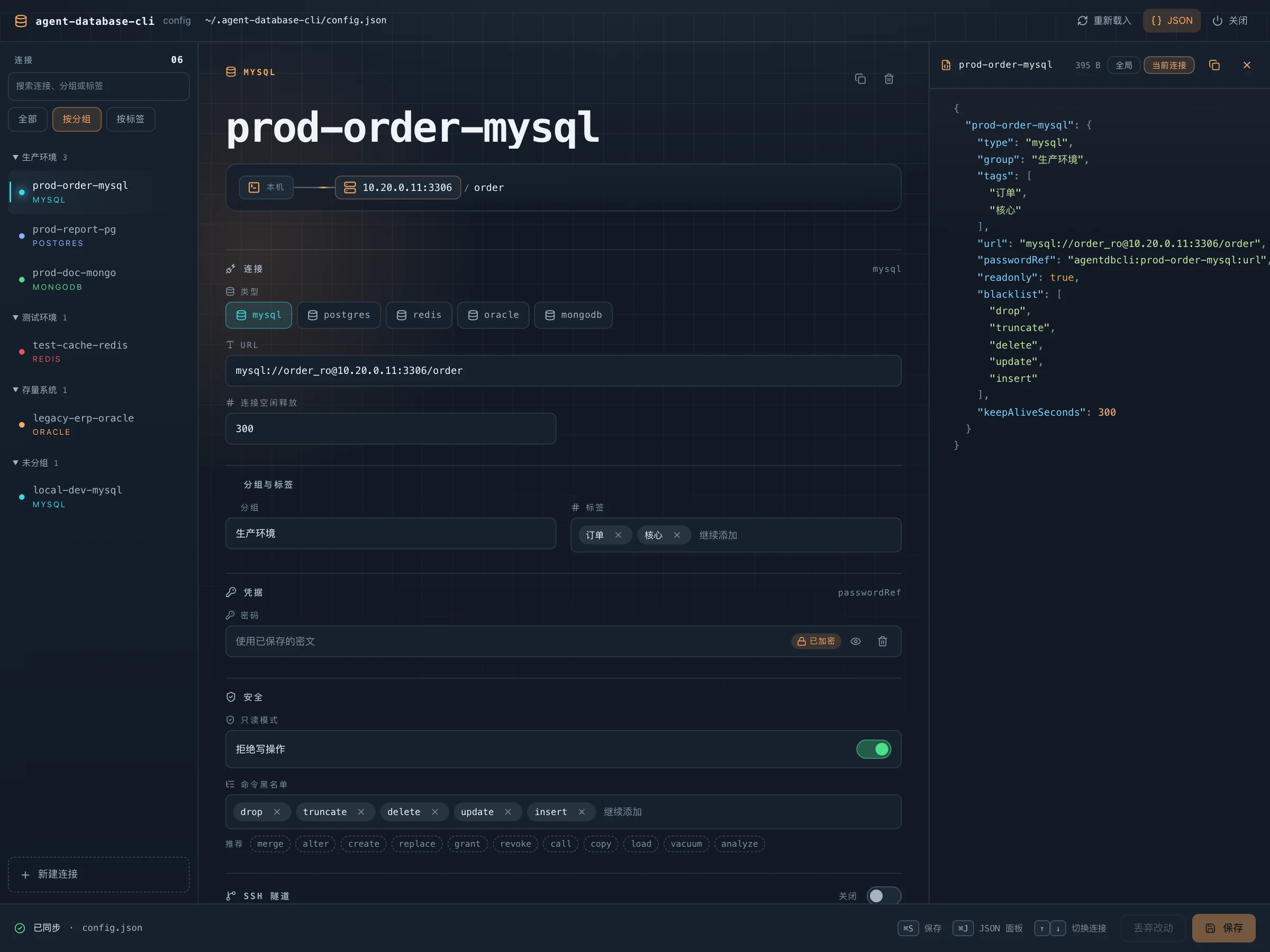
The page only shows fields that apply to the selected type, splits the connection URL into username, password, host, port, and database, and draws the local → SSH jump host → database path.
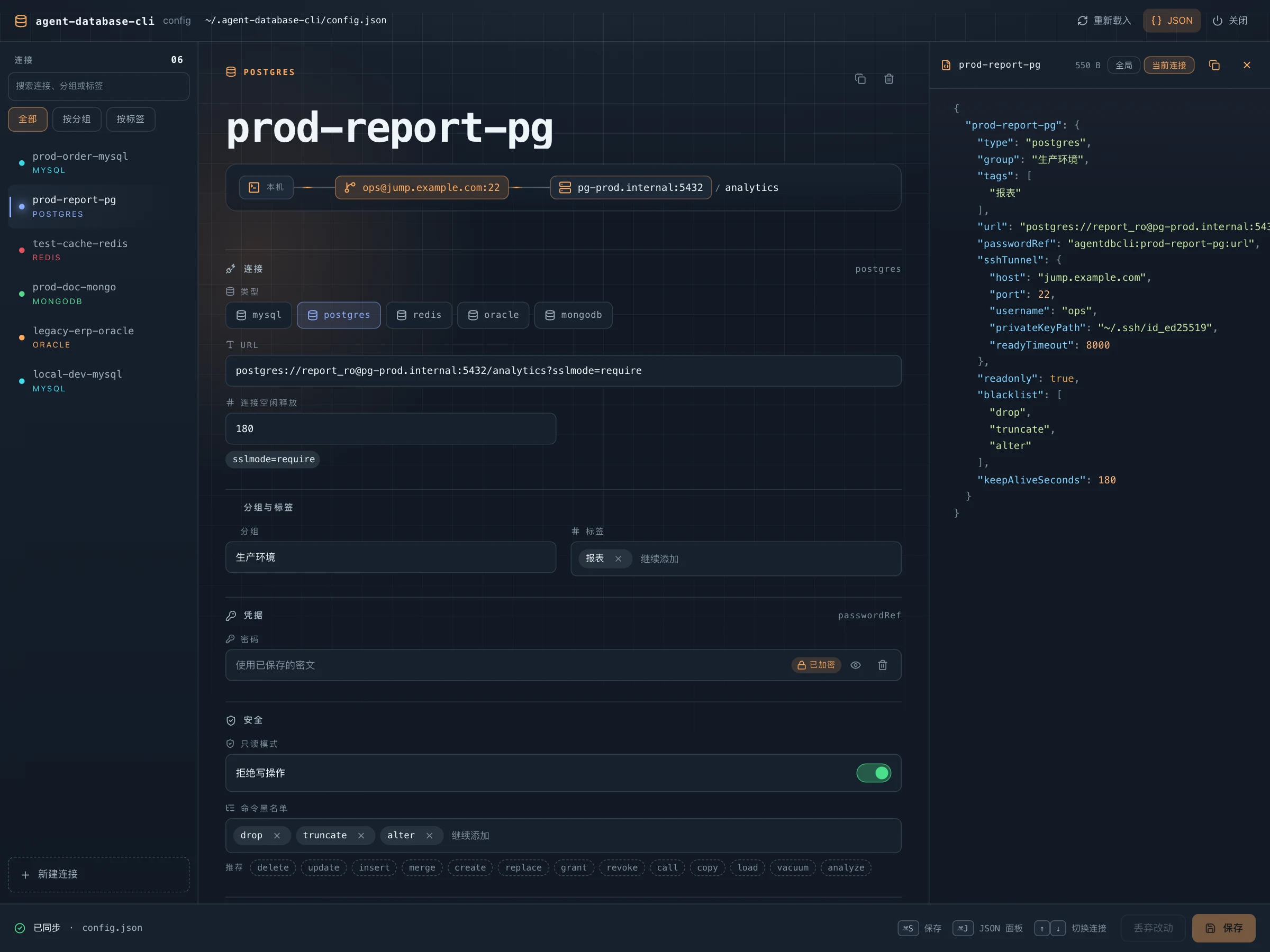
The JSON panel on the right shows exactly what will be written to disk and stays editable, with live validation that syncs back to the form:
| Panel capability | Description |
|---|---|
| Scope switch | 当前连接 shows only the selected connection (keyed by its name, ready to paste into another config), 全局 shows the whole file |
| Line diff | Compares against the on-disk content and marks added (+) and modified (~) lines in the left gutter; marks clear after saving |
| Secret toggle | The eye next to a secret field decrypts on demand or toggles visibility; plaintext is only used for display |
How sensitive fields are handled:
| State | Page behavior |
|---|---|
Existing passwordRef / passphraseRef |
Shown as encrypted by default; clicking the eye on that field decrypts it on demand (only refs referenced by the current config are accepted) and the result is only rendered into the input, never written back to the form data or the config file |
| Typing a plaintext password | Written to the configuration file in plaintext and encrypted into secrets.json by the next CLI command, following the existing migration logic |
| Removing credentials | Clears both the URL password and the related *Ref |
The page only writes the configuration file; permission control still happens when the CLI executes a command with the blocklist and read-only rules.
Query deadlines and connection reuse
AGENT_DB_QUERY_TIMEOUT_SECS: response deadline for each daemon database request, including initialization, queuing and result reads; defaults to60seconds. Only positive integers are accepted; invalid values use the default.AGENT_DB_DAEMON_IDLE_SECS: daemon idle shutdown threshold, default1800seconds, checked every 5 seconds. Requests stay active from acceptance through the complete response write. Only positive integers are accepted; invalid values use the default. Per-databasekeepAliveSecondsstill defaults to180.- After changing these variables, run
agent-database-cli daemon stop; the next command starts a daemon with the new values. - MySQL queries against the same configured database run concurrently through a pool. When
pool_maxis omitted, it defaults tomax(4, explicit pool_min). Explicit constraints and other pool settings are preserved; conflicting constraints fail. A timeout closes only its own connection. Commands may use different sessions, so do not rely on transactions or session variables spanning commands. - SQLcl timeouts terminate the child process. Native Oracle requests OCI cancellation and updates the per-round-trip limit using the remaining deadline only on Oracle Client ≥ 18.1; Client 11.2/12.1/12.2 retain the outer response deadline and OCI cancellation. During connection establishment, no OCI connection handle is available to cancel login. Other drivers provide a client response deadline without guaranteeing immediate server-side cancellation. A timeout does not prove that a write was not executed; inspect database state before retrying.
daemon statusincludes executing and queued requests inbusyandinFlight; idle cleanup preserves active entries.
Oracle SQLcl
Official link: https://www.oracle.com/database/sqldeveloper/technologies/sqlcl/
Oracle uses SQLcl by default, avoiding a mandatory Oracle Instant Client dependency and improving compatibility with older Oracle versions such as Oracle 11. You may omit oracleDriver or set it explicitly:
{
  "type": "oracle",
  "url": "oracle://USER:[email protected]:1521/qftest201",
  "oracleDriver": "sqlcl",
  "sqlclPath": "/opt/homebrew/Caskroom/sqlcl/26.1.0.086.1709/sqlcl/bin/sql",
  "javaHome": "/Applications/IntelliJ IDEA Ultimate.app/Contents/jbr/Contents/Home",
  "readonly": true,
  "blacklist": ["drop", "truncate", "delete", "update", "insert", "merge", "alter", "create"]
}
SQLcl passes connection information through a temporary script file to avoid exposing the password in process arguments; the script is removed on completion, failure or cancellation. Security checks still happen before execution, and both blocklist and read-only mode remain effective.
Update
npm install -g agent-database-cli@latest
Uninstall and Cleanup
Uninstall and clean local configuration:
npm uninstall -g agent-database-cli
npm cache clean --force
rm -rf ~/.agent-database-cli
Rust refactor notes
A Rust CLI scaffold has been added. The current binary is agent-database-cli:
npm run build:rust
npm run dev:rust -- list
npm run dev:rust -- daemon status
Oracle keeps two first-class drivers: omitting oracleDriver uses SQLcl; native oracle/oracledb drivers remain available when Oracle Instant Client is installed. The default entry is now the native Rust CLI. Windows, Linux and macOS binaries are distributed through npm platform subpackages. Oracle defaults to SQLcl; native Oracle drivers must be selected explicitly.
License
Friendly Links
Explore related projects
Asabeneh/30-Days-Of-Python
The 30 Days of Python programming challenge is a step-by-step guide to learn the Python programming language in 30 days. This challenge may take more than 100 days. Follow your own pace. These videos may help too: https://www.youtube.com/channel/UC7PNRuno1rzYPb1xLa4yktw
78,370 starsgrafana/grafana
The open and composable observability and data visualization platform. Visualize metrics, logs, and traces from multiple sources like Prometheus, Loki, Elasticsearch, InfluxDB, Postgres and many more.
77,752 starsredis/redis
For developers, who are building real-time data-driven applications, Redis is the preferred, fastest, and most feature-rich cache, data structure server, and document and vector query engine.
77,288 starsapache/superset
Apache Superset is a Data Visualization and Data Exploration Platform
75,448 stars