
slaveOftime/open-relay
slaveOftime/open-relay has 110 GitHub stars and 13 forks. GitHot measured 0 stars in 24 hours, 0 in 7 days, and +1 in 15 days. Last checked 2026-11-17 02:40 UTC. Last push 2026-11-12.
Measured star growth
- in 24h
- 0
- in 7 days
- 0
- in 15 days
- +1
- in 1 month
- Update delayed
Net star changes over overlapping periods, not daily totals. Missing measurements are left blank. Stars measure attention, not software quality.
About
oly runs coding agents and long-running commands in persistent, supervised terminal sessions. The daemon owns the PTY, so you can close your terminal and come back from the browser or your phone.
Developer ToolsREADME.md
Originaloly — Open Relay

Close your laptop. Your agents keep working. Come back to the one that needs you.


Run an interactive CLI once. Close your terminal. Come back from another terminal or a browser — with the process still running and its output recorded.
oly is a local-first session supervisor for coding agents, REPLs, and
long-running commands that still need a human in the loop. It runs the CLI you
already use — no model-provider integration — and serves both the oly ls --follow dashboard and a password-protected web UI at http://127.0.0.1:15443.
Why oly?
- Walk away without losing the job. The daemon owns the PTY, not your terminal.
- See who needs you. Lifecycle status and agent-reported program status roll into one list.
- Check in, don't babysit. Read recent output, inspect a live TUI, or wait for a likely input-needed checkpoint.
- Intervene without attaching. Send text, keys, or application mouse input; take over interactively when needed.
- Pick up from anywhere. Use the terminal or the browser — including your phone — and route work to connected machines.
- Give agents a reliable control surface. JSON metadata, bounded byte pages, and resumable cursors support scripted supervision.
Think persistent terminal sessions + a supervision API, not another agent framework. Use your shell for quick commands; use oly when a job needs a durable home.
See it
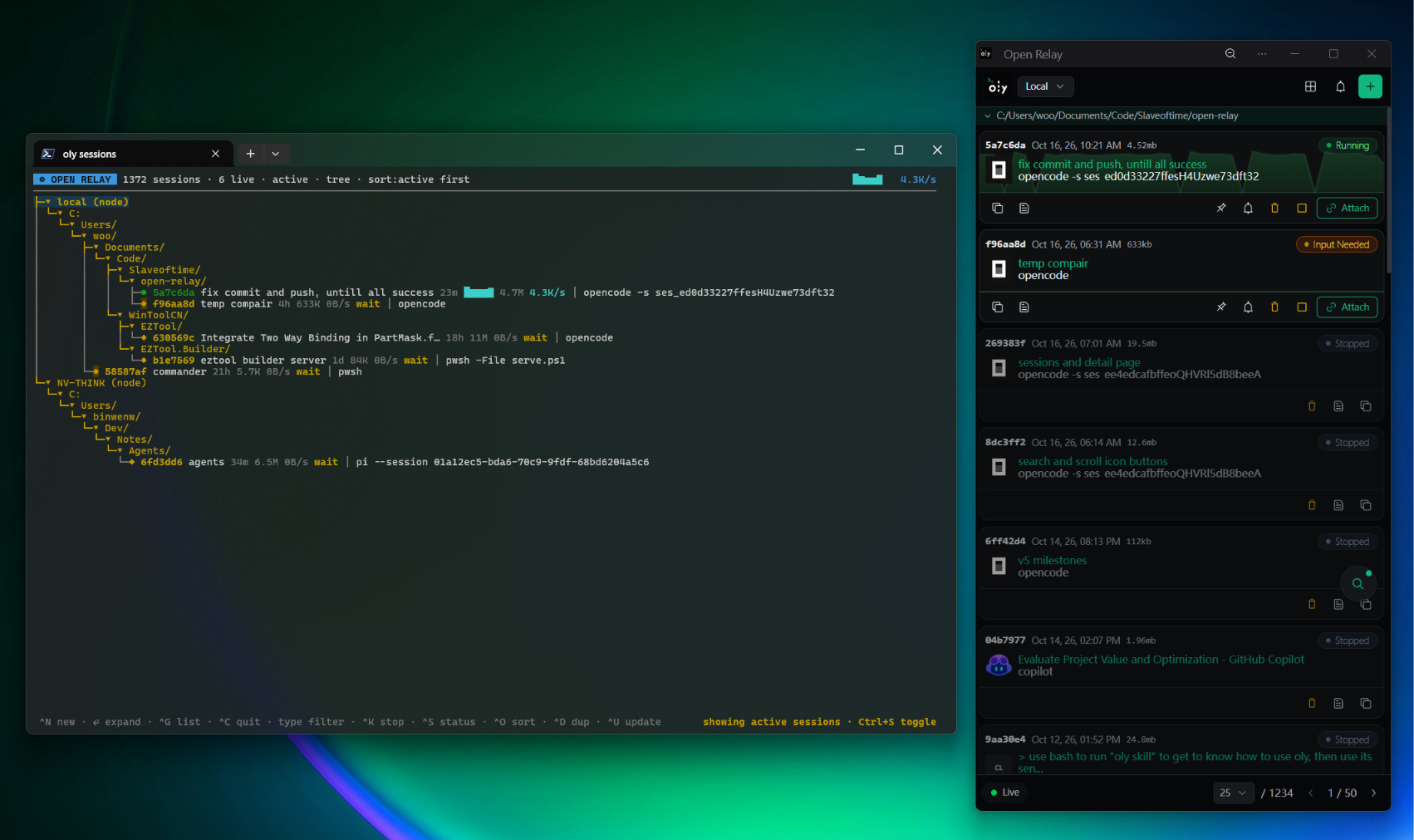
Terminal dashboard — oly ls --follow --node-all --limit 5000 lists every session, or groups them by working directory.
| List view | Tree view |
|---|---|
 |
 |
Browser UI — the same daemon from any device, with live status and one-click attach.


On a phone — the web UI installs as a PWA, so you can check a prompt and answer it without a laptop.
| Sessions | Detail |
|---|---|
 |
 |
Install
npm install -g @slaveoftime/oly
The npm package bundles binaries for Linux x64, Linux arm64, macOS Apple Silicon, and Windows x64. No GitHub asset download is needed during installation.
0.5.0 is available. This is a breaking upgrade from 0.3: back up state and read the migration guide before switching. See the release notes and verification.
Other installation options
Homebrew:
brew tap slaveOftime/open-relay https://github.com/slaveOftime/open-relay
brew install slaveOftime/open-relay/oly
Prebuilt binaries: download a platform archive from GitHub Releases.
Cargo:
cargo install oly
Building from source requires Rust and Node.js/npm: release builds compile and embed the web UI. See Contributing for development setup.
From launch to handoff
# Start the daemon (skip this if it is already running).
# Default: password-protected web UI at http://127.0.0.1:15443.
oly daemon start --detach

# Run your preferred CLI in the background; save the returned session ID.
oly start --detach copilot

# See sessions and inspect recent output.
oly ls
oly logs <id> --tail 40

# Inspect a TUI and, after reviewing its prompt, reply without attaching.
oly logs <id> --screen
oly send <id> "continue" key:enter

# Take over interactively. Ctrl-D detaches; the child keeps running.
oly attach <id>
Replace copilot with claude, codex, another agent, or any interactive
command. Pass oly options before the child command.
Open http://127.0.0.1:15443 for the browser UI, or use
oly ls --follow --node-all --limit 5000 for the live terminal dashboard.
A few commands worth remembering
| Want to… | Command |
|---|---|
| Wait for a likely checkpoint | oly logs <id> --wait prompt --timeout 5m |
| Inspect metadata and exit status | oly info <id> / oly info <id> --json |
| Watch without sending input or resizing | oly attach <id> --observe |
| Interrupt the child | oly send <id> key:ctrl+c |
| Export recorded display bytes | oly export <id> > capture.bin |
| Stop a session | oly stop <id> |
| Start a fresh run from saved launch metadata | oly restart <id> |
| Teach an agent how to supervise sessions | oly skill / oly skill --subagent |
Know the boundaries
- Persistent sessions, not immortal processes. Closing a client does not stop
the child. Stopping/crashing the daemon or rebooting the host does; retained
recordings remain, but live PTYs cannot be recovered.
restartlaunches a new run. - Hints, not task understanding. Prompt and idle detection can be wrong. Check fresh output and the actual result; successful input delivery is not completion.
- Shared control, not exclusive ownership. Multiple attached controllers can type concurrently; the last successful resize wins. Coordinate with other users.
- Local-first, not a sandbox. Child commands run with the daemon user's privileges. Keep HTTP on loopback or put remote access behind a trusted tunnel and authentication gateway. View-only mode is not a security boundary.
Go deeper
- CLI guide — logs, cursors, input, scrolling, and session lifecycle
- Remote access — browser security,
oly nodepeer management, and notifications - Troubleshooting — expected limits, and what to collect when reporting
- Agent skills — general usage; sub-agent orchestration, daemon configuration, web apps
- Upgrade to 0.5 — breaking changes and safe upgrades
- Architecture · Performance · Contributing
- What's new in 0.5 · Compatibility · All documentation
MIT licensed. If oly makes your workflow easier, a star on GitHub helps others find it.