
simonlin1212/vibe-astock
simonlin1212/vibe-astock has 1,004 GitHub stars and 269 forks. GitHot measured +15 stars in 24 hours and +53 in 7 days. Last checked 2026-11-11 14:09 UTC. Last push 2026-10-29.
Vibe AStock:A 股短线复盘与跟踪工作台 · 盯盘异动、情绪复盘(连板天梯、题材轮动、明日验证)、AI 复盘与周报、交易日志、盘前提醒,182 个数据端点。支持 Claude Code、Codex、WorkBuddy 订阅或任意模型 API。 | A short-term trading review and tracking workbench for China A-shares.
Measured star growth
- in 24h
- +15
- in 7 days
- +53
- in 15 days
- Collecting history
- in 1 month
- Collecting history
Net star changes over overlapping periods, not daily totals. Missing measurements are left blank. Stars measure attention, not software quality.
README_en.md
Original简体中文 | English
Vibe AStock
A short-term trading review and tracking workbench for China A-shares
Watch · Sentiment review · AI review · Next-day checks · Trade journal · Company deep dive · Backtesting · 182 data endpoints





Screenshots · Features · Data · Supported AI · Quick start · Upgrading · Privacy · Development · Changelog
Vibe AStock is a short-term trading review and tracking workbench for China A-shares. During the session, Watch follows your holdings, your watchlist, and yesterday's limit-up ladder as they move; after the close, Sentiment review shows the day's sentiment readings, lets an AI write a review in five parts (sentiment, money, themes, the dragon-tiger list, leading names), and records the conditions you want to check tomorrow, which are scored automatically after the next close; each of your own trades goes into the Trade journal, matched to the sentiment and board position on the day you entered so you can look back at yourself. Quotes and statistics are computed by the app, the AI only interprets them, and the app checks where every number came from; your data and records stay on your own computer.
From v2.0.0 it shares one foundation with Vibe Research: AI connections, company deep dive (A-shares, Hong Kong, US), backtesting, industry news, industry research, the report library, remote access, and portable packages all work the same way. If you used the old version (v1.x, the Python app), you can import your data; see Upgrading from v1.x.
- 10 primary sections: Home, Watch, Review, Trade journal, Industry news, Industry research, Research tools, My stocks, Library, and Connect AI. The short-term sections come first: Watch holds Live moves and Auction & intraday, Review holds Sentiment review and Daily review, and Trade journal is a section of its own; Research tools holds Company deep dive, Bull/bear debate, Backtesting, and Candidate pool, and Industry research lists each sector directly.
- Watch: live readings for your holdings, your watchlist, yesterday's ladder, large caps, and the top ten by turnover; a move of 1.5% or more within 3 minutes is logged as a surge or drop, and touching or leaving the limit-up price as sealed or opened; how yesterday's limit-up names did in the 09:25 auction, and the sentiment path across six snapshots through the day.
- Sentiment review: the money-making effect, promotion rates, the board ladder, the streak premium, gaps in the ladder, the sentiment cycle, seal quality, the theme tree, first-board names, and theme rotation over the last 5 days; AI review and AI weekly review, next-day checks (write conditions the night before, scored automatically after the next close), limit-up sample statistics, and structural shifts.
- Trade journal: each trade is matched automatically to that day's sentiment (strong / middling / weak) and where the stock stood, with win rates by sentiment, board, playbook, and whether it followed the plan; plus risk & discipline, review, and playbook cards. It stays on your machine and never goes to the AI.
- 182 data endpoints (35 layers), 14 of them built for short-term work: sentiment readings, six fact tables, the board ladder, the theme tree, theme rotation, first-board names, limit-up structure, intraday sentiment, yesterday's ladder, and more; the rest cover quotes, candles, tick trades, financial statements, consensus, filings, reports, fund flows, the dragon-tiger list, lock-up expiries, convertible bonds, futures and commodities, Hong Kong and US stocks, news, macro data, and more.
- Six-stage company research (A-shares, Hong Kong, US): company profile → financials → earnings expectations → valuation → risk → report. Raw data keeps its source; derived figures keep their calculations.
- Bring your own AI: a Claude Code, Codex, or WorkBuddy subscription, or any Chat Completions–compatible model API such as DeepSeek, Qwen, Kimi, or MiMo.
- Runs on Windows, macOS, and Linux; it can also run on a macOS / Linux cloud computer and be opened remotely through a link with an access token.
The product UI is in Chinese.
Screenshots
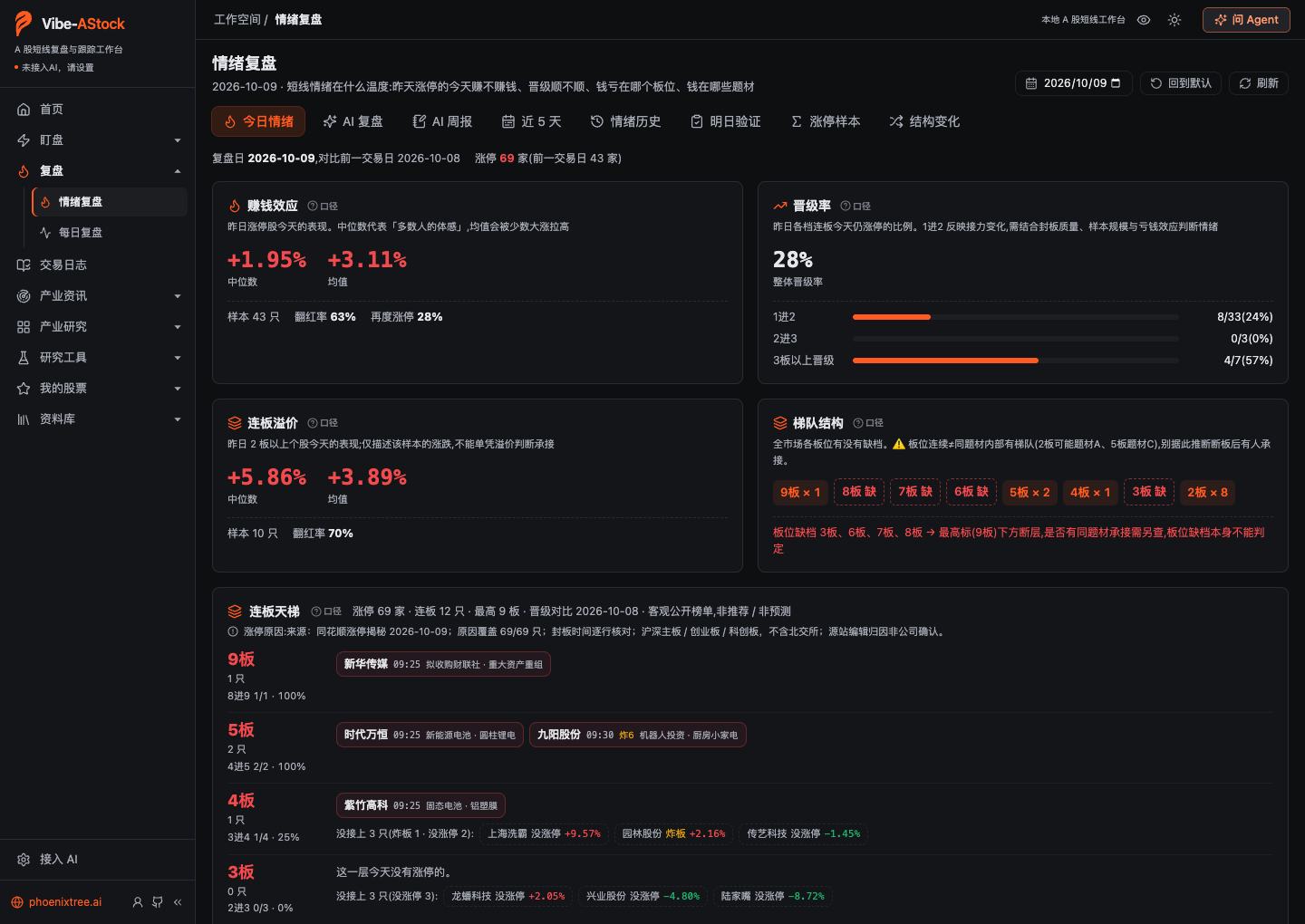
Sentiment review · Today: whether yesterday's limit-up names made money today, how smoothly they were promoted, where the ladder breaks, and which board levels lost money.
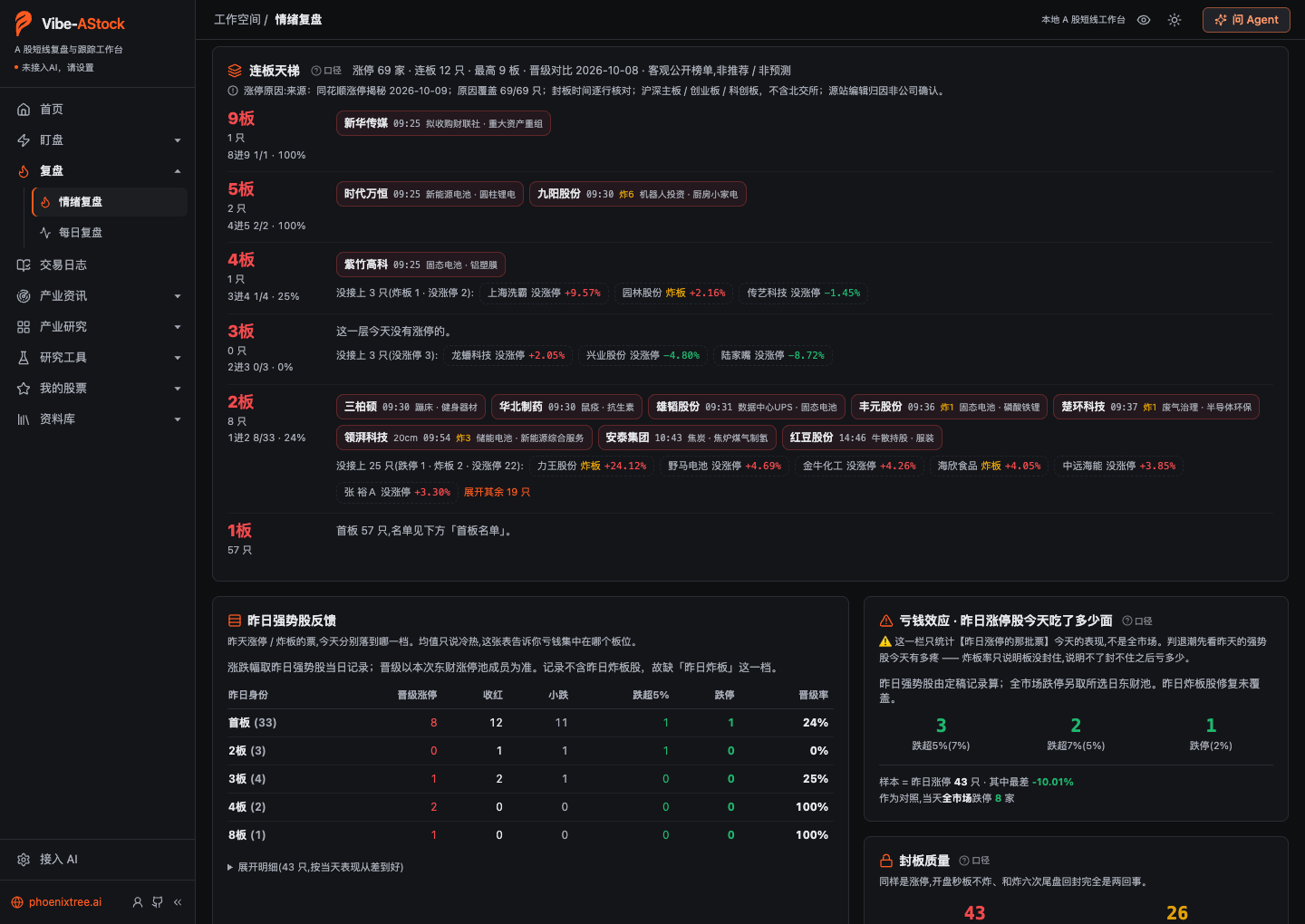 Board ladder: who is at each streak height, how many names one level down yesterday made it up, and whether the rest hit limit-down, broke the seal, or never reached limit-up today |
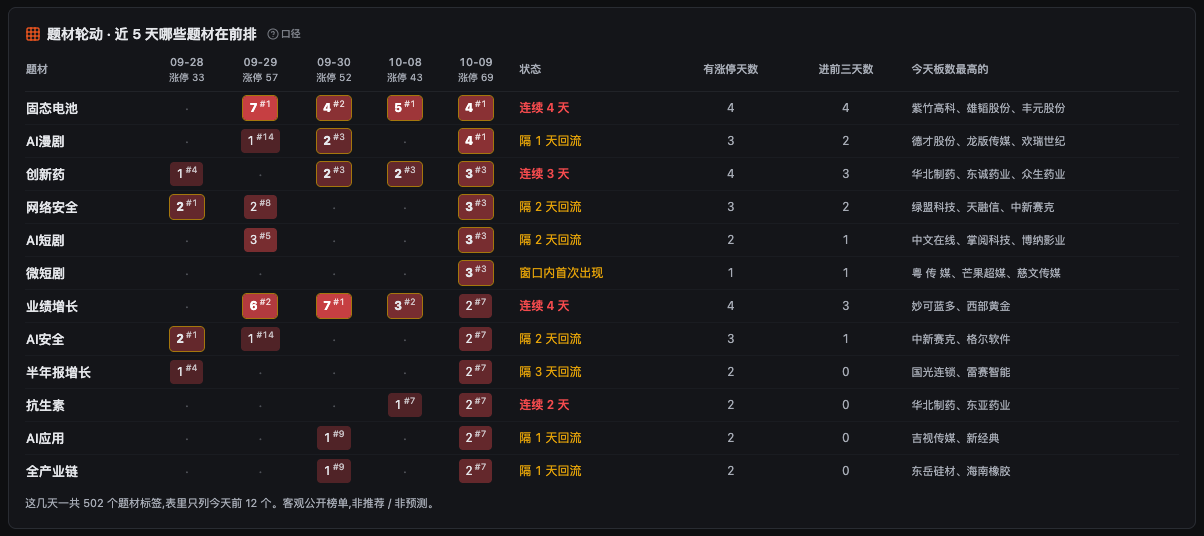 Theme rotation: limit-up counts and ranks for each theme over the last 5 trading days, with streaks, returns after a gap, and first appearances marked; it describes the past and makes no forecast |
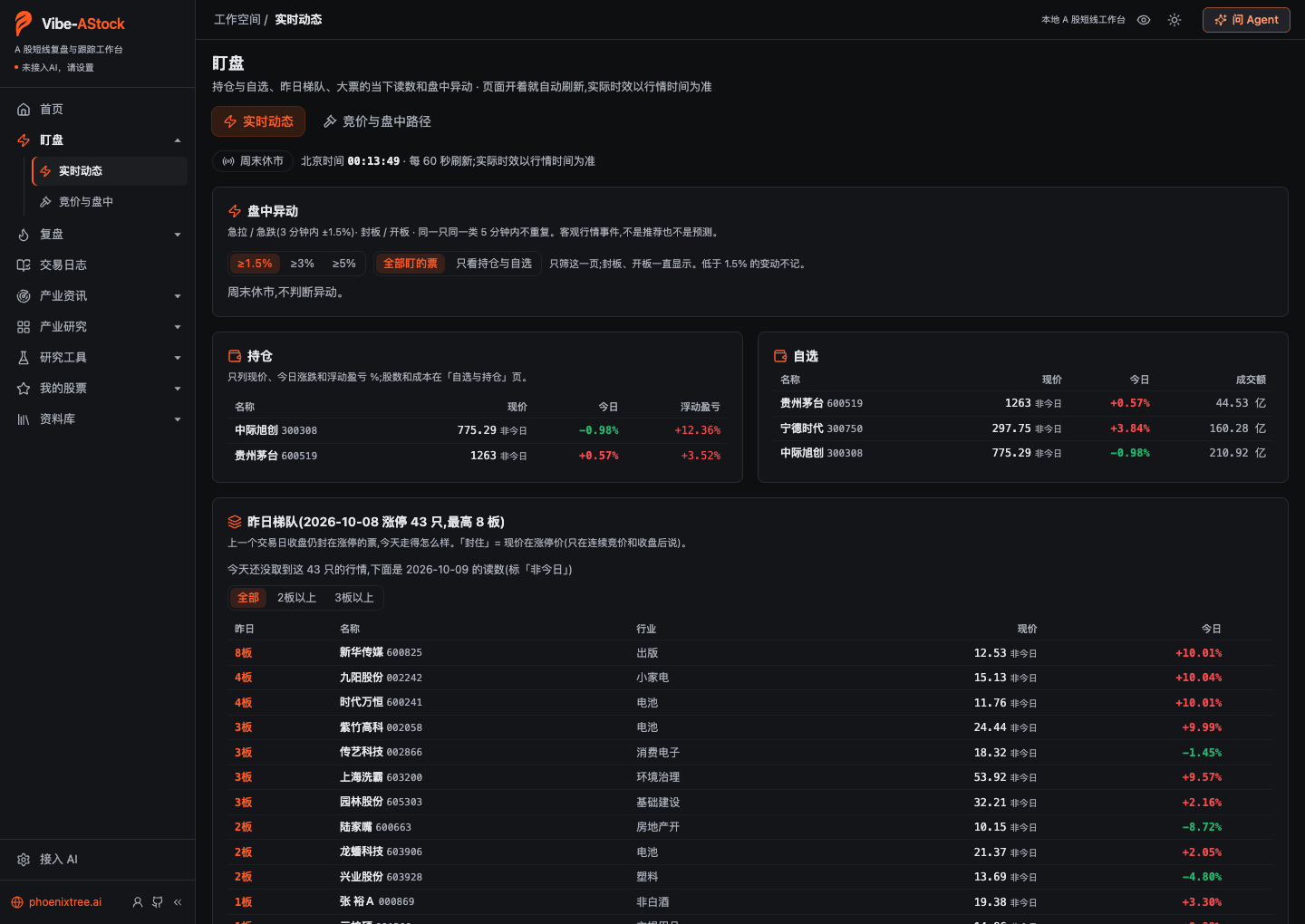 Watch · Live moves: live readings and intraday moves for holdings, the watchlist, and yesterday's ladder (captured on a weekend, so it shows the market closed) |
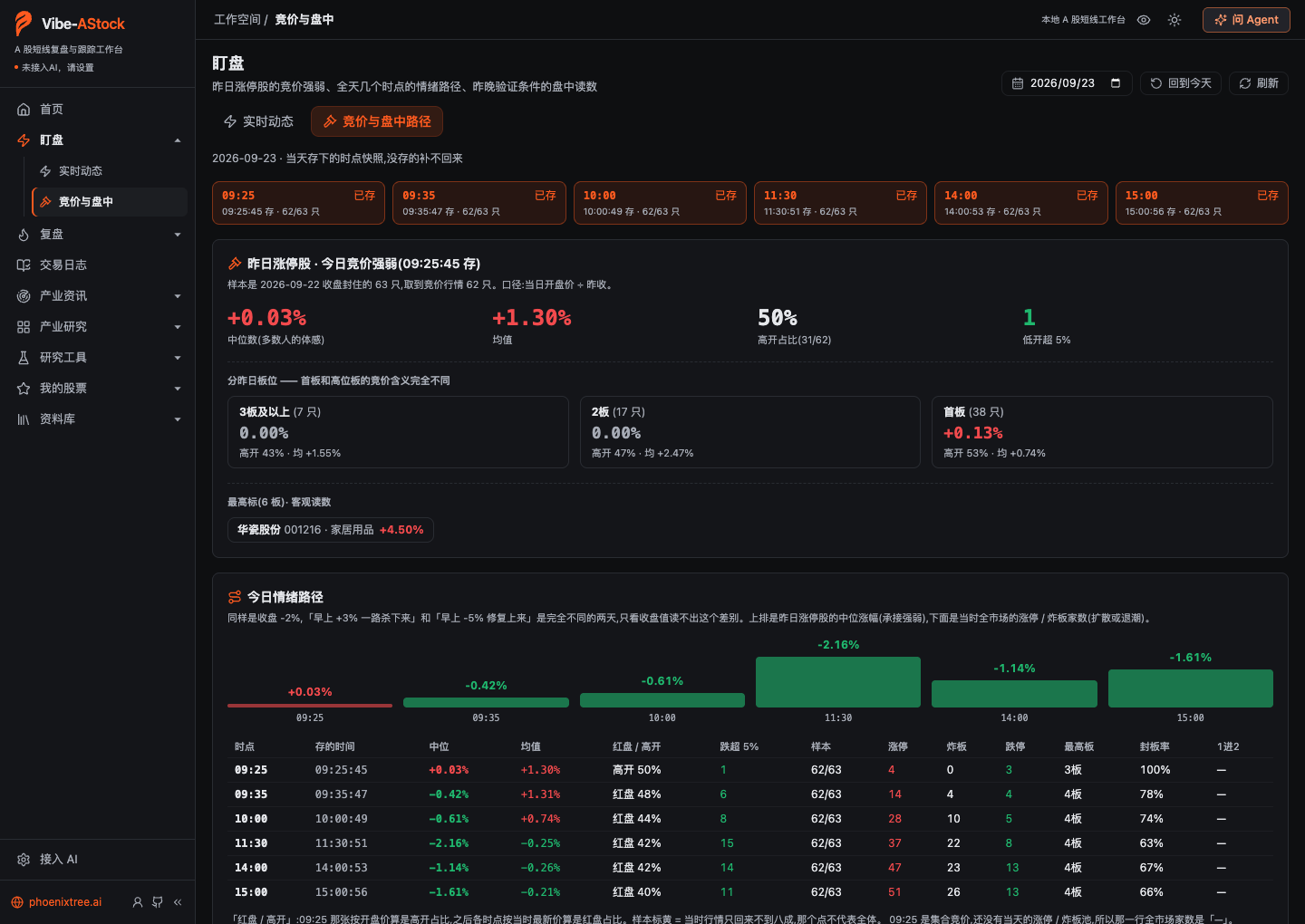 Watch · Auction & intraday: how yesterday's limit-up names did in the auction, and the sentiment path across six snapshots |
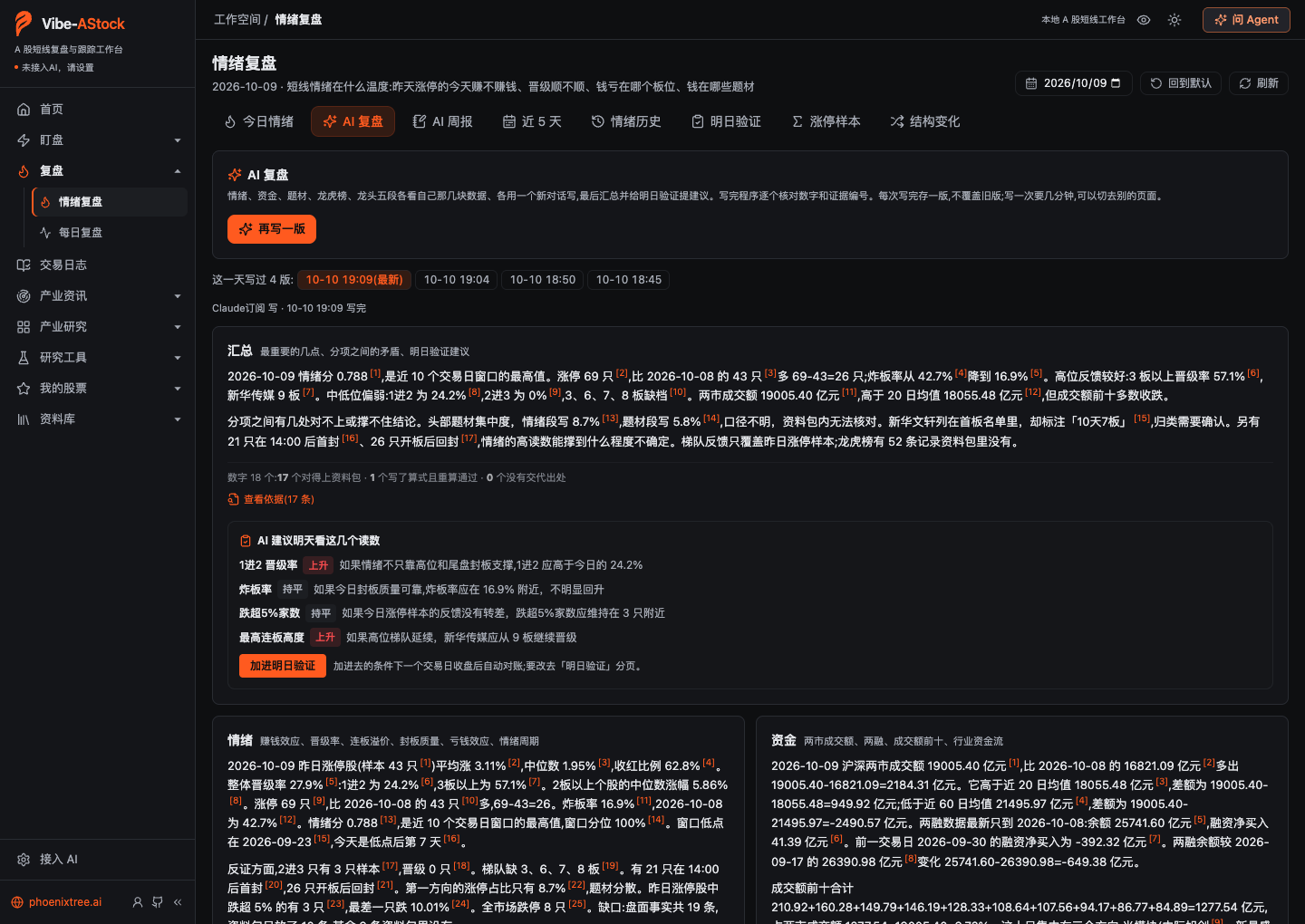 AI review: five parts written separately and then summarized, every number checked by the app, suggested conditions added to next-day checks in one click |
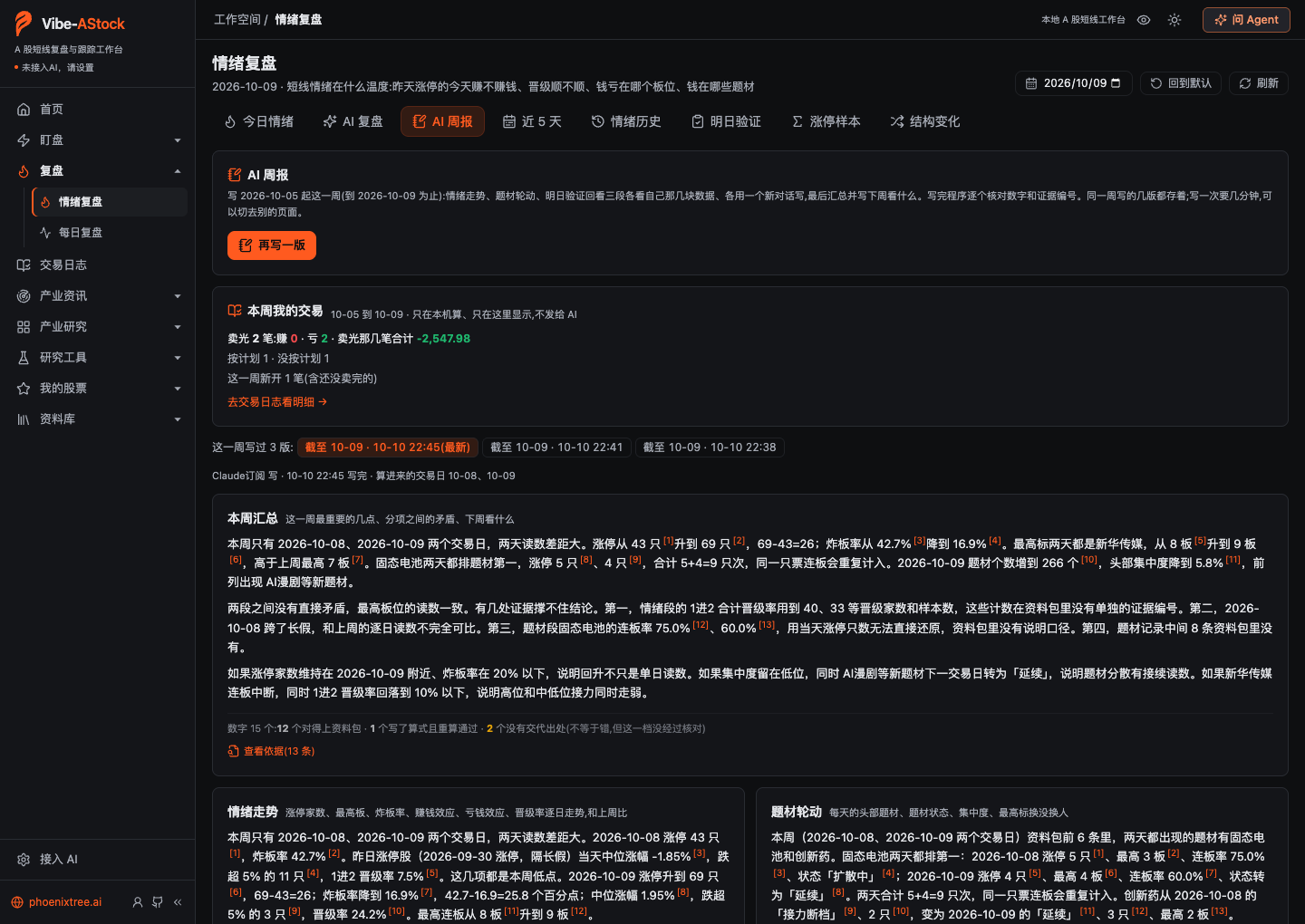 AI weekly review: the sentiment trend, theme rotation, and a look back at the checks; "My trades this week" is computed on your machine only |
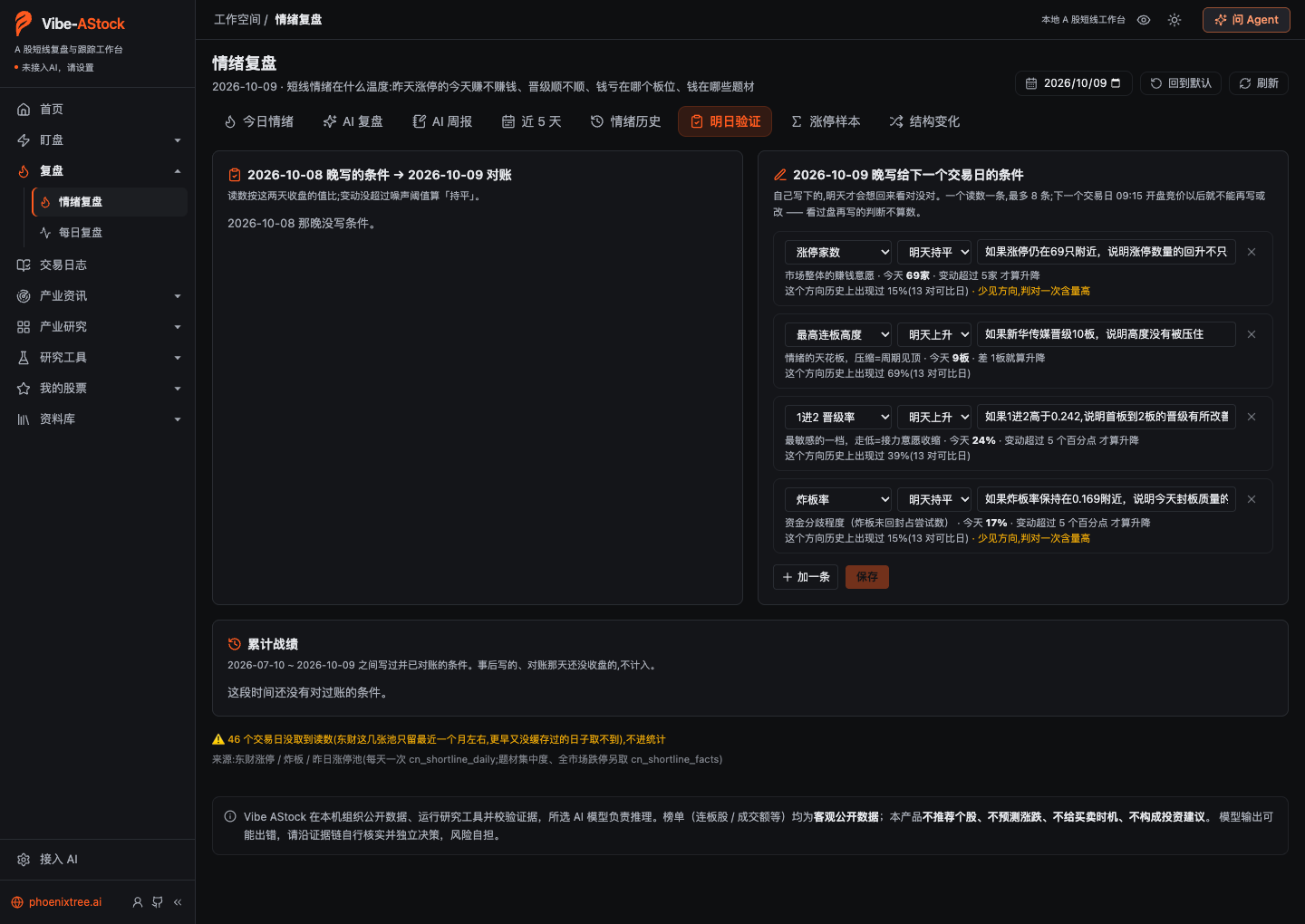 Next-day checks: after the close, write directional conditions for the next trading day with their historical base rates; they are scored after the next close |
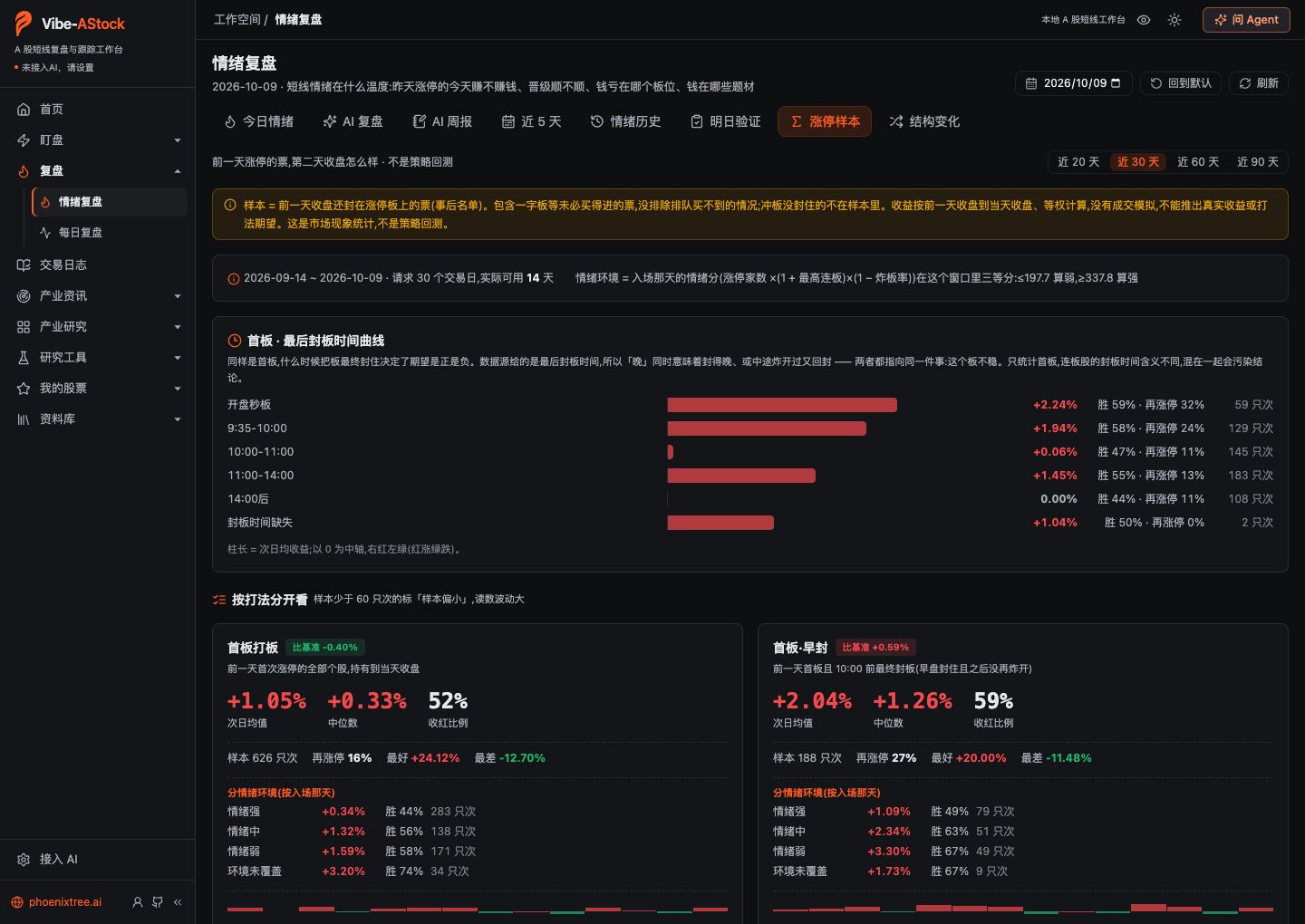 Limit-up samples: how yesterday's limit-up names did the next day, grouped by seal time, playbook, and the entry day's sentiment |
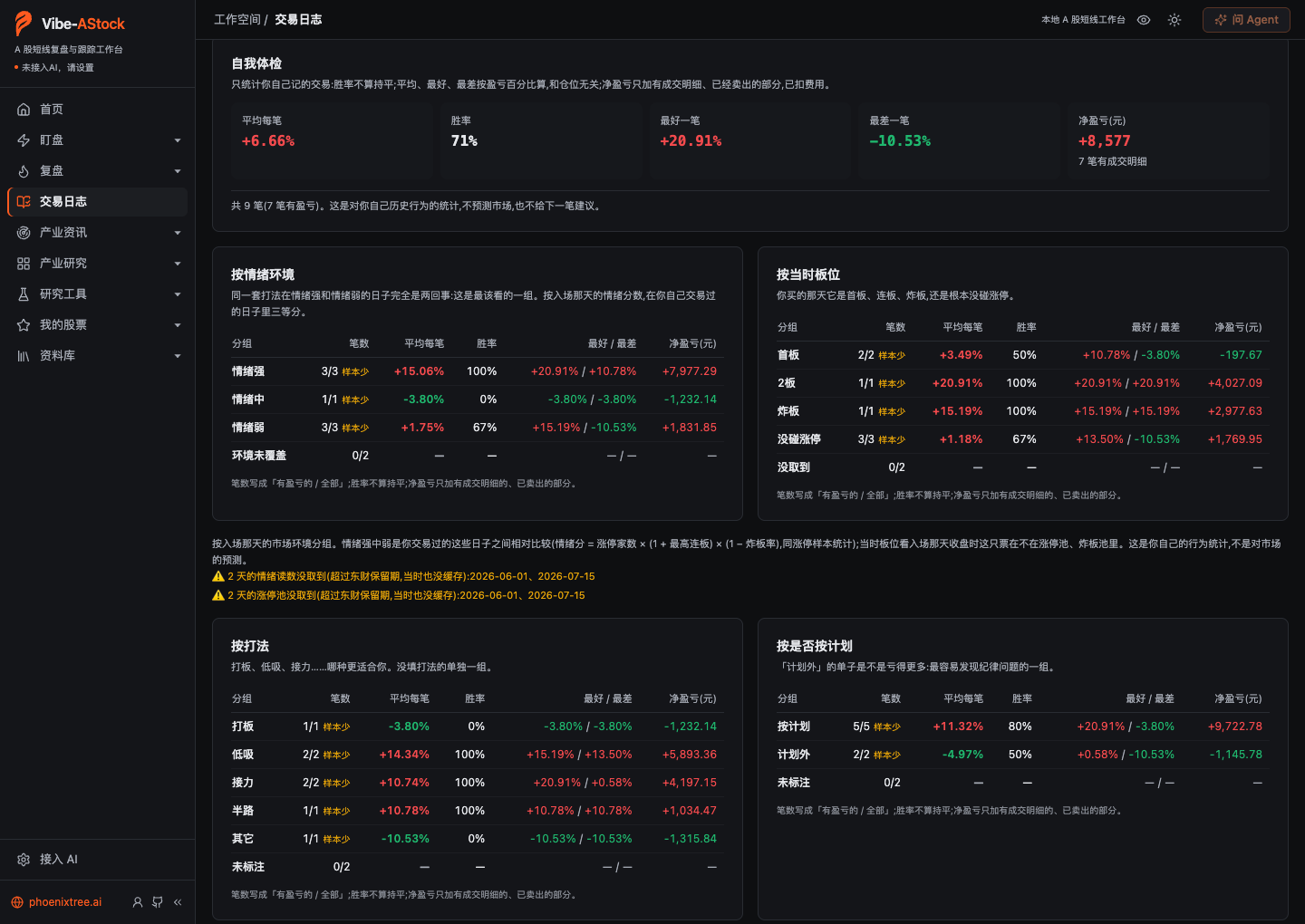 Trade journal · Trades (demo data): win rates by sentiment, board position, playbook, and whether the trade followed the plan |
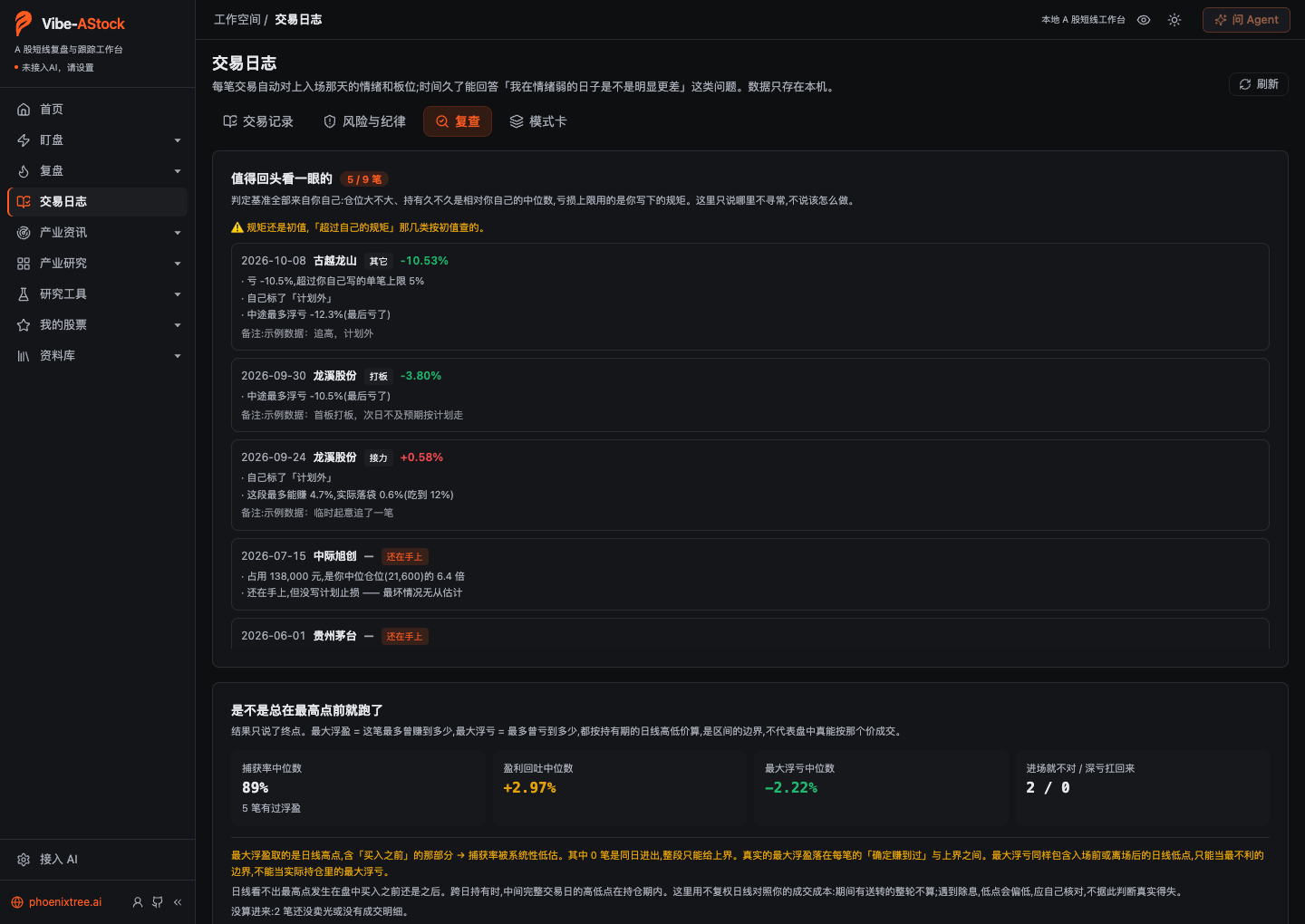 Trade journal · Review (demo data): trades worth a second look, the best and worst each one got to, and whether a loss came from a wrong read or poor execution |
Other sections (shared with Vibe Research)
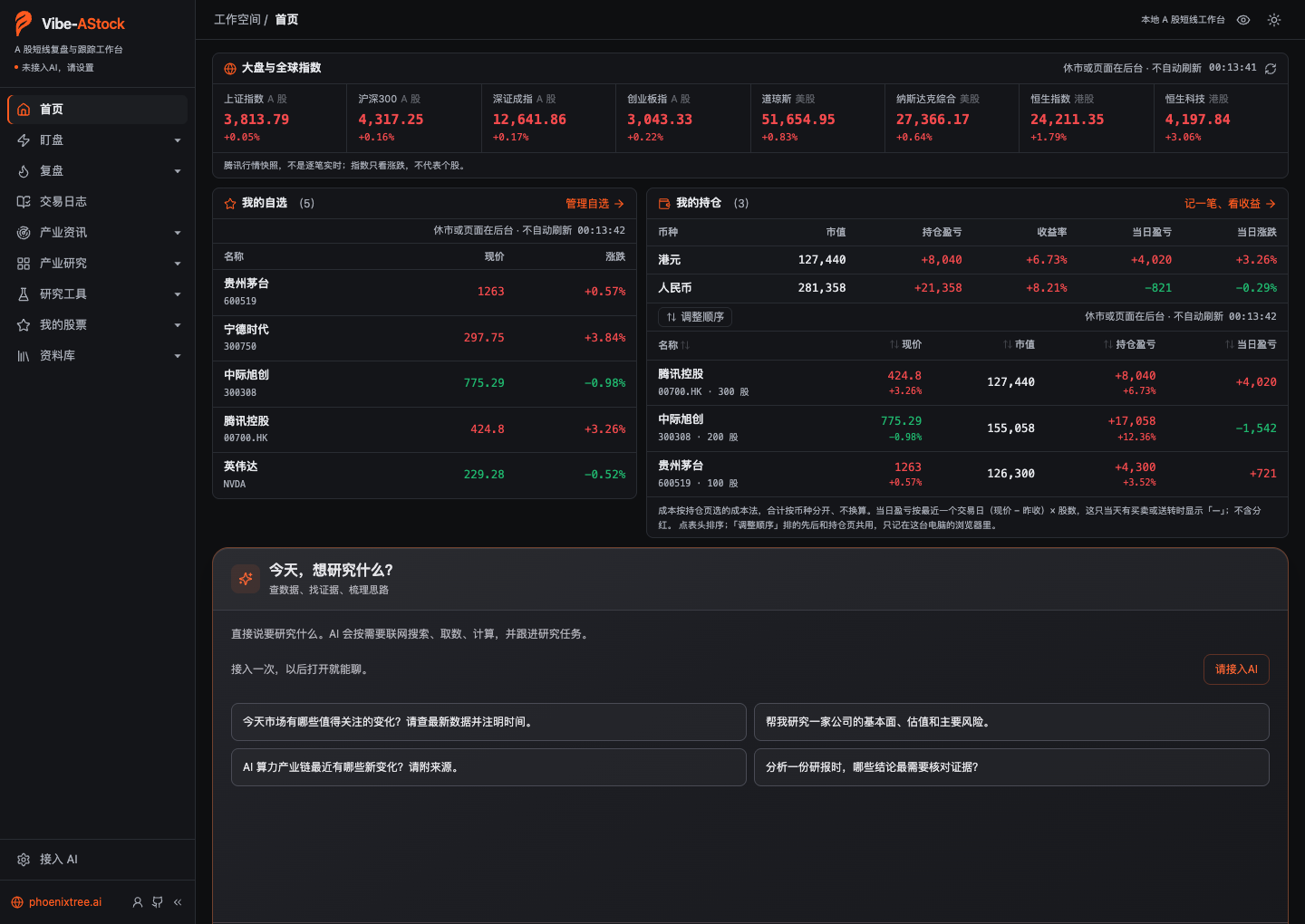 Home: indices, watchlist, holdings, and chat |
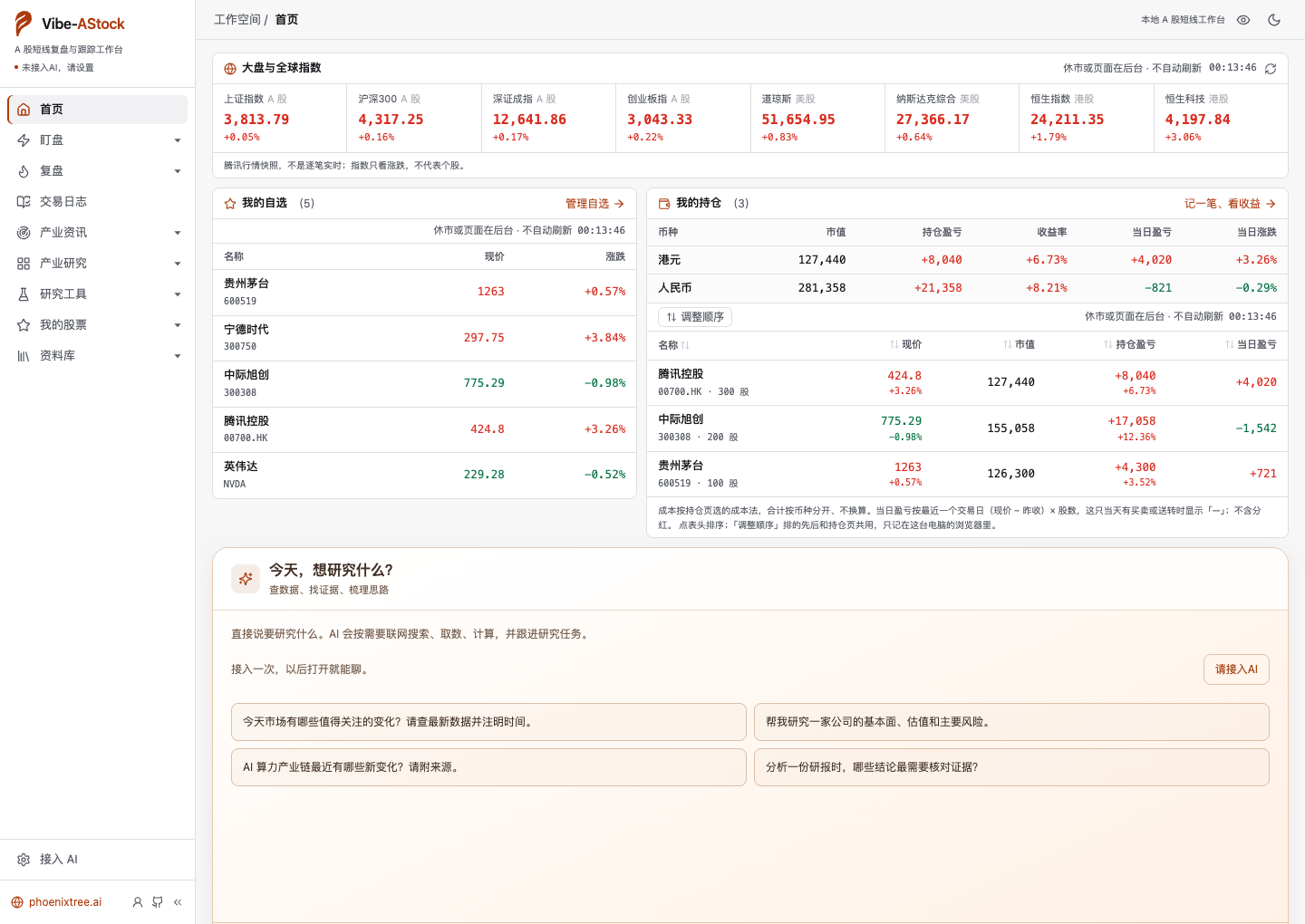 Home (light theme) |
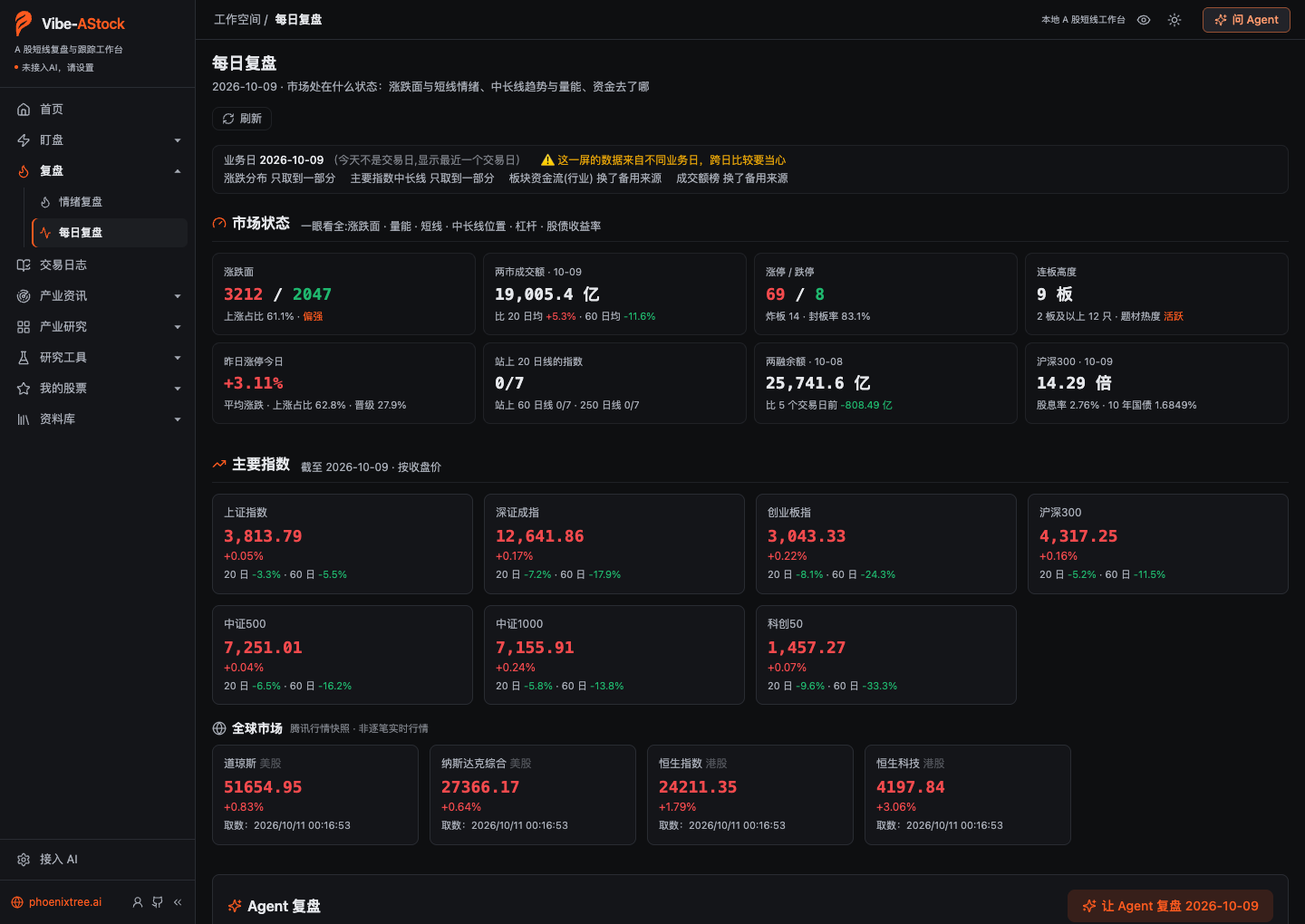 Daily review: breadth, turnover, limit-up streaks, margin balance, and where the main indices sit over the longer term |
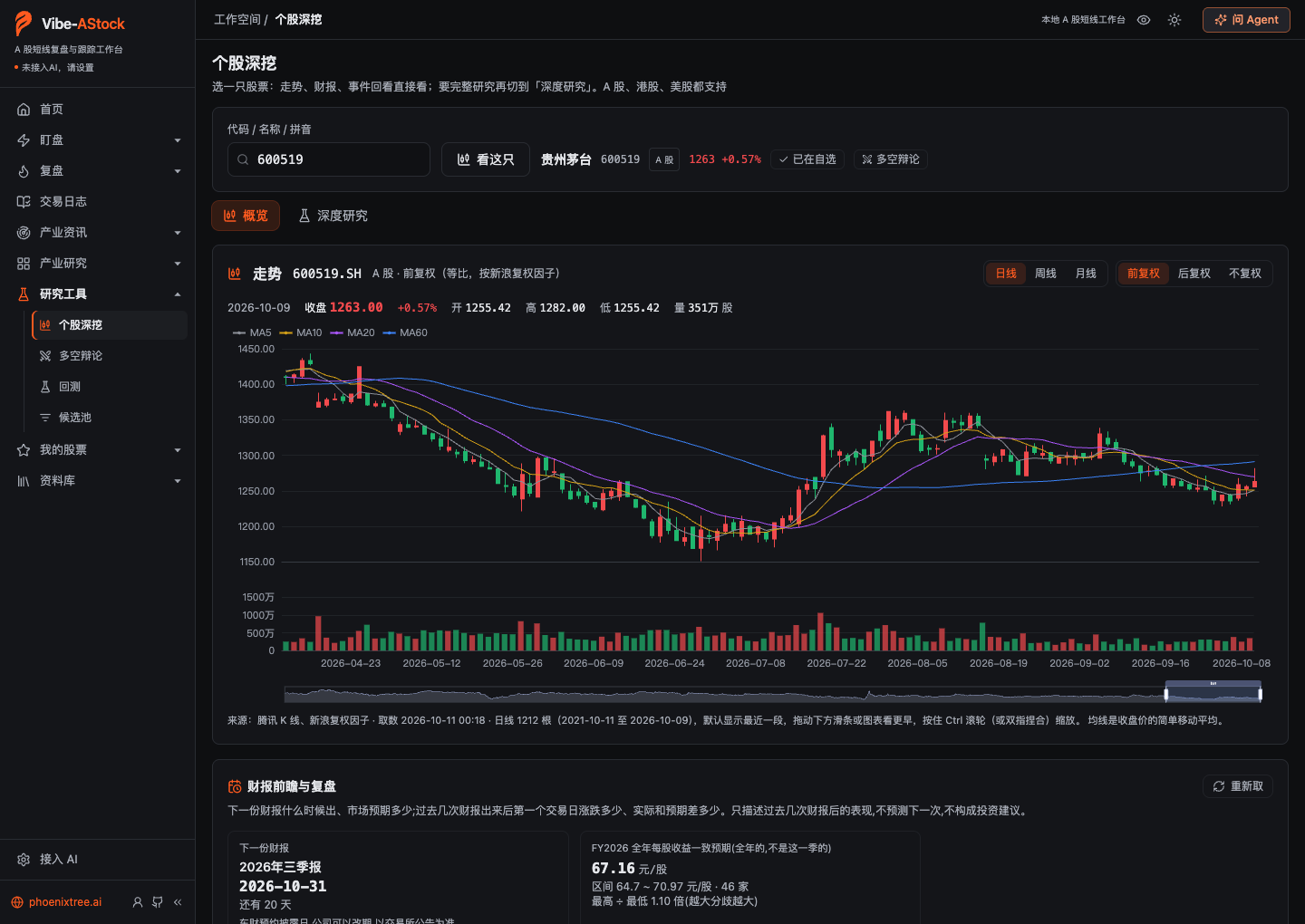 Company deep dive · Overview: candlestick chart with adjustable price adjustment, earnings preview and look-back, event look-back |
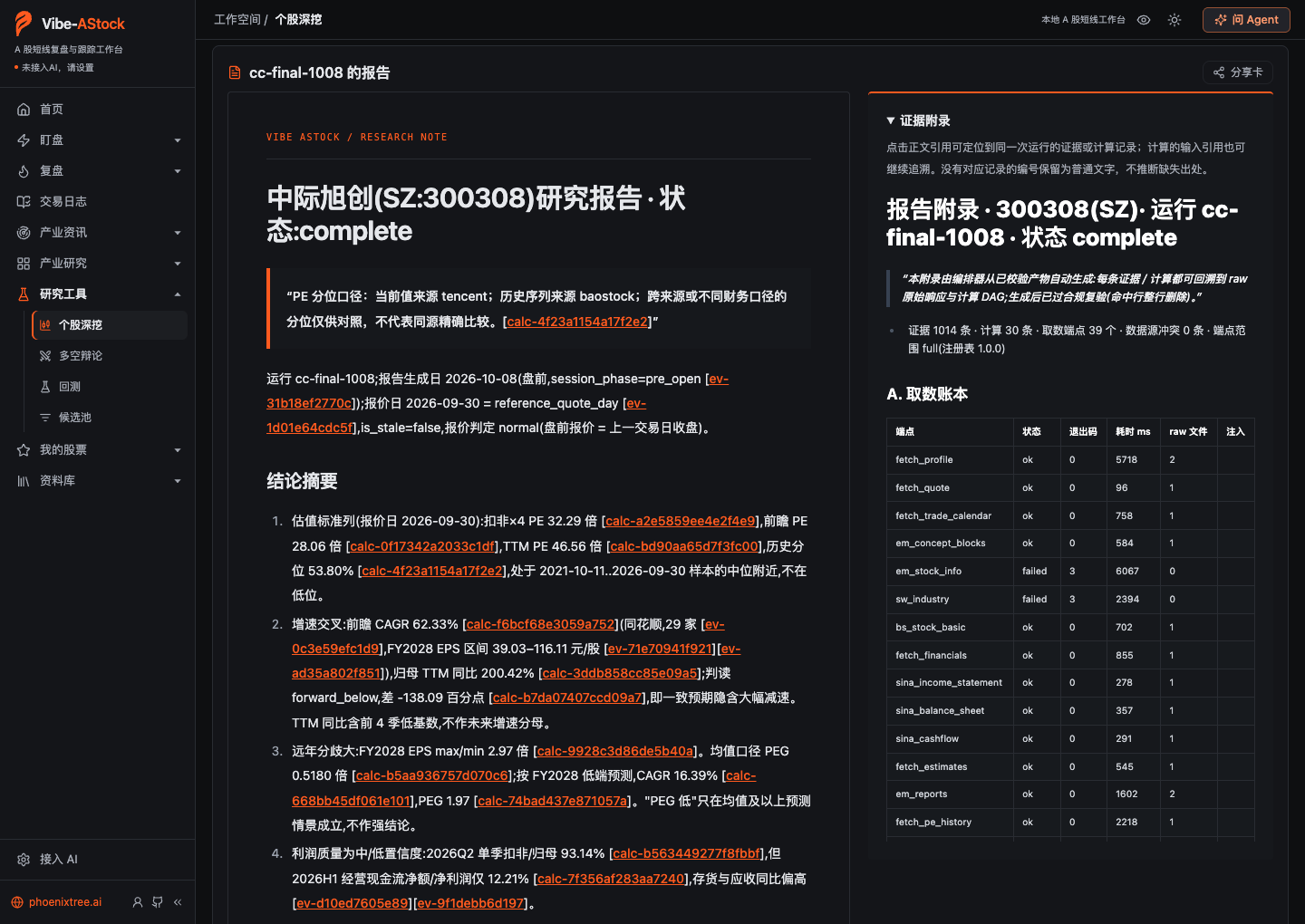 Six-stage research report: every number in the text carries an evidence or calculation ID; the evidence appendix on the right traces back to the raw data |
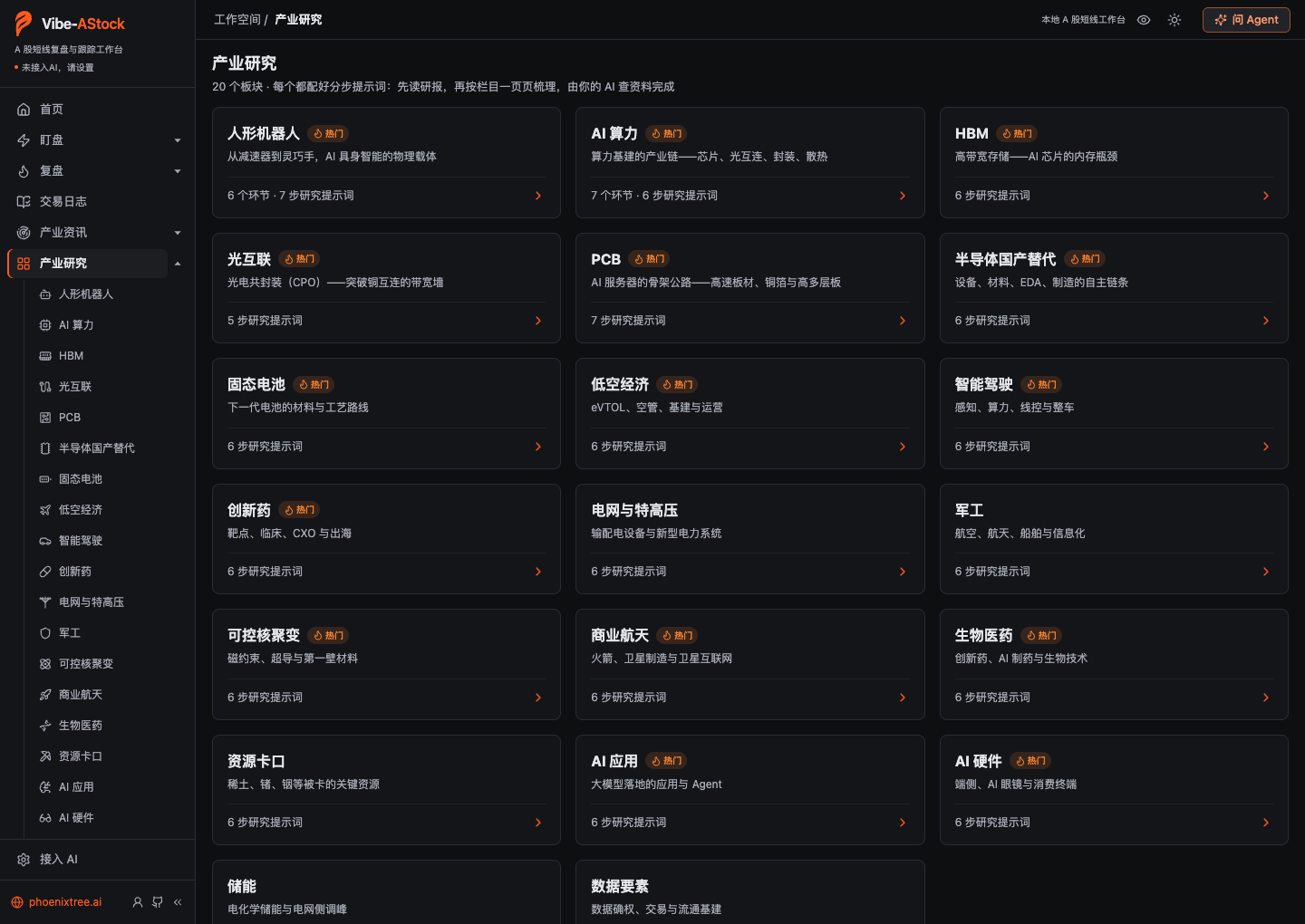 Industry research: 20 sectors, each with a set of step-by-step research prompts |
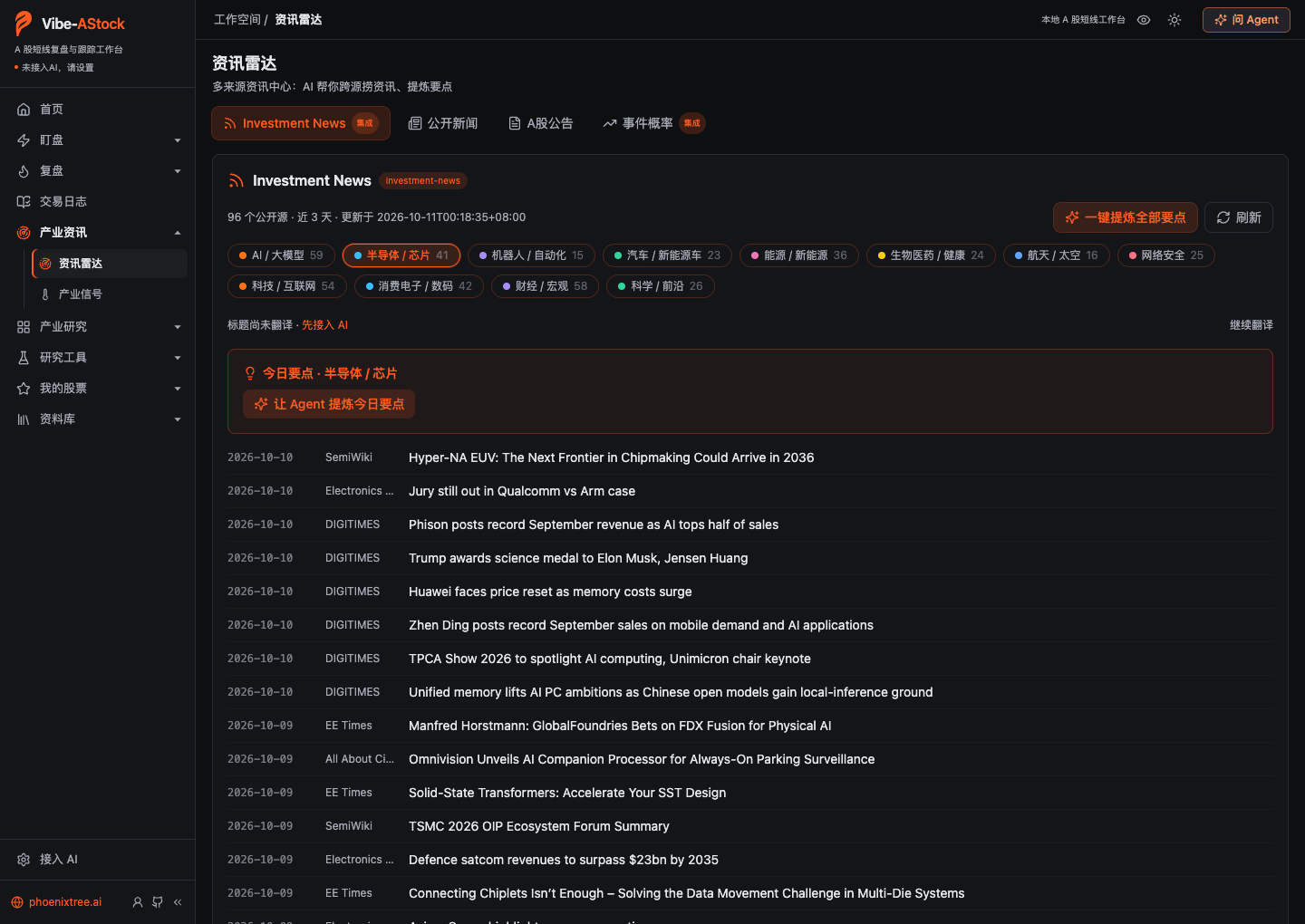 Intelligence radar: public sources across 12 industries, last 3 days |
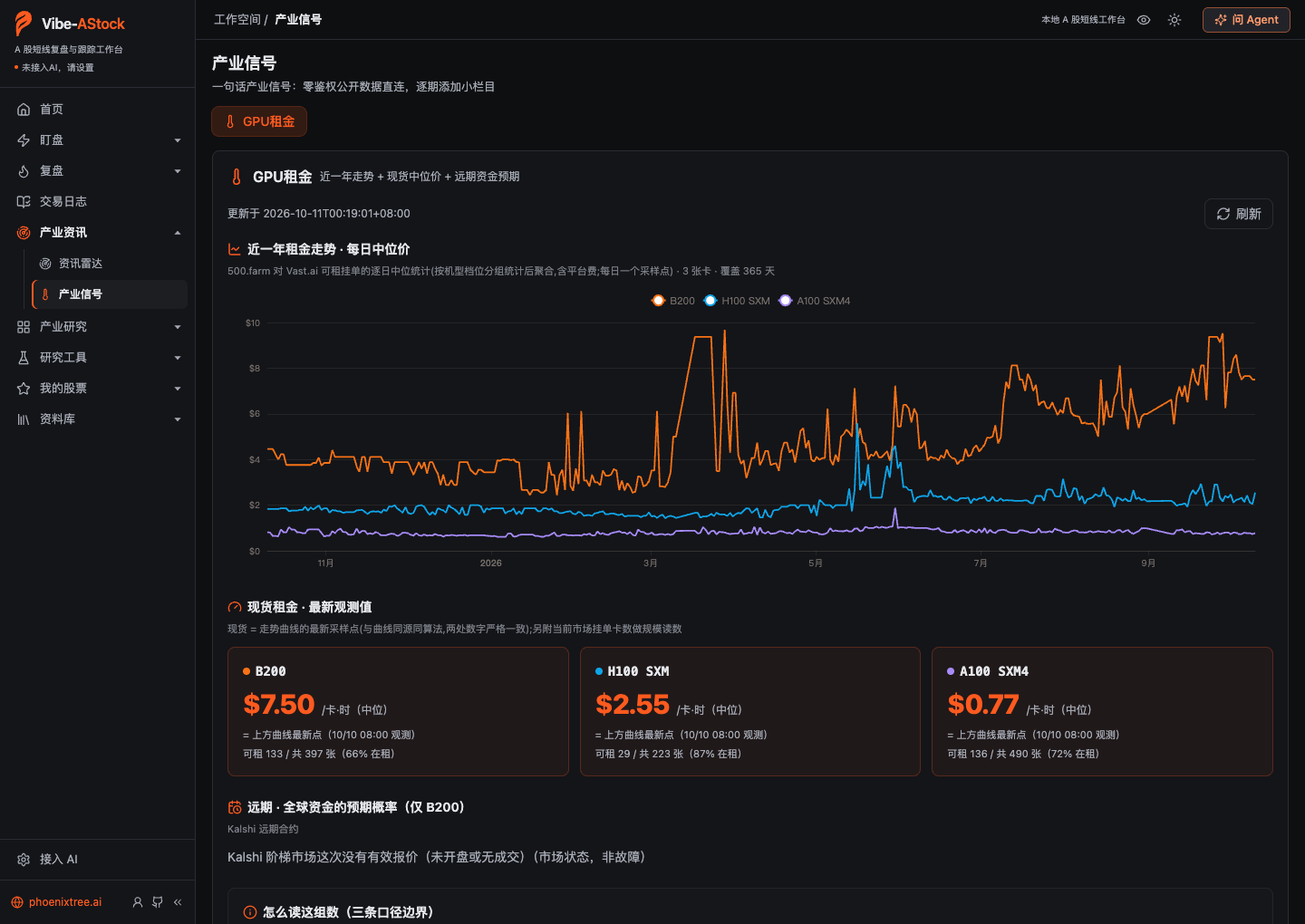 Industry signals: GPU rental rates over the past year and current spot prices |
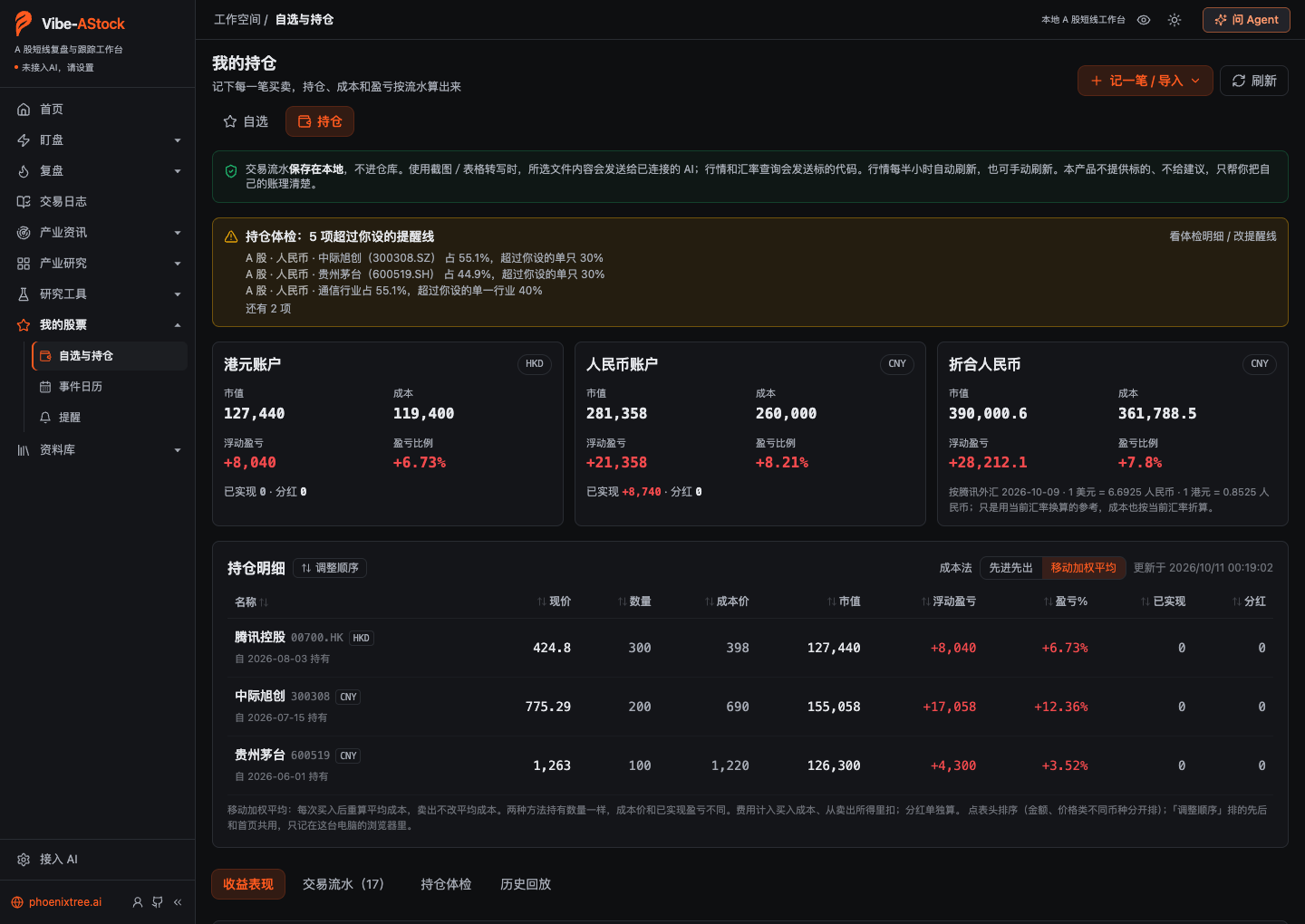 Holdings (demo data): positions, cost, and P&L computed from the transaction log |
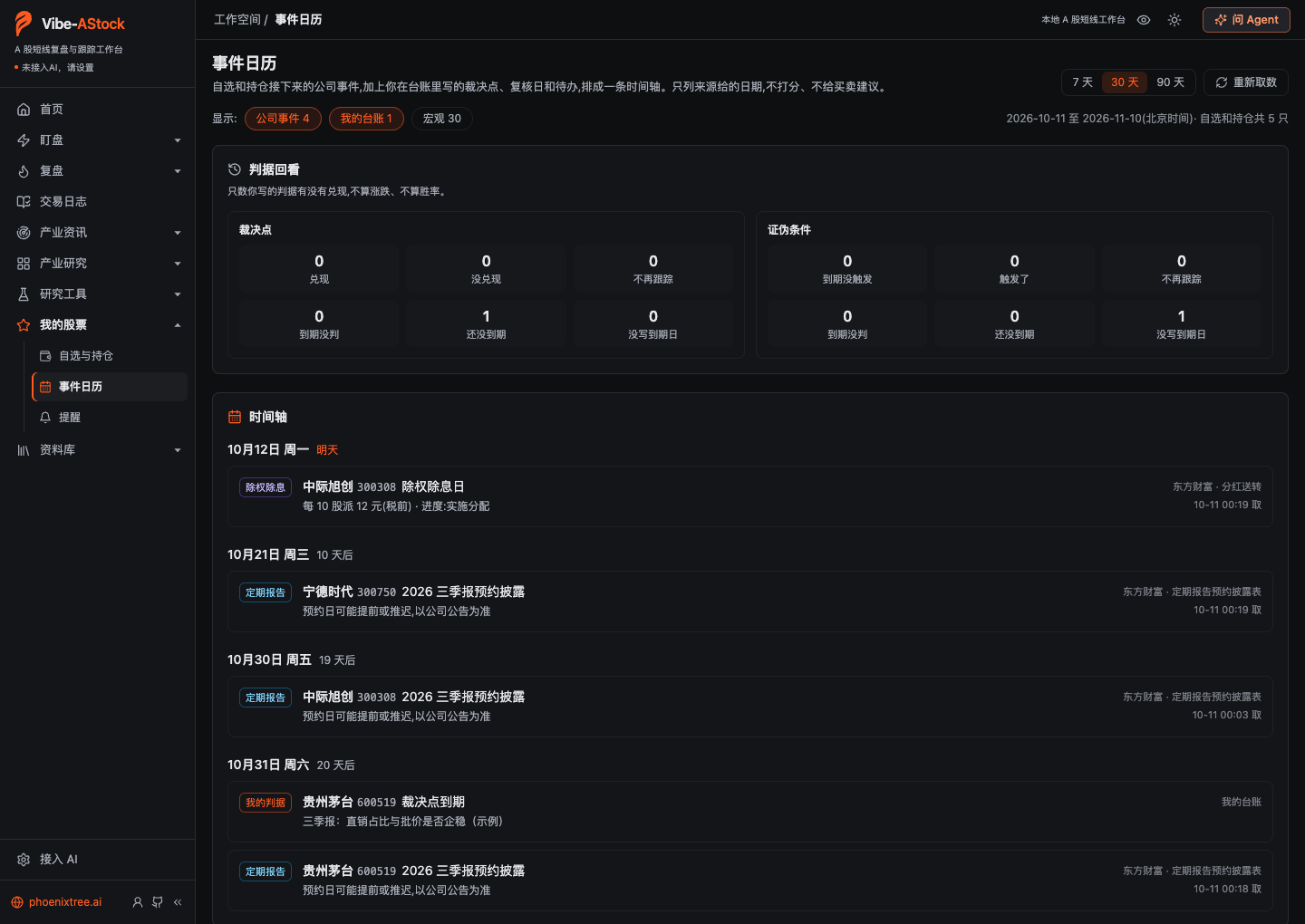 Event calendar: ex-dividend dates and scheduled earnings for your watchlist and holdings, plus the decision points you wrote |
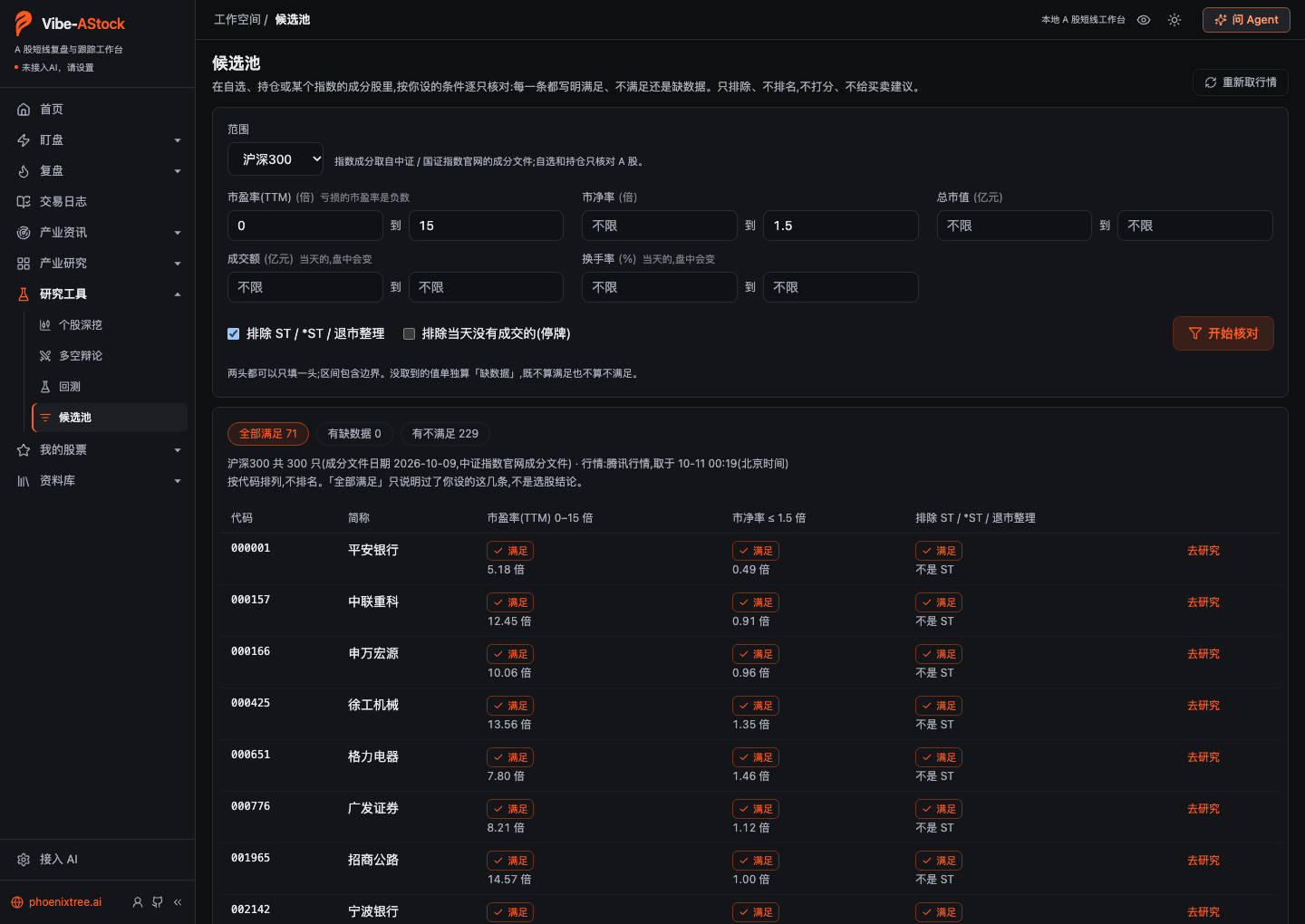 Candidate pool: checks index constituents one by one against your conditions; it filters out, it does not rank |
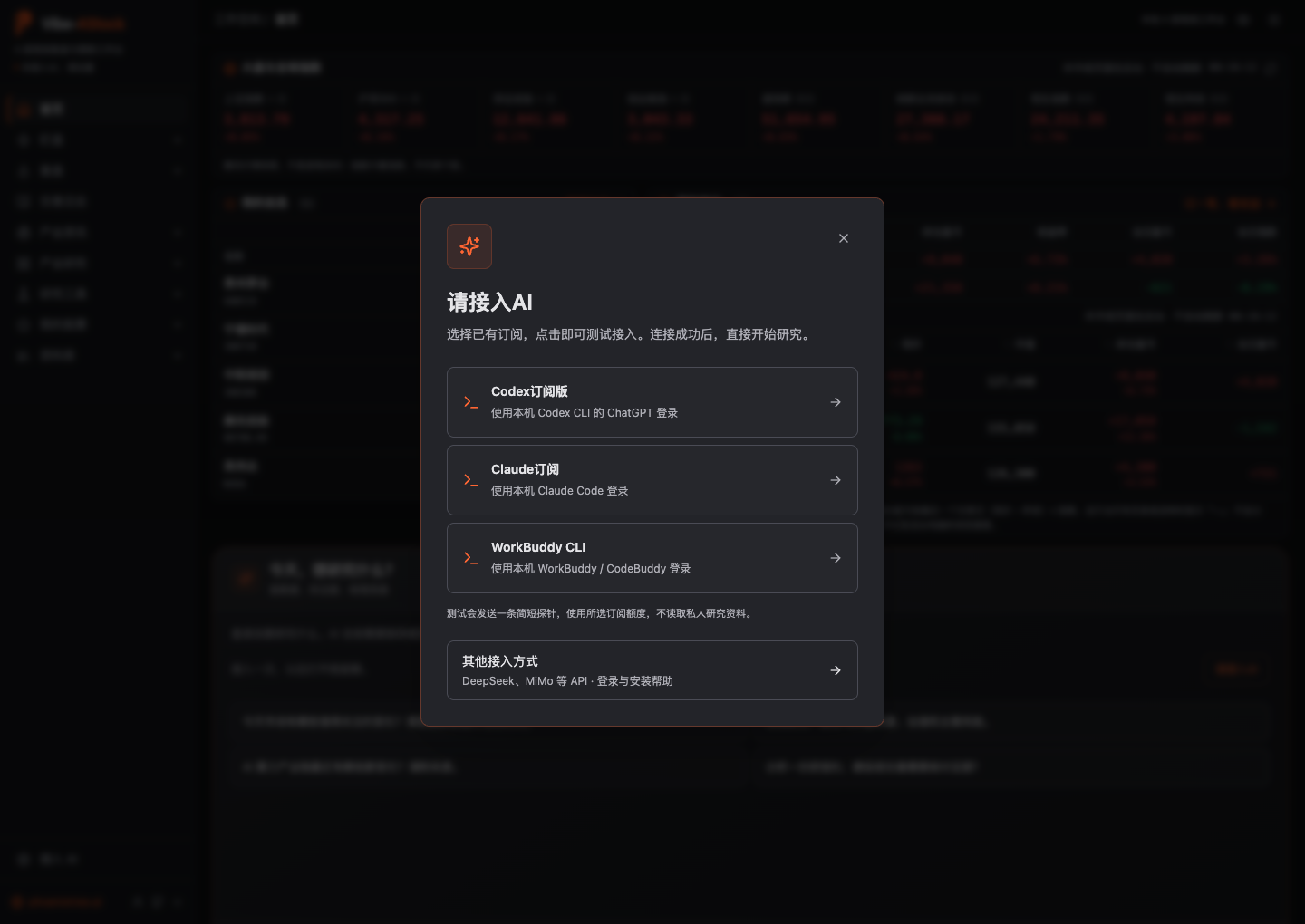 Connect AI: pick a subscription or model API on first launch |
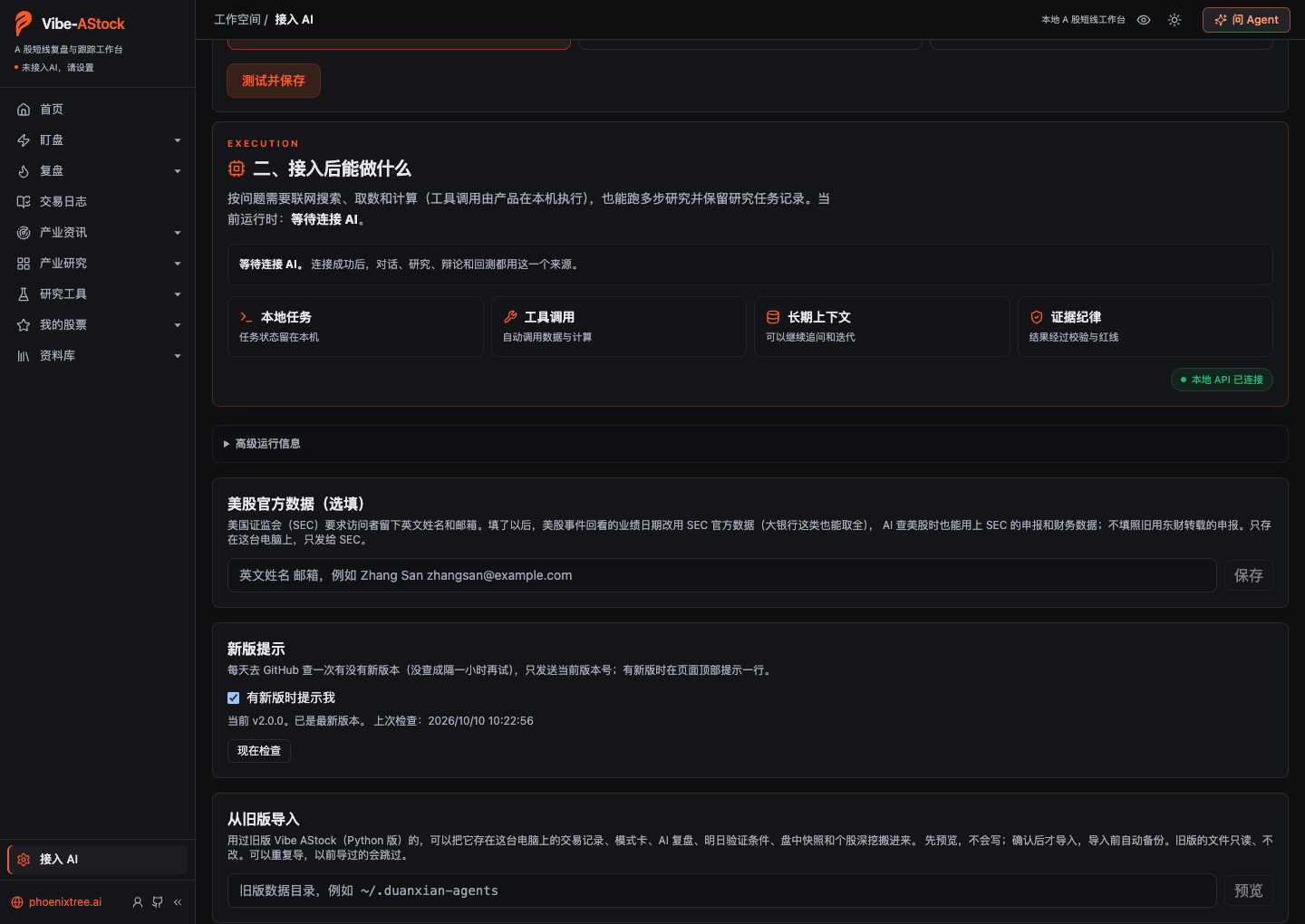 Import from the old version: preview first, then import, with an automatic backup beforehand |
Captured on October 10–11, 2026 from the development build (a weekend, market closed), in a separate demo workspace with no AI connected. The watchlist, holdings, and trade-journal trades are demo entries made for these screenshots (their notes say "示例数据", demo data, and prices fall between that day's real high and low), not real trades. The AI review and AI weekly review are versions actually written on October 10, 2026 with a Claude Code subscription for October 9, shown as is; Auction & intraday shows snapshots the old version saved during the September 23, 2026 session and that were then imported from it; the research report is one completed during development testing on October 8, 2026; everything else is public data the pages fetched at capture time. The screenshots only show the interface and are not investment advice. See capture notes.
Features
The sidebar has 10 primary sections; those with several pages fold them into a second level (click the arrow next to a section to expand it; with the sidebar collapsed to icons, clicking an icon opens its pages beside it):
| Section | Page | What it does |
|---|---|---|
| Home | — | China and global indices, your watchlist, and your holdings (market value, holdings P&L, today's P&L, prices refreshing on their own while markets are open) first; chat with AI below, and open features from the grouped directory |
| Watch | Live moves | During the session: your holdings and watchlist (price, today's change, unrealized P&L %), yesterday's limit-up ladder (how each name is doing today and whether it is sealed again), the top ten movers among stocks above 50 billion yuan in market cap, and yesterday's top ten by turnover; a move of 1.5% or more within 3 minutes is logged as a surge or drop, and touching or leaving the limit-up price as sealed or opened, with filters by size and scope. Refreshes on its own while the page is open and stops when you switch away |
| Watch | Auction & intraday | How yesterday's limit-up names opened in the 09:25 auction (median, share opening higher, by board level, the highest streak), the sentiment path across six snapshots (09:25 / 09:35 / 10:00 / 11:30 / 14:00 / 15:00: the median move of yesterday's limit-ups plus market-wide limit-ups, failed seals, and limit-downs at that moment), and last night's next-day checks against intraday readings. Snapshots are saved automatically at each time; a missed one cannot be filled in later |
| Review | Sentiment review | How hot short-term sentiment is: the money-making effect, promotion rates, the board ladder, the streak premium, gaps in the ladder, how yesterday's strong names did today, seal quality, the theme tree, and first-board names; an AI review written in five parts (sentiment, money, themes, the dragon-tiger list, leading names) plus a summary, with every number and citation checked by the app, the cited evidence one click away, and suggested conditions you can add to next-day checks in one click; plus the last 5 days (theme heat, theme rotation, and the lineage of leading names), sentiment history, next-day checks (write conditions the night before, checked automatically after the next close), limit-up sample stats, and structural shifts |
| Review | Daily review | Where the market stands at a glance: breadth, turnover, short-term sentiment (limit-ups / limit-downs / failed seals, how yesterday's limit-ups did today, promotion rates, limit-up streaks), where the indices sit over the longer term, margin balance, equity vs. bond yields, sector fund flows, and the Dragon-Tiger list; limit-up stocks grouped by industry and compared with the previous two trading days |
| Trade journal | — | Log each of your A-share trades (trades with fills go into your holdings ledger, with P&L worked out from the fills net of commission, stamp duty, and transfer fees; without fills you record just a P&L %), matched automatically to that day's sentiment (strong / middling / weak) and where the stock stood (first board, streak, failed seal, never touched limit-up); see win rate and average per trade by sentiment, board, playbook, whether it followed the plan, and holding days. Risk & discipline shows capital at risk from your planned stops, the equity curve, how your last 10 / 20 / 50 trades went, what unplanned trades cost, and breaches of your own rules; Review lists trades worth a second look, the best and worst each trade got to, and whether a losing day came from a wrong read or poor execution; Playbook cards write your setups down and split results by version. Stays on your machine and never goes to the AI |
| Industry news | Intelligence radar | News, company filings, and event leads that warrant further checking |
| Industry news | Industry signals | Supply-chain signals such as GPU rental rates, monthly industry data, raw materials, and hiring |
| Industry research | 20 sectors | The sidebar lists the 20 industry sectors directly (click Industry research itself for an overview of all of them). Each sector has its own page with a set of step-by-step research prompts: have the AI read the research reports first, then work through technology roadmaps, the supply chain, and the competitive landscape one page at a time; copy a prompt into your own AI or drop it into the chat in the upper-right corner. Your AI produces the sector content from what it finds; the product doesn't pre-fill it |
| Research tools | Company deep dive | Pick one stock (A-share, Hong Kong, or US) and switch between two tabs: Overview shows the candlestick chart, an earnings preview and review, and event reviews (earnings pre-announcements, major-shareholder trades, buybacks, institutional visits, dragon-tiger list appearances, and lock-up expiries for A-shares; earnings releases for Hong Kong and US stocks); Deep research works through business, financials, earnings expectations, valuation, and risks to produce an evidence-backed report that can be turned into a share card |
| Research tools | Bull/bear debate | A-shares only for now: compares supporting and opposing views to find missing assumptions, risks, and counterevidence |
| Research tools | Backtesting | Describe an idea in chat and check a defined rule against historical data, compared with an index and charted |
| Research tools | Candidate pool | Check your watchlist, holdings, or an index's constituents against conditions you set; each condition shows met, not met, or missing data; listed by code, not ranked |
| My stocks | Watchlist and holdings | Two tabs. Watchlist: add companies in bulk by name, pinyin, or symbol, refresh quotes, and keep tracking them; A-shares show how far they are from the exchanges' abnormal-volatility thresholds, and stocks you hold are marked. Holdings: keep a transaction ledger, see positions, P&L, and returns alongside quotes, run a portfolio checkup, and replay past drawdowns; this is not an order-entry tool. Click a stock name to open it in Company deep dive |
| My stocks | Event calendar | Upcoming earnings, lock-up expiries, and ex-dividend dates for your watchlist and holdings, on one timeline with your ledger's verdict and review dates; every entry names its source |
| My stocks | Reminders | Before each A-share trading day opens, a premarket reminder (overnight markets, filings and suspensions for streak names, today's IPOs); after the close, a close summary, watchlist changes, and criteria that have come due; all land in an inbox, optionally pushed to system notifications or Feishu / WeCom / DingTalk group bots |
| Library | My reports | Import, read, and search your own documents; ask questions and check the source text |
| Library | Research records | Revisit, search, and manage research, backtest, and debate reports by date |
| Connect AI | — | Choose a subscription or model API; once tested, it is shared across the product; pinned to the bottom of the sidebar |
Watch
Watch has two pages. They refresh on their own while open, stop and say "paused" when the page goes to the background, and fetch only one set of quotes no matter how many windows are open.
Live moves
- Holdings and watchlist: holdings show price, today's change, and unrealized P&L % (share counts and cost come from the Watchlist and holdings page); the watchlist shows price, today's change, and turnover.
- Yesterday's ladder: how the names still sealed at limit-up at the previous close are doing today, filtered by all / 2 boards and up / 3 boards and up. "Sealed" means the price is at the limit-up price, judged only during continuous trading and after the close. Before today's quotes arrive, the previous trading day's reading is shown and marked "not today".
- Large caps and turnover: the top ten gainers and top five decliners among stocks above 50 billion yuan in market cap, and yesterday's top ten by turnover.
- Intraday moves: a move of 1.5% or more within 3 minutes is logged as a surge or drop, and touching or leaving the limit-up price as sealed or opened; the same name and type is not repeated within 5 minutes. Moves are judged only during continuous trading; the window and seal state reset during the call auctions and the lunch break. Filter by size (≥1.5% / ≥3% / ≥5%) and scope (everything watched / holdings and watchlist only); the day's moves are kept on your computer and still show after a restart. A move is a market event that has already happened, not a recommendation or a forecast.
- During continuous trading quotes are fetched every 3 seconds (large caps every 30 seconds), otherwise every 15–60 seconds. Quotes are Tencent snapshots, not tick-by-tick, so changes between two snapshots are not seen.
Auction & intraday
- Auction strength: for yesterday's limit-up names at 09:25, the median and mean auction move, the share opening higher, how many opened more than 5% lower, split by yesterday's board level (a first board and a high streak read differently in the auction), and the highest streak.
- Today's sentiment path: at six snapshots (09:25 / 09:35 / 10:00 / 11:30 / 14:00 / 15:00), the median move of yesterday's limit-up names (how well they are being absorbed) and the market-wide limit-up / failed-seal / limit-down counts, seal rate, and highest streak at that moment, plus the first-to-second-board promotion rate on the same basis as the review. Closing down 2% after opening up 3% and selling off all day is different from closing down 2% after opening down 5% and recovering; the closing value alone cannot tell them apart.
- Intraday readings for next-day checks: last night's conditions are checked against intraday readings first, marked "provisional"; the close is what counts.
- Snapshots are saved by a scheduled job at each time (up to 6 retries for the same time if it fails), and you can also save one by hand inside a snapshot window; a missed time cannot be filled in later, and is shown as "not saved". On weekends and holidays every time is marked "closed". You can pick a date to look back at snapshots saved before.
Sentiment review
First under Review, with 8 tabs. The review date defaults to the most recent trading day that has closed; future dates and non-trading days are refused outright instead of producing "0 limit-ups".
- Today: the money-making effect (median and mean move of yesterday's limit-up names today, share in the green, how many hit limit-up again), promotion rates (first to second board, second to third, three boards and up), the board ladder (who is at each streak height, how many names one level down yesterday made it up, and whether the ones that didn't hit limit-down, broke the seal, or never reached limit-up today), the streak premium, the ladder structure (which board level has a gap), how yesterday's strong names did (by what they were yesterday), the money-losing effect, seal quality (never broke, broke and resealed), the sentiment cycle, the theme tree (Tonghuashun limit-up reasons grouped into themes, with iWencai as a supplement), and first-board names. Each block has a "method" note you can open to see how it is computed.
- AI review: five parts (sentiment, money, themes, the dragon-tiger list, leading names), each in a fresh conversation that sees only its own blocks of data, then a summary that suggests conditions for next-day checks, added in one click. Every number is checked by the app in three tiers: matches the data pack, shows a formula that recomputes correctly, or gives no source (a formula that does not recompute is flagged red); evidence IDs are checked one by one, and hovering "see evidence" shows the original row. Data after the review date never enters the data pack; each run is saved as a new version without overwriting older ones.
- AI weekly review: for the week containing the selected day, three parts (sentiment trend, theme rotation, a look back at the checks) plus a summary, checked the same way as the AI review; it opens by listing the weekdays the market was closed. "My trades this week" is computed from the trade journal on your computer, shown only on the page, and never enters the AI data pack or the page context.
- Last 5 days: theme heat, theme rotation, and the lineage of leading names. Theme rotation shows, for each of the last 5 trading days, how many limit-ups each theme had and where it ranked, and marks how many days in a row, a return after a gap, a first appearance in the window, and themes that were there yesterday but gone today; a day that could not be fetched shows "—", not 0. Leaders use forward-adjusted daily candles; names at the same height are ordered by first seal time.
- Sentiment history: where each daily reading sits within the last 10 / 20 / 30 / 60 trading days, compared with the day before.
- Next-day checks: after the close, write directional conditions for the next trading day (for example "limit-up count flat tomorrow" or "first-to-second promotion rate up tomorrow"), each with how often that direction has occurred historically; they are scored automatically after the next close, with a running record over the last 60 trading days. From 09:15 on the next trading day, when the opening auction starts, conditions can no longer be written or edited; anything written after that is marked "after the fact" and left out of the record.
- Limit-up samples: how yesterday's limit-up names did the next day, grouped by playbook (first-board breakout, early first-board seal, and so on), last seal time, and the entry day's sentiment, over the last 20 / 30 / 60 / 90 days. The samples are a list drawn up after the fact, do not account for orders that could not be filled in the queue, and use equal-weighted closing prices; they describe a market phenomenon, not a strategy backtest.
- Structural shifts: the last 10 trading days against the 20 before them, checking whether each reading's daily median has clearly shifted; whether the field lists returned by Eastmoney's pools have changed (a source changing its fields creates false breaks); and a log of rule changes you can record, such as a change to price-limit rules.
Sentiment tiers and cycles are an analytical framework, not objective facts, and no single reading leads directly to a trading conclusion. Eastmoney's limit-up, failed-seal, and limit-down pools only go back about a month; the short-term close fetch saves each trading day's final readings on your computer at 15:35, and once saved they stay available. A reading that could not be fetched says why instead of showing 0. The AI in the review only interprets the data the app fetched; it does not recommend stocks, forecast prices, or time trades.
Trade journal
Trade journal comes right after Review, with 4 tabs. Its data stays on your computer and never goes to the AI: these pages register no page context, and the AI in the lower-right corner says there is nothing on this page to talk about.
- Trades: fills are recorded only in the transaction log under My stocks, one ledger; a stock bought from flat and sold back to flat counts as one trade. Each trade is matched automatically to that day's sentiment (strong / middling / weak) and where the stock stood at the time (first board, streak, failed seal, never touched limit-up, with the number of failed seals and the industry). The sentiment score is limit-up count × (1 + highest streak) × (1 − failed-seal rate), split into thirds across the days you actually traded, so strong / middling / weak is relative. Each trade can carry a playbook (breakout, dip buy, relay, half-way, arbitrage, other), whether it followed the plan, a planned stop and target, and a note; group by sentiment, board position, playbook, plan, and holding days to see the trade count, win rate, average per trade, best and worst, and net P&L. Breakeven trades are left out of the win rate, and small groups are marked "small sample". A trade without fills can be recorded as a P&L % only.
- Risk & discipline: capital at risk estimated from your planned stops, the equity curve, how your last 10 / 20 / 50 trades went, and what unplanned trades cost; the rules you write yourself (max loss per trade, max loss per day, max open positions, max new trades per day, max share of unplanned trades) are checked one by one, with the dates of any breaches.
- Review: trades worth a second look, judged entirely against your own baseline (whether a position was large or held long is compared with your own medians, loss limits come from your rules); the best and worst each trade got to (unadjusted Tencent daily candles, only for rounds that were fully sold); and whether a loss came from a wrong read or poor execution (the entry day compared with the next-day checks written the night before).
- Playbook cards: write down your own setups (when they apply, entry, exit, sizing); an edit starts a new version from the next day, and results are split by version.
The journal covers A-share stocks only (fees, stamp duty, and T+1 all follow the rules for A-share stocks); ETFs, convertible bonds, and Hong Kong and US trades are still counted in your holdings but do not enter the journal. The arithmetic follows the old version: moving weighted average cost, with missing fees estimated from your fee rates and marked "est.". Privacy mode masks amounts, share counts, and the prices you wrote (input boxes too), and hides the equity curve. All of this is statistics about your own past behavior; it does not forecast the market or suggest the next trade.
Home
The home page shows your own stocks first and the chat below them:
- China and global indices: SSE Composite, CSI 300, SZSE Component, and ChiNext for A-shares; Dow Jones and Nasdaq Composite for the US; Hang Seng and Hang Seng Tech for Hong Kong.
- My watchlist: price and percentage change; the first 10 are listed and the rest expand on click. Click a name to open it in Company deep dive.
- My holdings: shares and cost come from your transaction ledger; each row shows price, market value, holdings P&L (amount and percentage), and today's P&L. Totals are kept separate for CNY, HKD, and USD and never converted and added together. Today's P&L = (price − previous close) × shares; when a stock had a buy, sell, or share split/bonus on its latest trading day, the previous close alone can't give the answer, so it is left out with the reason shown under the "—". The latest trading day comes from the quote's own trade date first, so holidays are handled too (the quote stays on the last day before the holiday). A missing price or previous close shows "—" with a note, never 0; ledger entries with bad data that were left out of the calculation get the same warning as on the holdings page.
- Prices refresh on their own: watchlist and holdings about every 3 seconds during trading hours while the page is in front; indices every 15 seconds while any of the A-share, Hong Kong, or US markets is open. Hong Kong counts until 16:10, so the closing-auction price is picked up too. Nothing refreshes when markets are closed or the window is in the background; the index strip has a manual refresh button. Quotes are Tencent snapshots, not tick-by-tick data.
- With privacy mode on, amounts are masked and percentages still show. This part of the home page is read-only: it never starts research, calls a model, or changes your ledger.
Below that, ask questions directly. Other sections also have a chat button in the upper-right corner for discussing the current page.
Once a subscription or model API is connected, the AI searches the web, reads pages, fetches data, and runs calculations as each question needs; questions that need no new data, such as explaining a concept, framing ideas, or translating, are usually answered directly. A full research run starts only after you confirm it; a conversation never turns into one automatically. You can browse every section before connecting AI.
Every answer ends with "Sources this turn": which data was fetched (source, time fetched, number of items, and a note when only part of it came back or a cached snapshot was used), which web pages were read (with links), and which page of which of your uploaded reports was cited, with failed calls listed separately. If nothing was looked up, the answer says so: nothing in it can be traced to a source.
Every number in a chat answer is checked for a source: it has to appear in your message, the current page, the data and web pages fetched, or earlier in the conversation, or be the result of a calculation written out in the answer. A number with no source is replaced by 「(略※)」 ("omitted"), the answer ends with a note saying how many were replaced, and the rest is shown as usual. Numbers that aren't data, such as dates, years, IDs, index names like CSI 300, and moving-average windows, aren't checked, and neither are example figures the answer labels as hypothetical (「假设」). The check confirms that a number appears in those sources, not that it is used correctly. Common-knowledge figures such as board-lot sizes or daily price limits are also replaced when nothing in the conversation backs them up.
Daily review
Daily review shows where the market stands as soon as you open it, and the Agent can write a review from what's on the page. During trading hours it shows today (numbers keep changing until the close); you can switch to the previous trading day for a complete day. From top to bottom:
- Market state: eight tiles at a glance — advancers and decliners, Shanghai + Shenzhen turnover against its 20- and 60-day averages, limit-ups / limit-downs / seal rate, the longest limit-up streak, how yesterday's limit-ups did today on average, how many indices are above their 20 / 60 / 250-day moving averages, the 5-day change in margin balance, and the CSI 300 P/E and dividend yield next to the 10-year government bond yield.
- Short-term sentiment: the advance/decline distribution (23 buckets from limit-up to limit-down) and per-exchange counts and turnover for Shanghai, Shenzhen, and Beijing; what yesterday's limit-ups did today (average and median change, share up, share that hit the limit again) and the losing side (limit-downs, failed seals, yesterday's limit-ups down 5% or more today); promotion (how many first-day limit-ups made a second day, second made a third, and so on); and streak stocks (streak length, time first sealed, that day's price and turnover, free-float market cap, industry, and Tonghuashun theme).
- Longer term: 5 / 20 / 60 / 250-day and year-to-date changes for eight major indices, how far each is from its one-year high, and whether it sits above or below its 20 / 60 / 250-day moving average; a 60-day turnover chart with average lines (today's unfinished bar isn't compared with full-day averages); the margin balance trend; and the gaps between the CSI 300 dividend yield, earnings yield, and the 10-year government bond yield.
- Where the money went: sector net inflows and outflows (falls back to Sina when Eastmoney is unavailable, with the method labeled), the top 20 stocks by turnover, and the top net buys and sells on the Dragon-Tiger list.
Each block shows its own data date; the distribution, sector flow, and turnover-ranking sources only serve today, so when you look at the previous trading day they are marked as a snapshot of right now. A block that couldn't be fetched says so and why instead of showing 0. Labels such as 偏强 (firmer) or 活跃 (active) come from fixed thresholds written on the label. Everything is a summary of public data; nothing here predicts the market.
Limit-up stocks are grouped by their Eastmoney industry, compared with the previous two trading days, and sorted into four tiers by count: sustained (连续集中: 3 or more limit-ups in the same industry today, and at least 2 on each of the previous two trading days), today only (今天集中: 3 or more today, but not at least 2 on both previous days), scattered (零散: 2), and single (单只: 1). Each industry lists its limit-up stocks, their streak lengths, the top streak (longest streak; on a tie, the one sealed earliest) and the streak ladder (how many stocks at each streak length), and the most frequent Tonghuashun theme tags. Tiers are fixed counting rules: they don't say whether a move will last, and they aren't recommendations. Industry names are Eastmoney's abbreviations (at most 4 characters), and theme tags are Tonghuashun's market narrative, not verified causes. If a previous day's limit-up pool couldn't be fetched, the page says it can't tell whether the concentration is sustained, instead of counting it as 0. When the Agent writes a review, the sector part follows these four tiers in order, with headings of 25 characters or fewer and no hype words.
Industry research
Industry research lists 20 industry sectors (humanoid robots, AI compute, HBM, optical interconnect, PCB, semiconductor localization, solid-state batteries, nuclear fusion, and more). Each sector comes with a set of step-by-step research prompts: step 1 has the AI read the reports in your library about that sector first, then find public industry reports from this year and last year; each later step produces one page, such as overview, technology roadmap, supply chain and value, global landscape, and certainty map (optical interconnect, HBM, humanoid robots, and PCB use their own pages). Years follow the date you open the page; none are hard-coded.
Copy any step into the AI you usually use, or click Send to Agent to drop it into the input box of the chat in the upper-right corner, where you read it before sending; nothing is sent automatically. Click Save to records under an answer to build up research notes for that sector.
The sector content isn't pre-filled: the prompts give only the research method, and your AI produces the content from what it finds at the time. Every number must carry a source and year, and anything it can't find is marked 「未查到」 ("not found"). The prompts stay on the industry: companies are described only by their place in the supply chain, with nothing on valuation, buying, or selling.
Candidate pool
The Candidate pool checks stocks one by one against conditions you set, within a scope you pick: your watchlist, your holdings, or the constituents of the CSI 300, CSI A500, CSI 500, CSI 1000, CSI 2000, SSE 50, STAR 50, or ChiNext index (constituents come from the constituent files on the CSI and CNI index websites). Conditions can be ranges for P/E (TTM), P/B, total market cap, the day's turnover value, and turnover rate, plus excluding ST / *ST / delisting-period stocks and stocks with no trades that day (suspended). Quotes come from Tencent.
Every stock and every condition shows met, not met, or missing data, with the actual value. Results are split into three groups (all met, missing data, not met), listed by stock code, with no ranking or scoring; "all met" only means a stock passed the conditions you set. A value the source didn't provide counts as missing, not as 0; a loss-making company's P/E is negative and shown as such. Before the open almost nothing has traded yet, so the suspended condition is marked as missing then. Funds, bonds, HK stocks, and US stocks in your watchlist or holdings are not checked, and the page says so. "Research" opens that stock in Company deep dive.
Company deep dive
Company deep dive starts with picking one A-share, Hong Kong, or US stock, then has two tabs: Overview and Deep research. Picking a stock only opens it; research never starts by itself. For A-shares, a Bull/bear debate button in the header opens the debate page with that stock.
Deep research works through six stages: company profile → financials → earnings expectations → valuation → risk → report. Alongside the report, each stage keeps its source material, calculations, conflicts between sources, and data gaps: missing data is recorded as a gap, not treated as zero, and results that cannot be verified are not presented as complete.
Hong Kong and US companies go through the same six stages with market-specific rules. The run first checks the company's identity (the names reported by the quote source and the company-profile source must match; if they do not, the report says so). Financials only use figures already published on the research date (filtered by announcement date); quarterly, full-year, and year-to-date figures are labeled separately, and trailing-four-quarter totals are derived from year-to-date figures rather than forced into calendar quarters. When the share price or market cap and the profits are in different currencies (for example, Tencent is quoted in HKD and reports in RMB), the P/E is calculated after converting with the exchange-rate data, copied as is. Consensus uses the current and next fiscal years. The reference quote day follows the market's benchmark (S&P 500 for the US, Hang Seng Index for Hong Kong), and the P/E history percentile uses Baidu Gushitong's P/E TTM series. Hong Kong and US companies do not disclose deducted net profit, so that P/E cell is marked as not obtained; quarter-on-quarter change is not calculated in this version.
Each item under "Inferences" in the report carries one of four confidence tiers: disclosed and confirmed / supported inference / unverified lead / contradicted. Every tier except "unverified lead" must cite an evidence or calculation ID. The report opens with caliber notes when a calculation mixes currencies, TTM and single-quarter calculations end in different periods, the financials are not the latest period due under A-share periodic-report deadlines, or annualizing deducted net profit × 4 is inflated or depressed by seasonality. A number in the report that cites no ID and cannot be traced to this run's data or calculations (or, on a line citing one of your library documents, to the excerpt used) is replaced with "〔未核实〕" (unverified) before delivery; the report opens by saying how many, and the run is marked incomplete. Dates, IDs, and lines or tables stated as assumptions or scenarios are exempt.
The Overview tab shows a candlestick chart with 5/10/20/60-day moving averages and volume, on daily, weekly, or monthly bars; A-shares can switch between forward-adjusted, backward-adjusted, and unadjusted prices. It shows market data only, with no buy or sell markers; Beijing Stock Exchange stocks are not supported yet.
Below the chart is an earnings preview and review card for A-shares, Hong Kong, and US stocks. It shows the next report date (for A-shares, the Eastmoney scheduled disclosure date, which companies can change, so exchange announcements are authoritative; for HK and US stocks, the Yahoo date, labeled as estimated or company-announced), the consensus mean and range (full-year EPS for A-shares, current-quarter EPS for HK and US stocks), and, for A-shares, the company's preliminary earnings estimate for the next period when there is one. For past reports it shows the move on the first trading day after each release (adjusted closing prices, including that day's market move; reports that land on the same day count once), compared with the average absolute move of the previous few, and how far actual results were from expectations (the preliminary estimate range for A-shares, consensus for HK and US stocks). Every number comes from the calculation library. It only describes the past: no forecast for the next report and no target price. Moves for Beijing Stock Exchange stocks aren't supported yet (the quote source doesn't cover them), and anything that couldn't be fetched is listed as a gap. When you ask the Agent from this page (「问 Agent」), the card goes along with your question.
The Overview tab also has an event review. For A-shares, pick one of seven kinds of events—preliminary earnings estimates, major shareholders increasing or reducing their stakes, buyback plans, institutional visits, dragon-tiger list appearances, or lock-up expiries (Eastmoney data)—and it lists every past occurrence for that stock with the cumulative excess return against the CSI 300 from 5 trading days before to 20 trading days after (each day's move minus the index's move that day, added up). It gives the mean, median, and share of positive outcomes for four windows (the 5 days before, days 0–1, days 0–5, and days 0–20) and draws the average path; preliminary estimates are also split into improving (预增, 略增, 扭亏, 减亏) and worsening (预减, 略减, 首亏, 增亏), dragon-tiger appearances into net buying and net selling by the listed trading seats, and lock-up expiries into large (shares actually becoming tradable are at least 1% of total shares) and small. Buybacks count from the day the plan was first announced; institutional visits count from the day the visit record was published (Eastmoney keeps only about the last year); the dragon-tiger list comes out after the close, so day 0 is the next trading day and the listing day's own move falls in the 5 days before; lock-up expiries also show batches already scheduled but not yet reached at the top (listed only, no returns). Hong Kong and US stocks use earnings releases: Hong Kong uses annual, interim, and quarterly results announcements from HKEXnews, and anything published after the 16:00 close starts from the next trading day (on half-day sessions such as Christmas Eve and Lunar New Year's Eve, afternoon releases still count as that day), measured against the Tracker Fund (tracks the Hang Seng Index); US stocks use 8-K filings for results of operations (Item 2.02): with an SEC contact filled in on the Connect AI page (an English name and email, which the SEC requires of every visitor), dates come from the SEC's official full-text search and are complete even for big banks; without it they come from Eastmoney's copy of the filings, which can miss big banks that file over a thousand debt filings a year, and the result suggests filling in the contact. Day 0 is the US Eastern filing date (most companies report after the close, so watch days 0–1), measured against SPY. Foreign issuers (ADRs) report on 6-K and aren't covered; Hong Kong and US daily prices go back only about 10 years, so earlier events are skipped. Announcements on the same day count once; events with a trading halt inside the window are listed but left out of the averages; recent events that haven't reached 20 trading days count only in the windows they've completed; events close enough for their windows to overlap are flagged; with fewer than 8 events no averages are given, only the individual results. A-share prices are forward-adjusted and the CSI 300 is a price index without dividends; Hong Kong and US prices are Yahoo split-adjusted closes, and the comparison ETFs are closes without dividends too. Major-shareholder trades for Hong Kong and US stocks aren't included in this version. Most companies have bought back shares only a few times and institutional visits cover only about a year, so these often have fewer than 8 events and show only the individual results. Data is fetched only when you click Start, and the result goes along when you ask the Agent; it only describes the past, with no forecasts and no buy or sell signals.
Once a company has been researched more than once, you can pick another run to compare when you open a report: key data is lined up item by item as changed / added / gone, each value traceable to its own evidence ID, and the report shows which lines changed in each section. It only puts what the two runs said side by side and does not interpret price moves; evidence and calculation IDs are regenerated on every run, so they are ignored in the comparison.
Research the same stock again with a different Agent, and the research process comparison puts those runs side by side: how much evidence was fetched and how much was actually cited, how many of the report's numbers that cite an evidence or calculation ID actually match it, how many stages had complete data, how many passed validation on the first try, how many gaps were written down, and how long each run took. It compares only the research process—not whether the conclusions were right, and not returns; there is no total score and no ranking, and anything that couldn't be read shows as "—". When the runs used different data scopes or covered only some stages, the page says so first, since the counts then can't be compared directly. Once the comparison is shown, it lists the subscription Agents signed in on this machine (Codex / Claude Code / WorkBuddy); one click has that Agent research the same stock with the same data scope, using its subscription for that run only, without changing your saved AI settings. The comparison can be saved to your research notes, and "This week's comparison" next to the research archive collects every stock researched by at least two different Agents in the last 7 days into one note that stays on this machine.
Once a report passes its checks, you can make a share card: a portrait (phone) or landscape PNG, or copy it as text. The card only carries raw data from this run (price, market cap, P/E, P/B, revenue, net profit attributable to shareholders, and consensus EPS, each with its date and source; when sources give different values for the same period, all of them are listed, up to two per item on the image and three in the text version), how many evidence items, sources, and calculations were used, which data had gaps, and a disclaimer. It leaves out the report's judgments, scores, and target prices.
View progress and request a stop while it runs; the status survives a page refresh. A stop request is not a confirmed stop, and the page shows the two states separately. Reports, evidence, and calculation records are saved in Research records.
My reports
Import PDF, DOCX, TXT, MD, or CSV files to read, search, and ask questions about them. Citations in answers lead back to the source text; text PDFs keep page references, while scanned PDFs need OCR first. A citation does not prove an inference is correct: check the source and calculation assumptions.
Original files are stored and parsed locally; only passages matched by search are sent to the selected model. Local storage does not mean everything runs offline.
Bull/bear debate and backtesting
Bull/bear debate (its own page under Research tools, A-shares only for now; the button in the Company deep dive header brings the current stock along) brings different analytical perspectives to the same material, with supporting arguments, risks, and rebuttals, to surface unresolved disagreements.
Backtesting checks explicit historical rules. Describe the rule in plain language; missing conditions are asked for, and the backtest runs once they are complete. Failures and unsupported conditions are stated plainly; an unexecuted task is never presented as a result.
- Index comparison: the CSI 300 Index for A-shares, the S&P 500 ETF (SPY) for US stocks, and the Tracker Fund of Hong Kong (02800.HK, tracking the Hang Seng Index) for Hong Kong stocks. If the index cannot be fetched, the backtest falls back to an equal-weight buy-and-hold of the tested symbols and says so.
- 43 numeric metrics, plus monthly / yearly return tables and the five deepest drawdowns. Each run is repeated on the same signals with fees and slippage set to zero, so the report shows a before/after-cost comparison and how many percentage points costs took. Four charts appear below the report—cumulative return vs. benchmark, underwater drawdown, monthly return heatmap, and yearly return bars—drawn from the same numbers as the report. Charts show only in the current session; Research records keeps the report and the yearly-return and drawdown tables.
- Robustness checks (a Sharpe confidence interval and segment tests) and a sensitivity grid over neighboring parameters; the page states that this does not identify optimal parameters or predict future performance.
- Four built-in rules: buy-and-hold, moving-average crossover, RSI mean reversion, and RSRS timing. RSRS is written from the formulas in Everbright Securities' public 2017 research report: each day, regress the last 18 days' highs on their lows and check whether the slope's z-score crosses ±0.7. The report tuned these parameters on the CSI 300 Index, so they may not hold for individual stocks. The first 617 daily bars only warm up the indicator and are never held, so RSRS needs a longer range (with the default parameters, about 3.5 years for swing and 4.5 years for long-term; a shorter range is refused with the shortfall stated). With fewer than 10 closed trades, the report says the result cannot show whether the method works. It is for historical backtests only and gives no reading for today.
- Multiple symbols in one run form an equal-weight portfolio. A-share backtests cover individual stocks only; ETFs, indices, and convertible bonds are rejected.
- On the last day of a backtest, positions that can be sold are closed at the close. Shares bought that day (A-share T+1; after a last-day top-up only the added shares stay, the rest is closed), a position closing locked at limit-down, or one with no quote that day is not given a made-up sale: it stays in ending equity at the close, and the report names it.
Both require a connected AI. Reports are saved in Research records. Historical performance does not predict future results and is not a trading recommendation.
Watchlist and holdings, research records
Watchlist and holdings has two tabs: Watchlist holds the companies you follow and marks the ones you already hold; Holdings keeps a transaction ledger, with performance, transactions, checkup, and drawdown replay as tabs lower on the page. Click a stock name to open it in Company deep dive. Research records keeps research, backtest, and debate reports by date. A-share, US, and Hong Kong symbols all work.
- Finding stocks: Company deep dive, Bull/bear debate, and Holdings (when recording a transaction) share one search box; "gzmt", "茅台", and "600519" all find Kweichow Moutai. Watchlist accepts a pasted list of symbols, Chinese names, or pinyin initials, and lists candidates when a term is ambiguous. If the search service is unreachable, it falls back to symbols only and says so.
- Abnormal-volatility proximity: A-share watchlist stocks show how far they are from the exchanges' "abnormal volatility" and "severe abnormal volatility" thresholds: the cumulative deviation over 3, 10, and 30 trading days (the stock's change minus its benchmark index's change over the same period) against each threshold, plus how many same-direction abnormal-volatility events have already occurred within 10 trading days. Thresholds follow the 2026 revised trading rules of the Shanghai, Shenzhen, and Beijing exchanges; results are estimated from the public rules, and exchange announcements are authoritative. It only shows the distance to each threshold, with no view on direction and no forecast. Beijing Stock Exchange stocks (not supported by the quote source), funds, bonds, and US / HK stocks are skipped, and the page says so; the main-board turnover criterion isn't computed because daily bars carry no turnover rate, and the page says that too.
- Transaction ledger: holdings are recorded as individual transactions—opening position, buy, sell, cash dividend, and bonus shares / split—and replayed by date into current positions, realized P&L, and dividends; cost basis can be first-in-first-out or moving average. Invalid transactions are listed with the reason and left out of the calculation. Totals are kept per currency, plus a reference line converted to CNY at the current exchange rate (rate and date shown). Old one-row-per-stock holdings are converted to "opening position" transactions automatically, after a backup to
ledger/持仓迁移备份-<date>/in the data folder; a symbol that already has transactions you entered is left for you to decide. - Returns: time-weighted return (how the chosen stocks themselves did) and money-weighted return (XIRR, what your money actually earned), separately per currency, with no annualized figure under one year. A-shares use unadjusted prices with share counts converted by the bonus shares you recorded; HK and US prices are restored to what they were at the time using the splits you recorded, so record bonus shares and splits. A stock with no prices is left out and listed as a gap rather than valued at cost; prices go back about 5 years, and positions sold out before that are not counted, with the number stated. Trades recorded without a fee count as zero fee; the notes say how many, and that the return may be overstated.
- Bulk import from a table: pick a CSV file or paste straight from a spreadsheet; it is parsed on your computer by column name and not sent to AI, and common broker export column names and GBK encoding are recognized. Each row goes through the same checks as entering a transaction by hand; bare numeric codes whose leading zeros a spreadsheet dropped (such as 1 or 700) are rejected so an A-share is never booked as a Hong Kong stock. You preview first (duplicates of existing transactions, rows that would oversell, and existing transactions the batch would make unusable are flagged), and the selected rows are written all together or not at all, after a backup to
ledger/持仓导入备份-<date>/. - Portfolio checkup: computed separately per currency—concentration, annualized volatility, maximum drawdown, one-day 95% VaR / ES, each holding's risk contribution, and pairwise correlations, plus industry exposure (Shenwan level 1 for A-shares; GICS sectors for Hong Kong and US stocks, from Eastmoney company profiles, with US stocks mapped up from Eastmoney's finer industry names), listing the holdings in each industry; ETFs and funds without industry data form their own group and don't count toward the single-industry alert. You set your own alert thresholds; crossings show at the top of the portfolio page. It reports numbers only, with no composite score; missing data is recorded as a gap.
- Scenario replay: replays several past market drawdowns at your current weights—five for A-shares (the 2015 crash, the January 2016 circuit-breaker drop, 2018, March 2020, and 2021–2024) and four each for Hong Kong and US stocks—showing portfolio return, maximum drawdown within the period, worst day, and the index over the same dates side by side; open a period to see the chart and each holding's contribution. Each currency is replayed on its own with no FX conversion. Holdings that were not yet listed or have no prices are listed as gaps, and when holdings with prices make up less than half of a group's value, no portfolio figure is given. A-shares go back to 2015 and Hong Kong / US stocks about 10 years; A-share ETFs, indexes and convertible bonds cannot be replayed in this version (Hong Kong and US ETFs can). Data is fetched only when you click Start; it looks back only—no forecasts and no trading suggestions.
- Tamper check: every finished research run and every record saved or deleted in the app gets a fingerprint in a local registry. Click Check at the bottom of Research records to find out whether reports, evidence, raw data, or ledger records were changed or deleted outside the app, and which files changed. The registry sits in the same folder as the data, so anyone who can edit the data can also rewrite the whole registry; the page therefore gives you a chain head to copy and keep somewhere else, and pasting it back later reveals such a rewrite.
Watchlist and portfolio drafts can also be transcribed by AI from screenshots or tables. Review them and confirm before saving; an upload never changes the ledger by itself. Selected content is sent to the current AI provider, so remove unrelated sensitive information first. Local temporary files are cleaned up after success, failure, or cancellation; keep the originals for checking. Local cleanup does not mean the model provider deletes content it has already received.
Scheduled reminders
While the app is running, four messages are put together before the open and after the close on each A-share trading day and land in the inbox on the Reminders page:
Pre-market reminder (09:05 by default): overnight moves of the three major US indices, the FTSE China A50 future (against its previous settlement), and USD/CNY; for the previous trading day's names on a streak of 2 boards or more, whether they are on today's suspension list, and for the 20 highest of them, new filing titles (titles with words such as trading halt, abnormal volatility, inquiry, or share reduction listed first) and which are close to the severe-abnormal-volatility threshold (estimated from the rules; exchange announcements are authoritative); and IPOs open for subscription or listing today. If it is set for the morning and only gets to run after 11:30, it is not sent.
Close summary (15:40 by default): major index moves, limit-up / failed-limit-up / limit-down counts, the longest limit-up streak, the top three industries by main-fund net inflow and outflow, and how many stocks made the Dragon-Tiger list.
Watchlist changes (16:15 by default): each watchlist stock's change for the day (US and HK stocks show their quote date), titles of new filings for A-share watchlist stocks since the last run (up to 30 stocks), and A-share watchlist stocks at least 70% of the way to an abnormal-volatility threshold (estimated from the rules; exchange announcements are authoritative).
Criteria due (16:30 by default): verdict criteria and falsifiers in your ledger that have reached their date, with titles of company filings since you wrote them (A-shares), as a reminder to come back and mark them. Criteria due on a weekend are reminded on the next trading day, and each one only once.
Two more jobs run in the background without sending a message: Short-term close fetch (15:35 by default) saves the day's final sentiment readings, how yesterday's limit-up names did today, the limit-up structure, the fact tables, and the board ladder on your computer, so sentiment history and next-day checks open without waiting, and the history keeps growing even though Eastmoney only keeps about a month; intraday snapshots are saved on trading days at 09:25 / 09:35 / 10:00 / 11:30 / 14:00 / 15:00 for Watch · Auction & intraday, and a missed one cannot be filled in later.
Facts only, no buy or sell suggestions; a block that could not be fetched says so instead of showing 0. Times are Beijing time and can be changed or turned off. Weekends and holidays are skipped; if the trading calendar cannot be fetched, nothing runs that day and the inbox says why. Nothing runs while the computer is off or the app is closed; when you open it later the same day, any task past its time runs once.
Pushes are optional: system notifications (macOS, Linux) and Feishu, WeCom, or DingTalk group bots. Messages go to the inbox either way. Bot URLs and secrets stay on your computer, and the page only shows them masked. You can set quiet hours (inbox only, no pushes); the same message is pushed at most once in 24 hours.
Event calendar
The Event calendar lays out what is coming up for your watchlist and holdings over the next 7 / 30 / 90 days on one timeline, and every entry names its source:
- A-shares: scheduled periodic-report dates, lock-up expiries (actual shares unlocked), and ex-dividend dates (cash per 10 shares, bonus and conversion shares). Reports past their scheduled date and still unpublished are listed separately.
- US stocks: earnings dates (Nasdaq); dates that are only estimates are marked as estimated.
- HK stocks: there is no per-stock event source available yet, and the page says so. The same goes for A-share ETFs, other funds, and bonds, which these sources do not cover.
- Verdict deadlines, thesis review dates, and to-do due dates from your ledger sit on the same timeline; anything past its date and not yet handled is shown at the top.
- A macro calendar (Wallstreetcn, high-importance releases only) is hidden by default and can be turned on.
Up to 30 A-share stocks are checked, holdings first. A source that could not be fetched is listed separately, not treated as having no events.
Verdict criteria and falsifiers that are due and not yet judged sit at the top of the page, each with titles of company filings since you wrote it (A-shares; the source returns only the latest 30 filings each time, and the page says so when that does not cover the whole period). You mark them yourself after checking: met / not met for a verdict criterion, not triggered by the deadline / triggered for a falsifier, or stop tracking, with an optional one-line reason; a wrong mark can be reverted to pending. Judged criteria add up to a review table that only counts how many criteria were met. It does not count price moves or win rates.
Data and markets
The data registry has 182 endpoints across 35 layers, 14 of them built for short-term work (cn_shortline_*): the four sentiment readings, the sentiment cycle, daily readings, six fact tables, the board ladder, the theme tree, theme rotation over the last 5 days, first-board names, how yesterday's limit-up names did today, limit-up structure, intraday sentiment, yesterday's ladder, the top ten by turnover, and large caps. Closed days are cached for good; a day that has not closed is marked "partial" and not cached. The 7 SEC endpoints need an SEC contact filled in on the Connect AI page (or the VRA_SEC_CONTACT environment variable); without it they say what's missing. Other coverage includes quotes, candles, tick trades, financial statements, consensus, filings, reports, fund flows, positioning, Southbound flows, A/H premiums, company profiles, options, indices, futures and commodities, corporate events, convertible bonds, SEC / FINRA / CBOE, news, macro data, industry thermometers, hiring, restrictions, and data calendars. A-share data is synced to a-stock-data v3.10.1; US and Hong Kong data to global-stock-data v2.0.3.
| A-shares | US | Hong Kong | |
|---|---|---|---|
| Watch, sentiment review, board position and sentiment in the trade journal | ✓ | — | — |
| Data endpoints (coverage differs by market; see the catalog) | ✓ | ✓ | ✓ |
| Watchlist, portfolio, document library, AI chat | ✓ | ✓ | ✓ |
| Six-stage company research | ✓ | ✓ | ✓ |
- The short-term features cover A-shares only: limit-up, failed-seal, streak, and ladder readings come from A-share sources such as Eastmoney's limit-up pools, Tonghuashun, and iWencai. The trade journal also covers A-share stocks only (fees, stamp duty, and T+1 follow the rules for A-share stocks); ETFs, convertible bonds, and Hong Kong and US trades are still recorded and valued under Watchlist and holdings, do not enter the journal, and are only counted on the page.
- Eastmoney's limit-up, failed-seal, and limit-down pools only go back about a month; the short-term close fetch saves each trading day's final readings on your computer at 15:35, and once saved they stay available. Days missed while the app was not running cannot be recovered after about a month; a reading that could not be fetched says why instead of showing 0.
- See "Company deep dive" above for how Hong Kong and US research differs.
- A registered endpoint is not a guarantee of third-party uptime; third-party public data may be delayed, incomplete, or wrong.
See datasources/CATALOG.md for the endpoint catalog.
Supported AI
| AI | What you need |
|---|---|
| Claude Code subscription | Claude Code installed locally and signed in with a claude.ai subscription |
| Codex subscription | OpenAI's official Codex CLI (0.160.0 or later) installed locally and signed in with a ChatGPT account via codex login |
| WorkBuddy / CodeBuddy | A locally installed, signed-in WorkBuddy desktop app (which bundles CodeBuddy Code), or Tencent's official CLI @tencent-ai/codebuddy-code |
| Model API | Any Chat Completions–compatible service (DeepSeek, Qwen, Zhipu GLM, Kimi, MiMo, OpenAI, and others): enter the API base URL, model name, and key |
- On first launch the home page shows a setup dialog: a signed-in subscription can be tested and saved in one click, and Other connection methods opens Settings for API configuration. You can dismiss the dialog and browse first.
- Subscriptions use the CLI you have already signed in to on your machine; no key needs to be entered in the page, and the product never reads or copies login files.
- Test and save first runs a real conversation and only takes effect if it succeeds; a failure does not overwrite the active configuration.
- The selected source is the one used: an unmet prerequisite fails with an error instead of silently switching to another source.
- A model API must support Chat Completions and tool calling (function calling).
- No subscription or quota is included; the corresponding service must be available to you.
- Much of it works without AI: Watch, the sentiment readings, scoring next-day checks, limit-up samples, and the trade journal are all computed by the app; the AI review, AI weekly review, chat, company research, bull/bear debate, and backtesting need an AI connected first.
How to connect each one:
- Codex: run
npm install -g @openai/codex, thencodex loginin a terminal to sign in with your ChatGPT account. Return to Connect AI, click Recheck, and click Test and save once it shows as available. A Codex CLI signed in with an API key is not accepted, so a subscription cannot silently turn into pay-as-you-go billing. - Claude Code: once signed in with a claude.ai subscription, Settings detects it automatically. API-key, Bedrock, and Vertex logins do not count as a subscription.
- WorkBuddy / CodeBuddy: an installed, signed-in WorkBuddy desktop app is detected directly, with no second installation or login. On Windows, an install on another drive or in a custom folder is also found through the installed-programs registry or a running WorkBuddy. Without the desktop app, run
npm install -g @tencent-ai/codebuddy-code, then runcodebuddyonce to sign in. If WorkBuddy still is not found (the card shows "not installed"), open WorkBuddy and click Recheck, or enter its installation folder on the WorkBuddy card, or setCODEBUDDY_BINbefore starting. - Model API: open Connect AI → API access, choose a provider, enter the API base URL, model name, and key, then click Test and save.
If the local status is unclear, run scripts/doctor (or scripts\doctor.ps1 on Windows) for an actionable diagnosis.
Connection details, tool permissions, and LAN access
- Each research stage is a separate session with access only to five controlled Vibe AStock tools (list files, read files, deterministic calculation, write the stage output, write the report); every built-in tool of the subscription CLIs is disabled. The product runs the completion check, identically for all four AI sources.
- Chat, research, debate, and backtesting in the interface all let the AI use the web and the product's tools. API callers can still send
executionMode: "direct"for a single answer without tools; company research, bull/bear debate, and Agent-guided backtesting then fail with an error instead of silently degrading. - Each subscription accepts only its own subscription login (Codex accepts only a ChatGPT login; Claude accepts only a claude.ai subscription login). API-key environment variables from your shell are not passed to the CLI, so billing cannot silently switch. Research exposes only the controlled product tools; user settings and automatic memory remain off.
- Exception: Codex reads your own global
$CODEX_HOME/AGENTS.md(no flag can turn it off). The product sends its own instructions at a higher priority, but settings such as a name or tone in that file can still apply. The product does not load yourconfig.toml. - If WorkBuddy bundles an older CLI without a no-session-persistence flag, the entire answer runs under a disposable temporary home that is deleted afterward.
- Each subscription chat starts the corresponding local CLI; response times are not guaranteed.
- In API mode, the key persists in the current browser profile's local
localStorageso it does not need to be entered again. It is not an OS keychain and encryption is not guaranteed, so use it only on a trusted personal computer and clear it after use on a shared machine. It is sent to the local backend per request and is not written to the repository, backend configuration, run ledger, or logs. - Built-in provider templates: OpenAI, DeepSeek, Qwen, Zhipu GLM, Kimi, and MiMo point to each vendor's official Chat Completions endpoint, plus an untested
selfhostedplaceholder. As of October 11, 2026, none of these templates has been run through the compatibility matrix with a real key, so the interface marks them as "template, untested". Untested templates still work: structured-output requirements go into the prompt, and the product still validates every artifact itself. Only templates tested with a real key are marked "tested". - If asked to reconnect, follow the specific error shown (not signed in, login expired, or the connection test failed); not every connection failure means the subscription has expired.
See docs/model-access.md and providers/README.md.
LAN access (optional, off by default): from the repository root, run VRA_LAN=1 bash scripts/start;
in Windows PowerShell, set $env:VRA_LAN="1" and run scripts/start.ps1. Only the UI is exposed; the backend stays on loopback.
With the backend already running, VRA_LAN=1 npm run dev --prefix desktop also starts the UI.
Trusted LANs only: this shares a single-user workspace, not separate accounts. Anyone who can reach the port can operate it.
HTTP is unencrypted; API keys, research data, and your trades may travel in plaintext. Never expose this port publicly or on an untrusted network.
The proxy checks the browser origin before normalizing it. Remote model endpoints still require HTTPS; loopback HTTP is supported.
See model access and LAN boundaries (Chinese).
Quick start
Requirements
| Item | Requirement |
|---|---|
| Operating system | Windows 11, macOS, or Linux; Windows runs natively and does not require WSL |
| Node.js | ≥ 22.18; Node 24 LTS recommended |
| Python | ≥ 3.11; Python 3.12 recommended and currently verified |
| Git | To clone and update the code |
| AI | See Supported AI; setup does not install Claude Code, Codex, or WorkBuddy |
Node must be a build with TypeScript support enabled (the official nodejs.org installers and anything installed via nvm / fnm / Volta are):
node -p process.features.typescriptshould printstriportransform. Some Linux distribution packages ship Node compiled without it; starting the app or running tests then fails withERR_UNKNOWN_FILE_EXTENSION ".ts"/ERR_NO_TYPESCRIPT— switch to an official build.npm testruns this check first and prints the same guidance.
Install and start
Windows (PowerShell or Command Prompt):
git clone https://github.com/simonlin1212/vibe-astock.git vibe-astock
cd vibe-astock
scripts\setup-windows.cmd
scripts\start.cmd
macOS / Linux:
git clone https://github.com/simonlin1212/vibe-astock.git vibe-astock
cd vibe-astock
scripts/setup
scripts/start
- Setup (
scripts/setuporscripts\setup-windows.cmd) creates.venv, installs Node / Python dependencies, initializes the private data directory, and runs diagnostics. - Start (
scripts/startorscripts\start.cmd) checks the installation and ports, starts the local API and the UI together, and opens http://127.0.0.1:5940 once both are healthy. No second terminal is needed; Ctrl+C stops both. - The ports differ from Vibe Research (5930), so both can run at once, and AI settings, chat history, and sign-in state are not shared between them. Environment variables keep Vibe Research's
VRA_prefix: if you setVRA_DATA_ROOTsystem-wide, both products use the same data directory, so set it only in front of a single command. - Ports: the UI defaults to 5940 and the local API to 8770. If a default port is taken by another program or reserved by the system (on Windows, Hyper-V / WSL often reserve whole port ranges), start switches to a free port, says so in the terminal, and opens the actual address. If a Vibe AStock is already running, it tells you to open that one instead.
- After a switch, the model API settings and chat history under Connect AI need to be set up again at the new address: they live in the browser and are kept per address. The same port conflict always leads to the same replacement port, and once the default port is free again, a restart brings back the original address and settings.
- To pin the ports:
scripts/start --port 6940 --api-port 9770(Windows:scripts\start.cmd -Port 6940 -ApiPort 9770), or setVRA_UI_PORT/VRA_API_PORT. A port you choose yourself is never swapped: if it is unavailable, start stops with an error.
- On macOS / Linux, use
scripts/start --no-opento skip opening the browser automatically. - Vite proxies
/api/*locally and adds authentication on the server side. IfVRA_DATA_ROOTis set, both processes must use the same value. - Watch's auto-refresh, the close fetch, and the intraday snapshots all need the app running; nothing runs while the computer is off or the app is closed, and a missed intraday snapshot cannot be filled in later.
Deployment, interface, and maintenance notes are in AGENTS.md (Chinese). desktop/ contains the browser frontend, not a desktop client.
Portable packages (Windows / macOS)
If you'd rather not install Node, Python, and Git, download the package for your computer from Releases. Node and Python are included:
| Computer | Requires | Package |
|---|---|---|
| Windows (x64) | 64-bit Windows 10 or later | VibeAStock-<version>-win-x64.zip |
| Apple silicon Mac | macOS 14 or later | VibeAStock-<version>-mac-arm64.zip |
| Intel Mac | macOS 14 or later | VibeAStock-<version>-mac-x64.zip |
- Unzip it anywhere and double-click
Start-VibeAStock.cmd(Windows) orStart-VibeAStock.command(macOS). A console / Terminal window opens and your browser goes to http://127.0.0.1:5940 (if 5940 is taken, another port is used; go by the address shown in the window); close that window to quit. - The packages are not code-signed, so the first launch is blocked: on Windows, when SmartScreen says "Windows protected your PC", click "More info" → "Run anyway"; on macOS, if the developer cannot be verified, run
xattr -dr com.apple.quarantine <unzipped folder>in Terminal and double-click again. - Trades, reviews, research records, and settings are kept in the folder's
.local(Finder hides folders whose names start with a dot; press Command+Shift+. to show them). To upgrade, unzip the new version into a new folder, copy the old folder's.localinto it, and start from the new folder; delete the old folder once everything looks right. - AI setup is the same as the source install: reuse the Claude Code / Codex / WorkBuddy already signed in on your computer, or enter a model API under "接入 AI" (Connect AI).
Each package has a matching .sha256 file for checking the download. The portable packages only open on this computer, with no LAN access; for LAN or cloud access, on Linux, or on older macOS, use the source install above.
Remote access (cloud computer)
On a macOS / Linux cloud computer:
scripts/setup
scripts/start --remote --no-open --public-url https://<public address the platform assigns to the UI port (default 5940)>
Once started, the terminal prints a link carrying an access token (https://…/?access=…); open it in a browser to use the workbench. For the next 30 days, opening the public address directly is enough. No SSH is needed, and nothing connects back to your own computer. For running in the background, rotating the token, and other details, see AGENTS.md §3 (Chinese).
- Every request for pages, static assets, and the API must pass the access token first; the local API still listens only on loopback.
- Use an https public address only; otherwise API keys entered in the page travel in plaintext. The page must be served from the root address, not a subpath.
- Anyone with the link can use everything on that computer, including your trade journal and holdings, so keep it to yourself; the startup log also contains the access token.
- A cloud computer usually has none of your subscription logins, so connect a model API in the page.
- In remote mode the UI port is never switched automatically, because the platform maps a fixed port: if 5940 is taken, stop whatever holds it, or use
--portto pick a port the platform exposes. - A cloud computer that stays on is a good fit for the close fetch and intraday snapshots, which then never miss a day because your own computer was off.
Upgrading from v1.x
The old v1.x was a Python app (data in ~/.duanxian-agents, page on port 8910); the new version is a different program and cannot be upgraded in place:
- Clone the repository again, or download a portable package, and install it as above. You do not need to delete the old folder or data directory; the new version does not touch them.
- The page address moves from
http://127.0.0.1:8910tohttp://127.0.0.1:5940(the local API is on 8770). - Old data: at the bottom of the "接入 AI" (Connect AI) page, use "从旧版导入" (Import from the old version), preview first, then import. It brings in trades, journal settings (fee rates, rules, account size), playbook cards (with all versions), AI reviews, next-day check conditions, intraday snapshots, and company deep dives; before importing, the ledger files involved are backed up to
ledger/旧版导入备份-<date>/in the data folder, and the old files are only read. What is not imported (hit-rate evaluations, limit-up pool archives, caches, backtest results, rejected reviews) is listed in the preview with counts and reasons. If you had setASTOCK_DATA_HOMEfor the old version, the import looks there by default. - The import first rehearses against the new rules: trades that could not be computed, existing labels that would be replaced, and fills identical to ones already recorded (possible duplicates) are listed in the preview first; anything that breaks the new rules (unreadable files, symbolic links, files over 30 MB, selling more than held, bad symbols or prices, B-shares, and so on) is skipped with a reason. You can import again; anything already imported is skipped by its source.
- Connect AI again: Claude Code, Codex, and WorkBuddy subscriptions use the official CLIs already signed in on your computer; the old product-specific Codex login is no longer used.
- The old ways of starting (
scripts/manage.py,启动 Vibe AStock.command / .cmd) andVIBE_ALLOW_HOSTSare no longer used; see above for LAN and remote access.
Use Vibe AStock from Claude Code / Codex / Cursor
Vibe AStock provides an MCP interface. Once connected, Claude Code, Codex, Cursor, and other MCP-capable tools can fetch data through Vibe AStock (short-term endpoints included), start research runs, and read reports and evidence. Runs started this way are the same ones you see in the web pages. MCP does not read your trade journal or holdings.
Finish setup first, then run these from the repository folder (in Windows PowerShell, replace "$(pwd)/orchestrator/src/mcp.ts" with "$PWD\orchestrator\src\mcp.ts").
Claude Code (add -s user to make it available in every folder):
claude mcp add vibe-astock -- node "$(pwd)/orchestrator/src/mcp.ts"
Codex:
codex mcp add vibe-astock -- node "$(pwd)/orchestrator/src/mcp.ts"
Cursor: add the following to ~/.cursor/mcp.json (or to .cursor/mcp.json inside one project) and replace the path with your repository location. If Cursor says it cannot find node, replace "node" with the full path printed by which node.
{
  "mcpServers": {
    "vibe-astock": {
      "command": "node",
      "args": ["/path/to/vibe-astock/orchestrator/src/mcp.ts"]
    }
  }
}
Things you can ask once it is connected:
- "Use vibe-astock to get the short-term sentiment readings and first-board names for October 9, 2026."
- "Use vibe-astock to pull the latest broker reports and consensus estimates for 600519."
- "Use vibe-astock to run a research job on 300308, then list the valuation numbers and their sources."
There are 8 tools: 7 read-only (endpoint list, fetch, run status, report, evidence, run list, knowledge file) and 1 that starts a research run (A-shares only for now). The server sends usage instructions when a client connects, and every error says whether retrying will help and what to do next.
- Research runs use this computer's backend default AI source; the choice made on the "Connect AI" page does not count. Set
provider.profilein.local/config.json(for examplecli-claude), or pass an environment variable when adding the server, such asclaude mcp add vibe-astock -e VRA_PROVIDER=cli-claude -- node …orcodex mcp add vibe-astock --env VRA_PROVIDER=cli-codex -- node …. Research uses the selected AI's quota. - Fetching data and reading reports and evidence need no AI.
Security and privacy
- The trade journal, holdings, and watchlist stay on your computer. Your own trades, holdings, costs, and P&L are not sent to the AI (unlike Vibe Research): the trade-journal pages and the "My trades this week" card in the AI weekly review register no page context and never enter an AI data pack; the holdings page only tells the AI that its data is not provided; what Watch, Candidate pool, and Event calendar send to the AI leaves out stocks that appear only because you hold them; and when the AI reads your records during a chat, it gets no trades, holdings, journal entries, or playbook cards. The watchlist, notes, theses, and criteria can go to the AI. The exceptions are your own choice: "recognize from a screenshot or table" for the watchlist and holdings sends the file you pick to the current AI, and whatever you type into a chat yourself is sent to the selected model.
- Importing from the old version only reads the old files; before importing, the new version's ledger files involved are backed up to
ledger/旧版导入备份-<date>/with restore instructions. - When the AI reads public pages, it may use the third-party Jina Reader service. The target URL, including its query parameters, is sent to that service. Do not submit URLs containing private tokens, internal documents, or signed download credentials. Search queries are also sent to the selected search service.
- Original research documents stay on the local machine. The model receives only passages selected by server-side search.
- Keys for the backend's default provider come only from environment variables and are not written to product configuration or the repository.
- An API key entered in the browser persists in that browser profile's local
localStorage; it is not an OS keychain and encryption is not guaranteed. It is sent through the local backend to the selected model provider only when used and is not written to backend configuration or logs. - Chat can use product-provided web and research tools. Bounded tasks such as document extraction retain task-specific execution restrictions.
- Document citations use
[资料:<id> p.<page>]. Missing, incorrect, or unknown citations are rejected by code. - Research stages have no network access and can use only five controlled tools. The orchestrator fetches data through controlled scripts and stores raw responses with hashes.
- The local API binds to
127.0.0.1by default. Write requests require authentication and JSON. - Privacy mode (the eye icon in the upper right): turn it on before recording or taking screenshots, and amounts, share counts, cost prices, and the prices you wrote in the trade journal display as •••• (input boxes show them like passwords), while percentages stay visible; the trade journal's equity curve is not drawn. It masks the screen only and does not change calculations or what is sent to the AI; chat masking works by phrasing, so some wordings may slip through.
- Update notice: once a day the app asks the GitHub API whether there is a newer stable release (retrying an hour later if a check fails), sending only the current version number. Turn it off at the bottom of the "接入 AI" (Connect AI) page, or set
VRA_UPDATE_CHECK=0to skip the network check entirely. - SEC contact (optional): present only if you fill it in on the "接入 AI" (Connect AI) page. It is stored in
sec-contact.jsonin the data folder (this computer only, readable only by you), passed only to fetches that call the SEC, and sent in the request header to the SEC; the page shows it only in masked form. You can also set it with theVRA_SEC_CONTACTenvironment variable, which takes precedence. - Tamper check: fingerprints of research results and ledger records are kept in
audit/chain.jsonlin the data folder, on your computer only. It catches changes made outside the app, but not someone who can also rewrite the registry; to cover that, keep the chain head shown on the page somewhere else. - Output is limited to data, analytical frameworks, scenario probabilities, conditions to check, and decision checkpoints. It does not provide position, sizing, target-price, or stop-loss instructions; the stops and targets in the trade journal are your own plans, which the app only uses for bookkeeping.
Current boundaries
- Watch: v2.0.0 was developed and captured on October 10–11, 2026 (a weekend), so auto-refresh, intraday moves, whether yesterday's ladder is sealed, and the scheduled snapshots have not yet been tested during trading hours; the Auction & intraday screenshot in this README uses snapshots the old version saved during the September 23, 2026 session and that were then imported.
- AI review and AI weekly review: on October 10, 2026 they were tested only with a Claude Code subscription (4 review versions, 3 weekly versions); Codex, WorkBuddy, and model APIs have not run these two features yet.
- Importing from the old version: preview and import were tested on a copy of real old data; files written in other old formats are listed as skipped in the preview with a reason.
- Delivered as source code and as Windows / macOS portable packages, both using a local browser UI. The portable packages are not code-signed; they are built on GitHub Actions at release time and uploaded only after their smoke test passes, and have not been validated on physical machines.
- None of the built-in model API templates has been tested with a real key yet; templates are not marked tested without real compatibility-matrix runs. See the CHANGELOG for what was run with the three subscriptions.
- Native Windows 11 support includes PowerShell setup/start scripts, Windows path and process handling, and the
controlled research toolchain. CI configuration includes
windows-latest,macos-latest, andubuntu-latest; Windows runs selected cross-platform contract tests, not the entire backend suite. Physical Windows hardware and a Job Object guarantee for child-process cleanup after normal exit have not been validated. Windows 10 has not been validated. - Hong Kong and US six-stage research is the same code as in Vibe Research: before the Vibe Research v2.1.0 release, one full research run each (Apple and Tencent) went through the hard tests with a Claude Code subscription. Under the current scoring the US run passes every check (142/142 report figures traced to their sources); the Hong Kong run misses one: three figures in its report genuinely cite no source. No other AI source has run Hong Kong or US research through the hard tests yet. When researching a past date for a Hong Kong company, Eastmoney overwrites older periods' announcement dates with later re-disclosure dates, so filtering by announcement date conservatively drops those periods and the trailing-four-quarter total may not be computable (it only uses less data; it never uses figures published after the research date). ADR-to-ordinary share ratios are not handled in this version.
- Remote access supports macOS / Linux only.
- Running from source requires local dependencies.
Development and tests
How it works
Local browser workbench
Home · watch · sentiment review · trade journal · daily review · industry news · industry research · company deep dive · backtesting · document library
        │
        ▼
Research layer
182 data endpoints · short-term readings and scoring · six-stage research workflow · calc · validator · report archive
        │
        ▼
Local Agent Runtime and Model Provider
Route by the selected source (alternative paths, not a chain, no fallback)
├─ Claude subscription → local Claude Code CLI
├─ Codex subscription → local Codex CLI (the user's own ChatGPT login)
├─ WorkBuddy / CodeBuddy → local CodeBuddy Code CLI
└─ Model API → Chat Completions (the product runs the tool loop locally)
The project enforces its rules at three levels, not just in prompts:
| Layer | Components | Purpose |
|---|---|---|
| Instruction | methodology/constitution.md (research constitution) + .agents/skills/ + calc/SPEC.md | Defines financial research discipline, procedures, and the calculation function contract, identically for every AI source |
| Execution | Controlled-tool whitelist + completion check | Research stages expose only five controlled tools, with every built-in tool of the subscription CLIs disabled; missing or invalid outputs are sent back to be fixed |
| Orchestration | orchestrator + validator + calc + gate | Enforces stages, citations, deterministic calculations, and compliance; every number and evidence ID in the AI review and weekly review is checked by the app |
The Codex Harness is no longer bundled as of v2.0.0: the three subscriptions call the official CLIs on the user's machine, model APIs go straight to Chat Completions, and the product implements the execution and orchestration layers itself.
Project structure
| Path | Purpose |
|---|---|
desktop/ |
React + Vite local browser UI |
orchestrator/ |
Agent orchestration, validators, API, MCP, chat, document library, and report archive |
orchestrator/src/finance/shortline/ |
Short-term readings, Watch, AI review and weekly review, next-day checks, limit-up samples, structural shifts, import from the old version |
orchestrator/src/finance/journal/ |
Trade journal: rounds, sentiment and board position, risk and discipline, review, playbook cards |
backtest/ |
Deterministic backtest engine and tool entry point |
calc/ |
Deterministic calculation library |
datasources/ |
Endpoint registry, catalog, and health checks |
.agents/skills/ |
Financial research procedures and data tools |
providers/ |
Provider templates with no secrets |
methodology/ |
Research constitution (constitution.md), the top-level discipline for research threads |
AGENTS.md |
Deployment, interface, and maintenance notes |
scripts/ |
Setup, start, initialisation, and diagnostics |
.local/ |
Private user data, configuration, reports, trades, access token, and run artifacts; gitignored |
The parts shared with Vibe Research keep its layout so its fixes can be merged later; the product name, repository, and ports live in orchestrator/src/brand.ts and desktop/src/verticals/finance/lib/brand.ts.
Run one research job from the command line
Windows PowerShell:
node orchestrator/src/run.ts `
  --symbol 300308 `
  --market SZ `
  --provider cli-claude `
  --python "$PWD\.venv\Scripts\python.exe"
macOS / Linux:
node orchestrator/src/run.ts \
  --symbol 300308 \
  --market SZ \
  --provider cli-claude \
  --python "$(pwd)/.venv/bin/python" < /dev/null
--provider picks the AI for the run: cli-claude / cli-codex / cli-codebuddy use a locally signed-in
subscription, and a template id such as deepseek uses a model API (the key comes from the environment variable the
template declares, such as DEEPSEEK_API_KEY). Without it, the backend default applies (provider.profile in
.local/config.json or the VRA_PROVIDER environment variable); if neither is set, the run fails instead of picking
one for you.
On every platform and with every AI source, the research thread has no shell, no network, and no workspace write permission; it can only read sanitized run files, call deterministic calculations, and write the current stage through controlled tools.
A full run depends on data scope, model response times, and validation retries; it can take tens of minutes or longer, with no fixed duration guaranteed. Progress remains visible, and results are written to
.local/runs/<run-id>/. Exit codes: 0 complete, 2 incomplete/stale, and 3 failed.
For Hong Kong or US companies, use --symbol 00700 --market HK or --symbol AAPL --market US; --market is required for both.
Research run artifacts
report.md: the final research report.evidence.json: evidence used in the run, including source, date, and raw reference.calculations.json: deterministic inputs, functions, and calculation DAGs.conflicts.json: disagreements between sources, without silent resolution.manifest.json: the AI source used and its execution guarantees, model, version, stages, status, recalled documents, and run metadata.viewer.html: a browser-readable evidence and report viewer.
Regression checks
npm run typecheck --prefix orchestrator
npm test --prefix orchestrator

npm run typecheck --prefix desktop
npm test --prefix desktop
npm run build --prefix desktop

.venv/bin/python -m pytest calc/tests -q
.venv/bin/python -m pytest backtest/tests -q
.venv/bin/python -m pytest .agents/skills/data-access/scripts/tests -q
Latest local acceptance checks (October 18, 2026, before the v2.1.2 release, on macOS):
- orchestrator: all backend tests on Node 26, 1,443 tests: 1,433 passed, 8 Windows-specific tests skipped; two timing-sensitive tests timed out while the machine was under heavy load, and their files passed in full when rerun on their own; type check passed.
- desktop: 406/406, type check and production build passed (the build only prints Vite's bundle-size notice); Python (calculation library 311, backtesting 583, data scripts 783): 1,677/1,677; mypy passed on 115 files.
- One independent read-only audit before release (Codex 6.1 Sol) found five issues, four of which were fixed; the fix patch then got its own review (Codex 6.1 Sol), which found three, two of which were fixed (the two left unfixed and the reasons are in the CHANGELOG). The Windows CI runner then showed that private files were not fully locked down; after that fix, one more review (Codex 6.1 Sol) found one issue, which was fixed. All of that was for v2.1.1; the two fixes in v2.1.2 (deny rules and file owner) were found by an audit (Codex 6.1 Sol) while the fixes were being ported back to Vibe Research, and a review of the fix patch found no new serious or moderate issues. Key fixes have a reverse check (undo the fix and the test must fail).
- v2.1.1 and v2.1.2 both fix Windows problems, but no Windows hardware was available: the Windows-specific tests run only on GitHub's Windows runner (which runs as administrator), and the "fails when not run as administrator" fix relies on the PR author's report from real hardware; v2.1.2's removal of deny rules and resetting of the file owner were not tested without administrator rights.
- In the previous release (v2.0.0), AI review and AI weekly review were run for real with a Claude Code subscription (written on October 10, 2026 for October 9: 4 review versions, 3 weekly versions; this release does not change them and they were not rerun), and the app's number checks and evidence-ID checks took effect; Import from the old version was tested on a copy of real old data (the original was not touched).
- Premarket reminder was run once by hand on real data (October 11, 2026) but has not yet run at 09:05 on a trading day; this round did not re-run every external data endpoint; Watch has not yet been tested during a trading session (see "Current boundaries").
Project rule: test each completed component; for significant changes, run one independent review, verify every finding, fix valid issues, and re-verify the affected scope. A component is not described as complete and is not committed or pushed before that loop closes.
Changelog
See CHANGELOG.md. v2.0.0 moved onto the Vibe Research foundation; for the foundation's own history, see the Vibe Research CHANGELOG.
Compare with the previous release, v1.1.3
The baseline is the v1.1.3 release. All changes are listed in the CHANGELOG.
| Area | v1.1.3 | v2.0.0 |
|---|---|---|
| Program | Python backend + React web page, with a bundled OpenAI Codex Harness as the Agent foundation | Moved onto the Vibe Research v2.1.0 foundation (Node + React, with Python only for calculations and data fetching); the Codex Harness is no longer bundled |
| Page address | http://127.0.0.1:8910 | http://127.0.0.1:5940 (local API on 8770), separate from Vibe Research |
| Data folder | ~/.duanxian-agents, ~/.vibe-astock-agent, and browser storage | .local/ in the repository (in the unzipped folder for portable packages); bring old data over with "Import from the old version" |
| Watch | Market data, live moves, yesterday's ladder, intraday checks | Live moves (holdings, watchlist, yesterday's ladder, large caps, turnover, intraday moves) + Auction & intraday (auction strength, the sentiment path across six snapshots), with snapshots saved automatically |
| Review | Review reports, first-board analysis, 5-day heat, historical statistics | Sentiment review with 8 tabs (Today, AI review, AI weekly review, last 5 days, sentiment history, next-day checks, limit-up samples, structural shifts) + Daily review; the AI review is written in five parts, with every number checked by the app |
| Trade journal | Under My stocks | A section of its own: matched automatically to the entry day's sentiment and board position, plus risk & discipline, review, and playbook cards; never sent to the AI |
| Other sections | Intelligence radar, company research and bull/bear debate, backtesting, holdings and watchlist, research records | Adds industry signals, industry research (20 sectors), six-stage company research (A-shares, Hong Kong, US), candidate pool, event calendar, scheduled reminders, and my reports |
| Connect AI | Codex used a product-specific login; model APIs had to support the Responses API | Claude Code, Codex, and WorkBuddy subscriptions use the official CLIs signed in on your computer; model APIs use Chat Completions |
| Installation | Source + scripts/manage.py, or double-click a start script | Source scripts/setup + scripts/start, plus Windows / macOS portable packages; can run on a cloud computer and be opened remotely |
Disclaimer
This tool is for organizing data, research, and looking back at history. It produces research data, analytical frameworks, conditions to check, and decision checkpoints only, and does not provide investment decisions, buy or sell recommendations, or position instructions. Sentiment tiers and cycles are an analytical framework, not objective facts; limit-up samples describe a market phenomenon, not a strategy backtest. Public data, the app's calculations, your own records, and AI interpretations can all be wrong; a citation does not make an inference correct, and past results do not predict future performance. Investing involves risk; users are responsible for verification, decisions, and compliance with each data source's terms.
License
Apache-2.0; see LICENSE. From v2.0.0 the foundation comes from Vibe Research by the same author (MIT); its license notice is in NOTICE.
Author: Simon Lin · X @linsizhen · Email: [email protected]
Explore related projects
affaan-m/ECC
The agent harness performance optimization system. Skills, instincts, memory, security, and research-first development for Claude Code, Codex, Opencode, Cursor and beyond.
301,299 starsNousResearch/hermes-agent
The agent that grows with you
262,706 starsmultica-ai/andrej-karpathy-skills
A single CLAUDE.md file to improve Claude Code behavior, derived from Andrej Karpathy's observations on LLM coding pitfalls.
232,187 starsfirecrawl/firecrawl
Supercharge your AI agents with data from the web and beyond. Building the library for superintelligence. 🔥
200,444 stars