
shurshun/count-in
shurshun/count-in has 106 GitHub stars and 0 forks. GitHot measured -1 stars in 24 hours. Last checked 2026-11-16 19:45 UTC. Last push 2026-11-15.
Measured star growth
- in 24h
- -1
- in 7 days
- Collecting history
- in 15 days
- Collecting history
- in 1 month
- Collecting history
Net star changes over overlapping periods, not daily totals. Missing measurements are left blank. Stars measure attention, not software quality.
About
Adds a drum-stick count-in before a song's first downbeat; optional guitar/vocal backing tracks
Creative & MediaREADME.md
Original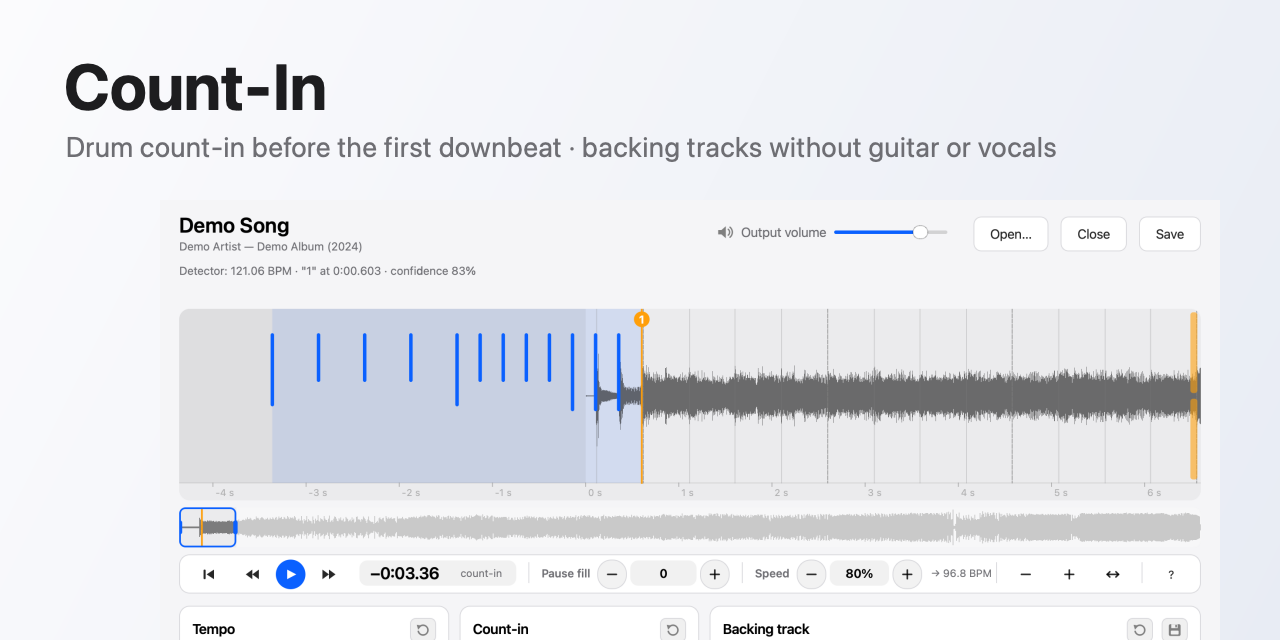
Count-In
count-in.app · English · Русский
Count-In finds a song's tempo and first downbeat and puts a drum count-in in front of it. The last click lands exactly one beat before the "one". The same song can become a backing track with the guitar and vocals removed or turned down.
- Count-in of 1 or 2 bars in 4/4, 3/4 or 6/8.
- Patterns: even, build-up (twice as dense in the second half, the last hits louder) or your own from a MIDI file.
- A neural network separates guitar and vocals in one pass; each has its own level.
- Input: mp3, FLAC, ALAC, WAV. Output: MP3 320 kbps, FLAC, ALAC or WAV, with tags and cover art kept.
- Works offline. The network is used only for updates.
The interface is in English and Russian; it follows the system language, and Settings can switch it.
Download
Get the latest version from Releases.
| System | File |
|---|---|
| Windows 10/11, x64 | Count-In-windows-x64.zip |
| macOS 12+, Apple Silicon | Count-In-macos-arm64.zip |
The builds are unsigned, so the system warns on first launch.
- Windows. Unzip and run
Count-In.exe. If SmartScreen appears, click "More info" → "Run anyway". - macOS. Unzip and drag
Count-In.appto Applications. The first launch gets blocked. Open System Settings → Privacy & Security, scroll down and click "Open Anyway" next to Count-In.
How to use
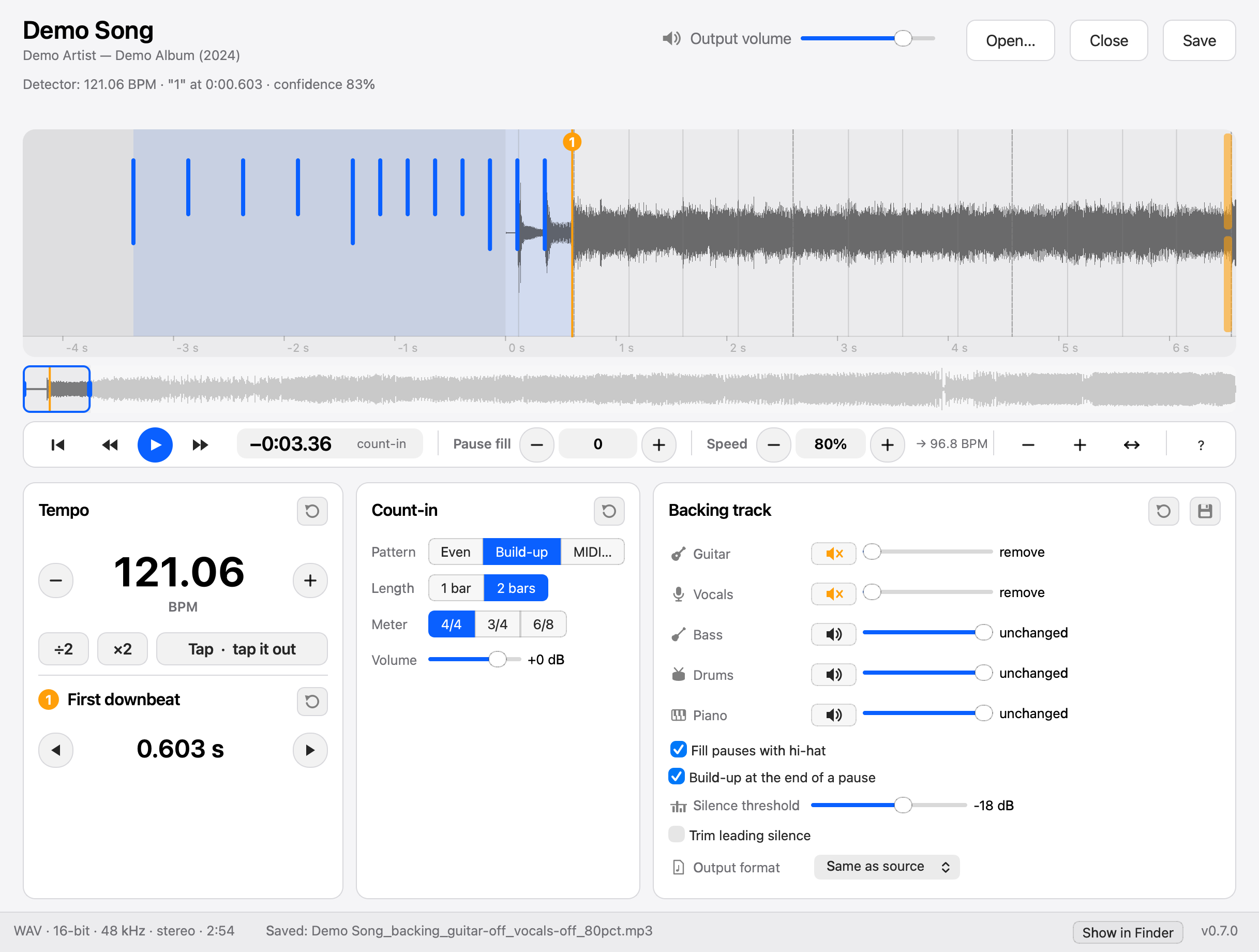
The app follows the system appearance and has a dark theme too.
- Drop a track onto the window or open it with ⌘O. The app works on one track at a time and analyzes it in the background.
- Check the orange "1" marker on the waveform. If the detector got it wrong, drag the marker to the right beat. It snaps to detected beats; hold ⌥/Alt to place it freely. The mouse wheel zooms, dragging the waveform pans.
- Pick the pattern, length and meter. Blue marks on the waveform show where the clicks will sound.
- For a backing track, lower the "Гитара" (guitar) and "Вокал" (vocals) sliders. The speaker button beside each slider removes the part in one click and brings the level back on the next.
- Press "Прослушать" (preview) or Space to hear the count-in and 10 seconds of the song. The guitar and vocal sliders change the sound while it plays.
- Press "Сохранить" (save) or ⌘S. By default the file goes next to the original, and Finder or Explorer opens with it selected; turn that off in Settings.
In Settings (⌘,) you can pick one output folder and have files sorted into Artist / Year - Album subfolders from the source tags; each level is a checkbox.
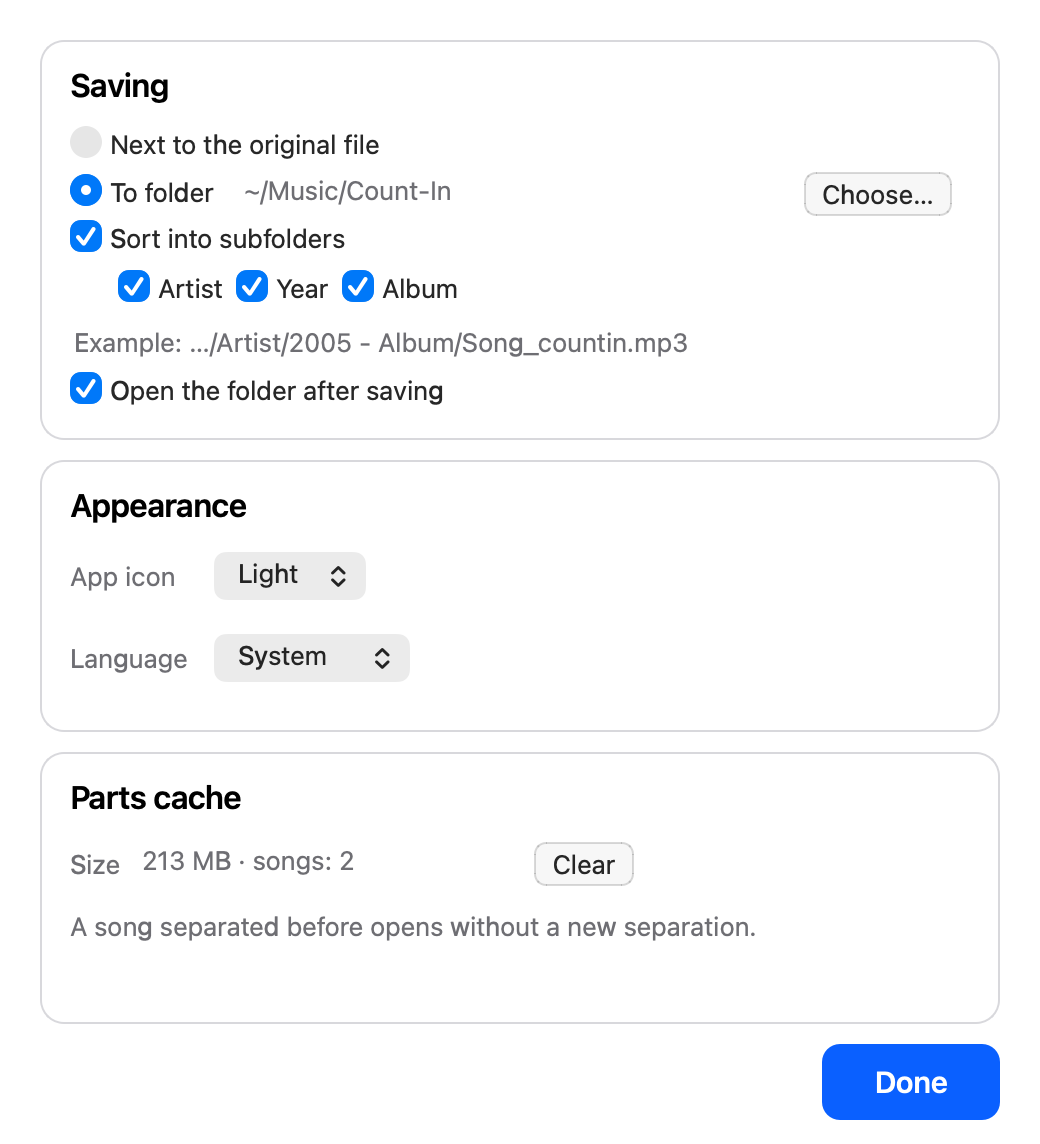
The bottom bar shows the file format, bitrate or bit depth, sample rate and length, plus the app version.
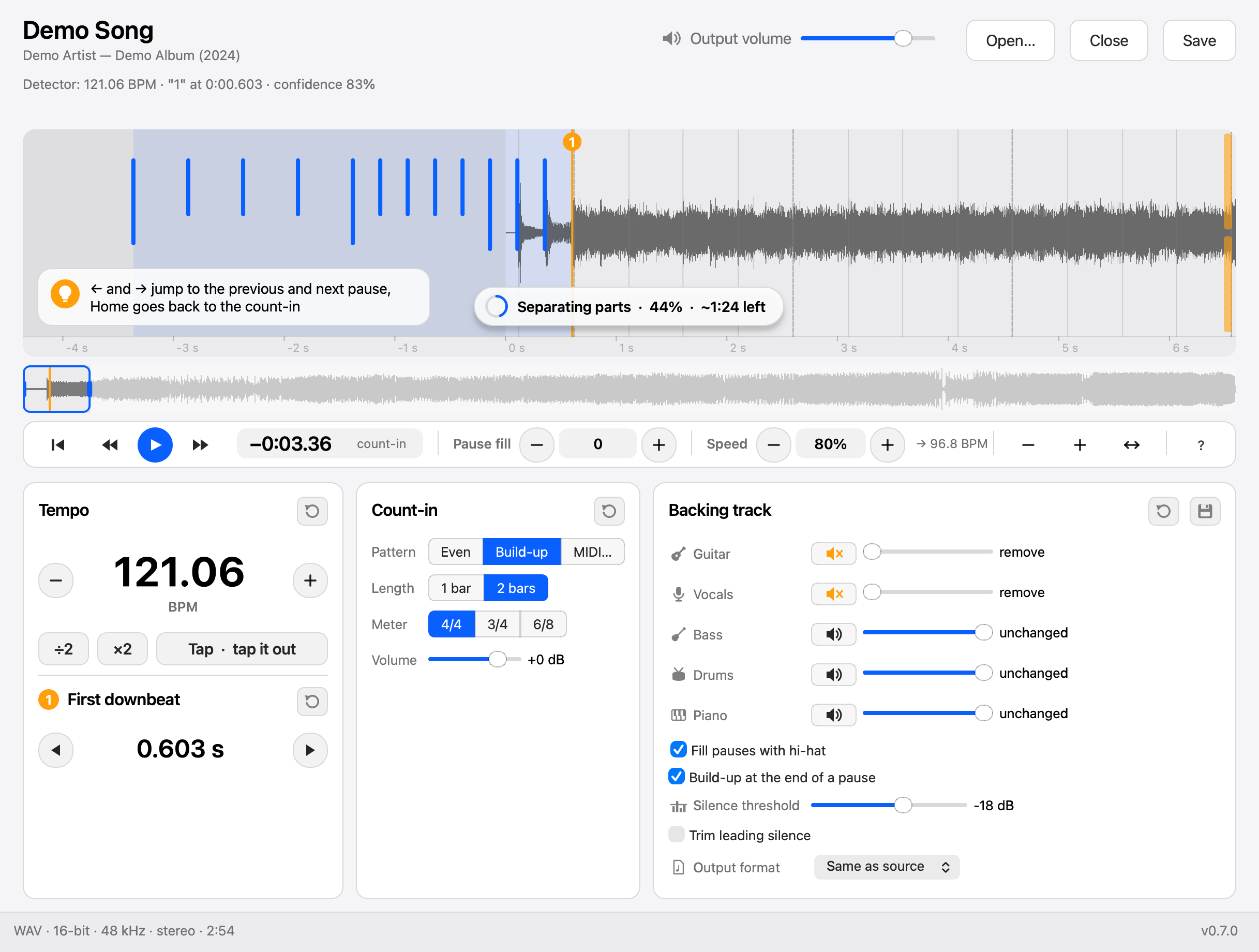
When the detector is unsure, an orange hint appears above the waveform. ×2 and ÷2 fix a doubled or halved tempo; Tap sets the tempo by tapping.
File names
| What was done | Name |
|---|---|
| Count-in only | Song_countin.mp3 |
| Backing track | Song_backing_guitar-off_vocals-6dB.mp3 |
Processing time
The count-in and analysis take seconds. Separating guitar and vocals takes longer: about 2.5 minutes for a 4-minute song on an Apple Silicon Mac, and noticeably longer on Windows, where only the CPU does the work. The bottom of the window shows the stage, percent and time left, and the job can be cancelled.
Updates
On start, the app checks GitHub for a newer version and downloads it in the background (about 800 MB), checking its SHA-256 against the release. When it is ready, a round blue badge appears left of the version in the bottom right corner, and the menu offers "Restart to Update". Without a restart, the update installs when you quit. "Check for Updates…" sits in the app menu on macOS and under Help on Windows.
The app updates itself only from a folder it can write to. Run from Downloads on macOS without moving it, or from a protected folder, the badge opens the download page instead.
Development
AGENTS.md explains how the code works, why these technologies were chosen and where to change things.
Environment
brew install ffmpeg            # or packaging/build_ffmpeg.sh, the LGPL build that goes into bin/
uv sync
packaging/fetch_models.sh      # beat_this final0 (81 MB), BS-RoFormer SW (700 MB)
Run
uv run countin-gui [files...]                        # the app
uv run countin song.mp3 --style buildup --bars 2     # command line
uv run countin *.mp3 --dry-run                       # table: BPM, first downbeat, confidence
uv run countin-verify out.mp3 --last-click 2.22526   # where the last click actually landed
| Flag | What it does |
|---|---|
--bars 1|2 |
count-in length |
--meter 4/4|3/4|6/8 |
meter; 6/8 clicks six eighths over two beats |
--style even|buildup |
even count-in or build-up |
--pattern file.mid |
pattern from MIDI, length rounded up to whole bars |
--bpm, --first-beat SEC |
set tempo and first downbeat by hand |
--tempo-x2, --tempo-half |
fix a doubled or halved tempo |
--pre-roll keep|trim |
keep puts clicks over the intro, trim first cuts leading silence |
--volume DB |
count-in volume |
--guitar-db DB, --vocals-db DB |
backing track levels, --guitar-db=-inf removes the guitar |
--out, --format mp3|flac|alac|wav |
output format, defaults to the source format |
Tests
uv run pytest -m 'not slow'    # fast
uv run pytest                  # including a neural network run
Build and release
uv run pyinstaller packaging/countin.spec --noconfirm --distpath build/dist --workpath build/work # app and CLI in one bundle
CI (.github/workflows/build.yml) builds Windows x64 and macOS arm64 for every pull request that touches code and runs the bundled CLI end to end; docs-only changes skip it. To release, bump version in pyproject.toml and tag v<version>. CI publishes both archives to Releases, and the in-app update check compares against that version.
License
Count-In is released under the MIT License. The bundled third-party components below keep their own licenses.
Third-party components
| Component | License |
|---|---|
| beat_this (beat detector, code and weights) | MIT |
| BS-RoFormer code from python-audio-separator, based on lucidrains/BS-RoFormer | MIT |
| BS-RoFormer SW weights (jarredou) | author's terms, no explicit license |
| FFmpeg, built without GPL parts, with LAME | LGPL |
| Qt for Python | LGPL |
| PyTorch | BSD |
Русский
Count-In находит темп и первую сильную долю песни и вставляет перед ней барабанный отсчёт. Последний клик звучит ровно за долю до «раз». Из той же песни можно сделать бэктрек: убрать или приглушить гитару и вокал.
- Отсчёт на 1 или 2 такта, размер 4/4, 3/4 или 6/8.
- Рисунок: ровный, «нарастание» (во второй половине вдвое чаще, последние удары громче) или свой из MIDI-файла.
- Гитара и вокал отделяются нейросетью за один проход, уровень каждого настраивается отдельно.
- Вход: mp3, FLAC, ALAC, WAV. Выход: MP3 320 kbps, FLAC, ALAC или WAV, теги и обложка сохраняются.
- Работает без интернета. Сеть нужна только для обновлений.
- Интерфейс на русском и английском: язык берётся из системы, его можно сменить в настройках.
Скачать
Последняя версия лежит на странице Releases.
| Система | Файл |
|---|---|
| Windows 10/11, x64 | Count-In-windows-x64.zip |
| macOS 12+, Apple Silicon | Count-In-macos-arm64.zip |
Сборки не подписаны, поэтому система при первом запуске предупредит.
- Windows. Распакуйте архив и запустите
Count-In.exe. Если появится SmartScreen, нажмите «Подробнее» → «Выполнить в любом случае». - macOS. Распакуйте архив и перетащите
Count-In.appв «Программы». Первый запуск система заблокирует. Откройте «Системные настройки» → «Конфиденциальность и безопасность», прокрутите вниз и нажмите «Всё равно открыть» рядом с Count-In.
Как пользоваться
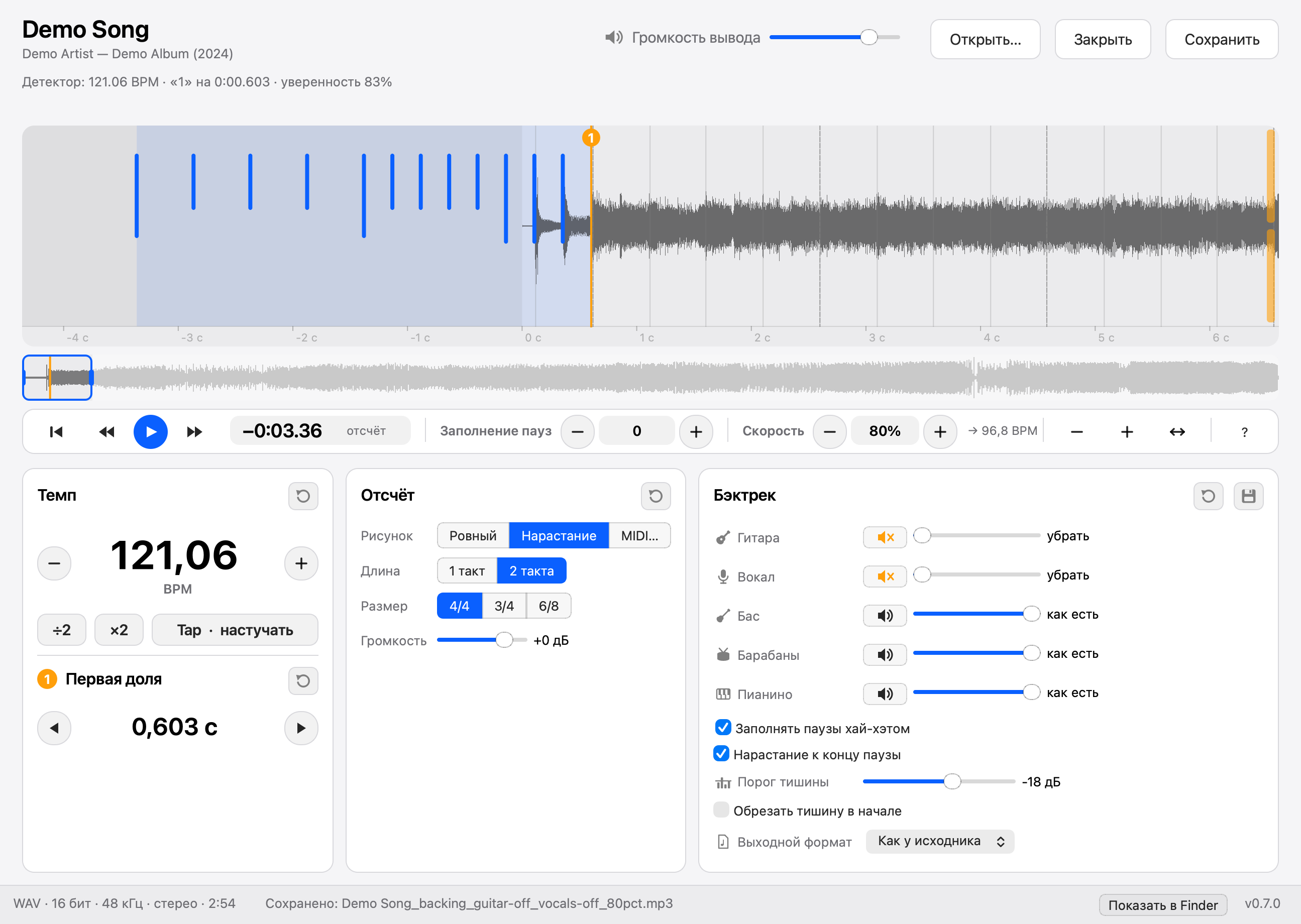
Приложение следует оформлению системы, есть и тёмная тема.
- Перетащите трек в окно или откройте его через ⌘O. Приложение работает с одним треком и анализирует его в фоне.
- Проверьте оранжевый маркер «1» на волне. Если детектор ошибся, перетащите маркер на нужную долю: он прилипает к найденным долям, с ⌥/Alt ставится свободно. Колесо мыши меняет масштаб, перетаскивание волны сдвигает её.
- Выберите рисунок, длину и размер отсчёта. Синие отметки на волне показывают, где прозвучат клики.
- Для бэктрека опустите ползунки «Гитара» и «Вокал». Кнопка с динамиком рядом с ползунком убирает партию одним нажатием, а следующее нажатие возвращает уровень.
- Нажмите «Прослушать» или пробел: прозвучит отсчёт и 10 секунд песни. Во время прослушивания ползунки гитары и вокала меняют звук сразу.
- Нажмите «Сохранить» или ⌘S. По умолчанию файл ложится рядом с исходником, а Finder или Проводник открывается с ним; это отключается в настройках.
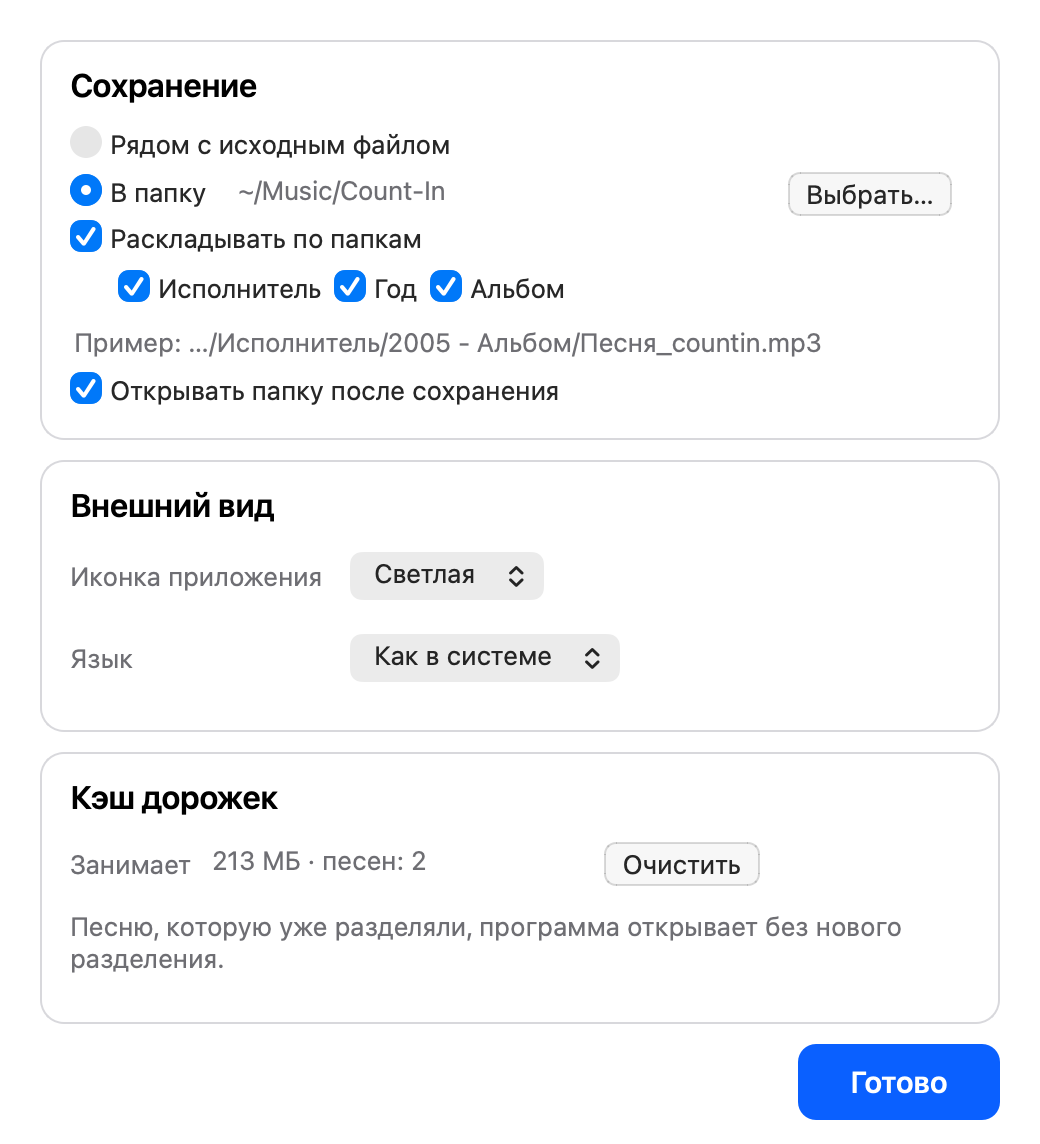
В настройках (⌘,) можно один раз выбрать папку для всех файлов и раскладывать их по подпапкам «Исполнитель / Год - Альбом» по тегам исходника, каждый уровень включается галочкой.
В нижней панели видны формат файла, битрейт или разрядность, частота дискретизации, длительность и версия приложения.
Если детектор не уверен в результате, над волной появляется оранжевая подсказка. Кнопки ×2 и ÷2 исправляют удвоенный или половинный темп, Tap задаёт темп постукиванием.
Имена файлов
| Что сделано | Имя |
|---|---|
| Только отсчёт | Песня_countin.mp3 |
| Бэктрек | Песня_backing_guitar-off_vocals-6dB.mp3 |
Время обработки
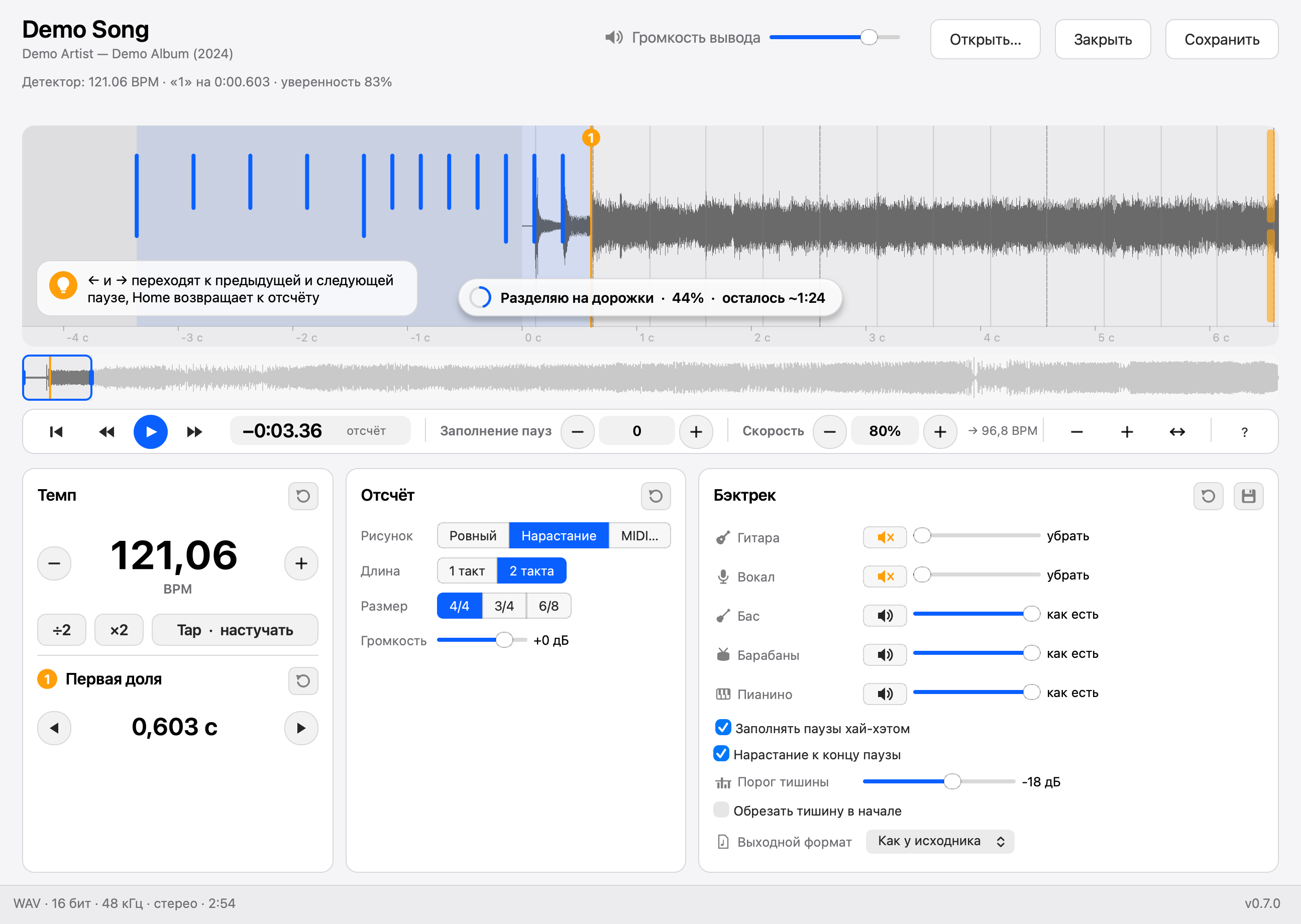
Отсчёт и анализ занимают секунды. Разделение на гитару и вокал работает дольше: около 2.5 минут на 4-минутную песню на Mac с Apple Silicon и заметно дольше на Windows, где считает только процессор. Внизу окна видны этап, проценты и оставшееся время, работу можно отменить.
Обновления
При запуске приложение проверяет, нет ли новой версии на GitHub, и в фоне скачивает её (около 800 МБ), сверяя SHA-256 с релизом. Когда загрузка готова, справа внизу слева от версии появляется круглый голубой значок, а в меню — пункт «Перезапустить и обновить». Если не перезапускать, обновление установится при выходе. «Проверить обновления…» находится в меню приложения на macOS и в меню «Справка» на Windows.
Само обновляется только приложение из папки, куда можно писать. Если на macOS запускать его прямо из «Загрузок», не перенося, или из защищённой папки, значок открывает страницу загрузки.
Разработка
Как устроен код, почему выбраны эти технологии и где что менять, описано в AGENTS.md (на английском).
Окружение
brew install ffmpeg            # или packaging/build_ffmpeg.sh, LGPL-сборка для бандла в bin/
uv sync
packaging/fetch_models.sh      # beat_this final0 (81 МБ), BS-RoFormer SW (700 МБ)
Запуск
uv run countin-gui [файлы...]                       # приложение
uv run countin song.mp3 --style buildup --bars 2     # командная строка
uv run countin *.mp3 --dry-run                       # таблица: BPM, первая доля, уверенность
uv run countin-verify out.mp3 --last-click 2.22526   # проверка, где оказался последний клик
| Флаг | Что делает |
|---|---|
--bars 1|2 |
длина отсчёта |
--meter 4/4|3/4|6/8 |
размер; 6/8 щёлкает шесть восьмых на две доли |
--style even|buildup |
ровный отсчёт или нарастание |
--pattern file.mid |
рисунок из MIDI, длина округляется до целых тактов |
--bpm, --first-beat SEC |
ручная правка темпа и первой доли |
--tempo-x2, --tempo-half |
исправить удвоенный или половинный темп |
--pre-roll keep|trim |
keep кладёт клики поверх вступления, trim сначала срезает тишину в начале |
--volume DB |
громкость отсчёта |
--guitar-db DB, --vocals-db DB |
уровни для бэктрека, --guitar-db=-inf убирает гитару |
--out, --format mp3|flac|alac|wav |
формат вывода, по умолчанию как у исходника |
Тесты
uv run pytest -m 'not slow'    # быстрые
uv run pytest                  # вместе с прогоном нейросети
Сборка и релиз
uv run pyinstaller packaging/countin.spec --noconfirm --distpath build/dist --workpath build/work # приложение и CLI в одном бандле
CI (.github/workflows/build.yml) собирает Windows x64 и macOS arm64 для каждого PR с изменениями кода и прогоняет CLI из бандла от начала до конца; PR только с документацией сборку не запускают. Чтобы выпустить релиз, поднимите version в pyproject.toml и поставьте тег v<версия>. CI опубликует оба архива в Releases, а проверка обновлений в приложении сравнивает именно эту версию.
Лицензия
Count-In распространяется по лицензии MIT. Сторонние компоненты из таблицы ниже сохраняют свои лицензии.
Сторонние компоненты
| Компонент | Лицензия |
|---|---|
| beat_this (детектор долей, код и веса) | MIT |
| Код BS-RoFormer из python-audio-separator, на основе lucidrains/BS-RoFormer | MIT |
| Веса BS-RoFormer SW (jarredou) | условия автора, явной лицензии нет |
| FFmpeg, сборка без GPL-частей, с LAME | LGPL |
| Qt for Python | LGPL |
| PyTorch | BSD |