
shiyubao78/token-sprite
shiyubao78/token-sprite has 27 GitHub stars and 2 forks. GitHot measured 0 stars in 24 hours, 0 in 7 days, and 0 in 15 days. Last checked 2026-11-14 01:53 UTC. Last push 2026-10-08.
Measured star growth
- in 24h
- 0
- in 7 days
- 0
- in 15 days
- 0
- in 1 month
- Collecting history
Net star changes over overlapping periods, not daily totals. Missing measurements are left blank. Stars measure attention, not software quality.
About
🌱 烧的是 token,长的是脑子|Burning tokens, growing neurons. 用 Claude Code / Codex 的真实用量养大一只桌面小精灵,并用你本机的 AI 复盘每天学到了什么——不只是写代码,写 PRD、做 demo 也算。全本地不上传。| A desktop pet fed by your real AI-tool usage, plus a daily journal of what you actually learned. Fully local.
AIREADME.en.md
Original🌱 Token Sprite
English · 中文
Burning tokens, growing neurons.
Turn your real AI usage into a tiny desktop companion that hatches, evolves, and bonds with you — and recaps what you actually learned each day. Works even if you only use web-based AI.
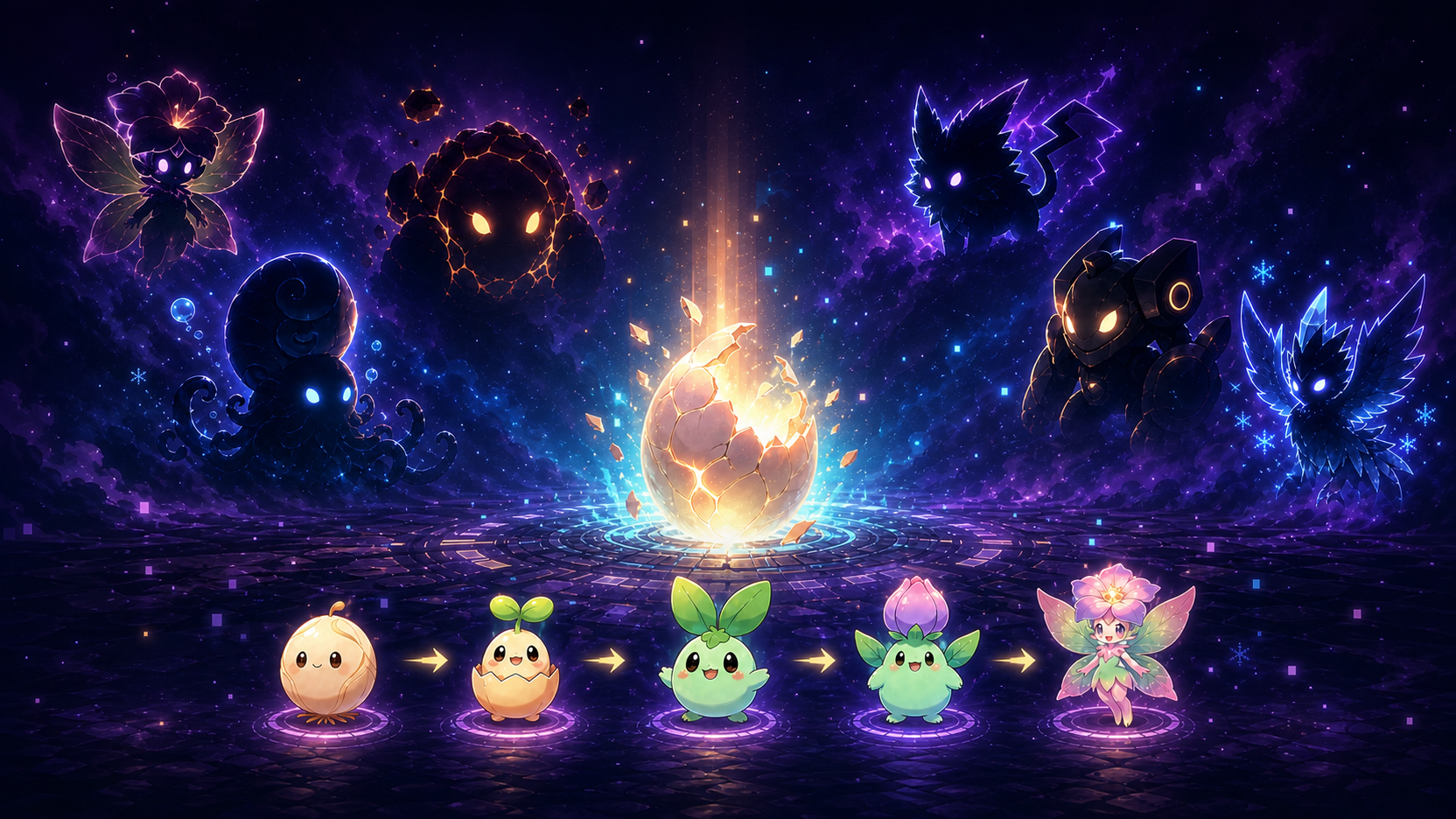
CODE → HATCH → EVOLVE → COLLECT
Write code, earn real tokens, hatch mystery eggs, evolve through five stages, and complete your collection.
macOS · Windows · Linux · Local-only · Nothing uploaded
🤖 Let your AI agent install it
Paste this to Claude Code, Codex, or any terminal-capable agent:
install and run github.com/shiyubao78/token-sprite
It reads AGENTS.md in the repo and installs it as a real app — no download, no unzip, no Gatekeeper prompt.
Prefer doing it by hand? ⬇️ Download the app — first launch needs right-click → Open (unsigned build, just once).
🥚 Hatch & Evolve
Choose an egg and feed it with the tokens you actually use, from first crack to final form.
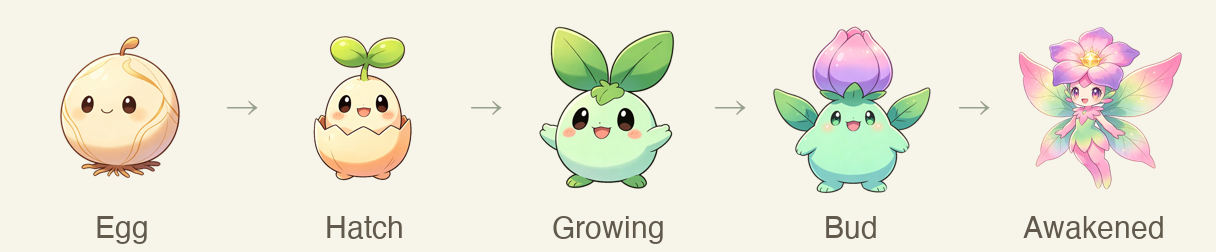
Six elements, six complete evolution lines: flora, ocean, magma, thunder, mech, and ice. You won't know who's inside until the egg hatches.
Got duplicate eggs of the same species? Merge them in the incubator — progress stacks and you earn bonus tokens by rarity, fast-tracking a favorite.
✨ Why It's Different
- Powered by real work — it grows from your actual local AI-tool token usage. Not just coding: writing PRDs, building demos, authoring skills, digging through docs — if you asked Claude Code or Codex, it counts.
- A companion, not a counter — it nudges you to rest, reminds you to sleep late at night, and waves when you return. After its final form it forms a growing bond with you the more you code.
- See usage and cost — a Usage Insights panel breaks tokens down by day, tool, and hour, and converts them into a rough dollar value of what you've used.
- Grow yourself, not just the pet — the Growth Journal hands you what's worth learning (explained), the to-dos you mentioned (editable), and a daily history. No Claude Code / Codex required — paste one prompt into whatever AI you're already using and bring its answer back.
- Always on your desktop — floating, always on top, draggable, and able to peek quietly from the screen edge.
- Hatch and collect — achievements unlock eggs; eggs evolve into creatures for your collection.
- Bilingual — full English & 中文, switch anytime from the menu. Follows your system language by default.
- Private by design — usage stays on your machine and is never uploaded; only released builds check GitHub for new versions.
🏆 Achievements & Hatching
Complete achievements to earn egg tickets. Each ticket usually matches its rarity, with a 15% chance to upgrade by one tier. Early achievements are quick, so you can collect the first few species in days and pick a favorite.
| Achievement | Requirement | Reward |
|---|---|---|
| First Contact | Type your first token | 🟢 Common |
| Warming Up | 100M total | 🔵 Rare |
| Getting There | 500M total | 🟢 Common |
| First Hatch | Hatch your first sprite | 🔵 Rare |
| Rookie | 1B total tokens | 🟢 Common |
| Dual Wield | 300M+ in any two tools | 🟢 Common |
| Night Owl | Code after midnight (0–6) on 3 days | 🟢 Common |
| Burst | 2B in a single day | 🔵 Rare |
| Week Streak | 7 days in a row | 🔵 Rare |
| Milestone | 30-day streak, or 10B total | 🟣 Epic |
| Path to Legend | 100B total | 🟡 Legendary |
Every draw gives you an egg. Keep coding to complete all five stages, and its final "Awakened" form joins your collection.
| Rarity | Tokens to Hatch |
|---|---|
| 🟢 Common | 0.5B |
| 🔵 Rare | 2B |
| 🟣 Epic | 8B |
| 🟡 Legendary | 30B |
Balance values live in
src/config/achievements.jsandsrc/config/rarities.js.
🖥️ A Look Inside
Fully local, no login — one floating window: rename, draw, hatch, collect, earn achievements, track usage & cost, and bond after final form.
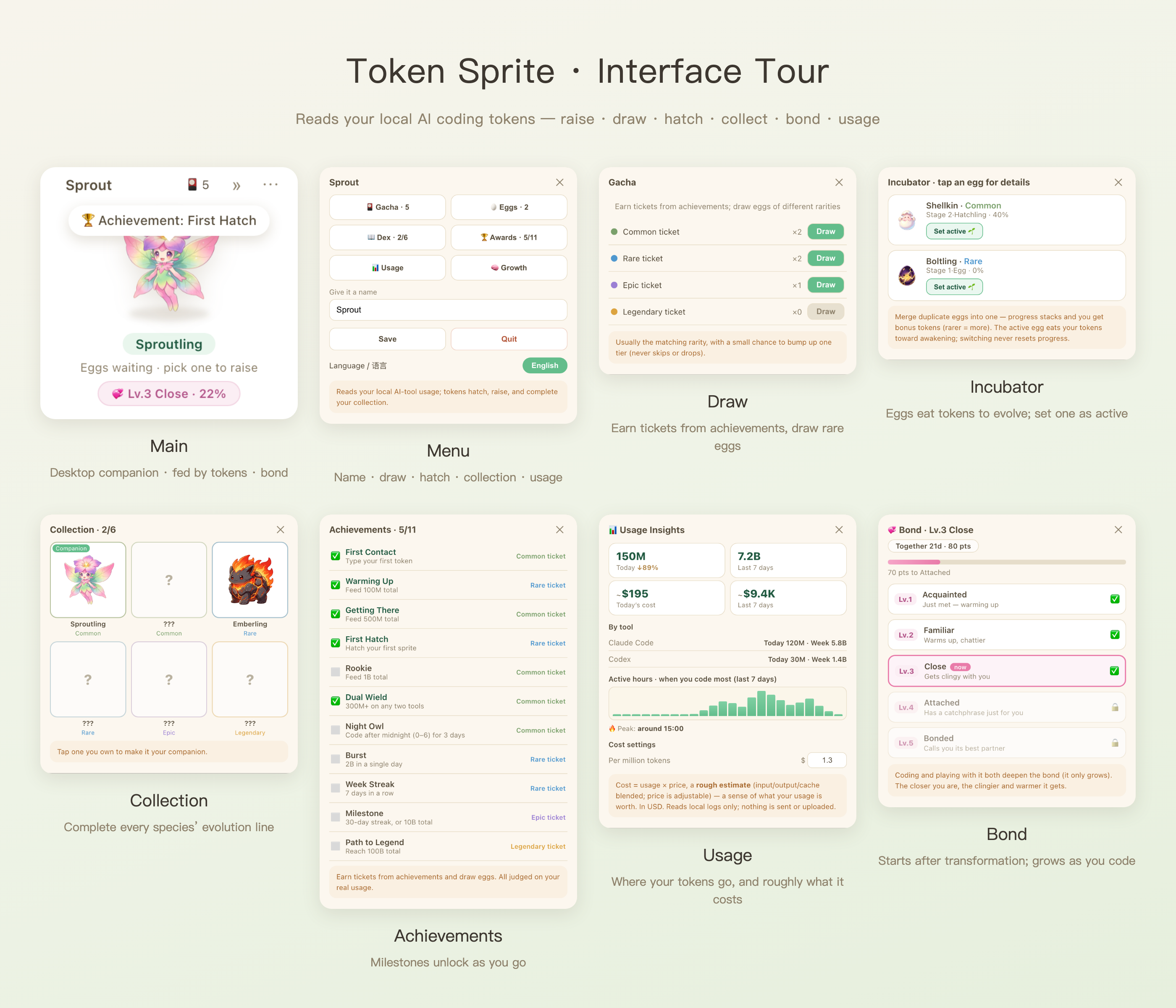
| Panel | What you do |
|---|---|
| 🏠 Main | Floating desktop pet with live hatch progress (down to 0.01%) |
| ⚙️ Menu | Rename your sprite, open features, switch language, toggle auto-launch |
| 🎴 Gacha | Spend achievement tickets to draw eggs of varying rarity |
| 🥚 Incubator | One tap to set an egg active; switch anytime, each keeps its own progress |
| 📖 Collection | Collect 6 species; tap an owned one to make it your companion |
| 🏆 Achievements | Earn tickets by hitting milestones, all judged on real token usage |
| 📊 Usage | Today & 7-day usage, per-tool split, active hours, plus a rough cost estimate |
| 💞 Bond | Unlocks after final form; coding and play deepen a 5-level bond |
| 🧠 Growth Journal | Takeaways, editable to-dos, daily history — auto via your local CLI, or borrow any AI you use (drag / ⌘⇧V it back) |
📊 Usage & Cost Insights
Open Usage Insights from the menu to see how many tokens you wrote today and over the last 7 days, each tool's share, and your most productive hours. It also turns usage into a rough dollar estimate (with an adjustable per-million rate) so you get a feel for what your usage is worth. Everything is read from local logs only, never uploaded.
After it reaches its final form, the companionship continues: coding and playful pokes level up your bond, unlocking warmer reactions over time.
🧠 Growth Journal
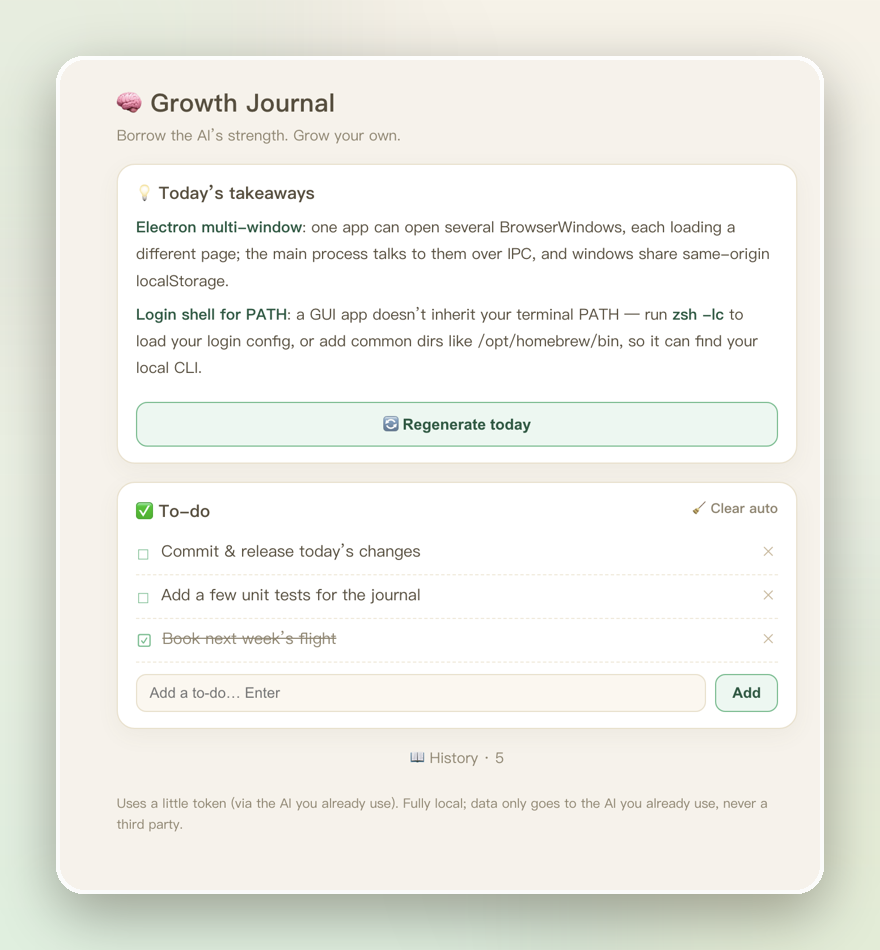
Burning tokens shouldn't mean outsourcing your brain. Open the Growth Journal and your sprite reviews today's AI-coding chats — through your own local Claude / Codex — and gives you back:
- Takeaways — the concepts you leaned on, actually explained, so you learn them.
- To-dos — things you said you'd do (commit, add tests, book a flight), editable and one-tap done; regenerating refreshes them without overwriting what you touched.
- Daily history — it all persists locally, building a trail of how you grow.
Everything runs through the AI you already use; nothing is uploaded to a third party.
🍃 No CLI installed? Still works
Only use web-based AI (Doubao, ChatGPT, whatever)? Borrow its own strength:
- Click Copy prompt in the Growth Journal
- Paste it into the AI you're already chatting with
- Bring its answer back — press ⌘⇧V or drop it on the sprite
Its context already holds today's conversation, so you never copy the chat itself — just bring the answer back and it lands straight in your journal.
🥢 Feed it anything
Spot something worth keeping? Select and drag it onto the sprite, or copy it and hit ⌘⇧V. It holds onto those until the next recap, then digests them together with the day's chats.
The shortcut reads your clipboard only at the moment you press it — never in the background. Watching your clipboard around the clock would mean reading every password and private message you copy; not worth it.
🚀 Quick Start
Requires Node.js 20+ and runs on macOS, Windows, and Linux.
🤖 Let your agent install it (recommended)
You're already using Claude Code / Codex — skip the download entirely. Send it this:
Install and run github.com/shiyubao78/token-sprite for me.
The repo ships an AGENTS.md, so your agent clones it, builds it, installs it into Applications and launches it — a real app that survives closing your terminal and starts on login.
You'll see ✅ 已安装并重新打开 vX.Y.Z when it's done. No line, no install — ask your agent to check the error.
🔄 Let your agent update it
One line again — your growth data is kept:
Update token-sprite to the latest version for me.
It runs git pull + npm install, and the installed app updates itself automatically
(npm install triggers a reinstall). Your data lives in ~/Library/Application Support/token-sprite/,
outside the app bundle, so reinstalls never touch it.
⬇️ Prefer to install it yourself?
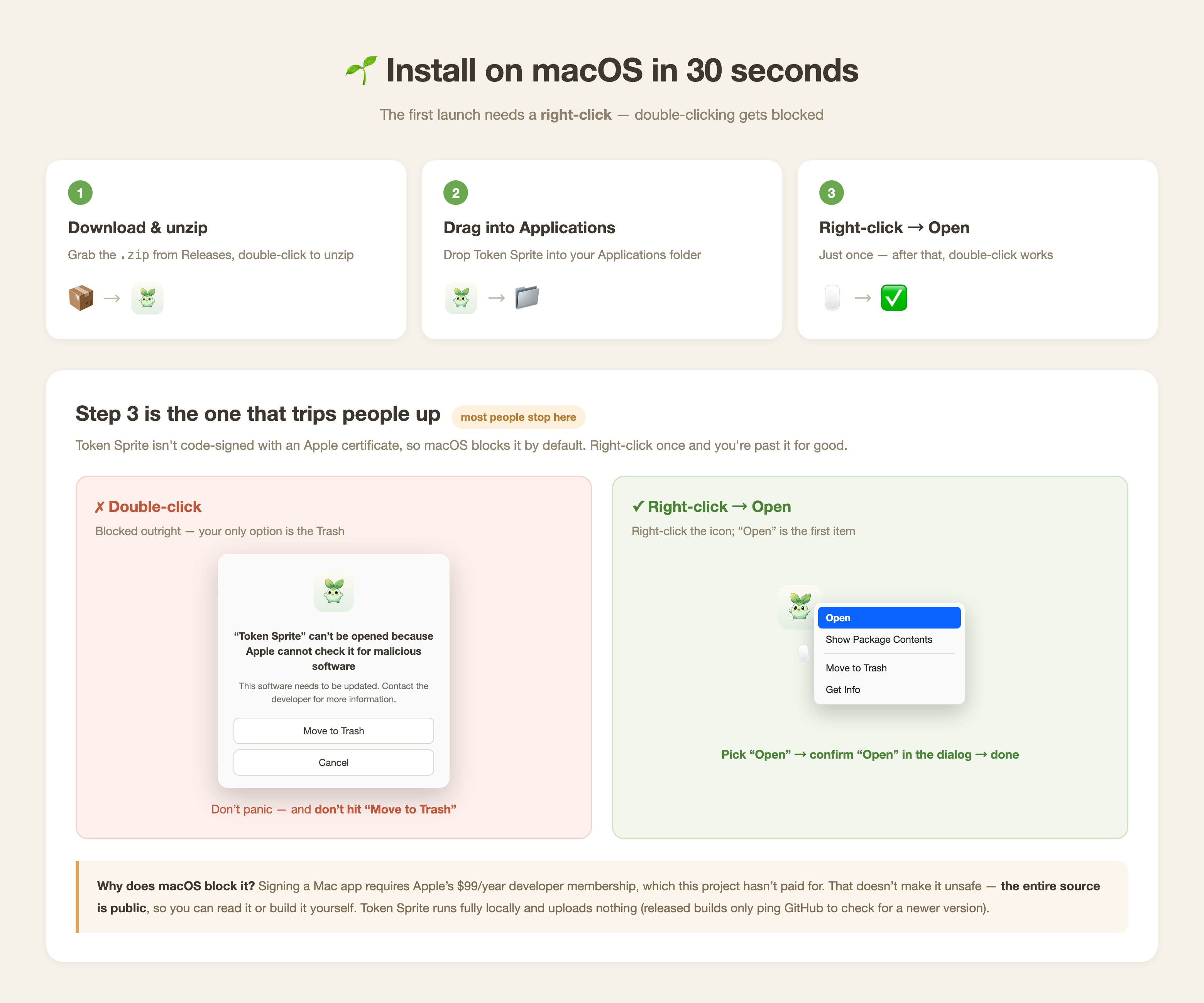
- Download the latest
.zipfrom Releases and double-click to unzip. - Drag Token Sprite into your Applications folder.
- Right-click the app → Open, then confirm Open in the dialog.
Step 3 is where people get stuck. If you double-click instead, macOS blocks it and offers only Move to Trash — don't. Right-click once and you're past it permanently.
Why does this happen? Signing a Mac app requires Apple's $99/year developer membership, which this project hasn't paid for. The entire source is public, so you can read it or build it yourself.
Released builds notify you when a new version is out; the menu-bar icon → Check for Updates opens the download page. Your growth data is kept across reinstalls.
🛠 Want to hack on it? Run from source
git clone https://github.com/shiyubao78/token-sprite.git
cd token-sprite
npm install
npm start        # dev mode — closing the terminal kills it, and it won't start on login
npm start is for development only. To install it for real:
npm run install:local # build + install into Applications + launch + verify, in one command
If your sprite disappears, choose Recall Sprite from the menu-bar icon. It also returns automatically after display changes or wake when its window is fully off-screen.
🧩 How It Works
The app detects supported AI tools and reads token usage from local logs. Missing tools are skipped automatically, and your data never leaves your computer.
| Tool | Local Data Source |
|---|---|
| Claude Code | ~/.claude/projects/**/*.jsonl |
| Codex | ~/.codex/**/rollout-*.jsonl |
A baseline is recorded on installation. Only new usage counts toward your sprite's growth.
Only tools that store parseable usage logs locally can be counted. Cloud-only usage is not accessible.
Add another tool
If tools like Gemini CLI, OpenCode, or Aider write usage to local logs, add a reader in the READERS array of scripts/usage.mjs:
async function readYourTool() {
  const root = join(homedir(), '.yourtool');
  if (!(await exists(root))) return null;
  let total = 0, recentTokens = 0, todayTokens = 0, lastActivityAt = 0;
  // Parse local logs and accumulate usage.
  return { total, recentTokens, todayTokens, lastActivityAt };
}

export const READERS = [
  /* existing readers */
  { source: 'yourtool', label: 'Your Tool', read: readYourTool },
];
Or just ask your agent:
Inspect my local
<tool>usage logs and add a reader to token-sprite.
📦 Package the Desktop App
Run the matching command on the target operating system. Builds are written to release/.
npm run pack              # macOS universal app
npm run pack:mac:release  # macOS universal DMG + ZIP + update metadata
npm run pack:win          # Windows portable app + installer
npm run pack:linux        # Linux AppImage
- macOS: without a Developer ID certificate, builds are unsigned; right-click → Open the first time. Official releases should be signed and notarized.
- Windows: if SmartScreen blocks it, choose More info → Run anyway.
- Linux: make the AppImage executable first; transparency and always-on-top depend on your desktop environment.
- Packaging must run on its target OS. GitHub Actions can also build all three platforms.
🔧 Customize
- Species, rarity, names, and artwork:
src/config/species.js - Achievements, thresholds, and odds:
src/config/achievements.js,src/config/rarities.js - Custom artwork:
assets/sprite/<species>/1-seed.png…5-adult.png
Each stage uses a 512×512 transparent PNG.
📄 License
Noncommercial. Commercial use is not permitted.
- Source code: PolyForm Noncommercial 1.0.0
- Art assets (
assets/**): CC BY-NC 4.0
Free for personal, educational, and nonprofit use; assets require attribution. Built-in artwork is AI-generated as an example and can be replaced.
Explore related projects
affaan-m/ECC
The agent harness performance optimization system. Skills, instincts, memory, security, and research-first development for Claude Code, Codex, Opencode, Cursor and beyond.
302,622 starsNousResearch/hermes-agent
The agent that grows with you
263,278 starsmultica-ai/andrej-karpathy-skills
A single CLAUDE.md file to improve Claude Code behavior, derived from Andrej Karpathy's observations on LLM coding pitfalls.
233,003 starsfirecrawl/firecrawl
Supercharge your AI agents with data from the web and beyond. Building the library for superintelligence. 🔥
201,663 stars