
shilp26/hermes-go
shilp26/hermes-go has 46 GitHub stars and 3 forks. GitHot measured 0 stars in 24 hours. Last checked 2026-11-09 07:28 UTC. Last push 2026-11-04.
Hermes Go — a mobile client for self-hosted Hermes Agent. Site + release assets.
Measured star growth
- in 24h
- 0
- in 7 days
- Update delayed
- in 15 days
- Update delayed
- in 1 month
- Update delayed
Net star changes over overlapping periods, not daily totals. Missing measurements are left blank. Stars measure attention, not software quality.
README.md
Original
Hermes Go
Your AI agent, in your pocket.
A native mobile client for your Hermes Agent. For self-hosted setups, one prompt configures basic auth, binds port 9119, detects Tailscale, and hands you your connection details. Hermes Cloud connects through its portal. Now live on Google Play.
Bots Mode brings named AI teammates to your phone — use desktop-style @ handoff from any chat, keep each teammate’s conversation isolated, hide agents from the roster, schedule routines, choose from 16 themes, and connect custom endpoints.
v2.2.4 · Google Play · Closed Source · Zero Telemetry

What is Hermes Go?
Hermes Go is a native Android client for Hermes Agent — self-hosted or Hermes Cloud. It is not a chat wrapper — it is the full agent in your hand:
- Live streaming — reasoning rows, tool timelines, and markdown as they happen
- Voice — dictate, hear replies, hands-free conversation loop
- Artifacts — images, audio, and HTML previews inline in chat
- Full control — approvals, sudo, secrets, queue, steer, stop
- Deep visibility — health, analytics, logs, ops console, config editor
- Your server, your data — connects direct to your server over LAN or Tailscale, or via Hermes Cloud for portal-managed agents
Closed source. The app is distributed through Google Play. No telemetry, no analytics, no tracking. Self-hosted connections go directly to your server; Hermes Cloud connections use Hermes Cloud.
💙 Built on Hermes Agent by Nous Research — thank you for making this possible!
Screenshots
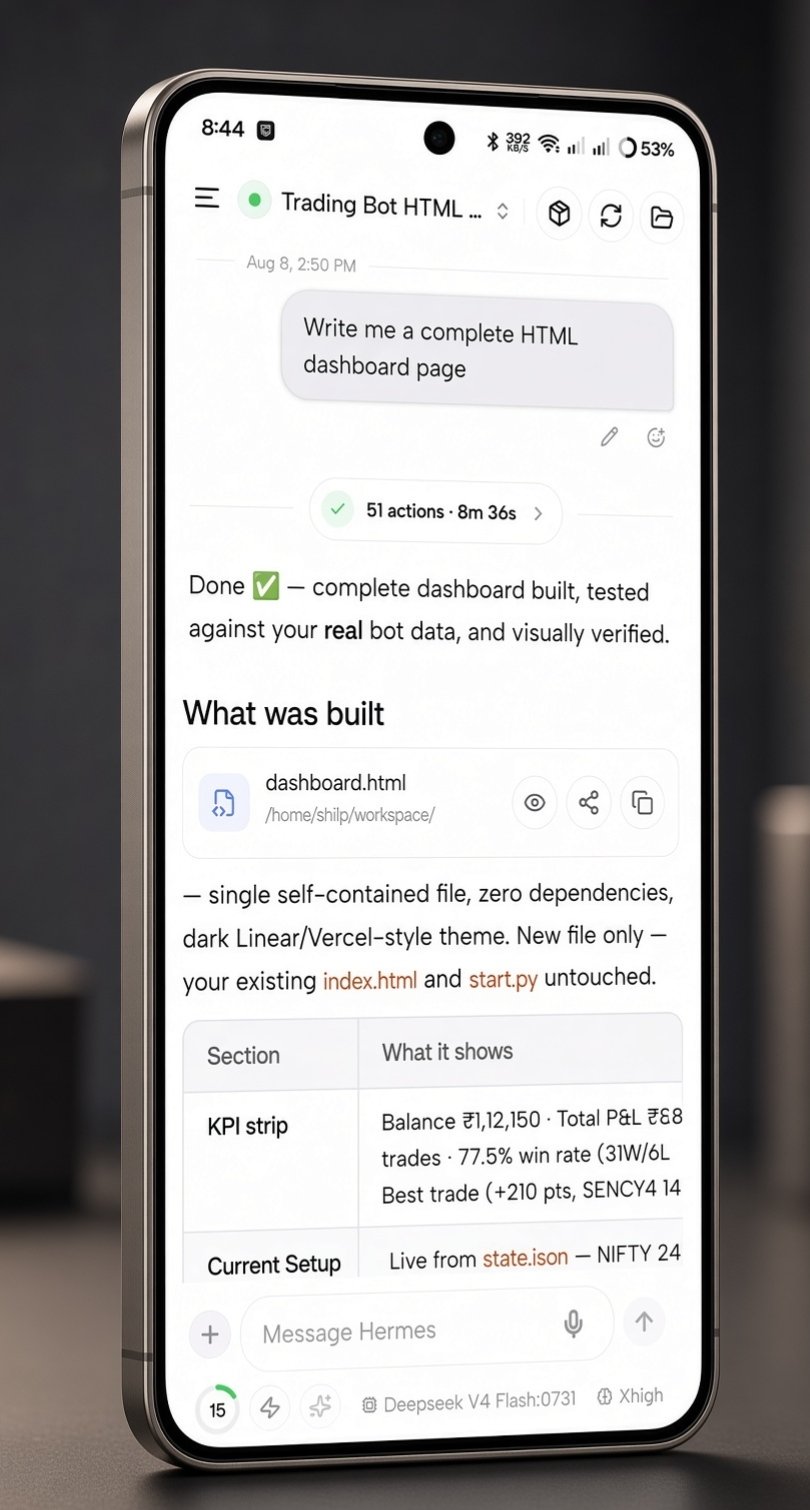
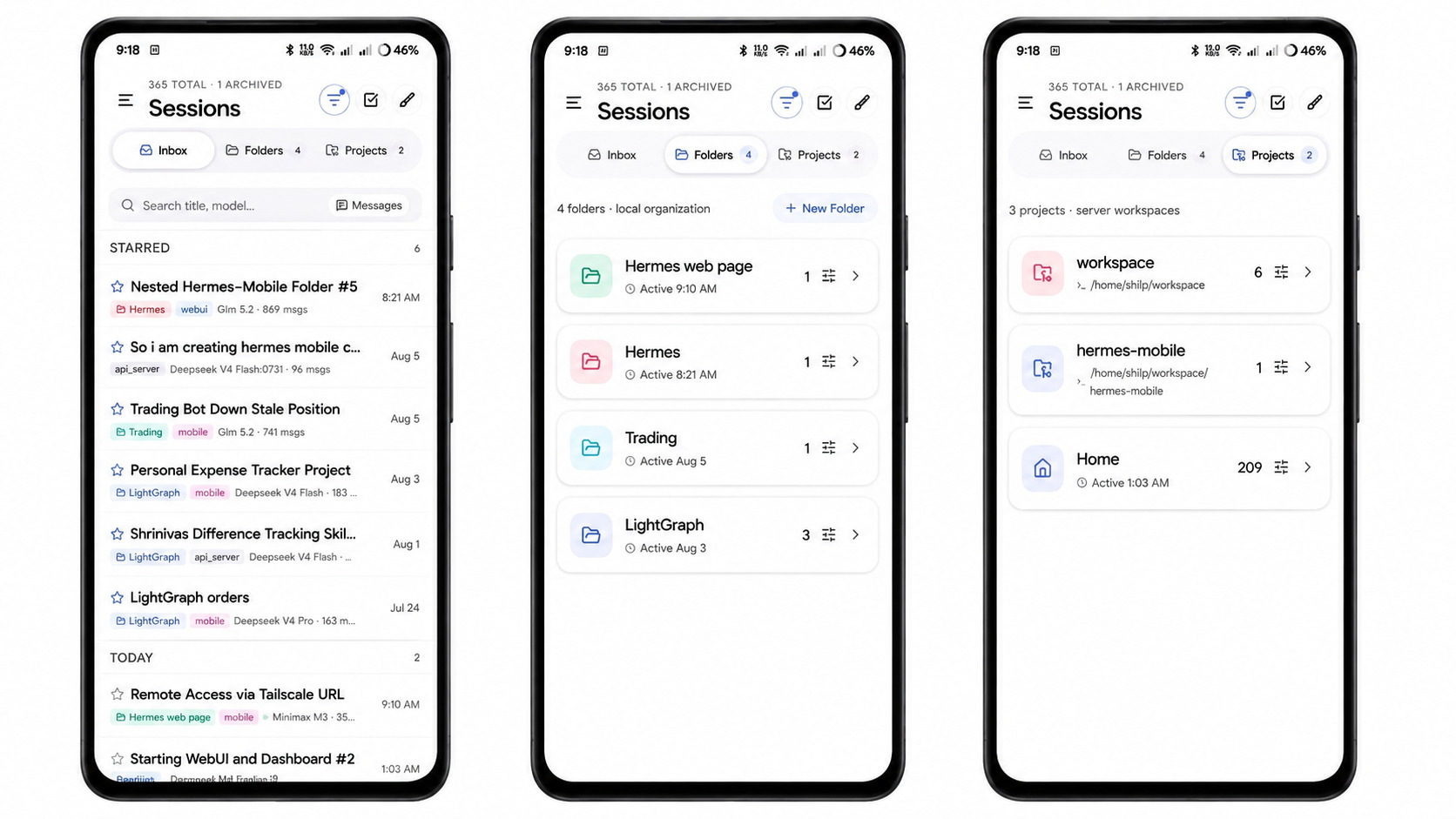
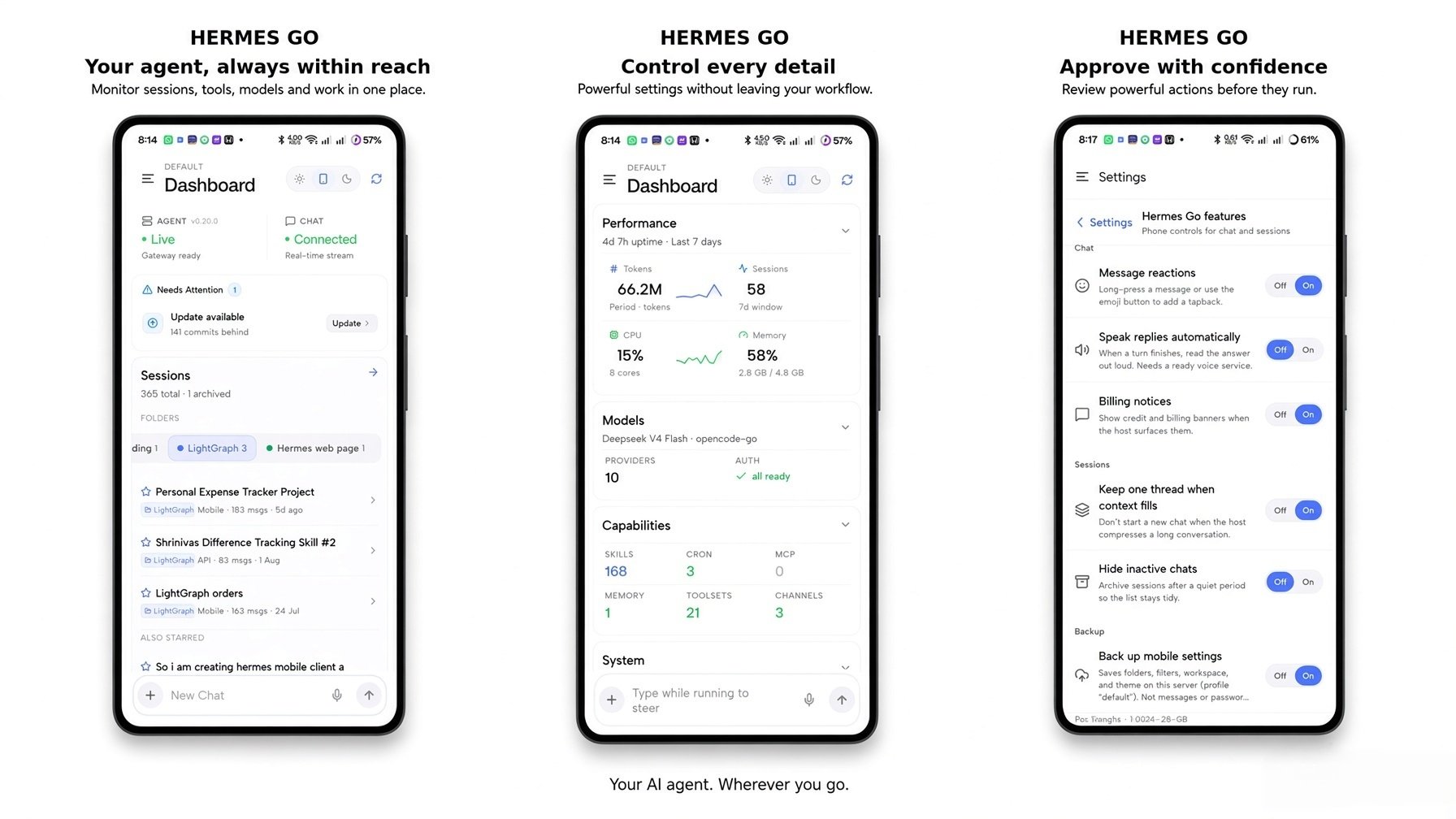
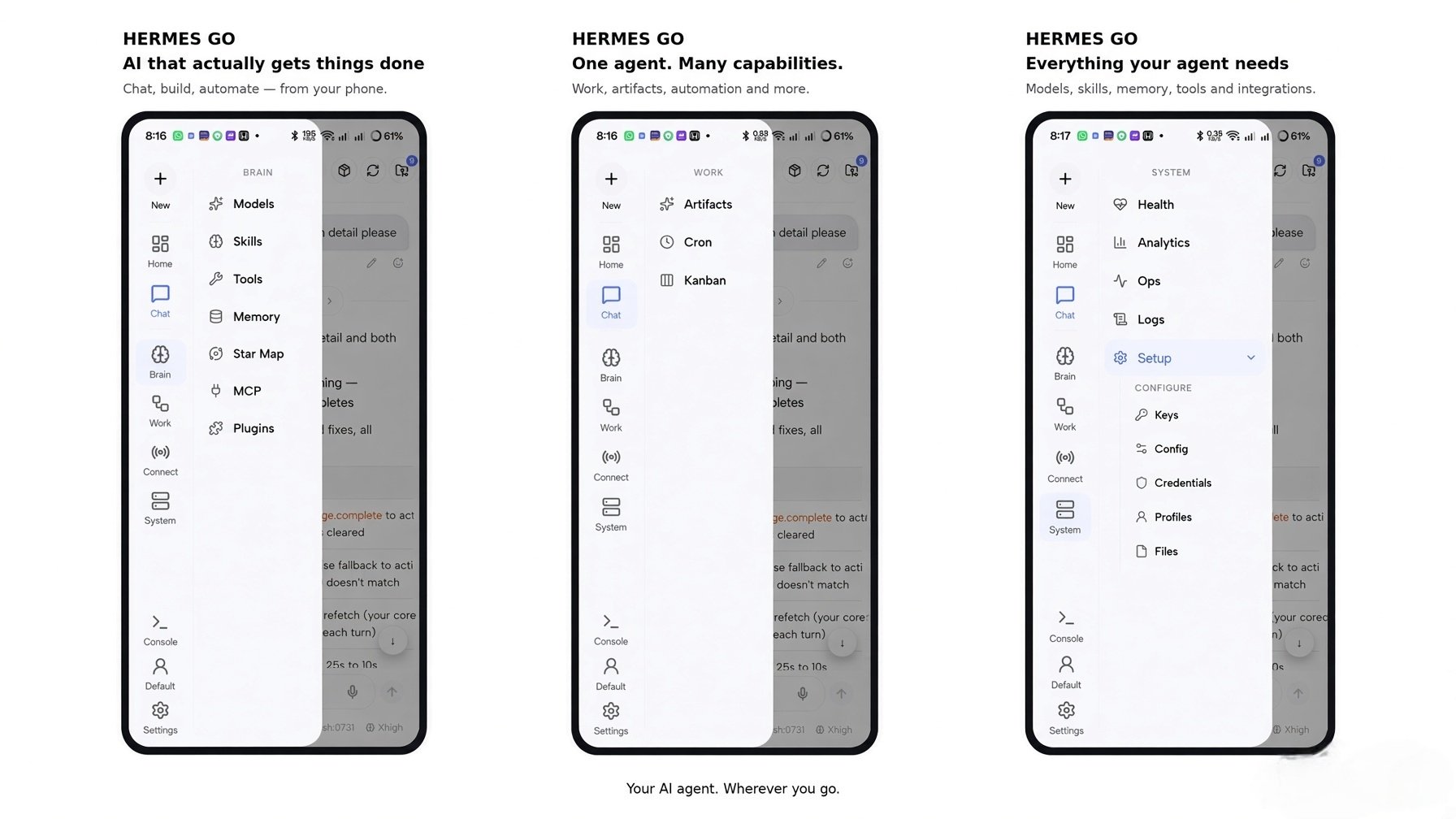
| Sessions | Dashboard & Settings | Drawer |
|---|---|---|
 |
 |
 |
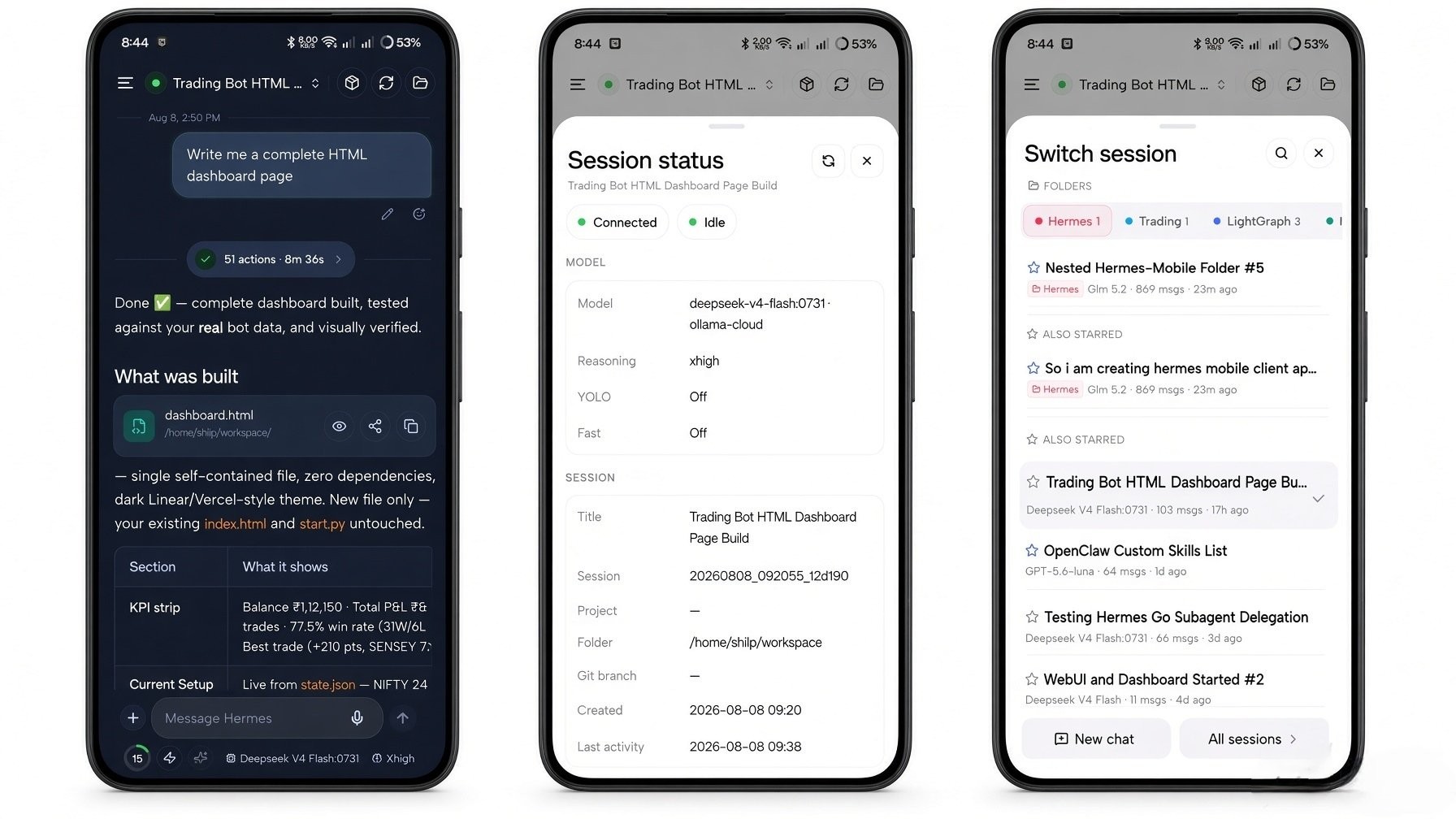
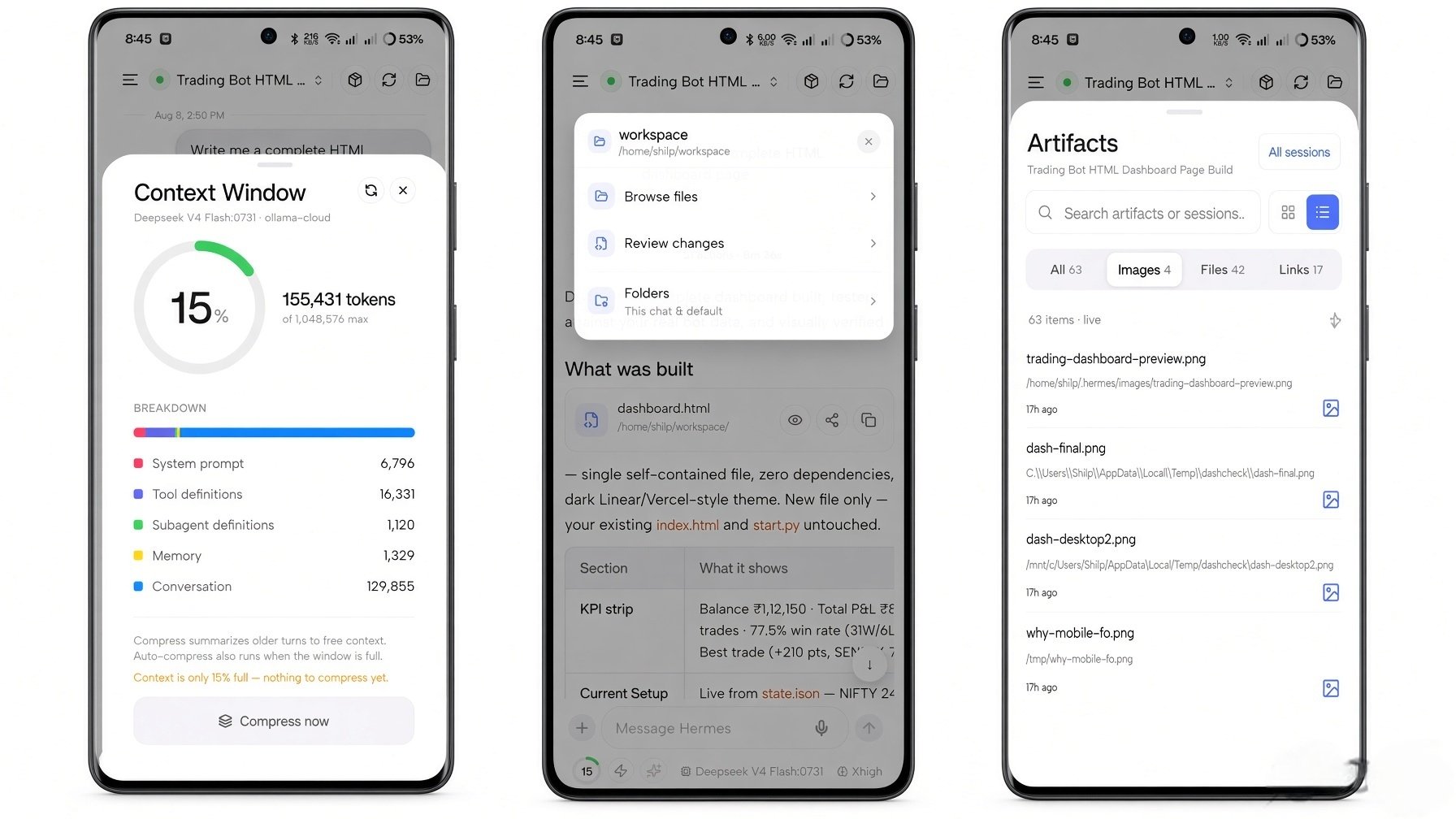
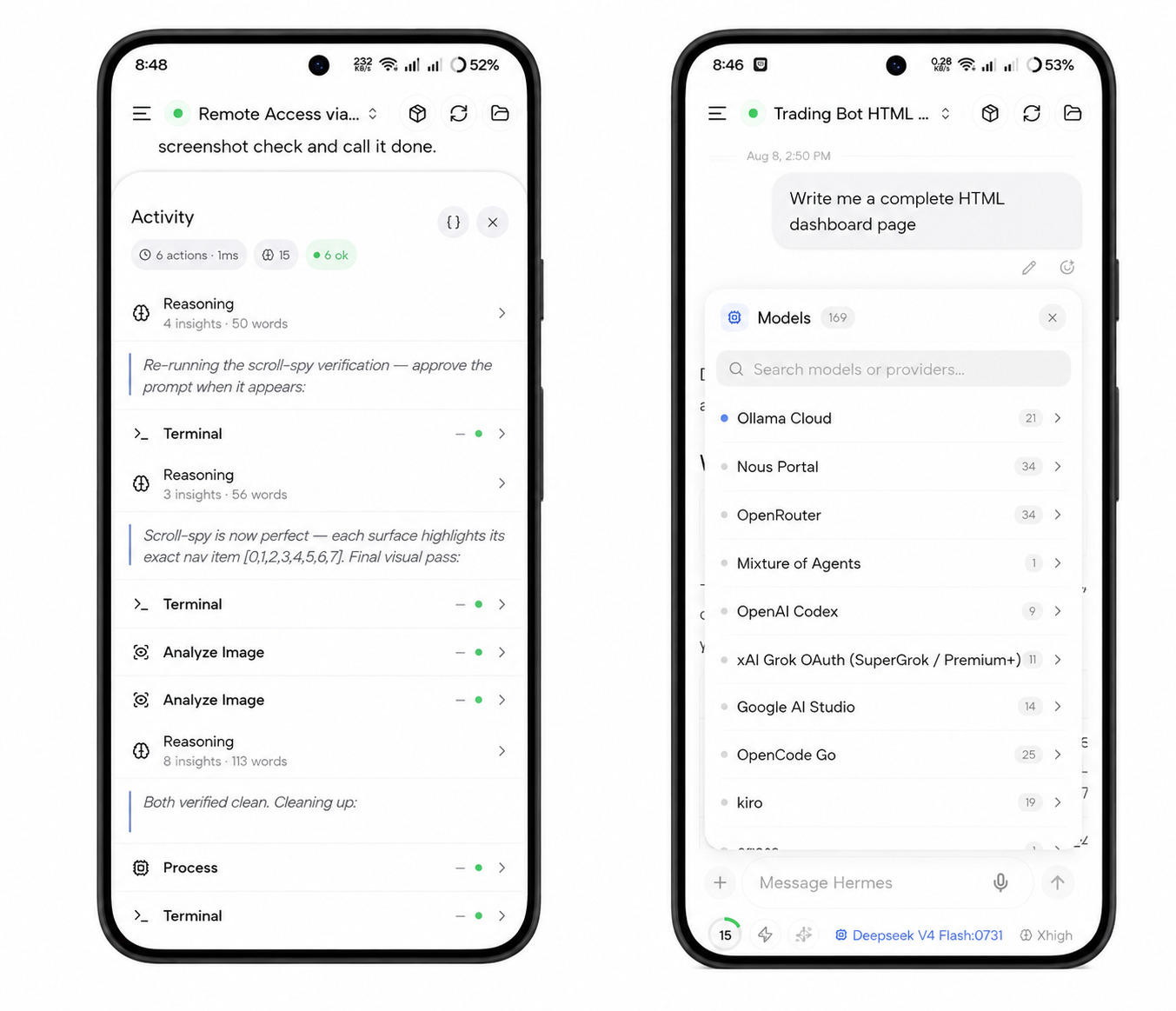
| Session sheets | Context & Artifacts | Activity & Models |
|---|---|---|
 |
 |
 |
App Map

Surfaces
| Surface | Segments | Features | What it does | |
|---|---|---|---|---|
 |
Dashboard | 7 | 47 | Agent status, performance, capabilities, alerts, Needs Attention bell & sheet, install-conflict warning, live Capsules that stay fresh on their own, quick compose, server switching, profile switcher |
 |
Chat | 9 | 90 | Live streaming, live reasoning, voice, media & artifacts, approvals & vault prompts, session control loops, queue & steer, Hermes Live background execution, subagent roster, share from other apps (Chats · Bots · Groups), notification clearing, composer tools & saved prompts, provider quota, stale-session retries |
 |
Bots | 4 | 38 | Agents, Bot Groups, shared rooms with file attachments, consensus distillation, deliverables export, Build Team visual canvas, permission taps & team archive, Bot Chat with a live bot screen (floating view), avatars, routines |
 |
Sessions | 4 | 21 | Inbox, full project workspaces with host folders and repo scan, jump-to-match search, export and move, bulk management |
 |
Brain | 7 | 34 | Models with specs, Cost Guard & provider quota, sub-agent routing, skills with Skill Hub, tools, profile-scoped memory, Star Map, MCP, plugin catalog with update consent |
 |
Work | 6 | 20 | Artifacts browser, cron jobs with capsule fetchers, kanban board, host files, processes, running sub-agents with pause |
 |
Connect | 4 | 9 | Channel status, Team Gateway account linking, webhook routes, pairing, Hermes Cloud |
 |
System | 7 | 27 | Health, analytics, setup with credential vault, checkpoints toggle, ops console, logs, power tools, host terminal |
 |
Settings | 7 | 25 | Servers, connection with OIDC sign-in, appearance with 11 languages, profile, app features, notifications control, feedback & info, feature map |
Total: 9 surfaces · 55 segments · 311 features
Full interactive map: App Map — Hermes Go
Getting Started
1. Install from Google Play
Get Hermes Go on Google Play →
Google Play handles signing and delivery directly. No sideloading, no manual checksum verification, no unknown-sources toggle — install and open.
2. Connect to your agent
- Open Hermes Go
- Self-hosted — enter your agent's address (
http://<host>:9119on your LAN, your Tailscale IP, orhttps://your-domainbehind a TLS reverse proxy) and your basic-auth credentials (set duringhermes-agentsetup) - Hermes Cloud — sign in from the Connect screen with your portal account, pick your org and agent
- Done — the full agent is in your hand
Key Features
🗨️ Chat — Liquid Glass & Hermes Live
- Hermes Live — background keep-alive keeps turns streaming with the screen off; live notifications show progress with quick-reply and approve/deny actions, all on-device (no push servers)
- Live streaming with reasoning rows and tool timelines
- Markdown, tables, syntax-highlighted code blocks with copy
- Context ring showing live context-window usage
- Inline media: images (full-screen viewer), audio playback, HTML/SVG live previews
- Approvals: approve/deny, clarify, sudo, secret, and vault prompts
- Send queue, mid-run steering, clean stop
- Subagent roster — live delegation with status, model, current tool, live tail, and stop controls
- Composer: attachments,
/skills,@mentions, prompt improve, YOLO mode, todo status /login— open the Nous account sheet straight from the composer- Share from other apps — send images, PDFs, Word/Excel files, text, or links straight into a chat
- Background job control — inspect output, stop, or dismiss running host processes from the chat meta row
- Tool timing — per-tool elapsed time remains accurate after background recovery and history rehydration
- Fast lane — toggle priority processing on supported models, with Use Fast or Standard choice on pick
- Reasoning effort — set Off → Ultra per session and as a profile default
- Session loops — recurring
/loopcards with countdown, status, pause, resume, and stop controls - Goal & heartbeat cards — standing
/goaland/heartbeatruns show above the composer with pause, resume, and clear controls - Activity stack — keep todos, subagents, and loops organized above the composer
- Persistent task plans — unfinished work stays visible across turns
- Recovered prompts — approvals and clarify prompts return after reconnect
- Readable tool cards — key-values, chips, lists, and markdown, with expandable output and one-tap copy
- Technical Activity view — switch to raw JSON when you need the underlying tool payload
- Batch clarify — answer several questions in one card with multi-select, Other, Confirm, and Skip
- Collapsible details — HTML
<details>/<summary>sections work like the desktop client while code fences stay untouched - Assign with @ from any session — choose one or several teammates, keep chatting, and receive their replies back in the current conversation
- Desktop-style handoff — assignments travel through the current agent while the specialist keeps its own Bot Chat
- Voice & Home assign — voice dictation and Home sends use the same desktop-style handoff as typed @mentions
- Live Reasoning banner — expandable thinking view with elapsed time, token metrics, and collapsible thought traces
- Side questions — answer tool/subagent questions from chat cards without stalling the turn
- Prompt stack — collapsible pending prompts with status pills, strictly session-scoped
- Listing embeds — list/tree tool results as interactive sortable, filterable cards
- Full-screen composer — long-form writing modal with formatting tools, token estimates, attachments
- System event cards — colored verb badges and structured summaries for skill, memory, and file updates, with middle-truncated paths and one-tap copy
- Deleted-profile notice — a clear message when a session’s host profile no longer exists
- Saved prompts — bookmark a message to save it, then fire it from the
/picker, the+menu, or Home; manage them in Settings - Provider quota — remaining usage on your configured providers, from the model-picker chart icon or Brain → Models; turn the cards off in Settings → Hermes Go features to stop fetches
- Copy session id — grab the active session id from the chat status sheet
- Degraded-gateway resilience — the connection holds when the gateway is degraded, with a stale-heartbeat warning in Health
- Edit-race recovery — if an edit races a live turn, the transcript is restored and you're asked to retry
- Hidden CLI runs — one-shot CLI runs stay out of your conversation lists
🤖 Bots Mode
- Agents hub — create or clone named AI teammates with their own chat, memory, skills, toolsets, model, reasoning effort, Fast mode, and SOUL
- Bot Chat — one canonical conversation per teammate, kept out of normal Sessions recents; scratch chats remain separate
- Agent identity — live faces, optional photo avatars, handles, last-active previews, unread dots, Default/In Chat status
- Roster controls — hide agents without disabling mentions or routines; reveal hidden agents with unread indicators
- Bot avatars — choose a face, upload a photo, or generate an image
- Bot details — edit profile, skills, tools, MCP, SOUL, model, Star Map scope, chats, and routines from one sheet
- Blob Studio — customize bot avatars with live Blobatar faces, shapes, colors, and pose controls
- Working pill — pulsing status indicator when a bot has a live task
- Bot chats — manage Forever Bot Chat, scratch chats, hidden chats, and deletion from Details
- Forever /new — compact the canonical Bot Chat instead of resetting it; use New chat for throwaways
- Bot-scoped Star Map — open the selected teammate’s learning graph from Details
- @-assign — ask a teammate from any chat or Home; multi-agent chips, live Asking/Waiting/Replied receipts, and returned markdown in place
- Routines — schedule agent-owned work daily, at intervals, or once; pause, resume, run, inspect history, or delete; Deliver to rail picks Local or a connected platform per routine
- Bot Groups & shared rooms — organize teammates into named teams with server-synced memberships
- Multi-agent discussion room — structured rounds with turn taking, passes, steering, and token-cost budget caps
- Executive consensus cards — automated distillation of round discussions into takeaways, findings, risks, and next steps
- Scoped exports — export clean executive deliverable summaries or full verbatim transcripts with code block inspection
- Build Team — visual canvas (draggable nodes, auto-layout), soul auto-composition, draft → verify → execute plans, starter templates, team routines, live deployment monitor
- Build Team hardening — permission questions are taps that never hold Create, a skipped
depends_onbranch cannot pin readiness, the six-question cap keeps required/answered questions, roster unreadable refuses the run, and refused edits say why - Capsules — turn a chat into a live card on Home: create from the composer + menu or pin a reply, preview in Capsule Studio, revise by chatting, edit by hand, set an expiry, and recover expired ones for 30 days
- Bot screen — open a bot's Linux desktop from the chat header: install it if missing, watch or take over the pointer and keyboard, and the bot pauses while you hold it
- Floating screen — shrink a bot screen to a draggable picture over the chat (S, M, or L); the small view only watches
- File handoff — tap Open on PDFs, Office files, and archives to hand them to another app; SVGs preview inside Hermes with scripts off
- Live capsule checks — the last few check steps appear in plain language, sensitive content kept off the line, and checks can run up to 5 minutes
- 11 languages — match the phone or pick English, Chinese (simplified/traditional), Russian, Spanish, French, German, Japanese, Korean, or Portuguese; chats stay as written
- Organization login — sign in with OIDC on an HTTPS gateway, with a guide to password, organization, and Cloud methods
- Autonomous capsules — four-step builder, host fetchers on a schedule with no tokens per check, timing/quiet hours, insight lines, ask without chatting, and memory forget
- Projects — full workspaces with host folders, repo scan, Active badge, project pill, JSON export, and jump-to-match search
- Terminal & vault — host shell under System plus quick commands; server-side credential vault with 1Password/Bitwarden unlock
- Team Gateway linking — Telegram, Discord, Slack, WhatsApp through the shared bot via one-time code; new app mark, server switching from Home
- Capsule refresh — each capsule re-checks its facts Daily, Weekly, or on ask, using tools and tokens; pin a check model or leave Auto, and the capsule shows when it was last checked and by which model
- In-capsule edits — tick checklist items and add to notes right inside the capsule; edits survive refreshes and backup, and an examples tab teaches capsules with live demos
- Quieter lists — Home hides scheduled runs and Sessions starts with Hide scheduled jobs on; cron history still lists them
- Bot API keys — new bots copy API keys from the main profile; OAuth logins stay on the host
🗂️ Sessions
- Action sheets — long-press actions show icons for star, folder, read/unread, rename, archive, and delete
🎙️ Voice
- Hold-to-dictate with STT
- Read any reply aloud (TTS)
- Hands-free conversation loop: listen → think → speak
- Inline audio playback for TTS tool output
- Expanded composer — long drafts open into a full-screen editor with model/effort, chips, and send
- Paste collapse — large pastes, code fences, and stack traces auto-collapse into snippet attachments
- Checkpoints & rollback — browse shadow snapshots, preview diffs, restore files, and rewind context
- Git review — stage, unstage, or discard changes and commit from the chat Review sheet
- Multi-server switching — save, rename, and switch between Hermes hosts with one tap
📦 Artifacts
- Every media item from a session, searchable
- Full-screen image viewer with pinch-zoom
- Offline-first browsing from cached session media
🧠 Brain
- Model provider catalog with fallback chain and effort control
- Custom endpoints — add, edit, and delete OpenAI-compatible providers (Ollama, vLLM, LM Studio) with server-side API keys
- Skills with enable toggles — open and edit skills from the Skills hub or skill tool cards
- Toolsets with environment configuration
- Memory block viewer/editor
- Star Map — interactive learning graph: constellation, clusters, timeline, node editor, curator
- MCP server connections
- Plugin toggles
- Plugin catalog — browse curated plugins with capability badges and install by catalog name
- Model specs — context window, max output, modalities, latency, pricing in the picker + capability badges
- Cost Guard — spending budgets, threshold banners, per-turn guards, confirm before expensive models
- Embedded Hub Picker — switch Models/Skills/Tools/Plugins without leaving the page
- Auxiliary reasoning effort — Auto, off, low, medium, or high per auxiliary task in the Auxiliary Models modal
- Skill Hub shelves & search — filter official shelves (Agents, Dev, Finance, Security), search community skills, preview, Get after confirm, Update all, or Remove
- Plugin Catalog shelves & search — filter by category or search by name, description, maintainer, tools, or env vars; install, update, or remove
📋 Work
- Artifacts browser (images, audio, files)
- Cron jobs: list, run-now, status badges, trigger history, manual dispatch, clear scheduled-fire errors, and a Deliver to rail (Local or a connected platform) — tap any past execution to open its run session
- Kanban board with live updates — request review from ready or running tasks
- Host files — browse the agent filesystem, drop
@file/@folderchips into the composer - Processes — manage background jobs from live sessions, filter and start/stop with confirmation
🔌 Connect
- Channel status (Telegram, Discord, Slack) with live dots
- Webhook routes
- Pairing requests + QR provisioning
- Hermes Cloud — portal sign-in, org and agent pick, cookie-based reconnect
- Channel details — webhook and callback URLs on channel cards; credential and toggle changes apply live on shared gateways
🖥️ System
- Health: host gauges, gateway status, host battery badge for laptop hosts
- Memory and disk pressure alerts — advisory notices on Home and Health when the host reports elevated pressure
- Analytics: usage trends; the dashboard token card breaks down in / out / cache
- Setup: app features, voice, thinking depth, safety, UI
- Checkpoints toggle — enable or disable workspace shadow snapshots with live gateway synchronization
- Onboarding setup prompt — collapse or expand the full prompt, then copy it
- Ops console with readable parsed output
- Live log stream with pause-on-scroll
- Power tools: config editor, environment, OAuth, profiles, files, credentials
⚙️ Settings
- Multi-server with URL switching
- Connection details + Tailscale detection
- Custom endpoints — manage OpenAI-compatible providers from Brain → Models
- Theme gallery — 16 WCAG-minded presets with live preview, System/Dark/Light filters, and separate dark & light defaults
- Theme reset — restore Obsidian Teal / Titanium Frost; choices persist
- Active profile with a display nickname for the default profile
- Feedback — submit a bug, feature idea, improvement, or question with screenshots and status tracking; replies land in Needs Attention
- Saved prompts — manage reusable prompts (search, view, edit, copy, delete); syncs through backup
- What's New — release notes in-app, product version in the footer
- Legal & Privacy — About, architecture diagrams, Privacy Policy, Terms, 82+ license catalog, and contact
- Saved servers — manage multiple gateway/cloud instances with nicknames, 1-tap switch, and clean teardown
- Backup preview — see exactly what a prefs restore brings back before accepting
- Feature map — interactive mosaic grid with fuzzy search, deep-link jumps, persistent layout
- Notifications — delivery modes (All updates / Approvals only), per-category toggles for turns, bot chats, and live status, and a system-settings shortcut when alerts are off
Security & Trust
| Property | Value |
|---|---|
| Distribution | Google Play (Play App Signing) |
| Telemetry | None. Zero analytics, zero tracking |
| Data path | Direct to your server (LAN / Tailscale) or Hermes Cloud — no telemetry either way |
| Auth | Basic auth (self-hosted) or Hermes Cloud portal sign-in |
| Secrets | Stored in platform secure storage (expo-secure-store) |
| Source | Closed source — Google Play is the distribution channel |
| Verification | Android verified boot, Play App Signing, and Play Protect |
Tech Stack
| Layer | Technology |
|---|---|
| Framework | Expo SDK 56 · React Native 0.85 |
| Navigation | expo-router (typed routes) |
| State | Zustand 5 |
| Persistence | expo-sqlite (local-first, background sync) |
| Real-time | WebSocket JSON-RPC gateway client |
| Cloud | Hermes Cloud portal (org & agent pick, cookie reconnect) |
| Voice | STT dictation + TTS playback |
| Icons | lucide-react-native |
| Build | EAS Build (APK) + OTA updates (expo-updates) |
Architecture
┌─────────────────────────────────────────────┐
│                 Hermes Go (Android)          │
├──────────────┬──────────────────────────────┤
│  UI Layer    │  Drawer rail · 9 surfaces    │
│  State       │  Zustand stores (sync-aware) │
│  Persistence │  SQLite · background sync    │
│  Transport   │  WebSocket JSON-RPC client   │
│  Auth        │  Basic auth · secure store   │
└──────────────┴──────────────────────────────┘
        │                        │
        │  WebSocket (JSON-RPC)  │  Hermes Cloud (portal
        │  / REST                │  sign-in · org & agent
        ▼                        ▼  pick · cookie reconnect)
┌──────────────────┐  ┌───────────────────────┐
│ Your self-hosted │  │    Hermes Cloud       │
│   Hermes Agent   │  │      agents           │
│ (port 9119 · LAN │  │  (portal-managed)     │
│  or Tailscale)   │  │                       │
└──────────────────┘  └───────────────────────┘
Changelog
See CHANGELOG.md for the full release history.
License
This repository (the website) is open source under the MIT License. The Hermes Go application itself is closed source — distributed exclusively through Google Play, where every release is signed and verified as part of Android verified boot. The app is provided for personal use; redistribution or modification of the binary is not permitted without written consent.
© 2026 Hermes Go by Shilp
Explore related projects
affaan-m/ECC
The agent harness performance optimization system. Skills, instincts, memory, security, and research-first development for Claude Code, Codex, Opencode, Cursor and beyond.
300,313 starsNousResearch/hermes-agent
The agent that grows with you
262,134 starsmultica-ai/andrej-karpathy-skills
A single CLAUDE.md file to improve Claude Code behavior, derived from Andrej Karpathy's observations on LLM coding pitfalls.
231,460 starsfirecrawl/firecrawl
Supercharge your AI agents with data from the web and beyond. Building the library for superintelligence. 🔥
200,178 stars