
secfoo-com/secfoo
About
AI security review CLI: SAST, secret scanning, SCA, threat modeling and architecture review with Claude Code, Copilot, Codex, Gemini, Cursor or an API key. Reads your design docs, Confluence and Jira through MCP. SARIF output for CI.
AIMeasured star growth
- in 24h
- +280
- in 7 days
- +649
- in 15 days
- Collecting history
- in 1 month
- Collecting history
Net star changes over overlapping periods, not daily totals. Missing measurements are left blank. Stars measure attention, not software quality.
README.md
Original
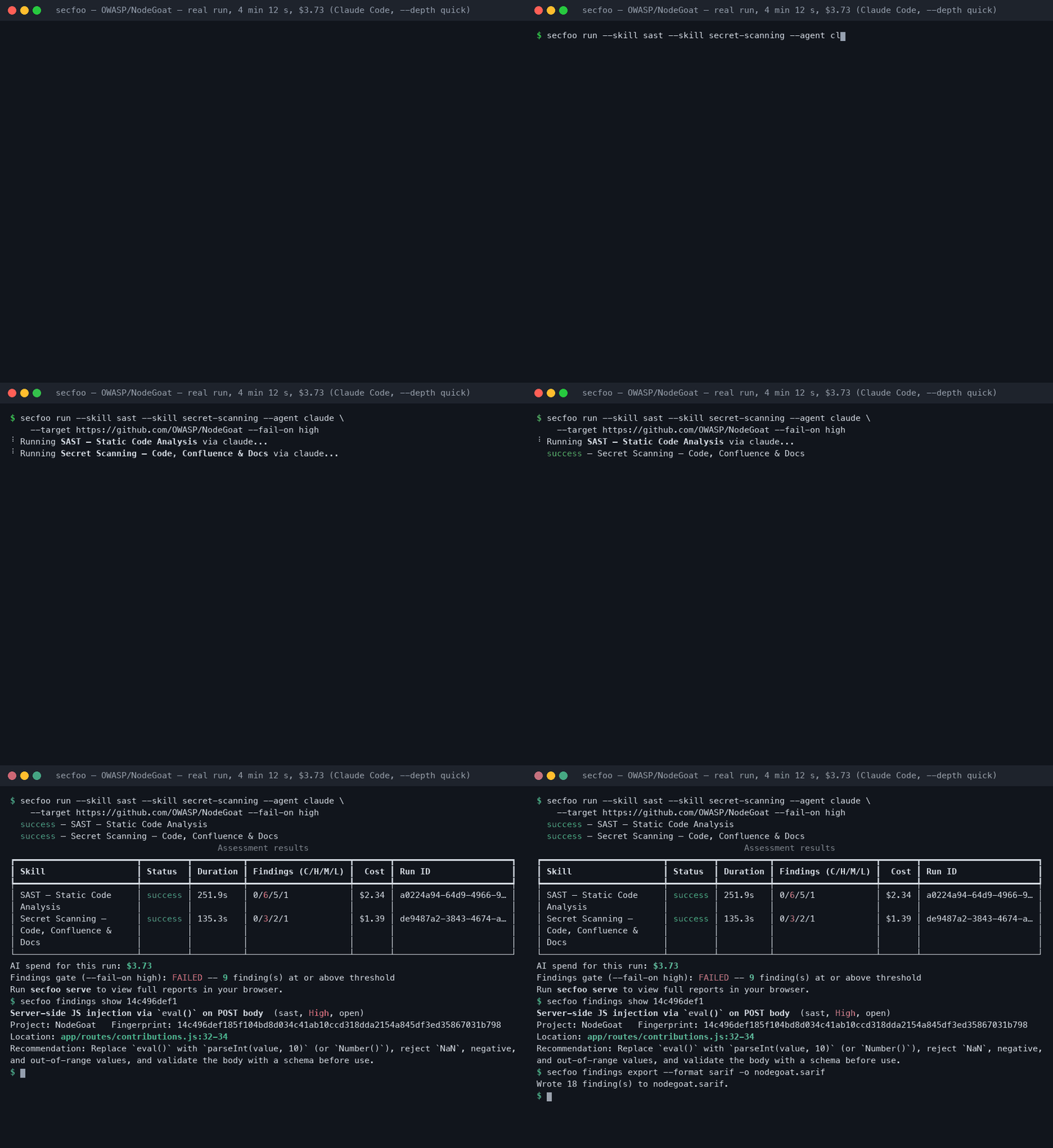
secfoo — AI security review CLI
Turn the coding agent you already have into a disciplined security reviewer.
SAST, secret scanning, SCA, threat modeling and architecture review, with your design docs, Confluence and tickets as context.
Same checklist, same report shape, every run.




Website · Getting started · CLI · CI guide · Sample output
uvx secfoo run --skill sast --skill secret-scanning --target https://github.com/OWASP/NodeGoat
That is the whole first run. No config file: secfoo picks the agent you
already have on PATH (Claude Code, Codex, Gemini CLI, Copilot, Cursor,
Antigravity, OpenCode, ...) or, if none is installed, uses the
OPENAI_API_KEY / ANTHROPIC_API_KEY / GEMINI_API_KEY already in your
shell. Pass --agent to choose. Keep it around with pipx install secfoo
or pip install secfoo; more channels under Install.
Context, not just code
A code repository is one input. Real reviews also need the design doc, the threat model from last year, the runbook and the ticket that explains why the odd thing is there. secfoo passes that context to the agent through MCP and asks the skills to use it: the architecture review compares what is documented (the provided documentation sources, README, ADRs) with what is implemented and reports the gaps; secret scanning covers linked documentation sources as well as code; every report ends with a coverage section that says which documentation sources were reached and which were not.
secfoo run --skill security-architecture-review --skill threat-modeling \
  --target https://github.com/org/payments-api \
  --context https://yourcompany.atlassian.net/wiki/spaces/PAY/pages/123/Architecture \
  --context ../design-docs/threat-model.pdf
Connect remote documentation sources once in ~/.secfoo/config.toml; any MCP
server works, so the same applies to SharePoint and Microsoft 365, Jira,
Notion, Google Docs or an internal wiki:
[[mcp_servers]]
name = "Atlassian-Rovo-MCP"          # Confluence + Jira, official Atlassian server
command = "npx"
args = ["-y", "mcp-remote@latest", "https://mcp.atlassian.com/v1/mcp/authv2"]

[[mcp_servers]]
name = "sharepoint"                   # any HTTP/SSE MCP server
url = "https://mcp.example.com/sharepoint"
transport = "http"
headers = { Authorization = "Bearer ..." }
| Context | How it gets in | Used by |
|---|---|---|
| Documentation sources (Confluence, Jira, SharePoint, Notion, Google Docs, local PDF/DOCX/Markdown) | --context <url|path> (repeatable; --confluence / -c alias) with an MCP server or local file extraction |
Architecture review, threat modeling, secret scanning, compliance skills |
| Jira, SharePoint, Notion, Google Drive, internal wikis | [[mcp_servers]] in config; the agent calls them as tools during the review |
Every skill |
| Vendor documents (PDF, DOCX, PPTX) and AI-BOM files | secfoo assessment upload <id> <file> |
Third-party risk assessment, Responsible AI compliance |
| Curated vulnerability patterns | secfoo memory signup (optional hosted service, exposed as an MCP server) |
SAST, SCA, secret scanning |
With --agent claude the configured servers are attached to each run
automatically and nothing else (your global Claude config is not touched and
the target's own .mcp.json is not loaded). For Gemini CLI and Cursor run
secfoo mcp sync --agent <agent> once. Codex, Antigravity and the api
agent cannot use MCP servers yet. Details in
docs/REFERENCE.md.
A 30-second look at the dashboard
Everything a run produces lands in a local dashboard: secfoo serve, on your machine.
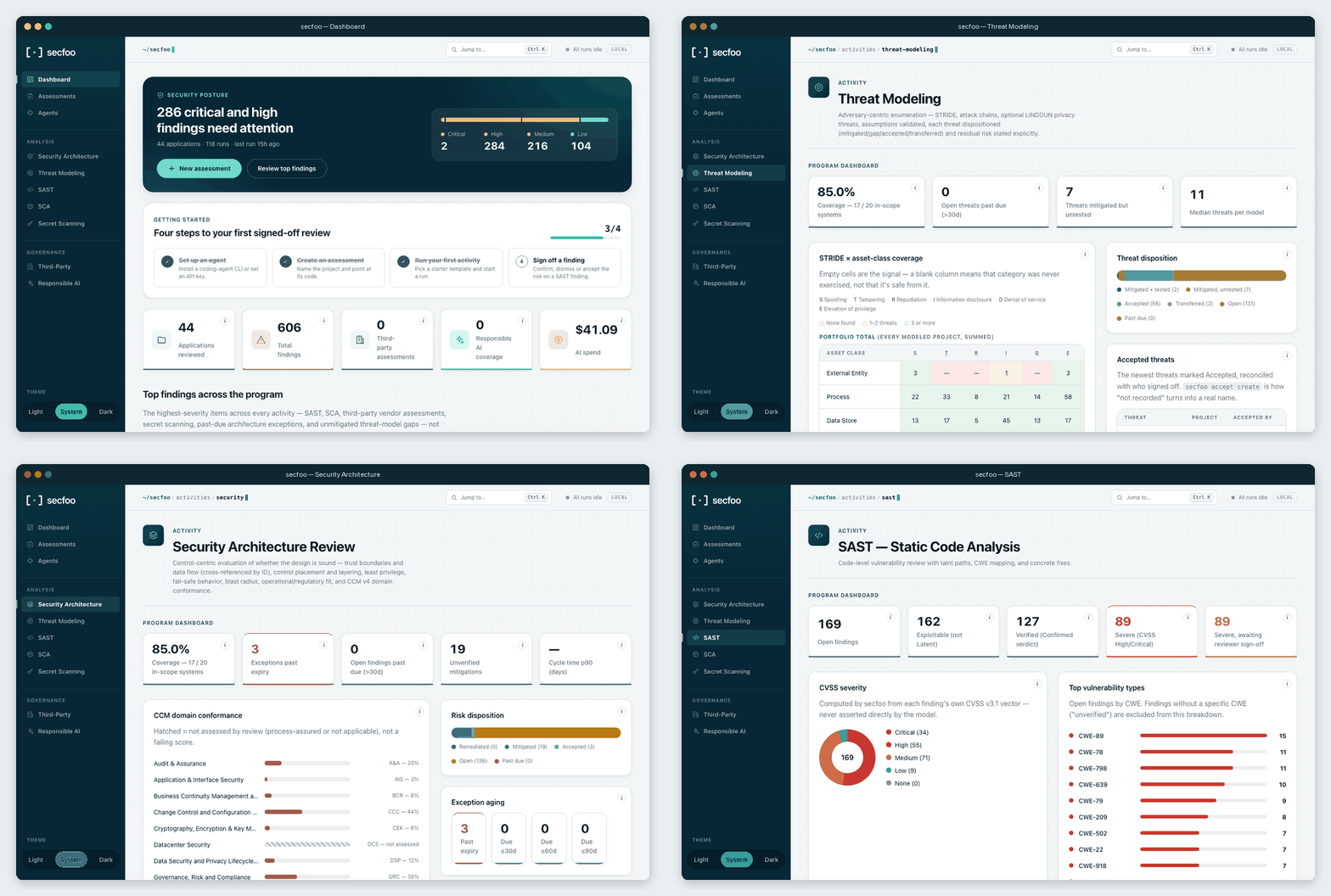
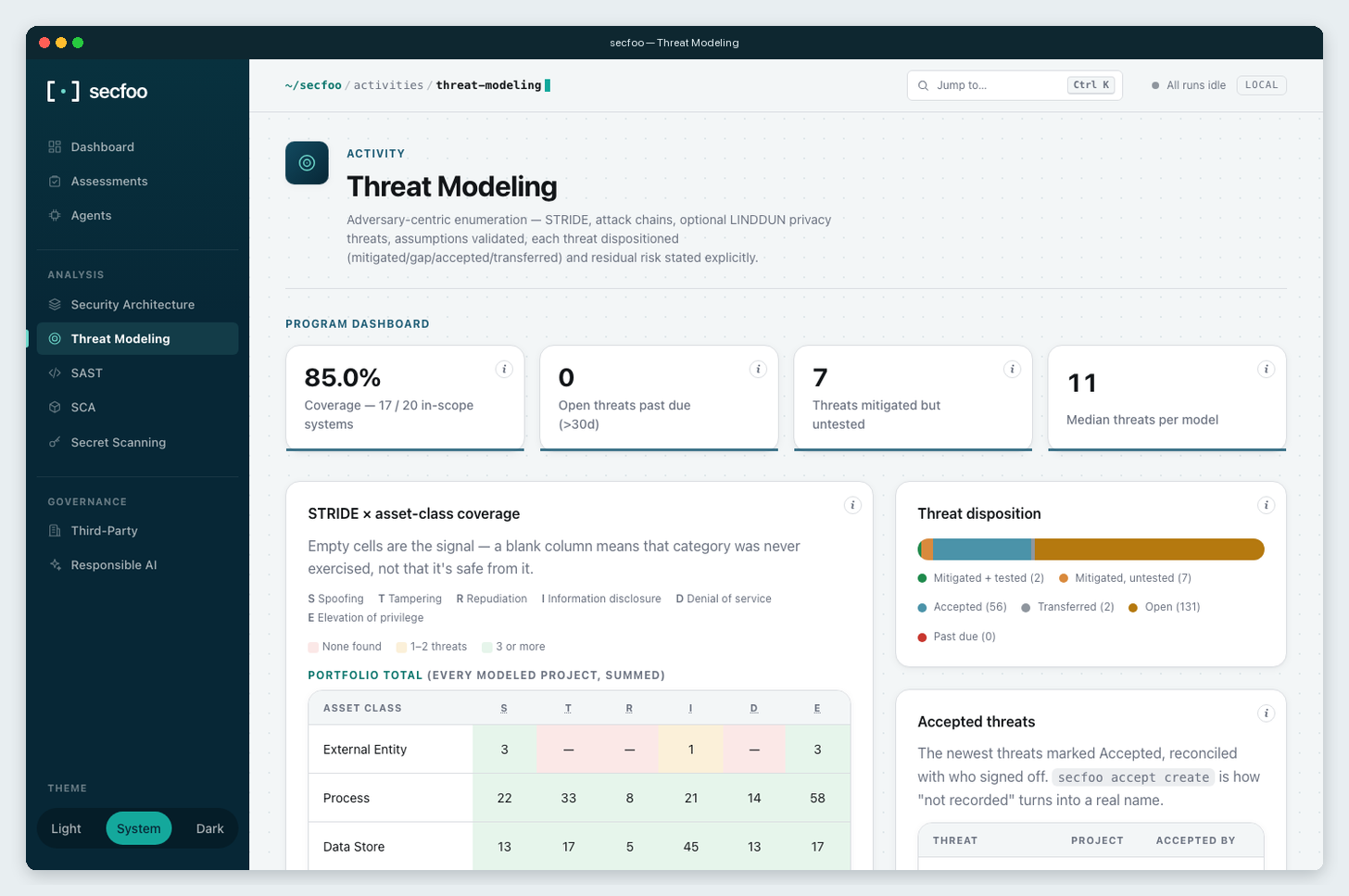
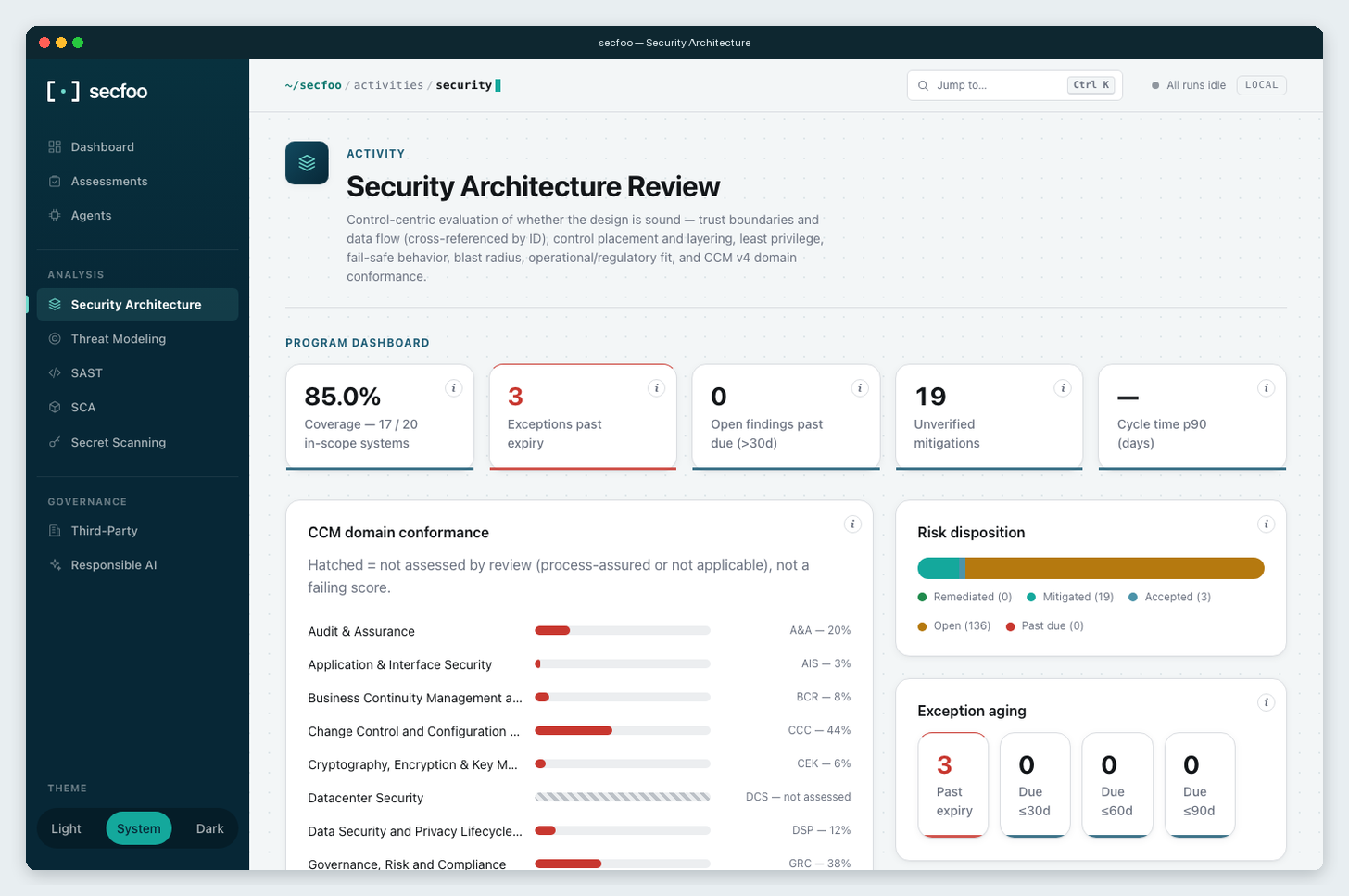
Screenshots are from a real local secfoo serve against public vulnerable-app targets.
What you get
- A skill is a brief, not a parser. secfoo hands your coding agent a structured prompt and a target, then collects a report in a fixed shape.
- One dashboard for the program. Coverage, dispositions, STRIDE, design verdicts, and findings across every project you have scanned.
- Context-aware. Confluence pages, tickets, design docs and uploaded vendor documents reach the agent through MCP, and the report says which sources it could and could not read. See Context, not just code.
- Local first. Runs and
secfoo servestay on your machine. Optionalsecfoo cloud loginsyncs to an org portal that is not in this repo. - Concurrent by default. Several
--skillflags run at the same time. - Portable findings. Export SAST, SCA, and secret-scanning findings as JSON Lines or SARIF 2.1.0 for GitHub code scanning and IDEs. See export examples.
- CI-ready.
--fail-on high,--max-cost 2.00,--json, and distinct exit codes for "the scan broke" vs "policy failed". Details in docs/CI.md.
Activity catalog
| Activity | Skill ID |
|---|---|
| Security Architecture Review | security-architecture-review |
| Threat Modeling | threat-modeling |
| SAST — Static Code Analysis | sast |
| SCA — Reachability & Upgrade Triage | sca-reachability |
| Secret Scanning | secret-scanning |
| Prompt Review | prompt-review |
| Deployment Readiness | deployment-readiness |
| Responsible AI Compliance | responsible-ai-compliance |
| Third-Party Risk Assessment | third-party-risk-assessment |
Run one, or several together. What each report actually contains is in docs/REFERENCE.md. Write your own skill as a Markdown file: docs/SKILLS.md.
Agents
Point Claude Code, Cursor, Antigravity, Gemini CLI, Codex, Copilot, Droid,
Devin or OpenCode at a target with --agent, or use an API key with the
built-in api agent. Setup and troubleshooting for every adapter:
docs/agents.md. Choose a model for one run with
--model <model-id>, or set a per-agent default in
configuration.
Repository targets
--target accepts local directories, GitHub URLs, GitLab (including nested
namespaces), and Bitbucket Cloud repositories:
secfoo run --skill sast --target https://gitlab.com/group/subgroup/repo --agent claude
secfoo run --skill sast --target https://bitbucket.org/workspace/repo --agent claude
GitLab and Bitbucket support HTTPS and git@host:namespace/repo.git SSH URLs;
.git is optional. SSH uses your existing SSH authentication. For self-hosted
GitLab, set SECFOO_GITLAB_HOST to its hostname, optionally with an HTTPS port
(e.g. git.example.org:8443), then pass that host's repository URL. The default
gitlab.com remains supported. URL credentials, queries, fragments, HTTP, and
ssh:// forms are rejected for these new targets.
For private HTTPS repositories, provide SECFOO_GITLAB_TOKEN (a GitLab token
with repository read access) or SECFOO_BITBUCKET_TOKEN (a Bitbucket repository,
project, or workspace access token with repository read permission) through your
environment or CI secret store. Bitbucket user API tokens/app passwords are not
supported by this token mode. Tokens are supplied to Git through a temporary
askpass helper, never placed in clone arguments, repository URLs, reports, or
Git config. Git errors omit raw server output to keep credentials out of logs.
Authenticated HTTPS clones disable redirects to avoid forwarding credentials to
another host. Without a token, Git uses your existing noninteractive authentication. Clones are shallow and
removed after the run, including failures.
Install
uvx secfoo --help                     # run from PyPI without installing (uv)
pipx install secfoo                   # isolated install, Python 3.10+
pip install secfoo                    # PyPI
npm install -g @rakfortltd/secfoo     # npm, no Python needed
docker run --rm ghcr.io/secfoo-com/secfoo --help
No agent CLI? Use an API key:
export OPENAI_API_KEY=...             # or ANTHROPIC_API_KEY / GEMINI_API_KEY
secfoo run --skill sast --target https://github.com/org/repo   # picks the api agent
Universal install scripts, standalone binaries, CI flags, spend tracking,
and configuration live in docs/REFERENCE.md.
Developing this repo: pip install -e ".[dev]".
What it found on OWASP NodeGoat
One real, unedited run against OWASP/NodeGoat
(Claude Code, --depth quick, 2026-11-14), both skills running concurrently:
| Skill | Critical | High | Medium | Low | Time | Cost |
|---|---|---|---|---|---|---|
| SAST — Static Code Analysis | 0 | 6 | 5 | 1 | 4 min 12 s | $2.34 |
| Secret Scanning — Code, Confluence & Docs | 0 | 3 | 2 | 1 | 2 min 15 s | $1.39 |
Among the Highs: eval() on a POST body (CWE-95), SSRF with the response
reflected as HTML (CWE-918), NoSQL injection through a $where string
(CWE-943), IDOR on /allocations/:userId, autoescaping disabled globally
(CWE-79), an RSA private key and the session-signing secret committed to the
repo. Every finding carries CWE, OWASP category, CVSS vector, location,
the vulnerable code and a fix. The full reports, the SARIF and the JSONL
export are in examples/sample-output/nodegoat.
Put it in CI
Findings show up in GitHub's Security tab and as PR annotations; the job fails on the severity you choose.
# .github/workflows/secfoo.yml
permissions:
  contents: read
  security-events: write
steps:
  - uses: actions/checkout@v4
  - uses: secfoo-com/secfoo@main
    env:
      OPENAI_API_KEY: ${{ secrets.OPENAI_API_KEY }}   # or ANTHROPIC_API_KEY / GEMINI_API_KEY
    with:
      skills: sast,secret-scanning
      fail-on: high
      max-cost: "2.00"
- GitHub Action with SARIF upload, job summary and severity outputs: docs/CI.md
- pre-commit:
repo: https://github.com/secfoo-com/secfoo, hookssecfoo-secretsandsecfoo(example) - GitLab CI job with SARIF artifact: examples/ci/gitlab-ci.yml
- Docker:
docker run --rm ghcr.io/secfoo-com/secfoo --help - Anywhere else:
secfoo run ... --json --fail-on high, thensecfoo findings export --format sarif. Exit codes0clean,1run failed,2findings gate,3cost gate.
Learn more
- docs/CI.md — GitHub Action, pre-commit, GitLab CI, Docker, SARIF
- docs/REFERENCE.md — catalog, dashboards, assessments, config, distribution
- Getting started
- CLI reference
- Running an assessment
- Editions
Contributing
PRs welcome — see CONTRIBUTING.md and CODE_OF_CONDUCT.md. Security issues go through SECURITY.md, not a public issue.
Hackathon? Issues tagged hackathon
are open for contribution, and merged PRs earn points on the
contributor leaderboard
(10 / 6 / 3 for hard / medium / low issues; Bronze, Silver and Gold at 25, 50 and 100).

Explore related projects
Loading…