
schibsted/videofy_minimal
schibsted/videofy_minimal has 656 GitHub stars and 120 forks. GitHot measured 0 stars in 24 hours. Last checked 2026-11-16 00:09 UTC. Last push 2026-03-13.
Measured star growth
- in 24h
- 0
- in 7 days
- Update delayed
- in 15 days
- Update delayed
- in 1 month
- Update delayed
Net star changes over overlapping periods, not daily totals. Missing measurements are left blank. Stars measure attention, not software quality.
About
Videofy Minimal is a local tool for turning news articles into short videos for digital signage screens.
Developer ToolsREADME.md
OriginalVideofy Minimal
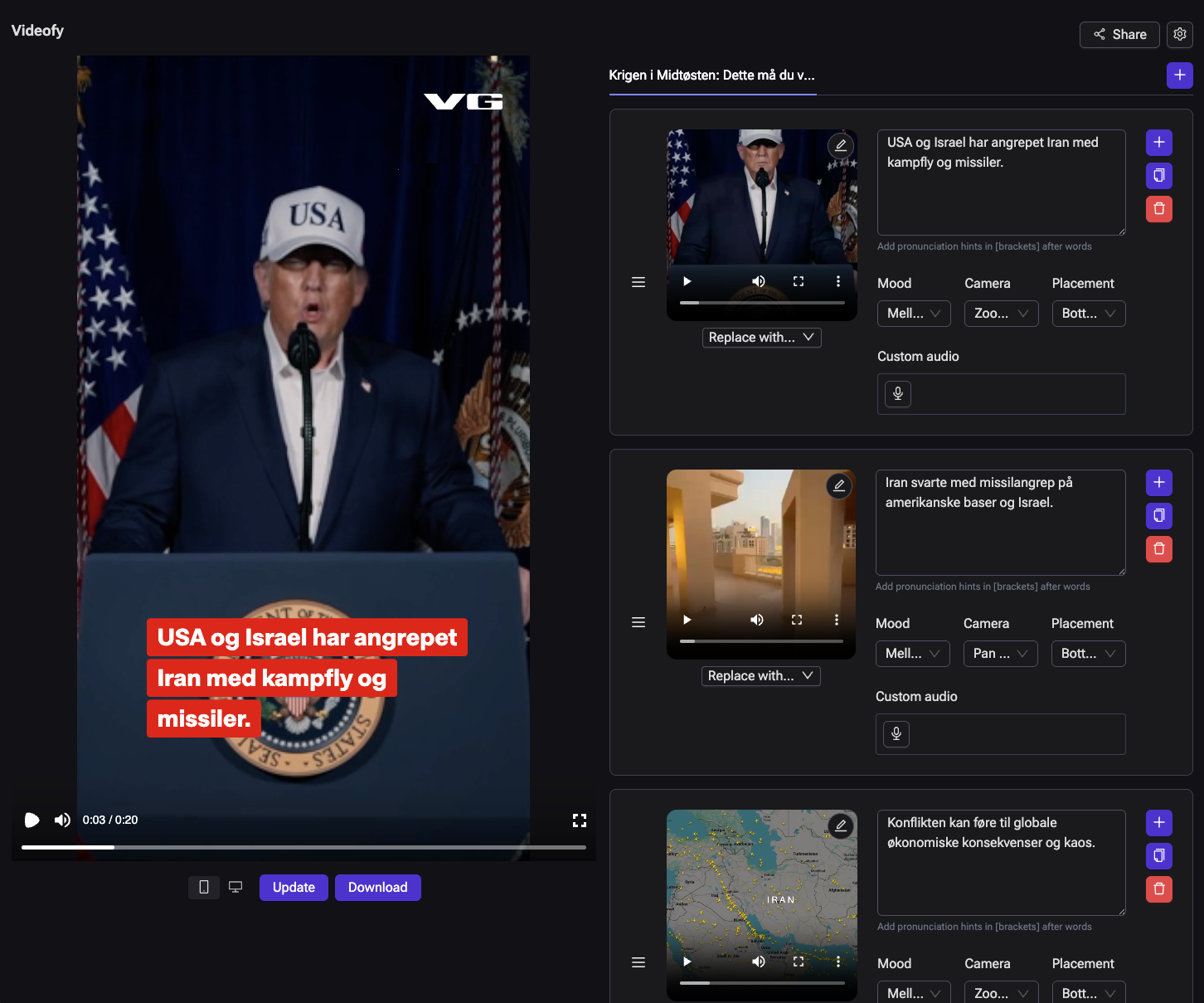
Videofy Minimal is a local tool for turning news articles into short videos for digital signage screens.
It fetches article content, generates a short manuscript, matches visuals, produces narration, and renders a final video through a review flow in the CMS UI.
Here is an example video from one of our brands: example_video_e24.mp4
This repository is designed to run on a laptop with only OpenAI and ElevenLabs credentials. It keeps the core workflow, but leaves out most of the internal integrations and infrastructure used in Schibsted's full Videofy setup.
Found a problem or want to chat about the project? Open an issue or join our Discord server
What It Does
Videofy Minimal takes content from a source such as Reuters, AP, or a test web URL, builds a manuscript, matches media, generates voiceover, and renders a video.
The result is a local MP4 with a human-in-the-loop workflow in the CMS UI, so editors can review, tweak, and rerun before rendering.
Architecture
At a high level, the CMS orchestrates fetching, generation, preview, and rendering, while project state is stored locally under projects/<projectId>/.
flowchart LR
  CMS[CMS UI<br/>Next.js]

  CMS --> Fetchers[Fetcher plugins<br/>fetchers/*]
  CMS --> API[Data API<br/>FastAPI]
  CMS --> Preview[Preview player<br/>Remotion]
  CMS --> Render[Local renderer]

  API --> AI[OpenAI / ElevenLabs]
  API --> Projects[Project files<br/>projects/<projectId>/]
  Fetchers --> Projects

  Projects --> Preview
  Projects --> Render
  Render --> Output[MP4 / audio / project export]
The CMS is the operator surface, the FastAPI service handles generation and processing, and each project is persisted under projects/<projectId>/.
Quickstart
1. Install Dependencies (macOS with Homebrew)
brew install uv node ffmpeg
You also need:
- Python 3.12
- npm (comes with Node)
2. Configure Environment
cp .env.example .env
Add your API credentials in .env:
OPENAI_API_KEYELEVENLABS_API_KEY
3. Install Project Dependencies
uv sync
npm install
4. Start Everything
make dev
If you want hotspot model support while using make dev, run:
make dev HOTSPOT=1
Open:
- CMS:
http://127.0.0.1:3000 - API:
http://127.0.0.1:8001
Docker Compose
To run the CMS and API in containers instead:
docker compose up --build
Docker Compose reads the same local .env file for values such as OPENAI_API_KEY and ELEVENLABS_API_KEY.
Open:
- CMS:
http://127.0.0.1:3000 - API:
http://127.0.0.1:8001
Projects and Folder Structure
Every run is stored as a project in projects/<projectId>/.
Projects are split into:
input: imported source files and article dataworking: intermediate and editable generation stateoutput: final processed files and rendered videos
Example layout:
projects/
  <projectId>/
    generation.json
    input/
      article.json
      images/
      videos/
    working/
      manuscript.json
      cms-generation.json
      config.override.json
      analysis/
      audio/
      uploads/
    output/
      processed_manuscript.json
      render-vertical.mp4
      render-horizontal.mp4
Key files:
generation.json: project-level settings (brand, options, timestamps)input/article.json: fetched article text and media referencesworking/*: data generated duringgenerateandprocess, plus UI editsoutput/*: final render-ready artifacts
Fetchers
Fetchers are a drop-in plugin architecture to add your own ways to get content into the system.
Each fetcher lives under fetchers/<id>/ and defines:
- input fields (
fetcher.json) - implementation (
fetcher.py)
In production, each brand/newsroom should build a proper fetcher integration against its own content APIs to get the highest quality data.
Included fetchers:
reuters: requires Reuters API credentialsap: requires AP API credentialsweb: generic HTML fetcher for local testing and demos
The web fetcher is useful for quick testing, but should not be treated as a production-grade ingestion path.
Brands
Brands are configured in brands/*.json.
A brand controls the look, voice, and generation behavior, including:
- prompts
- OpenAI models (
manuscriptModel,mediaModel) - voice + TTS defaults
- logo
- intro/wipe/outro assets
- colors and visual theme
- export defaults
To add a new brand:
- Copy
brands/default.json - Rename to your brand id (for example
brands/mybrand.json) - Update logo, wipes, colors, prompts, and voice settings
- Restart app (or refresh) and select the new brand in CMS
Player
Rendering is built with Remotion.
This project uses Remotion for composition and local rendering. For commercial use, verify that your usage complies with Remotion license terms. You might need a license.
Hotspot Model
We have trained our own hotspot model to pick good focus areas on press images (where motion/crops should center). Videofy Minimal can use this model by running the commands below.
The model is fetched from Hugging Face and runs locally in a worker process. If unavailable, the pipeline still runs with a fallback hotspot strategy.
To enable hotspot dependencies:
uv sync --group hotspot
If you start with make dev, include the hotspot group there too:
make dev HOTSPOT=1
Credits
Videofy Minimal was built with contributions from the following people:
- Johanna Johansson
- Johannes Andersen
- Edvard Høiby
- Njål Borch
- Anders Haarr
- Magnus Jensen