
sassanix/Warracker
sassanix/Warracker has 1,567 GitHub stars and 57 forks. GitHot measured +1 stars in 24 hours. Last checked 2026-11-08 04:12 UTC. Last push 2026-11-02.
🛡️ Warracker is an open source, self-hostable warranty tracker to monitor expirations, store receipts, files. You own the data, your rules!
What you can do
- 🗃️ Centralized Management - Track all your product warranties in one place
- 🧾 Detailed Records - Store purchase dates, durations, notes, multiple serial numbers, and product photos with thumbnail previews
- 📄 Document Storage - Upload receipts, invoices, and manuals securely
- 📝 Warranty Claims - Manage warranty claims end-to-end with statuses, dates, resolutions, attached documents, and full lifecycle visibility
Measured star growth
- in 24h
- +1
- in 7 days
- Collecting history
- in 15 days
- Collecting history
- in 1 month
- Collecting history
Net star changes over overlapping periods, not daily totals. Missing measurements are left blank. Stars measure attention, not software quality.
README.md
OriginalWarracker
Open-source warranty tracker for individuals and teams.
The easiest way to organize product warranties, monitor expiration dates, and store receipts or related documents.








⭐ If you find Warracker helpful, we’d truly appreciate a star on GitHub! Your support motivates us to keep improving and building great new features.

🌟Overview
Warracker is a web-based application that simplifies the management of product warranties. It allows users to organize warranty information, monitor expiration dates, and securely store related documents.
Full guides live in the Warracker Wiki: setup, the complete user guide, configuration, backup and restore, updating, reverse proxies, security, troubleshooting, and contributing.
🔑 Key Features
| Feature | Description |
|---|---|
| 🗃️ Centralized Management | Track all your product warranties in one place |
| 🧾 Detailed Records | Store purchase dates, durations, notes, multiple serial numbers, and product photos with thumbnail previews |
| 📄 Document Storage | Upload receipts, invoices, and manuals securely |
| 📝 Warranty Claims | Manage warranty claims end-to-end with statuses, dates, resolutions, attached documents, and full lifecycle visibility |
| 🔔 Proactive Alerts | Get alerts for upcoming expirations via email or 100+ push services (Discord, Slack, etc.) using Apprise — each threshold notifies once, never daily repeats |
| 🔍 Quick Search and Filter | Search by product name, serial number, vendor, and more with real-time filtering, and organize with custom tags |
| 👥 Multi-User & Global View | Multiple accounts with admin controls; authenticated users can view global warranty data with role-based permissions |
| 📤 Data Export/Import | Import/export warranty data via CSV — exports include every field (notes, currency, model, warranty type), so a re-import restores your data exactly |
| ⚙️ Customizable Settings | Configure currency, date formats, notification timing, and branding |
| 📦 Archiving | Archive expired or unused warranties for better organization, while keeping records accessible when needed |
| 🔑 OIDC SSO | Single sign-on with providers like Google, GitHub, and Keycloak |
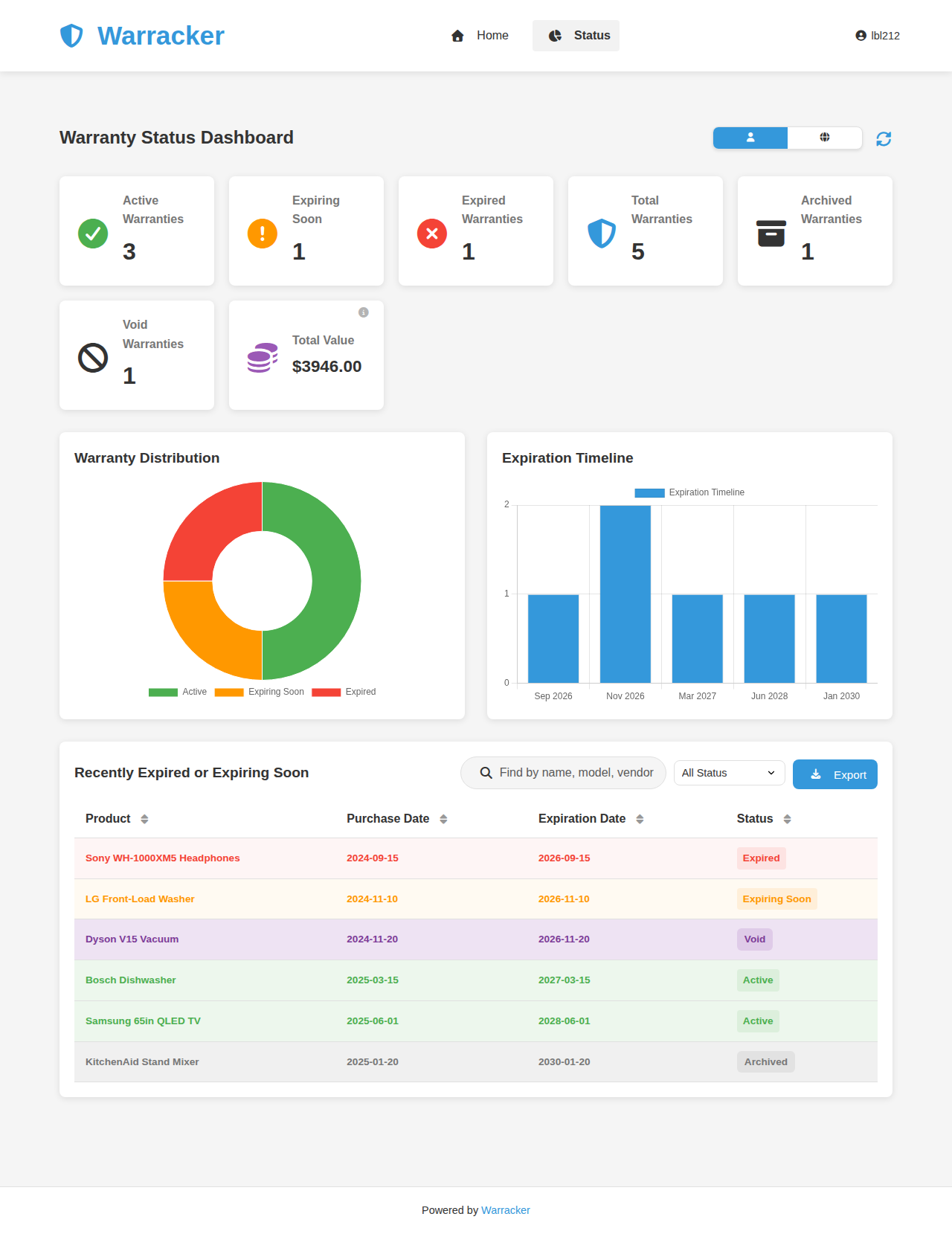
| 📊 Status Dashboard | Visual analytics and stats with charts, tables, and global/user views — including Total Value (in your default currency) and Archived summary cards, plus CSV export of the filtered view |
| 📦 Paperless-ngx Integration | Store/manage documents directly in Paperless-ngx with file-level control |
| 📖 Localization Support | Full multilingual UI with 20 languages, RTL support, instant language switching, and native name display |
Project Status
Warracker is in active development. The essential features are reliable and ready for everyday use. Development is ongoing, with regular updates and improvements.
- ✅ Stable core for tracking, notification , and managing warranty documents, files
- ✅ Full support for self-hosted deployments
- ⚒️ Advanced enhancements are still being worked on
- ✍️ Your feedback and bug reports help shape the future of the app
📸Screenshots
Home Page
Status Dashboard
🛠️Technology Stack
- Frontend: HTML, CSS, JavaScript
- Backend: Python with Flask
- Database: PostgreSQL
- Containerization: Docker and Docker Compose
- Web Server: Nginx
🗺️Roadmap
The current release is 1.0.4. What's planned next — 1.0.5 and the feature requests under consideration — lives on the Roadmap page in the wiki. Shipped work is in the changelog and the releases.
🚀Setup
Prerequisites
- Docker and Docker Compose installed on your system.
Steps
mkdir warracker && cd warracker
curl -O https://raw.githubusercontent.com/sassanix/Warracker/main/Docker/docker-compose.yml
curl -O https://raw.githubusercontent.com/sassanix/Warracker/main/Docker/.env.example
mv .env.example .env
- Fill in the required values in your
.envfile (database credentials,SECRET_KEY, etc.). - Start the stack:
docker compose up -d - Open
http://localhost:8005in your browser. The first account you create automatically becomes the admin.
The Getting Started guide walks through each install route step by step, and Configuration documents every .env variable.
Other platforms



One-click installs on Unraid (Community Apps), Proxmox VE (community helper script), and TrueNAS SCALE (Apps catalog) — see the proxmox/ and truenas/ guides.
Full docker-compose.yml reference
services:
  warracker:
    image: ghcr.io/sassanix/warracker/main:latest
    ports:
      - "8005:80"
    volumes:
      - warracker_uploads:/data/uploads
    env_file:
      - .env
    depends_on:
      warrackerdb:
        condition: service_healthy
    restart: unless-stopped

  warrackerdb:
    image: postgres:15-alpine
    volumes:
      - postgres_data:/var/lib/postgresql/data
    env_file:
      - .env
    restart: unless-stopped
    healthcheck:
      test: ["CMD-SHELL", "pg_isready -U $$POSTGRES_USER -d $$POSTGRES_DB"]
      interval: 5s
      timeout: 5s
      retries: 5

volumes:
  postgres_data:
  warracker_uploads:
📝 Usage
The User Guide walks through every screen, button, and field; the essentials are below.
Accounts & Roles
- The first account created in the system will automatically become the Admin account.
- The Admin can manage other users, assign roles, and has full system permissions.
- Regular users can only manage their own warranties unless granted additional privileges by the Admin.
Adding a Warranty
- Fill in the product details by clicking on Add Warranty.
- Enter the purchase date and warranty duration.
- Optionally upload receipt/documentation.
- Click the Add Warranty button.
Managing Warranties
- Use the search box to filter warranties.
- Click the edit icon to modify warranty details.
- Click the delete icon to remove a warranty.
- A warranty that expires today is still counted as active (not expired) across the dashboard, warranty lists, and expiry notifications.
To import, click Data > Import and choose a CSV file. The full field reference — formats, which fields are required, and how exports encode values — is in the User Guide.
🌐 Localization Support
Warracker offers full multilingual UI support with 20 languages, including RTL (Right-to-Left) support, instant language switching, and native name display. The language is auto-detected from your browser on first visit and saved to your profile. The full list of supported languages is in the User Guide.
Why I Built This
Warracker was born from personal frustration with warranty confusion. When my father’s dishwasher broke, we had the invoice and assumed it was under warranty, only to find out we were referencing the wrong one, and the warranty had ended by a couple of months.
That experience, along with others like it, made me realize how common and avoidable these issues are. So I built Warracker, a simple, organized way to track purchases, receipts, and warranties. It has already saved me money by reminding me to get car repairs done before my warranty expired.
Inspired by Wallos, I wanted to bring the same clarity to warranties that it brought to subscriptions and share it with anyone who's ever been burned by missed coverage.
Contributing
We welcome contributions and appreciate your interest in improving this project! The Contributing page in the wiki covers the development environment setup and how translations work. To get started, please follow these steps:
How to Contribute
- Fork the repository.
- Create a branch for your changes:
git checkout -b feature/amazing-feature - Commit your changes:
git commit -m "Add: amazing feature" - Push to your forked repository:
git push origin feature/amazing-feature - Open a Pull Request with a clear explanation of your changes.
📌Contribution Guidelines
- Start with an issue: Before submitting a Pull Request, ensure the change has been discussed in an issue.
- Help is welcome: Check the issues for open discussions or areas where help is needed.
- Keep it focused: Each Pull Request should focus on a single change or feature.
- Follow project style: Match the project's code style and naming conventions.
- Be respectful: We value inclusive and constructive collaboration.
🤝Contributors:
❤️Supporters:



Join Our Community

Want to discuss the project or need help? Join our Discord community!
🔒Security
Found a vulnerability? Please report it privately instead of opening a public issue — open a private security advisory or reach out on Discord. We credit all responsible disclosures in the release notes and README acknowledgements. Hardening guidance — HTTPS, secrets, closing registration, backups — is on the Security page in the wiki.
📜License
This project is licensed under the GNU Affero General Public License v3.0 - see the LICENSE file for details.
🙏Acknowledgements
Security researchers
- humidnhefty and the CSCE 413 (Texas A&M University) vulnerability-research team — Carrigan Royer, Jayani Singh, Seshadithya Saravanan, Aaditya Srinivasan, Miko Quinones — for the responsible disclosure of a stored XSS vulnerability.
- humidnhefty (Malik Abdullah, Lupine Security) — for the responsible disclosure of an authorization bypass on the
/api/files/document-serving route.
⭐Star History
Explore related projects
awesome-selfhosted/awesome-selfhosted
A list of Free Software network services and web applications which can be hosted on your own servers
335,021 starsimmich-app/immich
High performance self-hosted photo and video management solution.
118,481 starsStirling-Tools/Stirling-PDF
#1 PDF Application on GitHub that lets you edit PDFs on any device anywhere
95,961 starslouislam/uptime-kuma
A fancy self-hosted monitoring tool
93,358 stars