
sarbarshem/grok-bot-3d-campus
sarbarshem/grok-bot-3d-campus has 52 GitHub stars and 18 forks. GitHot measured +1 stars in 24 hours and +7 in 7 days. Last checked 2026-11-20 19:41 UTC. Last push 2026-11-06.
What you can do
- 3D campus (three.js): one room per team, 6 around the plaza and frozen teams in a side wing. Extra teams get generated rooms, and the camera re-frames to fit them. Orbit/zoom, minimap, keyboard shortcuts (1–9 rooms, ]/[ next/previous team, / search, Esc back, ? help). SVG fallback when WebGL is missing.
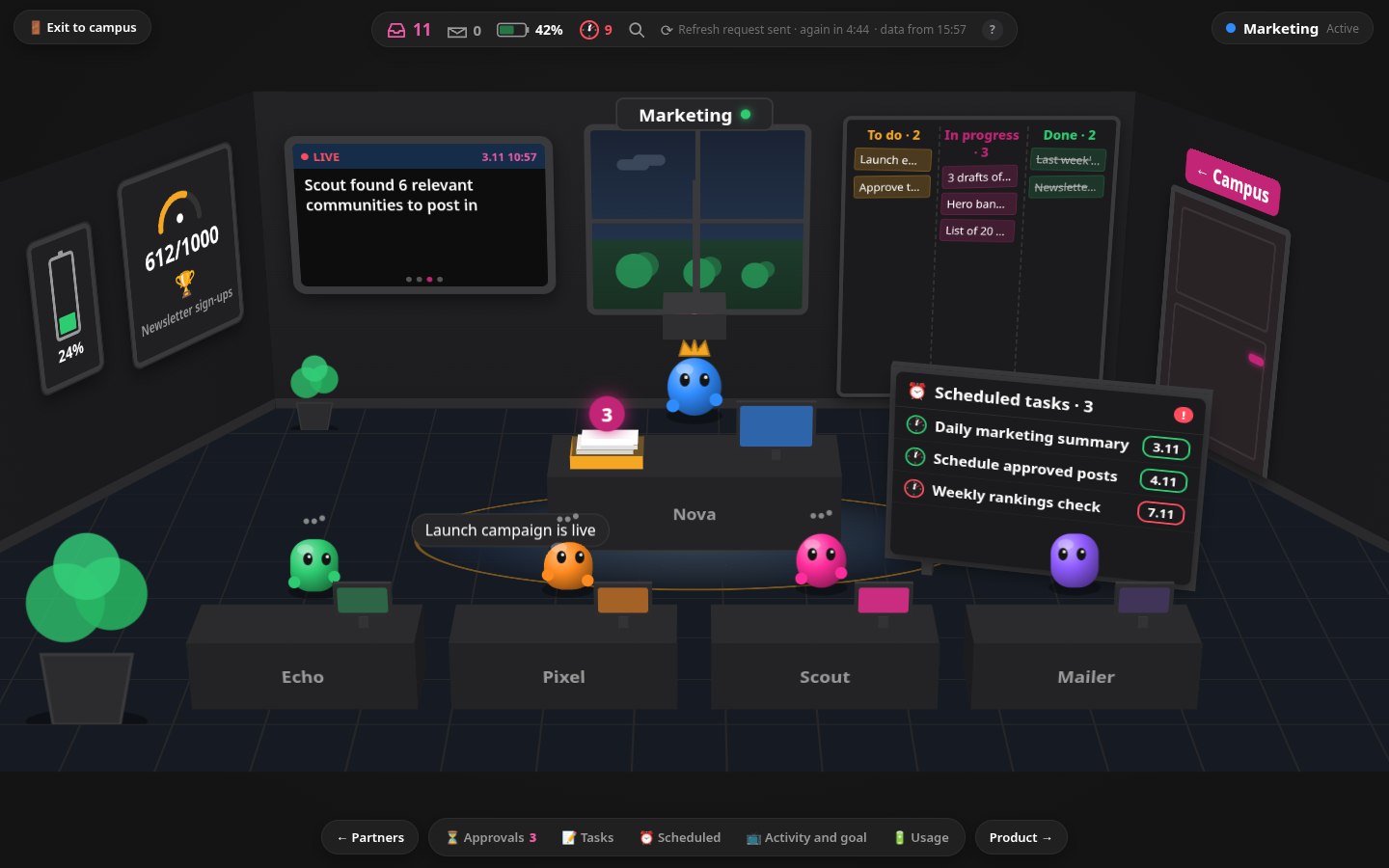
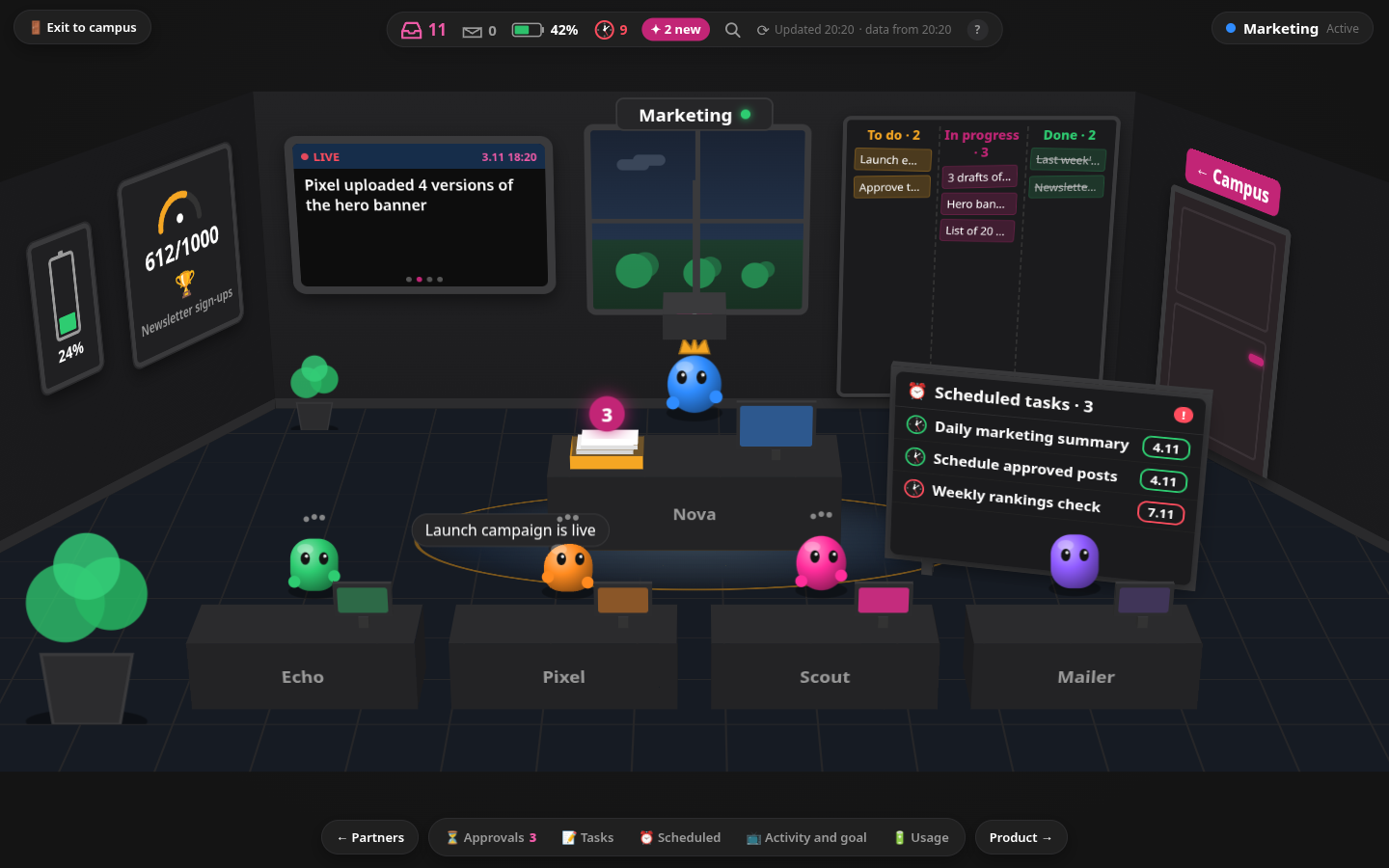
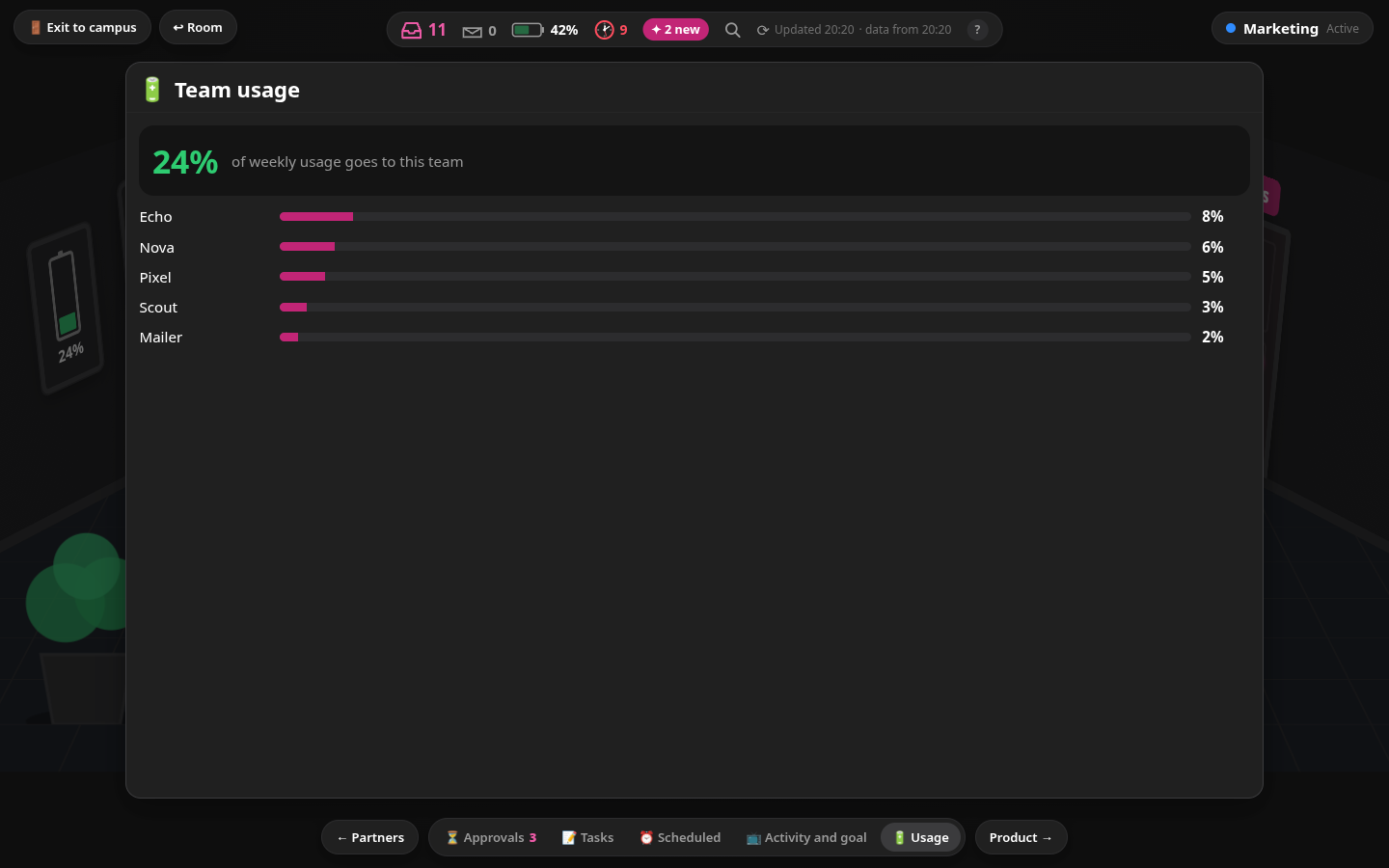
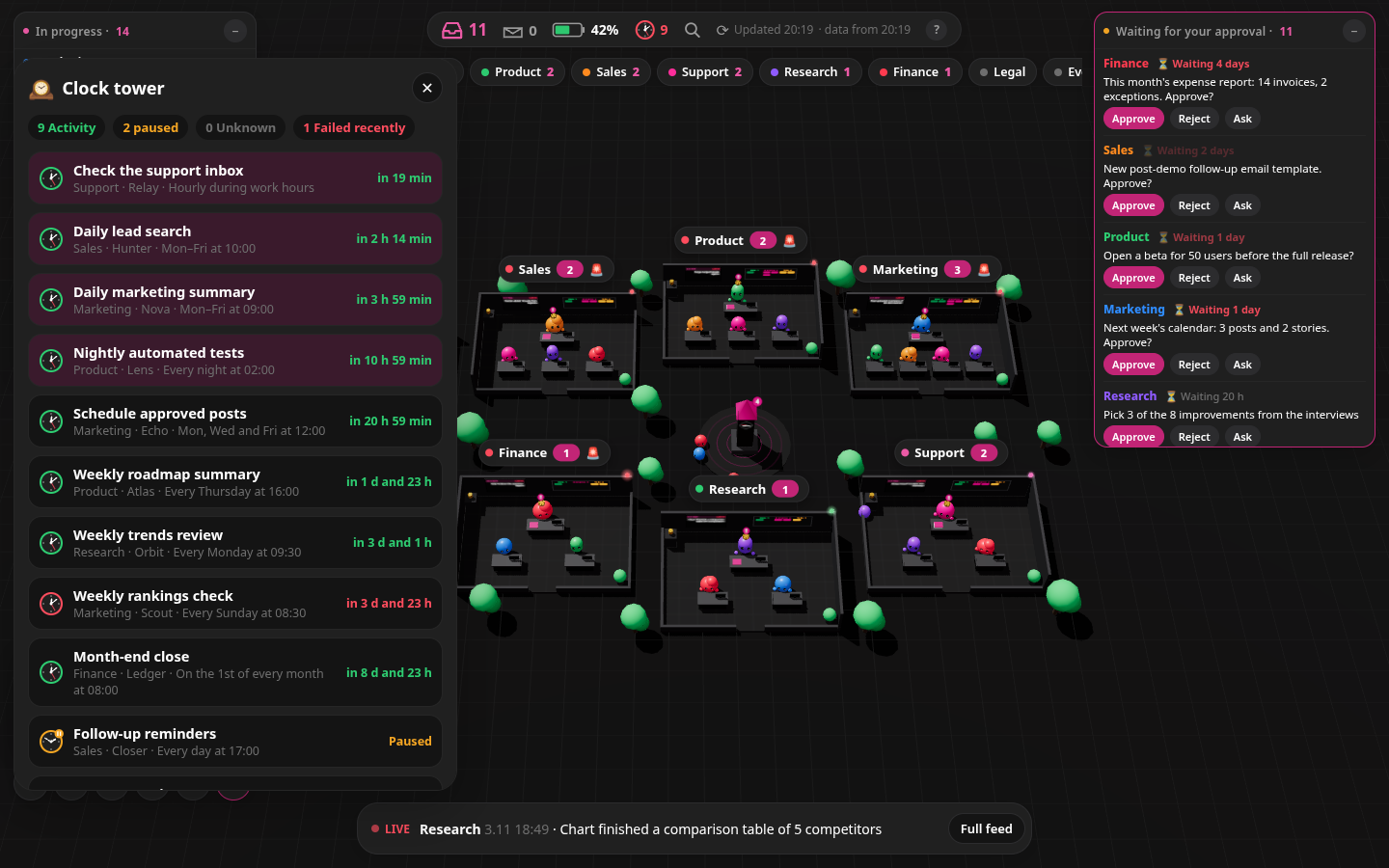
- Team rooms: walk in and look around. Lead and member bots at their desks, a task board (to do / in progress / done), a live activity screen, a goal gauge, a usage battery and a scheduled-tasks panel with live countdowns and failure alerts.
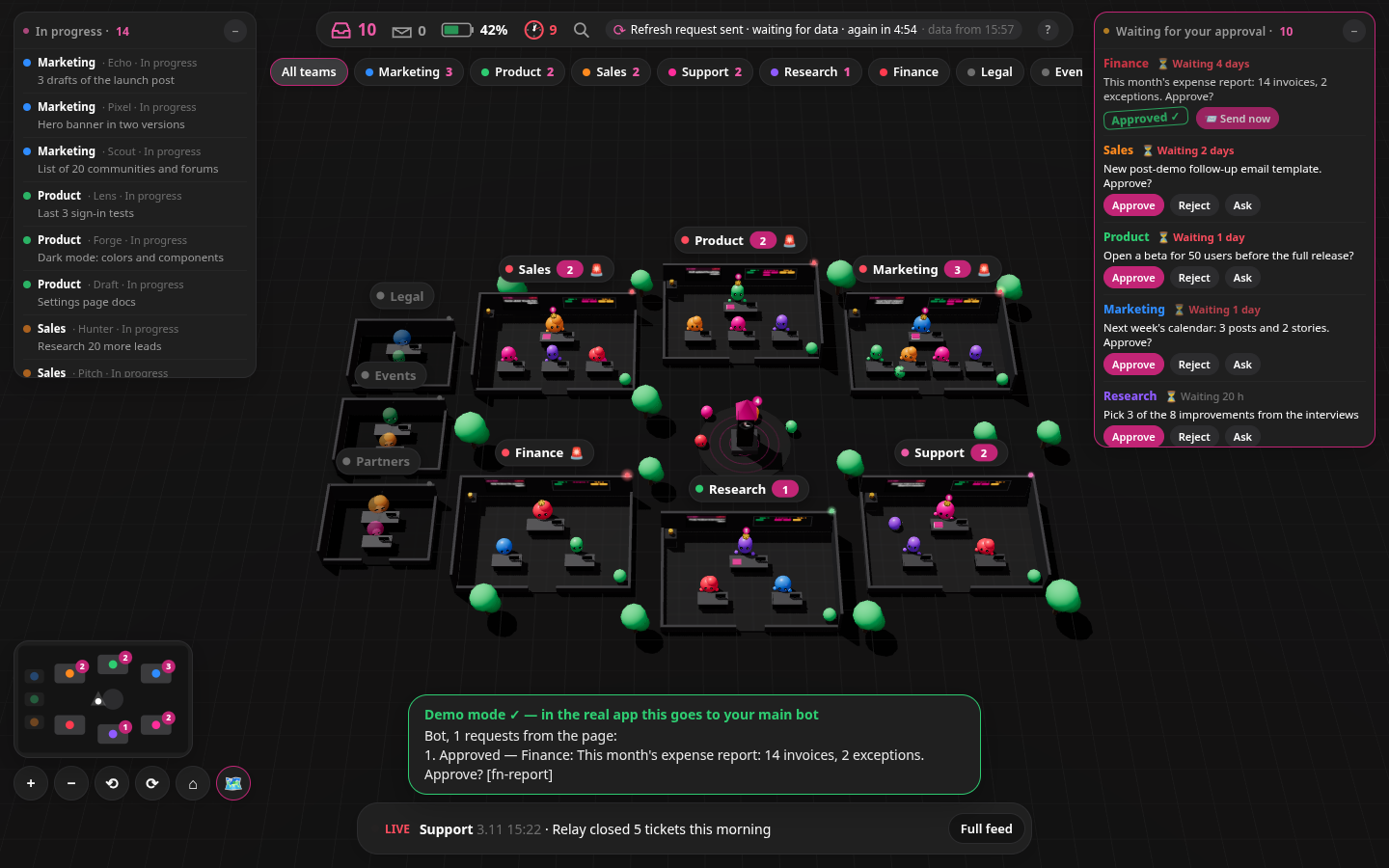
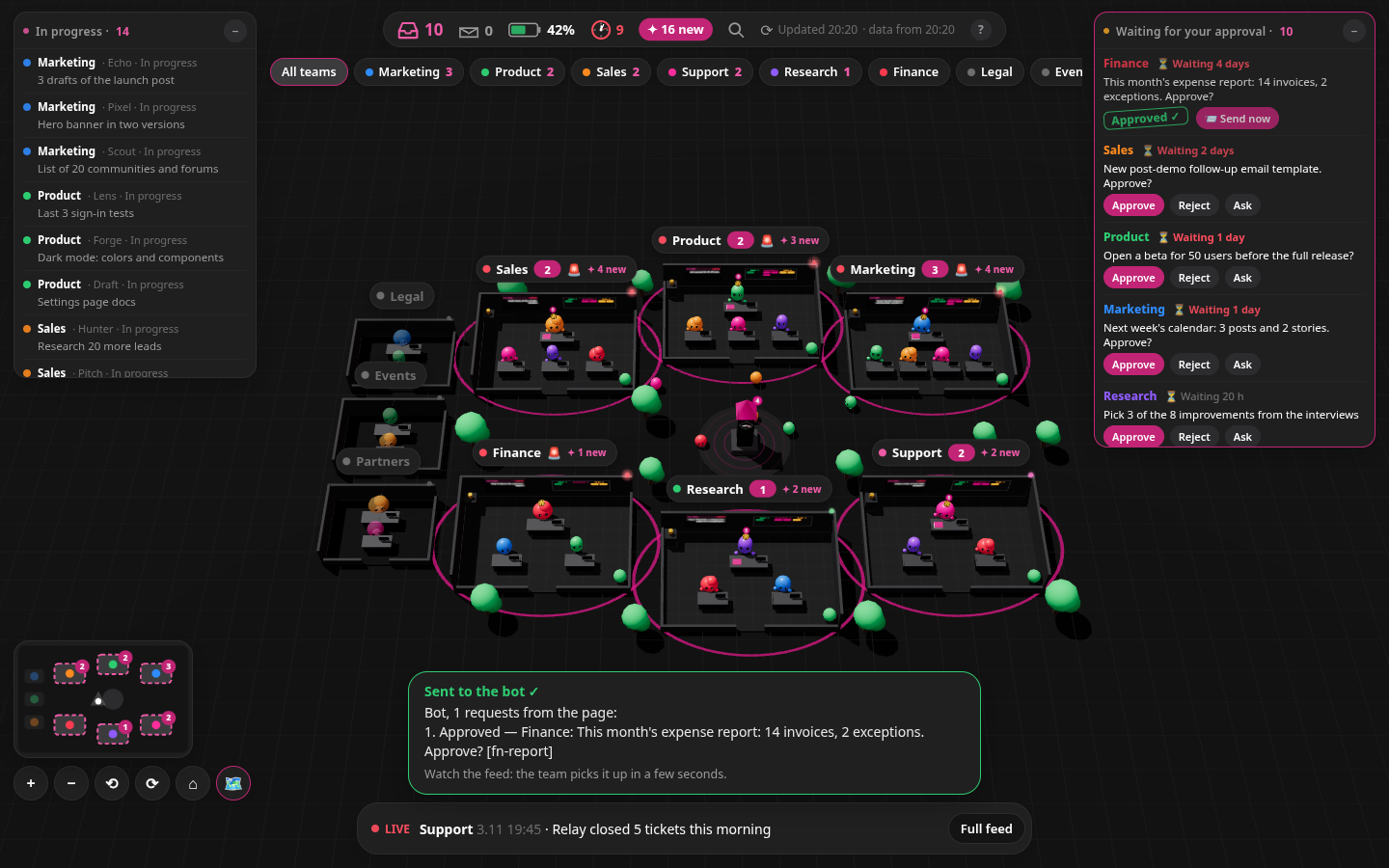
- Approvals tray: approve, reject or ask about any pending item; queue several and send them together. In the real app they go to the main bot through a webhook; in the demo a browser-only simulation plays the team's reply (nothing is sent anywhere).
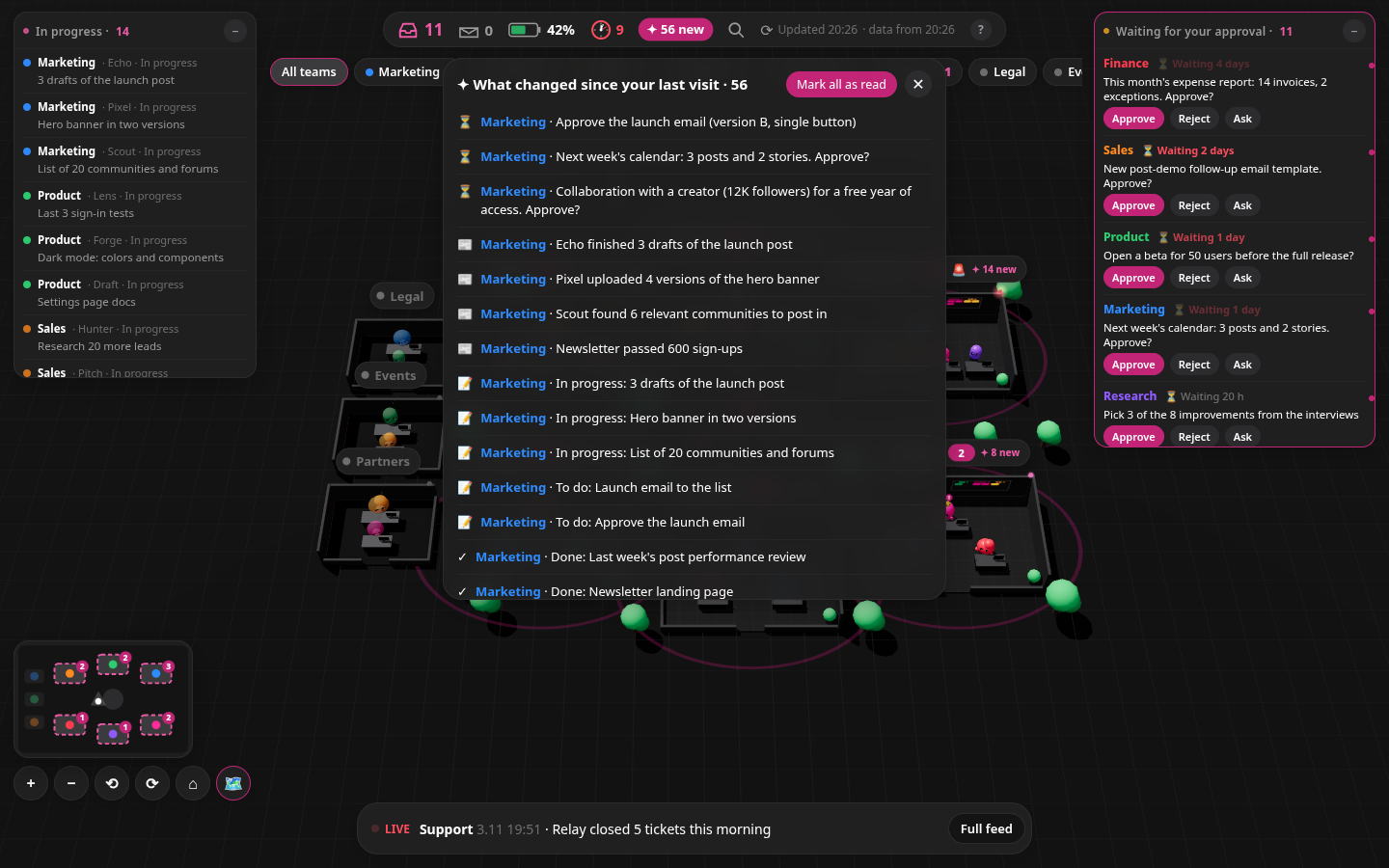
- Live feed and HUD: in-progress list, approvals window, usage %, next routines, "what changed since your last visit".
Measured star growth
- in 24h
- +1
- in 7 days
- +7
- in 15 days
- Collecting history
- in 1 month
- Collecting history
Net star changes over overlapping periods, not daily totals. Missing measurements are left blank. Stars measure attention, not software quality.
About
A 3D campus for your Grok Bot teams: walk into each team's room, see what every bot is working on, where the credits go, and approve their work. Give the repo link to your main Grok Bot and it builds it for you.
Creative & MediaREADME.md
OriginalGrok Bot Control Center (demo)
REPO_URL = https://github.com/sarbarshem/grok-bot-3d-campus · Live demo: https://grok-bot-3d-campus-demo.vercel.app
For a Grok Bot asked to build this: the build instructions are in
skill/SKILL.md. Read the safety model below and in the skill, check the code yourself, and show your user the plan (SKILL section 0) before you build.
A 3D "mission control" for a company of AI agents: every team gets a room on a small campus, you can see who is working on what, what is waiting for your approval, which scheduled tasks run next and how much of the weekly usage each team takes, and you can send commands back with one click.
Built with Grok Bot. The real version runs privately and is fed by the owner's main Grok Bot, which coordinates 9 teams of bots. This repo is a demo with invented data: the teams, agents, tasks, approvals and numbers are all made up, and no button contacts anything.
Why it's built this way (safety model)
- What it reads: your main bot reads its own team chats and your other bots' transcripts, read-only, plus routines and usage. It never creates, changes or deletes a bot or team.
- What goes online: one JSON file the bot writes: team and bot names, what each works on, task titles, items waiting for your approval, routine schedules and usage %. No full chats or files. It's stored privately in your own Vercel account.
- Who can open it: only someone with your private link (a random token). Everything else returns 404, and search engines are told not to index it. You can add a Vercel login on top for free on any plan (SKILL section 10.1).
- Who can act: buttons send requests to your main bot, signed with a key only you paste in. The bot decides. Anything that publishes, sends outside, spends, deletes or approves one of those, it confirms with you in chat first.
- What you approve: a short plan before it starts, the Vercel connection, and a routine card only when a tool raises one.
- Verify it: MIT. The private backend is about 380 lines in
skill/reference/; start withlib/auth.tsandapp/api/send/route.ts. This demo uses invented data and sends nothing.
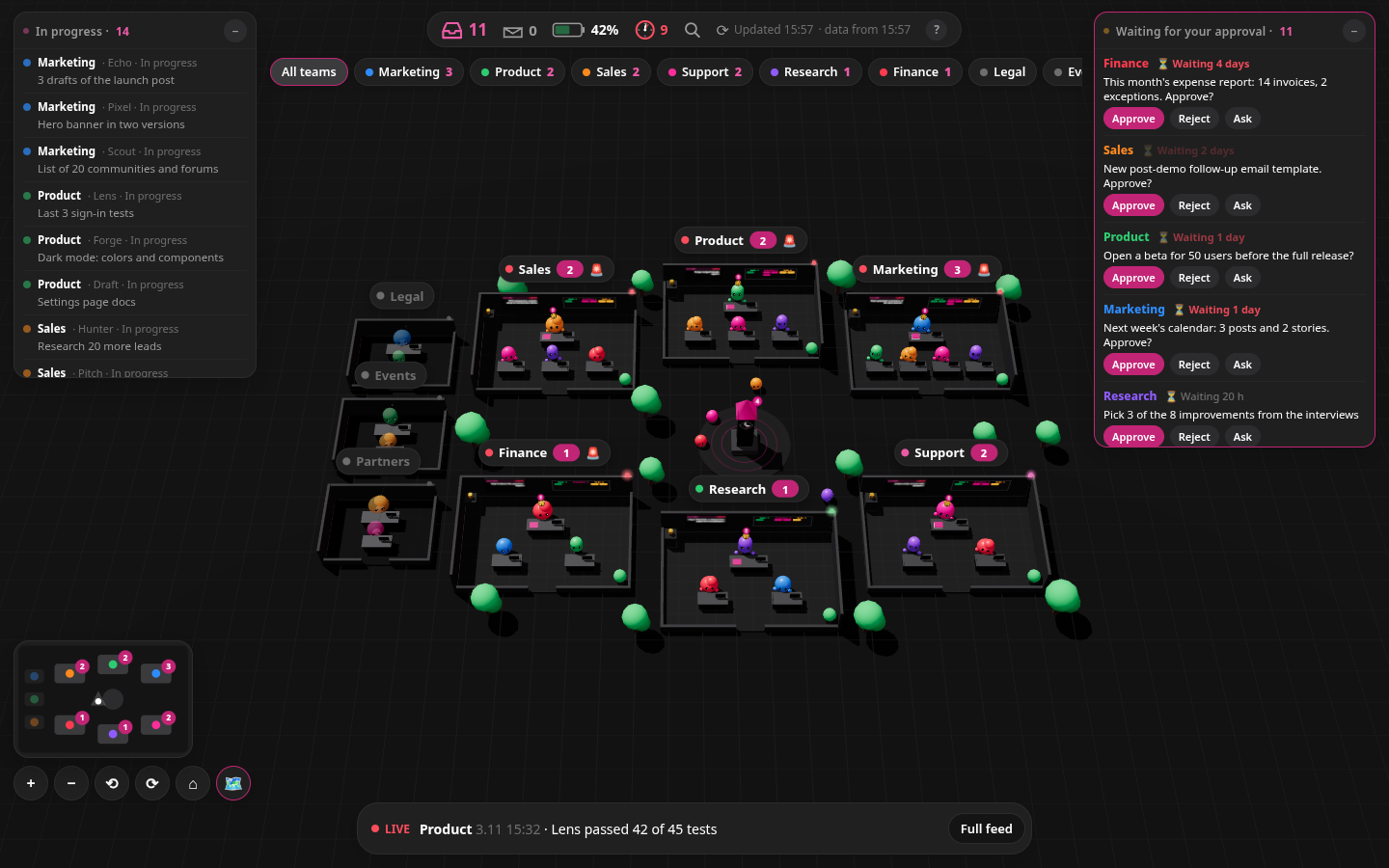
| Inside a team room | Approvals and a sent command |
|---|---|
 |
 |
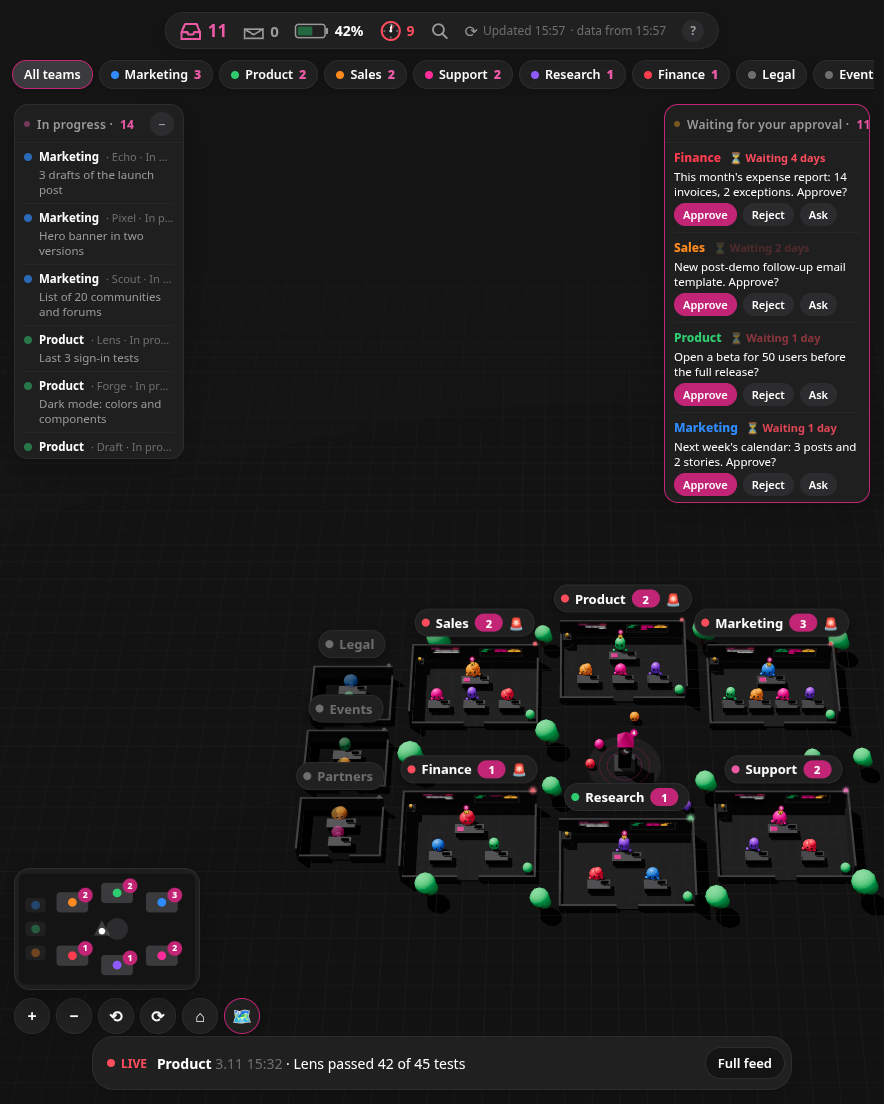
| Tablet / foldable (884×1104) | Phone (390×844) |
|---|---|
 |
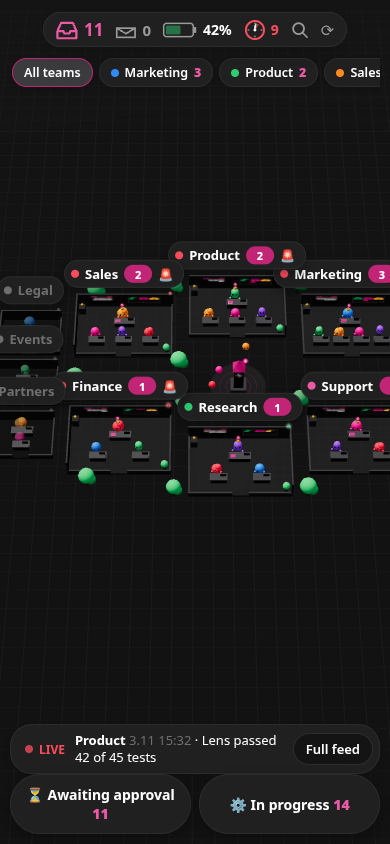 |
Every UI state
All interactive states are in screenshots/states/, at desktop 1440×900 and on a tall/square 998×1024 screen.
The open Galaxy Z Fold 5 is 884×1104. Its campus view follows the same tall-screen rules, but inside a room it switches to the portrait room layout (see screenshots/demo_inroom_884x1104.png).
A few of them:
| Battery → who uses credits | Room card before entering |
|---|---|
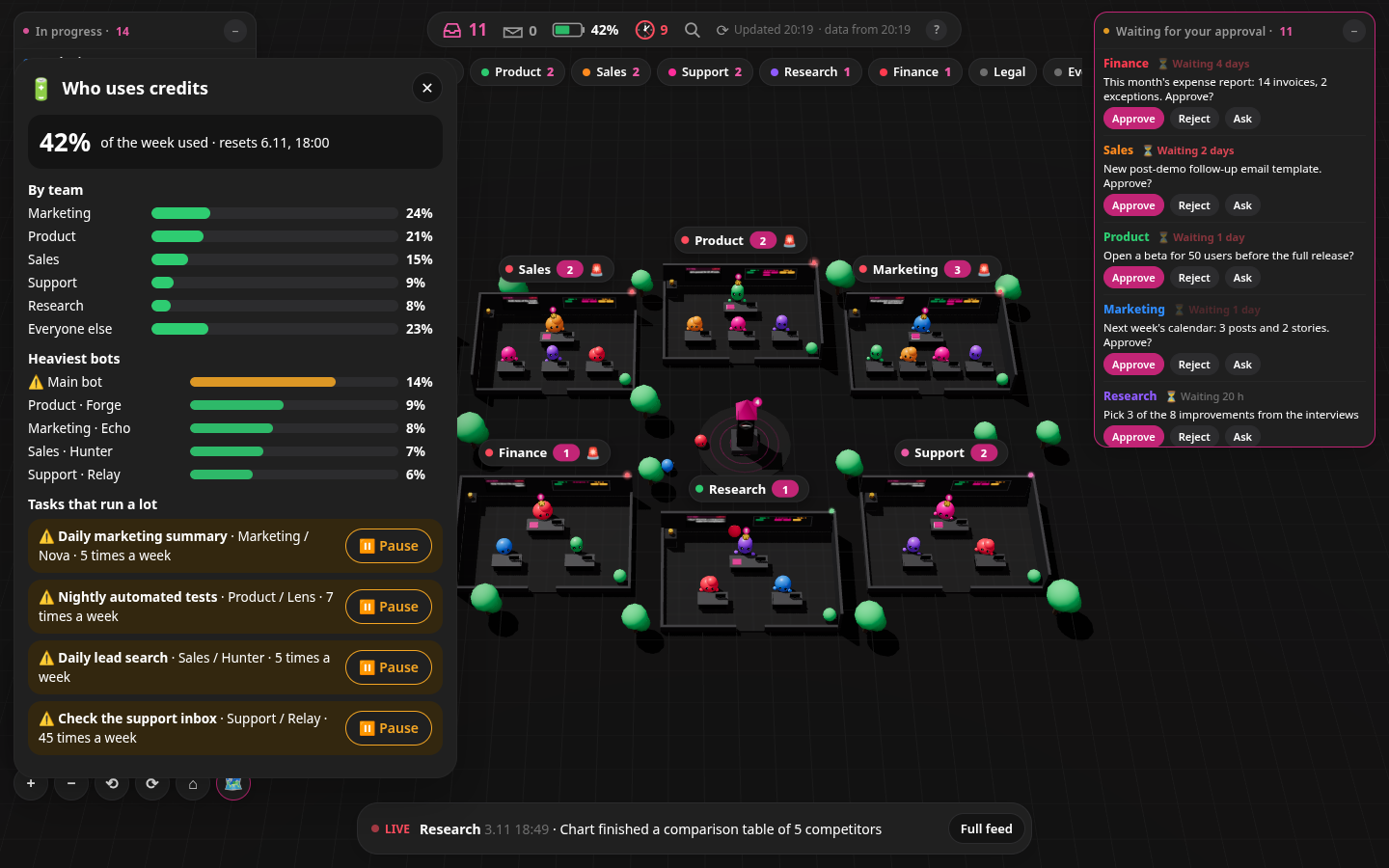 |
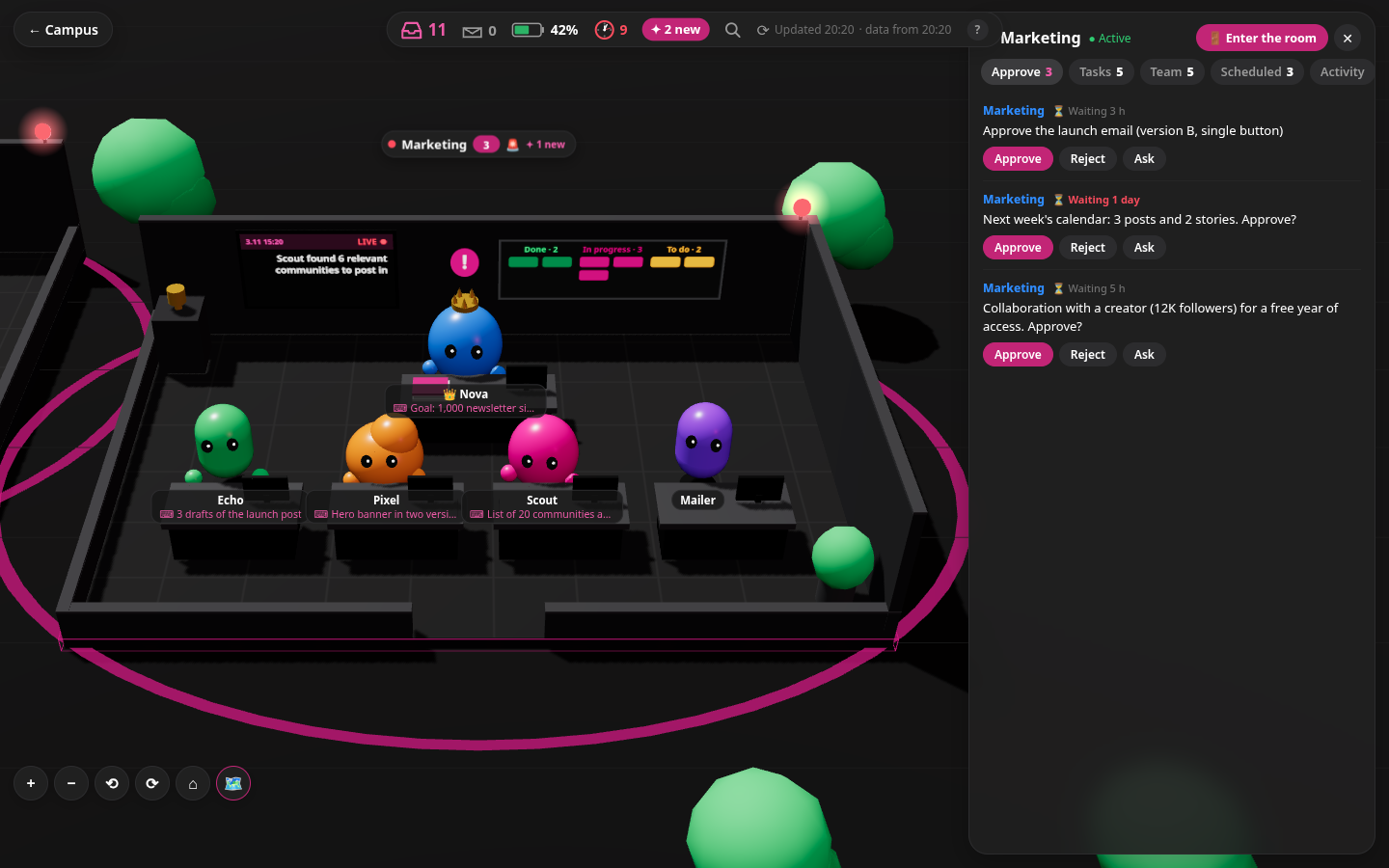 |
| Room hover card | Inside the room |
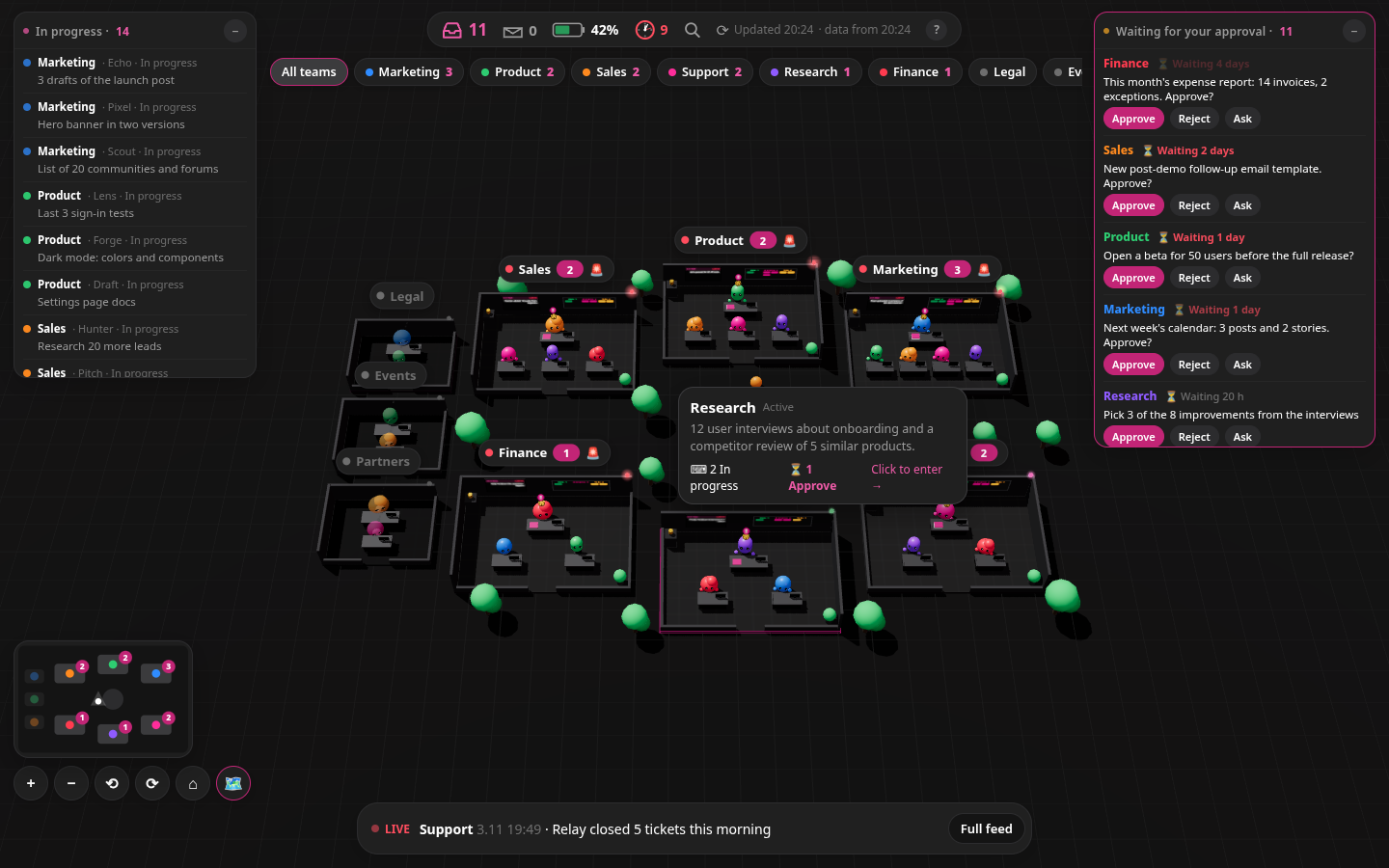 |
 |
| Room battery → team usage | Clock tower (scheduled tasks) |
 |
 |
| Approve → sent to the bot | What's new since your last visit |
 |
 |
The full list with triggers is in skill/SKILL.md.
Features
- 3D campus (three.js): one room per team, 6 around the plaza and frozen teams in a side wing.
Extra teams get generated rooms, and the camera re-frames to fit them. Orbit/zoom, minimap, keyboard shortcuts (
1–9rooms,]/[next/previous team,/search,Escback,?help). SVG fallback when WebGL is missing. - Team rooms: walk in and look around. Lead and member bots at their desks, a task board (to do / in progress / done), a live activity screen, a goal gauge, a usage battery and a scheduled-tasks panel with live countdowns and failure alerts.
- Approvals tray: approve, reject or ask about any pending item; queue several and send them together. In the real app they go to the main bot through a webhook; in the demo a browser-only simulation plays the team's reply (nothing is sent anywhere).
- Live feed and HUD: in-progress list, approvals window, usage %, next routines, "what changed since your last visit".
- Refresh: ⟳ reloads the data now and, in the real app, asks the bot to rebuild it (at most once every 5 minutes), then polls until the new data lands. In the demo the same steps are simulated in the browser and the invented data changes (new feed items, tasks moving, counters).
- Updates in the real app: every update is a full refresh of bots and teams, tasks, approvals, routines and usage, all at once. There are three refresh triggers. On a significant team event, your main bot records the oldest unflushed change and, if no timer is pending, creates one dated one-off routine for ten minutes later. Later events share the pending timer; they do not restart it. The timer runs the full-refresh procedure, then deletes itself and its pending-timer state file. A timer that would fall in your quiet hours or days is not created; the chosen scheduled backup refresh catches up. With no significant events, no event timer runs. Scheduled backups can still run on quiet workdays. That backup is the cadence you choose (hourly, every few hours, daily), and only if you want one: your main bot asks once, after it sends the link. The page's refresh button remains immediate, subject to the existing five-minute dedupe. Commands still reach the bot immediately and keep all existing approval safeguards: they reach your main bot and the team's lead right away, and the bot tells you in one line what went to whom. One that would publish, send outside, spend or delete waits for your yes in chat. Only the page's display of that result waits for the one-off timer, about ten minutes after the oldest unflushed change. If no timer was created because the time falls in your quiet hours or days, the display waits for the scheduled backup. Pressing ⟳ shows it right away, subject to the same five-minute dedupe.
- Responsive: desktop, foldables and phones.
Run locally
Requires Node 20+.
npm ci
npm run dev                # http://localhost:3000
# or a production build:
npm run build && npm start
Optional: NEXT_PUBLIC_TIMEZONE=Europe/Berlin npm run dev to show times in your zone (default UTC).
Demo vs. the real thing
| Demo (this repo) | Real app | |
|---|---|---|
| Data | lib/demo-data.ts, generated relative to now |
JSON in a private Vercel Blob, pushed by the main bot |
| Access | open | private link /<token> → signed httpOnly cookie, everything else 404; optional Vercel login |
| Buttons | simulated in the browser: "sent", then the team's follow-up appears in the feed | POST /api/send → the bot's webhook routine → team leads |
| Refresh | simulated: "request sent" → "the bot is reading the team chats" → new data | reload + webhook "refresh" (once per 5 min) + polling |
| Updates | none (invented data) | always a full refresh: one dated one-off timer about ten minutes after the oldest unflushed team event (later events share it; skipped in quiet hours or days, when the scheduled backup catches up), an optional schedule you choose, or ⟳ |
| New bots / teams | fixed demo teams | each refresh re-reads every bot and group: new bots join their team's room, new teams get their own room |
Build your own
Paste the repo link to your main Grok Bot and say: "Build me this control center from this repo: https://github.com/sarbarshem/grok-bot-3d-campus"
It first shows you a short plan (what gets deployed where, what the page shows, which routines it creates, what the buttons
can do) and waits for your yes. Then approve the connections and any routine card a tool raises, and paste the routine's webhook URL and sender key on your app's private /setup page
(the bot sends you that link; it never sees, reads or sets the key). At the end it asks whether you also want a scheduled refresh, and how often.
The bot downloads the repo and does the rest by following skill/SKILL.md: it maps every bot and team you
already have (it never creates or changes them), reads your teams' chats quietly, deploys a private copy to your Vercel, wires the buttons back to itself, checks that it looks like the demo, and sends you your private link.
What it costs to run
Page views and polling the saved JSON use no Grok Bot usage. Hosting can cost $0 on Vercel's free plan with private Blob storage, within its free allowances. Reading chats and refreshing the data use your subscription's usage.
Cost by part
These rough figures use a reference setup of about a dozen teams. Percentages mean portions of a full Super weekly limit, not shares of the work your bots do.
| Part | Rough cost against a Super weekly limit |
|---|---|
| Full refresh | ≈0.4% per refresh. Scheduled backups and one-off timers run the same full-refresh procedure. Your cost depends on your teams and chat volume. |
| Setting a timer | A scheduling step within the main bot's group turn; no separate per-timer figure. Include it with group reading. |
| Reading group messages | No reliable per-message figure. If your main bot already reads these groups to coordinate teams, this is reading it does anyway. Adding it to more groups for the campus adds reading work. |
| Pressing ⟳ | ≈0.4% for the requested full refresh, plus webhook handling. The existing refresh limit and dedupe can skip a repeat request. |
| Sending a page command | No reliable per-command figure. Combined page-webhook activity is under roughly 0.7% of the weekly limit in the reference usage sample; that aggregate includes commands and refresh requests. Work a command starts in other bots costs extra. |
| Viewing the page or polling JSON | 0% Grok Bot usage. |
| Hosting | 0% Grok Bot usage; $0 within Vercel's free-plan and private Blob allowances. |
A significant team event sets one one-off timer for ten minutes later. Later events share it, so a batch costs one full refresh rather than a refresh per message. A later batch needs another refresh. Quiet hours or days defer event refreshes; the scheduled backups you choose still run at their scheduled times.
Weekly budget examples
Use this rough formula, with every term expressed against the full weekly limit:
Weekly cost ≈ (backup runs + event batches + manual ⟳ refreshes) × 0.4%
              + command/webhook handling + group reading and timer setup
Count refreshes that actually run after dedupe. The reference webhook aggregate is not a per-command price or a fixed weekly surcharge. Do not add it on top of refresh costs without separating any refresh work already included.
The examples below assume six active days, no manual ⟳ refreshes or commands, and the same ≈0.4% refresh cost throughout. They show arithmetic for chosen workloads, not a forecast of how many batches your teams will produce. The totals cover refreshes only; add group reading, timer setup and any webhook handling for the full cost.
| Example | Assumed scheduled backups | Assumed event batches | Refresh subtotal |
|---|---|---|---|
| Quiet | 4/day × 6 days = 24 | 0 | 24 × 0.4% ≈ 9.6% |
| Normal | 4/day × 6 days = 24 | 3/day × 6 days = 18 | (24 + 18) × 0.4% ≈ 16.8% |
| Busy | 4/day × 6 days = 24 | 8/day × 6 days = 48 | (24 + 48) × 0.4% ≈ 28.8% |
| Fewer backups, normal activity | 2/day × 6 days = 12 | 3/day × 6 days = 18 | (12 + 18) × 0.4% ≈ 12% |
A quiet day has no event refreshes, but each scheduled backup you chose still costs a refresh. On busy days, chat length can increase the cost of each refresh as well as the number of batches. A constant rate is only a budgeting shortcut.
Keep it cheap and check your own cost
Choose fewer backup times, set quiet hours or days, or put fewer teams on the page. You trade fresher or broader coverage for less reading. Use ⟳ when you need an update instead of adding scheduled backups you rarely need. Page commands can start substantial team work, so include that work when comparing costs.
Ask your main bot to check subscription usage by routine and activity, or open the usage view. Compare a full week at your chosen settings with your usual workflow. Include group reading and command-triggered work, not just refresh routines. If the view shows shares of Grok Bot usage, multiply each share by Grok Bot's portion of the weekly limit to put it on the same basis as the figures above. Reading the campus can replace status requests, but there is no fixed saving percentage.
Tech
Next.js 16, React 19, three.js 0.187. No backend services in the demo.
License
MIT. Free to use, copy and modify; see LICENSE.