
santimontiel/gaussiancar
santimontiel/gaussiancar has 47 GitHub stars and 2 forks. GitHot measured 0 in 7 days. Last checked 2026-11-09 09:11 UTC. Last push 2026-10-07.
🚕 [IEEE ICRA 2026] GaussianCaR: Gaussian Splatting for Efficient Camera-Radar Fusion
Measured star growth
- in 24h
- Update delayed
- in 7 days
- 0
- in 15 days
- Update delayed
- in 1 month
- Update delayed
Net star changes over overlapping periods, not daily totals. Missing measurements are left blank. Stars measure attention, not software quality.
README.md
Original🚀 GaussianCaR: Gaussian Splatting for Efficient Camera-Radar Fusion
Santiago Montiel-Marín1, Miguel Antunes-García1, Fabio Sánchez-García1,
Ángel Llamazares1, Holger Caesar2, and Luis M. Bergasa1
1 Universidad de Alcalá, 2 Technical University of Delft
📝 Paper · 💻 Project Page · 🤗 Weights
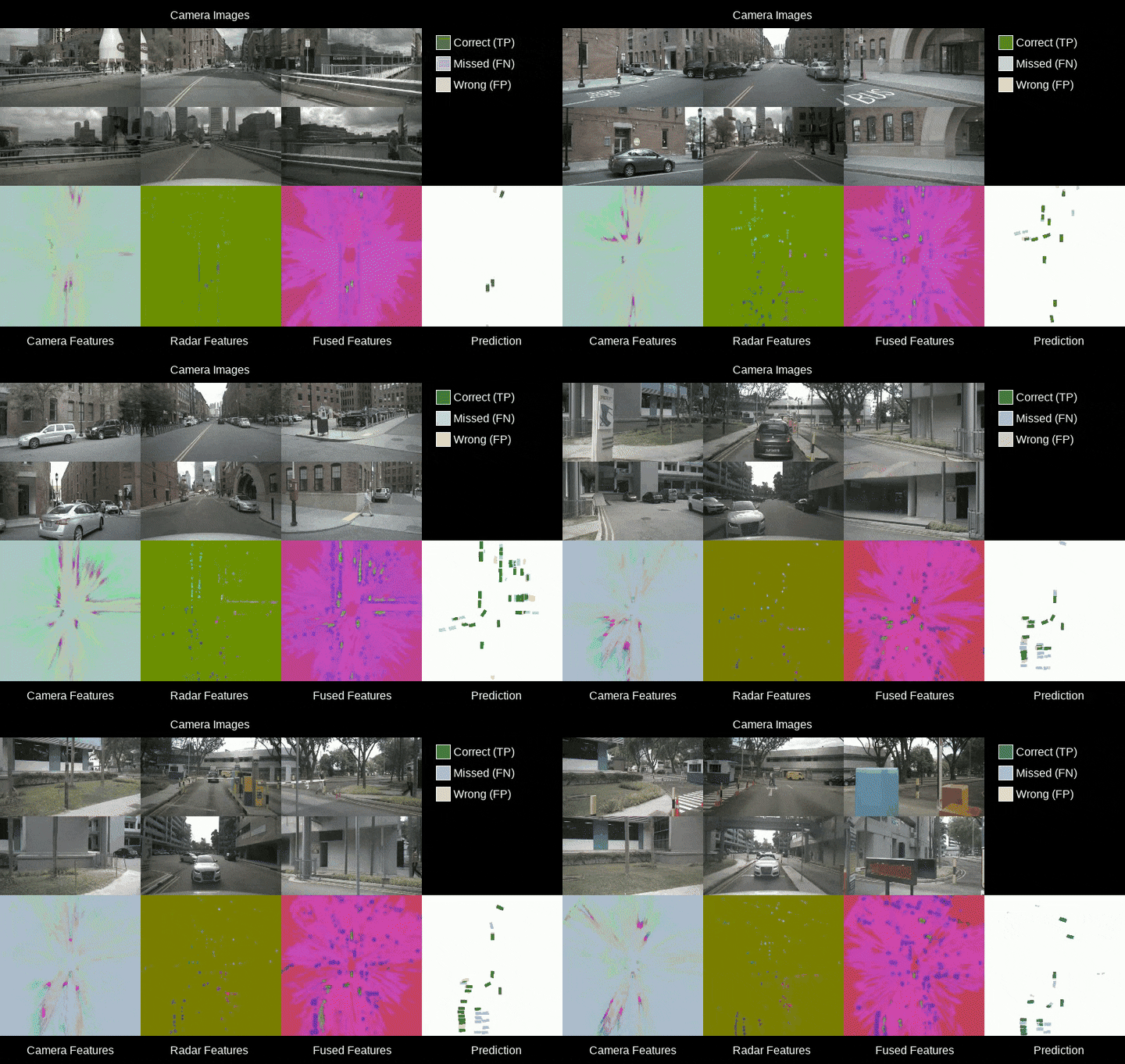





Accepted to IEEE ICRA 2026! ✨
📰 News
[7 Oct. 2026]: The ICRA 2026 proceedings version is out (see Citation), and our arXiv paper has been updated to v2!
[11 Feb. 2026]: We release code and weights!
[31 Jan. 2026]: GaussianCaR has been accepted for publication at IEEE ICRA 2026! See you in Vienna, Austria!
🔍 Abstract
Robust and accurate perception of dynamic objects and map elements is crucial for autonomous vehicles performing safe navigation in complex traffic scenarios. While vision-only methods have become the de facto standard due to their technical advances, they can benefit from effective and cost-efficient fusion with radar measurements. In this work, we advance fusion methods by repurposing Gaussian Splatting as an efficient universal view transformer that bridges the view disparity gap, mapping both image pixels and radar points into a common Bird’s-Eye View (BEV) representation.
Our main contribution is GaussianCaR, an end-to-end network for BEV segmentation that, unlike prior BEV fusion methods, leverages Gaussian Splatting to map raw sensor information into latent features for efficient camera-radar fusion. Our architecture combines multi-scale fusion with a transformer decoder to efficiently extract BEV features.
Experimental results demonstrate that our approach achieves performance on par with, or even surpassing, the state-of-the-art on BEV segmentation tasks (57.3%, 82.9%, 50.1% IoU for vehicles, roads, and lane dividers) on the nuScenes dataset, while maintaining a 3.2x faster inference runtime.
⭐ Key contributions:
- Gaussian Splatting as a universal view transformer for heterogeneous camera–radar fusion in BEV.
- End-to-end differentiable pixels/points → Gaussians → BEV pipeline without voxelization or depth discretization.
- State-of-the-art BEV segmentation efficiency, achieving comparable or better accuracy than prior fusion methods with 3.2x faster inference.
🚀 Getting Started
1. Download the nuScenes Dataset
Download the nuScenes dataset from the official website: trainval, mini, and map expansion. Extract it so that the directory structure looks like this:
  <your/path/to/nuscenes>/
    ├──── maps/
    ├──── samples/
    ├──── sweeps/
    ├──── v1.0-trainval/
    └──── v1.0-mini/
[!NOTE] The nuScenes dataset is large (~400GB). Make sure you have enough disk space before downloading.
Then, set the PATH_TO_NUSCENES environment variable to point to the dataset root:
export PATH_TO_NUSCENES=<your/path/to/nuscenes>
This variable will later be consumed by the Dockerfile, for example:
PATH_TO_NUSCENES := $(shell echo $$PATH_TO_NUSCENES)
You can also automate logging with Wandb by setting the following environment variable:
export WANDB_API_KEY=<your_wandb_api_key>
2. Build and run your container
We provide a Dockerfile and a Makefile to facilitate the setup of the required environment. To build the Docker image, run the following command in the root directory of the repository:
make build
To run the Docker container and build the environment, use the following command:
make run
If the previous command is successful, you should now be inside the Docker container and see a prompt like this:
------------------------------------ System info -----------------------------------

🔄 Checking virtual environment...
✅ .venv found

🔍 Checking datasets availability...
✅ nuScenes dataset at /data/nuscenes found!

🔍 Checking GPU and CUDA availability...
✅ PyTorch is working properly with the GPU.
📍 GPU Information:
   - CUDA version:     12.9
   - Device name:      NVIDIA GeForce RTX 5090
   - Number of GPUs:   1

------------------------------------------------------------------------------------
<your-user>@<your-device>:/workspace →
3. Preprocess the nuScenes Dataset
We use uv to manage our experiments inside the Docker container and hydra for configuration management.
Once inside the Docker container, preprocess the nuScenes dataset by running:
uv run tools/create_data.py
This will create the necessary data files for training and evaluation.
  <your/path/to/nuscenes>/
    ├──── maps/
    ├──── samples/
    ├──── sweeps/
    ├──── v1.0-trainval/
    └──── v1.0-mini/
    └──── labels/       # NEW!!!
        └──── scene-0001/
        └──── scene-0001.json
        └──── ...
        └──── ...
4. Run the training script!
You can now train the GaussianCaR model for either the vehicle segmentation or map segmentation tasks. Please, set the debug flag to False in the configuration files located in the configs/ directory for full training runs.
uv run tools/train.py task=vehicle
And, for the map segmentation task:
uv run tools/train.py task=map
The training runs are highly customizable via the configuration files located in the configs/ directory. You can modify hyperparameters, model architecture, and other settings by editing these files or by passing command-line arguments.
An example of how to change the batch size and number of devices available directly from the command line is shown below:
uv run tools/train.py task=vehicle trainer.batch_size=8 optimizer.lr=0.0001
[!WARNING] At this stage, training is limited to full precision (FP32). Mixed-precision (FP16/BF16) is currently unsupported due to the lack of backward support in the Points-to-Gaussians module (PTv3-based).
5. Validate your run
Once training is complete, you can validate the trained model using the following command:
uv run tools/eval.py task=vehicle checkpoint_path=<path_to_your_checkpoint>
🏋️♂️ Pretrained Weights
You can find the pretrained weights for GaussianCaR on our Hugging Face repository.
| Task | Dataset | Pretrained Weights Link |
|---|---|---|
| Vehicle Segmentation | nuScenes | Download |
| Map Segmentation | nuScenes | Download |
📈 Experimental Results
Table I. BEV Vehicle Segmentation on the nuScenes Validation Set.
| Type | Method | Cam Enc | Radar Enc | IoU (↑) |
|---|---|---|---|---|
| Camera-only | BEVFormer | RN-101 | - | 43.2 |
| GaussianLSS | RN-101 | - | 46.1 | |
| SimpleBEV | RN-101 | - | 47.4 | |
| PointBeV | EN-64 | - | 47.8 | |
| GaussianBeV | EN-64 | - | 50.3 | |
| Camera-radar | SimpleBEV++ | RN-101 | PFE+Conv | 52.7 |
| SimpleBEV | RN-101 | Conv | 55.7 | |
| BEVCar | DINOv2/B | PFE+Conv | 58.4 | |
| CRN | RN-50 | SECOND | 58.8 | |
| BEVGuide | EN-64 | SECOND | 59.2 | |
| GaussianCaR (ours) | EVIT-L2 | PTv3 | 57.3 |
Table II. BEV Map Segmentation on the nuScenes Validation Set.
| Type | Method | Driv. Area IoU (↑) | Lane Div. IoU (↑) |
|---|---|---|---|
| Camera-only | LSS | 72.9 | 20.0 |
| BEVFormer | 80.1 | 25.7 | |
| GaussianBeV | 82.6 | 47.4 | |
| Camera-radar | BEVGuide | 76.7 | 44.2 |
| Simple-BEV++ | 81.2 | 40.4 | |
| BEVCar | 83.3 | 45.3 | |
| GaussianCaR (ours) | 82.9 | 50.1 |
Table III. Inference Speed Comparison on an NVIDIA RTX 4090.
| Method | Veh. IoU (↑) | ms (↓) | FPS (↑) |
|---|---|---|---|
| Simple-BEV | 55.7 | 57.6 | 17.4 |
| Simple-BEV++ | 52.7 | 211.3 | 4.7 |
| BEVCar | 58.4 | 245.6 | 4.1 |
| GaussianCaR (vehicle) | 57.3 | 75.6 | 13.2 |
| GaussianCaR (map) | - | 81.1 | 12.3 |
🖊️ Citation
If you find this work useful for your research, please consider citing us following the BibTeX entry:
@inproceedings{montielmarin2026gaussiancar,
  title     = {GaussianCaR: Gaussian Splatting for Efficient Camera-Radar Fusion},
  author    = {Montiel-Marín, Santiago and Antunes-García, Miguel and
              Sánchez-García, Fabio and Llamazares, Ángel and
              Caesar, Holger and Bergasa, Luis M.},
  booktitle = {IEEE International Conference on Robotics and Automation (ICRA)},
  pages     = {13035--13042},
  year      = {2026},
  doi       = {10.1109/ICRA57385.2026.11697071}
}
📮 Contact
If you have any questions or suggestions, feel free to open an issue or contact us directly via email at: [email protected].
📄 License
This project is released under the Apache-2.0 License. See LICENSE for details.
🫂 Acknowledgements
This work has been supported by projects PID2021-126623OB-I00 and PID2024-161576OB-I00, funded by MCIN/AEI/10.13039/501100011033 and co-funded by the European Regional Development Fund (ERDF, “A way of making Europe”), by project PLEC2023-010343 (INARTRANS 4.0) funded by MCIN/AEI/10.13039/501100011033, and by the R&D program TEC-2024/TEC-62 (iRoboCity2030-CM) and ELLIS Unit Madrid, granted by the Community of Madrid.
Explore related projects
tensorflow/tensorflow
An Open Source Machine Learning Framework for Everyone
201,427 starshuggingface/transformers
🤗 Transformers: the model-definition framework for state-of-the-art machine learning models in text, vision, audio, and multimodal models, for both inference and training.
168,711 starsAUTOMATIC1111/stable-diffusion-webui
Stable Diffusion web UI
165,274 starsComfy-Org/ComfyUI
The most powerful and modular diffusion model GUI, api and backend with a graph/nodes interface. The fastest local inference engine in the world.
146,024 stars