
samestrin/llm-pdf-ocr-api
samestrin/llm-pdf-ocr-api has 37 GitHub stars and 11 forks. GitHot measured 0 stars in 24 hours. Last checked 2026-11-09 14:49 UTC. Last push 2026-11-04.
A Python-based REST API for PDF OCR using AI models with PyTorch and Transformers that runs in a Docker container.
Measured star growth
- in 24h
- 0
- in 7 days
- Collecting history
- in 15 days
- Collecting history
- in 1 month
- Collecting history
Net star changes over overlapping periods, not daily totals. Missing measurements are left blank. Stars measure attention, not software quality.
README.md
Originalllm-pdf-ocr-api


llm-pdf-ocr-api is a small FastAPI service that reads a PDF page by page and returns Markdown or JSON. Each page is read the cheapest way that works and the response says which way it was:
text_layer: the PDF's own text, when it has a usable one.tesseract: OCR with Tesseract, for scanned pages, with a 0 to 1 confidence.vision: a vision model you point it at (local or in the cloud), if you configure one.
A page that cannot be read is reported as failed with a reason; it is never returned as an empty page. Long PDFs can run as jobs with per-page progress.
Quick start
Run the published image (no GPU and no model download; Tesseract is inside):
docker run -p 5000:5000 ghcr.io/samestrin/llm-pdf-ocr-api
Or build it from this checkout and run that:
docker build -t llm-pdf-ocr-api .
docker run -d --name api -p 5000:5000 llm-pdf-ocr-api
Then open http://localhost:5000/ to drop in a PDF from the browser, or send it one:
curl -F [email protected] localhost:5000/v1/extract
docker compose up runs the same image, and docker compose --profile vision up -d adds a local Ollama server for the vision backend. To run without Docker, install uv and Tesseract, then:
uv sync
uv run uvicorn llm_pdf_ocr.app:app --port 5000
Configuration
Everything is an environment variable; none is required.
| Variable | Default | Meaning |
|---|---|---|
OCR_LLM_BASE_URL |
empty | Root of an OpenAI-compatible endpoint (ending in /v1). The vision backend is off while this is empty. |
OCR_LLM_DEFAULT_MODEL |
none | Vision model used when a request names none; required when OCR_LLM_BASE_URL is set. |
OCR_LLM_ALLOWED_MODELS |
the default model | Comma list of models a request may pick. |
OCR_LLM_API_KEY |
empty | Bearer key for the endpoint. |
OCR_LLM_TIMEOUT_SECONDS |
60 | Per-request timeout to the vision endpoint. |
OCR_LLM_CONCURRENCY |
2 | Vision requests in flight at once. |
OCR_LLM_FALLBACK_TO_TESSERACT |
false (true in docker-compose.yml) |
Read a page with Tesseract when the vision model fails it. |
OCR_MAX_FILE_MB |
50 | Largest upload; over it, 413 file_too_large. |
OCR_MAX_PAGES |
500 | Most pages in one PDF; over it, 413 too_many_pages. |
OCR_PAGE_TIMEOUT_SECONDS |
120 | Time allowed per page. |
OCR_JOB_TTL_SECONDS |
3600 | How long a finished job's result is kept. |
OCR_MAX_JOBS |
20 | Jobs held at once. |
OCR_WEB_PAGE |
true | Serve the web page at /. Set false for an API-only deployment: / and its files answer 404. |
Vision setup, with vLLM, Ollama and cloud examples, is in Vision model backend.
Benchmark
Twenty freely licensed PDFs (born-digital, two-column, tables, forms, scans and poor scans) with reference text, in benchmarks/. Results from uv run python benchmarks/run.py, committed in benchmarks/results/2026-11-03.md, which also has the per-document rows:
| Method | Text score (1 − CER) | Table F1 | Seconds per page | Failed pages |
|---|---|---|---|---|
text_layer |
0.557 | 0.000 | 0.01 | 7 |
tesseract |
0.702 | 0.000 | 2.43 | 0 |
vision |
not measured | not measured | not measured | not measured |
A document with a failed page scores 0, so text_layer is penalised for the seven scanned pages it cannot read (it fails them rather than guessing). Neither plain-text method recovers Markdown tables, so Table F1 is 0 for both. The vision row is empty because the committed run had no vision endpoint; it is filled in by running the benchmark with OCR_LLM_BASE_URL set.
Coming from 0.0.1
0.0.1 was a Flask service that ran TrOCR on CUDA. 1.0.0 is a different service with the same repository:
- Use
POST /v1/extractinstead of/ocr. It returns Markdown or JSON, says how each page was read and lists failed pages. /ocrstill works but is deprecated. It returns{"text": ..., "failed_pages": [...]}, and itsmodel,threshold_value,kernel_width,kernel_heightandmin_areafields are now ignored.- No model is downloaded and no GPU is needed. TrOCR, PyTorch and Transformers are gone; scanned pages are read with Tesseract, or with a vision model if you configure one.
- The server is uvicorn on port 5000 (it was gunicorn), and runs as a non-root user. Run one worker only, because jobs are held in memory.
- Install with
uv sync;src/requirements.txtis gone.
Endpoints
Interactive OpenAPI docs are served at /docs (schema at /openapi.json).
Extract
Endpoint: /v1/extract Method: POST
Read a PDF page by page and return Markdown or JSON. Each page says how it was read: text_layer (the PDF's own text), tesseract (OCR, with a 0 to 1 confidence) or vision (a vision model, named in model).
file: PDF fileformat(optional):markdown(default) orjson.pages(optional): 1-based pages to read, such as1-3,5. Defaults to every page.method(optional):auto(default) uses the text layer when it is usable, else the vision model if the operator configured one, else Tesseract.text_layer,tesseractorvisionreads every page that way.model(optional): the vision model to use, from the operator'sOCR_LLM_ALLOWED_MODELS. Defaults toOCR_LLM_DEFAULT_MODEL. Any other model is refused with 400model_not_allowed, andmethod=visionwith no vision model configured is refused with 400vision_not_configured.
curl -F [email protected] -F format=json -F pages=1-2 localhost:5000/v1/extract
A page that could not be read is returned as failed, with an error code and message, and is listed in failed_pages; the other pages are still returned.
To read scanned pages with a vision model, local or in the cloud, see Vision model backend. With none configured, scanned pages are read with Tesseract.
If the vision model times out, is rate limited (HTTP 429), returns an error or sends a reply that cannot be read, the page is failed with vision_failed and a message giving the reason. If the operator sets OCR_LLM_FALLBACK_TO_TESSERACT=true (off by default; docker-compose.yml turns it on unless you set it), Tesseract reads that page instead: its method is tesseract and its fallback (JSON) or a Read with Tesseract because ... line (Markdown) names the vision model and the reason it failed. fallback is null on every other page.
Jobs
Endpoint: /v1/jobs Method: POST, then /v1/jobs/{id} Method: GET
For a long PDF that takes minutes to read. POST /v1/jobs takes the same fields as /v1/extract and checks them the same way, then answers at once with 202, {"id": ..., "status": "queued"} and a Location header. GET /v1/jobs/{id} returns the job's status (queued, running, done or failed), pages_total, pages_done, each selected page as pending, ok or failed, and, once done, the result: the Markdown text, or the JSON document /v1/extract would return.
curl -F [email protected] -F format=json localhost:5000/v1/jobs
curl localhost:5000/v1/jobs/<id>
curl -o page1.png localhost:5000/v1/jobs/<id>/pages/1.png
While a job runs it renders each page it reads as a PNG (100 DPI, longer side at most 1600 px), served at GET /v1/jobs/{id}/pages/{n}.png. A page the job does not read, or has not rendered yet, answers 404 page_not_found.
Jobs are held in the service's memory and run one at a time. The PDF is dropped when its job ends, and the result and page images OCR_JOB_TTL_SECONDS (default 3600) after that; then the job answers 404 job_not_found. At most OCR_MAX_JOBS (default 20) jobs are held at once, finished ones included until they expire; over that, POST answers 429 too_many_jobs. Because jobs live in memory, run a single uvicorn worker, as the Docker image does, and expect jobs to be lost on a restart.
Web page
Endpoint: / Method: GET
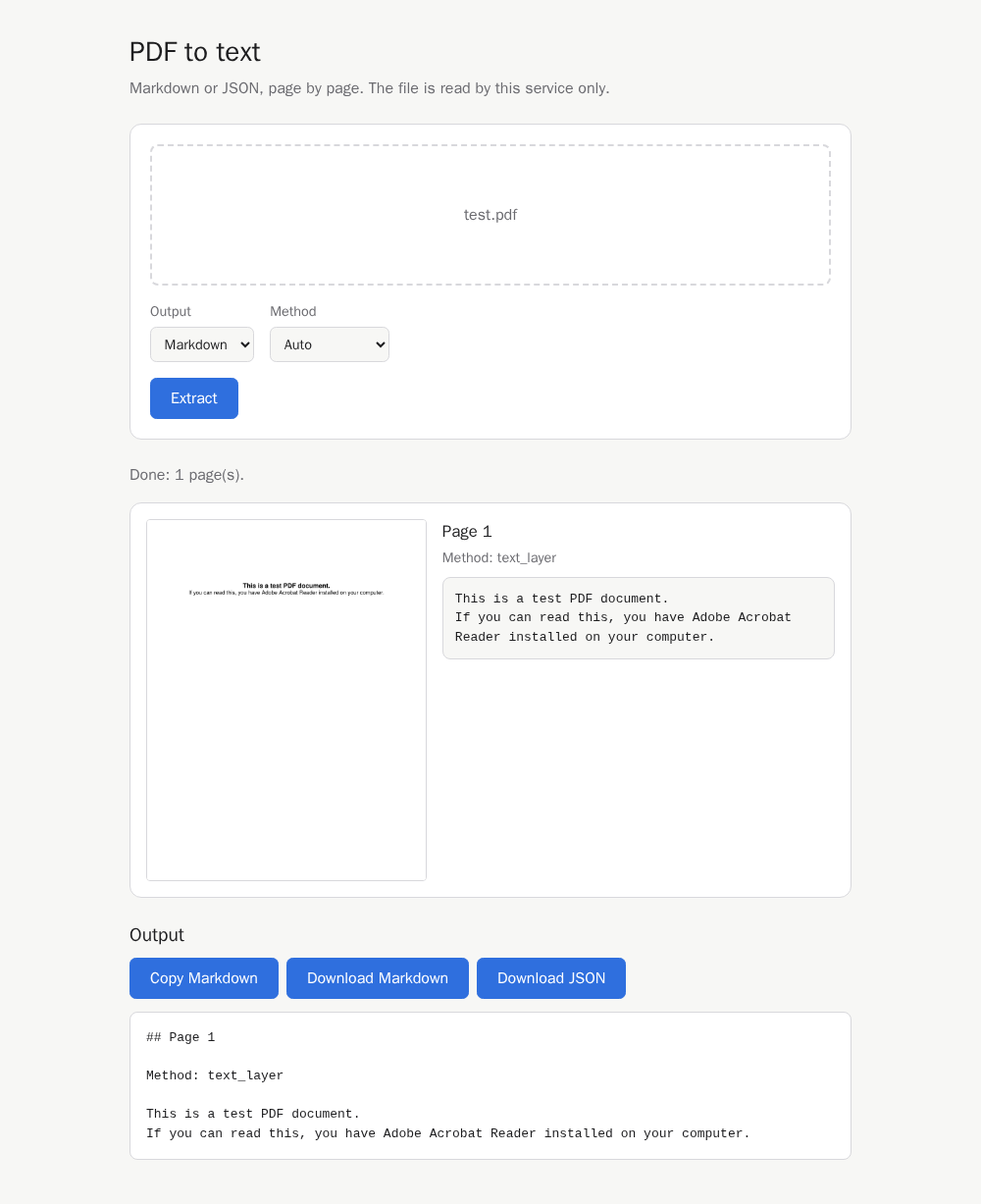
A page to use the service from a browser: drop or pick a PDF, choose Markdown or JSON and a method, and follow the job's progress. The result shows each page's image beside its text, the method that read it, and why it failed if it did; the full Markdown or JSON follows. The Markdown can be copied to the clipboard (which the browser allows on localhost or HTTPS), and the result downloaded as result.md or result.json. The page follows the browser's light or dark theme and fits a phone-width screen. Page text is shown as text, never as HTML, and a job that has expired is reported as an error. It is plain HTML, CSS and JavaScript shipped inside the package (no build step), served with Content-Security-Policy: default-src 'self', and loads nothing from any other origin, so it works with no network. For an API-only deployment, set OCR_WEB_PAGE=false: / and the page's files then answer 404, and every API endpoint works as before.
Capabilities
Endpoint: /v1/capabilities Method: GET
Returns the methods a request may use and the vision models it may pick, for example {"methods": ["auto", "text_layer", "tesseract"], "models": []}. vision and the OCR_LLM_ALLOWED_MODELS names appear only when a vision model is configured. The endpoint URL and key are never returned.
OCR (deprecated)
Endpoint: /ocr Method: POST
Kept for users of 0.0.1. Returns {"text": ..., "failed_pages": [...]}: the text of every page that was read, and the pages that failed. The 0.0.1 model, threshold_value, kernel_width, kernel_height and min_area fields are ignored, and no model is downloaded. Pages are routed as method=auto on /v1/extract. Use /v1/extract instead.
file: PDF file
Health
Endpoint: /health Method: GET
Returns {"status": "ok"}.
Error Handling
A request that cannot be served returns {"error": {"code": ..., "message": ..., "request_id": ...}}, with no stack trace. request_id is also the X-Request-ID response header of every response and appears in the service log line for the request, which never holds the file or any page text:
- 400 Bad Request:
invalid_pdf(not a readable PDF, or it has no pages),encrypted_pdf,invalid_page_rangeorpage_out_of_range. - 404 Not Found:
job_not_found, for a job id that does not exist or has expired. - 413 Content Too Large:
file_too_largeortoo_many_pages. - 404 / 405:
not_foundormethod_not_allowed, for a route that does not exist or a wrong method. - 422 Unprocessable Entity:
invalid_request, a missingfileor an unknownformat. - 500 Internal Server Error:
internal_error, for a failure the service did not expect; the log names only its type. - 429 Too Many Requests:
too_many_jobs.
Contribute
Contributions to this project are welcome. Please fork the repository and submit a pull request with your changes or improvements.
License
This project is licensed under the MIT License - see the LICENSE file for details.
Share


Explore related projects
affaan-m/ECC
The agent harness performance optimization system. Skills, instincts, memory, security, and research-first development for Claude Code, Codex, Opencode, Cursor and beyond.
300,256 starsNousResearch/hermes-agent
The agent that grows with you
262,088 starsmultica-ai/andrej-karpathy-skills
A single CLAUDE.md file to improve Claude Code behavior, derived from Andrej Karpathy's observations on LLM coding pitfalls.
231,377 starsfirecrawl/firecrawl
Supercharge your AI agents with data from the web and beyond. Building the library for superintelligence. 🔥
199,847 stars