
sakurartro/luma has 34 GitHub stars and 1 forks. GitHot measured 0 stars in 24 hours. Last checked 2026-11-09 06:34 UTC. Last push 2026-11-07.
Smart launcher for you, and your AI agent.
What you can do
- Fuzzy search of applications and files
- Full-text search inside documents (txt, md, pdf, docx…) — opt-in; matches show a snippet of the text
- Calculator (2 + 2) and currency conversion (100 usd to eur)
- Applications from all XDG dirs — system, ~/.local/share, Flatpak, Snap; a user .desktop override shadows the system entry
Measured star growth
- in 24h
- 0
- in 7 days
- Update delayed
- in 15 days
- Update delayed
- in 1 month
- Update delayed
Net star changes over overlapping periods, not daily totals. Missing measurements are left blank. Stars measure attention, not software quality.
README.md
Original
Luma
Smart launcher for you, and your AI agent
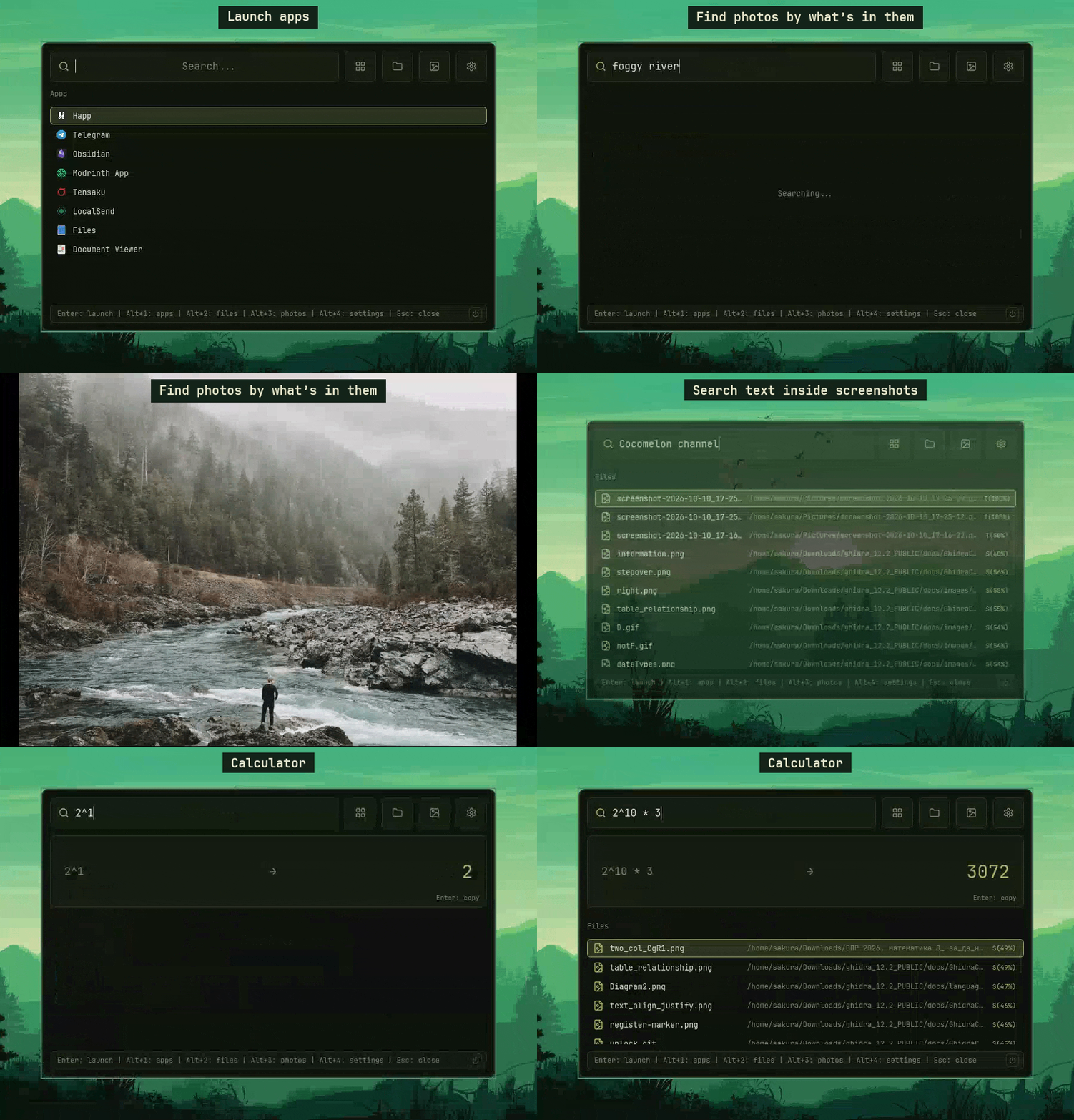
A Linux launcher that finds apps, files — and photos by what's in them. The same index is open to AI agents: ask one for "the photo of a bear" and it finds it in seconds.

For humans
For AI agents
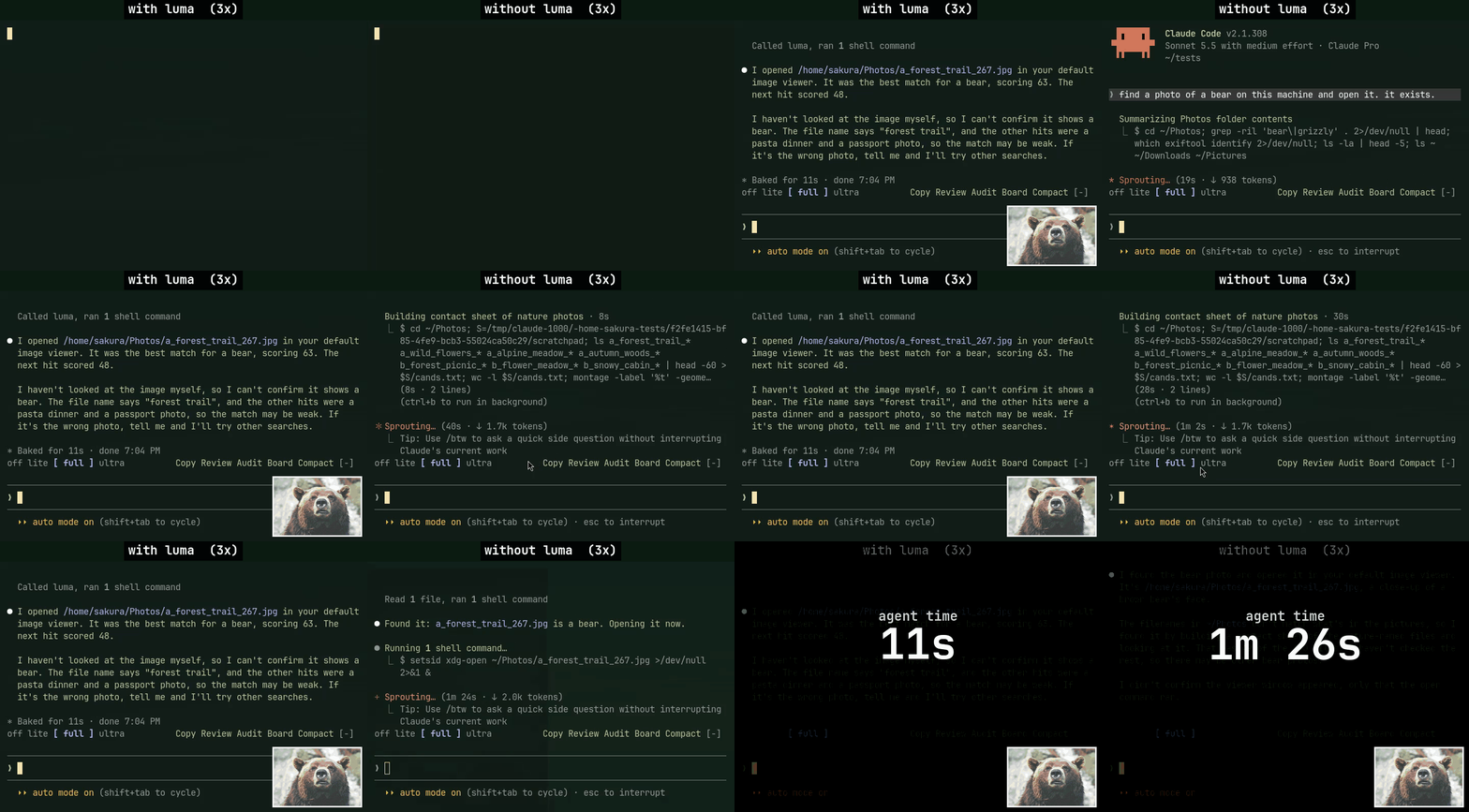
Same prompt, one run each (Claude Code, Sonnet 5.5, medium effort): 11 s with Luma, 1 min 26 s without. Both at 3x speed. More on agents.
Install
curl -fsSL https://raw.githubusercontent.com/sakurartro/luma/main/install.sh | sh
The script downloads the binary into ~/.local/bin (or a path of your choice: ... | sh -s /usr/local/bin).
To update later: luma update (installs the latest release next to the current binary if it is newer).
Setup
Keybind and floating window for Hyprland, niri, GNOME, KDE
Luma does not grab global keys itself — on Wayland that is forbidden by
protocol design. Bind a key to luma --toggle: it shows/hides the window
of the running instance; launching the binary again while an instance is live
acts the same. A cold start without the flag opens the window right away.
Hyprland
Keybind — stock in ~/.config/hypr/hyprland.conf; Omarchy (which does
not read hyprland.conf; the entry point is the Lua file) in
~/.config/hypr/bindings.lua:
bind = SUPER, Space, exec, luma --toggle
hl.bind("SUPER + SPACE", hl.dsp.exec_cmd("luma --toggle"))
Floating window for the app id luma-rust (Wayland apps cannot request
floating themselves — the compositor decides) — stock:
windowrule = float, class:^(luma-rust)$
Omarchy in ~/.config/hypr/hyprland.lua:
o.window("^(luma-rust)$", { float = true, center = true })
Reload afterwards: hyprctl reload.
niri
Keybind — in ~/.config/niri/config.kdl:
binds {
    Mod+Space { spawn "luma" "--toggle"; }
}
Floating window — same file:
window-rule {
    match app-id="luma-rust"
    open-floating true
}
Restart niri to apply. If Super+Space is already taken (e.g. input source
switch), pick another combo — e.g. SUPER, D / Mod+D — and use it everywhere.
GNOME / KDE (X11)
GNOME — Settings → Keyboard → Custom Shortcuts, command luma --toggle.
GNOME has no window rules; the window opens wherever the DE places it (force
floating with an extension, e.g. Try).
KDE — System Settings → Shortcuts → Add Custom Command luma --toggle.
Floating via Window Rules with Window class luma-rust (verify with xprop
that the class matches on X11).
Transparency on X11 requires a compositor — GNOME and KDE ship one by default.
Features
Search
- Fuzzy search of applications and files
- Semantic photo search (CLIP) — opt-in; matching files show a
S(N%)match-strength badge - Text-in-image search (OCR) — opt-in; matching files show a
T(N%)badge - Full-text search inside documents (txt, md, pdf, docx…) — opt-in; matches show a snippet of the text
- Calculator (
2 + 2) and currency conversion (100 usd to eur)
Apps
- Applications from all XDG dirs — system,
~/.local/share, Flatpak, Snap; a user.desktopoverride shadows the system entry - Launch ranking from usage stats (with time decay), pinned apps on top (right-click to pin/unpin)
- Category filter pills
Files and photos
- Separate views for apps, files, photos and settings (
Alt+1…Alt+4) - File type icons and cached photo thumbnails in the files grid
- File index with a background watcher and scan progress
System
- Power menu — shutdown, reboot, suspend, lock (power button in the bottom bar)
- Settings menu in the launcher (
Alt+4/Ctrl+,) — editssettings.jsonfor you - Full name on hover when a label is truncated
For AI agents
- MCP server (
luma mcp) and CLI (luma query) over the same photo and screenshot index — see below - One-click connect for Claude Code, Codex and opencode in Settings → Agents
Local by default — the index and the models stay on your machine; see Privacy.
For AI agents
An agent that is asked to find a photo usually walks the disk with find and opens
files one by one. Luma already holds a CLIP and OCR index of your photos, so the agent
asks it instead: one call, under a second, by what is in the picture or by the words
written on it.
Connect — Settings → Agents (Alt+4) has a button for Claude Code, Codex and
opencode: it registers luma mcp with the agent and switches the agent API on. By hand:
claude mcp add luma --scope user -- luma mcp
codex mcp add luma -- luma mcp
and set "agent_api": true in ~/.config/luma/settings.json (no restart needed). The API
is off by default.
The server offers two tools: luma_search_images (what the picture shows, English
queries) and luma_search_text (words written on it, English text). Each returns the
best matches with a 0–100 score.
Requirements — Luma must be running, and semantic (for images) and/or ocr (for
text) must be on, with indexing done. Only folders in search_dirs are searched. With a
search not ready the tool answers with a message saying what to enable.
Without MCP — luma query clip "river in fog" and luma query ocr "connection refused"
print one JSON line. agent/skills/luma/SKILL.md is a skill
that teaches an agent to use them.
Privacy
Nothing leaves your machine except two things you can turn off: the model download
(semantic / ocr, once) and exchange rates for 100 usd to eur (currency, cached for
an hour). Photos, thumbnails, the index and agent queries stay local.
Usage
| Key | Action |
|---|---|
Enter |
Launch the selected (top) result |
↑ ↓ ← → |
Move the selection (left/right in the grid views) |
Alt+1 |
Apps |
Alt+2 |
Files |
Alt+3 |
Photos |
Alt+4 / Ctrl+, |
Settings |
Esc |
Hide the window |
| Right click | Pin / unpin an app |
Configuration
Edit settings in the launcher (Alt+4 / Ctrl+,) or by hand in
~/.config/luma/settings.json. Hand edits, search_dirs, exclude_dirs, semantic
and ocr apply after a restart (the menu offers a Restart button); everything else
applies at once. New options are appended with their defaults; a broken file
falls back to defaults and is kept.
| Option | Default | |
|---|---|---|
bg surface hover selected border accent text text_dim |
see below | Colors, #RRGGBB; an unparsable value renders black |
search_dirs |
~/Documents ~/Pictures ~/Desktop |
Folders indexed for file search |
hide_patterns |
["."] |
File name prefixes to hide from results (dotfiles). Hidden files are still indexed; use exclude_dirs to keep a folder out of the index |
exclude_dirs |
[] |
Folders inside search_dirs that are never scanned, watched or fed to semantic/OCR indexing, e.g. ["~/Pictures/private"] |
semantic |
false |
Photo search by meaning (CLIP, English queries). Downloads ~154 MB of models, indexes photos in the background |
ocr |
false |
Image search by the text on them (PaddleOCR, English). Downloads ~12 MB of models, runs after semantic indexing |
docs |
false |
Search inside document contents (txt, md, pdf, docx…). Text goes into the local db. Limits docs_max_file_mb, docs_max_text_kb, docs_max_pdf_pages are tunable in settings.json |
agent_api |
false |
Lets agents query Luma (luma mcp, luma query). Set by Settings → Agents |
currency |
true |
100 usd to eur via open.er-api.com, rates cached for an hour. false = no network; the calculator still works |
semantic and ocr cost nothing while off; turning them off keeps the models
and index on disk for later.
Where things live ($XDG_CONFIG_HOME / $XDG_CACHE_HOME respected):
~/.config/luma/ — settings, main.sqlite3, models/;
~/.cache/luma/thumbs — photo thumbnails.
Apps are read from applications/ in $XDG_DATA_HOME and every
$XDG_DATA_DIRS entry, refreshed when those dirs change.
Full example (the defaults):
{
  "bg": "#0E120B", "surface": "#151B10", "hover": "#1E2716", "selected": "#28331C",
  "border": "#2C3620", "accent": "#A9B665", "text": "#E4E7D0", "text_dim": "#7E8A6C",
  "search_dirs": ["~/Documents", "~/Pictures", "~/Desktop"],
  "hide_patterns": ["."],
  "exclude_dirs": [],
  "semantic": false,
  "ocr": false,
  "docs": false,
  "agent_api": false,
  "currency": true
}
Palettes
Cold dark, warm, light
Cold dark:
{"bg": "#0D1117", "surface": "#161B22", "hover": "#1C2431", "selected": "#24304A", "border": "#2D3748", "accent": "#58A6FF", "text": "#E6EDF3", "text_dim": "#8B949E"}
Warm (gruvbox-like):
{"bg": "#282828", "surface": "#32302F", "hover": "#3C3836", "selected": "#504945", "border": "#665C54", "accent": "#D8A657", "text": "#FBF1C7", "text_dim": "#A89984"}
Light:
{"bg": "#FBF7EF", "surface": "#F1EBDD", "hover": "#E9E1CE", "selected": "#DFE4CB", "border": "#D3CBB2", "accent": "#5B7A3A", "text": "#2E3324", "text_dim": "#8A8B76"}
Requirements
- Linux (glibc 2.39+ — Ubuntu 24.04, Fedora 40+, Arch; the ONNX runtime of the semantic search sets this floor)
- The prebuilt binary links at runtime against libfontconfig, libGL (mesa) and libxkbcommon
- Power menu uses systemd:
systemctl poweroff|reboot|suspend; lock isloginctl lock-session, so a locker must listen for it (e.g. hypridle withlock_cmd)
Build from source
cargo build --release
Dev packages (Debian/Ubuntu naming): libxkbcommon-dev libfontconfig1-dev libgl1-mesa-dev libxcb1-dev. Binary: target/release/luma.
Troubleshooting
- Reset — delete
~/.config/luma/(settings and database are recreated; models are downloaded again if enabled) - Wrong or stale thumbnails — delete
~/.cache/luma/thumbs(regenerated on demand) - Stuck hotkey — kill the process or remove
$XDG_RUNTIME_DIR/luma-rust.sock(or/tmp/luma-rust-<uid>.sock) - Agent does not see Luma — Luma must be running;
claude mcp listshould showluma; withsemantic/ocroff the tools return a hint, not results - Logs go to stderr — run Luma from a terminal to see them
Update
luma update
Uninstall
rm -f ~/.local/bin/luma ~/.local/bin/luma_rust && rm -rf ~/.config/luma ~/.cache/luma
luma_rust is the old binary name; installs from before the rename keep it as a link.
If you connected an agent, remove it there too: Settings → Agents, or claude mcp remove luma.
License
Explore related projects
trimstray/the-book-of-secret-knowledge
A collection of inspiring lists, manuals, cheatsheets, blogs, hacks, one-liners, cli/web tools and more.
257,250 starsHack-with-Github/Awesome-Hacking
A collection of various awesome lists for hackers, pentesters and security researchers
125,103 starsswisskyrepo/PayloadsAllTheThings
A list of useful payloads and bypass for Web Application Security and Pentest/CTF
82,542 starscaddyserver/caddy
Fast and extensible multi-platform HTTP/1-2-3 web server with automatic HTTPS
78,935 stars