
saisaharsh3/Leftovers
saisaharsh3/Leftovers has 40 GitHub stars and 2 forks. GitHot measured 0 stars in 24 hours. Last checked 2026-11-15 05:02 UTC. Last push 2026-11-13.
What you can do
- Keypad-first entry; tap a digit to place a cursor and fix just that digit
- Expenses and income with categories, notes, accounts and receipt photos
- Add forgotten spending for any past day from a date strip or calendar
- Split one bill across several categories; the parts show under it
Measured star growth
- in 24h
- 0
- in 7 days
- Collecting history
- in 15 days
- Collecting history
- in 1 month
- Collecting history
Net star changes over overlapping periods, not daily totals. Missing measurements are left blank. Stars measure attention, not software quality.
About
A fast, private expense tracker for Android: log a spend in two taps, see what's safe to spend today, and plan ahead. Data stays on your phone.
SecurityREADME.md
Original
Leftovers
Know what's left. A fast, private expense tracker for Android. Log a spend in two taps, see what's safe to spend today, plan for the things you want, and ask an AI about your money if you'd like to.
saisaharsh3.github.io/Leftovers









If Leftovers is useful to you, a ⭐ helps other people find it.
Make it yours
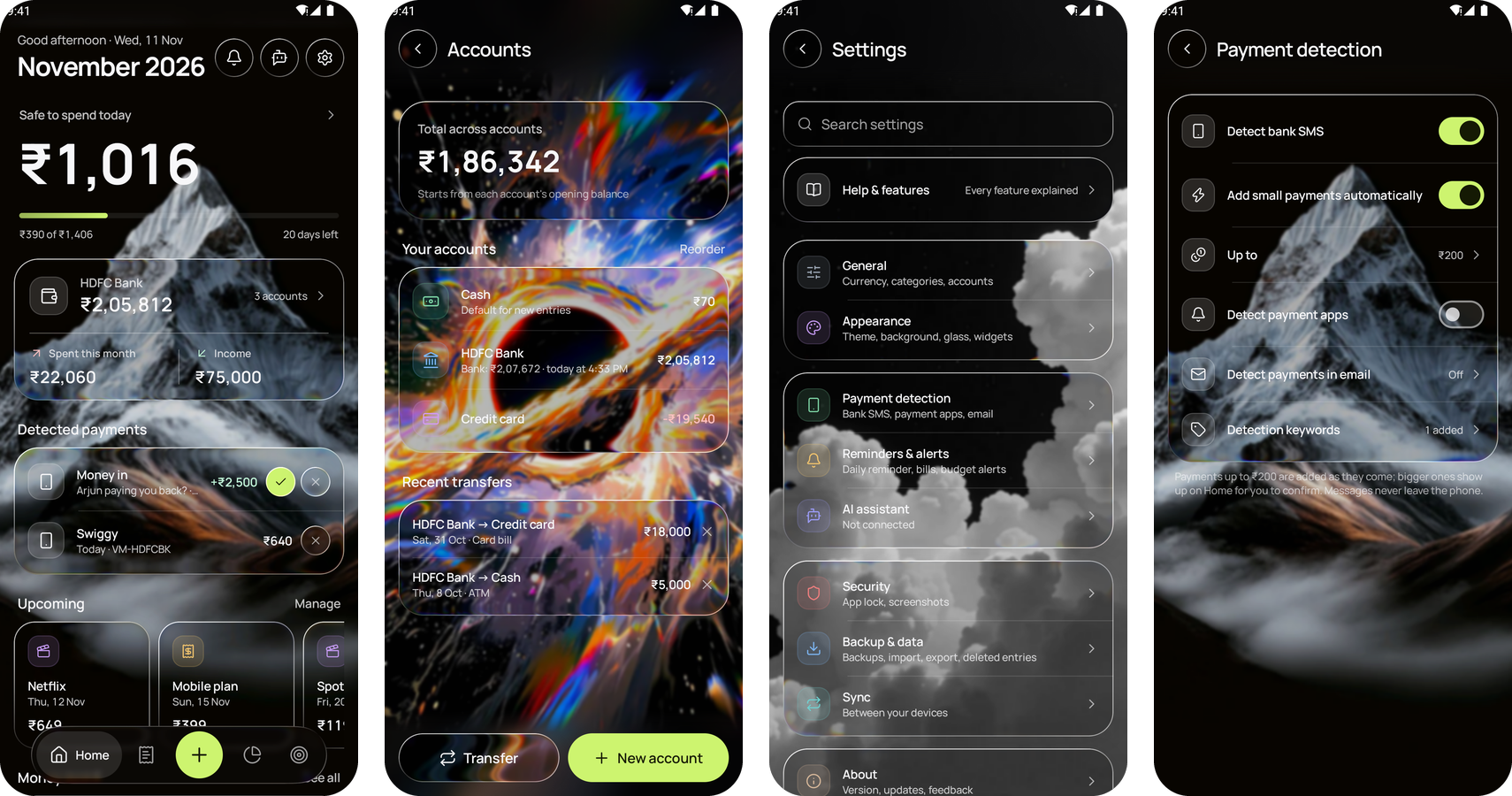
Set any wallpaper or a photo of your own as the background, with liquid or frosted glass over it.
Choose how sharp it is and how much it's dimmed, in Settings → Appearance → Background.
Why Leftovers?
Most budget apps want an account, show ads, or send your spending to a server. Leftovers doesn't.
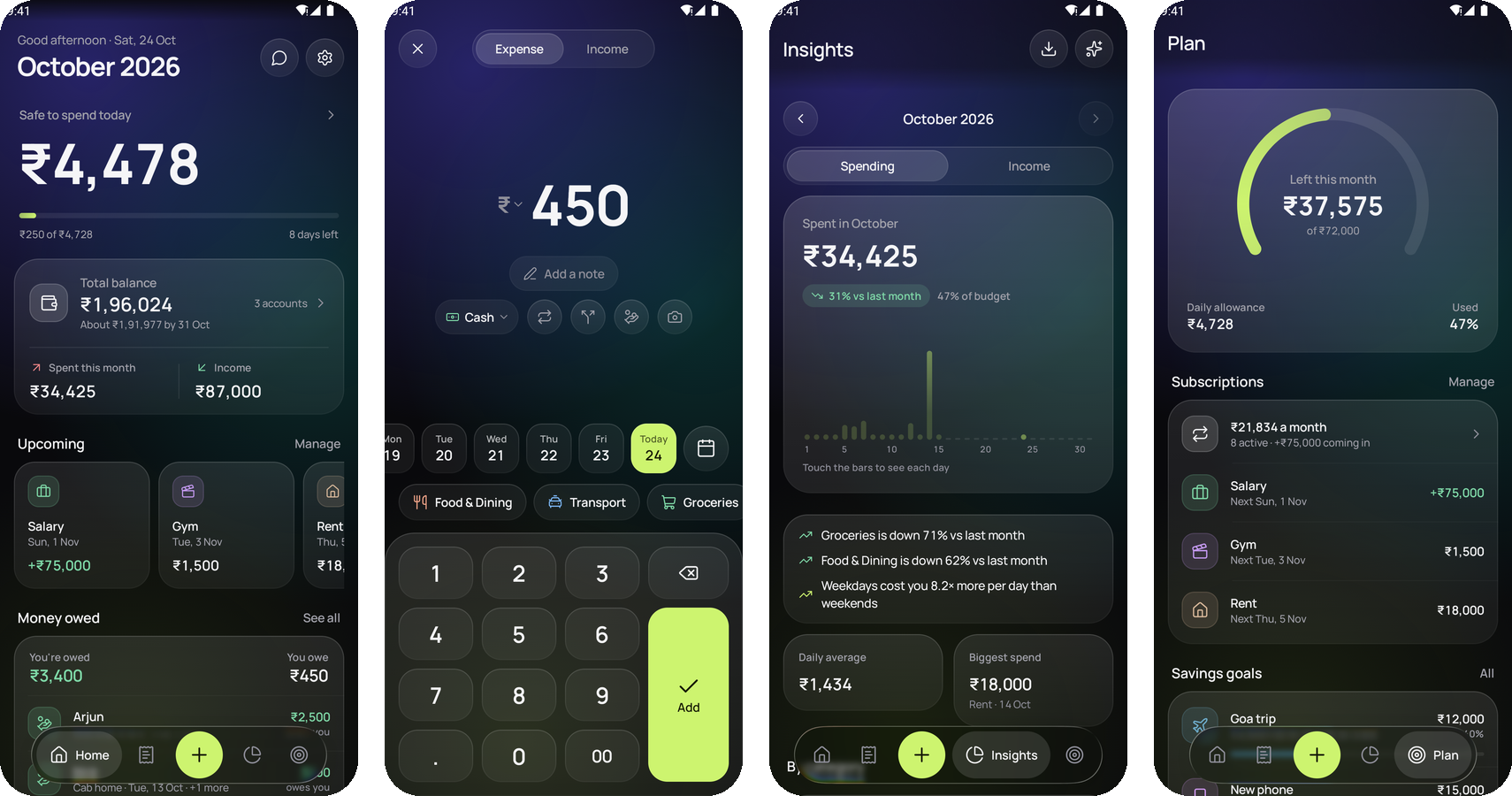
- It answers the question you actually have: how much can I spend today? What's left this month, minus bills still due, spread over the days remaining.
- Private by design: no sign-up, no ads, no analytics. Your data never leaves the phone unless you choose to connect an AI or an email account, or sync with your own devices.
- Fast to use: the keypad opens first, so a spend is logged in two taps. Bank SMS and email alerts can suggest entries for you, in any currency.
- Free and open source (MIT), with signed releases built in the open by GitHub Actions.
Features
Everyday tracking
- Keypad-first entry; tap a digit to place a cursor and fix just that digit
- Expenses and income with categories, notes, accounts and receipt photos
- Add forgotten spending for any past day from a date strip or calendar
- Split one bill across several categories; the parts show under it
- Monthly or yearly statement as a PDF, made on the phone
- Detects payments from FamApp, Google Pay, PhonePe, Paytm, BHIM and CRED notifications, or any app you choose, including your bank's own app, each into the account you pick (optional)
- Split a bill with friends, equally or by amount: your share is your expense, and what each person owes goes to Money owed
- Spending abroad? Log it in the local currency at your own rate; the original amount stays visible
- Search every entry by note, category or amount; filter by account, category or #tag; see one month or all time
- Tag entries (#goa, #work) to group them across categories and months, with a total; tags have their own row in the note box and show beside the note
- Tap an entry, the balance or a subscription for a quick card that grows out of it: the details, with Edit, Delete (with Undo), Pause or switching account right there. Deleted entries can be restored later from Settings
Budgets that make sense day to day
- Monthly budget, or a yearly one split evenly, by smart rollover, or custom per month; the budget month can start on payday (any day from the 1st to the 28th), or set one amount for dates you choose
- Optional 50/30/20: needs, wants and savings as shares of your income, with how much of each is used
- Safe to spend today: what's left, minus bills still due, spread over the remaining days
- Choose whether gifts, bonuses and other extra income add to that month's budget (off unless you turn it on; then per income category)
- When a month ends, choose whether what's left carries into the next month, or set it to always or never
- Per-category limits with alerts at 80% and 100%
Planning
- Subscriptions and recurring income every month, every 3 or 6 months, or yearly, logged automatically on their day, with a reminder the morning before a bill; longer cycles count as their monthly share in totals. Interest can be a yearly rate on an account's balance, worked out on the balance each time
- Skip a single payment without stopping the subscription
- Spots repeating expenses that look like a subscription and offers to add them
- Savings goals that say how much to put aside each month and whether you're on track. Add links from up to four shops (Amazon, Flipkart or any shop) and Check prices reads each one's price when you tap it, marking the cheapest, to compare with your target
- Accounts (cash, bank, UPI, cards) with live balances, transfers, a breakdown of how each balance adds up, and a one-step move of every entry to another account (with undo). An account can have its own currency: its entries are entered and shown in it, and totals count them at its rate, typed or fetched (optional). An account can be left out of Safe to spend, or out of the All accounts total (a savings account, say)
- When a bank text gives your balance ("Avl Bal Rs.12,000"), the account shows it next to its own and offers Match when they differ (with Undo). Only the number is kept, never the message
- Total balance across accounts on Home, with where it's heading by the end of the month; switch it to one account (like a wallet) to see just that account's balance, spending and income
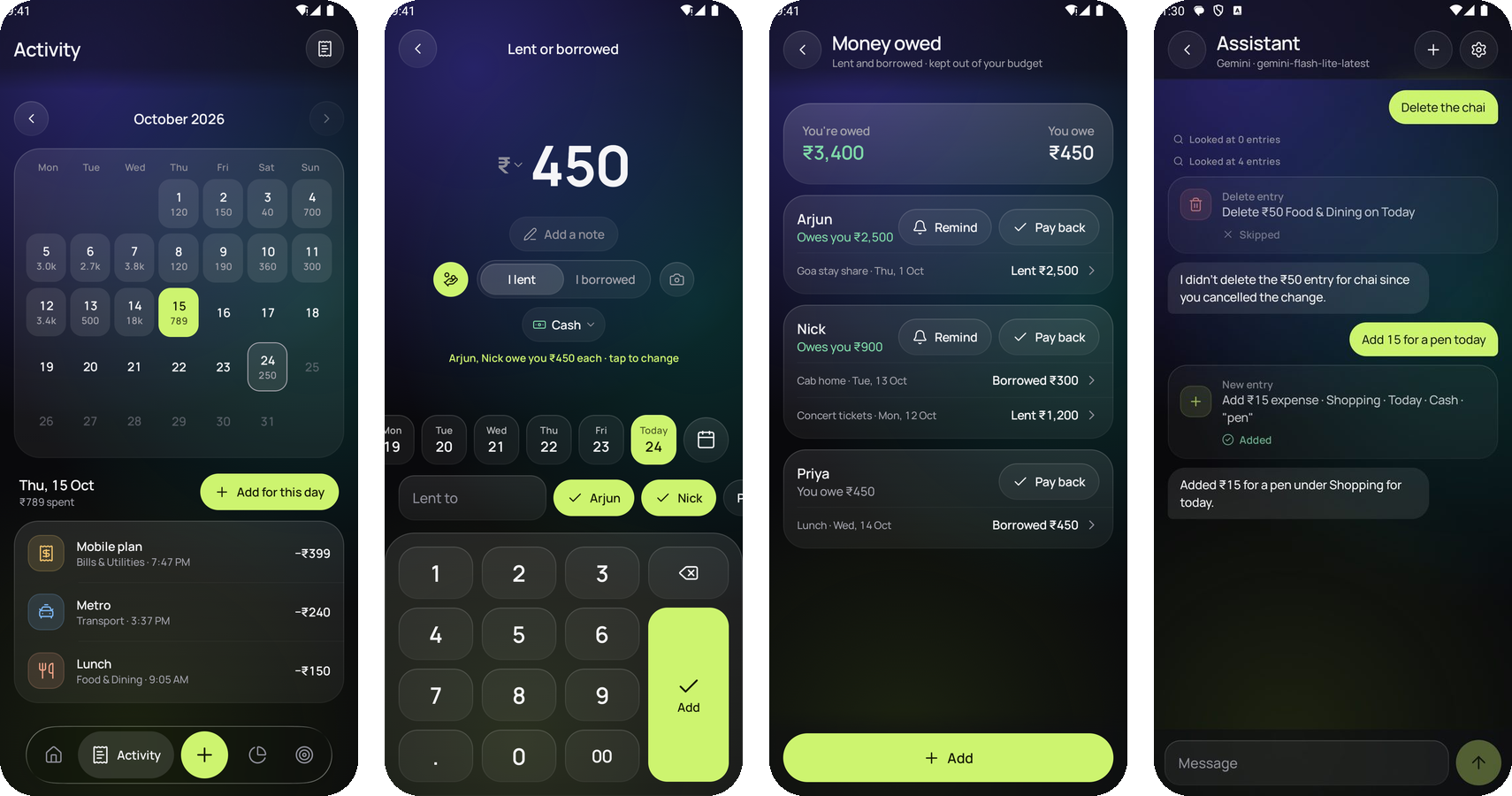
- Money owed: what you lent or borrowed and from whom, kept out of your budget. It moves the account the money went from or into while it's open, and can be paid back in full or a bit at a time. Remind sends someone who owes you a friendly message through WhatsApp, SMS or any app, with a link: if they use Leftovers too, a tap adds it to their own Money owed (the amounts are in the link itself, so nothing goes through a server)
- A friend paying you back is recognised: a detected payment from someone who owes you (or to someone you owe) asks "Arjun paying you back?", and one tap settles it in Money owed instead of counting it as income. Names match however the bank writes them (Ravi, Mr RAVI KUMAR, Ravi K, or a UPI ID); two different people never match, and when two could, the amount decides. Typing a repayment as income on the add screen offers the same
Insights
- Daily bar chart you can touch to read any day
- Category breakdown that opens each category's entries
- Spending calendar that opens any day's entries
- Trends: category changes vs last month, weekend spending, where the month is heading
- Month-over-month comparison, a story-style monthly recap you can share as an image, and a year in review
AI assistant (optional)
- Connect Claude, ChatGPT, Gemini, Mistral, Groq, DeepSeek, Grok, OpenRouter or your own server, with your own API key
- Or use the phone's own AI (Gemini Nano, on phones like the Pixel 9 and OnePlus 15R): offline, no key, nothing
leaves the phone. It's in the
-ai.apkdownload on GitHub; see Install - Ask questions like "How much did I spend on food this month?" or "Am I on track with my budget?"
- Tell it what to do: "Add 250 for coffee today", "Move yesterday's lunch to Cash", "Set a 5,000 limit on Shopping"
- Snap a bill or receipt and it suggests the entries, split by category
- On the add screen, attach a bill photo and tap Fill in from this photo: amount, date, category and note are filled in for you to check
- Ask AI about this month on Insights: what changed against last month and your budget, and what to do about it
- Knows about Money owed and tags too: "Who owes me money?", "I lent Arjun 500", "How much did #goa cost?"
- Test connection in its settings checks your key and model, and any refusal says why, in the service's words
- Every change it proposes waits for you to tap Apply. See AI assistant below.
Extras
- Home-screen widgets: Safe to spend today (with one-tap add), Left this month, and Quick add, which logs ₹50, ₹100, ₹200 or ₹500 in one tap (with Undo) without opening the app and shows what you've spent today; tap its category to switch. Plus an Add expense Quick Settings tile
- Sync between your devices, with no account: through a folder that Syncthing or Nextcloud's app keeps the same on each phone, or your own WebDAV server (Nextcloud, ownCloud). Entries deleted or changed on one phone are removed on the others, and the files are encrypted with your backup password
- Evening reminder, app lock with the phone's lock (fingerprint, face, screen lock) or its own PIN or password, locking as soon as you leave or after 30 s or 5 min
- Import a bank statement as CSV, Excel (.xlsx, .xls or a bank's HTML ".xls") or PDF, password-protected ones included, or another app's backup (JSON, or a .zip of it), with its notes, tags and categories. Anything already logged is skipped, and the totals show before anything is added
- Restore a backup over everything, or keep what's in the app and add only the backup's new entries
- Backup and restore to a file or Google Drive (photos included if you like), daily, weekly or monthly automatic backups to a folder you choose (with Back up now, and the reason if one fails), CSV export
- Optional backup password: backups are encrypted (AES-256) and need it to restore
- Optional payment detection from bank SMS and from bank email alerts, suggesting entries for you to confirm, including money coming in as income. Add your own keywords for banks it misses, and test any message to see what it would suggest. One payment never shows up twice, even when it arrives by both SMS and email. A payment to a place you've logged before opens under the category you used last time. Add small payments automatically (off unless you turn it on): spending from bank SMS up to an amount you choose goes straight in, under that place's category from last time; bigger ones, money coming in and paybacks still wait
- Settings arranged like your phone's: a search that finds any setting by name or a word for it, and categories (Appearance, Security, Reminders & alerts, Payment detection and more) that each open a page of their own
- Swipe sideways to move between Home, Activity, Insights and Plan
- Pull down on Home to check for new payment emails, log subscriptions that are due and sync right away
- Frosted glass design in dark and light mode (or solid surfaces with Glass effects off), a liquid glass tab bar on Android 13 and newer, spring animations, haptic feedback and high-refresh-rate support. The background can be a glow in several colours, plain, or your own photo, with liquid or frosted glass over it
- If the app ever closes unexpectedly, it offers to report it on GitHub or by email. You see the report (versions, phone model and the error, nothing from your entries) before anything is sent
Privacy
Everything stays on your device. There are no accounts, ads or analytics, and the app makes no network calls unless you connect the optional AI assistant or an email account, sync with your own WebDAV server, tap Check price on a goal, fetch exchange rates (on request, or daily if you turn it on; only the currency's name is sent, to the free and open currency-api), or turn on Tell me about new versions (one weekly request to GitHub for the latest version number).
- The app is excluded from Android's automatic cloud backup, so backups go only where you save them.
- With app lock on, screenshots are blocked and the app is hidden in the recent-apps preview. An app PIN or password is kept only as a salted hash, and repeated wrong tries make you wait longer each time.
- SMS detection is off by default. When on, messages are read on the device and nothing is added without your tap, unless you also turn on Add small payments automatically, which adds spending up to the amount you choose.
- Payment app detection is off by default too. When on, it reads only notifications from the payment apps listed in Settings, keeps just a fingerprint of each, and needs notification access you give in the phone's settings.
- Email detection is off by default and signs in with an app password (Gmail, Yahoo, iCloud, Zoho or any IMAP server with SSL). It connects only to your mail server, over TLS with the certificate checked. The inbox is opened read-only, so nothing is changed or marked as read. Only alerts from banks, cards and payment apps are opened (shops, social networks, newsletters and promotions are skipped unopened), and they're read in memory. Only the amount, merchant and date are kept, never the email. The address and app password are encrypted with an Android Keystore key, never backed up, and deleted when you disconnect.
- With a backup password, backup files are encrypted. The password is kept encrypted with an Android Keystore key and is never written into a backup; if it's forgotten, those backups can't be opened.
- Sync between devices is off by default. Each phone keeps a full copy of its data in the folder or on the server you choose, encrypted when you set a backup password (use the same one on each phone). A WebDAV password is encrypted with an Android Keystore key and never backed up.
- Crash reports are never sent by themselves: after a crash the app asks, and you read the report first.
- Network access is HTTPS-only and trusts only the system's certificate authorities.
AI assistant
Tap the chat button on Home (or Settings → AI assistant), pick a provider, paste an API key and tap Connect. Tap Load models to see every model your key can use.
| Provider | Get a key | Default model |
|---|---|---|
| Claude | console.anthropic.com | claude-opus-5-5 (also claude-sonnet-5-5, claude-haiku-4-5) |
| ChatGPT | platform.openai.com | gpt-5-mini |
| Gemini | aistudio.google.com | gemini-flash-lite-latest (fastest; also gemini-flash-latest, gemini-pro-latest) |
| Mistral | console.mistral.ai | mistral-small-latest |
| Groq | console.groq.com | llama-3.3-70b-versatile |
| DeepSeek | platform.deepseek.com | deepseek-chat |
| Grok (xAI) | console.x.ai | grok-4 |
| OpenRouter | openrouter.ai | openrouter/auto (one key for many models) |
| Custom | your server | any OpenAI-compatible HTTPS server, e.g. one you host yourself |
| On this phone | no key needed | the phone's own Gemini Nano, in the -ai.apk download (phones like the Pixel 9 and OnePlus 15R) |
Usage is billed by the provider to your own account (On this phone is free and works offline). Answer style switches between Quick (the default: a few seconds per answer) and Thorough (the model thinks longer).
What it can do
- Answer questions: totals for any period, biggest expenses, budget progress, subscriptions, goals.
- Log, edit and delete entries, including by date ("Move the parking from October 3 to October 5"). If several entries match, it asks which one instead of guessing.
- Set the monthly budget and category limits, add or stop subscriptions, move money between accounts, and add to savings goals.
- Read bills: tap the camera in the chat to take a photo or pick a screenshot of a bill or receipt. It proposes one entry per category, dated from the bill, with any discount or tax spread so the entries add up to what you paid.
Guardrails
- Nothing changes without you. Each change appears as a card with Confirm and Not now (Confirm all when there are several). Turn off Let it propose changes for read-only use.
- It sees only what a question needs. It already knows your category and account names; amounts come through specific commands (totals first, at most 50 entries at a time), and each reply shows what it looked at.
- Personal details stay hidden. Notes stay on the phone unless you turn on Share entry notes. Card and account numbers, UPI IDs, phone numbers and emails are blanked out first. Saved receipt photos and SMS are never sent; a photo goes only when you attach it, resized and re-encoded so location and camera data are removed.
- Your key is protected. It's encrypted with an Android Keystore key, never included in backups, and deleted when you disconnect. Custom servers must use HTTPS.
- Nothing is kept. Chats are held in memory only (so an answer can finish while you look elsewhere) and are gone when the app closes. The AI is told to treat your data as data, not instructions, and each message is limited in how many steps and changes it can make.
What you send is handled under the chosen provider's privacy policy (DeepSeek stores data in China; OpenRouter passes requests on to the model's own provider).
Install
F-Droid: Leftovers is on F-Droid. Install it from the F-Droid app and updates arrive there. F-Droid ships the same signed APK as the GitHub releases, so you can switch between the two without losing data.
From GitHub:
- Open the latest release on your phone and download
leftovers-<version>.apk. - Open the file. If Android asks, allow your browser or file manager to install unknown apps.
- Tap Install. Updates install over the top and keep your data.
Why there are two APKs: each release has leftovers-<version>.apk and leftovers-<version>-ai.apk. They're the
same app; the -ai one also has the phone's own AI for the assistant (Gemini Nano, on phones that have it, like the
Pixel 9 and OnePlus 15R). That uses Google's ML Kit library, which isn't open source, so F-Droid can't include it and
the plain APK is the one F-Droid checks. Both are signed with the same key, so either installs over the other, or over
F-Droid's, and keeps your data. Not sure? Take the plain one.
Pre-releases: before a big version, a pre-release (like 1.10.0-rc2) goes up on the
releases page to try first. It's on GitHub only, never marked
latest, and the app's update check and F-Droid ignore it. Back up first: a pre-release can update the database, so
going back to the previous version means uninstalling.
Automatic updates: add the repo to Obtainium with the badge at the top, and new releases install straight from GitHub.
Requires Android 8.0 (API 26) or newer. What's new in each version is in CHANGELOG.md.
Development
Build and test
You need JDK 17 or newer and the Android SDK; Android Studio provides both.
git clone https://github.com/saisaharsh3/Leftovers.git
cd Leftovers

./gradlew assembleDebug        # app/build/outputs/apk/debug/app-debug.apk
./gradlew installDebug         # install on a connected phone (USB debugging on)
./gradlew testDebugUnitTest    # unit tests: budget maths, forecasts, backups, database upgrades, privacy, every AI provider's format
Debug builds install as a separate app, Leftovers Dev (amber icon), so they never touch the real app's data.
On Windows use gradlew.bat. If Gradle can't find the SDK, create local.properties with
sdk.dir=/path/to/Android/Sdk (Android Studio does this for you).
Signed release build
- Create a keystore once and keep it safe. Every future update must be signed with the same key.
keytool -genkeypair -v -keystore release.jks -keyalg RSA -keysize 2048 -validity 10000 -alias leftovers - Copy
keystore.properties.exampletokeystore.propertiesand fill in the passwords. Both files are git-ignored. - Run
./gradlew assembleRelease. The APK is inapp/build/outputs/apk/release/.
Publishing a GitHub release
Pushing a tag such as v1.2.0 runs the release workflow, which runs
the tests, builds the signed APK and the -ai APK, and attaches both to a GitHub release. A tag with a dash
(v1.2.0-rc1) is published as a pre-release, never as latest. It needs these repository secrets
(Settings → Secrets and variables → Actions):
| Secret | Value |
|---|---|
SIGNING_KEYSTORE_BASE64 |
base64 -w0 release.jks (PowerShell: [Convert]::ToBase64String([IO.File]::ReadAllBytes("release.jks"))) |
SIGNING_STORE_PASSWORD |
keystore password |
SIGNING_KEY_ALIAS |
leftovers |
SIGNING_KEY_PASSWORD |
key password |
Bump versionCode and versionName in app/build.gradle.kts, rename ## Unreleased in CHANGELOG.md to the
version (e.g. ## 1.2.0; the release page shows that section), and add a short
fastlane/metadata/android/en-US/changelogs/<versionCode>.txt for F-Droid. Then:
git tag v1.2.0
git push origin v1.2.0
Tech stack
- Kotlin, Jetpack Compose, Material 3
- Room (SQLite) with versioned migrations, DataStore for settings
- WorkManager (reminders, bill alerts, automatic backups, sync), Glance (widgets), Biometric (app lock)
- OkHttp for WebDAV sync, which needs requests Android's built-in client can't send
- AI providers called over plain HTTPS with
org.json, so no extra SDKs ship in the app. The-aiAPK alone adds Google's ML Kit GenAI library for the phone's own AI; it's named only on that build's command line (-PonDeviceAi=…), never in the Gradle files, so the F-Droid build stays fully open source - Haze for frosted-glass blur
- Lucide icons and the Manrope typeface
app/src/main/java/com/leftovers/app/
├── ai/          AI assistant: provider clients, commands, privacy filter, encrypted key storage
├── data/        Room entities, DAOs, repositories, budget and trend maths
├── ui/          Compose screens, components, theme, icons
├── util/        Formatting, alerts, reminders, backups, SMS parsing
└── widget/      Home-screen widgets
Notes
- Bank SMS detection uses the
RECEIVE_SMSpermission, which Google Play restricts to default SMS apps and a few exceptions. It works for direct APK installs; remove it before publishing to Play. - The
INTERNETpermission is used only by the AI assistant and email detection, after you connect them, and by Check price on a savings goal, which fetches that one shop page when you tap it.
Get involved
- Try the newest changes: every push to
devis published as a Dev build that installs next to the real app, with its own data. To get each new one automatically, add Leftovers Dev to Obtainium (tap Continue when it asks to import). - Report a bug or suggest an idea with the issue forms, or ask a question in Discussions.
- Your bank's messages not detected? Paste one (with personal details removed) in an issue; adding it to the tests is a great first contribution.
- Write code: start with a
good first issue or one marked
help wanted. Read
CONTRIBUTING.md and open your pull request against the
devbranch.
Contributors
License
MIT. Third-party assets are listed in THIRD_PARTY_NOTICES.md.
Made by C. Sai Saharsh · github.com/saisaharsh3