
safedep/gryph
safedep/gryph has 183 GitHub stars and 23 forks. Star changes are not measured yet. Last checked 2026-11-13 18:34 UTC. Last push 2026-11-11.
Measured star growth
- in 24h
- Collecting history
- in 7 days
- Collecting history
- in 15 days
- Collecting history
- in 1 month
- Collecting history
Net star changes over overlapping periods, not daily totals. Missing measurements are left blank. Stars measure attention, not software quality.
About
Security layer for AI coding agents. Works with Claude Code, Cursor, Windsurf, Gemini CLI, OpenCode, Pi Agent and more.
SecurityREADME.md
Original

AI coding agents have no security boundaries. Gryph is building one.
Everyone runs YOLO mode. Gryph enforces guardrails and keeps the audit trail.
Quick Start · Demo · Supported Agents · Use Cases · Security Policy








AI coding agents (Claude Code, Cursor, Windsurf, Gemini CLI, OpenCode) can read any file, write anywhere, and execute arbitrary commands on a developer's machine. They run dozens of tool calls per session. There are no boundaries on what they can do and no audit trail when something goes wrong.
Gryph fixes that. It hooks into agents, enforces YAML policy rules that block, warn, or guide actions in real time, and logs every event to a local SQLite database for review and audit. All data stays local. No cloud, no telemetry.
The Problem
A developer asks Claude Code to refactor a module. It runs 47 tool calls in 90 seconds. Then the tests fail.
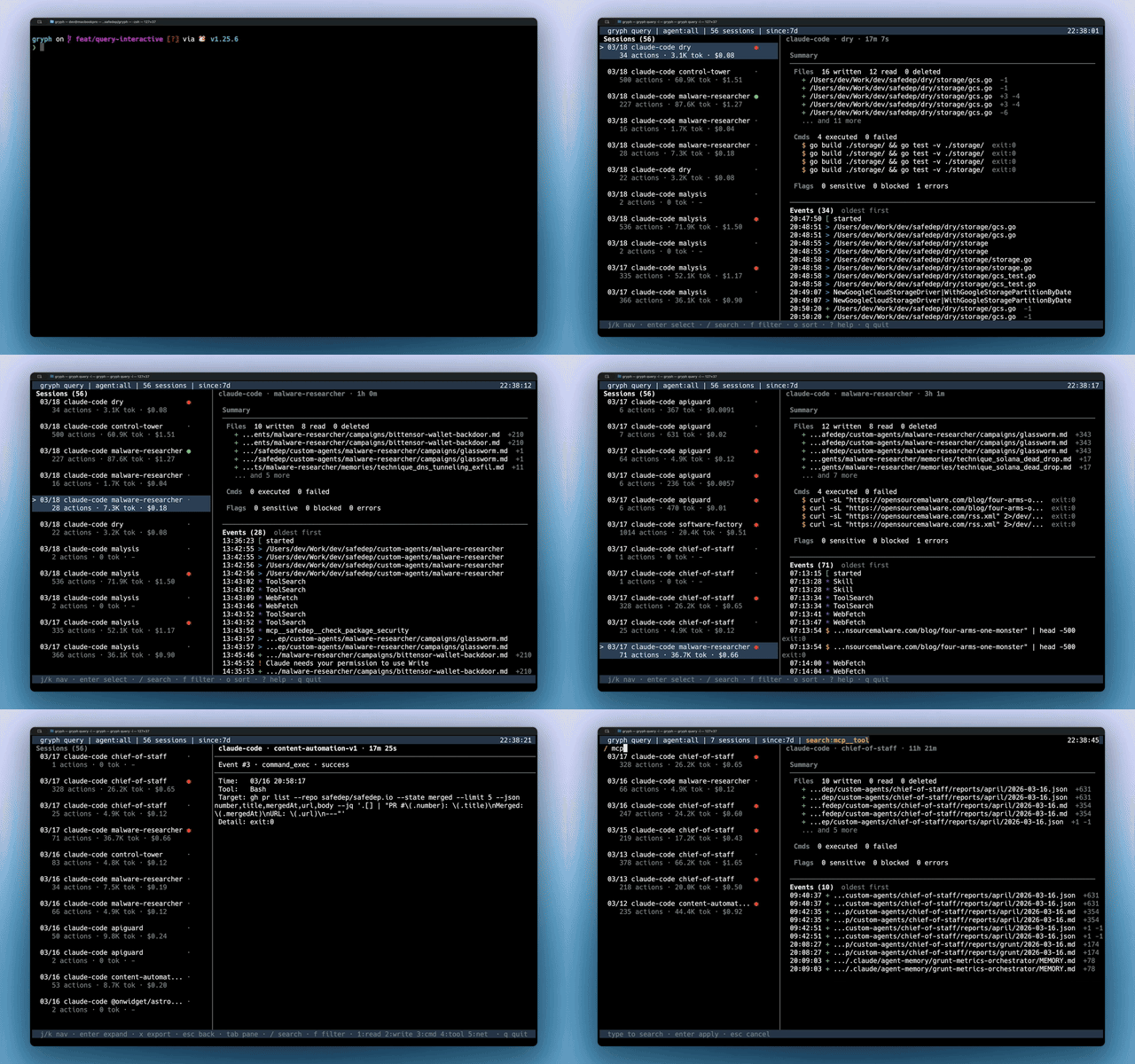
- Which files did the agent read before making changes?
- Did it run shell commands that were not expected?
- Did it touch config files, secrets, or CI pipelines?
- What did the file look like before and after?
Without Gryph, developers are left guessing. With Gryph, gryph logs shows everything.
Quick Start
# Install Gryph with one command
curl -fsSL https://raw.githubusercontent.com/safedep/gryph/main/install.sh | sh

# Setup gryph for available agents
gryph install                    # hooks into all detected agents
gryph status                     # verify setup

# ... use your AI agent normally ...
gryph logs                       # see what happened
Other install methods
# Homebrew (macOS/Linux)
brew install safedep/tap/gryph

# npm
npm install -g @safedep/gryph

# Go
go install github.com/safedep/gryph/cmd/gryph@latest
Pre-built binaries for macOS, Linux, and Windows are available on the GitHub Releases page.
Tip: Set
logging.leveltofullto see file diffs and raw events:gryph config set logging.level full. See Configuration for details.
Supported Agents
| Agent | Hook Support |
|---|---|
| Claude Code | Full (PreToolUse, PostToolUse, Notification) |
| Codex | Full (PreToolUse, PostToolUse, SessionStart, UserPromptSubmit, Stop) |
| Command Code | Full (PreToolUse, PostToolUse, Stop, SessionStart) |
| Cursor | Full (file read/write, shell execution, MCP tools) |
| Devin CLI | Full (PreToolUse, PostToolUse, SessionStart, UserPromptSubmit, Stop, SessionEnd) |
| Gemini CLI | Full (BeforeTool, AfterTool, Notification) |
| OpenCode | Full (tool.execute, session events) |
| Pi Agent | Full (tool_call, tool_result, session events) |
| Windsurf | Full (file read/write, commands, MCP tools) |
Note: Codex hooks require enabling the
codex_hooksfeature flag in your Codex configuration (~/.codex/config.toml):[features] codex_hooks = true
Note: Devin CLI also loads Claude Code hooks from
~/.claude/settings.jsonby default (read_config_from.claude). When gryph hooks are installed for both agents, one Devin session emits devin events and claude-code events. Disableread_config_from.claudein the Devin user config to keep one stream.
One command installs hooks for all detected agents. No per-agent setup required.
See It in Action
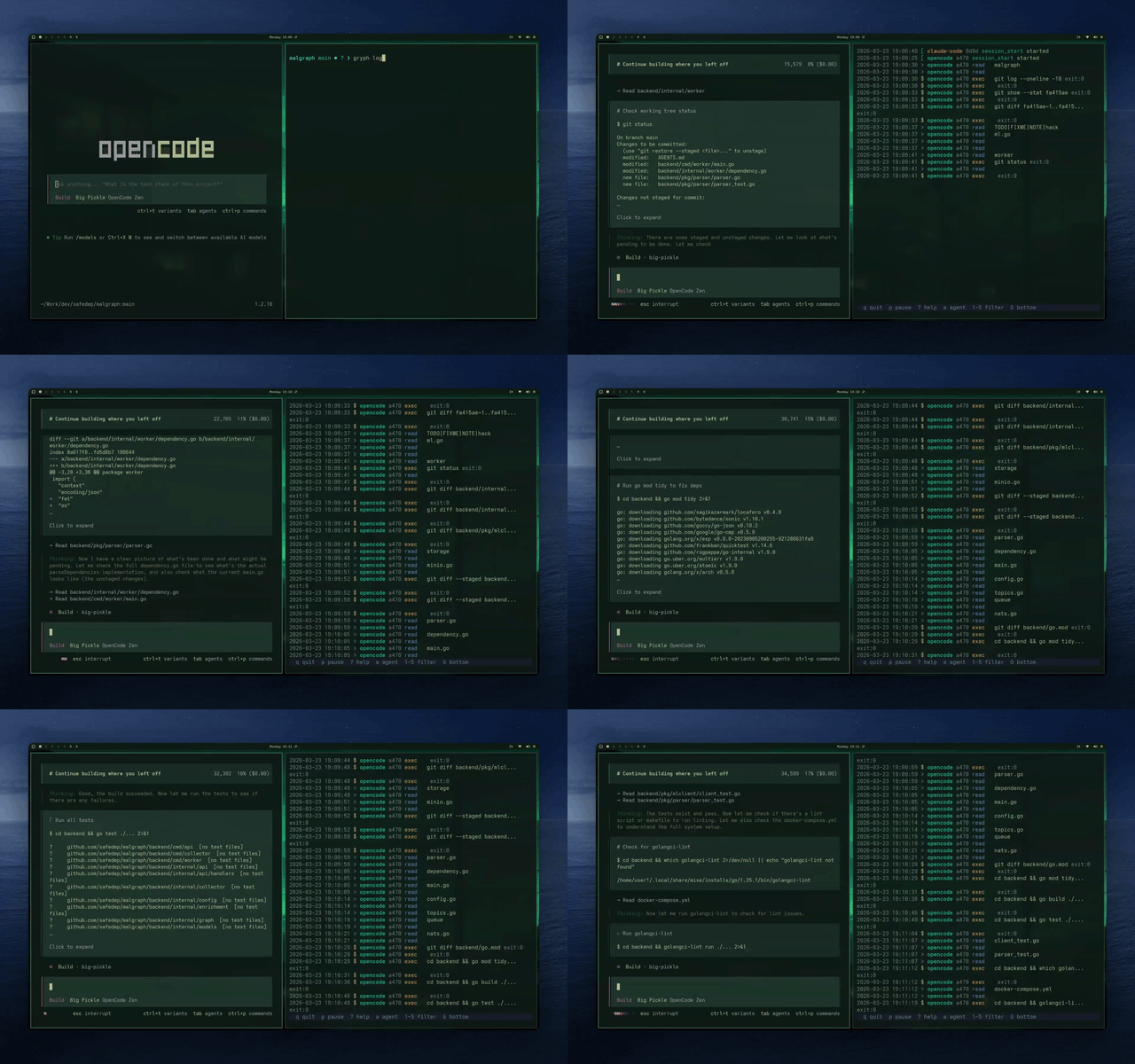
Live streaming of agent actions as they happen with gryph logs --live:
Use Cases
| Scenario | How Gryph Helps |
|---|---|
| Replay the full session | git diff shows final changes. Gryph shows the full sequence: what the agent read, what it ran, what it wrote and reverted, and in what order. |
| Catch invisible side effects | Agents run shell commands that leave no trace in git (npm install, curl, rm). gryph query --action exec surfaces them all. |
| Sensitive file access | Gryph flags access to .env, *.pem, *.key, and similar files automatically. Actions are logged but content is never stored. |
| Block risky agent actions | Author YAML rules to block destructive commands, refuse writes that leak credentials, or scope behavior per agent or project. See Security Policy. |
| Security review | Export events to your SIEM, or use the OpenSearch observability example for centralized dashboards and threat detection alerts. |
| Cost and token tracking | Track per-session token usage and estimated costs across models and agents. See docs |
| Compare agents | Filter by --agent to see how different agents approach the same task: which reads more, which runs more commands, which costs more. |
How It Works

Gryph installs lightweight hooks into AI coding agents. When an agent reads a file, writes a file, or executes a command, the hook sends a JSON event to Gryph. Events are stored in a local SQLite database and can be queried anytime. Because Gryph hooks into both pre-tool and post-tool events, it captures the full lifecycle of every agent action.
Security Policy
Beyond logging, Gryph can enforce a YAML policy over agent actions. Rules can block, warn, guide, or allow based on action type, file path, command pattern, tool name, agent, project, and CEL expressions over per-session counters. Blocked actions never reach the agent's tool, guidance is delivered back to the agent as stderr text, and every decision is persisted.
gryph policy init          # write the example policy to the global config dir
gryph policy edit          # open it in $EDITOR and scaffold if missing
gryph policy validate
gryph policy test --action file_write --path ./secrets/db.env
gryph config set policy.enabled true
See security policy for more details.
Gryph also protects its own hooks, policy and audit trail. gryph doctor shows the level of each asset and the profile they earn. In the guard profile, Gryph guards against agent mistakes and simple attempts to change it, detects a change to a hook configuration, and repairs it when you turn repair on. It does not stop a determined same-user adversary or root. See self-protection for the limits and the claims you can make. An administrator installs Gryph for every user of a host with gryph install --managed. See the managed install guide.
On a managed host, a decision service outside the user evaluates the policy, keeps the audit trail of every account, signs with a machine key and answers approvals, so a process of the agent's user cannot read the key, edit the trail or forge a decision. The locked profile then holds for the agents whose managed hook entry resists the user, Claude Code, Codex and Cursor today; for Gemini and Windsurf the entry is a root-owned file without a lock, and Gryph detects a missing hook instead of preventing it. See the threat model for what you can claim. To try it on one host, follow the Linux walkthrough or the macOS walkthrough.
Commands
For a complete reference of all commands and flags, see CLI Reference.
Install and Uninstall Hooks
gryph install                      # Install hooks for all detected agents
gryph install --dry-run            # Preview what would be installed
gryph install --agent claude-code  # Install for a specific agent
gryph uninstall                    # Remove hooks from all agents
gryph uninstall --purge            # Remove hooks and purge all data
gryph uninstall --restore-backup   # Restore original hook config from backup
View Recent Activity
gryph logs                     # Last 24 hours
gryph logs --today             # Today's activity
gryph logs --agent claude-code # Filter by agent
gryph logs --follow            # Stream events in real time
gryph logs --format json       # Output as JSON
Query Historical Data
gryph query --file "src/auth/**" --action file_write    # Find writes to specific files
gryph query --action exec --since "1w"           # Commands run in the last week
gryph query --session abc123                             # Activity from a specific session
gryph query --action file_write --today --count          # Count matching events
gryph query --command "npm *" --since "1w"               # Filter by command pattern
Sessions
gryph sessions                        # List all sessions
gryph session <session-id>            # View detailed session history
gryph session <session-id> --show-diff # View session with file diffs
Diffs and Export
gryph diff <event-id>                                  # See what changed in a write event

gryph export                                           # Export last hour as JSONL to stdout
gryph export --since "1w" -o audit.jsonl               # Export last week to file
gryph export --export-profile metadata                 # Labels and digests only
gryph export --since 1d | jq -r '.action_type' | sort | uniq -c | sort -rn
Each exported line includes a $schema field pointing to event.schema.json.
The default export profile drops secret content and exports prompts as keyed digests. See content labels.
See CLI Automation for more jq recipes.
Statistics Dashboard
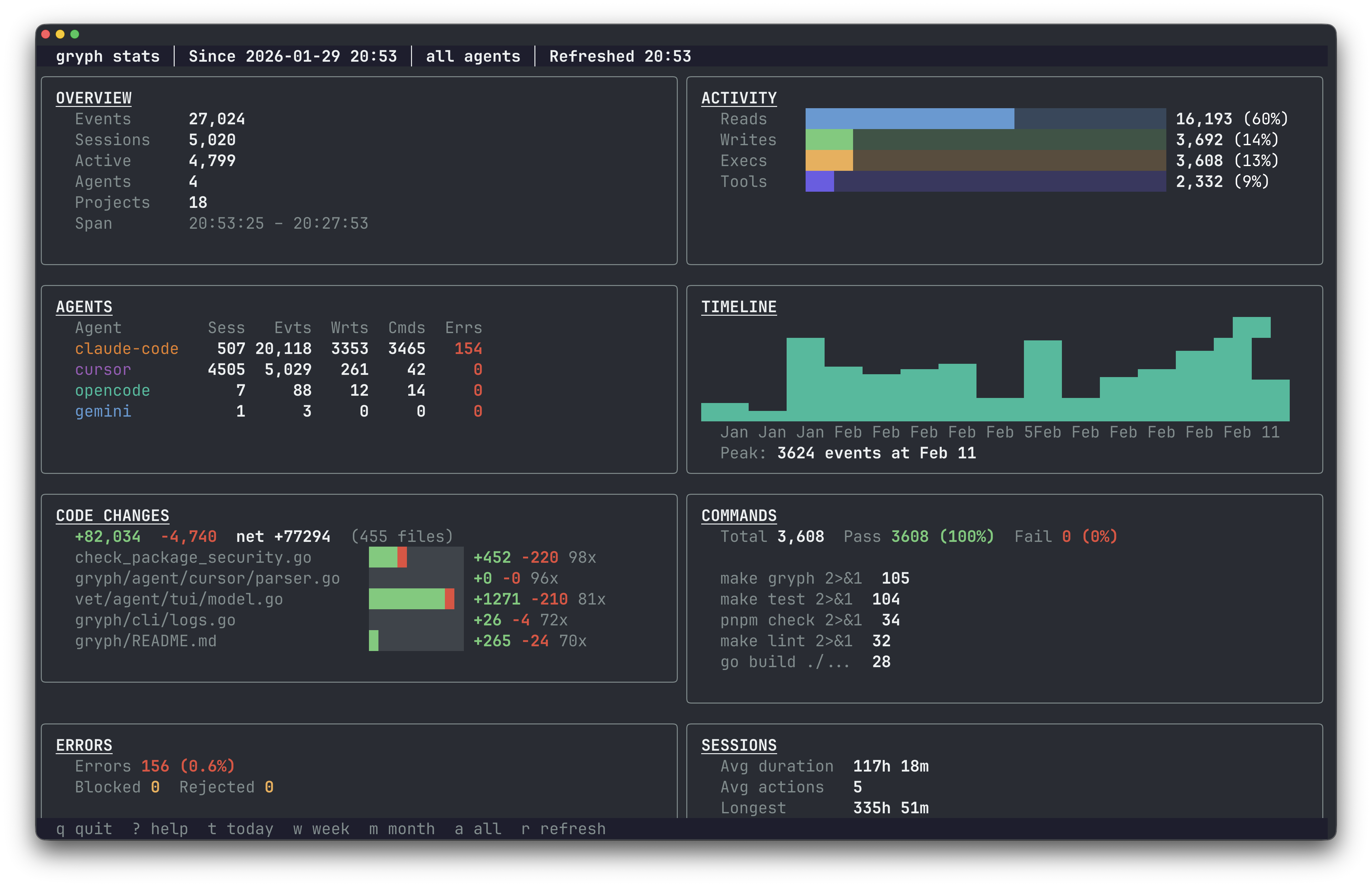
gryph stats                               # Interactive stats TUI
gryph stats --since 7d                    # Stats for the last 7 days
gryph stats --since 30d --agent claude-code # Filter by agent
Data Management
gryph retention status         # View retention policy and stats
gryph retention cleanup        # Clean up old events
gryph retention cleanup --dry-run # Preview what would be deleted
gryph self-log                 # View gryph's own audit trail
Health Check
gryph status                       # Check installation status
gryph doctor                       # Diagnose issues, show the self-protection table and the host posture
gryph doctor --repair              # Also repair a changed hook configuration
gryph supervisor reconcile --once  # The self-protection pass alone, for a timer
See self-protection.
Configuration
Gryph works out of the box. Configuration is optional.
gryph config show                       # View current config
gryph config get logging.level          # Get a specific value
gryph config set logging.level full     # Set logging level
gryph config reset                      # Reset to defaults
Logging levels:
minimal: Action type, file path, timestampstandard: Adds diff stats, exit codes, truncated output (default)full: Adds file diffs, raw events, conversation context
Sensitive files (.env, *.pem, *secret*, etc.) are detected automatically. Actions on these files are logged but content is never stored.
Privacy
Gryph sends nothing by default. SafeDep Cloud is opt-in. The data stays on the local machine until you set up an export, a stream target or SafeDep Cloud, and each of them applies an export profile to what leaves the host.
- Sensitive file detection : Files matching
.env,*.pem,*.key,*secret*,.ssh/**,.aws/**and more are automatically flagged. Actions are logged but content is never stored. - Content redaction : Passwords, API keys, tokens, and credentials are automatically redacted from logged output.
- Content labels : Each stored content value carries a label: its data classes, its size, a SHA-256 digest of the value before redaction, and flags that say whether Gryph redacted, truncated, or removed it.
- Content hashing : File contents are stored as SHA-256 hashes by default, allowing identity verification without storing actual content.
- Local storage by default : SQLite database with configurable retention (default 90 days). Nothing leaves the host unless you turn on an export, a stream target or SafeDep Cloud.
Files Modified During Installation
Files Modified During Installation
For transparency, these are the files Gryph modifies during gryph install:
| Agent | File Modified | Description |
|---|---|---|
| Claude Code | ~/.claude/settings.json |
Adds hook entries to the hooks section |
| Codex | ~/.codex/hooks.json |
Creates or updates hooks configuration |
| Cursor | ~/.cursor/hooks.json |
Creates or updates hooks configuration |
| Devin CLI | ~/.config/devin/config.json |
Adds hook entries to the hooks section |
| Gemini CLI | ~/.gemini/settings.json |
Adds hook entries to the hooks section |
| OpenCode | ~/.config/opencode/plugins/gryph.js |
Installs a JS plugin that bridges to gryph |
| Windsurf | ~/.codeium/windsurf/hooks.json |
Creates or updates hooks configuration |
The OpenCode plugin works with OpenCode 1.x and 2.x. An upgrade of OpenCode
does not need a new gryph install. Run gryph install once after you
upgrade Gryph from v0.9.0 or earlier: the plugins of those releases do not
load on OpenCode 2.x.
Until you do, gryph doctor reports the OpenCode hooks as invalid, and
self-protection records the old plugin as a change.
Backups
Existing files are automatically backed up before modification. Backups are stored in the Gryph data directory:
| Platform | Backup Location |
|---|---|
| macOS | ~/Library/Application Support/safedep/gryph/backups/ |
| Linux | ~/.local/share/safedep/gryph/backups/ |
| Windows | %LOCALAPPDATA%\safedep\gryph\backups\ |
Backup files are named with timestamps (e.g., settings.json.backup.20250131120000).
Community
Questions, feedback, or contributions are welcome.
- Discord : Join the SafeDep community
- Issues : Report bugs or request features
- Contributing : See CONTRIBUTING.md for guidelines
If Gryph is useful, consider giving it a star. It helps others discover the project.
Star History
License
Apache 2.0. See LICENSE for details.
Built by SafeDep · Discord · Star on GitHub
Explore related projects
trimstray/the-book-of-secret-knowledge
A collection of inspiring lists, manuals, cheatsheets, blogs, hacks, one-liners, cli/web tools and more.
258,246 starsHack-with-Github/Awesome-Hacking
A collection of various awesome lists for hackers, pentesters and security researchers
125,443 starsswisskyrepo/PayloadsAllTheThings
A list of useful payloads and bypass for Web Application Security and Pentest/CTF
82,659 starscaddyserver/caddy
Fast and extensible multi-platform HTTP/1-2-3 web server with automatic HTTPS
79,023 stars