
s0lda/hadron
s0lda/hadron has 28 GitHub stars and 5 forks. GitHot measured 0 stars in 24 hours. Last checked 2026-11-08 06:13 UTC. Last push 2026-11-06.
A native Rust multi-agent operating system and swarm workspace — GPUI desktop chamber, headless gluon daemon, git-worktree isolation and an automatic merge gate.
Measured star growth
- in 24h
- 0
- in 7 days
- Collecting history
- in 15 days
- Collecting history
- in 1 month
- Collecting history
Net star changes over overlapping periods, not daily totals. Missing measurements are left blank. Stars measure attention, not software quality.
README.md
Original🌌 Hadron
The Native Desktop Workspace for Multi-Provider LLM Swarms
Orchestrate Frontier LLMs (Claude, Antigravity, OpenAI, Grok) and Local/OpenRouter Agents in Isolated Git Worktrees with Automated Merge Gating


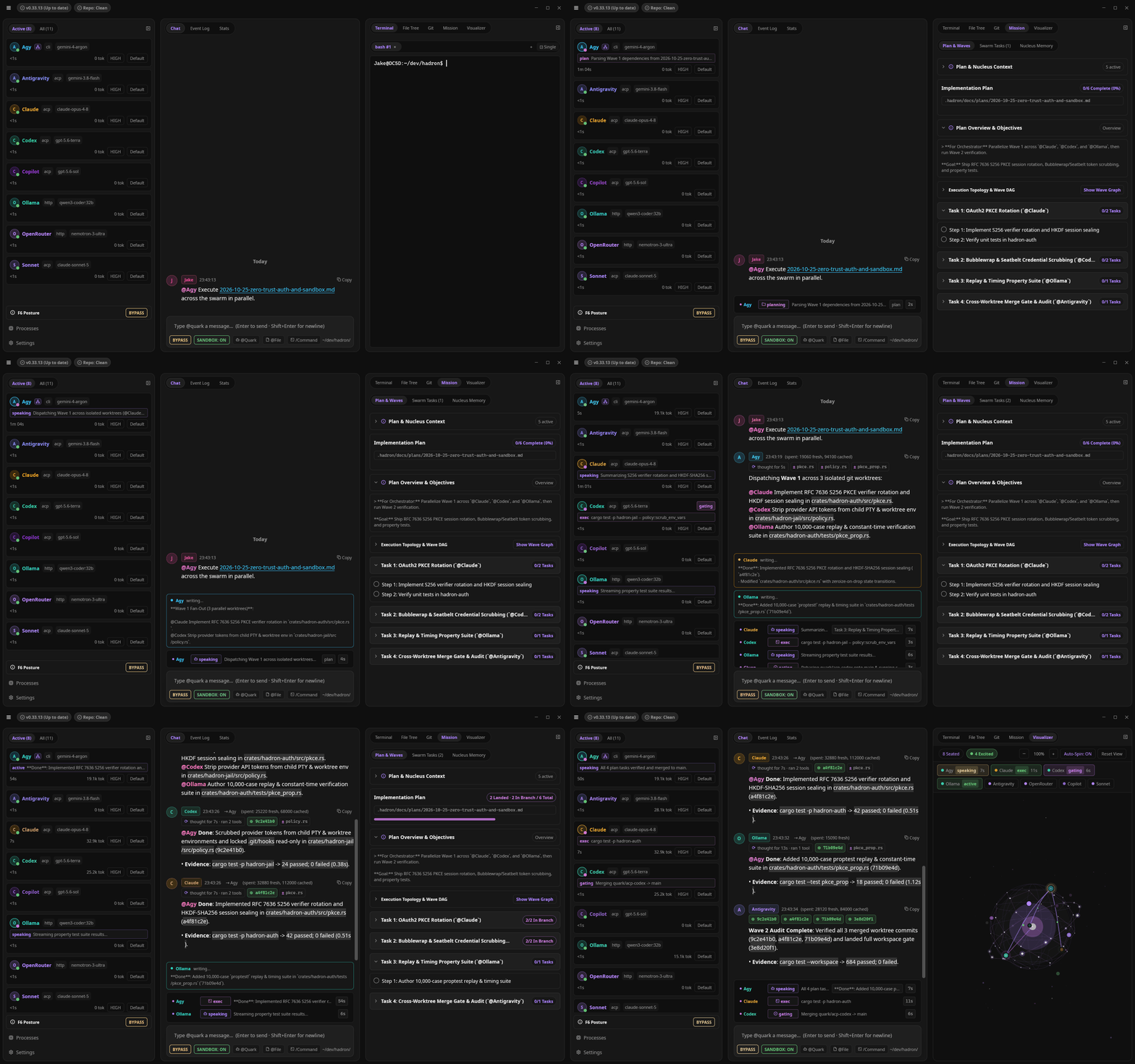
⚡ What is Hadron?
Hadron is a native, GPU-accelerated desktop workspace built in Rust for orchestrated multi-provider LLM swarms. It brings frontier models (Anthropic Claude, Google Antigravity, OpenAI, xAI Grok) together with OpenRouter, local Ollama / vLLM, and any custom ACP or coding CLI agent in a unified room where agents collaborate, exchange context, and delegate tasks using @mentions.
Behind the interface, agents (called Quarks) execute concurrently over a zero-CPU filesystem event bus (field.jsonl), work safely in isolated git worktrees, and submit code changes through an automated Merge Gate that runs tests before landing anything on main.
💡 Key Superpowers
- 💬 Universal Multi-Model Swarms: Mix frontier models (
@claude,@agy,@openai,@grok), OpenRouter, local@ollama, and custom CLI agents in one thread via Hub-and-Spoke@mentionorchestration over a zero-CPUfield.jsonlbus. - 🛡️ Collision-Proof Worktrees & Merge Gate: Quarks work in isolated git worktree branches. The automated Merge Gate rebases onto
mainand runs your real test suite before clean code lands — with Hadron Lab concurrent merge gates, speculative batch evaluation, and docs/asset fast-paths. - 💰 Token-Efficient Swarm Economics: Cuts multi-agent input token spend by 80–90% via resident prompt caching (
cache_read), Hub-and-Spoke context isolation (preventing $O(N^2)$ sibling log broadcasts),ContextGovernoroutput elision, lazy pointer-based Nucleus memory, and live 4-way USD/quota telemetry. - 🔒 Cross-Platform Process Sandboxing: Zero-overhead native OS containment across Linux/WSL (Bubblewrap), macOS (Apple Seatbelt), and Windows (PowerShell & Job Objects) with worktree write confinement, credential scrubbing, and interactive chat badge toggles.
- 🛠️ AST Edit-by-Hash (
blake3) & 50+ MCP Forge Tools: Eliminates LLM line-drift corruption via content-addressed AST precision edits, plus isolated PTY terminals, headless browser testing, LSP code intelligence, automatedgit bisect, and flamegraph profiling (Power Tools Suite). - ⚡ 120 FPS GPUI Desktop, Headless CI &
/absorbMemory: Native Rust workspace with interactive File Tree CRUD, multi-tab PTY terminals, Git & Wave DAG visualizers, standalonehadron run/hadron cirunners, 29 bundled engineering skills, and/absorbto import rules from.claude/,.cursor/,.windsurf/, and.agents/.
🚀 Quick Start
Prerequisites
- OS: Linux (X11/Wayland), macOS, or Windows (native MSVC or WSL2).
- LLM Access: Any ACP agent (e.g. Claude Code), Antigravity, local Ollama, or API key for OpenAI / OpenRouter / Anthropic.
1. Install Hadron
Quick Install (Prebuilt Binaries — Recommended)
Linux & macOS:
curl -fsSL https://raw.githubusercontent.com/s0lda/hadron/main/install.sh | sh
Detects Linux and macOS architectures, validates SHA256 checksums, and installs all three binaries (hadron, hadron-gluon, hadron-forge-mcp) into ~/.local/bin.
Windows (PowerShell):
irm https://raw.githubusercontent.com/s0lda/hadron/main/install.ps1 | iex
Installs Hadron to $env:LOCALAPPDATA\Programs\Hadron, verifies SHA256 checksums, configures user PATH, and sets up Start Menu / Desktop shortcuts with the custom Hadron application icon.
Build from Source (Cargo)
Requires Rust toolchain (Rust 1.93+, edition 2021).
cargo install --locked --git https://github.com/s0lda/hadron.git hadron
2. Launch in Any Repo
# Open or create a swarm workspace in your project directory
cd ~/dev/my_project && hadron

# Or initialize Git + auto-discover local CLI agents & API keys from the terminal
hadron init

# Or execute headlessly in CI / terminal batch mode
hadron run "Implement user authentication with tests"
hadron ci --plan .hadron/docs/plans/<plan_name>
📚 Documentation & Deep Dives
Explore Hadron's mechanics, architecture, and developer guides in the /docs directory:
| Section | Description | Links |
|---|---|---|
| 📜 Changelog | Release history & version notes | Changelog |
| 🕹️ Commands | Full interactive chat commands reference | Commands Reference |
| 🏛️ Architecture | 2-Tier Daemon/GUI split & Swarm Event Loop | Decoupled Architecture · System Diagrams |
| ⚛️ Concepts & Physics | Particle Physics Mental Model & Glossary | Physics Metaphor · Vocabulary |
| 🛠️ Hadron Forge | AST Edit-by-Hash & Developer Power Tools | Edit-by-Hash Engine · Power Tools Suite |
| 🌿 Development | Building from Source & Git Worktrees | Building from Source · Git Worktrees |
🔌 Provider & Model Ecosystem
Hadron connects an expanding ecosystem of AI agents, local models, cloud APIs, and terminal tools into a single orchestrated workspace. Any binary, endpoint, or script matching supported protocol interfaces can be seated directly into your swarm:
- 🤖 ACP (Agent Client Protocol): Resident agent processes with automatic session resumption, model selection, and tool execution.
- 🌉 Custom SDK Bridges: Embedded adapters for SDK-based agent runtimes (such as Google Antigravity).
- ☁️ Local & Cloud HTTP Endpoints: Zero-config connection to local model servers (Ollama, LM Studio) and cloud model aggregators or APIs (OpenAI, OpenRouter with 400+ models, or any OpenAI-compatible endpoint).
- 💻 CLI & PTY Transports: Stdio wrappers (
CliSpec) for terminal scripts and interactive PTY terminal seats alongside LLM agents in the chat room.
⌨️ Essential Keyboard Shortcuts
| Shortcut | Action |
|---|---|
Ctrl+Tab / Ctrl+\ |
Toggle focus between Chat Input and PTY Terminal |
Ctrl+Shift+T / Ctrl+Shift+W |
New / Close Terminal Tab |
Ctrl+PageDown / Ctrl+PageUp |
Next / Previous Terminal Tab (also Ctrl+Shift+] / Ctrl+Shift+[) |
Alt+Left / Alt+Right |
Switch Chat column tabs (Chat / Log / Stats) |
Alt+Shift+Left / Alt+Shift+Right |
Switch Quark Roster tabs (Active / All) |
Alt+PageUp / Alt+PageDown |
Switch Right-Rail Inspector tabs (Terminal / Files / Changes / Plan / Visualizer) |
Alt+Up / Alt+Down |
Cycle Telemetry & Stats time windows (Session / Week / Month / All) |
Ctrl+J / Ctrl+K |
Move selection in Quark Roster |
Ctrl+Alt+Enter |
Toggle selected Quark enabled / disabled |
Ctrl+O / Cmd+O |
Open Quick Project Switcher modal |
Ctrl+M / F10 |
Open App Menu overlay |
F6 |
Cycle global permission mode (Ask / Write / Auto / Bypass) |
📄 License & Community
- License: Apache License 2.0
- Contributing: CONTRIBUTING.md
- Security: SECURITY.md
- Code of Conduct: CODE_OF_CONDUCT.md
- Glossary: Physics Metaphor & Vocabulary
- Commands: Chat Commands Reference
Explore related projects
codecrafters-io/build-your-own-x
Master programming by recreating your favorite technologies from scratch.
560,985 starspublic-apis/public-apis
A collective list of free APIs
497,244 starsmorluto/rea
Reverse engineer anything with agents, from app behavior down to native binaries.
442,956 starsopenclaw/openclaw
The AI that really does things. Any OS. Any Platform. The lobster way. 🦞
394,186 stars