
ruwiss/screen_forge
ruwiss/screen_forge has 34 GitHub stars and 2 forks. GitHot measured 0 stars in 24 hours. Last checked 2026-11-15 15:59 UTC. Last push 2026-10-13.
What you can do
- Capture - Region, fullscreen, freeform (collage) canvas
- Annotation - Arrow, shapes, pen, highlight, text, steps, blur/pixelate
- Freeform mode - Multi-select, copy / paste / duplicate, system clipboard PNG
- Output - Copy, save (PNG/JPEG/WebP), cloud upload, GIF / MP4
Measured star growth
- in 24h
- 0
- in 7 days
- Collecting history
- in 15 days
- Collecting history
- in 1 month
- Collecting history
Net star changes over overlapping periods, not daily totals. Missing measurements are left blank. Stars measure attention, not software quality.
About
Modern Windows screenshot & annotation tool. Region/fullscreen capture, blur, steps, GIF recording, cloud upload. Free Lightshot-style alternative for Windows 10/11.
ProductivityREADME.md
OriginalScreenForge — Windows Screenshot & Annotation Tool
ScreenForge is a modern, fast screen capture and annotation app for Windows. Lightshot-style workflow with drawing tools, numbered steps, blur/pixelate, freeform collage canvas, GIF and MP4 screen recording, and one-click cloud upload.







Free Windows screenshot tool · Turkish UI · Windows 11–inspired dark theme
Built with .NET 9 · WPF · SkiaSharp
Why ScreenForge?
Looking for a Lightshot alternative, a better Snipping Tool, or a lightweight screen recorder for short GIFs? ScreenForge combines capture, annotation, export, and upload in one tray app:
- Capture a region, fullscreen, or a freeform collage canvas
- Annotate with arrows, shapes, pen, highlight, text, numbered steps, and blur / pixelate
- Export PNG, JPEG, or WebP — solid background or transparent
- Record a region or fullscreen as GIF or MP4 and preview before save
- Upload to the cloud and get a shareable link
- Global hotkeys, system tray, settings, and auto-update
Features
| Area | What you get |
|---|---|
| Capture | Region, fullscreen, freeform (collage) canvas |
| Annotation | Arrow, shapes, pen, highlight, text, steps, blur/pixelate |
| Freeform mode | Multi-select, copy / paste / duplicate, system clipboard PNG |
| Output | Copy, save (PNG/JPEG/WebP), cloud upload, GIF / MP4 |
| Export | Background or transparent + crop from the right edge |
| System | Tray icon, global hotkeys, settings, automatic updates |
Screenshots
Overview
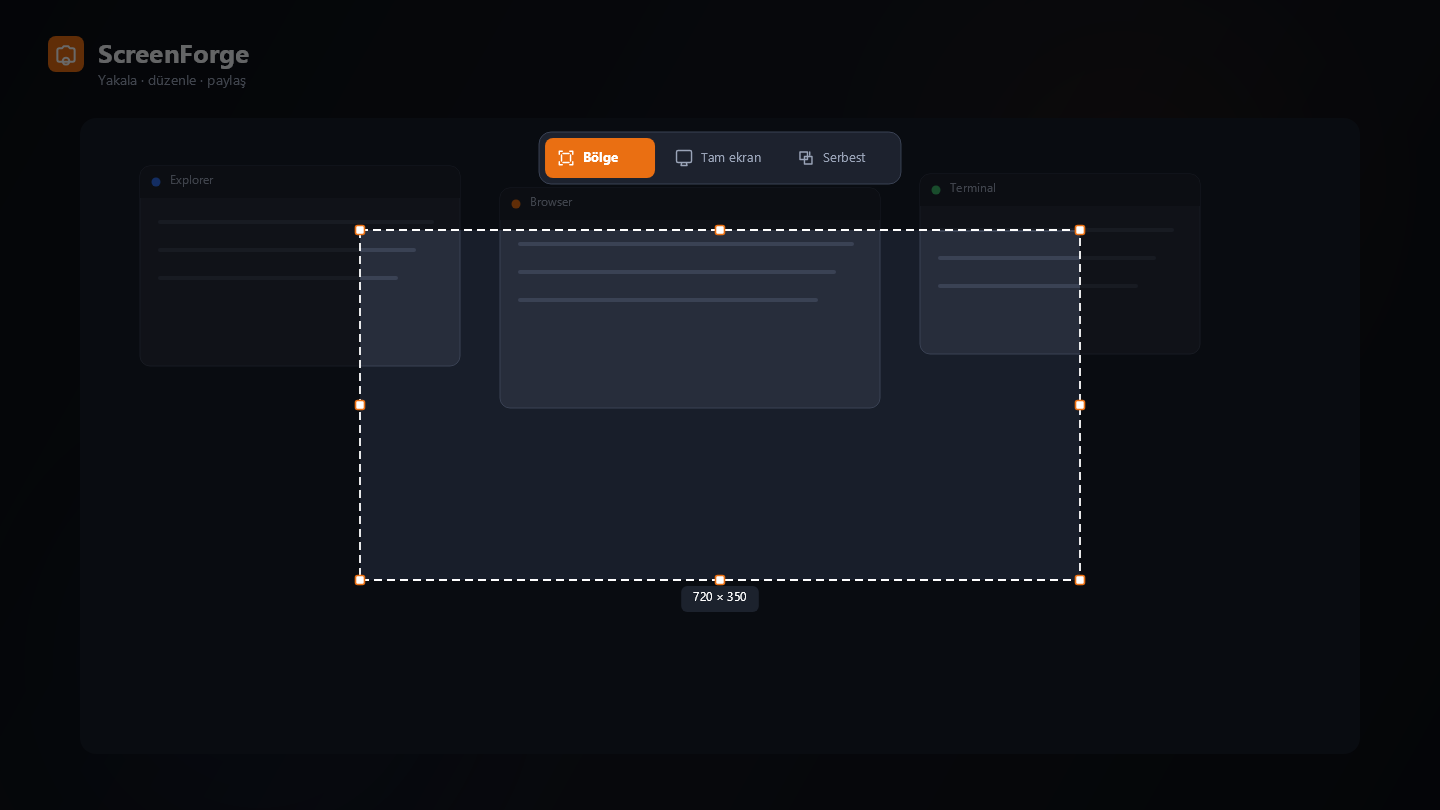
Region selection and mode bar (Region · Fullscreen · Freeform).
Annotation tools
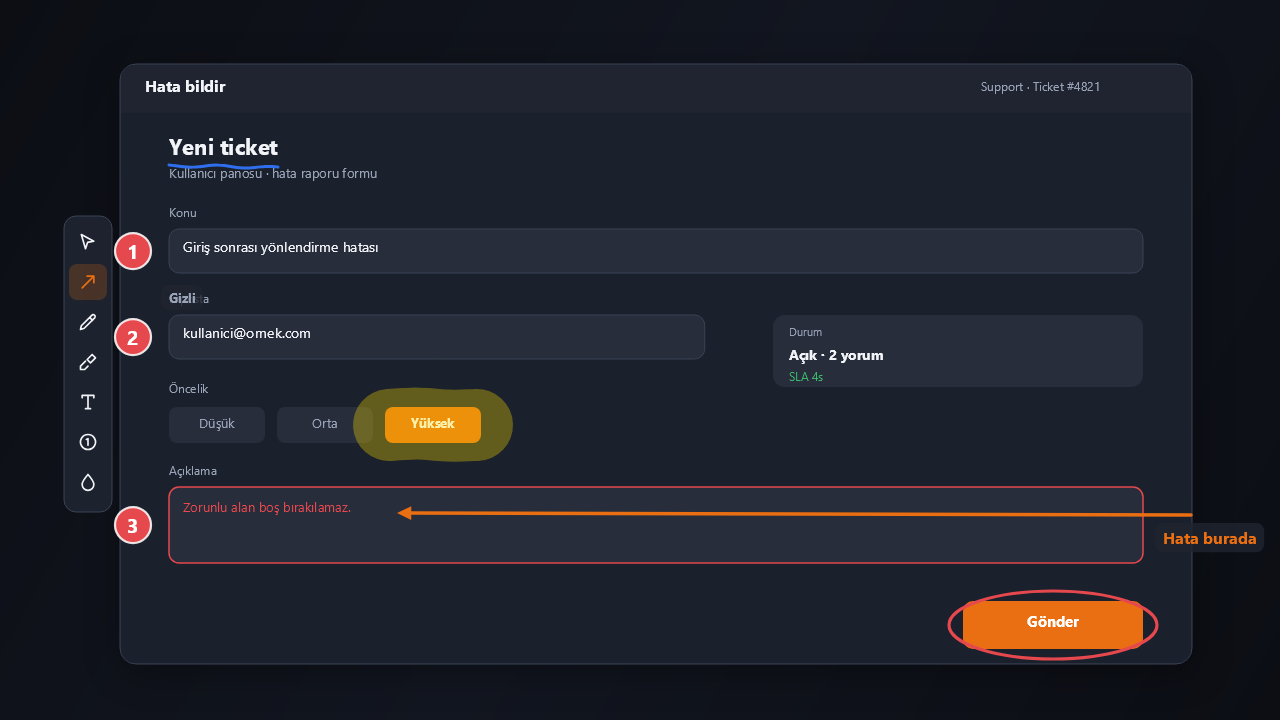
Arrow, step numbers, highlight, text, ellipse, and blur over the selection.
Global hotkeys
| Action | Default |
|---|---|
| Capture region | Alt + Shift + S |
| Quick translate | Alt + Shift + T |
| Fullscreen | unset |
| Fullscreen + upload | unset |
| Freeform / collage | unset |
Change shortcuts under Settings → Hotkeys.
Download & install
Binary (recommended)
Grab the latest build from GitHub Releases:
| File | Use |
|---|---|
ScreenForge-win-Setup.exe |
Installer (auto-update ready) |
ScreenForge-win-Portable.zip |
Portable — no install |
Also mirrored under Releases/ in this repo for packaging workflows.
Requirements
- Windows 10 / 11 (x64)
- No separate runtime install needed for release builds (self-contained packaging via Velopack)
Build from source
Requires the .NET 9 SDK.
dotnet build ScreenForge.sln -c Release
dotnet run --project ScreenForge/ScreenForge.csproj -c Release
dotnet test ScreenForge.Tests/ScreenForge.Tests.csproj -c Release
Optional README assets:
dotnet run --project tools/ReadmeAssets -c Release -- docs/readme
Tech stack
| Layer | Choice |
|---|---|
| Runtime | .NET 9 |
| UI | WPF + Windows Forms interop |
| Drawing | SkiaSharp |
| Tray | H.NotifyIcon.Wpf |
| Updates | Velopack |
| MVVM helpers | CommunityToolkit.Mvvm |
FAQ
Is ScreenForge free?
Yes. ScreenForge is free to download and use for personal and internal work. See the License section for redistribution.
Is it a Lightshot / ShareX alternative?
It targets a Lightshot-like capture-and-annotate flow on Windows, with steps, blur, freeform collage, GIF region capture, and cloud upload. It is lighter than full ShareX-style tool suites and focused on daily screenshot workflows.
Does it record video?
Yes. Region or fullscreen can be recorded as MP4 (H.264, optional system audio and microphone) or as an animated GIF.
What export formats are supported?
PNG, JPEG, and WebP, plus clipboard copy and optional cloud upload.
Which languages are supported?
The UI is Turkish. The project and this README are documented in English for discoverability.
Project layout
ScreenForge/          # Main WPF application
ScreenForge.Tests/    # Unit tests
docs/readme/          # README images
Releases/             # Packaged installers & portable zip
scripts/              # Packaging helpers (Velopack)
tools/ReadmeAssets/   # Optional screenshot asset generator
Contributing
Issues and pull requests are welcome. For bugs, include Windows version, ScreenForge version, and steps to reproduce.
License
Personal / internal use. For redistribution, contact the repository owner.
Keywords: Windows screenshot tool · screen capture · annotation · Lightshot alternative · snipping tool · GIF recorder · blur · pixelate · WPF · SkiaSharp · .NET 9