
rust-dd/rsql has 79 GitHub stars and 5 forks. Star changes are not measured yet. Last checked 2026-11-10 01:07 UTC. Last push 2026-11-08.
A Tauri application for efficient and secure database management.
Measured star growth
- in 24h
- Update delayed
- in 7 days
- Update delayed
- in 15 days
- Update delayed
- in 1 month
- Update delayed
Net star changes over overlapping periods, not daily totals. Missing measurements are left blank. Stars measure attention, not software quality.
README.md
OriginalRSQL
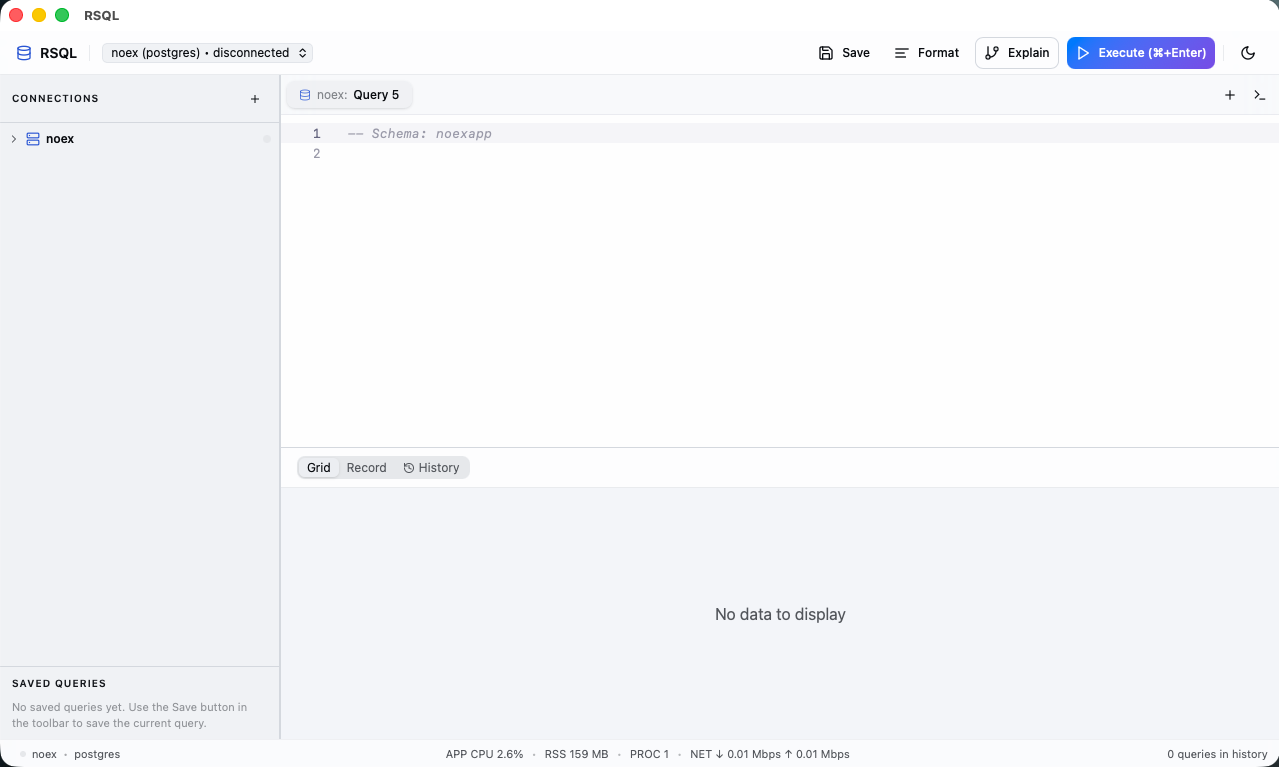
A desktop PostgreSQL client for macOS, Windows and Linux.
Write SQL, edit data, explore schemas and inspect query plans in one app. RSQL is built with Rust, Tauri and React, and is free and open source under the MIT license. No account required. No telemetry.
Download · First query · Features · Development · Report an issue
Install
Choose an installer from the latest release:
| Platform | Architecture | Download |
|---|---|---|
| macOS | Apple Silicon | rsql_<version>_aarch64.dmg |
| macOS | Intel | rsql_<version>_x64.dmg |
| Windows | x64 | .msi or -setup.exe |
| Linux | x86_64 | .AppImage, .deb or .rpm |
On macOS, open the DMG and drag RSQL into Applications. Signing and notarization details are documented in the macOS release guide.
RSQL checks for updates on startup. Use Updates in the top bar to check manually.
Run your first query
Open the command palette with Cmd/Ctrl+K and choose New Connection.
Enter your host, port, database, username and password, or paste a connection URL such as
postgresql://user:password@localhost:5432/mydb. Enable SSL or configure an SSH tunnel if your server requires it.Click Connect, then select the connection for your query tab if needed.
Enter a query and press Cmd/Ctrl+Enter, or click Execute:
SELECT current_database(), current_user, version();
Expand the sidebar to browse schemas and tables. Use the command palette to find database objects, open another query tab, or save and load a workspace.
Features
Write and organize SQL
- Schema-aware completion: Monaco editor with suggestions for schemas, tables, views, columns, functions and table aliases, plus SQL snippets and formatting.
- Tabs and split view: work on several queries, compare queries side by side, and save workspaces for later.
- Saved queries and history: keep queries for reuse and browse the last 500 executions in the current session.
- Execution controls: cancel a running query or set a statement timeout per tab. Scripts can contain multiple statements; the last result set is displayed.
- Query plans: inspect
EXPLAIN ANALYZEoutput with timing, cost, and estimated versus actual rows for each node. Explain executes the query to collect measurements.
Inspect and edit data
- Results grid: canvas rendering with pages loaded from Rust as you scroll through large results.
- Data editing: update and delete rows in eligible single-table results, then apply changes together in one transaction. The query must include the table's primary key.
- Result tools: search cells, inspect a row in Record view, follow foreign keys, and compare results against a pinned snapshot.
- Import and export: import CSV with column mapping; export to CSV, JSON, SQL
INSERT, Markdown or XML. Paged results support CSV export. - Geometry preview: view WKT, GeoJSON and EWKB point values on an OpenStreetMap map.
In edit mode, type NULL in any letter case for SQL NULL, or "NULL" for literal text. Empty input remains an empty string; cell-to-cell pastes preserve literal text. See result limits for tools available on larger queries.
Explore schemas and manage PostgreSQL
- Object browser: databases, roles, tablespaces, schemas, tables, views, materialized views and functions, with columns, indexes, constraints, triggers, rules and row-level security policies.
- Schema tools: inspect DDL, generate
ALTER TABLEstatements in the structure editor, compare schemas, and export schema ER diagrams as SVG. - Server tools: roles and grants, extensions, enums, server settings,
LISTEN/NOTIFY, and a built-in terminal. - Performance monitor: activity, locks, table statistics, index advice, bloat estimates and the slowest queries of the current session.
- Maintenance: run actions such as
VACUUM,ANALYZEandREINDEXfrom object properties.
Manage connections
- Save and rename connections, paste PostgreSQL connection URLs, and enable SSL.
- Connect through SSH with a password or key file. RSQL verifies the server's host key before authenticating.
- Give connections on the same server a shared label while keeping the server address visible.
- Switch between light and dark themes; the choice is restored on restart.
Keyboard shortcuts
Use Cmd on macOS and Ctrl on Windows and Linux.
| Action | Shortcut |
|---|---|
| Execute SQL in the focused editor | Cmd/Ctrl+Enter |
| Explain the query | Cmd/Ctrl+Shift+Enter |
| Cancel the running query | Cmd/Ctrl+. |
| Open the command palette | Cmd/Ctrl+K |
| Open a terminal tab | Cmd/Ctrl+` |
| Close the active tab | Cmd/Ctrl+W |
Result limits
The main query pane uses 2,000-row pages by default. Larger results stay in Rust and are fetched by the grid as needed.
| Capability | Up to 2,000 rows | More than 2,000 rows |
|---|---|---|
| Browse results | Full result in the grid | Pages loaded as you scroll |
| Search, Record view, editing, foreign key navigation and result diff | Available where the query supports them | Narrow the query to use these tools |
| Export | CSV, JSON, SQL INSERT, Markdown, XML |
CSV of the retained result |
| Map view | Detected geometry values | First page only |
The backend retains at most 1,000,000 rows per result, within a 256 MiB budget shared by cached results and running paged queries. Results that reach a limit are marked truncated. These limits bound retained data; they do not add a SQL LIMIT or stop the remaining statements in a script. Narrow the query when you need rows beyond the retained result.
Local data and credentials
Saved connections, queries and workspaces live in a local rsql.db database. Release builds use the operating system's application data directory; debug builds use the working directory. Open query tabs and editor contents are restored from local WebView storage. Query history is held in memory for the current session.
Database and SSH passwords are currently stored unencrypted in rsql.db. Treat that file and its backups as sensitive. When older connection records are migrated to stable IDs, RSQL first creates a sibling backup named rsql.db.<timestamp>.bak.
Development
Prerequisites
- Node.js 24.21.0, pinned in
.node-version. - Yarn 1.x.
- Rust 1.95.0, pinned in
src-tauri/rust-toolchain.toml. - The Tauri system prerequisites for your operating system.
- Access to a PostgreSQL server to use the app. CI runs integration tests against PostgreSQL 16, 17 and 18.
Run locally
git clone https://github.com/rust-dd/rsql.git
cd rsql
yarn install --frozen-lockfile
yarn tauri dev
yarn tauri dev starts both Vite and the desktop app. yarn dev starts only the frontend server; database access requires the Tauri backend.
Build an installer
For a local build without release signing keys, disable updater artifacts:
yarn tauri build --no-sign --config '{"bundle":{"createUpdaterArtifacts":false}}'
Installers are written to src-tauri/target/release/bundle/. Automatic updates are disabled in builds without TAURI_UPDATER_PUBLIC_KEY.
Checks and tests
Run the frontend checks from the repository root:
node scripts/check-version.mjs
yarn check:ci
yarn typecheck
yarn test
yarn build
Run Rust checks from src-tauri so the pinned toolchain is used:
cd src-tauri
cargo fmt --check
cargo clippy --locked --all-targets -- -D warnings
cargo test --locked
Database integration tests are ignored by default. To run them, point RSQL_TEST_DATABASE_URL at a disposable PostgreSQL database. From the repository root, in a Bash-compatible shell:
cd src-tauri
export RSQL_TEST_DATABASE_URL=postgres://postgres:postgres@localhost:5432/postgres
cargo test --locked --test row_mutations --test schema_index --test foreign_keys -- --ignored
cargo test --locked --bin rsql -- --ignored
Project layout
| Path | Contents |
|---|---|
src/ |
React UI, Zustand stores, Monaco completion and Tauri client calls |
src-tauri/ |
Rust backend, PostgreSQL driver, SSH tunnels and local storage |
tests/ |
Shared fixtures and browser performance harnesses |
scripts/ |
Version checks, dependency audits and icon generation |
docs/ |
Project documentation and release setup |
website/ |
Separate website with an interactive SQL demo |
The desktop icon source is assets/app-icon.png. Run yarn icons:generate to regenerate platform icons; see the icon notes.
Architecture
The React UI talks to Rust through Tauri commands. The PostgreSQL driver uses tokio-postgres's simple query protocol, preserving database values as text. Results cross the IPC boundary as packed strings and are decoded into grid pages in the frontend.
Each saved connection has separate pools for user queries (up to 8 connections) and metadata (up to 4), so schema browsing does not queue behind a long query. Local persistence uses libSQL.
Contributing
Open an issue for bugs or feature requests. For bugs, include your RSQL version, operating system, PostgreSQL version and steps to reproduce, with credentials and sensitive data removed.
For code changes, run the relevant checks above and describe the problem and resulting behavior in your pull request. Use a purpose-based branch name such as fix/query-cancellation or feat/result-export, and Conventional Commit subjects such as fix: handle cancelled queries.
Releases
Pushing a v* tag runs the release workflow. It verifies version consistency, runs frontend and Rust checks, builds the supported platforms, and uploads signed updater artifacts to a draft GitHub release. Publish the draft after the builds and signing checks finish. The updater endpoint is configured in tauri.conf.json.
Release signing configuration
Configure these GitHub repository secrets before releasing:
- Updater:
TAURI_UPDATER_PUBLIC_KEY,TAURI_SIGNING_PRIVATE_KEY, and optionallyTAURI_SIGNING_PRIVATE_KEY_PASSWORD. - macOS:
APPLE_CERTIFICATE,APPLE_CERTIFICATE_PASSWORD,APPLE_SIGNING_IDENTITY,APPLE_ID,APPLE_PASSWORD(app-specific password) andAPPLE_TEAM_ID. Set the repository variableMACOS_SIGNING_ENABLEDtotrueafter following the macOS signing guide. - Windows:
WINDOWS_CERTIFICATE(base64.pfx),WINDOWS_CERTIFICATE_PASSWORD, and optionallyWINDOWS_TIMESTAMP_URL(defaults to DigiCert). - Linux:
TAURI_SIGNING_RPM_KEY(ASCII-armored GPG key),APPIMAGETOOL_SIGN_PASSPHRASE, and optionallyTAURI_SIGNING_RPM_KEY_PASSPHRASEandSIGN_KEY(AppImage GPG key ID).
License
MIT — free to use, modify and distribute.
Explore related projects
Asabeneh/30-Days-Of-Python
The 30 Days of Python programming challenge is a step-by-step guide to learn the Python programming language in 30 days. This challenge may take more than 100 days. Follow your own pace. These videos may help too: https://www.youtube.com/channel/UC7PNRuno1rzYPb1xLa4yktw
78,486 starsgrafana/grafana
The open and composable observability and data visualization platform. Visualize metrics, logs, and traces from multiple sources like Prometheus, Loki, Elasticsearch, InfluxDB, Postgres and many more.
77,790 starsredis/redis
For developers, who are building real-time data-driven applications, Redis is the preferred, fastest, and most feature-rich cache, data structure server, and document and vector query engine.
77,332 starsapache/superset
Apache Superset is a Data Visualization and Data Exploration Platform
75,455 stars