
ronaldo-avalos/Maya has 1,086 GitHub stars and 62 forks. GitHot measured +8 in 7 days. Last checked 2026-11-11 01:08 UTC. Last push 2026-08-23.
🖥️ 📱 ▶️ Wrap your iPhone screen recordings in a beautiful device frame, add cinematic zoom moments, and export ready-to-share videos.
Measured star growth
- in 24h
- Update delayed
- in 7 days
- +8
- in 15 days
- Collecting history
- in 1 month
- Collecting history
Net star changes over overlapping periods, not daily totals. Missing measurements are left blank. Stars measure attention, not software quality.
README.md
Original
Maya
Wrap screen recordings in a beautiful device frame, adjust the pacing, add cinematic zoom and tap moments, and export ready-to-share videos.
A native macOS app for turning raw screen recordings into polished marketing clips, social-media posts, and in-app tutorial overlays.
⬇️ Download
Download Maya for macOS · Website
Requires macOS 26.3 (Tahoe) or later. Maya is signed with a Developer ID and notarized by Apple — it opens with a normal double-click, no security workaround needed.
Want the latest unreleased changes? Build from source. Maintainers: see RELEASING.md.
🆕 What's new in 1.1
- Visible tap feedback with Ripple, Pulse, and Ring styles so viewers can follow every press.
- Direct tap placement on the device screen, with timing, color, and size controls in a dedicated timeline track and editor panel.
- Smoother zoom editing with a continuous live preview while dragging and timeline snapping when the drag ends.
- Editor reliability improvements, including a settings sidebar that remains fully accessible in compact windows.
✨ Features
🎬 Device framing
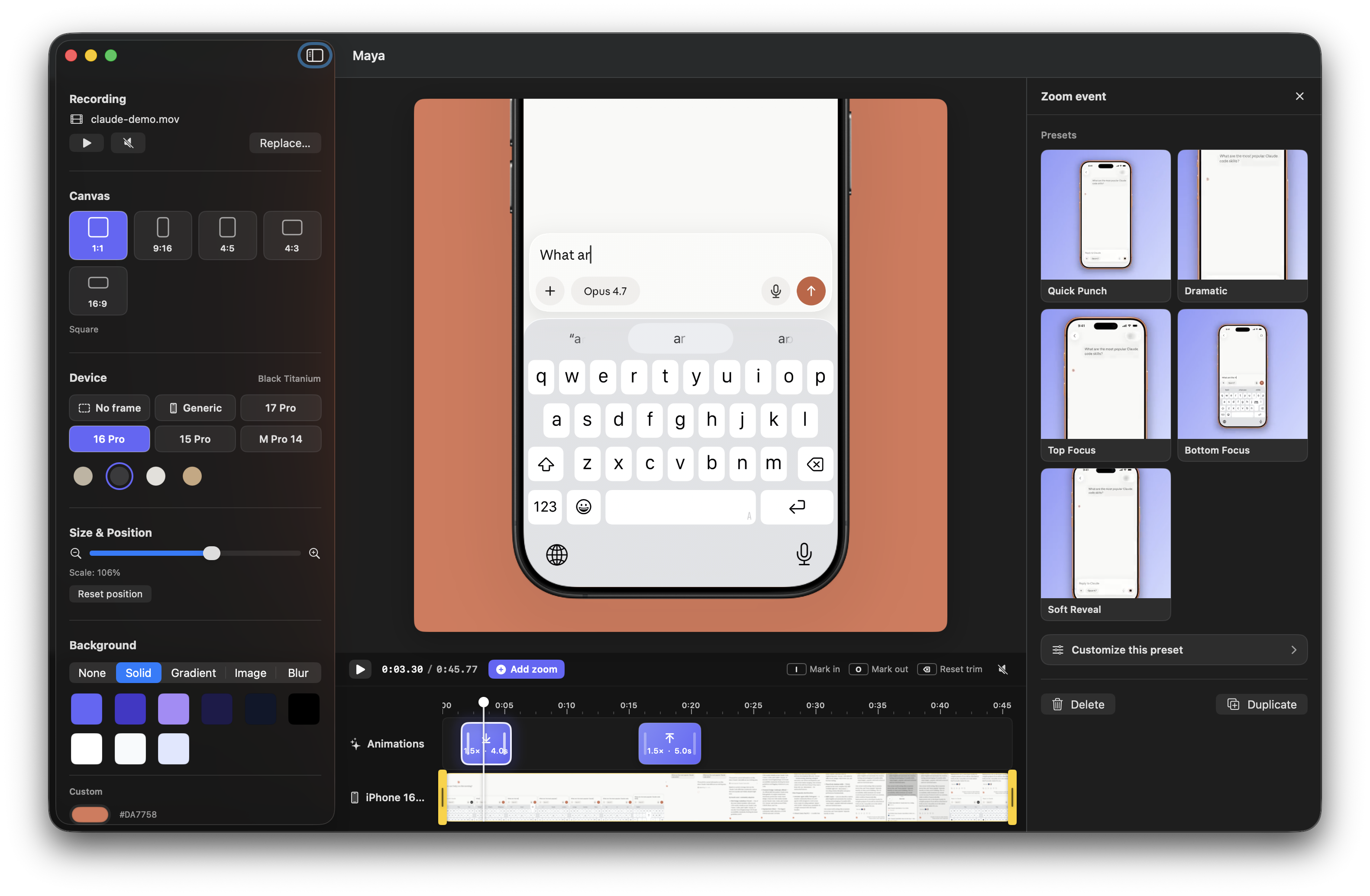
- Drop a screen recording — Maya wraps it in a clean device mockup with the correct screen cutout and corner radius.
- Multiple devices: iPhone 17 Pro, iPhone 16 Pro, iPhone 15 Pro, iPad Pro 11" (landscape), and MacBook Pro 14. The iPhones include their titanium color variants (Cosmic Orange, Deep Blue, Silver, Natural / Black / White / Desert Titanium…). Switch model and color from the sidebar in one click.
- Generic mode: a brand-agnostic frame with user-defined bezel width and bezel color.
- No frame mode: ship the bare screen recording with rounded corners only.
- A corner radius slider appears in Generic / No-frame modes so you can dial from sharp to stadium.
- The framed device lives inside a configurable canvas — 1:1, 9:16, 4:5, 4:3 landscape, 16:9 widescreen — so you can target Reels, Shorts, TikTok, YouTube, X, or in-app overlays from a single source.
- Manually scale and reposition the device on the canvas via slider + drag.
- Optional drop shadow under the device with controls for color, blur, X/Y offset, and opacity.
🎨 Backgrounds
A single picker, five modes:
- None — Photoshop-style checkered preview, exports to
.movwith HEVC + alpha. - Solid — brand-aligned palette + custom hex.
- Gradient — eight curated brand presets, all derived from the app's official color (
#6466FA). - Image — drop in any image, scale-to-fill.
- Video Blur — Keynote-style blurred poster of your own video as the backdrop.
⏱ Timeline, speed, zoom & tap feedback
Like shots.so for Mac:
- Bottom track: live video thumbnails strip.
- Trim the recording with draggable in/out handles, or mark the range from the playhead with I and O.
- Speed track: mark any part of the recording and play it from 0.25× to 4×, with presets for common slow-motion and fast-forward rates.
- Speed segments have draggable edges, a dedicated right-side editor, rate-aware live playback, and synchronized audio/video export.
- Zoom track: hover anywhere to drop a zoom event with a
+affordance. - Each zoom event has a start, duration, scale, focus (Top / Center / Bottom), independent zoom-in / zoom-out timing, and a chosen animation curve.
- Add a tap event at the playhead, click the device screen to position it, then choose Ripple, Pulse, or Ring and customize its timing, color, and size.
- Tap events have their own draggable timeline track and render identically in the live canvas and exported video.
- Drag a block to move it; drag the edges to resize. Zoom events preview continuously while moving and settle to 0.25 s intervals or the nearby playhead when the drag ends.
- Live tooltips show timestamps while dragging.
- The playhead is scrubbable.
- Selecting a zoom or tap event opens an inline right-side editor panel so every change updates the canvas in real time — no modal, no lost context.
🌀 Six animation curves
| Curve | Feel |
|---|---|
| Spring | Soft overshoot, lively (default) |
| Bouncy | More overshoot, playful |
| Smooth | Classic ease in/out |
| Snappy | Fast attack, slow settle |
| Gentle | Soft and organic |
| Linear | Constant rate, mechanical |
🚀 One-click presets
Five pre-baked combinations of scale + focus + duration + curve, each with a looping visual preview: Quick Punch, Dramatic, Top Focus, Bottom Focus, and Soft Reveal.
📤 Smart export
- With background → 1080×1080 (or your aspect)
.mp4, H.264. Drop straight into Reels / TikTok / Shorts. - Transparent (background set to None) →
.movwith HEVC + alpha channel. Composite the framed device over any UI inside anotherAVPlayer/AVKitconsumer — perfect for in-app tutorials, Final Cut, Motion. - All speed changes, zooms, and tap animations bake into both exports.
⌨️ Keyboard shortcuts
| Key | Action |
|---|---|
| Space | Play / pause |
| M | Mute / unmute |
| ← / → | Scrub ±0.25 s |
| ⇧+← / ⇧+→ | Scrub ±1 s |
| I / O | Mark trim in / out at the playhead |
| ⌥+⌫ | Reset trim |
| ⌫ | Delete selected zoom, tap, or speed event |
| ⌘+D | Duplicate selected zoom, tap, or speed event |
🛠 Tech stack
- SwiftUI + AppKit (custom
NSViewRepresentableforAVPlayerLayer) - AVFoundation:
AVMutableComposition, per-range time scaling, customAVVideoCompositing,AVAssetExportSession, manualAVAssetReader/AVAssetWriterpipeline for HEVC + alpha - Core Image + Metal for per-frame compositing
- VideoToolbox for HEVC-with-alpha encoder properties
- Swift Concurrency (
@Observable, actors, async/await) — export runs on a dedicated actor so the UI never blocks - App Sandbox with file hard-link/copy adoption strategy (videos are brought into the sandbox container on load so AVFoundation reads work from any thread)
Requirements
- macOS 26.3 (Tahoe) or later
- Xcode 26.5 or later
- A screen recording in
.mp4/.movformat
Build & run
git clone https://github.com/ronaldo-avalos/Maya.git
cd Maya
open Maya.xcodeproj
# In Xcode: ⌘R
🤝 Contributing — Maya is open source
This project is in active development and contributions are very welcome. Whether you're an iOS/macOS dev, a designer, or someone who just loves polished tools, there's a place for you.
High-impact contribution areas
📱 More device frames
Maya currently ships iPhone 17 Pro, 16 Pro, 15 Pro (each with multiple color variants), iPad Pro 11" (landscape), and MacBook Pro 14, plus a configurable Generic frame and a No-frame mode. PRs that add more devices are very welcome:
- iPhone 16 / 16 Plus, iPhone 15 / 15 Plus
- iPhone SE
- iPad mini, iPad Air, portrait iPad orientations
- More MacBook sizes and desktop displays
- Older models (iPhone 14, 13, 12 family)
- Android devices (Pixel, Galaxy)
To add a frame:
- Drop transparent-screen PNG(s) into an appropriate group under
Maya/Assets.xcassets/— one imageset per color variant. - Register the model in
Maya/Models/DeviceFrame.swift(DeviceModel) with the frame aspect, normalized screen rect, corner radius, and aDeviceColorper variant. Append it toDeviceModel.all. - Submit a PR with a screenshot of the result. That's it.
🎯 Feature ideas (good first issues)
- Undo / Redo for canvas, animations, and background changes (
⌘Z/⌘⇧Z). - Saved projects — persist a
.mayaprojdocument on disk so users can come back to a layout. - Automatic tap detection — parse screen-recording metadata, when available, to create tap events without manual placement.
- Tap presets — save and reuse a preferred style, color, size, and duration.
- Caption / annotation overlays with their own timeline track.
- Watermark toggle for users who want a "Made with Maya" footer.
🎨 Design / UX polish
- A more refined empty state for the canvas before any video is loaded.
- A welcome screen with recent projects.
- Onboarding tooltips for first-launch.
- An export history with thumbnail previews and quick access to recent renders.
- A keyboard shortcuts cheat sheet accessible from a menu item.
- More gradient and solid color presets that work for non-indigo brands.
🐛 Engineering improvements
- More iPhone screen orientations (currently the compositor assumes portrait recordings).
- HDR pass-through for HDR screen recordings.
- Audio waveform rendering on the timeline.
- Apple Silicon performance profiling of the export pipeline.
- Build and test checks on pull requests, alongside the existing release workflow.
- Unit tests for
AnimationSampler,DeviceFramecoordinate math, andBlurPosterCache.
How to contribute
- Fork the repo and create a feature branch:
git checkout -b feature/iphone-16-pro - Code the change. Try to match the existing style — small files, no unnecessary comments, single-responsibility views.
- Test locally (⌘R). Take a screenshot or short GIF showing the change.
- Open a PR with a clear title, a short description, and the screenshot/GIF.
For larger features, open an issue first so we can align on the approach before you spend hours on it.
Code map
Maya/
├── MayaApp.swift                 App entry
├── ContentView.swift             Root → EditorView
├── Models/                       State + value types
│   ├── Project                   Root @Observable state (video, canvas, devices, shadow, animations…)
│   ├── DeviceFrame               DeviceModel + DeviceColor catalog (iPhone, iPad, MacBook, Generic, None)
│   ├── CanvasAspectRatio         1:1, 9:16, 4:5, 4:3, 16:9 — pixel sizes + chip metadata
│   ├── PhoneShadow               Drop-shadow parameters (color, blur, offsets, opacity)
│   ├── BackgroundOption          Solid / gradient / image / video-blur / transparent
│   ├── ZoomSegment               Per-segment zoom animation spec
│   ├── TapEvent                  Positioned press-feedback animation spec
│   └── SpeedSegment              Source-anchored speed range + timeline mapping
├── Services/                     AVFoundation + Core Image plumbing
│   ├── DeviceFrameCompositor     Custom AVVideoCompositing (per-frame compositing)
│   ├── ExportService             Actor that runs both .mp4 and .mov exports
│   ├── AnimationSampler          Envelope math for zoom segments
│   ├── BlurPosterCache           One-shot blurred-frame cache
│   └── VideoThumbnailGenerator   Async timeline thumbnails
├── Views/                        SwiftUI views
│   ├── EditorView                Top-level layout (sidebar / canvas / timeline / editor panel)
│   ├── CanvasView                Configurable-ratio canvas with framed device + background
│   ├── FramedDeviceView          Composite of video + frame overlay + shadow
│   ├── BackgroundPicker          Mode tabs + per-mode controls
│   ├── SettingsSidebar           Left sidebar (recording, canvas, device, transform, background, shadow, export)
│   ├── AnimationEditorSheet      Right panel for editing a selected zoom event (live preview)
│   ├── TapEditorPanel            Right panel for editing a selected tap event
│   ├── SpeedEditorPanel          Right panel for speed presets, rate, and source range
│   └── Timeline/                 Ruler, video strip, zoom/tap/speed tracks, draggable playhead
└── Assets.xcassets/              iPhone/iPad/MacBook frame PNGs + app icon
📄 License
MIT — see LICENSE.
You can fork, use Maya in personal or commercial projects, and ship derived work. Attribution is appreciated but not required.
🙏 Acknowledgements
- The app's brand color
#6466FAborrows from the Tailwind/Indigo family. - iPhone 15 / 16 / 17 Pro, iPad Pro and MacBook Pro frame PNGs generated by the project owner.
- Built with ❤️ on macOS Tahoe.
If Maya helps you ship a video, tag @ronaldo-avalos — we'd love to see it.
Explore related projects
ytdl-org/youtube-dl
Command-line program to download videos from YouTube.com and other video sites
141,527 starsexcalidraw/excalidraw
Virtual whiteboard for sketching hand-drawn like diagrams
135,396 starsgodotengine/godot
Godot Engine – Multi-platform 2D and 3D game engine
119,942 starsmrdoob/three.js
JavaScript 3D Library.
117,983 stars