
revolunet/react-analytics-widget
revolunet/react-analytics-widget has 37 GitHub stars and 11 forks. GitHot measured 0 in 7 days. Last checked 2026-11-10 23:08 UTC. Last push 2022-06-30.
Embed Google Analytics widgets in your React applications.
Measured star growth
- in 24h
- Update delayed
- in 7 days
- 0
- in 15 days
- Collecting history
- in 1 month
- Collecting history
Net star changes over overlapping periods, not daily totals. Missing measurements are left blank. Stars measure attention, not software quality.
README.md
Originalreact-analytics-widget

Embed Google Analytics widgets in your React applications.
- The
GoogleProvidercontainer ensure user is logged on analytics - The
GoogleDataChartcomponent display any DataChart configuraton
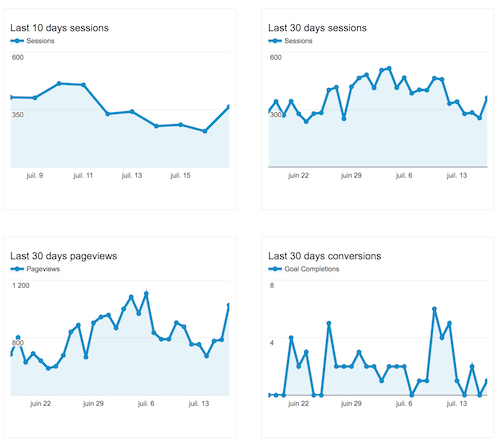
Demo : https://revolunet.github.io/react-analytics-widget
Requirements
You need to create a OAUTH client id in the google developer console and provide an analytic view ID. Alternatively you can use server-side authentication tokens. You can find more info in this example.
Note:
If you provide values for both the accessToken and the clientId props, the latter will be ignored.
Also, add the Google SDK at the top of your page
;(function(w, d, s, g, js, fjs) {
  g = w.gapi || (w.gapi = {})
  g.analytics = {
    q: [],
    ready: function(cb) {
      this.q.push(cb)
    }
  }
  js = d.createElement(s)
  fjs = d.getElementsByTagName(s)[0]
  js.src = "https://apis.google.com/js/platform.js"
  fjs.parentNode.insertBefore(js, fjs)
  js.onload = function() {
    g.load("analytics")
  }
})(window, document, "script")
Usage
OAUTH authentication
import { GoogleProvider, GoogleDataChart } from 'react-analytics-widget'

const CLIENT_ID = 'x-x--x---x---x-xx--x-apps.googleusercontent.com';

// graph 1 config
const last30days = {
  reportType: "ga",
  query: {
    dimensions: "ga:date",
    metrics: "ga:pageviews",
    "start-date": "30daysAgo",
    "end-date": "yesterday"
  },
  chart: {
    type: "LINE",
    options: {
      // options for google charts
      // https://google-developers.appspot.com/chart/interactive/docs/gallery
      title: "Last 30 days pageviews"
    }
  }
}

// graph 2 config
const last7days = {
  reportType: "ga",
  query: {
    dimensions: "ga:date",
    metrics: "ga:pageviews",
    "start-date": "7daysAgo",
    "end-date": "yesterday"
  },
  chart: {
    type: "LINE"
  }
}

// analytics views ID
const views = {
  query: {
    ids: "ga:87986986"
  }
}

const Example = () => (
  <GoogleProvider clientId={CLIENT_ID}>
    <GoogleDataChart views={views} config={last30days} />
    <GoogleDataChart views={views} config={last7days} />
  </GoogleProvider>
)
Server-side token authentication
import React, { Component } from 'react';
import { GoogleProvider, GoogleDataChart } from 'react-analytics-widget'

// graph 1 config
const last30days = {
  reportType: "ga",
  query: {
    dimensions: "ga:date",
    metrics: "ga:pageviews",
    "start-date": "30daysAgo",
    "end-date": "yesterday"
  },
  chart: {
    type: "LINE",
    options: {
      // options for google charts
      // https://google-developers.appspot.com/chart/interactive/docs/gallery
      title: "Last 30 days pageviews"
    }
  }
}

// graph 2 config
const last7days = {
  reportType: "ga",
  query: {
    dimensions: "ga:date",
    metrics: "ga:pageviews",
    "start-date": "7daysAgo",
    "end-date": "yesterday"
  },
  chart: {
    type: "LINE"
  }
}

// analytics views ID
const views = {
  query: {
    ids: "ga:87986986"
  }
}

class Example extends Component {
  componentDidMount = () => {
    const request = new Request('https://yourserver.example/auth/ganalytics/getToken', {
      method: 'GET'
    });
    fetch(request)
      .then(response => response.json())
      .then(({ token }) => {
        this.setState({ token }); // TODO: handle errors
      });
  }

  render = () => (
    <GoogleProvider accessToken={this.state.token}>
      <GoogleDataChart views={views} config={last30days} />
      <GoogleDataChart views={views} config={last7days} />
    </GoogleProvider>
  )
}
Explore related projects
freeCodeCamp/freeCodeCamp
freeCodeCamp.org's open-source codebase and curriculum. Learn math, programming, and computer science for free.
458,950 starsdonnemartin/system-design-primer
Learn how to design large-scale systems. Prep for the system design interview. Includes Anki flashcards.
377,588 starsreact/react
The library for web and native user interfaces.
252,497 starsvuejs/vue
This is the repo for Vue 2. For Vue 3, go to https://github.com/vuejs/core
212,622 stars