
renjfk/SimplyTrack
renjfk/SimplyTrack has 45 GitHub stars and 3 forks. GitHot measured 0 stars in 24 hours. Last checked 2026-11-09 05:23 UTC. Last push 2026-06-20.
Automatic time tracking for macOS
What you can do
- 📊 App & Website Tracking - Monitor time spent in applications and websites (Safari, Chrome, Edge, Arc, Brave, Vivaldi, Dia, Firefox experimental)
- 📈 Visual Analytics - Charts showing daily/weekly activity patterns
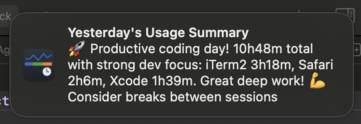
- 🔔 Smart Notifications - Optional AI-powered daily summary notifications with usage insights
- 🤖 AI Integration - Built-in MCP server for seamless integration with Claude and other AI assistants
Measured star growth
- in 24h
- 0
- in 7 days
- Update delayed
- in 15 days
- Update delayed
- in 1 month
- Update delayed
Net star changes over overlapping periods, not daily totals. Missing measurements are left blank. Stars measure attention, not software quality.
README.md
Original


SimplyTrack
A simple, elegant macOS productivity tracking app that helps you monitor your application and website usage patterns.
| App Overview | MCP Demo with Claude Desktop |
|---|---|
 |
 |
| Daily Activity View with Bar Chart | Daily Activity View with Pie Chart |
|---|---|
 |
 |
| Weekly Activity Overview | AI-Powered Usage Summary Notifications |
|---|---|
 |
  |
Motivation
I created SimplyTrack out of a personal need to understand and improve my productivity. Like many developers and professionals, I wanted to track my app and website usage to identify patterns, time-wasters, and productivity trends.
After trying several existing solutions, I found they were either:
- Too complex - Loaded with features I didn't need
- Too limited - Missing key functionality I required
- Too expensive - Overkill for simple usage tracking
- Privacy concerns - Sending data to external servers
So I decided to build exactly what I needed: a clean, privacy-focused, local-only productivity tracker that gives you insights without the bloat.
✨ Features
- 📊 App & Website Tracking - Monitor time spent in applications and websites (Safari, Chrome, Edge, Arc, Brave, Vivaldi, Dia, Firefox experimental)
- 📈 Visual Analytics - Charts showing daily/weekly activity patterns
- 🔔 Smart Notifications - Optional AI-powered daily summary notifications with usage insights
- 🤖 AI Integration - Built-in MCP server for seamless integration with Claude and other AI assistants
- 📥 CSV Export - Export usage data as CSV via UI or MCP for analysis in spreadsheets
- 🔒 Privacy-First - All data stored locally, secure keychain storage for API keys, optional private browsing tracking
- 🚀 Menu Bar Interface - Clean popover UI, native macOS integration
- 🔍 Smart Detection - Automatic idle detection, session management, and private browsing detection
🛠️ Installation
Requirements
- macOS 15.0 (Sequoia) or later
- Apple Silicon Mac
Download
Or manually:
- Go to the Releases page
- Download the latest
SimplyTrack.dmgfile - Open the DMG and drag SimplyTrack to your Applications folder
- Launch SimplyTrack and follow the permission setup guide
Building from Source
git clone https://github.com/renjfk/SimplyTrack.git
cd SimplyTrack
open SimplyTrack.xcodeproj
Build and run in Xcode 15.0 or later.
Setup & Permissions
SimplyTrack requires several macOS permissions to function properly:
Required Permissions
Automation Permission: To track browser activity
- System Preferences → Privacy & Security → Automation
- Enable SimplyTrack for your browsers (Safari, Chrome, Edge, Arc, Brave, Vivaldi, Dia, Firefox)
System Events Permission: For Safari and Firefox browser integration
- System Preferences → Privacy & Security → Automation
- Enable SimplyTrack for System Events
Accessibility Permission: For Safari and Firefox browser integration
- System Preferences → Privacy & Security → Accessibility
- Enable SimplyTrack
Firefox Additional Setup: Firefox does not expose tab URLs through its scripting interface, so SimplyTrack reads the address bar via the macOS Accessibility API. This requires a one-time Firefox configuration change. Firefox website tracking is experimental and may stop working if Firefox changes its accessibility hierarchy, if the toolbar is customized, or while the browser UI is in a transient state:
- Open Firefox and navigate to
about:config - Accept the risk warning if prompted
- Search for
accessibility.force_disabled - Set the value to
-1
- Open Firefox and navigate to
Notifications (Optional): For update notifications
- System Preferences → Notifications & Focus → SimplyTrack
Permission Setup
The app provides helpful banners and direct links to the appropriate system preference panes when permissions are needed.
🤖 AI Integration (MCP)
SimplyTrack includes a built-in Model Context Protocol (MCP) server that allows AI assistants like Claude to access your usage data for insights and analysis.
Features
- Usage Data Access: AI assistants can retrieve your app/website usage statistics
- Smart Analysis: Get personalized productivity insights from your data
- Privacy-Focused: Data never leaves your machine - AI connects directly to your local SimplyTrack instance
- Easy Setup: One-click configuration for Claude Desktop
Setup with Claude Desktop
- Open SimplyTrack Settings → AI tab
- In the "AI Tool Integration" section, click "Auto-Configure"
- Select your Claude Desktop configuration file when prompted
- Restart Claude Desktop to activate the integration
Available Tools
get_usage_activity- Retrieve detailed usage statistics for any date- Filter by applications or websites
- Customize time ranges and top activity percentages
- Get formatted data perfect for AI analysis
export_usage_csv- Export usage sessions as CSV- Daily or weekly export periods
- Standard CSV format for spreadsheets and analysis tools
Example Usage
Ask Claude: "What were my top 3 most used apps yesterday?" or "Analyze my productivity patterns this week"
The MCP server provides real-time access to your usage data while maintaining complete privacy and control.
Contributing
SimplyTrack is open to contributions and ideas! Whether you're a developer wanting to add features or a user with suggestions, your input is valuable.
Issue Conventions
When creating issues, please follow our simple naming convention:
Format: type: brief description
Issue Types
feat:- New features or functionalityfix:- Bug fixesenhance:- Improvements to existing featureschore:- Maintenance tasks, dependencies, cleanupdocs:- Documentation updatesbuild:- Build system, CI/CD changes
Examples
feat: add CSV export functionalityfix: app crashes when importing large filesenhance: improve data loading performancechore: update dependencies to latest versionsdocs: update README with installation instructionsbuild: update Xcode project settings
Guidelines
- Use lowercase for the description
- Be specific and actionable
- Keep under 60 characters
- No period at the end
Development
Release Process
Manual releases with GitHub MCP integration - see RELEASE_PROCESS.md.
For planned improvements and testing infrastructure, see issue #9.
License
This project is licensed under the MIT License.
Explore related projects
n8n-io/n8n
Fair-code workflow automation platform with native AI capabilities. Combine visual building with custom code, self-host or cloud, 400+ integrations.
209,926 starslanggenius/dify
Build Agentic workflows, RAG pipelines, with rich AI model and tool support on one collaborative workspace. Deploy on cloud, VPC, or self-hosted, so teams move from prototype to production without rebuilding the stack.
160,773 starsmicrosoft/PowerToys
Microsoft PowerToys is a collection of utilities that supercharge productivity and customization on Windows
140,755 starsstablyai/orca
Orca is the place for working with a fleet of agents (e.g. Grok Bot, Claude Code). Run any coding agent with your own subscription. Available on desktop, mobile and remote runtime.
120,349 stars