
renatomoselli/rpacore
renatomoselli/rpacore has 53 GitHub stars and 4 forks. GitHot measured 0 stars in 24 hours. Last checked 2026-11-15 05:28 UTC. Last push 2026-11-12.
Measured star growth
- in 24h
- 0
- in 7 days
- Collecting history
- in 15 days
- Collecting history
- in 1 month
- Collecting history
Net star changes over overlapping periods, not daily totals. Missing measurements are left blank. Stars measure attention, not software quality.
About
RPA Core - deterministic, stateful RPA in Python
ProductivityREADME.md
OriginalRPA Core
Deterministic, stateful RPA in Python for code-first enterprise automation.
Requires Python 3.11+.
Documentation shipped with a release describes that release. The default branch may include changes intended for the next release; when exact compatibility matters, use the source and documentation at the tag matching your installed package.
Package Name
The public project name is RPA Core. The package, import path, and CLI
command are rpacore.
What Is RPA Core?
RPA Core is a pip-installable Python library for building reliable, auditable robotic process automations. Define your steps, wire them into a transaction, and the framework handles execution order, retry logic, persistence, logging, queues, reports, credentials, and notifications.
For complete working automations, see the separate RPA Core examples repository. It includes file inbox processing, JSON event log processing, database reconciliation, Excel reorganization, checkpoint/resume behavior, API batching, and other user-facing examples built against the released package.
The design direction is:
AI-assisted development, deterministic execution.
That means RPA Core should be friendly to humans and AI coding agents, but the runtime remains deterministic. There are no runtime AI dependencies.
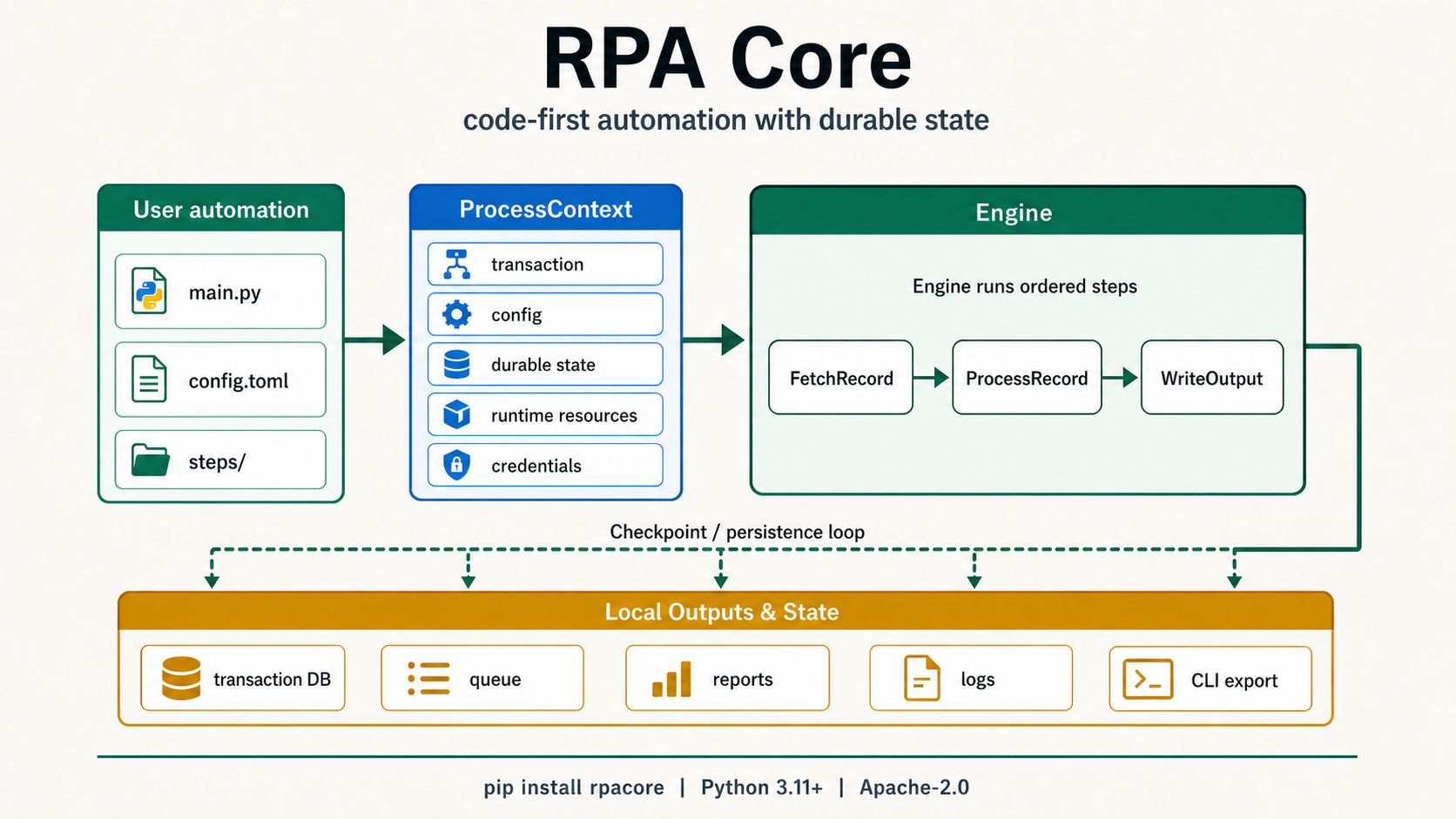
Core traits:
- Deterministic execution: predictable behavior, no hidden runtime magic.
- Stateful transactions: every step's status is tracked and persisted.
- Idempotent retries: resume from failure and re-run only failed work.
- Explicit exceptions: business rule failures and system failures are classified separately.
- Structured logging: text or JSON output through stdlib logging.
- TOML configuration: externalized settings with simple defaults.
- SQLite persistence: local transaction history without a service.
- Queue processing: SQLite-backed queue with atomic item claiming.
- Reports and notifications: text/HTML reports, SMTP email, and webhooks.
Installation
pip install rpacore
For complete documentation, start at docs/README.md. See CHANGELOG.md for current development changes and published release notes. For maintainer validation and release scripts, see scripts/; these scripts are intentionally separate from the runtime package.
Community and release-readiness routes:
Quick Start
from rpacore import (
    Engine,
    Transaction,
    configure_logger,
    execute_transaction,
    load_config,
)

from my_steps import FetchRecord, ProcessRecord, WriteOutput


config = load_config("config.toml")
configure_logger(level=config["log_level"], fmt=config["log_format"])

tx = Transaction(
    reference="my-automation",
    definition_identity="my-automation/v1",
)
tx.steps = [
    FetchRecord(
        name="fetch_record",
        execution_order=1,
        arguments={"record_id": "ABC-001"},
    ),
    ProcessRecord(name="process_record", execution_order=2),
    WriteOutput(name="write_output", execution_order=3),
]

engine = Engine(
    max_retries=config["max_retries"],
    retry_delay=config["retry_delay"],
    retry_backoff=config["retry_backoff"],
)
execute_transaction(
    tx,
    config=config,
    engine=engine,
    transaction_db_path=config["transaction_db_path"],
)
definition_identity is your automation's recovery-compatibility token. It is
not tied to the RPA Core package version: keep it stable through compatible
fixes, and change it when older in-progress transactions must not resume under
the new automation definition.
CLI
Create a new project scaffold:
rpacore init my_project
cd my_project
rpacore run
rpacore init <project_name> creates a normal Python project with
pyproject.toml, rpacore.toml, config.toml, main.py, a steps/ package,
a pytest step test, and .gitignore. Step tests use normal pytest with
plain step instances and ProcessContext; see Testing RPA Core Steps.
rpacore run discovers rpacore.toml from the current directory, resolves the
declared module:callable entrypoint, and invokes it. The CLI does not build
steps, transactions, config, or persistence automatically; that wiring remains
in project Python code. Entrypoint imports temporarily prioritize the manifest's
project directory and replace only conflicting cached modules in that Python
package namespace; the process working directory is unchanged. Dependencies
outside the entrypoint's top-level package follow normal Python import-cache
semantics and are never globally purged by RPA Core.
Inspect persisted local transactions:
rpacore transaction list
rpacore transaction list --json
rpacore transaction show <transaction_id>
rpacore transaction show <transaction_id> --json
rpacore transaction export --format json
rpacore transaction export --format ndjson
Transaction inspection uses [storage].transaction_db_path from rpacore.toml
by default. Pass --db path/to/rpacore.db to inspect a specific database.
--db paths are resolved relative to the current working directory; manifest
storage paths are resolved relative to rpacore.toml. transaction list
returns the latest 100 transactions by default; pass --limit N to choose a
different cap. Human output is intended for operators; --json writes parseable
JSON to stdout with diagnostics only on stderr. Transaction inspection JSON uses
schema_version = 2 and embeds the canonical transaction record with
transaction_format_version = 3. The record includes the caller-owned
definition_identity used to guard recovery compatibility.
Transaction export writes portable machine-readable records for all persisted
transactions. JSON export uses an envelope with export_format_version = 2,
framework_version, exported_at, and transactions. NDJSON export writes one
record per line with export_format_version = 2 on each record. Export selects
records through normalized-UTC cursor pages in created_at DESC, id ASC order.
It keeps one page of summaries at a time and releases the page query before
loading records, so slow output or partial consumption does not hold a SQLite
read lock against concurrent checkpoints. Inserts before the current cursor do
not appear later; inserts after it can appear in a later page. Updates to a
selected transaction are visible when that record is loaded, while a selected
transaction deleted by concurrent cleanup before its load is omitted. Unlike
transaction list, export has no 100-record cap.
Machine-readable transaction records include user-supplied state, metadata,
step arguments, exception messages, and artifact metadata. These fields can
contain sensitive business data. They never include resources, config,
credentials, or artifact file contents. Webhook notifications preserve their
compact payload shape by default while including report metadata and artifact
records. Set
[notification.webhook].include_transaction = true to include the canonical
transaction record in the webhook JSON payload.
Webhook URLs must use http or https. Local, private, loopback, and
link-local hosts are allowed because webhook endpoints are trusted operator
configuration in local automation deployments. Treat webhook config as
sensitive: outbound requests can still reach internal services. The stdlib URL
open timeout bounds socket operations after resolution starts, but it does not
fully control operating-system DNS resolution latency.
Email notifications attach screenshots referenced by exception reports only
when [notification.email].attach_screenshots is true, which is the default.
Missing or unreadable screenshot files are skipped; report and notification
payloads include artifact records and paths, not artifact file contents.
Set log_format = "json" and pass it to configure_logger(..., fmt=...) for
line-delimited JSON logs. Each JSON log line contains log_format_version,
UTC timestamp, severity, logger, namespaced event, message, and nested
attributes. User extras cannot replace canonical envelope fields. Logged
exceptions add an exception object with type, message, and stacktrace;
explicit stack data uses stacktrace. Text logs preserve the same diagnostic
evidence.
Exit behavior is stable across platforms:
- entrypoint returns
None: exit0 - entrypoint returns an integer from
0through255: propagate it - entrypoint or framework execution raises: exit
1with diagnostics on stderr - CLI usage errors, invalid manifests, entrypoint-resolution errors, or invalid
return values: exit
2
rpacore version prints the installed framework version.
Writing a Step
from rpacore import BusinessException, ProcessContext, Step


class FetchRecord(Step):
    def execute(self, ctx: ProcessContext) -> None:
        record_id = self.arguments.get("record_id")
        if not record_id:
            raise BusinessException(
                message="record_id is required",
                action="FetchRecord",
            )

        # Fetch and store durable state for later steps.
        ctx.state["record"] = {"id": record_id}
Project Structure
rpacore/              # Framework core
  __init__.py      # Public API re-exports
  exceptions.py    # BusinessException, SystemException
  status.py        # Status enum
  step.py          # Step base class
  transaction.py   # Transaction model
  engine.py        # Execution engine
  persistence.py   # SQLite persistence
  logger.py        # Logging helpers
  config.py        # Configuration loader
  context.py       # ProcessContext
  credentials.py   # Credential providers
  queue.py         # SqliteQueue, QueueProvider
  runner.py        # run_queue_loop
  report.py        # Report generation and rendering
  notify.py        # Email and webhook notifications
User automations should live outside rpacore/, usually in their own repository
with a steps/ package and a small main.py wiring layer.
Execution Model
main.py
  load_config()
  configure_logger()
  create Transaction
  attach ordered Steps
  execute_transaction(transaction, transaction_db_path=...)
  generate report / dispatch notifications
Transaction lifecycle:
PENDING -> IN_PROGRESS -> SUCCESSFUL
                       -> FAILED
Engine.run() validates transaction wiring and durable JSON data before any
step runs. Transaction references and step names must be non-empty, step
names must be unique within the transaction, and step execution orders must be
unique positive integers. Transaction state and metadata, step arguments, and
artifact metadata must contain only JSON-safe values. Malformed input raises
ExecutionValidationError or JsonStateError and should be treated as a
permanent configuration or code issue, not as a retryable runtime failure. The
same validation applies before persistence and recovery, so invalid data is not
partially persisted or silently coerced.
Persistence is written by user wiring. For strict crash boundaries in ordinary
one-off runs, use execute_transaction(transaction, transaction_db_path=...);
it supplies save_transaction() as the engine checkpoint after each transaction
or step state transition. Advanced callers can still build ProcessContext
directly and call Engine.run(ctx, checkpoint=...). Without a checkpoint
callback, user code may still save only after Engine.run() returns. Loading a
persisted transaction preserves the stored status; explicit recovery happens
when user code calls resume_transaction() with the exact application-owned
definition identity. Unidentified or mismatched non-successful records fail
closed before recovery mutation.
Configuration
Create a rpacore.toml in your project to declare the Python entrypoint and
transaction storage:
[project]
entrypoint = "main:main"

[storage]
transaction_db_path = "rpacore.db"
rpacore.toml is intentionally small. Step construction and transaction wiring
stay in Python; the manifest does not define pipelines or automatic step
discovery. See docs/project-manifest.md for the full schema.
When both rpacore.toml and config.toml are present, the value passed to the
runner or storage layer by user wiring still decides which transaction database
is used. Queue settings, retry settings, credentials, screenshots, and
notifications remain config.toml settings; they are not part of the project
manifest schema.
Create a config.toml in your project:
max_retries = 2
retry_delay = 0.0
retry_backoff = 1.0
log_level = "INFO"
log_format = "text"  # "text" or "json"
transaction_db_path = "rpacore.db"
screenshot_dir = ""
credential_provider = "env"

[queue]
db_path = "queue.db"
lease_timeout = 30
max_retries = 3

# [notification.email]
# host = "smtp.example.com"
# port = 587
# from_addr = "[email protected]"
# to_addrs = ["[email protected]"]
# attach_screenshots = true

# [notification.webhook]
# url = "https://hooks.example.com/rpacore"
# include_transaction = false
Relative transaction_db_path, queue.db_path, and non-empty
screenshot_dir values are resolved from the directory containing
config.toml. An empty screenshot_dir remains the disabled sentinel;
whitespace-only values and :memory: with or without surrounding whitespace
are invalid screenshot directories. These config paths are independent from
paths declared in rpacore.toml, which resolve from the manifest's directory.
Exception Model
| Exception | Meaning | Engine behavior |
|---|---|---|
BusinessException |
Expected rule violation, such as invalid input data. | Step fails; remaining steps continue unless explicitly halted. |
SystemException |
Technical failure, such as network or file errors. | Step fails, execution stops, retryable. |
| Any other exception | Unhandled Python exception. | Wrapped as SystemException. |
Use halts_remaining_steps=True for a business failure that should halt downstream work:
raise BusinessException("bad row", action=self.name, halts_remaining_steps=True)
Timeouts and Deadlines
RPA Core does not provide a generic per-step timeout. Python threads cannot be safely stopped, so an in-process timeout can mark a step failed while the timed out code keeps running and mutating external systems.
Configure I/O timeouts in the library that performs the work, such as the HTTP, SMTP, browser, database, or desktop automation client used by a step. If an automation needs a hard deadline with termination, run it behind a separate worker process boundary and record the outcome back into RPA Core. RPA Core intentionally rejects Pebble or similar process-timeout dependencies because process termination cannot make arbitrary external side effects reversible. See Runtime Dependency Decisions for the current decisions on process-timeout libraries, Pydantic, Tenacity, and AnyIO.
Optional Dependencies
pip install "rpacore[screenshots]"   # mss: auto-capture screenshots on exception
pip install "rpacore[keyring]"       # keyring: OS credential store integration
Examples
This repo keeps a minimal in-repo automation under examples/ to support
integration-style tests for the framework itself:
examples/sample_step.pyexamples/sample_main.py
Fuller user-facing automations live in the separate RPA Core examples repository. Start there if you want complete projects that install RPA Core as a package and show recommended project structure.
Example projects include:
- file inbox processing
- JSON event log processing
- database reconciliation
- Excel reorganization
- checkpoint/resume behavior
- REST API batch processing
- browser and desktop automation examples
For a step-by-step beginner guide, see docs/tutorial.md.
For persistence, migrations, and crash-behavior details, see docs/durability.md. For CLI, API, config, export, and import-boundary references, see docs/README.md. For vulnerability reporting and local security posture, see SECURITY.md and docs/security.md.
Local-First Design
RPA Core is local-first:
- projects remain normal Python repos
- runs persist locally
- logs, reports, queues, transactions, and artifacts stay readable
Remote orchestration and distributed worker protocols are outside the current Core runtime; see docs/non-goals.md for current non-goals.
Compatibility
RPA Core's documented public APIs, CLI behavior, storage schemas, export formats, and generated-project persistence patterns are compatibility boundaries. A breaking change requires a correctness, security, or release-blocking reason, a documented migration path, and focused validation. See CHANGELOG.md for released user-facing changes.
License
Apache 2.0. See LICENSE.