
rbong/vim-flog
rbong/vim-flog has 908 GitHub stars and 30 forks. GitHot measured 0 stars in 24 hours, -1 in 7 days, and +2 in 15 days. Last checked 2026-11-09 18:53 UTC. Last push 2026-07-25.
A blazingly fast, stunningly beautiful, exceptionally powerful git branch viewer for Vim/Neovim.
What you can do
- Custom log format support
- Multiline commit message support
- Ability to view history of selected visual range
- Contextual command completion
Measured star growth
- in 24h
- 0
- in 7 days
- -1
- in 15 days
- +2
- in 1 month
- Update delayed
Net star changes over overlapping periods, not daily totals. Missing measurements are left blank. Stars measure attention, not software quality.
README.md
OriginalFlog

Flog is a blazingly fast, stunningly beautiful, exceptionally powerful Git branch viewer for Vim/Neovim.
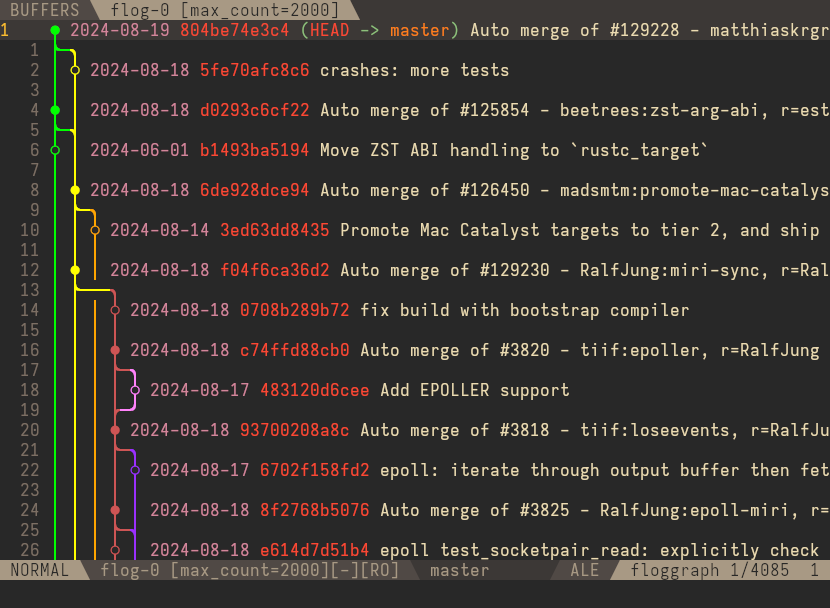
Features
- Custom log format support
- Multiline commit message support
- Ability to view history of selected visual range
- Contextual command completion
- Many navigation mappings
- Commit-based marks and jump history
- Ability to expand/collapse commit body
- Intelligently restore cursor position between updates
- Fugitive integration
- Functions for integrating with your Git workflow and plugins
- Extended graph symbol support (currently only in Kitty)
- Dynamic branch highlighting (Neovim only)
- Automatic updates (Neovim only)
- And more!
Installation
If you use Plug, add the following to your .vimrc:
Plug 'tpope/vim-fugitive'
Plug 'rbong/vim-flog'
For lazy.nvim users:
{
  "rbong/vim-flog",
  lazy = true,
  cmd = { "Flog", "Flogsplit", "Floggit" },
  dependencies = {
    "tpope/vim-fugitive",
  },
},
In Vim, LuaJIT 2.1 must be installed. Lua 5.1 is also supported but less performant than LuaJIT.
Getting Started
- You can open the commit graph with
:Flogor:Flogsplit. - Use
<Tab>completion or:help :Flogto see available arguments. - Open commits with Fugitive using
<CR>. - Jump between commits with
<C-N>and<C-P>. - Toggle viewing all branches with
a. - See more mappings with
g?. - Quit with
gq.
Many familiar mappings from the Fugitive :Git status window will work in Flog.
You can also run any git command using :Floggit.
This command will contextually complete arguments based on your cursor position.
See :help :Floggit for more.
Flog can be heavily customized. See examples for details.
More Help
- FAQ
- Examples
- Issue tracker
- Discussions board
- Fugitive repo
- Run
git log --helpin a terminal for help withgit log. - Run
:help flogin Vim to see the full documentation.
Explore related projects
codecrafters-io/build-your-own-x
Master programming by recreating your favorite technologies from scratch.
561,599 starspublic-apis/public-apis
A collective list of free APIs
497,924 starsmorluto/rea
Reverse engineer anything with agents, from app behavior down to native binaries.
449,790 starsopenclaw/openclaw
The AI that really does things. Any OS. Any Platform. The lobster way. 🦞
394,297 stars