
rage/secret-project-331
rage/secret-project-331 has 355 GitHub stars and 28 forks. GitHot measured 0 stars in 24 hours. Last checked 2026-11-19 02:17 UTC. Last push 2026-11-17.
Measured star growth
- in 24h
- 0
- in 7 days
- Collecting history
- in 15 days
- Collecting history
- in 1 month
- Collecting history
Net star changes over overlapping periods, not daily totals. Missing measurements are left blank. Stars measure attention, not software quality.
About
Secret Project 331 is a Learning Management System (LMS) developed by the MOOC Center of the University of Helsinki. It's deployed at https://courses.mooc.fi. It includes:
Developer ToolsREADME.md
Original
[!IMPORTANT] This document contains technical information intended for software developers. If you're not a software developer, you might find these resources helpful instead:
- To learn more about the courses, visit https://www.mooc.fi.
- For teacher documentation, refer to the Wiki tab in this repository.
Secret Project 331 is a Learning Management System (LMS) developed by the MOOC Center of the University of Helsinki. It's deployed at https://courses.mooc.fi. It includes:
- A visual, no-code course material editor based on blocks (text, media, embeds, exercises, etc.)
- Exercises are created directly within the material editor — no need to context-switch to a separate tool
- Multiple exercise types including multiple-choice, essay, short answer, and timelines
- New exercise types can be added via plugins. Plugins can be developed by third parties and installed without changes to the core system
- Automatic progress tracking, pass/fail logic, and certificate generation
- Built-in glossary, citation manager, course statistics, and inline student feedback tools
- Support for multilingual courses
- Integration with the Open University of the University of Helsinki for official completion registration
[!NOTE] The system builds on years of dedicated work on Massive Open Online Courses (MOOCs) at the Computer Science Department of the University of Helsinki. It was developed by a team led by Henrik Nygren, who also designed the core features and software architecture.
You can check out the rest of the contributors here.
Development Environment Setup
To begin development on Secret Project 331, set up your local environment by following the instructions in Development.md, which covers setup on Windows, Linux, and macOS.
Package Manager
This project uses pnpm 11.5.0 as the package manager. If you set up with Nix (bin/install-nix), pnpm is provided automatically. Otherwise, install it manually by following the pnpm installation guide. The root package.json pins the pnpm version, and pnpm installs the Node runtime declared in devEngines.runtime.
Code Style
In this project, code style is enforced with automatic tools. To ensure your contributions follow the project's code style, you need to set up pre-commit hooks and configure your editor.
Setting Up Pre-Commit Hooks
Run pnpm install in the repository root to install the necessary tools:
$ cd Code/secret-project-331/
$ pnpm install
This will install lint-staged, which ensures that your code passes some basic code style checks before committing.
When you're ready to perform a comprehensive code style check (note: this may take some time), use:
bin/git-run-branch-ready-checks
Configuring Your Editor
Visual Studio Code
To configure Visual Studio Code for this project, open it in the repository root with the pre-configured workspace:
$ cd Code/secret-project-331/
$ bin/code
The bin/code command automatically opens the project with recommended settings.
After opening, install the recommended extensions prompted in the bottom right corner:
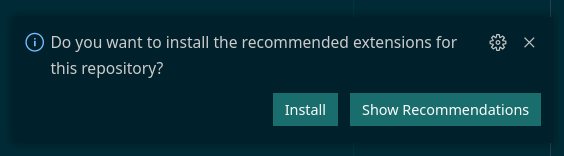
Once installed, these settings will enable your editor to:
- Automatically display code style issues.
- Automatically fix some issues when saving files.
Documentation
Documentation for teachers is located in the Wiki tab of this repository. The documentation within the repository itself is intended for developers only.
Technical Documentation
- Backend: Headless LMS Server Documentation
- Database Schema: Database Documentation
- Shared Module: Component Storybook
For additional developer documentation, see the docs folder in the repository.
Development Resources
Below are essential resources, conventions, and courses to support development on this codebase. Familiarize yourself with these resources before beginning work.
Frontend Development
- Mobile-first CSS
- Full Stack React Development: Fullstack Open
- Next.js: Next.js Basics
- CSS Box Model: Mozilla CSS Box Model
- CSS-in-JS with Emotion: Emotion Documentation
- CSS Layouts with Flexbox and Grid:
- Flexbox (primary layout tool):
- Patterns: Flexbox Patterns
- Playground: Flexyboxes
- Documentation: Mozilla Flexbox Documentation
- Grid (secondary layout tool):
- Documentation: Mozilla Grid Documentation
- Flexbox (primary layout tool):
- TypeScript: TypeScript Documentation
- Iframes:
- Iframe Element: MDN Iframe Documentation
- Channel Messaging API: Channel Messaging Documentation
Deployment Resources
- Docker: DevOps with Docker
- Kubernetes: DevOps with Kubernetes
Backend Development
- Rust Programming Language: The Rust Book
- Actix Web Framework: Actix Web
- SQLx for Rust: SQLx Usage
- Rust by Example: Rust by Example
- Learn Rust with Linked Lists: Entirely Too Many Linked Lists
- Rustlings (Rust Exercises): Rustlings
- Rust Cookbook: Rust Cookbook
License
The program in the services/cms folder is licensed under GPL-3.0-only.
All other parts of the codebase are licensed under Apache-2.0.