
r-slashslash/AWG-Router
r-slashslash/AWG-Router has 88 GitHub stars and 10 forks. GitHot measured +43 stars in 24 hours. Last checked 2026-11-15 16:44 UTC. Last push 2026-11-13.
What you can do
- Add, rename, disable and delete clients.
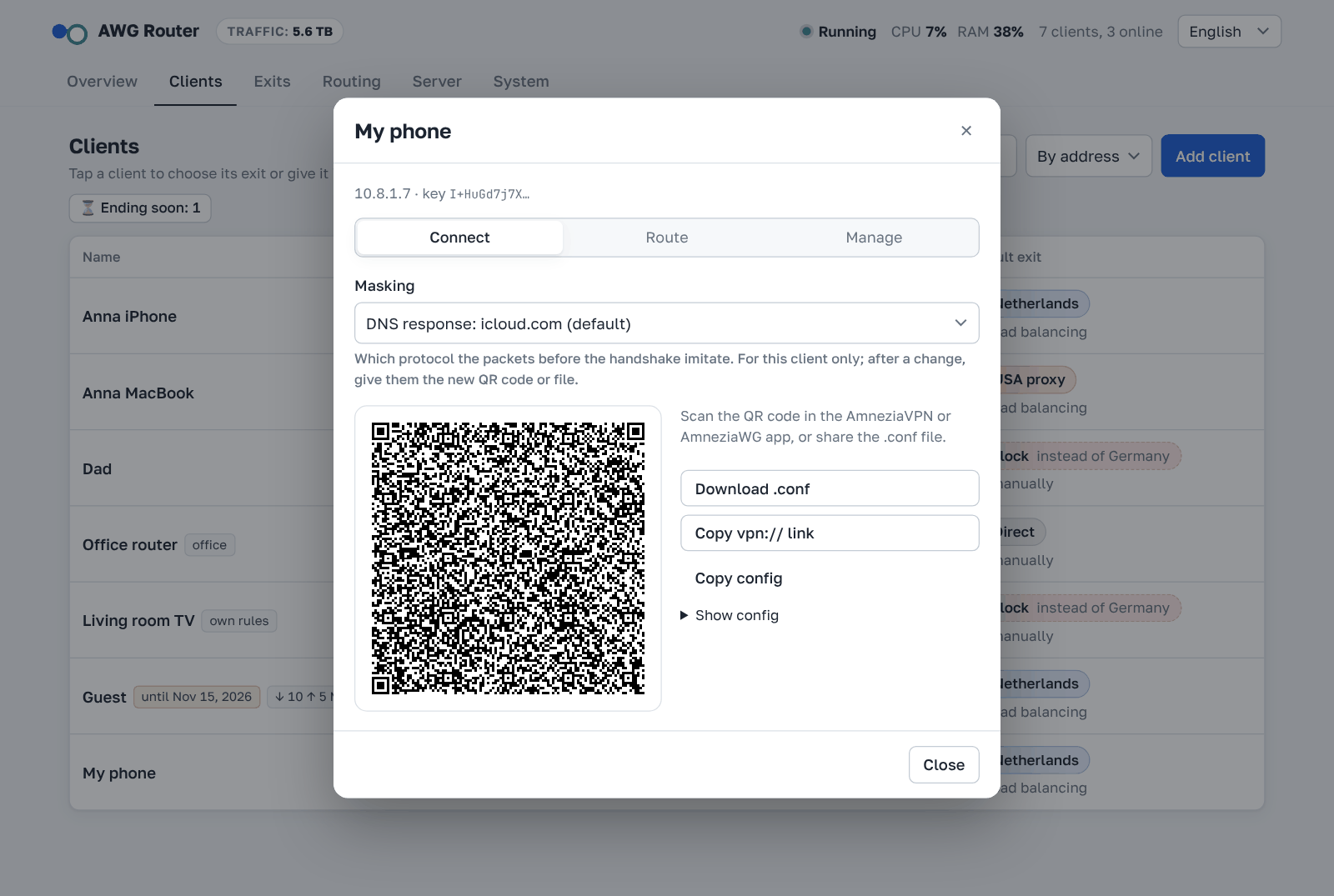
- Connect a device with a QR code, a .conf file or a vpn:// link for the AmneziaVPN app.
- Clients created in the AmneziaVPN app show up and can be managed too. The panel can't show their config, because the private key exists only on the device.
- A disabled client stays in the config as a comment, so nobody else takes its address.
Measured star growth
- in 24h
- +43
- in 7 days
- Update delayed
- in 15 days
- Update delayed
- in 1 month
- Update delayed
Net star changes over overlapping periods, not daily totals. Missing measurements are left blank. Stars measure attention, not software quality.
About
AmneziaWG: веб-панель для каскада VPN-серверов с балансировкой | AmneziaWG cascade VPN panel with load balancing
Self-hostedREADME.md
OriginalEnglish · Русский · 中文 · فارسی







AWG Router
A web panel for AmneziaWG: users, tunnel settings, cascade routing and individual routing for each client in one place.
It works with the server that the AmneziaVPN app installs (the amnezia-awg2 Docker container), or installs its own AmneziaWG server — in a Docker container or on the host. Protocol support goes up to AmneziaWG 3.1.
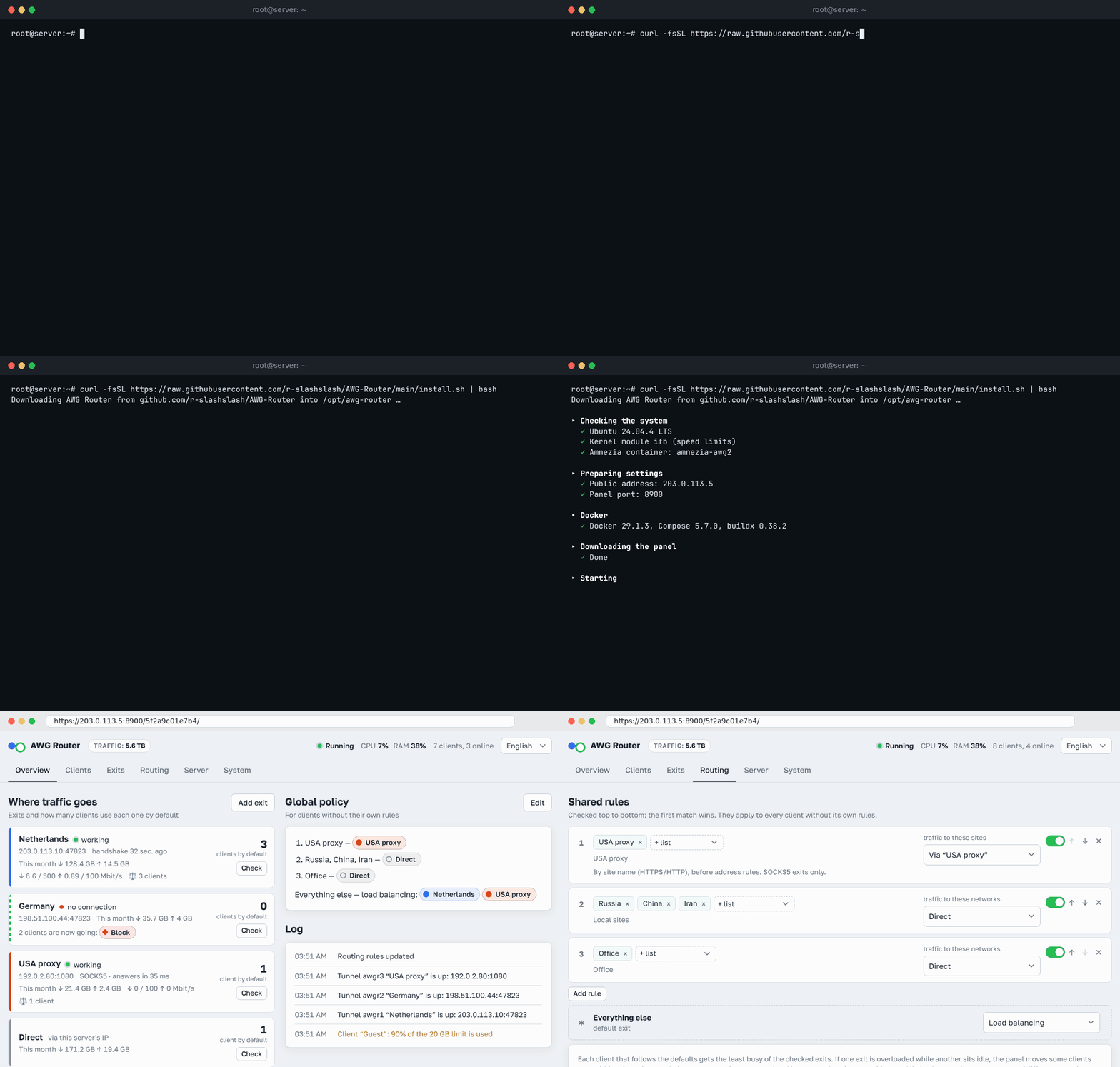
Quick start — on an Ubuntu or Debian server, as root (Docker is installed if it's missing):
curl -fsSL https://raw.githubusercontent.com/r-slashslash/AWG-Router/main/install.sh | bash
The installer sets up everything, including Docker Compose, and prints the panel link and password at the end. Details: Install.
                               ┌── RU / CN / IR ──────────► internet (this server's IP)
 clients ──AWG──► this server ─┤
                               ├── everything else ──AWG──► server #2 ──► internet
                               └── client "Dad" ─────AWG──► server #3 ──► internet
Cascade VPN (double VPN): local traffic direct, the rest through a server abroad
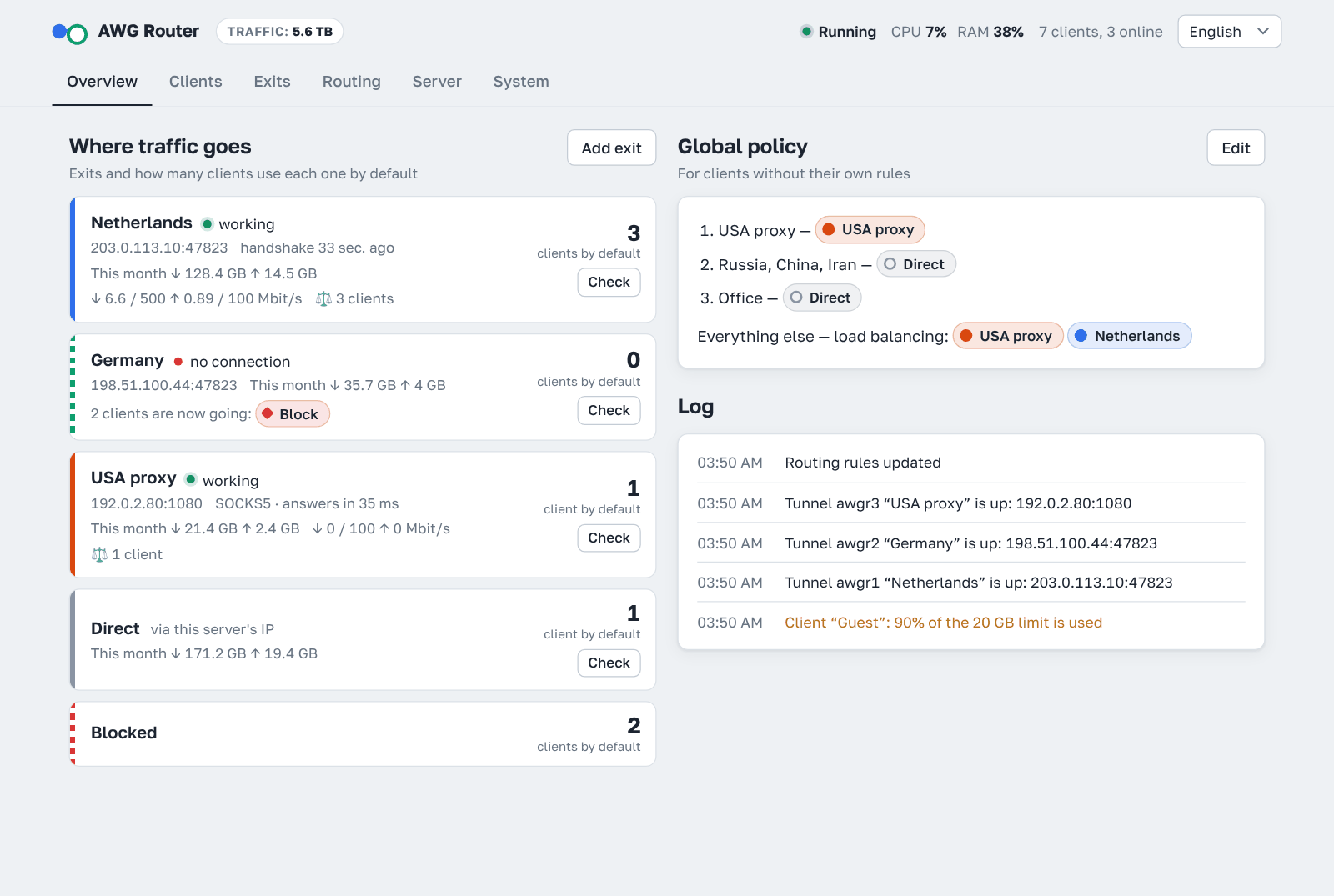
AWG Router makes your AmneziaWG server the entry point of a cascade. Clients connect to it only, and the server decides where each connection leaves for the internet:
- traffic to the countries, networks or sites you choose goes out directly from the entry server, with its local IP and no detour;
- everything else goes through a second AmneziaWG server (or a SOCKS5 proxy) in another country and reaches the internet from that server's IP;
- there can be several exits: different lists to different servers, or a separate exit for a single client;
- the split (split tunneling) lives on the server, so client configs stay ordinary — nothing to set up on phones or routers;
- exits, lists and rules are set up in the panel instead of hand-written iptables and ipset scripts;
- if an exit goes down, traffic doesn't slip past it: it goes direct, is blocked or moves to another exit, as you choose.
A fallback helps only when it fails separately from the main exit. Two exits to the same server are one path, not two: if its address is blocked entirely, a SOCKS5 proxy over that address and a direct AmneziaWG tunnel to it stop working at the same moment.
So put an exit on a different server in the fallback — a different address, a different host, a different autonomous system. And where possible don't reach the final server directly from a country that blocks: if it is only reached from abroad, its address is not visible there.
Details are in How routing works.
Features
Clients
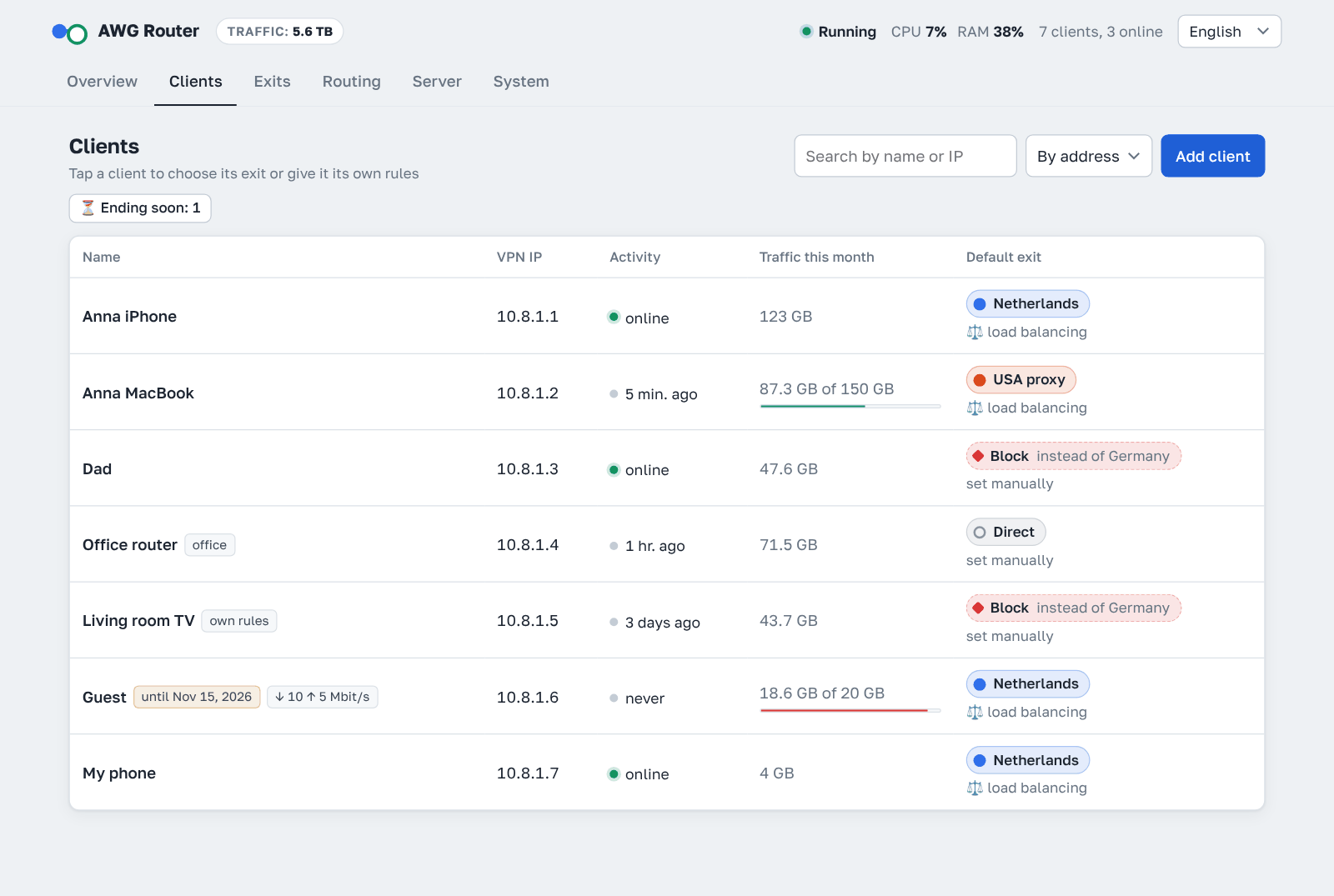
- Add, rename, disable and delete clients.
- Connect a device with a QR code, a
.conffile or avpn://link for the AmneziaVPN app. - Clients created in the AmneziaVPN app show up and can be managed too. The panel can't show their config, because the private key exists only on the device.
- A disabled client stays in the config as a comment, so nobody else takes its address.
- Traffic per client for the month and all time; it survives restarts. Sort by name, address, traffic or activity.
- All-time traffic through the server next to the panel name (it stays when clients are deleted).
- The server's CPU and memory load in the panel's status line; hover for the load average and how much memory is in use.
- If the AmneziaWG server's interface disappears while the container keeps running (for example, the kernel killed
amneziawg-gowhen memory ran out), the panel restarts the server by itself and tells you in Telegram. Server → Restart the AWG server does it by hand. - An end date and a traffic limit (per month or in total). When they run out, the client turns off by itself; a monthly limit resets on the 1st at 00:00 UTC (the panel shows when that is in your time) and the client turns back on. Three days before the end date and at 90% of the limit you get a warning, and Ending soon in the client list shows who is close.
- Speed limits (off until you set them): a cap for all clients together, a personal cap per client and a cap per exit, download and upload separately. Within the common cap the speed is split evenly between those downloading right now. Connections don't drop, the internet just gets slower, and latency stays low under load.
- A personal link: the person opens it, downloads their config or scans the QR code, and sees their traffic and end date — no panel sign-in.
Server
- Every AmneziaWG parameter: Jc/Jmin/Jmax, S1–S4, H1–H4, I1–I5, HeaderProtectionKey, ContentPaddingAddition, AWG 3 timings, RandomTrailers and DisableCookies.
- Ready-made masking for the signature packets I1–I5: STUN (calls, WebRTC), QUIC (HTTP/3), DNS query, SIP and a DNS response for icloud.com with Apple’s real address, with random parts so no two handshakes look alike. The packet AmneziaVPN puts in by default (the same everywhere, with icloud.com pointing to a Yandex address) is replaced with this one by the panel itself. I1–I5 are checked strictly (only tags every AmneziaWG understands, packet size shown) and can be set per client: if a client's provider starts blocking, give that one client another masking.
- Fresh parameters on demand, generated the same way as the AmneziaVPN installer does for AWG 3.1.
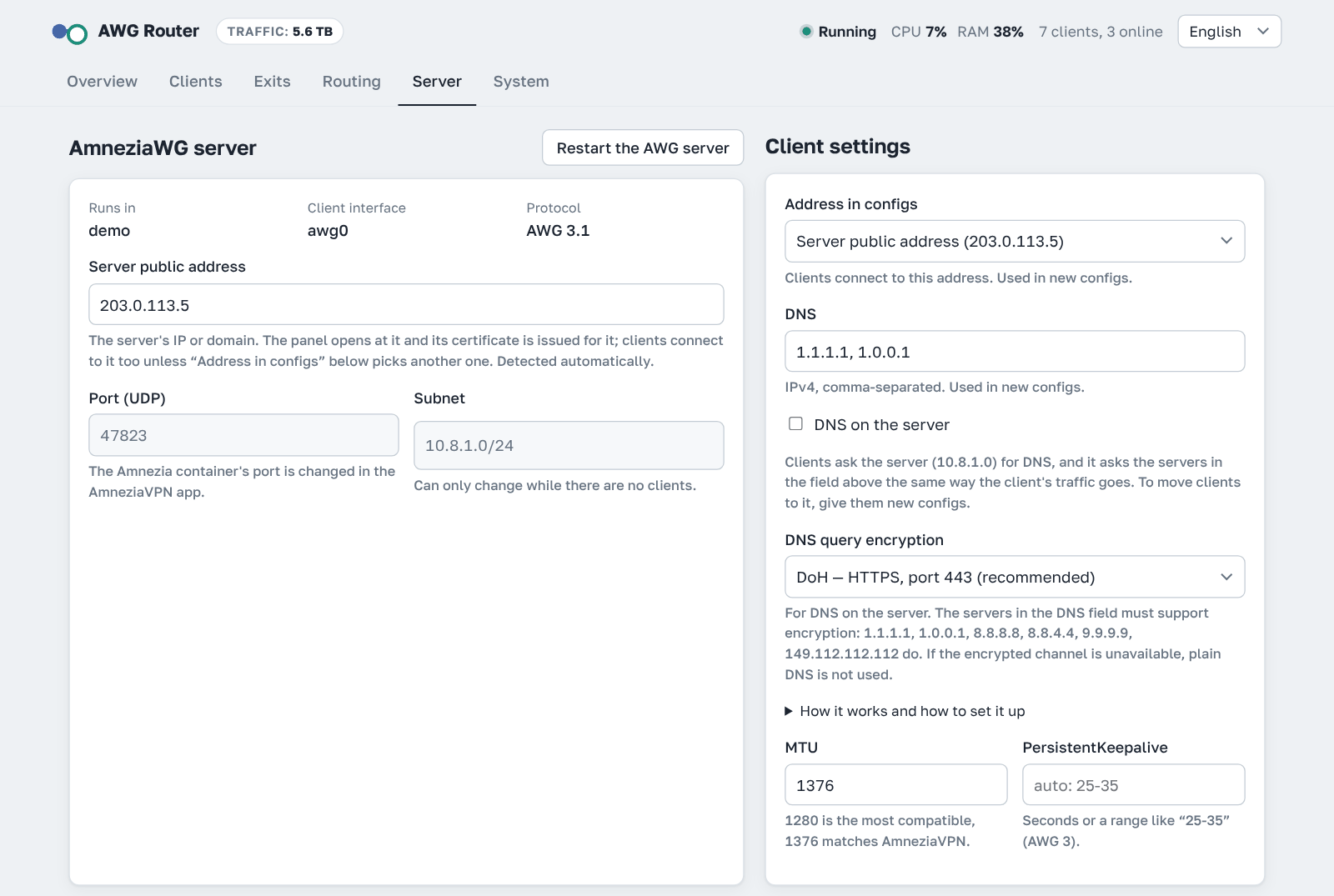
- Port, subnet, client DNS/MTU/keepalive, public address and the address in client configs (IPv4 or IPv6).
- DNS on the server (optional): clients ask the server for DNS, and it asks the servers from the settings the same way the client's traffic goes, with a cache and encryption (DoH or DoT). See DNS on the server.
- Adding or removing a client is applied live without dropping anyone. Server-side parameters restart the interface, which takes a few seconds.
Routing
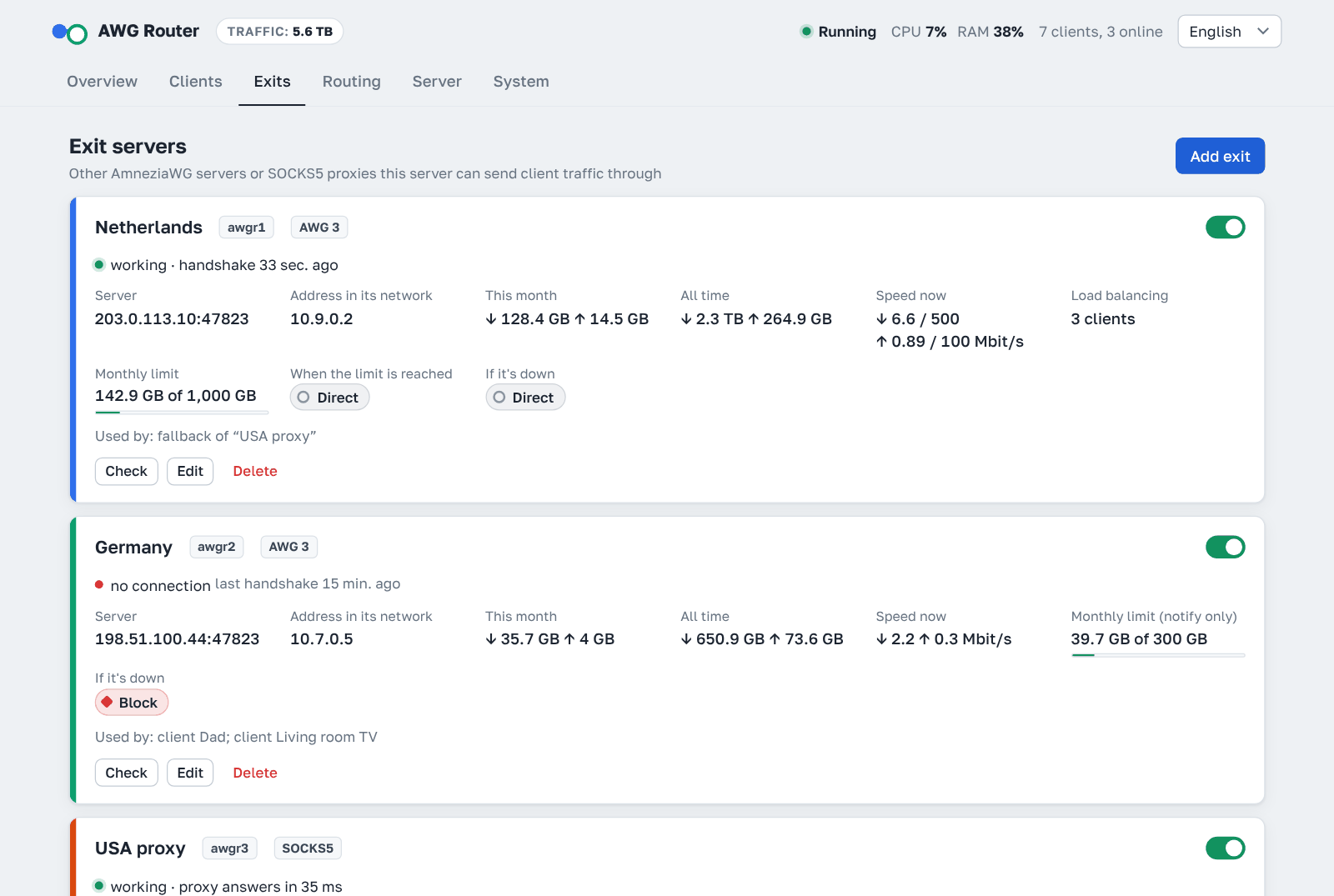
- Exits are client configs from other AmneziaWG servers or SOCKS5 proxies (
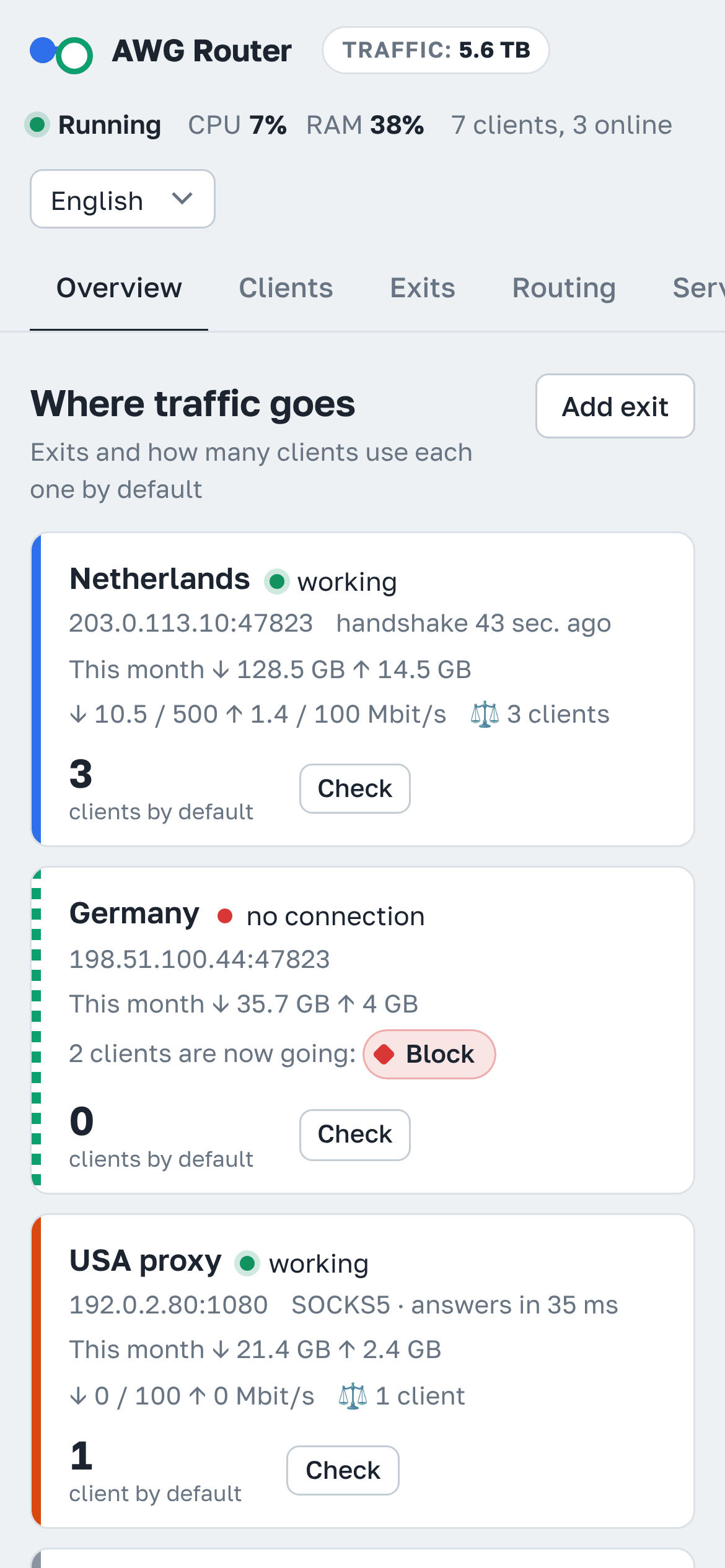
socks5://login:password@host:port). Both TCP and UDP go through a SOCKS5 exit (UDP if the proxy supports UDP ASSOCIATE). If an exit fails, its traffic goes direct, gets blocked or moves to another exit, whichever you choose. - Traffic per exit and direct for the month and all time, and each client's monthly traffic split by exit. An exit can have a monthly limit; when it is used up, its traffic until the 1st goes direct, gets blocked or moves to another exit, whichever you choose (or you only get a notification).
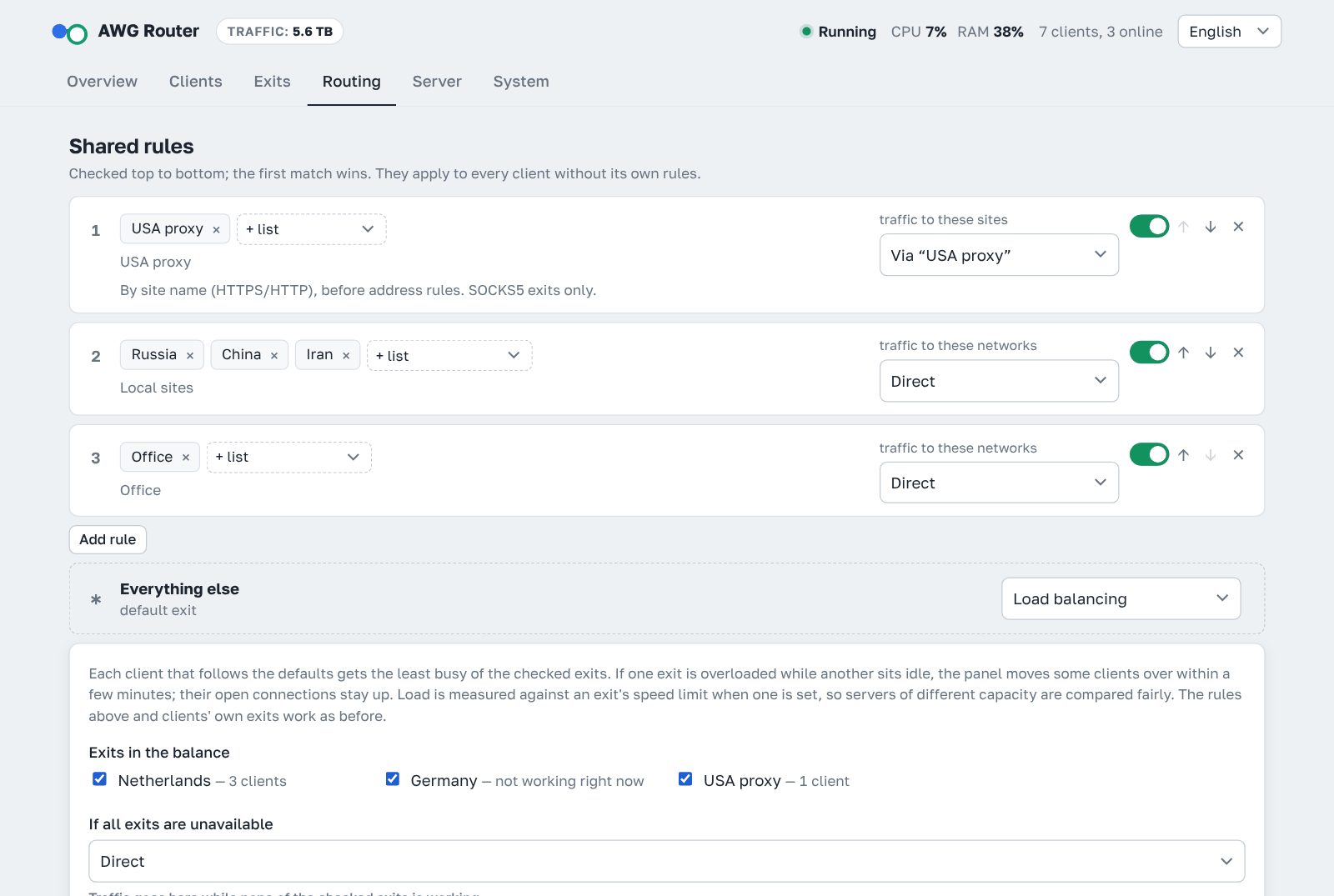
- Rules map a list to an exit. Lists can be countries, autonomous systems (ASN), lists fetched from a URL, your own subnets or domains, and they refresh automatically. Rules and lists live on one Routing tab: each list shows where it is used, and a new list can be created right from a rule.
- Domain rules for SOCKS5 exits:
example.comon a list also covers all its subdomains; you can paste a link to a ready-made list (plain domains, dnsmasq, hosts, Adblock, v2ray). The server learns the site from its name at the start of an HTTPS or HTTP connection (ports 443 and 80) and passes the name to the proxy, which finds the address itself, so DNS spoofing by the ISP doesn't matter. Client DNS and configs don't change. Such rules are checked before address rules. - The exit window asks for the type first (AmneziaWG or SOCKS5). For SOCKS5 there are separate fields for the address, port, login and password (they make up the connection string; a pasted string fills them in), and the routing for that exit is set in the same window: sites (domains) to send through it, domain and network lists, or all traffic. This is saved as ordinary global rules; rules you turned off, rule names and their order stay as they are.
- Each client can have its own exit and its own rules.
- Load balancing (optional) instead of the default exit: each client gets the least busy of the chosen exits, measured against the exit's speed limit when one is set. If one exit is overloaded while another sits idle, some clients are moved over within a few minutes without dropping their open connections; a failed exit's clients move at once. Rules and clients' own exits still apply.
- Route check shows which way an IP or domain would go.
Panel
- HTTPS with a Let's Encrypt certificate for the server's IP or your domain, renewed by itself, or with your own certificate (for example, from certbot). If nginx or Apache already holds port 80, validation goes through it.
- Alternatively, the panel can be reachable only through an SSH tunnel.
- The address uses a random port and a secret path, and login is password-protected with brute-force protection. A sign-in lasts 4 hours.
- Optional second factor: a 6-digit code from an authenticator app (Google Authenticator, Aegis, 2FAS…). Turned on in System.
- Optional Telegram notifications: an exit stops or recovers or nears its limit, the AmneziaWG server is unreachable or restarted, server memory or CPU stays above 90%, a client nears or hits its end date or limit, a new client connects for the first time, panel sign-ins, a certificate that can't be renewed, a new panel version. Set up in System. Where Telegram is blocked (Russia, China, Iran), the bot can send through one of your exits; if that exit stops working, the message tries the other exits, then goes directly, and waits for a connection if nothing works.
- Optional control from Telegram: the bot becomes a remote:
/startopens the menu in a single message — the panel logo with the host, panel version, clients, how many are online and all-time traffic under it — and everything happens in that message, with a ‹ Menu button to go back. Server holds the status (versions, IPv4 and IPv6, DNS on the server, uptime, RAM, traffic this month) and the exits (tap an exit to check it or make it the default); Clients starts with New client. Also: turning a client on or off or deleting it (after a confirmation), its QR code and config file, +30 days or +10 GB, a new client with/add, checking an exit and changing the default one, where traffic to an address goes, a backup, a link to the panel and a panel update. Buttons also appear under notifications (for example, +30 days under “access period ended”). Only the chat set in the panel is obeyed. - The password can be changed right in the panel.
- Backup and restore in one file: panel settings, exits, rules, client keys and the AmneziaWG server config — handy for moving to another server. The downloaded file can be encrypted with a password. The bot can also send a backup to Telegram every day or week, encrypted with a password if you set one.
- The panel shows its version, tells you when an update is out and updates itself with one button (or
awg-router updateon the server). Only a released version is installed, and its archive is checked against its checksum. - Can be installed on a phone: System → Install on a phone shows a QR code and how to add the panel to the home screen, where it opens like an app.
- Languages: English, Russian, Chinese and Persian. The language follows the browser or system setting, and a manual choice is remembered.
Install
You need an Ubuntu or Debian server. Run this as root (if you log in as another user, run sudo -i first). If Docker is missing, the installer sets it up.
curl -fsSL https://raw.githubusercontent.com/r-slashslash/AWG-Router/main/install.sh | bash
The installer downloads the panel into /opt/awg-router and asks a few questions:
- What to manage.
- If it finds an AmneziaVPN container, it offers to manage that container or a separate AmneziaWG server on the host.
- If there's no AmneziaWG on the server, it offers to install one, either in a Docker container like AmneziaVPN does (the app will see it too) or directly on the host as a systemd service. It suggests a random UDP port.
- How to open the panel. Choose a browser over HTTPS, or an SSH tunnel only.
- Panel domain (browser only). Press Enter to open the panel by IP; a domain must point to this server.
If port 80 is already taken by nginx or Apache, the installer shows the small file it can add there for the Let's Encrypt validation and asks before adding it (see Port 80 is taken by a web server).
It asks for the panel port (Enter — a random free 4-digit one); the rest is automatic: a password, the panel image, the certificate. The image is downloaded ready-made from GitHub's registry (ghcr.io), so the server doesn't have to reach Alpine and GitHub sources, which are filtered in some countries; if the download fails, the image is built on the server as before (AWGR_BUILD=1 always builds it). At the end it prints the link and password:
  AWG Router is ready
  Link:     https://203.0.113.5:4721/3f9a1c2e7b6d/
  Password: Xk3vQ9mT2pLw8ZrA
  Let's Encrypt certificate valid until 2026-11-04 08:15, renews automatically
Firewall: open TCP port 80 (used for a few seconds while Let's Encrypt validates) and the panel port. If your hosting provider has its own firewall in its control panel, open the ports there as well.
The awg-router command
| Command | What it does |
|---|---|
awg-router info |
show the link and password |
awg-router update |
download the latest version and update (settings are kept) |
awg-router password |
set a new random password |
awg-router 2fa-off |
turn off the authenticator code (if you lost your phone) |
awg-router restart |
restart the panel |
awg-router logs |
show the panel log |
awg-router reconfigure |
choose the mode and access method again; can also move the AmneziaWG server from its container to the host with the same keys, port and clients |
awg-router install-kernel |
build and load the AmneziaWG kernel module (see AmneziaWG engine) |
awg-router uninstall |
remove the panel and its routing rules; asks whether to keep the AmneziaWG server it installed (kept by default; its keys live in /opt/awg-router/awg-server, so don't delete the folder while it runs) |
Access through an SSH tunnel
In this mode the panel isn't reachable from the internet. On your computer or phone (Termux), run:
ssh -N -L PORT:127.0.0.1:PORT root@SERVER_IP
Keep it running and open http://127.0.0.1:PORT/secret-path/. Run awg-router info to get the exact command and address.
Certificate
- The panel gets a Let's Encrypt certificate with lego for the server's IP or the panel domain, validating over port 80, and renews it without a restart. For an IP address Let's Encrypt issues only 6-day certificates (the
shortlivedprofile), so the panel renews about every 3 days. - System → Domain and certificate sets the panel domain (empty — by IP) and chooses Let's Encrypt or your own certificate. For your own, give the paths on the server to the certificate (full chain) and the key, for example certbot's
/etc/letsencrypt/live/example.com/fullchain.pemandprivkey.pem. The panel checks that the certificate is for the panel address and that the key matches; when certbot renews it, the panel picks up the new one within a few minutes. - With IPv6 in use (an IPv6 Server public address, or IPv6 picked in Address in configs), the certificate covers both the server's IPv4 and IPv6 addresses, so the panel opens without a warning at either. If Let's Encrypt can't validate the second address (for example, port 80 is closed over it), the certificate covers the main one and the panel tries the second again a day later. Through a web server on port 80 the certificate covers only the main address.
- The domain is the panel's address. Client configs use the server address from the Server tab; the installer offers to put the panel domain there too.
- If issuance fails, the panel runs with a temporary self-signed certificate, so the browser will show a warning. It retries every 30 minutes.
- Status and a Get a certificate now button are on the System tab.
Port 80 is taken by a web server
If nginx or Apache already serves sites on this server, Let's Encrypt validates the panel through it. The installer and System → Set up validation through the web server show the file first and add it only when you agree:
- nginx (also Angie and OpenResty) on the host or in Docker when its config folder is mounted from the host:
awg-router-acme.confnext to your configs (conf.d,sites-enabled). Apache on the host: a siteawg-router-acme.conf. - The file answers only
/.well-known/acme-challenge/and only for the panel address, from the folder/var/lib/awg-router/acme. Your sites and other config files don't change. - Before the reload the config is tested (
nginx -t,apachectl configtest), then the panel requests a test file through the web server. On any error the file is removed and the web server goes back to its previous settings. - Caddy, other web servers, and containers with the config inside the image: the panel shows the block to add by hand, then press Check.
- Remove from the web server and
awg-router uninstalldelete the file.
Server modes
AmneziaVPN container
The panel writes the config in the app's own format:
- a shared PSK;
clientsTablewith client names;- I1–I5 kept as comments.
Clients added in the panel appear in the app, and vice versa.
Limitations:
- The container's port can only be changed in the AmneziaVPN app.
- In a container created by the AmneziaVPN app the subnet can't be changed either: the app writes it into the container's start script.
- If you change server-side parameters in the panel (S1–S4, H1–H4, header protection key), the app doesn't learn about it. New clients from the app won't connect until you re-check the server in the app, which reads the parameters back from the server.
If the AWG Router installer created the container, its configs live on the host in /opt/awg-router/awg-server/data and survive re-creating the container.
AmneziaWG on the host
The panel installs awg, awg-quick, amneziawg-go (AWG 3.1) and the awg-quick@awg0 service.
- The config is at
/etc/amnezia/amneziawg/awg0.conf. - NAT and forwarding are set up in
PostUp, so the VPN keeps working even when the panel is stopped. When you change the subnet, the panel moves NAT to the new one.
AmneziaWG engine
AmneziaWG runs either as the amneziawg-go program or as a Linux kernel module.
- amneziawg-go (default) works the same on any server and comes with the panel. Encryption takes a noticeable share of the CPU: on a small VPS with many clients, or in a cascade, where every packet is encrypted twice (on the server and in the tunnel to the exit), it can become the limit.
- The kernel module encrypts inside the kernel: several times less CPU and more speed. It is built for your kernel (DKMS) and rebuilt when the kernel is updated; a module older than 3.x doesn't understand AWG 3.1. If the CPU isn't busy, stay on amneziawg-go.
To switch:
- On the server:
sudo awg-router install-kernel. Ubuntu 22.04+ or Debian 12+, x86_64 or aarch64, and a VPS that isn't OpenVZ/LXC are needed. The command builds the module from the Amnezia PPA, checks that it is 3.x and removes an older one, so the server keeps working. - In the panel: Server → Restart the AWG server. The server picks the module by itself (awg-quick prefers the kernel).
- Tunnels to exits follow the server: on the module too, with nothing to pick. If the module can't start a tunnel, the panel moves the exits back to amneziawg-go by itself and tries the module again after the next server restart. To keep exits on one engine regardless of the server (for example, to read the amneziawg-go logs while looking into a problem), set
EXIT_ENGINE=goorEXIT_ENGINE=kernelin/opt/awg-router/.envand runawg-router restart.
Server → AmneziaWG engine shows what the server runs on and which module is loaded. The AmneziaVPN app may install a kernel module by itself; if it is older than 3.x while the server uses AWG 3.1 parameters, the panel warns (in Telegram too): such a server may not come up. To go back to amneziawg-go: apt remove amneziawg-dkms && rm -f /etc/modules-load.d/amneziawg.conf, then reboot the server. install-kernel also loads the module at boot (/etc/modules-load.d/amneziawg.conf), so a server in a container comes up on it after a reboot too.
DNS on the server
Turned on in Server → Client settings → DNS on the server; off by default. It is similar to AmneziaDNS in the AmneziaVPN app, but built with the cascade in mind.
How it works. The panel runs a small DNS server in the AWG server's network (dnsproxy.py, port 53 on the server's tunnel address, for example 10.8.1.1). Clients get its address in the DNS line of their config, and the first server from the "DNS" field as the second one. The server does not resolve names itself: it forwards the query to the servers from the "DNS" field through this client's main exit (if the exit is down, through its fallback, like the traffic). Answers are cached for their TTL separately for each exit, so a repeated query does not cross the cascade.
Encryption. Queries to the servers from the "DNS" field are encrypted — the DNS query encryption setting:
- DoH (default) — DNS over HTTPS, port 443. It looks like ordinary HTTPS and is the hardest to block;
- DoT — DNS over TLS, port 853;
- no encryption — plain DNS.
With encryption, neither the entry server's ISP nor the exit's ISP can see which sites clients open or spoof the answer: the server's certificate is checked. TLS connections are kept open, so the handshake is not repeated for every query. The servers in the "DNS" field must support encryption: 1.1.1.1, 1.0.0.1 (Cloudflare), 8.8.8.8, 8.8.4.4 (Google), 9.9.9.9, 149.112.112.112 (Quad9) do. If the encrypted channel is unavailable, plain DNS is not used instead: the client asks the second DNS from its config, and the panel shows "DNS servers don't answer".
The cascade catch. A resolver on the entry server that asks the internet straight from there (this is how AmneziaDNS works) gets answers as seen from the entry country. CDNs judge where the client is by the resolver's address and return nodes near the entry server, while the traffic goes out through an exit in another country: sites and video load slowly, and services that check the region may refuse. AmneziaDNS encrypts its queries, so the ISP can't spoof the answers, but it can block the encrypted connection itself.
Here a query takes the same way as the client's traffic, so clients that go out through another server get answers right for their country. For clients whose main route is "direct", queries leave straight from the entry server, as with AmneziaDNS. That's right for them: their traffic leaves from there too, and encryption protects the queries from the ISP.
Limits:
- a client with a block gets a refusal;
- rules by addresses (for example, "local networks direct") don't affect DNS: names of such sites are also resolved through the client's main exit, and a CDN may return a node abroad for them;
- the server only forwards queries and does not validate DNSSEC itself — the servers from the "DNS" field do;
- while the panel is stopped or updating, clients ask the second DNS from their config.
How to use it best.
- Keep DoH encryption and servers that support it in the "DNS" field, for example
1.1.1.1, 8.8.8.8. Your local ISP's servers don't fit: queries to them go through the exit anyway, and they usually can't do encryption. - Turn it on if most clients' main route is through an exit.
- After turning it on or off, give clients new configs (QR codes or files): old ones keep asking the previous DNS.
- A separate AmneziaDNS is not needed then; if it is installed, the panel leaves it alone.
How routing works
The panel runs in its own container (network_mode: host, pid: host, privileged) and enters the AWG server's network namespace with nsenter.
- Each exit gets a tunnel
awgrNwith its own routing table. For a SOCKS5 exit it is a hev-socks5-tunnel interface: whatever enters it goes through the proxy. - Domain rules: TCP 80/443 of clients that have them is redirected to a handler in the server's network (
sniproxy.py). It reads the site name (SNI or Host); on a match the connection goes through the SOCKS5 proxy by name, otherwise to the original address with the client's policy mark, and the usual address rules pick the path (an nftablestype routechain in the output hook). Data is relayed inside the kernel (splice), not copied through Python. QUIC (UDP 443) is blocked for such clients; browsers switch to HTTPS by themselves. If the handler is down, the panel removes the redirect and only address rules apply. - Client packets are marked by nftables rules in the
ip awgrtable. - The tunnel address on the exit server is applied with SNAT, so it never clashes with your clients.
- If a tunnel disappears, an
unreachableroute stays in its table, so traffic never leaks around the exit. - Load balancing pins each client to one exit, and each connection remembers its exit in conntrack (
ct mark), so moving a client sends only its new connections through the new exit. Speed limits aretcHTB queues: on the clients' interface (awg0) for clients and onawgrNfor exits; incoming traffic is shaped through anifbdevice.
Everything that's applied is visible on the System tab under What's applied right now.
Security
The panel effectively has root access to the server.
- The password is long and random, and the address includes a random port and a secret path.
- After 8 wrong passwords, logins from that IP are blocked for 10 minutes.
- The most locked-down option is access through an SSH tunnel only.
- Private keys of exits and of clients created in the panel are stored in
/opt/awg-router/data/state.json, with permissions 600. - Telegram control obeys a chat, not a person: if that chat is a group, every member can control the panel. Use a private chat with the bot.
- A backup holds the private keys of the server and of all clients. Set a password for downloaded backups and for backups sent to Telegram.
- Starting with 1.19.1, the images and the archive are built by GitHub Actions and carry a signed build attestation, and the images also have an SBOM (list of components). You can check a download with
gh attestation verify oci://ghcr.io/r-slashslash/awg-router:<version> -R r-slashslash/AWG-Router(images) orgh attestation verify awg-router.tar.gz -R r-slashslash/AWG-Router(the archive).
Limitations
- Inside the tunnel, IPv4 only. Clients connect to the server over IPv4 or IPv6, and the panel opens over both.
- Domain rules see only HTTPS and HTTP (ports 443 and 80) and can't see the site when the browser hides the name (Encrypted Client Hello); such connections follow the address rules. In host mode with an nftables-only firewall (for example, firewalld), allow incoming TCP port 10443 on the clients' interface; with iptables or ufw the panel does it itself.
- SOCKS5 exits need IPv6 support in the kernel (always there, except on servers booted with
ipv6.disable=1). - Exits over IPv6 in the AmneziaVPN container mode need IPv6 in Docker: by default the container's network has none, and the panel says so instead of a bare “no connection”. Add
"ipv6": true, "fixed-cidr-v6": "fd5a:3c71:9e20::/64", "ip6tables": trueto/etc/docker/daemon.json(keep what is already there; Docker older than 27 also needs"experimental": true) and runsystemctl restart docker— this restarts every container. Or give the exit an IPv4 address or a domain with an A record. - Country lists are built from registry data. For a specific service, an ASN list is more accurate.
- Upload limits for clients and download limits for exits need the kernel's
ifbmodule. The installer adds it (linux-modules-extraon cloud kernels); if the kernel has no such package, the panel says so and the other limits still work.
Development
python3 -m unittest discover tests                                     # configs, nftables, parameters
sudo PYTHONPATH=<pyroute2>:. python3 tests/netns_e2e.py                 # routing in network namespaces
sudo PATH=<awg,amneziawg-go>:$PATH PYTHONPATH=<pyroute2>:. python3 tests/awg_real_e2e.py
                                                                        # a real AWG tunnel client ↔ server
sudo PATH=<hev-socks5-tunnel>:$PATH PYTHONPATH=<pyroute2>:. python3 tests/domains_socks_e2e.py
                                                                        # a SOCKS5 exit and domain rules
DRY_RUN=1 PANEL_PASSWORD=demo DATA_DIR=./demo python3 -m app.main       # demo without a server
The panel has no Python dependencies outside the standard library. The Docker image adds amneziawg-go, amneziawg-tools, hev-socks5-tunnel and lego.
Credits
People who helped
They found problems, traced them down to the line of code and suggested solutions; a lot of this panel exists because of them.
 Neborya 🐛 💡 Compose package on Debian 13 #1, traffic per exit #2, Telegram through an exit #3, port 80 shared with a web server #4, client names in configs #7 |
 koo-pub 🐛 💻 🔍 QR codes that scan reliably in AmneziaWG on Android #5, the panel domain in client configs #22 #23 |
 LCF30 🐛 💻 🔍 exits with a domain name in Endpoint #6, ready images for Russia, China and Iran #8, SOCKS5 exit health #9, Telegram alerts that don't depend on the failing exit #10, release download through the GitHub API when github.com fails #13 |
 alexeyvolodin 💻 🔍 domain rules relayed inside the kernel #19, busy port check in the installer #17 |
 paris19891 🐛 💡 🔍 IPv6 exits and the panel address in the container mode #20, the kernel module engine #24, moving the server and uninstall #25, the subnet field #26, reinstalling over a host server #27 |
 xiaomiiraqly-alt 🐛 🔍 Let's Encrypt validation through a web server on port 80 #21 |
🐛 found and explained problems · 💡 ideas · 💻 code · 🔍 testing on real servers
Projects
- AmneziaWG — the protocol,
amneziawg-goandamneziawg-tools - lego — Let's Encrypt client
- hev-socks5-tunnel — SOCKS5 exits (MIT)
- ipverse — country and ASN IP lists
- QR Code Generator by Kazuhiko Arase (MIT)
- Fonts Golos Text, JetBrains Mono, Vazirmatn (SIL Open Font License 1.1)