
r-lib/ragg
r-lib/ragg has 184 GitHub stars and 30 forks. GitHot measured 0 stars in 24 hours and 0 in 7 days. Last checked 2026-11-09 15:48 UTC. Last push 2026-05-13.
Graphic Devices Based on AGG
Measured star growth
- in 24h
- 0
- in 7 days
- 0
- in 15 days
- Collecting history
- in 1 month
- Collecting history
Net star changes over overlapping periods, not daily totals. Missing measurements are left blank. Stars measure attention, not software quality.
README.md
Originalragg 


This package provides graphic devices for R based on the AGG library developed by the late Maxim Shemanarev. AGG provides both higher performance and higher quality than the standard raster devices provided by grDevices. For a comparison with the default devices, see the performance and quality vignettes.
Installation
The package can be installed from CRAN with install.packages('ragg')
or, if the development version is desired, directly from github:
# install.packages('pak')
pak::pak('r-lib/ragg')
Use
ragg provides drop-in replacements for the png, jpeg, and tiff graphic devices provided by default from the grDevices packages and can both produce png, jpeg and tiff files. Notable features, that sets itself apart from the build-in devices, includes:
- Faster (up to 40% faster than anti-aliased cairo device)
- Direct access to all system fonts
- Advanced text rendering, including support for right-to-left text, emojis, and font fallback
- High quality anti-aliasing
- High quality rotated text
- Support 16-bit output
- System independent rendering (output from Mac, Windows, and Linux should be identical)
You can use it like any other device. The main functions are
agg_png(), agg_jpeg() and agg_tiff(), all of which have arguments
that closely match those of the png(), jpeg() and tiff()
functions, so switching over should be easy.
library(ragg)
library(ggplot2)

file <- knitr::fig_path('.png')

on_linux <- tolower(Sys.info()[['sysname']]) == 'linux'
fancy_font <- if (on_linux) 'URW Chancery L' else 'Papyrus'

agg_png(file, width = 1000, height = 500, res = 144)
ggplot(mtcars) +
  geom_point(aes(mpg, disp, colour = hp)) +
  labs(title = 'System fonts — Oh My! 😱') +
  theme(text = element_text(family = fancy_font))
invisible(dev.off())

knitr::include_graphics(file)

Further, it provides an agg_capture() device that lets you access the
device buffer directly from your R session.
cap <- agg_capture(width = 1000, height = 500, res = 144)
plot(1:10, 1:10)

scatter <- cap()
invisible(dev.off())

# Remove margins from raster plotting
par(mai = c(0, 0, 0, 0))
plot(as.raster(scatter))

Use ragg with knitr
knitr supports png output from ragg by setting dev = "ragg_png" in the
chunk settings or globally with
knitr::opts_chunk$set(dev = "ragg_png").
Use ragg in RStudio
ragg can be used as the graphic back-end to the RStudio device (for RStudio >= 1.4) by choosing AGG as the backend in the graphics pane in general options (see screenshot)
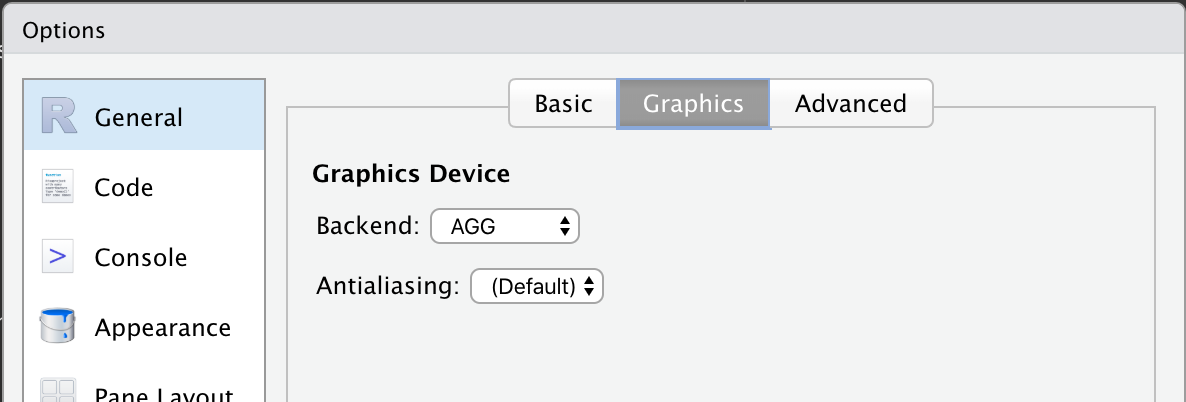
Setting ragg as backend in RStudio
Code of Conduct
Please note that the ‘ragg’ project is released with a Contributor Code of Conduct. By contributing to this project, you agree to abide by its terms.
Explore related projects
ytdl-org/youtube-dl
Command-line program to download videos from YouTube.com and other video sites
141,500 starsexcalidraw/excalidraw
Virtual whiteboard for sketching hand-drawn like diagrams
135,396 starsgodotengine/godot
Godot Engine – Multi-platform 2D and 3D game engine
119,840 starsmrdoob/three.js
JavaScript 3D Library.
117,905 stars