
qoomon/gradle-git-versioning-plugin
qoomon/gradle-git-versioning-plugin has 109 GitHub stars and 12 forks. Star changes are not measured yet. Last checked 2026-11-13 18:00 UTC. Last push 2026-10-20.
Measured star growth
- in 24h
- Collecting history
- in 7 days
- Collecting history
- in 15 days
- Collecting history
- in 1 month
- Collecting history
Net star changes over overlapping periods, not daily totals. Missing measurements are left blank. Stars measure attention, not software quality.
About
This extension will set project version, based on current Git branch or tag.
Developer ToolsREADME.md
OriginalGradle Git Versioning Plugin 


ℹ Also available as Maven Extension
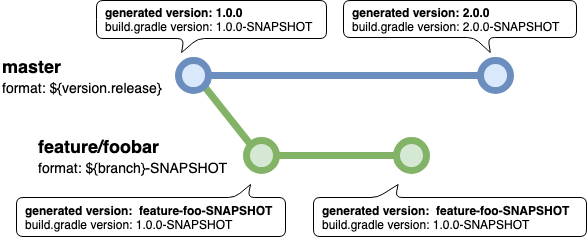
This plugin can virtually set project version and properties, based on current Git status.
ℹ No files will be modified, version and properties are modified in memory only.
- Get rid of...
- editing
build.gradle - managing project versions within files and Git tags
- git merge conflicts
- editing
Usage
Add Plugin to Gradle Project
⚠️ Minimum required Java version 17, tested with Gradle 8.14 and newer
⚠️ You should apply git versioning (gitVersioning.apply{...}) directly after version declaration at root project only.
Groovy DSL build.gradle
plugins {
    id 'me.qoomon.git-versioning' version '6.4.4'
}

version = '0.0.0-SNAPSHOT'
gitVersioning.apply {
    // see configuration documentation below
}
Kotlin DSL build.gradle.kts
plugins {
    id("me.qoomon.git-versioning") version "6.4.4"
}

version = "0.0.0-SNAPSHOT"
gitVersioning.apply {
    // see configuration documentation below
}
Configure Plugin
ℹ Consider CI/CD section when running this plugin in a CI/CD environment
You can configure the version and properties adjustments for specific branches and tags.
Groovy DSL Example: build.gradle
version = '0.0.0-SNAPSHOT'
gitVersioning.apply {
    refs {
        branch('.+') {
            version = '${ref}-SNAPSHOT'
        }
        tag('v(?<version>.*)') {
            version = '${ref.version}'
        }
    }

    // optional fallback configuration in case of no matching ref configuration
    rev {
        version = '${commit}'
    }
}
Kotlin DSL Example: build.gradle.kts
version = "0.0.0-SNAPSHOT"
gitVersioning.apply {
    refs {
        branch(".+") {
            version = "\${ref}-SNAPSHOT"
        }
        tag("v(?<version>.*)") {
            version = "\${ref.version}"
        }
    }

    // optional fallback configuration in case of no matching ref configuration
    rev {
        version = "\${commit}"
    }
}
Configuration Options
disableglobal disable(true)/enable(false) extension, default isfalse.- Can be overridden by command option, see (Parameters & Environment Variables)[#parameters-&-environment-variables]
describeTagPatternAn arbitrary regex to match tag names for git describe command- has to be a full match pattern e.g.
v(.+), default is.*
- has to be a full match pattern e.g.
describeTagFirstParentEnable(true) or disable(false) following only the first parent in a merge commit- default is
true
- default is
updateGradlePropertiesEnable(true)/disable(false) version and properties update ingradle.propertiesfile, default isfalse- Can be overridden by command option, see (Parameters & Environment Variables)[#parameters-&-environment-variables]
refsList of ref configurations, ordered by priority.ℹ First matching configuration will be used.
considerTagsOnBranchesBy default, tags pointing at current commit will be ignored if HEAD is attached to a branch.- If this option is
truetags will always be taken into account.
- If this option is
branch(pattern)/tag(pattern)specific ref patch definition.patternAn arbitrary regex to match ref names- has to be a full match pattern e.g.
mainorfeature/.+
- has to be a full match pattern e.g.
describeTagPatternAn arbitrary regex to match tag names for git describe command- has to be a full match pattern e.g.
v.+) - will override global
describeTagPatternvalue
- has to be a full match pattern e.g.
describeTagFirstParentEnable(true) or disable(false) following only the first parent in a merge commit- default is
true
- default is
versionThe new version format, see Format PlaceholderspropertiesA property definitions to update the value of a property.nameThe property namevalueThe new value format of the property, see Format Placeholders
groovy
⚠️properties = [ "name" : "value", ]groovy.lang.MetaClasshidespropertiesconfig field.
If you need to call a method on `properties` config field, you need to use the alias field `properties_` e.g. `properties_.put("name", "value")`
**kotlin** ```kotlin properties = mapOf( "name" to "value", ) ```
updateGradlePropertiesEnable(true) or disable(false) version and properties update ingradle.propertiesfile- will override global
updateGradlePropertiesvalue
- will override global
revRev configuration will be used if no ref configuration is matching current git situation.- same as
branch(pattern)/tag(pattern)configuration, exceptpatternparameter.
- same as
Format Placeholders
ℹ ….slug placeholders means all / characters will be replaced by -.
ℹ Final version will be slugified automatically, so no need to use ${….slug} placeholders in version format.
ℹ define placeholder default value (placeholder is not defined) like this ${name:-DEFAULT_VALUE}
e.g ${env.BUILD_NUMBER:-0} or ${env.BUILD_NUMBER:-local}
ℹ define placeholder overwrite value (placeholder is defined) like this ${name:+OVERWRITE_VALUE}
e.g ${dirty:-SNAPSHOT} resolves to -SNAPSHOT instead of -DIRTY
Placeholders
${env.VARIABLE}Value of environment variableVARIABLE${property.name}Value of commandline property-Pname=value${version}versionset inbuild.gradlee.g. '1.0.0-SNAPSHOT'${version.core}the core version component of${version}e.g. '1.2.3'${version.major}the major version component of${version}e.g. '1'${version.major.next}the${version.major}increased by 1 e.g. '2'
${version.minor}the minor version component of${version}e.g. '2'${version.minor.next}the${version.minor}increased by 1 e.g. '3'
${version.patch}the patch version component of${version}e.g. '3'${version.patch.next}the${version.patch}increased by 1 e.g. '4'
${version.label}the version label of${version}e.g. 'SNAPSHOT'${version.label.prefixed}like${version.label}with label separator e.g. '-SNAPSHOT'
Project Version Pattern Groups
Content of regex groups in
projectVersionPatterncan be addressed like this:${version.GROUP_NAME}${version.GROUP_INDEX}Named Group Example
groovy
projectVersionPattern = '^.+-(?<environment>.+)-SNAPSHOT$'
branch('main') {
    version = '${version.environment}-SNAPSHOT'
}
kotlin
projectVersionPattern = '^.+-(?<environment>.+)-SNAPSHOT\$'
branch("main") {
    version = "\${version.environment}-SNAPSHOT"
}
${ref}${ref.slug}ref name (branch or tag name or commit hash)Ref Pattern Groups
Content of regex groups in branch/tag
patterncan be addressed like this:${ref.GROUP_NAME}${ref.GROUP_NAME.slug}${ref.GROUP_INDEX}${ref.GROUP_INDEX.slug}Named Group Example
groovy
branch('feature/(?<feature>.+)') {
    version = '${ref.feature}-SNAPSHOT'
}
kotlin
branch("feature/(?<feature>.+)") {
    version = "\${ref.feature}-SNAPSHOT"
}
${commit}commit hash '0fc20459a8eceb2c4abb9bf0af45a6e8af17b94b'${commit.short}commit hash (7 characters) e.g. '0fc2045'${commit.timestamp}commit timestamp (epoch seconds) e.g. '1560694278'${commit.timestamp.year}commit year e.g. '2021'${commit.timestamp.year.2digit}2-digit commit year.g. '21'${commit.timestamp.month}commit month of year e.g. '12'${commit.timestamp.day}commit day of month e.g. '23'${commit.timestamp.hour}commit hour of day (24h)e.g. '13'${commit.timestamp.minute}commit minute of hour e.g. '59'${commit.timestamp.second}commit second of minute e.g. '30'${commit.timestamp.datetime}commit timestamp formatted asyyyyMMdd.HHmmsse.g. '20190616.161442'${describe}Will resolve togit describe --tags --first-parentoutput${describe.distance}The distance count to last matching tag${describe.tag}The matching tag ofgit describe${describe.tag.version}the tag version determined by regex\d+\.\d+\.\d+${describe.tag.version.core}the core version component of${describe.tag.version}e.g. '1.2.3'${describe.tag.version.major}the major version component of${describe.tag.version}e.g. '1'${describe.tag.version.major.next}the${describe.tag.version.major}increased by 1 e.g. '2'
${describe.tag.version.minor}the minor version component of${describe.tag.version}e.g. '2'${describe.tag.version.minor.next}the${describe.tag.version.minor}increased by 1 e.g. '3'
${describe.tag.version.patch}the patch version component of${describe.tag.version}e.g. '3'${describe.tag.version.patch.next}the${describe.tag.version.patch}increased by 1 e.g. '4'${describe.tag.version.patch.next.plus.describe.distance}the${describe.tag.version.patch.next}increased by${describe.distance}e.g. '3'${describe.tag.version.patch.plus.describe.distance}the${describe.tag.version.patch}increased by${describe.distance}e.g. '2'
${describe.tag.version.label}the label version component of${describe.tag.version}e.g. 'SNAPSHOT'${describe.tag.version.label.next}the${describe.tag.version.label}converted to an integer and increased by 1 e.g. '6'${describe.tag.version.label.next.plus.describe.distance}the${describe.tag.version.label.next}increased by${describe.distance}e.g. '3'${describe.tag.version.label.plus.describe.distance}the${describe.tag.version.label}increased by${describe.distance}e.g. '2'
Describe Tag Pattern Groups
Content of regex groups in
describeTagPatterncan be addressed like this:${describe.tag.GROUP_NAME}${describe.tag.GROUP_NAME.slug}${describe.tag.GROUP_INDEX}${describe.tag.GROUP_INDEX.slug}Named Group Example
groovy
branch('main') {
    describeTagPattern = 'v(?<version>.*)'
    version = '${ref.feature}-SNAPSHOT'
}
kotlin
branch("main") {
    describeTagPattern = "v(?<version>.*)"
    version = "\${describe.tag.version}-SNAPSHOT"
}
${dirty}If repository has untracked files or uncommitted changes this placeholder will resolve to-DIRTY, otherwise it will resolve to an empty string.- ⚠️ Can lead to performance issue on very large projects (10,000+ files)
${dirty.snapshot}Like${dirty}, but will resolve to-SNAPSHOT${value}Original value of matching property (Only available within property format)
Parameters & Environment Variables
Disable Extension
- Environment Variables
export VERSIONING_DISABLE=true- Command Line Parameters
gradle … -Dversioning.disable
Set branch or Add tag by environment variable
- Environment Variables
export VERSIONING_GIT_REF=$PROVIDED_REFe.g.refs/heads/main,refs/tags/v1.0.0orrefs/pull/1000/headexport VERSIONING_GIT_BRANCH=$PROVIDED_BRANCH_NAMEe.g.mainorrefs/heads/mainexport VERSIONING_GIT_TAG=$PROVIDED_TAG_NAMEe.g.v1.0.0orrefs/tags/v1.0.0- Command Line Parameters
gradle … -Dgit.ref=$PROVIDED_REFgradle … -Dgit.branch=$PROVIDED_BRANCH_NAMEgradle … -Dgit.tag=$PROVIDED_TAG_NAME
ℹ Especially useful for CI builds see Miscellaneous Hints
Update
gradle.propertiesfile- Environment Variables
export VERSIONING_UPDATE_GRADLE_PROPERTIES=true- Command Line Parameters
gradle … -Dversioning.updateGradleProperties
Provided Project Properties
git.commite.g. '0fc20459a8eceb2c4abb9bf0af45a6e8af17b94b'git.commit.shorte.g. '0fc2045'git.commit.timestampe.g. '1560694278'git.commit.timestamp.datetimee.g. '2019-11-16T14:37:10Z'git.refgit.ref.slugHEAD ref name (branch or tag name or commit hash)
Configuration Cache
The plugin is compatible with the configuration cache.
All git information is read through value sources, so a cached configuration is reused as long as
the git information used by your version and property formats stays the same, and recalculated as soon as it changes
(e.g. a new commit, a new tag or a dirty working tree if ${dirty} is used).
Likewise, only the environment variables and properties referenced by ${env.*} and ${property.*} placeholders are configuration cache inputs.
- The plugin's log output (e.g.
matching ref: ...) is only printed when the configuration is calculated, not when it is reused from the cache. - With
updateGradlePropertiesenabled,gradle.propertiesfiles are rewritten during configuration. As Gradle tracks these files, a rewrite causes one additional configuration cache miss. - The plugin applies the version to all projects from the root project, so it is not compatible with isolated projects yet.
Gradle Tasks
version- Print project version e.g.
gradle :version -q
- Print project version e.g.
CI/CD Setup
Most CI/CD systems do checkouts in a detached HEAD state so no branch information is available, however they provide environment variables with this information. You can provide those, by using Parameters & Environment Variables.
Native Support
- GitHub Actions: if
$GITHUB_ACTIONS == true,GITHUB_REFis considered - GitLab CI: if
$GITLAB_CI == true,CI_COMMIT_BRANCH,CI_COMMIT_TAGandCI_MERGE_REQUEST_SOURCE_BRANCH_NAMEare considered - Circle CI: if
$CIRCLECI == true,CIRCLE_BRANCHandCIRCLE_TAGare considered - Jenkins: if
JENKINS_HOMEis set,BRANCH_NAMEandTAG_NAMEare considered
Manual Setup
Set following environment variables before running your gradle command
export VERSIONING_GIT_REF=$PROVIDED_REF;
$PROVIDED_REF value examples: refs/heads/main, refs/tags/v1.0.0 or refs/pull/1000/head
or
export VERSIONING_GIT_BRANCH=$PROVIDED_BRANCH;
export VERSIONING_GIT_TAG=$PROVIDED_TAG;
$PROVIDED_BRANCH value examples: main, refs/heads/main or refs/pull/1000/head
$PROVIDED_TAG value examples: v1.0.0 or refs/tags/v1.0.0
Miscellaneous Hints
Commandline To Print Project Version
gradle :version -q
Build & Release
 # Publishes this plugin to local Maven
  ./gradlew build publishToMavenLocal
  # Publishes this plugin to Gradle Plugin portal.
  ./gradlew login && ./gradlew publishPlugins
Explore related projects
codecrafters-io/build-your-own-x
Master programming by recreating your favorite technologies from scratch.
562,325 starspublic-apis/public-apis
A collective list of free APIs
498,756 starsmorluto/rea
Reverse engineer anything with agents, from app behavior down to native binaries.
457,376 starsopenclaw/openclaw
The AI that really does things. Any OS. Any Platform. The lobster way. 🦞
394,392 stars