
qboson/kaiwu-pytorch-plugin
qboson/kaiwu-pytorch-plugin has 144 GitHub stars and 92 forks. GitHot measured 0 stars in 24 hours. Last checked 2026-11-09 21:14 UTC. Last push 2026-11-05.
Kaiwu-PyTorch-Plugin is a quantum computing programming suite based on PyTorch and the Kaiwu SDK.
What you can do
- Quantum Support: Inherits from Kaiwu SDK, supports calling photonic quantum computers
- Native PyTorch Support: Seamless integration with the PyTorch ecosystem, supports GPU acceleration
- Flexible Architecture: Supports custom visible and hidden layer dimensions
- Extensibility: Modular design makes it easy to add new energy functions or sampling methods
Measured star growth
- in 24h
- 0
- in 7 days
- Collecting history
- in 15 days
- Collecting history
- in 1 month
- Collecting history
Net star changes over overlapping periods, not daily totals. Missing measurements are left blank. Stars measure attention, not software quality.
README.md
Original




Kaiwu-PyTorch-Plugin
Language Versions: Chinese | English
For using Kaiwu-PyTorch-Plugin, please refer to the documentation.
First contribution to KPP? Start with the Kaiwu developer community to explore its open-source programs, then pick a small change to the documentation or an example.
If KPP helps with your development work, consider giving it a Star on GitHub.
Project Overview
Kaiwu-PyTorch-Plugin is a quantum computing programming suite based on PyTorch and the Kaiwu SDK. It enables the training and evaluation of Restricted Boltzmann Machines (RBMs) and Boltzmann Machines (BMs) on coherent photonic quantum computers. The plugin provides easy-to-use interfaces, allowing researchers and developers to quickly implement the training and validation of energy-based neural network models and apply them to various machine learning development tasks.
A Restricted Boltzmann Machine is an energy-based unsupervised learning model consisting of a visible layer and a hidden layer, with full connections between layers but no connections within a layer. Its core idea is to model the probability distribution of data through an energy function and train weights using algorithms such as Contrastive Divergence (CD), allowing the model to learn hidden features of input data. RBMs are commonly used for feature extraction, dimensionality reduction, or collaborative filtering, and are also the foundation for building more complex models. A Boltzmann Machine is a fully connected stochastic neural network where all neurons can be interconnected (including within the visible and hidden layers). Traditional sampling methods for BMs are inefficient, and quantum computing provides a new approach.
graph TD
    %% 定义子图样式(可选)
    classDef subGraph fill:#f8f9fa,stroke:#ddd,stroke-width:1px,rx:5,ry:5;

    subgraph Classical_Framework ["Classical Framework"]
        PyTorch["PyTorch<br>(Autograd/Tensors)"]:::node
    end

    %% 1. 右上模块名字只需要保留 Kaiwu SDK
    subgraph Kaiwu_SDK ["Kaiwu SDK"]
        SA["SimulatedAnnealingOptimizer"]:::node
        CIM["CIMOptimizer"]:::node
    end

    %% 2. 中间模块名字显示完整:Kaiwu Torch Plugin
    subgraph Torch_Plugin ["Kaiwu Torch Plugin"]
        Abstract["abstract_boltzmann_machine.py"]:::node
        RBM["restricted_boltzmann_machine.py"]:::node
        GBRBM["gbrbm.py<br>GaussianBernoulliRestricte"]:::node
        FullBM["full_boltzmann_machine.py<br>BoltzmannMachine"]:::node
        QDiff["qdiffusion.py<br>QDDiffusion"]:::node
        QVAE["qvae.py<br>QVAE"]:::node

        %% 3. dbn.py 作为 RBM 的下链,且保持在 Kaiwu Torch Plugin 层中
        DBN["dbn.py<br>UnsupervisedDBN"]:::node
    end

    %% 4. 最下面模块名字为 Examples,不需要 "[]"
    subgraph Examples
        rbm_digits["rbm_digits"]:::node
        dbn_digits["dbn_digits"]:::node
        bm_generation["bm_generation"]:::node
        qdiffusion["qdiffusion"]:::node
        qvae_mnist["qvae_mnist"]:::node
        qvae_cell["qvae_cell"]:::node
    end

    %% -------- 连线逻辑 --------
    %% 上层框架指向插件
    PyTorch --> Abstract
    SA -.-> Abstract
    CIM -.-> Abstract

    %% 插件层内部的继承/实现关系
    Abstract --> RBM
    Abstract --> GBRBM
    Abstract --> FullBM
    Abstract --> QDiff
    Abstract --> QVAE

    RBM --> DBN

    %% 插件层指向示例层
    RBM --> rbm_digits
    DBN --> dbn_digits
    FullBM --> bm_generation
    QDiff --> qdiffusion
    QVAE --> qvae_mnist
    QVAE --> qvae_cell

    %% 应用子图背景样式
    class Classical_Framework,Kaiwu_SDK,Torch_Plugin,Examples subGraph;
The diagram above shows the main code structure of the project:
- The
kaiwu-torch-pluginpackage (src/kaiwu/torch_plugin) provides the core modules: the abstract base classAbstractBoltzmannMachine,RestrictedBoltzmannMachine/BoltzmannMachine,QVAE(with Bernoulli / mixture utilities),QDiffusion, andUnsupervisedDBN. All modules are built on PyTorch and sample via the Kaiwu SDK samplers (SA / CIM backends). - The
exampledirectory contains runnable examples: digit recognition (RBM / DBN), image generation and latent classification (QVAE on MNIST), protein sequence generation (Q-Diffusion), and single-cell representation learning (QVAE on cell data). - The
testsdirectory contains the corresponding basic tests.
Main Features
- Quantum Support: Inherits from Kaiwu SDK, supports calling photonic quantum computers
- Native PyTorch Support: Seamless integration with the PyTorch ecosystem, supports GPU acceleration
- Flexible Architecture: Supports custom visible and hidden layer dimensions
- Extensibility: Modular design makes it easy to add new energy functions or sampling methods
- Q-Diffusion Support: Includes a public
QDiffusionmodule for energy-guided discrete generation with DPLM backbones
Plugin Advantages
- Flexible Configuration: Sampling methods and energy functions are implemented separately, making it easy to add new energy functions or sampling methods. Widely used BMs and RBMs are implemented, and can be integrated into other models by defining objective functions.
- Example References: The plugin provides relevant examples, such as digits and qvae training, which can serve as references for your own work.
- Cutting-edge Algorithm Support: The plugin provides a solid platform for implementing and applying cutting-edge algorithms. For example, innovative methods that replace the Gaussian assumption in VAE with a Boltzmann distribution are implemented based on Kaiwu-PyTorch-Plugin. The plugin supports end-to-end model training for large-scale, high-noise single-cell data, lowering the barrier for algorithm development and application.
Quick Start
Requirements
- python == 3.10
- kaiwu >= 1.3.1, <= 1.4.3
- torch == 2.7.0
- numpy == 2.2.6
Kaiwu compatibility covers the published releases 1.3.1, 1.4.0, 1.4.1,
1.4.2, and 1.4.3. The same model code handles the precision-reducer location
change and translates CIM mode names (quota / sample and
optimization / sampling, case-insensitive) for the installed SDK.
The published SDK wheels in this range require Python 3.10.
SDK CI checks 1.3.1, 1.4.0, and 1.4.3 on Python 3.10, covering the interface
change and the newest supported release. Run CI manually with
all-kaiwu-versions enabled to include 1.4.1 and 1.4.2. These jobs test local
solving and CIM construction without submitting cloud tasks. Use a regular
pip install . for cross-SDK checks: SDK 1.3.1 uses a regular package whose
namespace does not discover the plugin through an editable installation.
Code Style
- Follows PEP 8 standards
Installation Steps
You can choose either local setup (conda/pip) or Docker setup (recommended for reproducibility and isolation).
Option 1: Local Setup (conda/pip)
Create and activate an environment:
# It is recommended to use conda to create a new environment
conda create -n quantum_env python=3.10
conda activate quantum_env
Clone this repository locally:
git clone https://github.com/QBoson/Kaiwu-pytorch-plugin.git
cd kaiwu-pytorch-plugin
Install dependencies:
pip install -r requirements/requirements.txtKaiwu SDK 1.3.1 through 1.4.3 is supported; install a specific version with
pip install "kaiwu==1.3.1" ..Install the plugin:
pip install .
Option 2: Docker Setup (no local environment required)
The Docker setup builds a pre‑configured Jupyter notebook environment with all dependencies (including the Kaiwu SDK) already installed.
Project structure required:
requirements/
├── docker-compose.yml
├── requirements.txt               # Kaiwu SDK included
├── kaiwu-1.3.1-py3-none-any.whl   # Or download from Qboson platform
└── docker/
    └── Dockerfile
Clone the repository::
git clone https://github.com/QBoson/Kaiwu-pytorch-plugin.git
cd kaiwu-pytorch-plugin/requirements
Enter the requirements directory and build the image
cd kaiwu-pytorch-plugin/requirements
docker compose build
Start the Jupyter notebook server:
docker compose up
The notebook will be available at http://localhost:8888 (no token required).
Directly access the plugin source code
The container's/home/jovyan/workis mounted to the project root (../), so you can directly view and editsrc/,setup.py, and all other files in the JupyterLab file browser — no additionalgit cloneinside the container is required.Stop the server: Press
Ctrl+C, then run:docker compose down
Kaiwu SDK Installation Instructions (Required)
Kaiwu version 1.3.1 can now be installed directly via pip install kaiwu==1.3.1.
The download and installation steps for other versions of the Kaiwu SDK are as follows:
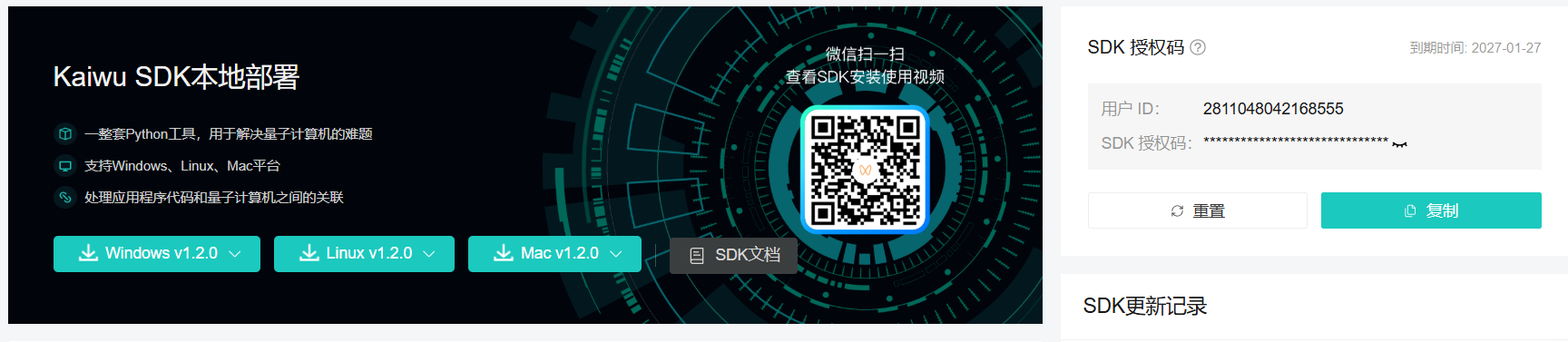
Get the SDK:
- Visit Kaiwu SDK download page (registration required)
- See Kaiwu SDK installation instructions
Configure authorization information: Obtain your SDK authorization information:
User ID: <your-user-id>
SDK Token: <your-sdk-token>
Please replace the above information with your actual authorization details
Obtain Real Quantum Machine Access
To experience real quantum computing, please register an account on the Qboson Platform and contact the official staff via the contact information provided in the documentation to obtain a real-machine quota.
Community Research Incentive Program
For AI developers and researchers who need computing resources on real quantum hardware.
Kaiwu-PyTorch-Plugin (KPP) supports research and engineering in quantum-native AI and energy-based neural networks.
Our Research Computing Incentive Program offers a 50% discount on computing resources (provided as a buy-N-get-N-free offer) when using KPP and Kaiwu SDK for development and research.
View eligibility requirements and fill out the application form (the questionnaire is at the bottom of the page).
Eligibility in brief: cite or acknowledge KPP or Kaiwu SDK in your research outputs and submit an application through the questionnaire. Coordination will be completed within 3 business days after approval.
Contact: [email protected]
Example Cases
Simple Example
Below is a simple example of calling RBM. This example demonstrates how to use the interface and does not involve a specific task.
import torch
from torch.optim import SGD
from kaiwu.torch_plugin import RestrictedBoltzmannMachine
from kaiwu.classical import SimulatedAnnealingOptimizer
from kaiwu.cim import CIMOptimizer
from kaiwu.torch_plugin._kaiwu_compat import PrecisionReducer

if __name__ == "__main__":
    SAMPLE_SIZE = 17
    USE_CIM = False

    if USE_CIM:
        sampler = CIMOptimizer(task_name="test_kpp", wait=True)
        sampler = PrecisionReducer(
            sampler,
            precision=8,
            truncated_precision=10,
            target_bits=550,
            only_feasible_solution=False
        )
    else:
        sampler = SimulatedAnnealingOptimizer()
    num_nodes = 50
    num_visible = 20
    x = 1 - 2.0 * torch.randint(0, 2, (SAMPLE_SIZE, num_visible))

    # Instantiate the model
    rbm = RestrictedBoltzmannMachine(
        num_visible,
        num_nodes - num_visible,
    )
    # Instantiate the optimizer
    opt_rbm = SGD(rbm.parameters())

    # Example of one iteration in a training loop
    # Generate a sample set from the model
    x = rbm.get_hidden(x)
    s = rbm.sample(sampler)

    opt_rbm.zero_grad()
    # Compute the objective---this objective yields the same gradient as the negative
    # log likelihood of the model
    objective = rbm.objective(x, s)
    # Backpropagate gradients
    objective.backward()
    # Update model weights with a step of stochastic gradient descent
    opt_rbm.step()
    print(objective)
Q-Diffusion Quick Start
Q-Diffusion is available from the top-level plugin package as a generic discrete-sequence core:
from kaiwu.torch_plugin import QDiffusion, QDiffusionConfig
from kaiwu.torch_plugin.qdiffusion import SequenceTokenSpec

# Build your own proposal model, energy model, token spec, and energy adapter.
model = QDiffusion(
    proposal_model=proposal_model,
    energy_model=energy_model,
    token_spec=SequenceTokenSpec(
        pad_id=0,
        bos_id=1,
        eos_id=2,
        mask_id=3,
    ),
    energy_adapter=energy_adapter,
    config=QDiffusionConfig(num_candidates=4),
)
Runnable DPLM-based workflow examples live under example/qdiffusion/, with
simple/ for minimal demos and dplm/ for the protein-case workflows.
If you want to run those DPLM examples, install the extra example-side dependencies separately:
pip install -r example/qdiffusion/requirements.txt
Classification Task: Handwritten Digit Recognition
Demonstrates feature learning and classification on the Digits dataset using Restricted Boltzmann Machines (RBM). This example is suitable for beginners to understand the application of RBMs in image feature extraction and classification, serving as a foundation for advanced experiments and functional extensions. Key steps include:
- Data Augmentation & Preprocessing: Expand the original 8x8-pixel handwritten digit images through shifting (up, down, left, right) and normalize features using MinMaxScaler.
- RBM Model Training: Implement the
RBMRunnerclass to encapsulate the RBM training process, with support for visualizing generated samples and weight matrices during training. - Feature Extraction & Classification: After RBM training, use its hidden layer outputs as features for classification evaluation via logistic regression.
- Visual Analysis: Enable sample generation and weight visualization during training to monitor and assess model learning.
To run this example, execute example/rbm_digits/rbm_digits.ipynb.
Generation Task: Q-VAE for MNIST Image Generation
Demonstrates how to train and evaluate a Quantum Variational Autoencoder (Q-VAE) model on the MNIST handwritten digits dataset. This example is designed for users seeking to understand Q-VAE training, generation, and evaluation workflows, providing a foundation for generative model research. Key steps include:
- Data Loading & Preprocessing: Implement a custom dataset class with batch indexing, combined with ToTensor conversion and flattening operations.
- Model Architecture: Construct the Q-VAE framework, including encoder/decoder modules and RBM-based latent variable modeling.
- Training Process: Design and execute the full training loop, tracking metrics (e.g., loss, ELBO, KL divergence) with support for checkpoint saving.
- Visualization & Generation: Provide comparative visualization of original, reconstructed, and generated images for intuitive model assessment.
To run this example, execute example/qvae_mnist/train_qvae.ipynb.
Q-Diffusion Generation Task: Proteomes: Homo sapiens Generation
Demonstrates how to train and evaluate an energy-guided discrete diffusion
workflow for protein sequence generation using Q-Diffusion with DPLM
backbones. This example is designed for users who want to understand how the
generic Q-Diffusion core is connected to practical protein-generation
experiments, providing a reference workflow for training, guided generation,
checkpoint reruns, and evaluation. Key steps include:
- DPLM-backed Model Assembly: Use
example/qdiffusion/dplm/utils/dplm_builder.pyto load one proposal backbone and one energy backbone, expose token metadata, build the energy adapter, and assemble a generic Q-Diffusion instance. - Training Objective: In the epoch loop, tokenize FASTA sequences into
targets, callgenerator.objective({"targets": ...}), corrupt clean sequences into noisy states, sample proposal candidates, and optimizeenergy_objective.mean()to train the energy-guidance branch. - Checkpoint and Rerun Workflow: Save compact checkpoints containing the
energy encoder, feature projector, energy backend weights,
energy_head, andvocab_proj, then rebuild baseline and guided generators for test-time generation and reruns. - Evaluation and Reporting: Compare baseline and guided outputs with quality metrics such as identity, Jensen-Shannon divergence, uniqueness, repeat ratio, and ESM2-based embedding distances, then write structured reports.
To run the minimal examples, execute:
pip install -r example/qdiffusion/requirements.txt
python example/qdiffusion/simple/simple_train_example.py
python example/qdiffusion/simple/simple_generate_example.py
To run the full DPLM workflow, execute:
python example/qdiffusion/dplm/train_workflow.py
For a more focused walkthrough of the example tree and its data flow, see
example/qdiffusion/README.md.
Usage Statistics
Kaiwu 1.4.3 does not expose the caller-context hook used for KPP attribution, so KPP-specific statistics are inactive with this release. The controls below apply only to SDK releases that provide that hook; they do not control the SDK's own statistics.
When the hook is available, kpp attributes SimulatedAnnealingOptimizer and CIMOptimizer calls to KPP in the background. This attribution is enabled by default and requires no changes to user code.
Statistics are only collected within the kpp call path (i.e., triggered via AbstractBoltzmannMachine.sample()); calling kaiwu SDK optimizers directly is never tracked.
Control via Environment Variable
# Enable stats (default)
export KPP_STATS_ENABLED=true

# Disable stats
export KPP_STATS_ENABLED=false
Control via Code
from kaiwu.torch_plugin import disable_usage_stats, enable_usage_stats, is_usage_stats_enabled

# Check current status
print(is_usage_stats_enabled())  # True

# Disable stats
disable_usage_stats()

# Re-enable
enable_usage_stats()
What Is Collected
- Trigger condition: Only fires inside kpp call paths such as
rbm.sample(sampler)/bm.sample(sampler); direct calls tosampler.solve()are excluded - Performance impact: Asynchronous, no perceptible effect on training speed
- Privacy: Only metadata (optimizer type, model type, variable count) is reported; user code and model parameters are never included
Scientific Research Achievements
QBM Inside VAE = A More Powerful Generative Data Representer (QBM-VAE)
Data from natural domains (e.g., biology, chemistry, materials science) exhibits extreme complexity, where traditional Gaussian i.i.d. assumptions often lead to distorted representations.
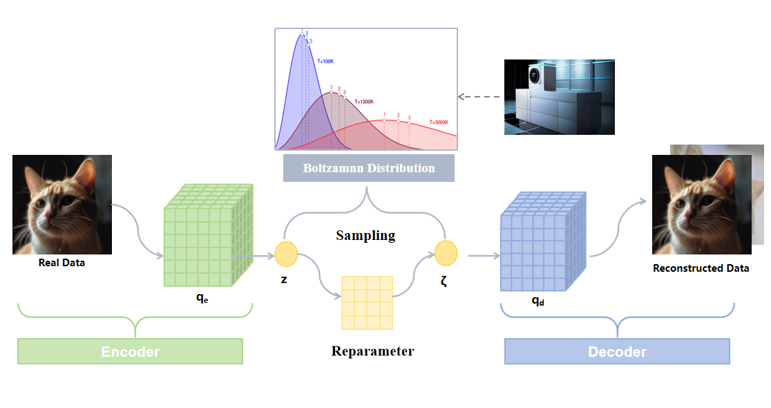
By leveraging the native Boltzmann distribution sampler of coherent photonic quantum computers, we developed a Quantum Boltzmann Machine (QBM)-enhanced Deep Variational Autoencoder (QBM-VAE). This significantly improves the VAE’s encoding capability, enabling it to capture previously unrecognized deep data features.
In single-cell transcriptomics analysis (a technique revealing cellular heterogeneity and functional differences by measuring gene expression at single-cell resolution), QBM-VAE markedly enhances clustering accuracy, identifying novel cell subtypes (new pathogenic factors with unique signatures) undetectable by conventional methods—providing new clues for target discovery.
Based on this representation, we successfully integrated millions of single-cell transcriptomic data points and achieved superior performance in downstream tasks (e.g., cell clustering, classification, trajectory inference) compared to existing methods, validating the excellence of this latent representation.
If you are interested in this work, please check out our paper:
Quantum-Boosted High-Fidelity Deep Learning
Acknowledgments
- We thank all contributors for their invaluable efforts.
- We appreciate the support and feedback from the quantum computing community.
Contact
- Boson Quantum Developer Community: Access more learning resources.
- Boson Quantum Official Assistant: Inquire about real-machine access and collaborations.
- email: [email protected]


Explore related projects
tensorflow/tensorflow
An Open Source Machine Learning Framework for Everyone
201,427 starshuggingface/transformers
🤗 Transformers: the model-definition framework for state-of-the-art machine learning models in text, vision, audio, and multimodal models, for both inference and training.
168,711 starsAUTOMATIC1111/stable-diffusion-webui
Stable Diffusion web UI
165,274 starsComfy-Org/ComfyUI
The most powerful and modular diffusion model GUI, api and backend with a graph/nodes interface. The fastest local inference engine in the world.
146,024 stars