
pxlrbt/move-wsl
pxlrbt/move-wsl has 1,559 GitHub stars and 155 forks. GitHot measured 0 stars in 24 hours. Last checked 2026-11-07 04:58 UTC. Last push 2026-09-11.
Easily move your WSL distros VHDX file to a new location.
What you can do
- ✅ Supports both WSL 1 and WSL 2
- ✅ Interactive and CLI modes
- ✅ Automatic WSL shutdown to prevent file locks
- ✅ Preserves default distro setting
Measured star growth
- in 24h
- 0
- in 7 days
- Collecting history
- in 15 days
- Collecting history
- in 1 month
- Collecting history
Net star changes over overlapping periods, not daily totals. Missing measurements are left blank. Stars measure attention, not software quality.
README.md
OriginalMove WSL
PowerShell script to move WSL 1 and WSL 2 distros VHDX file to a different location.
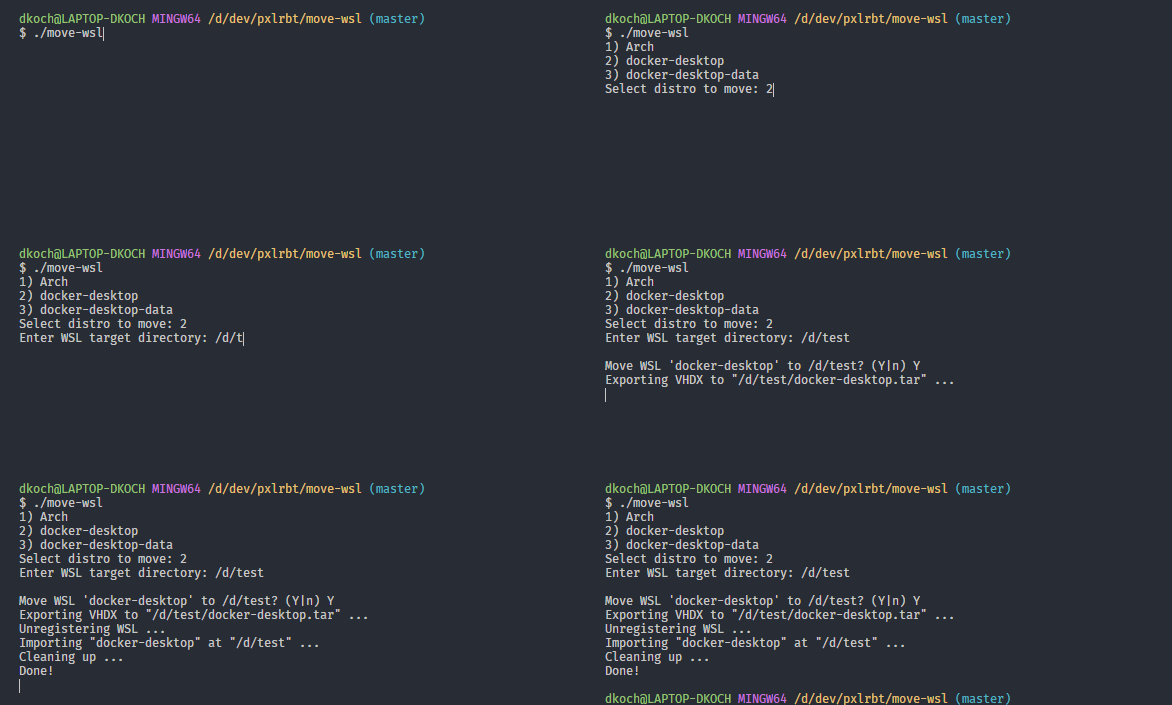
Features (v1.4.0)
- ✅ Supports both WSL 1 and WSL 2
- ✅ Interactive and CLI modes
- ✅ Automatic WSL shutdown to prevent file locks
- ✅ Preserves default distro setting
- ✅ Pre-checks for NTFS compression (prevents corruption)
- ✅ Colored output with progress feedback
Usage
Interactive Mode
./move-wsl.ps1
- Select your distro from the list
- Enter your target path (e.g.,
D:\wsl\ubuntu) - Confirm the operation
CLI Mode (Non-Interactive)
# Basic usage
./move-wsl.ps1 -Distro "Ubuntu" -Target "D:\wsl\ubuntu"

# Force mode (skip confirmations)
./move-wsl.ps1 -Distro "Ubuntu" -Target "D:\wsl\ubuntu" -Force

# Skip WSL shutdown (not recommended)
./move-wsl.ps1 -Distro "Ubuntu" -Target "D:\wsl\ubuntu" -NoShutdown
Parameters
| Parameter | Description |
|---|---|
-Distro |
Name of the WSL distro to move |
-Target |
Destination folder path |
-Force |
Skip confirmation prompts and NTFS compression warning |
-NoShutdown |
Skip automatic WSL shutdown (not recommended) |
⚠️ Important Notes
Warning
This script uses official
wslcommands and was used by many people. Make sure you have a backup of your data before proceeding.
Before Running
- Backup important data in your WSL distro
- Close all applications using WSL
- Stop Docker Desktop if moving Docker WSL distros
NTFS Compression Warning
The script will check if the target folder has NTFS compression enabled. Compressed folders can corrupt WSL images. If detected, disable compression:
- Right-click the target folder
- Properties → Advanced
- Uncheck "Compress contents to save disk space"
FAQ
Default user was switched to root when moving a distro
Set your default user inside your distro by adding the following configuration to your /etc/wsl.conf:
[user]
default=YOUR_USERNAME
If the file doesn't exist, create it manually. Then exit your distro, terminate it (wsl -t YOUR_DISTRO) and start it again.
Some distributions also allow setting the default user via command line:
ubuntu config --default-user johndoe
Standard distro switched when moving it
The script now automatically preserves the default distro setting (v1.4.0+). If using an older version:
wsl -s YOUR_DISTRO
Script cannot be loaded (not digitally signed)
Run this command to allow the script:
Set-ExecutionPolicy -Scope Process -ExecutionPolicy Bypass
./move-wsl.ps1
WSL version was switched when moving distro
On import, the distro will be registered with its original WSL version. If it changed:
wsl --set-version <Distro> <Version>
Moving Docker WSL
Before moving Docker WSL, make sure to:
- Stop Docker Desktop completely
- Wait a few seconds for processes to terminate
- Run the script
License
This project is licensed under the GPL-3.0 License - see the LICENSE file for details.
Explore related projects
codecrafters-io/build-your-own-x
Master programming by recreating your favorite technologies from scratch.
560,557 starspublic-apis/public-apis
A collective list of free APIs
496,834 starsmorluto/rea
Reverse engineer anything with agents, from app behavior down to native binaries.
439,113 starsopenclaw/openclaw
The AI that really does things. Any OS. Any Platform. The lobster way. 🦞
394,097 stars