
pvarentsov/typescript-clean-architecture
pvarentsov/typescript-clean-architecture has 1,505 GitHub stars and 179 forks. GitHot measured 0 stars in 24 hours. Last checked 2026-11-08 04:32 UTC. Last push 2023-09-17.
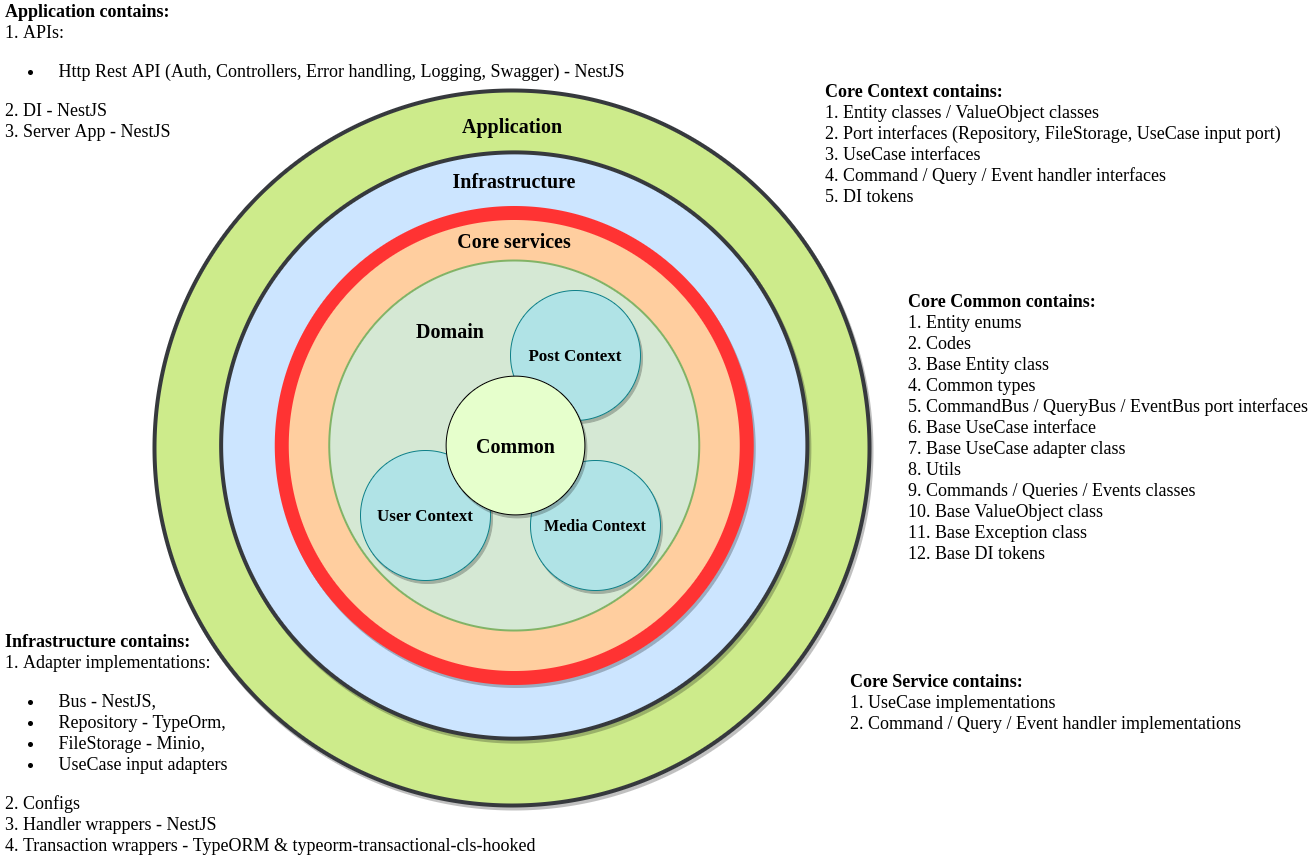
It is my attempt to create Clean Architecture based application in TypeScript.
Measured star growth
- in 24h
- 0
- in 7 days
- Collecting history
- in 15 days
- Collecting history
- in 1 month
- Collecting history
Net star changes over overlapping periods, not daily totals. Missing measurements are left blank. Stars measure attention, not software quality.
README.md
OriginalTypescript Clean Architecture
It is my attempt to create Clean Architecture based application in Typescript.


IPoster
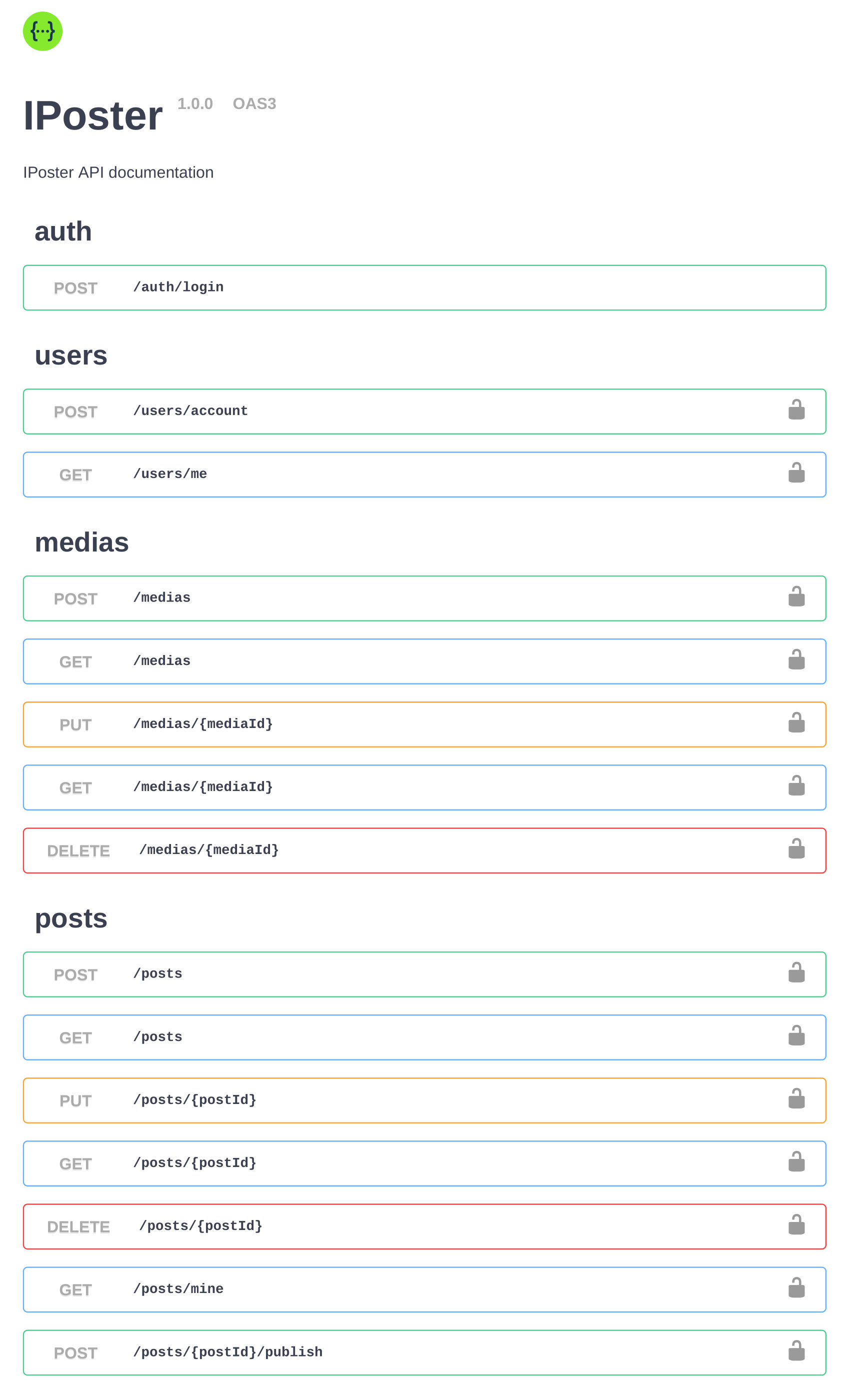
IPoster is a simple fictional application that allows users to publish posts.
Main Entities
- User
- Post
- Media
Use Cases
User -> IPoster
Usercan createGuestaccount inIPosterUsercan createAuthoraccount inIPoster
User -> Media
Authorcan create ownMediaAuthorcan edit ownMediaAuthorcan get ownMediaAuthorcan get ownMedialistAuthorcan remove ownMedia
User -> Post
Authorcan create own draftPostAuthorcan edit ownPostAuthorcan attach an imageMediato ownPostAuthorcan publish ownPostAuthorcan get ownPostAuthorcan get ownPostlistAuthorcan remove ownPostAuthorandGuestcan get publishedPostAuthorandGuestcan get list with publishedPosts
Local Development
Docker
All necessary external services are described in the ./docker-compose.local.yml:
- Run
docker-compose -f docker-compose.local.yaml up -d - Stop
docker-compose -f docker-compose.local.yaml stop
Services:
- PostgreSQL - Credentials.
- Minio - Credentials.
- Run
Building
- Install libraries -
npm install - Build application -
npm run build
- Install libraries -
Configuring
Configuring is based on the environment variables. All environment variables must be exposed before starting the application. See all environment variables.
Running
Start application -
npm run startExpose ./env/local.app.env and start application -
npm run start:local
Linting
npm run lint
Testing
- Prepare environment -
docker-compose -f docker-compose.test.yaml up -d - Run tests -
npm run test - Run tests with coverage -
npm run test:cov
- Prepare environment -
Libraries checking
- Show new libraries' versions -
npm run lib:check - Upgrade libraries' versions -
npm run lib:upgrade
- Show new libraries' versions -
IDE
IntelliJ IDEA:
Visual Studio Code:
Explore related projects
codecrafters-io/build-your-own-x
Master programming by recreating your favorite technologies from scratch.
560,927 starspublic-apis/public-apis
A collective list of free APIs
497,176 starsmorluto/rea
Reverse engineer anything with agents, from app behavior down to native binaries.
442,406 starsopenclaw/openclaw
The AI that really does things. Any OS. Any Platform. The lobster way. 🦞
394,177 stars