
putyy/res-downloader
putyy/res-downloader has 21,151 GitHub stars and 2,597 forks. GitHot measured +17 stars in 24 hours. Last checked 2026-11-07 12:38 UTC. Last push 2026-11-01.
Download common online resources, including WeChat Channels, mini programs, Douyin, Kuaishou, Xiaohongshu, livestreams, m3u8, Kugou, QQ Music, and more!
Measured star growth
- in 24h
- +17
- in 7 days
- Collecting history
- in 15 days
- Collecting history
- in 1 month
- Collecting history
Net star changes over overlapping periods, not daily totals. Missing measurements are left blank. Stars measure attention, not software quality.
README-EN.md
Original




🎉 Aixiang Resource Downloader
A cross-platform resource downloader built with Go + Wails.
Clean UI, easy to use, and supports a wide range of resource sniffing and downloading.
✨ Features
- 🚀 User-Friendly: Simple operation with an intuitive and beautiful UI
- 🖥️ Cross-Platform: Available on Windows / macOS / Linux
- 🌐 Supports Multiple Resource Types: Video / Audio / Images / m3u8 / Live streams, and more
- 📱 Wide Platform Compatibility: Works with WeChat Channels, Mini Programs, Douyin, Kuaishou, Xiaohongshu, KuGou Music, QQ Music, and more
- 🌍 Proxy Capture: Built-in proxy allows fetching resources behind network restrictions
📚 Docs & Versions
- 📘 Online Documentation (Chinese)
- 🧩 Mini Version Ui Display using default browser | Old Electron Version Support Win7
- 💬 Join the User Group (Chinese)
If full, you can add WeChat
AmorousWorldwith a note “github”
🧩 Download Links
- 🆕 Download from GitHub
- 🆕 Download via Lanzou Cloud (Password: 9vs5)
- ⚠️ Windows 7 users: Please use version
2.3.0
🖼️ Preview
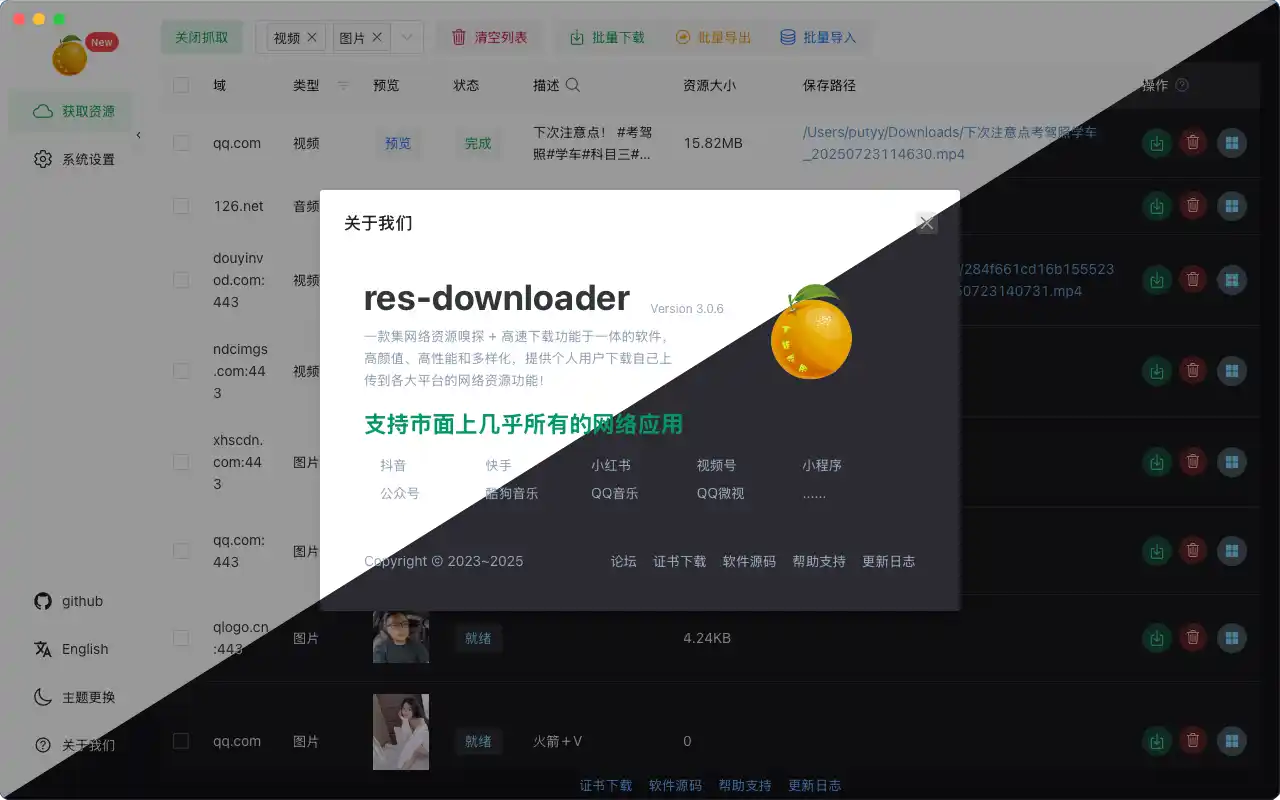
🚀 How to Use
Follow these steps to use the software correctly:
- During installation, be sure to allow certificate installation and grant network access
- Launch the software → Click "Start Proxy" at the top left
- Choose the resource types to capture (default is all)
- Open the target content externally (WeChat, Mini App, Browser, etc.)
- Return to the homepage to view the captured resource list
❓ FAQ
📺 m3u8 Video Resources
📡 Live Stream Resources
- We recommend OBS for recording (search for setup tutorials)
🐢 Slow Downloads or Large File Failures?
- Recommended download managers:
- For WeChat videos, click
Decrypt Videoafter download
🧩 Unable to Intercept Resources?
- Check your system proxy settings:
Address: 127.0.0.1
Port: 8899
🌐 Can't Access Internet After Closing the App?
- Manually disable the system proxy settings
🧠 More Questions?
💡 Principles & Motivation
This tool captures traffic via a local proxy and filters useful resources.
Its working principle is similar to tools like Fiddler, Charles, or browser DevTools, but with a more user-friendly display and enhanced filtering, making it suitable for everyday users with minimal tech background.
⚠️ Disclaimer
This software is for educational and research purposes only.
Commercial or illegal use is strictly prohibited.
The author is not responsible for any consequences arising from misuse.
Explore related projects
codecrafters-io/build-your-own-x
Master programming by recreating your favorite technologies from scratch.
560,634 starspublic-apis/public-apis
A collective list of free APIs
496,888 starsmorluto/rea
Reverse engineer anything with agents, from app behavior down to native binaries.
439,662 starsopenclaw/openclaw
The AI that really does things. Any OS. Any Platform. The lobster way. 🦞
394,107 stars