
ptonlix/OneSelf
ptonlix/OneSelf has 53 GitHub stars and 1 forks. GitHot measured 0 stars in 24 hours. Last checked 2026-11-16 03:38 UTC. Last push 2026-11-11.
Measured star growth
- in 24h
- 0
- in 7 days
- Collecting history
- in 15 days
- Collecting history
- in 1 month
- Collecting history
Net star changes over overlapping periods, not daily totals. Missing measurements are left blank. Stars measure attention, not software quality.
About
One self. One context. Every AI.
Self-hostedREADME_EN.md
Original
OneSelf
One self. One context. Every AI.
Open-source personal context management: build one context about you, let every AI understand you, and keep privacy and efficiency in balance.







Quick start · Architecture · Agent entry points · Docs · 中文
https://github.com/user-attachments/assets/98c48652-0ec5-476c-a6b6-bd5dde7151a5
💡 What is OneSelf
You shouldn't have to start with an introduction every time.
You switched AIs. You are still you. Your experience, knowledge, work, and preferences should not move with a platform.
OneSelf puts that material back in your hands.
Open source and self-hosted. One set of personal material, shared by many AIs. Every read, edit, and publication needs your approval.
Your material, your call. AIs come to know you, instead of you adapting to each AI.
✨ Features
OneSelf is agent-first personal context management: agents read, organize, and maintain; you set the boundaries: who gets what, how much, and for how long.
🗂️ Manage
- One context for everything about you: experience, notes, and document summaries become pages, and photos and PDFs are uploaded as originals and attached to them; new kinds of data need no schema change, and facts, timelines, tags, and links between pages are indexed for keyword, filtered, and fact search.
- Every change is traceable and reversible: incremental edits must carry the current version, so nobody silently overwrites changes they haven't seen; each page keeps its last 50 versions, and deleted pages and sources can be restored for 30 days.
🔐 Privacy
- Private by default, public only by your choice: permissions per source at three levels (read, write, change visibility); without access, a private page looks exactly like a missing one. Your public homepage shows only what you mark public, and agents can redesign it, but a new version goes live only after you approve.
- You approve every grant, and can revoke any of them: whether an agent connects with an API key or the OAuth device flow, you confirm it on your approval page, and keys are shown once; revoke any single key or grant and the next request fails. Agents can't issue themselves keys or approve on your behalf.
- Your context stays on your machine: one Node.js process with PostgreSQL and RustFS, deployed with Docker Compose; agents only use the API and never touch the database, object storage, or secrets.
⚡ Efficiency
- Agent-first, any AI can onboard itself: an agent reads
/.well-known/pcpand theoneselfskill to learn how to use it; one operation table serves both HTTP (OpenAPI) and MCP, so any AI that speaks either can connect, with identical results. - AI keeps it current, no more repeating yourself: agents can read originals you upload and turn them into pages, remember or forget a fact, add a timeline entry, tags, and links, so the next AI always reads the latest you.
🚀 Quick start
🐳 Option 1: CLI install
Requires Docker and Docker Compose v2.
macOS / Linux
curl -fsSL https://github.com/ptonlix/OneSelf/releases/latest/download/oneself.sh | sh
Windows (PowerShell, not Git Bash)
powershell -c "irm https://github.com/ptonlix/OneSelf/releases/latest/download/oneself.ps1 | iex"
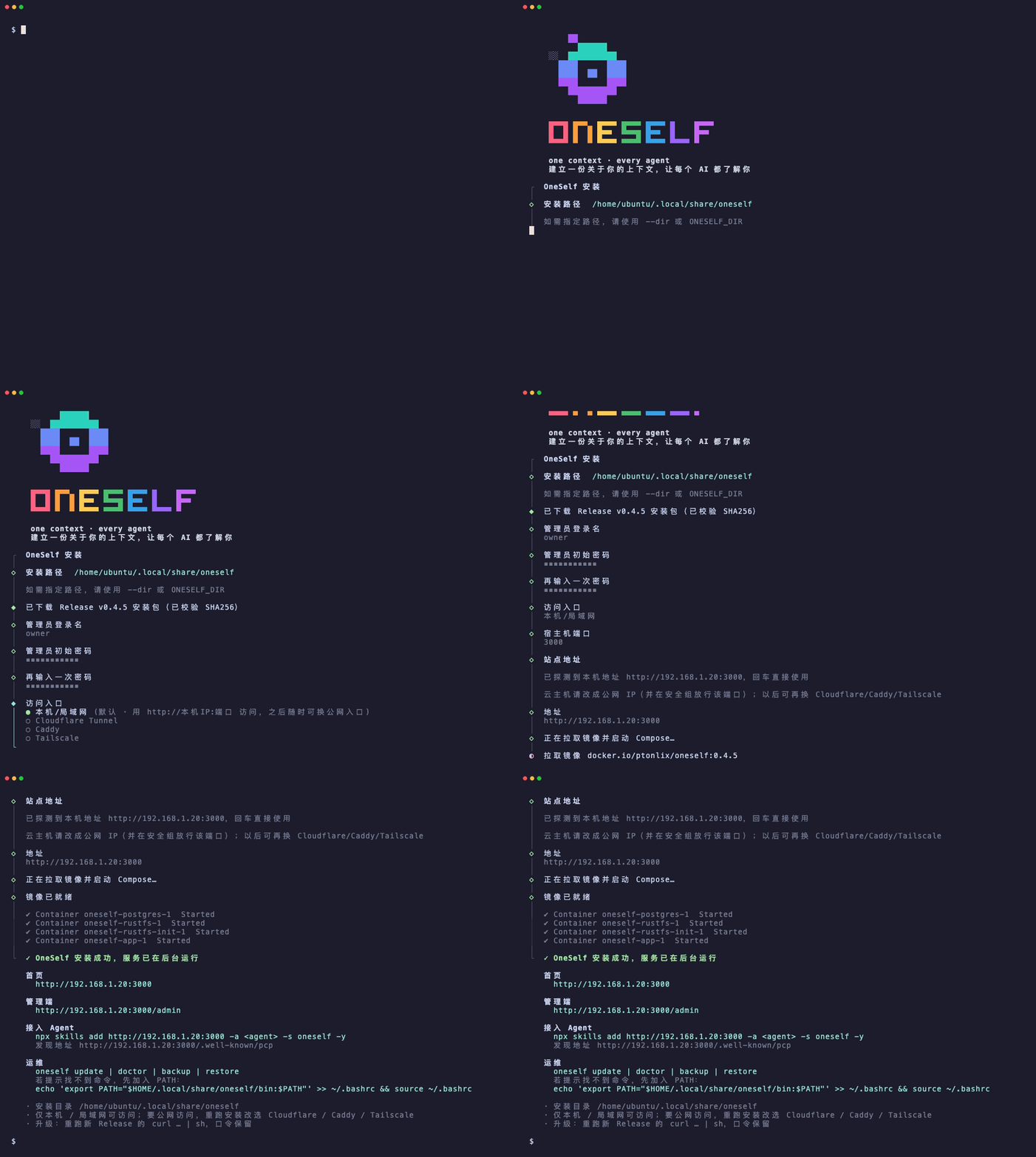
The installer prompts for the public origin and ingress, then starts the services. Then:
- Open the printed
PUBLIC_ORIGIN(home page) - Give this command to the agent you are talking to (replace
<agent>with its name):
npx skills add https://your-origin -a <agent> -s oneself -y
- With no credential, the agent requests a device code. Sign in at
/admin, then approve it at/admin/device. - An API key is for a script or a long-lived key, not the first conversational connect.
Install options
- Directory:
$HOME/.local/share/oneselfby default (%LOCALAPPDATA%\oneselfon Windows), never the source tree; the script prints it first - Another directory:
ONESELF_DIR=/pathorsh -s -- --dir /path(the Compose project staysoneself, sharing the same volumes) - Non-interactive:
ONESELF_YES=1 - Ingress: local/LAN by default; Cloudflare Tunnel, Caddy, or Tailscale also available, see Deployment
- Variables: see Configuration
Operations
- Commands:
bin/oneself update | doctor | backup | restore backup/restorerun in the install directory with itscompose.yaml; they do not need a checkout orscripts/transfer-cli.tsupdateupgrades and restarts when a newer release exists; otherwise it only pulls the current image.doctoronly checksupdatecan move.oneself-releaseandONESELF_IMAGE, but replacing the CLI binary still requires re-running the Release install command.- Passwords are kept. An older Release's install command never downgrades; set
ONESELF_REF=v1.2.3to force a version
Implementation
- One install implementation: the CLI binary in
apps/cli oneself.sh/oneself.ps1are thin bootstraps (deploy/oneself-bootstrap.sh,deploy/oneself-bootstrap.ps1) that download and verify the platform binary, then hand over- Alpine/musl uses
oneself-linux-*-musl
💻 Option 2: Local development
Requirements:
- Node.js
>=24 - pnpm 12.9.1 (via Corepack)
- Docker and Docker Compose v2
corepack enable
corepack prepare [email protected] --activate
pnpm install --frozen-lockfile
docker compose -f compose.dev.yaml up -d
compose.dev.yaml starts only PostgreSQL and RustFS, bound to 127.0.0.1. Create a local .env at the repository root (these credentials are for your machine only, never production; leave PUBLIC_ORIGIN unset locally so the app uses http://127.0.0.1:3000):
DATABASE_URL=postgres://oneself:[email protected]:5432/oneself
OBJECT_STORAGE_ENDPOINT=http://127.0.0.1:9000
OBJECT_STORAGE_REGION=us-east-1
OBJECT_STORAGE_BUCKET=oneself
OBJECT_STORAGE_ACCESS_KEY=oneself
OBJECT_STORAGE_SECRET_KEY=oneselfsecret
OWNER_LOGIN=owner
OWNER_PASSWORD=<choose an initial password>
pnpm dev builds the admin UI and the built-in public page, then starts the server; the process applies pending migrations before it listens. The app requires Node.js 24; the root .node-version pins it, so fnm, nvm, asdf, and volta switch automatically:
pnpm dev
pnpm db:migrate applies migrations without starting the app. Use it before an import so the process does not create the owner first.
Open http://127.0.0.1:3000 for the original page and http://127.0.0.1:3000/admin to sign in.
[!TIP] On direct start the app checks
DATABASE_URL,OBJECT_STORAGE_*,apps/admin/dist, andpackages/public-page/dist, and refuses to start if any is missing. It also refuses to start when no account exists yet andOWNER_PASSWORDis not set.
🔧 Configuration
See .env.example for every variable with comments. .env is git-ignored; never commit real secrets.
| Variable | Description |
|---|---|
PUBLIC_ORIGIN |
The single public origin, used for discovery, OAuth issuer, approval links, and media URLs; adds Secure to the cookie when HTTPS |
OWNER_LOGIN / OWNER_PASSWORD |
Creates your account (the single account owner) on first start, stores only an Argon2id hash, and forces a password change |
OWNER_RESET_PASSWORD |
Set temporarily if you forget the password; on restart it replaces the hash and forces a change again. Remove it afterwards. There is no email reset |
DATABASE_URL |
PostgreSQL connection string; built from POSTGRES_PASSWORD in Compose |
OBJECT_STORAGE_* |
S3-compatible endpoint, region, bucket, and keys; supplied from RUSTFS_ACCESS_KEY / RUSTFS_SECRET_KEY in Compose |
COMPOSE_PROFILES |
Ingress: local (default, LAN http://IP:HOST_PORT), cloudflared, caddy, or tailscale; only one at a time |
TUNNEL_TOKEN / APP_DOMAIN, ACME_EMAIL / TAILSCALE_AUTHKEY |
For cloudflared, Caddy, and Tailscale respectively |
ONESELF_IMAGE |
App image. Installs use docker.io/ptonlix/oneself:latest. Use oneself:local only when building from source |
HOST / PORT |
Listen address and port, default 127.0.0.1:3000; 0.0.0.0 inside the container |
🧱 Architecture
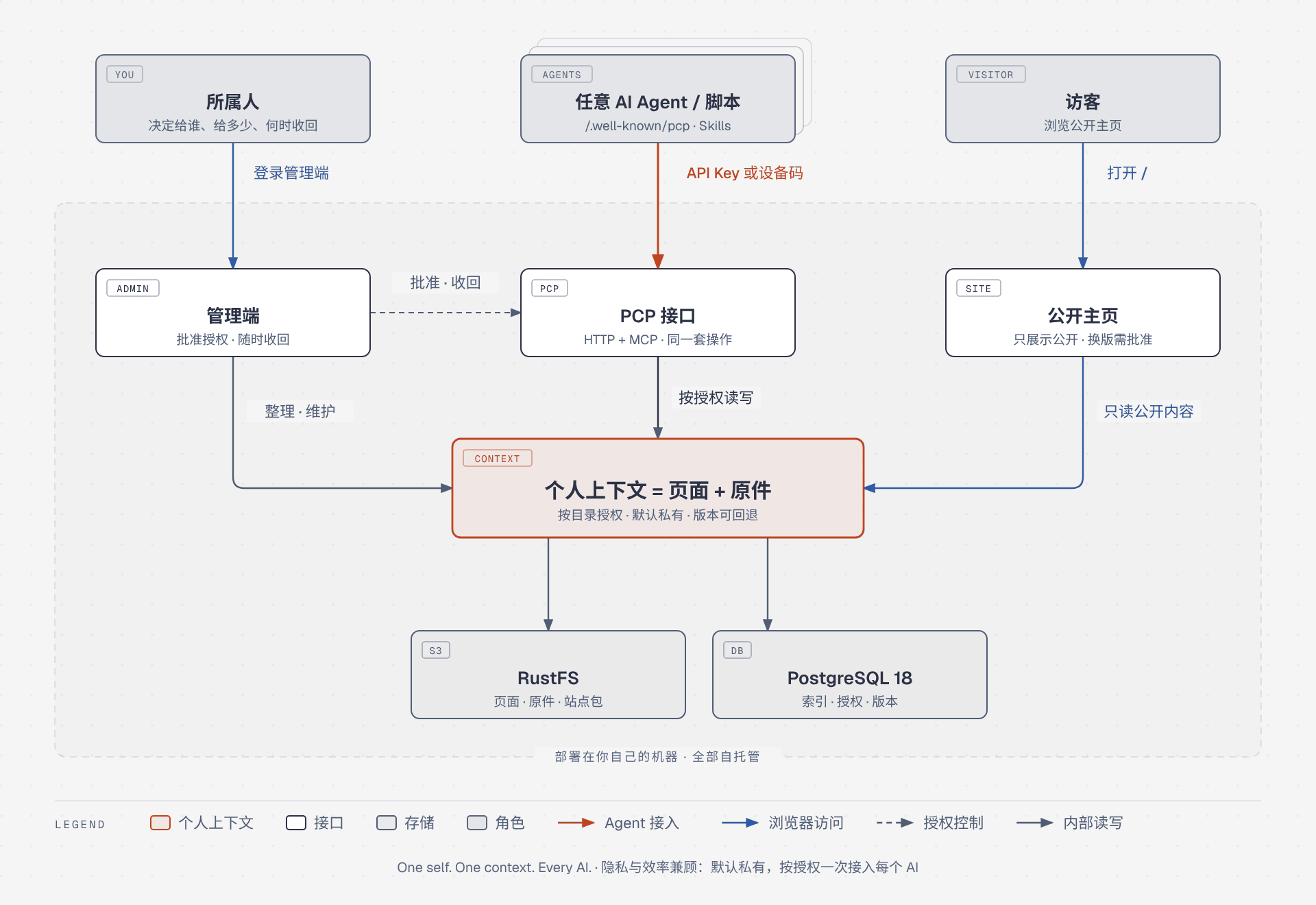
- One process: PCP, MCP, OAuth, the admin static files, and the published site are all served by one Hono app. No microservices, no Redis, no queue.
- Rules stay out of routes: HTTP and MCP only authenticate, parse, and respond. Shared use cases live in
apps/server/src/app, business rules in pure-TypeScriptpackages/domain; object storage, clock, and page parsing come in throughports/adapters, and dependency-cruiser enforces the direction. - Source vs. projection: page sources, originals, and site files live in object storage; page bodies, tags, links, facts, and timelines in PostgreSQL are projections. A write stores the hashed object first, then updates projections and appends a version in one transaction.
- The site never queries pages: the handler that serves site files only follows the site pointer; data on the page comes from separate browser requests to the public PCP.
| Role | Can | Cannot |
|---|---|---|
| You (account owner) | Sign in to the admin UI, approve API keys and device-flow grants, revoke keys and grants, approve homepage launches, delete or restore sources | Reset the password by email |
| AI agent | Call the same operations within the approved sources and permissions using an API key or device-flow token; request a homepage launch with site:write |
Create or manage keys, approve grants or launches |
| Visitor | Open the live public site and read public content and public originals | Read any private page |
For the Mermaid system overview, code boundaries, tables, and key flows, see docs/ARCHITECTURE.md (Chinese, with an English diagram).
🤖 Agent entry points
| Path | Who | Purpose |
|---|---|---|
/.well-known/pcp |
Agents | Discovery: protocol version, operation list, auth headers, public endpoints, upload limits, OpenAPI, MCP, OAuth, skills |
/.well-known/agent-skills/index.json |
Installers | Archive index for the single product skill oneself |
/skills/oneself/SKILL.md |
Agents | The only product skill. Read the context reference before writing, and the public-page reference before customizing the public page |
/openapi.json |
Agents, scripts | OpenAPI generated from the operation registry and the same input schemas as MCP, with parameters, bodies, and security |
POST /mcp |
MCP clients | Streamable HTTP; same auth headers as PCP |
/pcp/v1/* |
Authenticated callers | Pages, originals, search, structure, sources, identity, and site operations |
/pcp/v1/public/* |
Anyone | Only visibility: public, non-deleted pages |
/media/{id} |
Depends on owning page | Original bytes; anonymous when the owning page is public |
/oauth/device/auth, /oauth/token |
Agents | Request a device code; obtain and refresh access tokens |
/admin |
You (account owner) | Sign in, change password, approve device codes, API keys, and site launches |
/_preview/{releaseId}/ |
Anyone | Preview an unreleased build without moving the live pointer |
Agents connect with either an API key (Authorization: ApiKey <key> or X-Api-Key) or an access token from the OAuth 2.1 device flow (Authorization: Bearer <token>). You approve both, and the same permissions give the same results. Errors are always { "error", "message" }. Paths are defined in packages/operations/src/registry.ts.
PCP operations
| Group | Operations |
|---|---|
| Pages | put_page, edit_page, put_pages, get_page, list_pages, delete_page, restore_page, get_versions, revert_version, resolve_slugs |
| Originals | file_upload, file_list, file_url |
| Search | search, query, recall |
| Structure write-back | add_tag, remove_tag, get_tags, add_link, remove_link, get_links, get_backlinks, add_timeline_entry, get_timeline, remember, forget |
| Sources and identity | sources_list, sources_add, sources_delete, sources_restore, sources_status, whoami, list_skills, get_skill |
| Site | list_sites, get_site, put_site, preview_site, activate_site |
| HTTP only | create_api_key, list_api_keys, revoke_api_key |
🧩 How context is organized
A context is made of pages and originals, grouped by source, e.g. profile, career, health:
- Pages: identified by
(source, slug); fields such astype,title, andvisibilitygo in the frontmatter at the top, and any other keys are free-form. Statements that need a validity date or confidence go under## Facts, and dated events under## Timeline. - Originals: photos, scans, and documents (JPEG, PNG, WebP, GIF, PDF, up to 20 MiB each) are uploaded with
file_uploadand referenced from a page'sfiles; an original is anonymously readable only when its page is public.
---
type: profile
title: Engineer
name: Jane Doe
visibility: public
tags: [public-profile]
files: []
---

# Jane Doe

Builds personal tools and developer products.

## Facts

- id: fact_01
  entity: Jane Doe
  statement: Lives in Shanghai
  confidence: 0.9
  valid_until: 2027-01-01

## Timeline

- 2024-06-01 | Joined a company | Backend work
Pages recognize only these two structured blocks, and a parse failure rolls back the whole write. Full rules: skills/oneself/references/context.md.
📁 Project structure
OneSelf/
├── apps/
│   ├── server/            # The single Node process: pcp/, mcp/, oauth/, owner/, site-files/; use cases in app/
│   └── admin/             # Admin UI (Vite + React), talks HTTP only
├── packages/
│   ├── domain/            # Pure business rules: pages, originals, search, access, site pointer
│   ├── operations/        # Operation registry: names, paths, http-only. Zero dependencies
│   ├── ports/             # Interfaces for object storage, clock, page parsing
│   ├── adapters/          # S3 and PostgreSQL implementations plus in-memory test fakes
│   ├── db/                # Drizzle schema and SQL migrations
│   ├── public-client/     # Anonymous public PCP client, also used by custom sites
│   └── public-page/       # Source of the built-in public page
├── skills/oneself/        # Product skill: SKILL.md and references/
├── tests/                 # API smoke tests and skill acceptance tests
├── deploy/Caddyfile       # Caddy ingress, reverse proxy only
├── docs/                  # PRD and architecture
├── openspec/              # Behavior specs and change records
├── compose.yaml           # Production: app + PostgreSQL + RustFS + one ingress profile
├── compose.dev.yaml       # Local dependencies: PostgreSQL + RustFS
└── Dockerfile             # App image: admin UI, original page, its source zip, and skills/
🧪 Development
pnpm check            # Prettier, ESLint, tsc, Vitest, dependency-cruiser, Knip, in order
pnpm test             # Unit and in-process API tests (no Compose needed)
pnpm test:smoke       # Closed-loop smoke test on the running compose.dev.yaml services, separate DB and bucket
pnpm boundaries       # Package dependency direction only
pnpm db:migrate       # Apply migrations to DATABASE_URL from .env without starting the app
pnpm data:export --out oneself-export --stopped
pnpm data:import --from oneself-export.tar.gz --stopped
pnpm dev              # Build the admin UI and built-in public page, then start the app
data:export / data:import pack the PostgreSQL public data and the RustFS pages/, files/, and sites/ prefixes into a tar.gz, then load that archive into an empty database and bucket migrated to the same revision. --out oneself-export writes oneself-export.tar.gz; copy that file to the new machine. Stop the app and pass --stopped. The bundle contains password hashes and key hashes; do not commit it. Sessions, device codes, PUBLIC_ORIGIN, and object-storage credentials are not included. Add --via compose when the production database port is not published. Without a PostgreSQL 18 pg_dump on the host, use --via compose --compose compose.dev.yaml for the dev dependencies. Import into a non-empty target only with --replace.
pnpm test:smoke starts and stops no containers; bring the dev services up first with docker compose -f compose.dev.yaml up -d. It creates and resets a separate oneself_smoke database in the same PostgreSQL and creates and empties a separate oneself-smoke bucket in the same RustFS, never touching dev data, and leaves both in place afterwards. It does not read DATABASE_URL or OBJECT_STORAGE_* from .env; override with SMOKE_POSTGRES_ADMIN_URL (default postgres://oneself:[email protected]:5432/postgres), SMOKE_DATABASE, SMOKE_OBJECT_STORAGE_ENDPOINT, SMOKE_OBJECT_STORAGE_BUCKET, SMOKE_OBJECT_STORAGE_ACCESS_KEY_ID, SMOKE_OBJECT_STORAGE_SECRET_ACCESS_KEY, and SMOKE_OBJECT_STORAGE_REGION. A database or bucket name without smoke, or named oneself, is refused.
pnpm check is the local gate before merging. Install dependencies with pnpm only. Behavior follows docs/PRD.md; paths, transactions, and deployment follow docs/ARCHITECTURE.md.
🚢 Deployment
compose.yaml runs the app, PostgreSQL 18, and RustFS; none of them publishes a host port. The ingress is chosen by COMPOSE_PROFILES in .env from four mutually exclusive profiles (the installer asks once); switching ingress does not change the app image:
| Profile | Who can reach it | Needs |
|---|---|---|
local (default) |
This host / LAN, http://IP:port |
HOST_PORT (default 3000). Only this port is published |
cloudflared |
Internet, hostname on Cloudflare | TUNNEL_TOKEN. No router ports opened |
caddy |
Internet, your own domain | APP_DOMAIN, ACME_EMAIL; ports 80 and 443 reachable |
tailscale |
Devices on the same tailnet only | TAILSCALE_AUTHKEY. Serve only, no Funnel |
PUBLIC_ORIGINmust match the chosen ingress's public address.- Behind Cloudflare, do not cache
/pcp,/oauth,/.well-known,/admin,/skills,/media, or/_preview. - Without the installer:
cp .env.example .env, fill in the variables, thendocker compose pull && docker compose up -d. - Agents connect with
npx skills add https://your-origin -a <agent> -s oneself -y.
📚 Documentation
- Product requirements (PRD, Chinese): goals, non-goals, data model, PCP, acceptance criteria
- Architecture (Chinese): stack, code boundaries, data, paths, and key flows
- Skill: oneself
- On a running instance:
/.well-known/pcp,/.well-known/agent-skills/index.json,/openapi.json,/skills/oneself/SKILL.md - Install:
npx skills add https://your-site -a <agent> -s oneself -y
🤝 Contributing
Issues and pull requests are welcome. Read CONTRIBUTING.md first. Report vulnerabilities through SECURITY.md, and do not paste keys, passwords, or export archives into an issue. The collaboration agreement is CODE_OF_CONDUCT.md.
- Branch from the current
main. - Keep changes within the scope of docs/PRD.md; if operation names, permissions, or error codes change, update the docs and
packages/operationsbefore the code. - Run
pnpm checkbefore committing. - Open a pull request describing the behavior change and how you verified it.