
psygreg/linuxtoys
psygreg/linuxtoys has 1,370 GitHub stars and 80 forks. GitHot measured 0 stars in 24 hours. Last checked 2026-11-06 09:09 UTC. Last push 2026-11-01.
For everything Linux - tools, tweaks and software manager - ready for the age of AI.
Measured star growth
- in 24h
- 0
- in 7 days
- Collecting history
- in 15 days
- Collecting history
- in 1 month
- Collecting history
Net star changes over overlapping periods, not daily totals. Missing measurements are left blank. Stars measure attention, not software quality.
README.md
OriginalLinuxToys
LinuxToys is a software distribution platform for Linux systems. It aims to make powerful Linux functionality simple and accessible to all users through an intuitive interface, and enable developers to ship their apps consistently and reliably by giving them control over the installation process of their apps, all in one solution for dozens of Linux distributions.
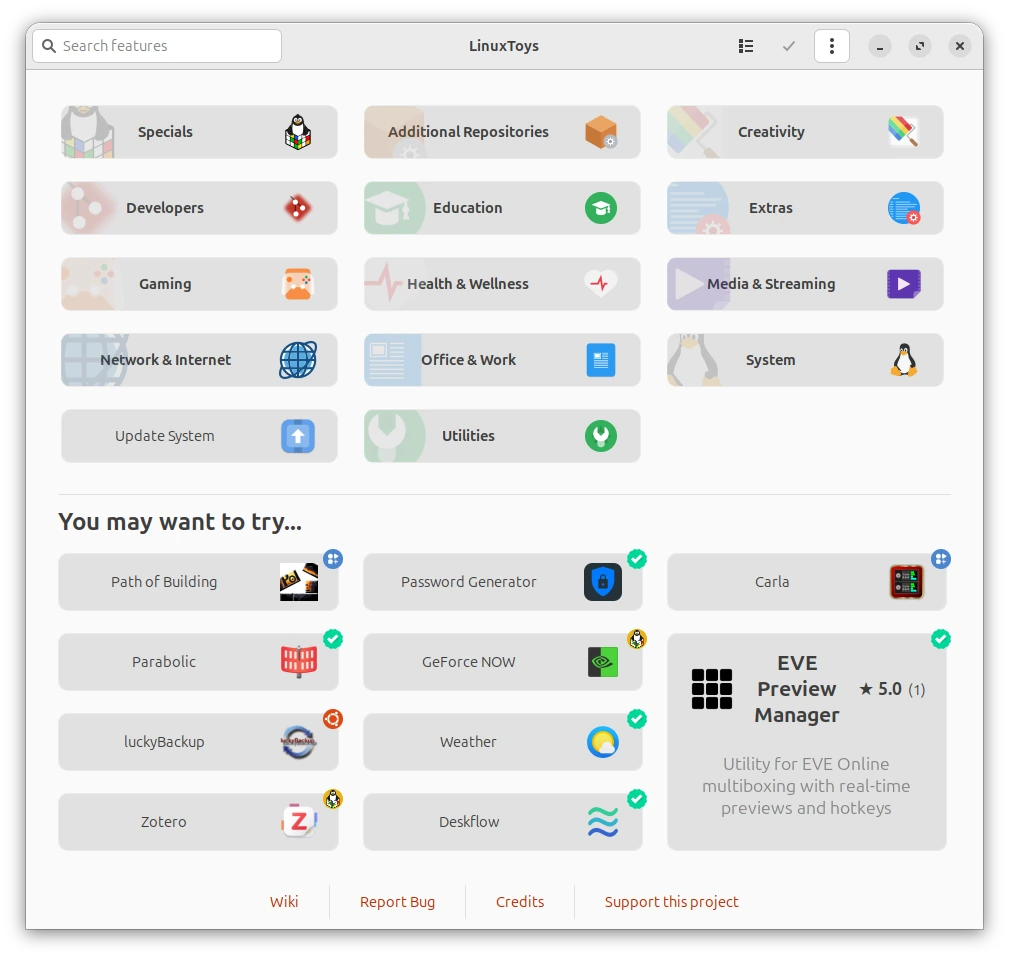
Compatibility
LinuxToys is compatible with the following Linux distributions, provided they are running their latest stable versions:
- Debian and derivatives (PikaOS, LMDE, Tuxedo, etc.)
- Ubuntu and derivatives (Ubuntu flavours, Mint, Zorin, etc.)
- Fedora and derivatives (Nobara, Ultramarine and spins)
- Red Hat Enterprise Linux and similars (CentOS Stream, AlmaLinux, etc.)
- Arch Linux and derivatives (EndeavourOS, CachyOS, etc.)
- Manjaro and Big Linux
- OpenSUSE (Leap, Slowroll and Tumbleweed)
- Fedora-based Atomic Distributions (Atomic Fedora,
rpm-ostreeUniversal Blue images like Bazzite and Aurora) - Solus
- Deepin
- SteamOS, Bluefin Dakota, Gnome OS and KDE Linux
Only x86 computers are supported, as other architectures lack support from most packages that are components of LinuxToys, even though the app itself may run on ARM devices. Support for non-systemd init systems is limited, and some features of the app cannot be offered for them.
Installation
Automatic Installation
The simplest way to install LinuxToys is by using the automated installation script. Open your terminal and run:
curl -fsSL https://linux.toys/install.sh | bash
This will automatically pick the correct package option for your distribution and install it.
Manual Installation
If you prefer to review the script before running it, you can download and execute it manually:
curl -fsSLJO https://linux.toys/install.sh
chmod +x install.sh
./install.sh
You may also pick the package that suits your system best yourself.
Official Repositories
LinuxToys is available in several official and community repositories for easier package management.
Ubuntu (PPA)
You can install LinuxToys from our official PPA on Launchpad:
sudo add-apt-repository ppa:psygreg/linuxtoys
sudo apt update
sudo apt install linuxtoys
Fedora / RHEL / OpenSUSE (COPR)
Packages are available via Fedora COPR for the latest releases of AlmaLinux, Fedora and RHEL.
For Standard Systems:
sudo dnf copr enable psygreg/linuxtoys
sudo dnf install linuxtoys
For Atomic Systems (Fedora Atomic, Universal Blue):
curl -fsSL https://copr.fedorainfracloud.org/coprs/psygreg/linuxtoys/repo/fedora-$(rpm -E %fedora)/psygreg-linuxtoys-fedora-$(rpm -E %fedora).repo | sudo tee /etc/yum.repos.d/psygreg-linuxtoys-fedora-$(rpm -E %fedora).repo
sudo rpm-ostree install linuxtoys
Arch Linux (AUR)
Arch Linux users can install the linuxtoys-bin package from the AUR:
git clone https://aur.archlinux.org/linuxtoys-bin.git
cd linuxtoys-bin
makepkg -si
SteamOS and usage without installation
You may use the AppImage available at the latest release to use LinuxToys without requiring installation. For SteamOS, the automatic installer will integrate this AppImage using Gear Lever.
MCP Agent Server
LinuxToys ships with an opt-in MCP (Model Context Protocol) server that lets AI agents use the app on your behalf, like a user would: browse and search the catalog, read app pages (descriptions, screenshots, donation and purchase links), install and remove apps, clean up the leftover data of uninstalled Flatpak apps, run the full system update or LinuxToys' own self-update, translate descriptions, and change settings such as automatic updates, automatic bug reports and language.
- Off by default. Turn it on from the app menu (☰) with the MCP Agent Server toggle, or let an agent do it following the bundled
linuxtoys-mcpagent skill. - Runs as a systemd user service (
linuxtoys-mcp.service): installed with the app, enabled only when you toggle it, and started automatically with your session from then on. It never registers the GUI's application identity, so the app keeps launching normally through every other method. - Your credentials stay yours. When an installation needs root, the usual
askpasspassword dialog appears on your screen — the agent never sees or handles credentials. The server listens only on127.0.0.1, and agents authenticate with a per-install token stored at~/.config/linuxtoys/mcp-token.
Agents connect over MCP Streamable HTTP at http://127.0.0.1:7420/mcp (port configurable in ~/.config/linuxtoys/settings.conf, [mcp] port). The bundled skill teaches agents how to enable the server and use every tool; you can also install it manually to any agent that supports skills — it is bundled inside the app (/usr/share/linuxtoys/app/mcp_skill/SKILL.md) and written to detected agents' skill directories when you enable the server.
Suggestions, feature requests and other topics
For suggestions, feature requests and issue reports that for any reason are not possible to send through the LinuxToys bug reporting system, please refer to the Discussions.
Development GIT
For running the application from source, please follow these steps.
Prerequisites
Ensure your system has the necessary dependencies installed. Those will include build dependencies and python virtual environment setup.
Debian/Ubuntu:
sudo apt install -y bash git curl wget zenity appstream libappstream5 python3 python3-gi python3-requests libgtk-3-0 gir1.2-gtk-3.0 gir1.2-vte-2.91 gir1.2-appstream-1.0 cargo python3-dev python3-maturin python3-venv pkgconf libgtk-3-dev patchelf
Fedora/RHEL:
sudo dnf install -y bash git curl wget zenity appstream appstream-data python3 python3-gobject python3-requests gtk3 vte291 cargo python3-devel maturin gtk3-devel pkgconf-pkg-config patchelf
Arch Linux:
sudo pacman -S --noconfirm bash git curl wget zenity appstream archlinux-appstream-data python python-gobject python-requests gtk3 vte3 cargo maturin pkgconf patchelf
OpenSUSE:
sudo zypper in -y bash git curl wget zenity libappstream5 python3 python3-gobject python3-requests gtk3 libvte-2_91-0 typelib-1_0-Vte-2.91 typelib-1_0-AppStream-1_0 cargo python3-devel python3-maturin gtk3-devel pkgconf-pkg-config patchelf
Solus:
sudo eopkg it -y git curl wget zenity appstream python3 python-gobject python-requests libvte rust python-devel pkg-config gtk3-devel patchelf
For Solus, you will have to install
maturinusingpipon the virtual environment you will set up in the next steps.
Cloning and Running
Clone the repository:
git clone --depth=1 https://github.com/psygreg/linuxtoys.git
cd linuxtoys
Build rust libraries for development
Start by setting up a python virtual environment for maturin, from the repository root:
python3 -m venv --system-site-packages .venv
source .venv/bin/activate
Then compile the libraries with the script:
./build-rust.sh develop
The compiled rust library for development and testing, virtual environment files and building artifacts are automatically ignored by the repository if you follow this procedure correctly.
Run the application:
p3/linuxtoys.py
For developers who wish to contribute, check our documentation, please refer to the Contribution Guidelines.
To distribute your app through LinuxToys, check out the Developer Portal.
Explore related projects
codecrafters-io/build-your-own-x
Master programming by recreating your favorite technologies from scratch.
560,355 starspublic-apis/public-apis
A collective list of free APIs
496,644 starsmorluto/rea
Reverse engineer anything with agents, from app behavior down to native binaries.
437,116 starsopenclaw/openclaw
The AI that really does things. Any OS. Any Platform. The lobster way. 🦞
394,048 stars