
polyackiy/camoufox-profile-manager
polyackiy/camoufox-profile-manager has 93 GitHub stars and 28 forks. GitHot measured +1 stars in 24 hours. Last checked 2026-11-15 16:01 UTC. Last push 2026-11-06.
Measured star growth
- in 24h
- +1
- in 7 days
- Update delayed
- in 15 days
- Update delayed
- in 1 month
- Update delayed
Net star changes over overlapping periods, not daily totals. Missing measurements are left blank. Stars measure attention, not software quality.
About
Self-hosted antidetect browser profile manager on Camoufox — profiles that stay the same machine across sessions
Self-hostedREADME.md
OriginalCamoufox Profile Manager


A self-hosted, open-source manager for Camoufox antidetect browser profiles — a free alternative to AdsPower, Dolphin, Multilogin or GoLogin, for people who would rather run it themselves.
Each profile is one long-lived machine. It keeps the same fingerprint every session, along with its own cookies, storage and history, so an account opened from it in January still looks like the same computer in June.
Desktop release: download the latest stable release from Assets. macOS Apple Silicon and Intel, Windows x64, and Ubuntu/Debian x64 builds are produced by CI. Releases remain unsigned; certificates and macOS notarization are not planned and are not release requirements. OS security warnings can appear. See Getting started / Начало работы. See installation evidence and coverage limits. Chrome migration remains experimental.
For changes in 0.7.0 and the next priorities, see the changelog and roadmap.
What it does
- A profile is the same machine every launch. Camoufox generates a fresh fingerprint on every start, which is right for a privacy tool and wrong for a long-lived account. The first launch resolves the fingerprint once and stores it; every launch after replays it. Location, timezone and WebRTC stay dynamic so they keep following the proxy. See docs/profile-settings.md.
- Real device fingerprints. Create a profile from one of the 312 fingerprints Camoufox captured from actual machines, instead of a synthetic one.
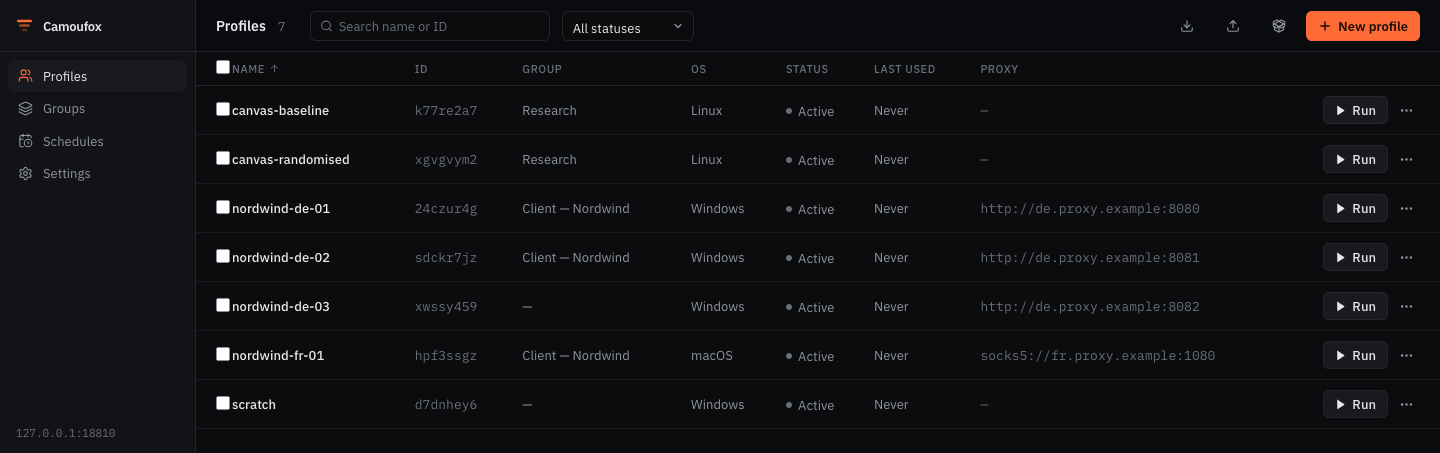
- Profiles and groups — create, edit, clone, delete, search, filter, bulk actions, and grouping by client or purpose. A clone gets its own machine by default: two profiles sharing one fingerprint are provably one computer.
- Browser control — launch and stop a browser per profile; closing the window yourself is noticed and the session is cleaned up.
- Scheduling — open a profile on a schedule (warming), and keep its pinned browser version current automatically. Hardware never rotates on a timer, on purpose — docs/scheduling.md.
- Proxies, checked before you trust them. HTTP, HTTPS and SOCKS, with
passwords encrypted at rest when
CPM_SECRET_KEYis set. Check proxy reports where the proxy really comes out and whether the profile agrees with it — a timezone on a different clock from the exit country is the kind of contradiction a page can measure in two lines of JavaScript. The answer stays in the profiles list — exit address, country and latency under the proxy, green or amber or red — and a selection can be checked in one go. - Reusable proxy library — save named proxies, import a list and preview ordered assignments or assign one proxy to several closed profiles. Library passwords are write-only and require encryption. Assigned profiles retain independent copies. See the proxy guide and protocol acceptance matrix.
- Multi-user, when you need it. Nothing to configure for the usual case: the
app binds to loopback and is open. Set
CPM_API_KEYfor machine clients, or create an account (camoufox-pm user add) and humans get a login screen — argon2id hashes, HttpOnly session cookies, a logout that really invalidates. Administrators assign operator/viewer roles, profile access and separate export grants from Access, with a searchable activity log. See roles and access. - Encrypted device synchronization (experimental, opt-in). Opt in to closed-profile handoff through your self-hosted relay, approve trusted devices, and retain local recovery copies. Same tested OS/architecture/browser build only; local roles and schedules stay local. See synchronization setup and the support matrix.
- Move a profile anywhere. Export a profile with its fingerprint and its browser data into one archive, and import it on another machine.
- Cookie transfer — import and export standard JSON or Netscape cookie files, with validation, explicit merge/replacement and recovery before replacement. See cookies.
- Templates and Firefox extensions — reuse browser settings in independent profiles and manage local add-ons without modifying Camoufox. Assigned add-ons travel with profile archives. Create numbered profile batches with an explicit proxy mapping and safe retry. See templates and extensions.
- Tags and saved views — label profiles individually or in bulk, then save your search, filters and ordering for repeated work. See profile organization.
- Bulk editing via Excel — docs/excel.md.
- REST API and web UI, served on one port from one process.
- English, Russian and Simplified Chinese UI. Switch languages in the sidebar or on the sign-in screen. Your choice is saved in this browser; the first visit follows its language preferences. Profile fingerprint languages stay separate.
- Optional Chrome migration — import cookies and history from your own Chrome
profiles (
extras/chrome_migration).
What it looks like
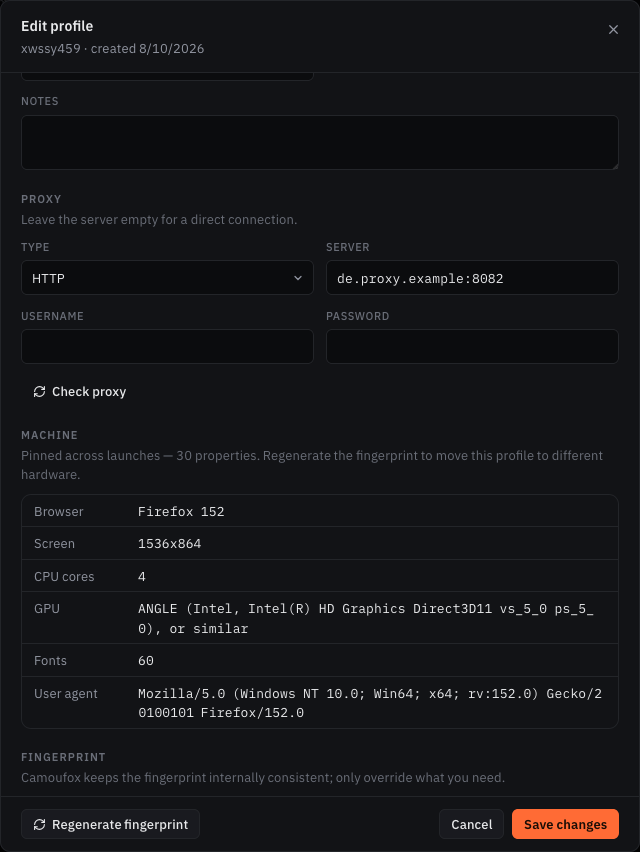 |
The pinned machine. This is the part that makes a profile an account rather than a browser window. Every value here was resolved once and is replayed on every launch — the screen, the CPU count, the GPU string, the font set, the user agent. Regenerate moves the profile to different hardware, deliberately, and tells you what that costs. The profile above is pinned to one of the 312 devices Camoufox captured from real machines, so the combination is one that actually exists rather than an assembly of plausible parts. |
| Scheduled work | System settings |
|---|---|
 |
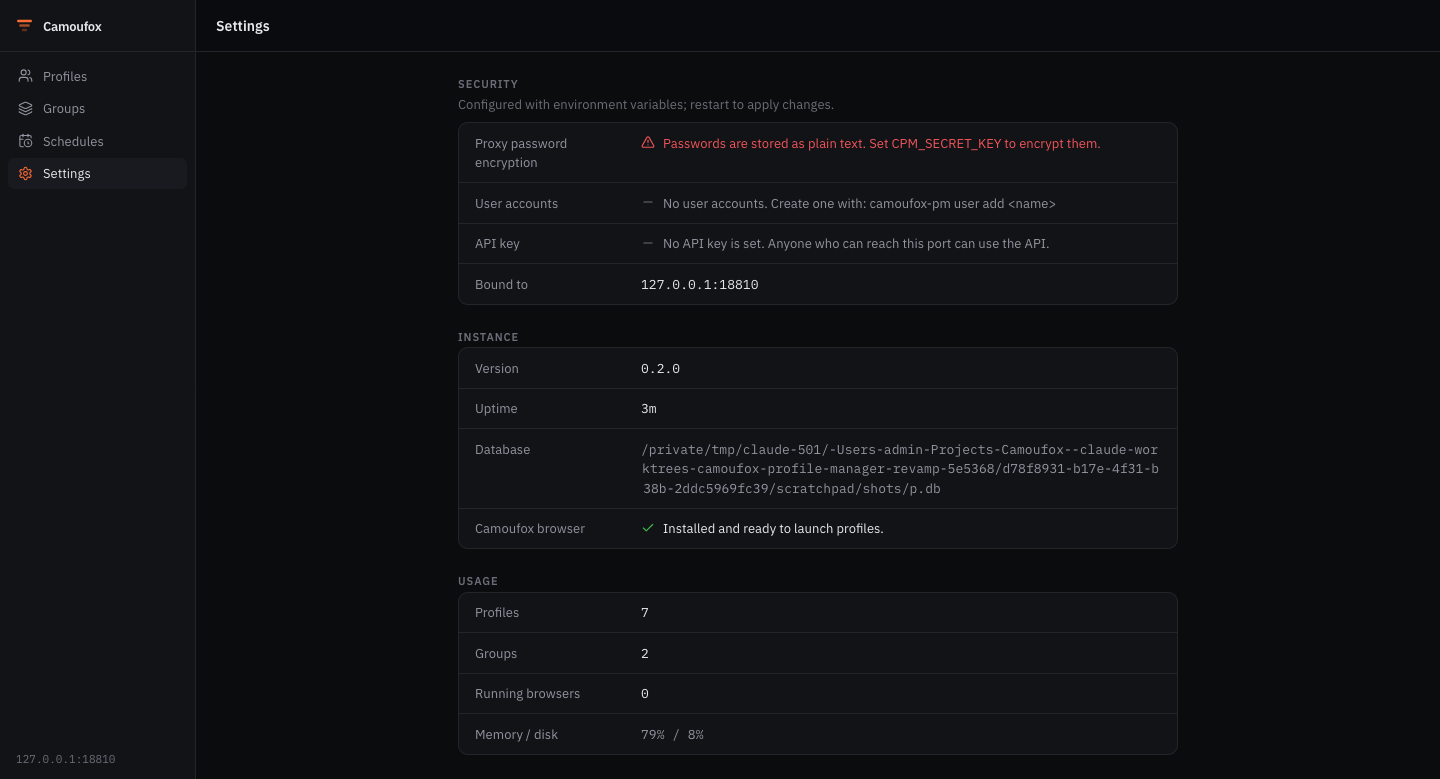 |
| Warming launches and browser-version refreshes. Hardware never rotates on a timer — why. | Reports the effective configuration and warns when proxy passwords are unencrypted or the API is open. |
Install and run
Desktop app — recommended
Open Releases and choose the installer in Assets for your computer:
Computer Download Mac, Apple Silicon (M1 or newer) camoufox-pm-macos-arm64.dmgMac, Intel camoufox-pm-macos-x86_64.dmgWindows 10/11, Intel/AMD 64-bit camoufox-pm-windows-x86_64-setup.exeUbuntu 22.04+/compatible Debian, Intel/AMD 64-bit camoufox-pm-linux-x86_64.debInstall and open Camoufox Profile Manager. You do not need Python, Node.js or a terminal. On Mac, drag the app into Applications first.
Click Install browser in the app, wait for the download, and create your first profile. The app shows progress and provides a retry if installation fails.
Older releases may only offer Python packages. Desktop installers are unsigned under the release policy; macOS/Windows can show a security warning. Read the short beginner guide for installation, backups, Trash, updates, and where your data lives.
From source (developers)
Install uv and Node.js 20.9+; uv manages Python.
git clone https://github.com/polyackiy/camoufox-profile-manager.git
cd camoufox-profile-manager
uv sync --extra desktop
uv run python scripts/build_webui.py
uv run python -m camoufox_pm.desktop
To use a browser tab instead of a desktop window, run uv run camoufox-pm.
This CLI keeps the existing data/profiles.db path by default. The desktop
launcher uses a persistent OS data folder. See CLI options.
On Linux, source desktop mode needs a supported pywebview GUI backend and system
libraries; prefer the packaged .deb for the included Qt backend.
Build a standalone desktop bundle with uv sync --extra build followed by
uv run python scripts/build_desktop.py --package. Packaging tools differ by
platform; see releasing.
With Docker
docker compose up # then open http://localhost:8000
One container serving the API and the UI on one port, like every other way of running it. The port is published on loopback only. Launching real browsers inside a container needs a virtual display; profile management, scheduling and the UI work as-is.
First steps
- Install the Camoufox browser when prompted, then click New profile.
- Give the profile a name. Leave advanced fingerprint fields at their defaults, or pick a real device if you need a particular machine.
- Add and check a proxy if you have one, or assign one from Proxies. HTTP/HTTPS and SOCKS5 support credentials; SOCKS4 credentials are unsupported.
- Press Run. The profile stays running until you click Stop or close its browser window.
Settings includes browser download retry, profile backups, and an update check. Deleted
profiles go to Trash for recovery. Updates prepare a backup before offering
an installer; replacing the app remains a manual installation step.
Getting started explains these controls.
The manager also provides complete offline data/browser recovery
and explicit preview-release discovery. These additions are included in the v0.6.0-rc.4
installer release; signed automatic app replacement remains tracked in #63.
Roles, profile grants and activity history are available
under Access. Existing accounts migrate to administrators; export permission
is separate from profile visibility.
For Simplified Chinese UI and Linux input-method setup, see 简体中文与 Linux 输入法.
Configuration
The desktop app creates its data folder and encryption key automatically.
Advanced/source configuration uses environment variables (prefix CPM_); copy
.env.example to .env if needed. Explicit configuration also overrides desktop defaults.
| Variable | Default | Description |
|---|---|---|
CPM_HOST |
127.0.0.1 |
Bind address |
CPM_PORT |
8000 |
Port |
CPM_DB_PATH |
data/profiles.db (CLI) |
SQLite database path; desktop uses the OS data folder |
CPM_LEASE_TTL |
120 |
Seconds a profile's lease survives without a heartbeat — how long a crashed instance keeps its profiles locked. Minimum 60 |
CPM_SECRET_KEY |
(empty) | Fernet key; encrypts proxy passwords at rest |
CPM_API_KEY |
(empty) | If set, required as the X-API-Key header (machine clients) |
CPM_SESSION_TTL_HOURS |
168 |
Login session lifetime, in hours |
CPM_SECURE_COOKIES |
0 |
Force the session cookie's Secure flag (set behind a TLS proxy) |
CPM_CORS_ORIGINS |
http://localhost:3000 |
Comma-separated allowed origins |
CPM_WEBUI_DIR |
(auto) | Override where the bundled web UI is served from |
Generate an encryption key with:
uv run python -c "from cryptography.fernet import Fernet; print(Fernet.generate_key().decode())"
Create the first administrator from the CLI, then manage users, roles and profile
grants in Access in the web UI. CLI account management remains available: camoufox-pm user add <name> creates one, and from then on the API and UI require a login (see
SECURITY.md).
Running more than one instance
Two instances against one database — the web UI and a CLI launch on the same machine, or two machines sharing a database file — must not open the same profile at once. One identity in two browsers means one cookie jar written from two places and the same account live from two IPs, which is exactly the correlation a profile exists to avoid.
Each launch therefore takes a lease on the profile, and a second instance is
refused (409 over the API) until the browser closes. A lease is renewed while
the browser runs and expires CPM_LEASE_TTL seconds after an instance stops
renewing, so a machine that died does not lock its profiles forever.
camoufox-pm leases          # who holds what
camoufox-pm unlock <id>     # force-release, after checking the holder is gone
Force-release is CLI-only by design: it is the one operation that can put two browsers on one identity, so it takes shell access to the host rather than a button in the UI.
Editing is protected separately, because a profile is usually edited while nobody is running it. Each save carries the version it was based on, so two people editing the same profile no longer overwrite each other: the second save is refused, and the web UI says what changed and lets you apply your version deliberately rather than losing either edit.
Sharing the database file itself is safe between processes on one machine. Across machines it needs a filesystem whose locking SQLite can trust — which rules out most NFS and SMB mounts, where a lease may be read as free while another host holds it.
Documentation
| Document | What it covers |
|---|---|
| docs/getting-started.md | Desktop installation and first steps |
| docs/automation.md | Unreleased reusable workflows, scheduling and safe cancellation |
| docs/cli.md | Every command and flag |
| docs/api.md | The REST API, endpoint by endpoint |
| docs/profile-settings.md | What each setting does, how the pinned machine works, and what Camoufox cannot do |
| docs/scheduling.md | Scheduled launches and browser refresh, and why hardware rotation is not offered |
| docs/excel.md | Bulk import and export |
| docs/accessibility-roadmap.md | Plan for reaching non-technical users |
| docs/releasing.md | Cutting a release |
| docs/signing.md | Unsigned release policy and package integrity |
| docs/roadmap.md | Merged work, release status and next priorities |
| docs/operation-diagnostics.md | Safe diagnostic evidence for issue reports |
| CONTRIBUTING.md | Working on the project |
| SECURITY.md | Reporting a vulnerability |
Measured, not assumed
Fingerprint behavior was checked against a running browser, and several results turned out differently than expected. The measurements are in the repository, as tests that fail if the behaviour changes:
| What was measured | Result |
|---|---|
| Does an unpinned profile keep its hardware between launches? | No. The same profile reported 1600x900 then 3440x1440, 12 then 32 CPU cores, an NVIDIA then an AMD GPU. This is why pinning exists. |
| Is the canvas stable for a site across sessions? | No, by default — it is stable within a session and per site, and changes on the next launch. stable_canvas fixes that, at the cost of being identical across sites. Both are asserted in browser tests. |
Does Camoufox's canvas:seed property work? |
No. It is declared and passed through, and nothing reads it. Reported upstream as daijro/camoufox#721 with a reproduction. |
| What happens if a profile sets coordinates? | Camoufox's IP lookup switches off, and Firefox then reports the host machine's own timezone — a real leak, found by reading the clock in a live browser. Fixed by filling that in ourselves. |
The same discipline applies to the code: cleanup that could delete every profile directory, clones that shared a fingerprint with their source, and a release that reported the wrong version were all found by running the thing, not by reading it. See CHANGELOG.md.
Architecture
src/camoufox_pm/
├── main.py             FastAPI app; serves the API and the bundled UI
├── cli.py              the camoufox-pm command, including user accounts
├── config.py           environment-based settings
├── core/
│   ├── models.py            profiles, groups, browser settings, schedules
│   ├── database.py          SQLite storage and migrations
│   ├── profile_manager.py   profile lifecycle and browser control
│   ├── browser_session.py   running browsers
│   ├── fingerprint_store.py pinning, refreshing, and the real device presets
│   ├── fingerprint_generator.py  the high-level constraints a new profile starts from
│   ├── proxy_check.py       where a proxy exits, and whether the profile agrees
│   ├── scheduler.py         scheduled launches and browser refreshes
│   ├── profile_archive.py   whole-profile export and import
│   ├── excel_manager.py     bulk import and export
│   ├── auth.py              password hashing and login sessions
│   ├── crypto.py            proxy-password encryption at rest
│   └── cleanup.py           finding and removing orphaned profile directories
└── api/                routes, models, error shape, middleware
web/                    Next.js web interface
extras/chrome_migration/  optional Chrome → Camoufox migration
Backend: Python, FastAPI, SQLite, Camoufox + Playwright. Frontend: Next.js 16, React 19, TypeScript, Tailwind v4.
Development
uv sync --extra dev
uv run ruff check src tests
uv run mypy src/camoufox_pm
uv run pytest -m "not browser"    # fast suite
uv run pytest -m browser          # launches a real browser, needs `camoufox fetch`
See CONTRIBUTING.md.
Disclaimer
This tool is for lawful use only — for example testing, privacy, and managing multiple accounts in accordance with each site's terms of service. You are responsible for how you use it. Antidetect browsing does not make any activity that would otherwise be against a service's rules acceptable.
License
MIT © Camoufox Profile Manager Contributors.
Built on Camoufox by daijro.
Русская версия: README.ru.md.
Next stage: synchronization
Stage four architecture and plan proposes encrypted closed-profile handoff between trusted devices of one owner. This is planned work, not a shipped synchronization feature. Follow #82 for the implementation sequence and security acceptance gates.