
physicsdolphin/nv-uefi-unlocker
physicsdolphin/nv-uefi-unlocker has 2,127 GitHub stars and 191 forks. GitHot measured +57 stars in 24 hours and +733 in 7 days. Last checked 2026-11-09 05:18 UTC. Last push 2026-11-02.
UEFI pre-driver NVIDIA GPU unlocker for Windows Linux Hackintosh and all EFI-bootable system (Rust): SEC2 scrubber -> FWSEC/WPR2 -> signed Booter -> V67 four-write payload, read-back verified. Verified on most RTX 20 30 40 Series.
Measured star growth
- in 24h
- +57
- in 7 days
- +733
- in 15 days
- Collecting history
- in 1 month
- Collecting history
Net star changes over overlapping periods, not daily totals. Missing measurements are left blank. Stars measure attention, not software quality.
README.en.md
Originalnv-uefi-unlocker: Revert Gimpvidia's limit · FAQ
Your GeForce runs AI at half speed — this fixes it before the driver even loads.
"U SAY WHAT? — Gimpvidia's limit can be reverted???"





A UEFI pre-driver NVIDIA GPU unlocker for the GTX 16 + RTX 20 + RTX 30 + RTX 40 series
Unlock your NVIDIA GPU’s Tensor compute performance. Boot from a USB stick, unlock, and continue into Windows, Linux, or any other operating system. No VBIOS flashing is needed; powering off clears the unlock.
Read first → the FAQ (USB file layout / relock and sleep / Thunderbolt and eGPU / Secure Boot / safety - most operational questions already have answers there; for the background concepts see what are UEFI / DXE / chain loading)
Watch the project trailer ↗ (Simplified Chinese) Official videos: tool overview ↗ · full unedited walkthrough ↗
Measured up to ~2.6× FP16 / BF16 / TF32 tensor throughput · FP8 up to ~1.9× · +14–75% image / video generation · up to +94% DirectML inference kernels · LLM inference prefill up to +19% (decode +5%) · no VBIOS flashing, cleared by power-off (per-board data in the compatibility matrix; gains are bounded by power limits and precision paths — the LLM row is a dual-GPU MoE end-to-end measurement, not a microbenchmark extrapolation)
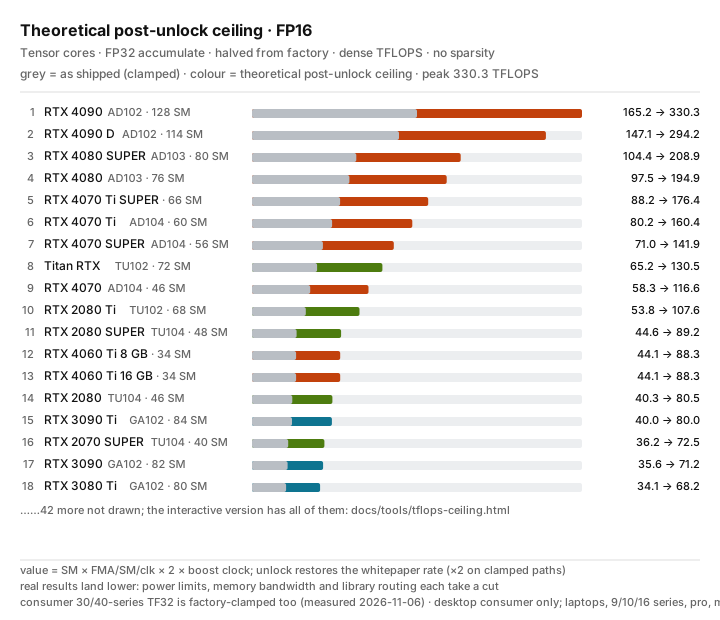
Theoretical post-unlock ceiling chart (FP16 · desktop) — open the interactive version: five precision tabs (FP32/TF32/FP16/BF16/FP8), the full GTX 10 – RTX 50 desktop / laptop / pro / mining / datacenter lineup, a toggle for as-shipped values; ?k=fp8 deep-links a precision. This is a theoretical yardstick and differs from the measured figures above; see the theoretical uplift analysis.
Compatibility at a glance
| Series | Support |
|---|---|
| GTX 16 · Turing | Theoretically compatible; field tests welcome |
| RTX 20 · Turing | Fully compatible; some models have known issues listed in the full matrix |
| RTX 30 · Ampere GA10x | Fully compatible, laptops and desktops |
| RTX 40 · Ada | Fully compatible, laptops and desktops |
| Pascal and older / GA100 / RTX 50 | Unsupported |
Community success reports and reproductions
The hardware/model groups below let you scan straight for your own card name and see whether a success precedent exists (you may not know the PCI ID or chip codename up front!). Sources are partly the video comment section, partly the community validation archive; the comment-section portion consists of viewer reports. Where a model has several reports, the most informative one is kept. Current support and known limitations remain in the full compatibility matrix.
The table distinguishes before/after measurements, post-unlock-only screenshots and text-only reports. Benchmark gains are not application gains; reports involving overclocking or different power settings are marked accordingly.
| Reported hardware | Community report / conditions | Sources |
|---|---|---|
| RTX 2050 Laptop 4GB | Full EFI chain passes and Windows-side ssdiag reports UNLOCKED (PLM open, SS overrides live); preliminary PyTorch peaks FP16 25.13 / BF16 25.33 TFLOPS, no strict locked-state A/B yet | #142 |
| RTX 3050 Laptop 6GB (MUXless) | Second in-OS model of the GA107 family: v2.1.10 full chain and Windows ssdiag UNLOCKED; same-machine A/B FP16 16.03 → 29.14 (+82%), BF16 +75%, TF32 +72%, both FP32 controls flat; survives driver init but S3/S5 clear it - hybrid laptops should expect a per-boot replay |
#188 |
| RTX 2060 12GB | Passes after the fix; six single-variable rounds and offline PROM analysis placed staging exactly on the 4 GiB boundary (no performance numbers) | #89 |
| RTX 2060 Super 8GB | Full chain passes: FWSEC → WPR2 → BOOT_DIRECT → PLM open → SS0/SS1 readback; signatures restored and Windows handoff normal | #12 |
| RTX 2070 Laptop 8GB | Passes on v2.1.3; first Turing laptop success, and its cross-chip signature drove the >4G allocation fix (no performance numbers) | #16 |
| RTX 2070 8GB (developer's own test) | Full chain passes (FWSEC → BOOT_DIRECT booter → PLM open → SS0/SS1 readback); FP32-accumulate GEMM 36 → 60–63 TFLOPS (+67–75%), GSP mode required | final result |
| RTX 2070 Super Max-Q (laptop) | First 1ed1 in-OS: same-stick two-round A/B - the default HIGH staging always ends 0x89, \tx-low-staging.txt turns it green; PyTorch FP16 26.63 → 35.15 TFLOPS (+32%), FP32 control flat; UNLOCKED under the Linux proprietary driver |
#191 |
| RTX 2080 8GB | Passes after the v2.1.8 fix; reporter pinned 0x91 with eight single-variable rounds and a bitwise diff against a working machine (no performance numbers) | #62 |
| RTX 2080 Super 8GB | Retest passes after the 0x91 fix: 46 → 68 TFLOPS (+47.8%); first success in that fix chain | #14 |
| RTX 2080 Ti | Exact A/B on one card: FP16 (FP32 accumulate) sustained 58.70 → 94.97 TFLOPS (+62%), FLOP/clk ×1.80, 60 s soak with 30,287 GEMMs and zero stalls, no TDR/WHEA; FP32/INT8/bandwidth unchanged (300 W cap, GSP on). A separate stock 11GB run survives into the proprietary Linux driver at 60.31 → 89.57 TFLOPS; H3 gain is not obvious | #125 · #103 · S41 |
| RTX 2080 Ti 22GB mod | Reports success on the final attempt; no performance comparison | S33 |
| RTX 3060 12GB | FP16 25.37 → 45.79 TFLOPS; Anima generation 1.20 → 1.94 it/s | S30 · screenshots |
| RTX 3060 Ti (Lenovo OEM desktop) | First per-precision locked-state A/B: FP16 30.25 → 56.41 (1.86x, 1.96x per clock), BF16 1.84x, TF32 1.85x, FP32 SIMT control flat at 0.95–1.01x; the locked state sits at 46.7% of theoretical peak - a direct confirmation that the clamp is exactly one half. Also: v2.1.0 full chain (PLM flip readback, Inno3D Ice Dragon VBIOS cross-flashed) | #199 · #11 |
| RTX 3070 8GB (desktop) | USB-boot unlock succeeds, diag confirms it and generation time drops 50%; after system sleep (S4) diag reports not_unlocked and generation time returns. Another v0.2.0 record on the same model reaches the full EFI chain and keeps selectors across FLR, but the state is not retained after entering Windows | Discussion #129 · #54 |
| RTX 3070 Ti (desktop) | v2.1.10 full chain and retained in Windows (ssdiag readback: gate open, SS live); same-script A/B: FP16 33.69 → 71.99 (2.14x), BF16 2.09x, TF32 2.20x, FP32/bandwidth controls flat - a desktop data point for the factory-clamped GA10x TF32 | #194 |
| RTX 3070 Laptop 8GB | FP16 42.05 → 82.06 TFLOPS; 150W VBIOS and overclocked setup | S12 · screenshots |
| RTX 3070 Ti Laptop | WMMA FP16 45.51 → 88.84 TFLOPS; cuBLAS FP16 largely unchanged | S36 |
| RTX 3080 10GB | OS-side UNLOCKED; FP16 53.91 → 84.60 TFLOPS | S28 · screenshots |
| RTX 3080 12G LHR | ComfyUI video generation 800 s → under 500 s (ID not stated) | community archive |
| RTX 3080 20G | BF16 GEMM 65 → 110–113 (three runs: 110.11/113.01/113.19, 275 W power cap); with models resident in VRAM, qwen2.1 BF16 193.7 → 92.9 s and krea2pornV4 42 → 31.5 s | community archive |
| RTX 3080 Laptop | Reports success and ~33% higher BF16; no absolute before/after values | S18 |
| RTX 3080 Ti Laptop | v2.1.0 success report; another reports BF16 45 → 72 TFLOPS with overclocking also mentioned | S04 · S09 |
| RTX 3080 Ti 20G (native Tongde) | Unlock succeeds; device ID/VBIOS pending (native Tongde is not necessarily ES — could be a repaired card or ES bare die; no performance numbers) | community archive |
| RTX 3080 Ti (form factor unspecified) | Screenshot: FP16 73.9 → 123.2, unit unspecified; FP32 control largely unchanged | S48 · screenshots |
| RTX 3090 | Qwen-Image2.1 Turbo BF16: nearly 60 → 22 s/image (approximate baseline) | S49 |
| RTX 3090 20GB OEM (reporter label) | FP16 77.36 → 115.20 TFLOPS; reporter also notes unlock loss after sleep/resume | S46 · screenshots |
| RTX 3090 Ti | v2.1.10 marker-free full chain plus an output-hash-level A/B (SM 1440 → 1015 MHz doing more work at the same power): BF16 1.66x, TF32 +58% / FP16 +44% at 273 W undervolt, 300 s steady-state +38%; HWiNFO shows nothing running hotter after the unlock. Also: H3 INT8 workflow at the same 418.5W, total 123.47 → 108.08 s/item | #195 · S25 · screenshots |
| RTX 4050 Laptop 6GB | Success report; post-unlock FP16 39.15 TFLOPS only, with overclock settings | S34 · screenshots |
| RTX 4060 Laptop | Screenshot: FP16/FP32 accumulation 31.12 → 54.33 (unit unspecified); generation reports also available | S01 · S16 · S42 · screenshots |
| RTX 4060 Ti 8GB | First 8GB 2803 data point: readback passes (PLM open, SS0/SS1, READOUT_1=0); cuBLAS 4096³ medians FP16 45.59 → 77.36 (+69.7%), BF16 45.64 → 77.74 (+70.3%), TF32 20.06 → 41.91 (+108.9%), FP32 control at noise level |
PR #87 |
| RTX 4060 Ti 16GB | Two reporters describe successful unlocks and faster generation, including ASUS B550M | S05 · S50 |
| RTX 4060 8GB (form factor unspecified) | MOSS Image, 1024×1536, 30 steps: ~240 → ~200 s | S31 |
| RTX 4070 Laptop | FP16 N=4096: 33.296 → 64.005 TFLOPS; another success report | S21 · S39 · screenshots |
| RTX 4070 desktop | FP16 61.99 → 76.32–87.82 TFLOPS (150W/200W conditions); generation 35 → 27 s | S13 · screenshots |
| RTX 4070 (form factor unspecified) | Pony 1024²: 11.1 → 9.0 s; Wan2.2 5B / 49 frames: 96 → 78.2 s | S44 |
| RTX 4070M mod | AD106 / 10de:2820; success after an update, FP16 40 → 70 (unit unspecified) | S02 |
| RTX 4070 SUPER | After the bridge BME fix, replay/unlock passes and marker, SS0/SS1 and post-FLR exit readbacks are correct; cuBLAS 8192 medians over seven runs: FP16→FP32 accumulate 70.5 → 100.1, BF16 71.0 → 107.0, TF32 35.5 → 48.4, while FP16 accumulate and FP32 SIMT controls stay flat (220 W) | #3 |
| RTX 4070 Ti (ASUS TUF OC) | Local modified v2.1.9: full readback passes (POST-FLR verified, HANDOFF-OUT all correct); cuBLAS 8192³: FP16 80.35 → 137.97 (1.72×), BF16 80.44 → 144.13 (1.79×), FP32 control 1.01× | Discussion #140 |
| RTX 4070 Ti SUPER | Includes an OS-side UNLOCKED screenshot; the 57.00 → 150.93 TFLOPS report also changed overclocking | S07 · S10 · S23 · S51 · screenshots |
| RTX 4080 Laptop | Reports FP16 ~57 → ~80 TFLOPS | S08 |
| RTX 4080 16GB | Cold boot passes first try: WPR2 → marker → PLM flip → four writes → selector readback → selectors survive AON after FLR → bootmgfw handoff; two independent A/Bs FP16 4096³ 100.53 → 185.50/185.24 (1.85×), BF16 4096³ 100.37 → 192.18/189.44 (1.91×), FP32 control unchanged (340 W cap) | #53 · Discussion #72 |
| RTX 4080 SUPER | Reports success and ~1.85×; no application timing | S24 |
| RTX 4080 SUPER 32GB mod | Includes dual GPUs on TRX40; BF16 107.1 → 191.1, prefill +16.4%/+19.1%, decode +5.5% | S11 · S32 · S43 · context with incomplete test conditions |
| RTX 4090 | Screenshot: TF32 79.4 → 148.5 (unit unspecified); reporter also describes ~15–20% faster MOSS BF16 | S40 · S45 · screenshots |
| RTX 4090 Laptop (configuration screenshot label) | Later reports it works; model comes from their AI configuration screenshot, with no performance comparison | S38 |
| RTX 5060 Ti 16GB (as display primary) | Blackwell 2d04 has no asset-family mapping and is safely skipped in a dual-GPU machine while the system stays normal (the secondary 4060 Ti passes the full chain); not an unlock of the 5060 Ti itself. Since #168 ssdiag / diag-unlock / the EFI SAMPLE record its FEAT block and fuses (read-only; the gate is PL3-only and all 3 writes are dropped) — mechanism and exploration status in docs/blackwell-gb20x-status.md |
#56 · #168 |
| GTX 1080 Ti (negative control) | All three units in the same machine are correctly skipped; Pascal is outside the unlock target | #69 |
| Tesla V100-SXM2-16GB (negative control) | Excluded via tx-select-bdf.txt on a dual-GPU machine; the target card unlocks normally |
Discussion #140 |
| Quadro P600 (display secondary) | Used as display secondary in an X99 machine without iGPU and correctly skipped with zero writes (negative control); the target 3060 12GB unlocks normally | Discussion #131 |
| Quadro RTX 5000 | Listed by the reporter as a follow-up plan, no measurement yet | S01 |
Screenshot examples
Click an example for its source and conditions. All 22 images from 15 reporters, with attribution and notes (Chinese) · Source and SHA-256 index.
RTX 3060 12GB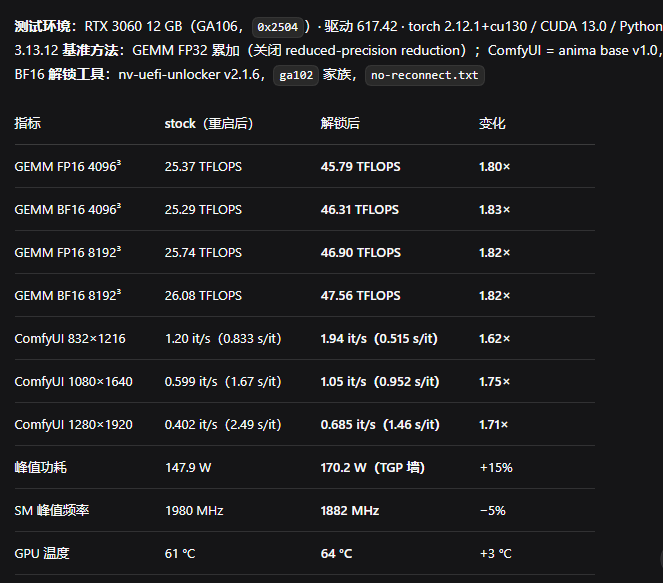 original, source and conditions |
RTX 3080 10GB / UNLOCKED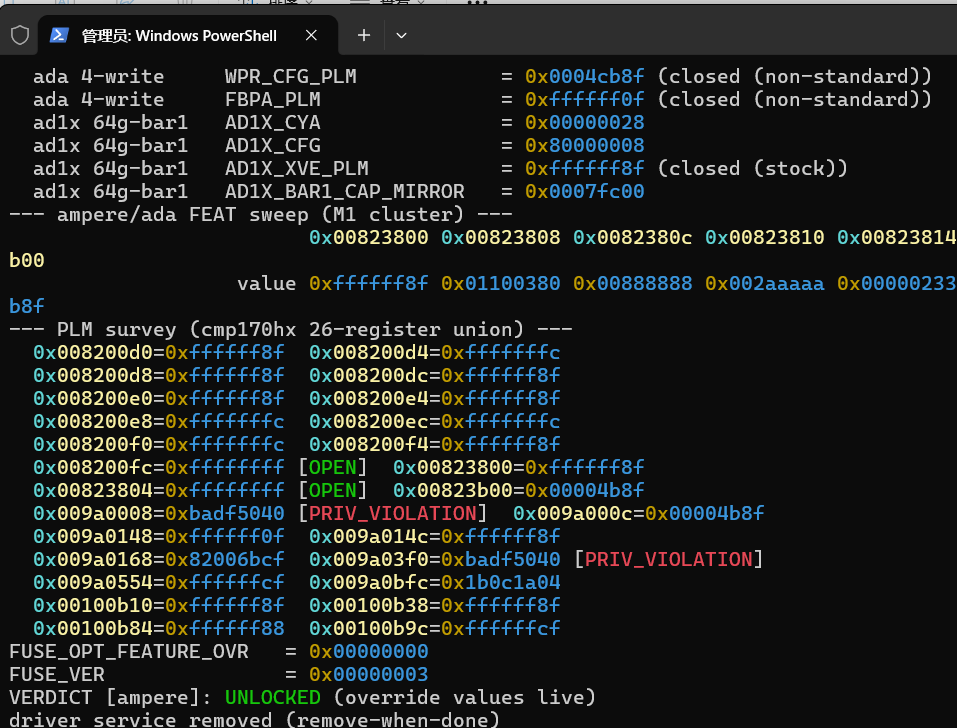 original, source and conditions |
RTX 4060 Laptop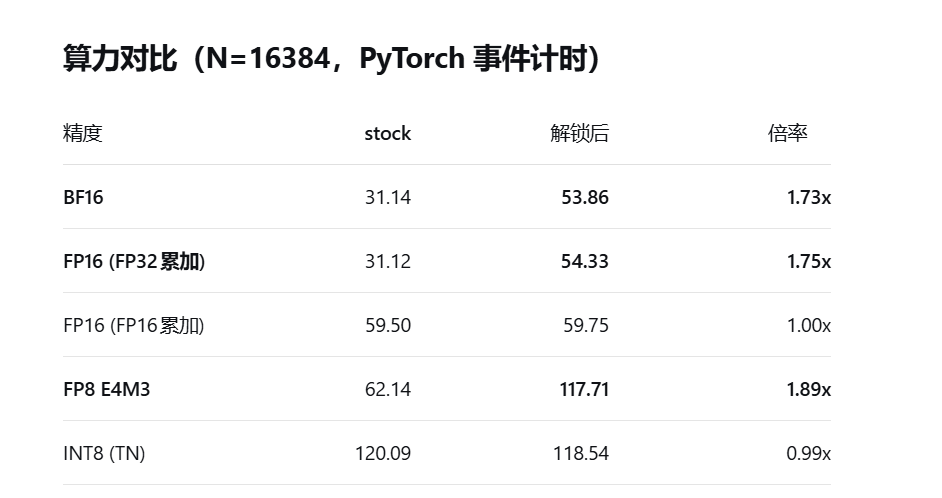 original, source and conditions |
RTX 4070 Laptop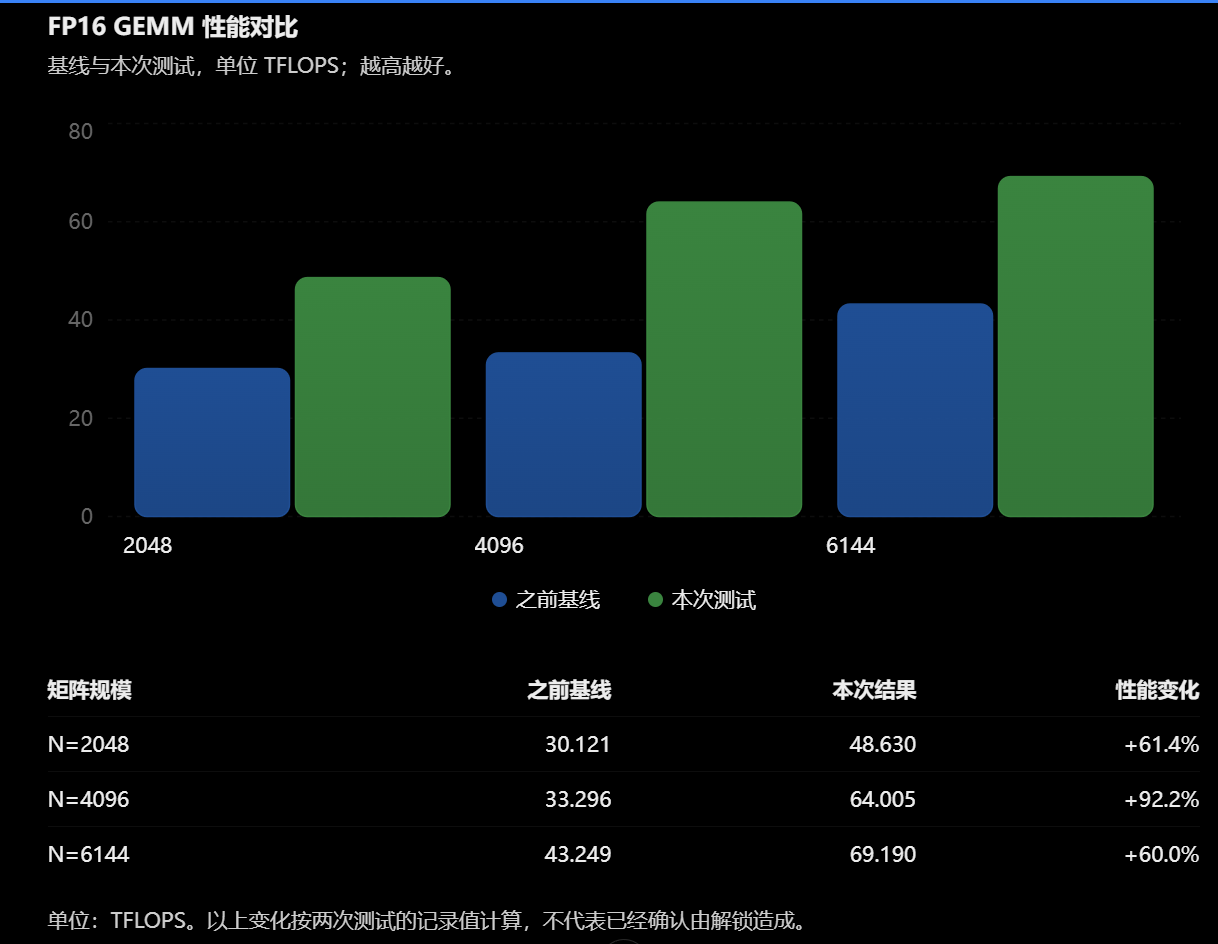 original, source and conditions |
Field cases
Beyond the matrix, these closed cases show the engineering depth behind the tool — each with full logs and an evidence chain:
- Compute-class P8 lock from a modded VBIOS (#90): a 2080 Ti's EFI transaction was proven successful at source level by disassembling the booter to plain text — the real culprit behind the Windows-side black screen and low clocks was a kingpin-class extreme-testing BIOS flashed onto the card (special BIOS NVIDIA ships to OEM OC labs, with a separate P-state policy for compute workloads). The fingerprint: a
nvidia-smipower reading far above the retail wall. Four misleading layers (a false-negative verdict line, a WHEA hardware red herring, clean stress tests, a shunt-resistance suspicion) were peeled one by one; the final blow came from years of hands-on card-modding experience recognizing that one number. → full five-layer chain · mechanism open question - The X99 + CSM handoff law (#35/#61): "transaction green but Windows lands Code 12" survived four conclusion reversals before becoming the handoff console-ownership law — independent of the unlock, chip family and topology; CSM off fixes it. Later independently reproduced by an upstream (Zagitta) user on X99. → the law
- Thunderbolt unlocks = low staging (#74): pinned down the ≥4 GiB DMA unreachability three-death shape on TB platforms with single-variable proof on two machines and two implementations, which made sub-4 GB staging the v2.1.8 default (zero counterexamples since). → forensics matrix
Per-precision theoretical uplift (simple classification; for the mechanism derivation, per-generation SM diagrams, and the stressor tool reconciliation see theoretical uplift):
| Precision | Execution unit | Shipped clamp (RTX 20–40) | Ceiling |
|---|---|---|---|
| FP16 · BF16 · TF32 (FP32-accumulate tensor paths) | gen-2–4 Tensor Cores | shipped at half rate | 2× |
| FP8 (E4M3/E5M2) | gen-4 Tensor Cores (SM89+) | shipped at half rate | 2× |
| FP16 (FP16acc) / INT8 / INT16 / INT32 / FP32 / FP64 | Tensor Cores / CUDA cores / FP64 units | none (factory full-rate) | 1× |
Real-world multiples are bounded by power limits, memory bandwidth, and per-die binning (typically 1.5–2×, approaching 2× when clock-normalized); CMP mining cards are the exception (÷32 clamps across all paths, 32× ceiling).
Full compatibility matrix and field results (incl. 4090M 2757 / Alienware m18 R1 ~2x) · FAQ
Get started
1. Get the tools and check prerequisites
Download and extract a package from Releases. NVIDIA firmware is not bundled; the setup script downloads the specified versions, verifies them and generates the required files.
Prepare a FAT32 USB stick and back up its files. The target must boot in UEFI mode, with Secure Boot disabled or a self-signed EFI certificate trusted. On laptops, prefer dGPU-only display mode and choose Restart in the OS before entering the one-time boot menu.
Turing users: run this once in an administrator PowerShell on the target Windows machine, then restart:
.\enable-turing-unlock.ps1
After restarting, confirm that GSP firmware is running before making the stick. Linux Turing targets also need GSP-RM; see the GSP prerequisite. Linux users should also check RTD3 to prevent power loss from clearing the unlock after handoff.
2. Prepare the bootable USB stick
Run from the extracted package directory. Select 40 for the 40 series, 30 for the 30 series, or 20 for the 20 / 16 series.
Windows PowerShell:
$gpuSeries = "40"
.\make-usbroot.ps1 -Family $gpuSeries
Linux / WSL / Git Bash:
gpu_series=40
bash make-usbroot.sh --family "$gpu_series"
Windows requires PowerShell 5+; the Linux binary requires glibc ≥ 2.34 (for example, Ubuntu 22.04+ / Debian 12+). Initial generation needs internet access. Resolve download or verification failures without substituting another firmware version.
Files are generated in the local usbroot/ directory, which already contains EFI/BOOT/BOOTX64.EFI. Copy the contents of usbroot/ to the stick root (do not copy the directory itself as U:\usbroot\). The other extraction intermediates do not need to be copied.
USB stick (FAT32)
├── EFI/BOOT/BOOTX64.EFI
└── Firmware files (.bin files listed by the script)
Keep the generated v67-*.bin unlock file. Full file list and purposes.
Back up an existing EFI/BOOT/BOOTX64.EFI before replacing it. Do not copy into the system ESP or change the permanent boot order. See USB files and options for file details, building on another host, GPU selection and advanced options.
3. Boot and verify
- Select the USB stick in the firmware’s one-time boot menu.
- Press Space or Enter at the version screen. Any other key or 30 seconds without input aborts the transaction and returns to the OS bootloader. A temporary black screen or frozen frame on the target GPU is expected.
- Wait for the automatic OS handoff. The log is
loader.logat the stick root. - On Windows, run the
ssdiag-x86_64-windows.exethat ships as its own release asset to check the in-OS state (it is no longer inside the zip - an unsigned host wrapping a kernel driver makes some engines flag the whole package, see antivirus false positives), then compare performance using the same workload. On Linux, runsudo python3 tools/diag-unlock.pyfrom a source checkout. See verification and repair. Replay after each cold boot.
If picking the stick flashes and bounces back to the boot menu (or straight into the OS) with no loader.log, the EFI never executed - and nothing was written; usually EFI/BOOT/BOOTX64.EFI is missing or Secure Boot is still on. Work through the no-boot checks.
On STOP, a fault or a stuck black screen, do not retry in the same session. Fully power off, remove the stick and boot normally; follow the recovery instructions.
Unlock log green but Windows will not start (0xc000009a Recovery screen)? The mechanism and the now-default fix are in low memory at handoff.
EFI transaction green but no unlock once the OS is up? Read why an unlocked card gets locked again once it reaches the OS before opening an issue - most cases are a platform-side reset or power-removal event, not the driver countering us; that section has the triage, which log lines to copy, and what still helps.
For agent-assisted setup, use the deployment guide. Copy this request:
Follow https://github.com/physicsdolphin/nv-uefi-unlocker/blob/main/AGENTS.deploy.md to install nv-uefi-unlocker and set it up to unlock my GPU.
Build from source (optional)
Skip this section if you use a release package. Install Rust; choose the MSVC toolchain on Windows. From the repository root:
rustup target add x86_64-unknown-uefi
cargo build --release
cargo efi-tx
The EFI program is generated at target/x86_64-unknown-uefi/release/loader.efi. Prepare the boot files with the following commands (40-series example; use -Family 30 for the 30 series or -Family 20 for the 20 / 16 series):
.\release\make-usbroot.ps1 -Family 40 -AssetsExe .\target\release\assets.exe -BootEfi .\target\x86_64-unknown-uefi\release\loader.efi
bash release/make-usbroot.sh --family 40 \
  --assets ./target/release/assets \
  --boot-efi ./target/x86_64-unknown-uefi/release/loader.efi
Then copy to the USB stick using the layout above. Read-only diagnosis, tests and development notes.
Combine with nvoc
This tool unlocks Tensor compute performance. nvoc provides in-OS power, voltage and overclocking controls; the two can be combined.
- Unlock with this tool, verify the in-OS state and record a baseline.
- Follow the nvoc documentation for controls supported by your GPU. The kmd power-wall unlock works on mobile GPUs; its performance effects on 10/20-series desktop cards remain unverified.
set-volt-rail-limitvoltage-wall control applies to 10-series and newer GPUs. - Compare the same workload with cli-stressor-cuda-rs, monitoring power, Hot Spot and throttle reasons.
Combined operation can substantially exceed stock power and thermal envelopes; check cooling and power-delivery headroom. Combined test results and risks.
About the author and team
The author is a long-time hardware-overclocking and GPU-modding enthusiast who has overclocked, modded, serviced and operated several hundred NVIDIA cards (mining and modded cards included), with years of experience across laptop, desktop and server operations, hardware repair, UEFI BIOS modding and hardware debugging.
This project is a student-run hobby research effort with the author's classmates. Accordingly, every write path in the tool is built on a "read-back verification + archived evidence" discipline; recovery procedures for failure scenarios are documented under safety constraints.
AI coding assistants were used during development. As with all code in this repository, nothing they produced is trusted by default: the transaction core is a behavior-level port of the upstream GPL-2.0 implementation, must pass the behavioral simulator before touching hardware, and every release claim is backed by real-machine read-back — the same rule for human- and AI-written code alike.
References and repositories
This project is a direct beneficiary and derivative of community work; full credits in docs/credits.md (verified against each item's actual role in the repo history).
Two contributions get their own line (the full list is credits.md §6):
- 8bit2qubit (PR #5): diagnosed the true root cause of booter
0x89— the GPU's upstream PCI bridge had Bus Master disabled, so device DMA got Master Aborts — and supplied the fix (BridgeMaster: enable before the transaction, restore on exit) plus a fourth verification card. The desktop-wide failure pattern closed there, and the guard is a mandatory precondition of every transaction to this day. The issue #98 record erratum is also theirs: they checked the source at every release tag and re-ran two builds on the same machine to pin the defect to4b7e955rather than the original implementation. See the bridge-BME root-cause record. - seti9585 (#107): the native-GOP console rebuild that is the default display-recovery path since v2.1.10 (extract the card's own unmodified stock GOP from its shadowed Option ROM and start it explicitly) was their proposal — their own RTX4080SUPER-Tensor-Core-Unlocker proved the mechanism first, and their source review of our initial implementation caught the misplaced field in the
EFI_DECOMPRESSprotocol struct (the root cause of the #128 freeze,edecba5). Credited in the release notes too; the implementation is behavior-borrowed and independently written (their repository carries no license header).
The repositories actually studied and cited during development are cloned
into a local, untracked reference/ directory, grouped by role:
Transaction-chain sources and first-hand authority
- gpu-unlock (GPL-2.0) — the
transaction-chain porting source;
unlock_610.cread section by section, and the blueprint for this repo's mock tests - gpu-unlock-ada
(GPL-2.0) — the AD10x four-write chain origin; the 28e1 report
(Windroid234) is this project's direct basis and drove three verdict
corrections here (FBPA
0xffffff0facceptance, non-fatal scrubber, EALREADY without FLR) - gpu-unlock-bar1 — AD10x large-BAR1 reference line (not merged into the mainline)
- cmp90hx-unlock — the V67 payload-chain origin
- open-gpu-kernel-modules (MIT) — first-hand authority on the boot path: all four Turing generational differences (BOOT_DIRECT, register-portal loading, RM_RISCV_UCODE_DESC v4, FWSEC generic-BL) were verified here and landed in the code
- AD103_win_unlocker (TOTORONG) — the Windows EFI carrier-craft precedent (GOP disconnect/chain-load handoff/transaction-log conventions)
Turing lineage and addressing (the 0x4096xx FEAT block)
- cmp170hx — PLM semantics, the booter 0x89/0x91 status-code dictionary and verification methodology
- cmp50hx-unlock — the
hardware-proven origin of the Turing lineage: 31.7× measured on 50HX
(TU102); 40HX/50HX share the TU102 booter archive, which is the
field evidence behind TU106 full-chain feasibility; also the source
of the FEAT block
0x409650/64/6caddressing - turing-unlock (nlzy) — the
official Turing adaptation of the Zagitta kmod (Dell 2080 Ti 22GB,
~1.6× FP16); source of the TU102 gadget/stack geometry tables and
the GSP IDA database; the
TU_FEAT_READOUT 0x409668citation source (ssdiag and the loader share this constant) - travis-mcdevitt/nv-uefi-unlocker — a downstream fork of this project; its successful Turing chain logs feed the 0x91 forensics cross-check
- tu102-22g-uefi-unlock — UEFI approach for TU102 22G modded cards (peer reference for the 22G support line)
Prior Windows/UEFI work of the same kind
- rtx30-unlock — the Windows/UEFI port of the Zagitta kmod (GA10x predecessor)
- rtx30-unlock-windows-toolkit — companion toolkit for the above (single-GPU, single-display)
- rtx3080-unlock-public — earlier RTX 3080 10GB UEFI experiment (Korean)
- KohakUnlock — source-first research covering the Turing lineage (boot-hook form) and a 4090 Windows/UEFI unlock
- Turing-unlock (haohervchb) — volatile unlock on a 2080 Ti (TU102), one successful physical run 2026-10-22
- nv_unlock_win — Titan RTX in-kernel Windows attempt (a different route to the same goal)
- gpuunlock — merged distribution for 4090 / 4070 Ti SUPER
Register/fuse side lines
- ReBarUEFI (xCuri0, MIT) — the platform-side authority for ReBAR on RTX 30+ (enumeration-time hook + PCIe ReBAR extended capability) and the catalog of platform large-BAR limitation patches; NvStrapsReBar is its Turing fork — overturned this project's earlier "Turing BAR1 is not expandable" assumption; direct basis of the M1 sample PSTRAPS decoding
- ga100-fuse-re · gpcprobe · 170hx-rir-tool — GA100 fuse/RIR architecture (fuse-semantics reference line)
- p104-gen2-unlock — P104 PCIe Gen2 link tool (PCI config-space operation reference, orthogonal to the compute unlock)
- CMP clamp prehistory — FluidX3D #8
(2023-10-27,
FP_CONTRACT OFF: the earliest public behavioral evidence of per-instruction-type issue-rate throttling) → NVIDIA-patcher #73 (2023-12-06, jetcat8848: 170HX FP32 0.395→6.285 TFLOPS 15.9× + the efuse 1/2^n hypothesis — the embryo of the nine-selector model, and the thread that led to the 2026 register-level crack); see docs/credits.md and the prehistory footnote in theoretical-uplift §2
Reverse-engineering toolchain
- envytools — envydis (fuc5 Falcon disassembler; the production booter secure segment is ciphertext and only decodes with the key in hand) + nvbios
- faucon — alternative fuc5 disassembler (could not decode the production booter in practice)
License: GPL-2.0-only (LICENSE). NVIDIA firmware and VBIOS remain
NVIDIA property; regenerate them locally from pinned public packages
under their own license terms — they are not distributed in this
repository.
- How it works (Simplified Chinese): power-user edition · beginner edition
- Community discussions and coverage (language tagged per item): Reddit (EN) · TechPowerUp (EN) · Wccftech (EN) · NotebookCheck (EN) · HKEPC (ZH-HK) · ProfesionalReview (ES) · Tom's Hardware (EN) · VideoCardz (EN) · TechNews (ZH-HK) · KOCPC (ZH-HK) · Guru3D(EN) · Frandroid(FR) · Mezha Media (EN; Chinese) · Digg (EN) · XenoSpectrum (EN) · HotRepo (EN) · HardwareCooking (FR) · Playground.ru (RU) · FanaticosDelHardware (ES) · OMGPU (FR) · PauseHardware (FR) · HardwarePremium (ES) · Gaming-ST (JA) · GECID (UK) · DicasPC (PT-BR) · Diario da Midia (PT-BR) · GPU-Unlock.net (EN) · IT-SVR (KO) · ShiftDelete (EN) · GizNewsDaily (EN) · PixLib (RU) · ShiftDelete forum (TR) · WindowsForum (EN) · eTeknix (EN) · Coolaler (ZH-HK) · GameApps.hk (ZH-HK) · HyperAI (ZH) · VGover (ZH) · DreamDigi (ZH-HK) · AHAN (ZH) · WORLDTECH (ZH) · Telset.id (ID) · Silicon Report(EN) · Kantan.News(EN) · digitalcitizen.life(EN) · PC Test Bench(EN) · FreeLLM(EN) · Hooshware(EN) · SECNews (EN) · X/RoundtableSpace (EN) · X/Pirat_Nation (EN) · DNS Club (RU) · Shahrsakhtafzar (FA) · Quasar Zone (KO) · GiggleHD (KO) · Facebook/PCMR HUB (EN) · YouTube/Max Herrera (EN) · Facebook/ComfyUI community (EN) · Sohu (ZH) · NetEase (ZH) · X/NFT_Chen (ZH) · Instagram (ZH-HK) · NetEase (ZH) · X/xiax0603 (ZH) · YouTube/究極完全体ガジェモン (JA) · Facebook/老N顯示卡 (ZH-HK) · GamerSky (ZH) · XFastest (ZH-HK) · Tencent News (ZH) · Facebook/Coolaler fans (ZH-HK) · the9.pro(PT-BR) · TrashExpert(RU) · Facebook/Fier De Mon PC(FR) · PBX Science(EN) · Fosswire(EN) · YouTube/Kempinator Gaming(EN) · YouTube/duffytechnology – overview(EN) · YouTube/duffytechnology – full walkthrough(EN) PCGH Extreme forum (DE) · Hacker News (EN) · Global Computer Community(EN) · zod.kr(KO) · Inven(KO)
Star History
Explore related projects
codecrafters-io/build-your-own-x
Master programming by recreating your favorite technologies from scratch.
561,227 starspublic-apis/public-apis
A collective list of free APIs
497,456 starsmorluto/rea
Reverse engineer anything with agents, from app behavior down to native binaries.
445,519 starsopenclaw/openclaw
The AI that really does things. Any OS. Any Platform. The lobster way. 🦞
394,229 stars