
physical-superintelligence-lab/Psi0 has 2,882 GitHub stars and 107 forks. GitHot measured 0 stars in 24 hours. Last checked 2026-11-07 19:38 UTC. Last push 2026-10-14.
[RSS'26] Welcome to Psi-Zero, a Humanoid VLA towards Universal Humanoid Intelligence.
Measured star growth
- in 24h
- 0
- in 7 days
- Update delayed
- in 15 days
- Update delayed
- in 1 month
- Update delayed
Net star changes over overlapping periods, not daily totals. Missing measurements are left blank. Stars measure attention, not software quality.
README.md
Original[RSS'26] Ψ₀: An Open Foundation Model
Towards Universal Humanoid Loco-Manipulation
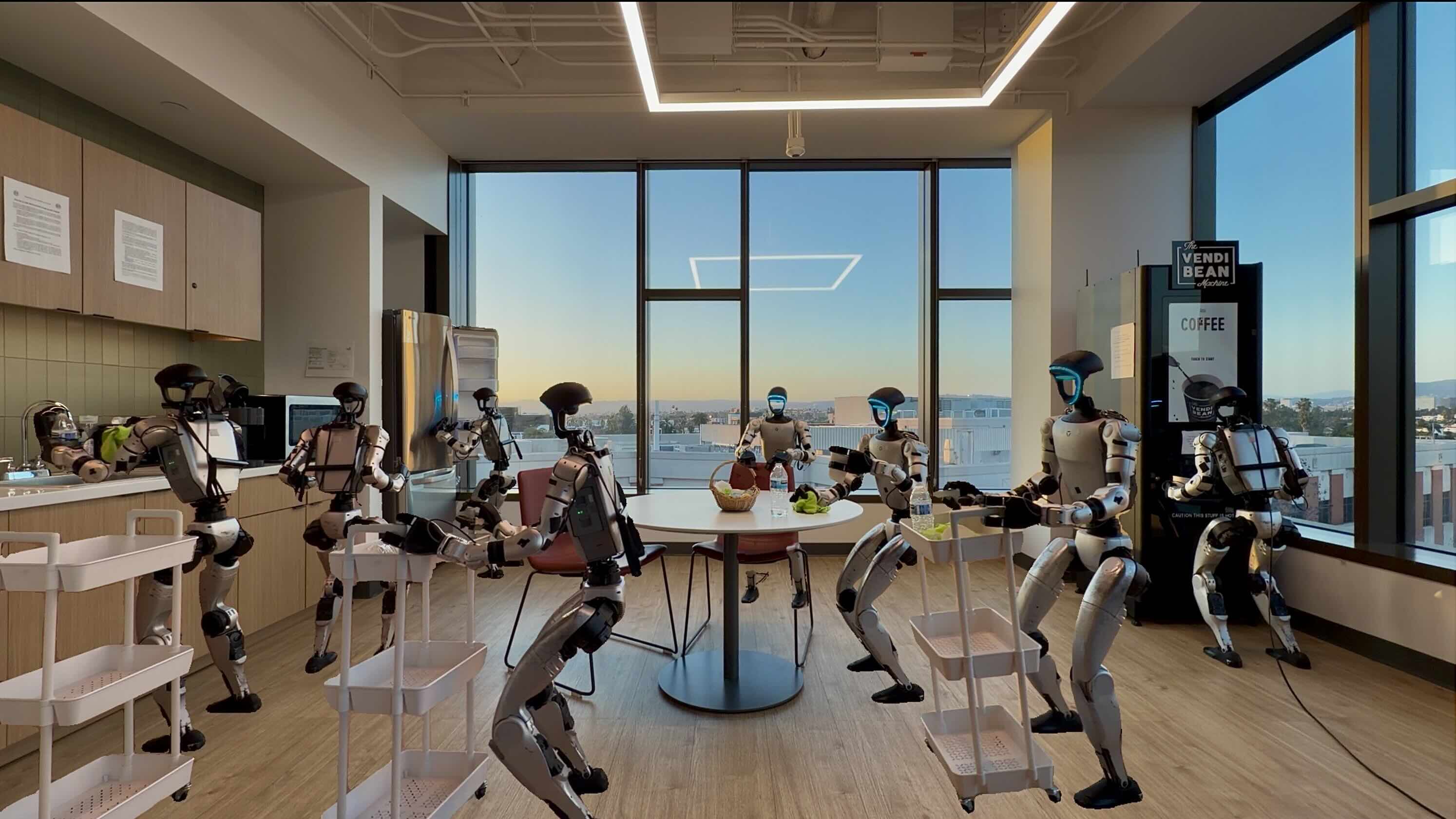





Contributors: Songlin Wei, Hongyi Jing, Boqian Li, Zhenyu Zhao, Jiageng Mao, Zhenhao Ni , Sicheng He, Jie Liu, Xiawei Liu, Kaidi Kang, Sheng Zang,Weiduo Yuan, Marco Pavone, Di Huang, Yue Wang
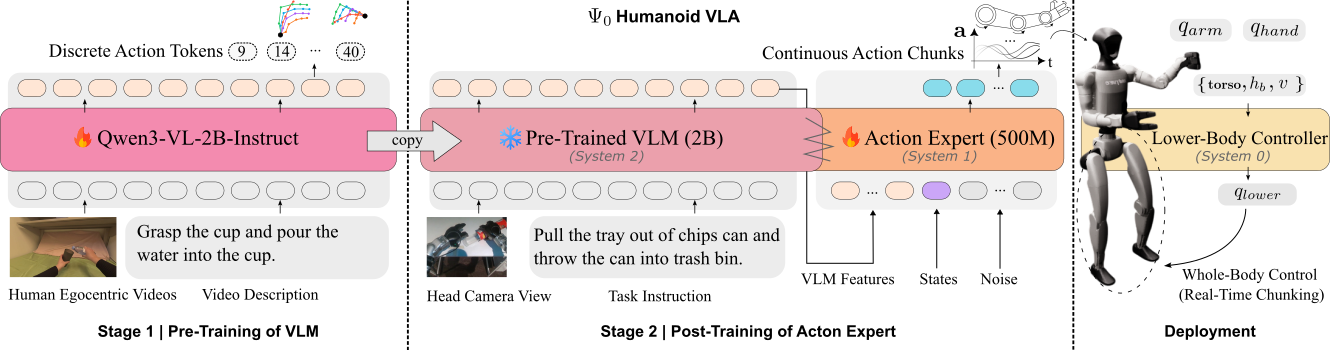
$\Psi_0$ is an open vision-language-action (VLA) model for dexterous humanoid loco-manipulation. Our model first learns task semantics and visual representation from large-scale human egocentic videos, and then is post-trained on a smaller amount of real-world teleoperated robot data, to learn general dynamics of the embodiment.
[Optional] Expand to know more about Ψ₀.
Our foundation model is capable of acquiring new long-horizontal dexterous loco-manipulation skill by fine-tuning using as few as 80 trajectories. Our key finding is that scaling the right data in the right way.
At the top, the $\Psi_0$ model consists of two end-to-end trained components: a vision–language backbone (System-2) and a multimodal diffusion transformer (System-1) action expert. The backbone is based on Qwen’s Qwen3-VL-2B-Instruct, which extracts vision–language features from observations and instructions. These features condition a flow-based multimodal diffusion transformer inspired by Stable Diffusion 3. The action expert (≈500M parameters) predicts future whole-body action chunks, enabling efficient fusion of visual, linguistic, and action representations. At the lowest level (System-0), an RL-based tracking controller executes the predicted lower-body action commands, ensuring stable and precise physical control.
📢 News & Updates
- [2026-09-13] Released new Psi-0 checkpoints specifically trained for SONIC and its training recipes: post-train and fine-tune. Checkout out this release node.
- [2026-08-30] Released SIMPLE SONIC wholebody training recipe.
- [2026-08-30] Released docker support.
- [2026-07-14] Released DreamZero baseline for SIMPLE.
- [2026-06-13] Released SONIC integration for Psi-0.
- [2026-06-03] 🎉🎉🎉 Psi-0 won the Best Paper Award at the 2nd 3D-LLM/VLA Workshop at CVPR 2026.
Table of Contents
- Finetune Ψ₀ on Unitree G1 Humanoid Robot
- Baselines
- Simulation 🚀🚀🚀
- Reproduce Ψ₀: Pre-Training and Post-Training
- Checkpoints
- Troubleshootings
- Citation
Finetune Ψ₀ on Unitree G1 Humanoid Robot
Installation
Clone the project and change directory to the project root:
git clone [email protected]:physical-superintelligence-lab/Psi0.git
cd Psi0
We use uv to manage Python dependencies. Install uv if not already installed:
curl -LsSf https://astral.sh/uv/install.sh | sh
Set up the $\Psi_0$ environment:
ℹ️ We manage the $\Psi_0$ environment and all the baselines through
uvand they all share the samesrc/code. See Environment Management for more details.
uv venv .venv-psi --python 3.11
source .venv-psi/bin/activate
GIT_LFS_SKIP_SMUDGE=1 uv sync \
  --group serve \
  --group viz \
  --group psi \
  --index-strategy unsafe-best-match \
  --active
uv pip install flash_attn==2.7.4.post1 --no-build-isolation
Intel GPU (XPU) inference: Psi0 supports inference on Intel GPUs. After
uv syncabove, install the XPU-enabled PyTorch wheels:uv pip install torch==2.7.0 torchvision==0.22.0 --index-url https://download.pytorch.org/whl/xpuSkip the
flash_attninstallation on XPU; FlashAttention is CUDA-only and Psi0 uses PyTorch SDPA when it is unavailable. The serving CLI defaults tocuda:0, so explicitly pass--device xpu:0when serving on XPU.
Test installation, a version number should be displayed.
python -c "import psi;print(psi.__version__);"
Verify the shared lerobot stack is importable.
python -c "from psi.data.lerobot.compat import LEROBOT_LAYOUT; print(LEROBOT_LAYOUT)"
Docker Support
Pull the prebuilt image from the GitHub Container Registry:
docker pull ghcr.io/physical-superintelligence-lab/psi0:latest
docker tag ghcr.io/physical-superintelligence-lab/psi0:latest psi:train
The retag is what lets docker-compose.yml find it — it refers to the image as
psi:${PSI_TAG:-train}, and PSI_TAG overrides only the tag, not the registry
path. Use a dated tag such as :260830 to pin an exact build.
The image holds dependencies only — python 3.11, torch 2.7 cu12 and
flash-attn in /workspace/.venv-psi, on a plain CUDA base. Your checkout stays
outside it and is bind-mounted, so psi is installed editable and source edits
take effect on a container restart rather than a rebuild.
Serve a checkpoint with it:
docker compose up serve-psi0-sonic-http
Every argument is overridable from the shell or .env (PORT, RUN,
CKPT_STEP, ACTION_EXEC_HORIZON, RTC_FLAG, GPUS, ...), and
docker compose run --rm serve-psi0-sonic-http --help lists the server's own
options.
If you want to build it locally:
docker compose build psi # or: docker build -f scripts/train/Dockerfile -t psi:train .
See scripts/train/README.md for the enroot/cluster recipe and for how dependencies are pinned.
[Deprecated.] Psi-0 with AMO
Data Collection
📂 We open-sourced all the 9 real-world tasks. You can directly download the data and jump to the Fine-Tuning.
See the detailed teleoperation guide here:
Real-World Deployment Guide
Pre-Processing: Convert Raw Data to LeRobot Format
export task=Hug_box_and_move

hf download USC-PSI-Lab/psi-data \
  g1_real_raw/$task.zip \
  --local-dir=$PSI_HOME/data/real_teleop_g1 \
  --repo-type=dataset

unzip $PSI_HOME/data/real_teleop_g1/g1_real_raw/$task.zip -d $PSI_HOME/data/real_teleop_g1/g1_real_raw/$task
You should observe similar folder structure:
g1_real_raw
└── Hug_box_and_move
    ├── episode_0
    │   ├── color
    │   │   ├── frame_000000.jpg
    │   │   └── ...
    │   └── data.json
    └── ...
Edit the task description file with the following format, eg.,
vim scripts/data/task_description_dict.json
{
  "Hug_box_and_move": "Hug box and move."
}
Run conversion script
python scripts/data/raw_to_lerobot.py \
  --data-root=$PWD/data/real_teleop_g1/g1_real_raw \
  --work-dir=$PWD/data/real \
  --repo-id=psi0-real-g1 \
  --robot-type=g1 \
  --task=$task
Calculate stats
python scripts/data/calc_modality_stats.py \
  --work-dir=$PSI_HOME/data/real \
  --task=$task
Create $\Psi_0$ format stats (simply a copy for now)
cp $PSI_HOME/data/real/$task/meta/stats.json $PSI_HOME/data/real/$task/meta/stats_psi0.json
Now it's ready to finetune $\Psi_0$.
✈️ If training env is already configured, directly launch training via
scripts/train/psi0/finetune-real-psi0.sh $task
Fine-Tuning
✔️ Suppose the data is already collected and processed. Now we can proceed to fine-tune the $\Psi_0$ model.
There is a known issue of loading our real data, apply this fix first
python scripts/data/patch_lerobot_meta.py $PSI_HOME/data/real/$task
📝 Here we illustrate by using the pre-collected data from Huggingface psi-data.
Set up the environment variables following .env.sample. The environment variables will be loaded by the dotenv.load_dotenv() in python.
cp .env.sample .env
# and edit the following env variables
# HF_TOKEN=<YOUR HF READ TOKEN>
# WANDB_API_KEY=<API KEY for wandb logging>
# WANDB_ENTITY=<wandb entity>
# PSI_HOME=<Path where PSI cache/checkpoint/data are located by convention>

source .env
echo $PSI_HOME
Download the collected real-world data and extract it:
export task=Pick_bottle_and_turn_and_pour_into_cup

hf download USC-PSI-Lab/psi-data \
  real/$task.zip \
  --local-dir=$PSI_HOME/data \
  --repo-type=dataset

unzip $PSI_HOME/data/real/$task.zip -d $PSI_HOME/data/real
👀 If you want to visualize the episode please refer to the Data Visualization in the examples.
Launch the training script:
scripts/train/psi0/finetune-real-psi0.sh $task
🖥️ You can always change the GPUs, e.g.,
CUDA_VISIBLE_DEVICES=0,1,2,3 scripts/train/....
⚠️ Please try to maintain a reasonable global batch size = device batch size x number of GPUs x gradient accumulation step. We use global batch size 128 throughout all the real-world and simulation experiments.
Open-Loop Evaluation
Follow the steps in
examples/simple/openloop_eval.ipynb
Load the training dataset, and run model inference to see how model fits the training data.
Deployment
Serve $\Psi_0$ (RTC mode)
bash ./scripts/deploy/serve_psi0-rtc.sh
Start $\Psi_0$ Client (RTC mode)
bash ./real/scripts/deploy_psi0-rtc.sh
For detailed real-world deployment environment setup, please also refer to the dedicated documentation:
Ψ₀ with SONIC
SONIC is a powerful whole-body controller for humanoid robots. $\Psi_0$ now supports data collection, fine-tuning, and deployment with SONIC. Please use our fork to avoid any compatibility issues.
Initialize the SONIC submodule first:
git submodule update --init --recursive third_party/GR00T-WholeBodyControl
For the full environment setup — workstation venvs, TensorRT + C++ build, PICO/XRoboToolkit, and the robot-side camera server — see the SONIC real-world teleoperation guide.
Data collection
Please follow the SONIC real-world teleoperation guide to record demonstrations.
Datasets are saved locally under third_party/GR00T-WholeBodyControl/outputs/<dataset-name>/ in LeRobot format.
Pre-Processing: Convert to $\Psi_0$ LeRobot Format
Convert the SONIC-collected dataset into the $\Psi_0$ LeRobot format:
export task=<dataset-name>

python scripts/data/raw_sonic_to_psi_lerobot.py \
  --data-root=third_party/GR00T-WholeBodyControl/outputs/$task \
  --work-dir=$PSI_HOME/data/sonic/lerobot \
  --repo-id=$task \
  --robot-type=g1
Calculate stats
python scripts/data/calc_modality_stats.py \
  --work-dir=$PSI_HOME/data/sonic/lerobot \
  --task=$task
Create $\Psi_0$ format stats (simply a copy for now)
cp $PSI_HOME/data/sonic/lerobot/$task/meta/stats.json $PSI_HOME/data/sonic/lerobot/$task/meta/stats_psi0.json
Now it's ready to fine-tune.
Finetune $\Psi_0$ with SONIC
bash ./scripts/train/psi0/finetune-real-sonic-psi0.sh $task
Deploy $\Psi_0$ with SONIC
Please follow the SONIC real-world deployment guide for detailed instructions.
Serve Policy Server of $\Psi_0$ with SONIC (RTC mode)
bash ./scripts/deploy/serve_psi0-rtc-sonic.sh
Start whole-body controller on robot for $\Psi_0$ with SONIC (RTC mode)
bash ./real/scripts/deploy_psi0-sonic-rtc-robot.sh
Start Policy Client of $\Psi_0$ with SONIC (RTC mode)
bash ./real/scripts/deploy_psi0-sonic-rtc-client.sh
Baselines
Baselines
GR00T
Install the env
cd src/gr00t; uv sync
- training
cd src/gr00t
./scripts/train_gr00t.sh --dataset-path /your/lerobot/dataset
- serving a checkpoint
cd src/gr00t
./scripts/deploy_gr00t.sh
- openloop eval on trained checkpoint using gt
cd src/gr00t
./scripts/openloop_eval.sh
OpenPI $\pi_{0.5}$
Please see more detailed instructions here: baselines/pi05.
InternVLA-M1
Install the env
cd src/InternVLA-M1; uv sync --python 3.10
- training
cd src/InternVLA-M1
bash scripts/train_internvla.sh
- serving a checkpoint
cd src/InternVLA-M1
./scripts/deploy_internvla.sh
H-RDT
See quick-start doc for baseline/hrdt.
EgoVLA
See quick-start doc for baseline/egovla.
Diffusion Policy
See dedicated doc here baseline/dp
ACT
See dedicated doc here baseline/act
Simulation
We use SIMPLE to benchmark $\Psi_0$ and all the baselines.
📢 SIMPLE is an easy-to-use humanoid benchmarking simulator built on the MuJoCo physics engine and Isaac Sim rendering.
Install SIMPLE
Currently, there are two options to integrate SIMPLE and Psi-0.
[Option 1] Install stand-alone SIMPLE (Best for collecting data through teleoperation)
We recommend to install SIMPLE on stand alone desktop with a NVIDIA GPU (3090/4090/5090).
Please refer to the SIMPLE repo here
[Option 2] Install SIMPLE as third-party dependency (Best for evaluting Psi-0 and all baselines)
Please refer the more details steps here.
Data Generation
📂 We also provide 6 pre-collected whole-body humanoid loco-manipulation tasks at Huggingface psi-data. If you want to use the existing simulation data, jump to the Fine-Tuning
Motion-Planning Based Data Generation
Please refert to the SIMPLE docs.
Teleoperation in Simulator
Please refert to the SIMPLE docs.
Fine-Tuning
👉 You can skip fine-tuning and download our released checkpoints for SIMPLE.
Download SIMPLE task data and extract it:
💡 Dont forget
source .envfirst before following below commands.
export task=G1WholebodyXMovePickTeleop-v0

hf download USC-PSI-Lab/psi-data \
  simple/$task.zip \
  --local-dir=$PSI_HOME/data \
  --repo-type=dataset

unzip $PSI_HOME/data/simple/$task.zip -d $PSI_HOME/data/simple
👀 If you want to visualize the episode please refer to the Data Visualization in the examples.
Start training:
Please set up the envrionment variables if not done so yet.
bash scripts/train/psi0/finetune-simple-psi0.sh $task
The training will create a run dir which is located under .runs in the project root.
If your GPU has limited VRAM, set --train.optimizer-foreach=false to reduce optimizer-step memory usage at the cost of some speed.
Evaluation in SIMPLE
Serve $\Psi_0$
export run_dir=<the run dir here under folder .runs>
export ckpt_step=<checkpoint step>
uv run --active --group psi --group serve serve_psi0 \
  --host 0.0.0.0 \
  --port 22085 \
  --run-dir=$run_dir \
  --ckpt-step=$ckpt_step \
  --action-exec-horizon=24 \
  --rtc
For Intel XPU, add --device xpu:0 to the command above.
Run open-loop evaluation (offline)
examples/simple/openloop_eval.ipynb
Run the Evaluation in SIMPLE
This quick-start guide assumes running SIMPLE on a Stand-alone workstation with NVIDIA GPU.
We recommend serving the VLA models on a remote server other than locally as IsaacSim is also resource demanding.
If the server is started on a remote server, run ssh port forward. eg.,
ssh -L 22086:localhost:22086 songlin@nebula100.
Once port forward is done, open a new terminal to test if server is up
curl -i http://localhost:22085/health
Download eval tasks from USC-PSI-Lab/psi-data.
cd /path/to/SIMPLE
export task=G1WholebodyXMovePickTeleop-v0
Download eval data and extract it:
hf download USC-PSI-Lab/psi-data \
	simple-eval/$task.zip \
	--local-dir=data/evals \
	--repo-type=dataset

unzip data/evals/simple-eval/$task.zip -d data/evals/simple-eval
Now start SIMPLE eval in the SIMPLE environment:
We provide three domain randomization levels:
level-0,level-1,level-2for each task
export dr=level-0
We use two different entrypoints for evaluating different tasks:
set entrypoint and agent to eval_decoupled_wbc.py and psi0_decoupled_wbc if the evaluating task ends with Teleop, which means the task data is collected using teleoperation:
export entry=eval_decoupled_wbc.py
export agent=psi0_decoupled_wbc
and set entrypoint and agent to eval.py and psi0 if the evaluating task ends with MP, which means the task data is generated using CuRobo Motion planning:
export entry=eval.py
export agent=psi0
Launch the evaluation script:
python src/simple/cli/$entry \
	simple/$task \
	$agent \
	$dr \
	--host=localhost \
	--port=9000 \
	--sim-mode=mujoco_isaac \
	--no-headless \
	--data-format=lerobot \
	--data-dir=data/evals/simple-eval/$task/$dr
The policy rollout videos will be found in folder third_party/SIMPLE/data/evals/psi0.
The evaluation for a single episode could take up to 6~10 minutes because SIMPLE use a synchronous rendering API in IsaacSim. See here for more explanation.
Reproduce Ψ₀: Pre-Training and Post-Training
Pre-Train VLM
Download and cache the official Qwen/Qwen3-VL-2B-Instruct weights.
python scripts/predownload_qwen3vl.py
Pre-train on the EgoDex dataset
Pre-compute 48 DoF EgoDex action:
We re-use the pre-process code from H-RDT EgoDex Pre-Processing.
- Change the paths in
src/h_rdt/datasets/pretrain/setup_pretrain.sh.- Tweak the
NUM_PROCESSESif on a powerful server, i tried max 64.- set
FORCE_OVERWRITE=Trueif the processing script is disrupted.
source src/h_rdt/datasets/pretrain/setup_pretrain.sh
source .venv-psi/bin/activate
bash src/h_rdt/datasets/pretrain/run_pretrain_pipeline.sh
[Optinal] If you also want to train
FASTtokenizer, please refer to traing FAST.
bash scripts/train/psi0/pretrain-egodex-psi0-fast.sh
Pre-train on humanoid everyday dataset
Please download the pre-processed HE data here:
hf download USC-PSI-Lab/psi-data HE_RAW.zip --repo-type=dataset
bash scripts/train/psi0/pretrain-he-psi0-fast.sh
Save the pretrained checkpoints once training is done:
python scripts/save_pretrain_qwen3vl_backbone.py
Post-Train Action Expert
Download pre-trained psi-0 VLM backbone
python scripts/data/download.py \
  --repo-id=USC-PSI-Lab/psi-model \
  --remote-dir=psi0/pre.fast.1by1.2601091803.ckpt.ego200k.he30k \
  --local-dir=$PSI_HOME/cache/checkpoints/psi0/pre.fast.1by1.2601091803.ckpt.ego200k.he30k \
  --repo-type=model
Post-train on humanoid everyday (HE) dataset
bash scripts/train/psi0/posttrain-he-psi0.sh
Save post-trained action header once training is over
python scripts/save_posttrain_action_expert.py
Checkpoints
The released checkpoints on HuggingFace Psi-Model is listed
Newest checkpoints for Psi-0 + SONIC whoblebody control:
| Checkpoint | Description | Remote Directory |
|---|---|---|
| $\Psi_0$ VLM (EgoDex) |
Pre-trained VLM backbone (EgoDex 390K steps) | psi0/pre.fast.2605160748.ckpt.ego390k |
| $\Psi_0$ VLM (Sonic-v1.0) |
Post-trained VLM On 50H UnifoLM | psi0/postpre.sonic1.0.unifolm.2609092156.40k |
| $\Psi_0$ Action Expert (Sonic-v1.0) |
Post-trained Action Expert On 50H UnifoLM | psi0/postpre.sonic1.0.unifolm.2609092156.40k |
| $\Psi_0$ VLM + Action Expert (Sonic) |
Fine-tuned VLM On 5h Psi-Dream data |
psi0/sonic-checkpoints/multi-task.psi-dream.2609092156 |
| --- | --- | --- |
| $\Psi_0$ VLM (Sonic-v1.1) |
Post-trained VLM On 50H UnifoLM | psi0/postpre.sonic1.1.unifolm.2609181726.40k |
| $\Psi_0$ Action Expert (Sonic-v1.1) |
Post-trained Action Expert On 50H UnifoLM | psi0/postpre.sonic1.1.unifolm.2609181726.40k |
Old Psi-0 + AMO decoupled wholebody control:
| Checkpoint | Description | Remote Directory |
|---|---|---|
| $\Psi_0$ VLM (Baseline) |
Pre-trained VLM backbone (EgoDex 200K steps + HE 30K steps) | psi0/pre.fast.1by1.2601091803.ckpt.ego200k.he30k |
| $\Psi_0$ Action Expert (Baseline) |
Post-trained Action Expert On HE | psi0/postpre.1by1.pad36.2601131206.ckpt.he30k |
and more variants for ablation studies:
| Checkpoint | Description | Remote Directory |
|---|---|---|
| $\Psi_0$ VLM (Ablation Study) |
Pre-trained VLM backbone only on EgoDex 200K steps | psi0/pre.fast.egodex.2512241941.ckpt200k |
| $\Psi_0$ VLM (Ablation Study) |
Pre-trained VLM backbone only on HE 48K steps | psi0/pre.abl.only.he.2512311516.48k |
| $\Psi_0$ VLM (Ablation Study) |
Pre-trained VLM backbone only on 10% EgoDex | psi0/pre.abl.ego.10per.2602021632.46k |
| $\Psi_0$ Action Expert (Ablation Study) |
Post-train on HE by picking pre-trained variant psi0/pre.abl.only.he.2512311516.48k |
psi0/postpre.abl.only.he.2602050012 |
| $\Psi_0$ Action Expert (Ablation Study) |
Post-train on HE by picking pre-trained variant psi0/pre.abl.ego.10per.2602021632.46k |
psi0/postpre.abl.ego.10per.2602050006 |
Download the selected models
Edit
.envto useHF_ENDPOINT=https://hf-mirror.comif needed.
export CKPT_DIR=<Remote Directory>

python scripts/data/download.py \
  --repo-id=USC-PSI-Lab/psi-model \
  --remote-dir=$CKPT_DIR \
  --local-dir=$PSI_HOME/cache/checkpoints/$CKPT_DIR \
  --repo-type=model
Troubleshootings
- Lerobot dataset issues:
stack(): argument 'tensors' (position 1) must be tuple of Tensors, not Column
This usually means the environment is still on the legacy PSI lerobot stack. Resync the PSI env so it uses the
same lerobot and datasets versions as SIMPLE, then verify the import layout:
source .venv-psi/bin/activate
uv sync --group psi --active
python -c "from psi.data.lerobot.compat import LEROBOT_LAYOUT; print(LEROBOT_LAYOUT)"
- Fail to install
evdev,src/evdev/input.c:10:10: fatal error: Python.h: No such file or directory
sudo apt update
sudo apt install -y python3-dev python3-venv build-essential \
    linux-headers-$(uname -r)
- RuntimeError: Could not load libtorchcodec. Likely causes ...
sudo apt-get install ffmpeg
- ImportError: cannot import name 'Deprecated' from 'wandb.proto.wandb_telemetry_pb2'
re-install wandb
source .venv-pusht/bin/activate
uv pip uninstall wandb
uv pip install wandb==0.18.0
- support
sm_120on newer GPUs like5090orRTX 6000, UserWarning: Ignoring invalid value for boolean flag CUDA_LAUNCH_BLOCKING: truevalid values are 0 or 1.
update torch and flash-attn
uv pip uninstall torch torchvision
uv pip install torch==2.7.0 torchvision==0.22.0 torchaudio==2.7.0 --index-url https://download.pytorch.org/whl/cu128
uv pip install flash-attn --no-build-isolation
- Failed to download and build
lerobot ..., Usegit lfs logs lastto view the log.
GIT_LFS_SKIP_SMUDGE=1 uv ...
Citation
@article{wei2026psi0,
  title={{$\Psi_0$}: An Open Foundation Model Towards Universal Humanoid Loco-Manipulation},
  author={Wei, Songlin and Jing, Hongyi and Li, Boqian and Zhao, Zhenyu and Mao, Jiageng and Ni, Zhenhao and He, Sicheng and Liu, Jie and Liu, Xiawei and Kang, Kaidi and others},
  journal={arXiv preprint arXiv:2603.12263},
  year={2026}
}
License
This project is licensed under the Apache License 2.0.
See the LICENSE file for details.
Explore related projects
codecrafters-io/build-your-own-x
Master programming by recreating your favorite technologies from scratch.
560,941 starspublic-apis/public-apis
A collective list of free APIs
497,204 starsmorluto/rea
Reverse engineer anything with agents, from app behavior down to native binaries.
442,648 starsopenclaw/openclaw
The AI that really does things. Any OS. Any Platform. The lobster way. 🦞
394,182 stars