
philippnormann/cs-grep
philippnormann/cs-grep has 29 GitHub stars and 7 forks. GitHot measured 0 stars in 24 hours and +1 in 7 days. Last checked 2026-11-14 13:22 UTC. Last push 2026-11-01.
Measured star growth
- in 24h
- 0
- in 7 days
- +1
- in 15 days
- Collecting history
- in 1 month
- Collecting history
Net star changes over overlapping periods, not daily totals. Missing measurements are left blank. Stars measure attention, not software quality.
About
🔎 Fast, local search across the CS research literature, with an expressive query language, an interactive TUI, and scriptable output.
Developer ToolsREADME.md
Originalcs-grep
Fast, local search across computer science research literature.
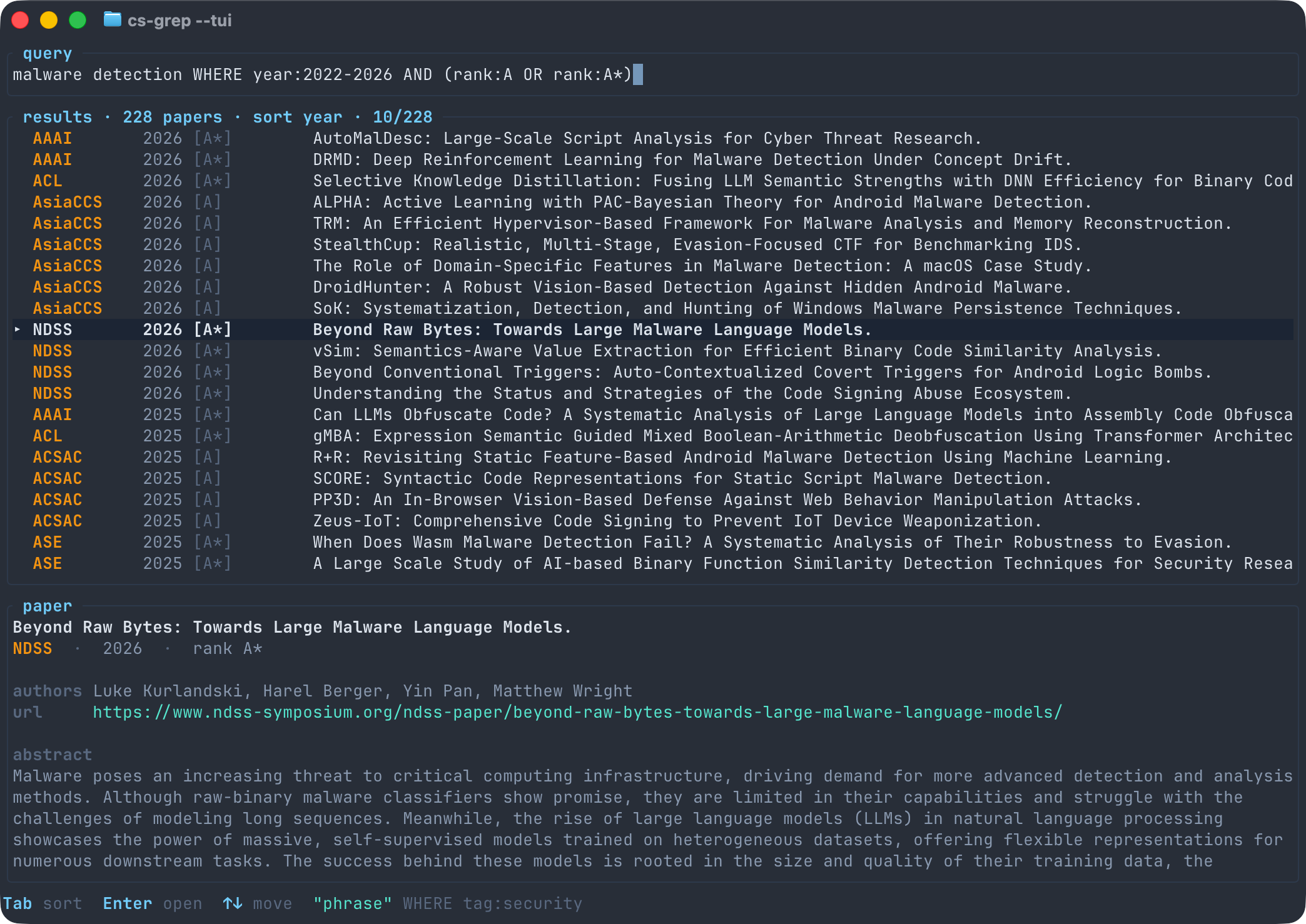
cs-grep builds a local SQLite/FTS5 index from DBLP and gives you a clean CLI
and TUI for searching papers with an expressive query language across title,
authors, abstract, venue, year, rank, tag, and DOI.
Why
- Search across configurable computer science venue catalogs.
- Keep the corpus local and query it quickly with SQLite/FTS5.
- Search in the CLI or TUI, and export CSV, JSON, or BibTeX for scripts.
Install
Requires Rust 1.95 or newer.
cargo install --git https://github.com/philippnormann/cs-grep cs-grep
Or from a local checkout:
cargo install --path crates/cs-grep
Cargo installs to ~/.cargo/bin on macOS/Linux and
%USERPROFILE%\.cargo\bin on Windows. Make sure that directory is on PATH.
Or use nix:
nix run "github:philippnormann/cs-grep" -- <arguments> # run once
nix shell "github:philippnormann/cs-grep"              # add to PATH
Use
cs-grep init
cs-grep update --since 2018
cs-grep --tui
In the TUI, use Tab to cycle sort modes, arrow keys to move, and Enter to
open the selected paper URL.
Sort CLI results with --sort relevance, --sort year, --sort venue, or
--sort rank.
Search from the shell:
cs-grep 'title:fuzzing WHERE venue:ndss AND year:2020-'
cs-grep '("side channel" OR cache) WHERE venue:CCS OR venue:SP'
cs-grep '* WHERE doi:10.1145' --fields venue,year,title,doi
More examples:
# Recent malware-detection papers in A/A* venues
cs-grep 'malware detection WHERE year:2022- AND (rank:A OR rank:A*)' --sort year

# Export matching papers as BibTeX
cs-grep 'kernel fuzz* WHERE venue:USENIX-SEC' --format bibtex > papers.bib

# Script-friendly JSON output
cs-grep 'large language model WHERE year:2023-' --format json

# Limit output for quick triage
cs-grep '(ransomware OR botnet) WHERE year:2020-' --limit 20

# Search a custom database path
cs-grep --db ./papers.db 'symbolic execution WHERE venue:ccs'
Query Language
Queries have a full-text expression followed by optional metadata filters:
cs-grep '(malware OR botnet) WHERE year:2020- AND NOT venue:CCS'
- Both sides support
AND,OR,NOT, parentheses, and implicitAND. - Text supports phrases, trailing prefixes such as
fuzz*, and the fieldstitle:,author:, andabstract:. WHEREsupportsvenue:,year:,rank:,tag:, anddoi:.*matches all papers when only metadata filters are needed.- Year values can be
2020,2018-2024,2020-, or-2019.
Text NOT requires a positive text term; metadata filters can be negated
directly.
cs-grep '* WHERE tag:ml AND tag:security'
cs-grep '* WHERE tag:ml OR tag:security'
Bundles and Tags
Bundles choose which venue catalogs update and enrich process. Tags filter
papers by venue family during search. Bundled venues use the broad tags
security, ml, nlp, cv, se, and hci; custom venues can define
additional tags. The default bundles are security, ml, and se; hci is
available separately.
cs-grep update --bundle security,ml
cs-grep update --bundle hci
cs-grep enrich --bundle ml
# ML venue papers
cs-grep 'mechanistic interpretability WHERE tag:ml AND year:2023-'

# Papers from ML-security venues
cs-grep '(prompt injection OR jailbreak) WHERE tag:ml AND tag:security'
Venues
The bundled venue catalogs are listed in
crates/cs-grep-core/venues/.
After cs-grep init, you can extend or override the catalog with a user
config.yaml:
- macOS:
~/Library/Application Support/cs-grep/config.yaml - Linux:
~/.config/cs-grep/config.yaml - Windows:
%APPDATA%\cs-grep\config.yaml
You can also pass a specific file with --config path/to/config.yaml.
bundles selects bundled venue sets for subfields. User venues are always
merged after selected bundles by id: reuse an existing id to override a
bundled venue, or add a new id to extend the catalog.
bundles: [security, ml, se]

defaults:
  min_year: 2018

venues:
  - id: DIMVA
    name: Conference on Detection of Intrusions and Malware & Vulnerability Assessment
    dblp_stream: conf/dimva
    aliases: [dimva]
    rank: B
    tags: [systems, network, malware]
Then ingest and search it:
cs-grep update --venue DIMVA
cs-grep 'malware WHERE venue:DIMVA'
dblp_stream is the DBLP stream id used by the RDF endpoint, such as
conf/dimva.
Abstracts
Abstract enrichment is optional, cached, and best-effort. cs-grep uses paper DOIs and DBLP paper URLs to find abstracts.
cs-grep enrich --jobs 8
No API keys are required, but keys can improve rate limits and coverage.
| Variable | Used for | Get a key |
|---|---|---|
OPENALEX_API_KEY |
OpenAlex lookups | openalex.org/settings/api |
SEMANTIC_SCHOLAR_S2_KEY |
Semantic Scholar lookups | semanticscholar.org/product/api |
OPENREVIEW_USERNAME / OPENREVIEW_PASSWORD |
OpenReview lookups | OpenReview API docs |
Set them in the shell:
export OPENALEX_API_KEY=...
export SEMANTIC_SCHOLAR_S2_KEY=...
export OPENREVIEW_USERNAME=...
export OPENREVIEW_PASSWORD=...
Or place them in a local .env file:
OPENALEX_API_KEY=
SEMANTIC_SCHOLAR_S2_KEY=
OPENREVIEW_USERNAME=
OPENREVIEW_PASSWORD=
.env is loaded automatically when present.
Acknowledgements
Inspired by top4grep.
License
Released under the MIT License.