
phase1geo/Minder
phase1geo/Minder has 1,215 GitHub stars and 88 forks. GitHot measured +4 in 7 days. Last checked 2026-11-10 21:58 UTC. Last push 2026-10-26.
Mind-mapping application for Elementary OS
Measured star growth
- in 24h
- Update delayed
- in 7 days
- +4
- in 15 days
- Collecting history
- in 1 month
- Collecting history
Net star changes over overlapping periods, not daily totals. Missing measurements are left blank. Stars measure attention, not software quality.
README.md
Original
Minder
Create, develop and visualize your ideas

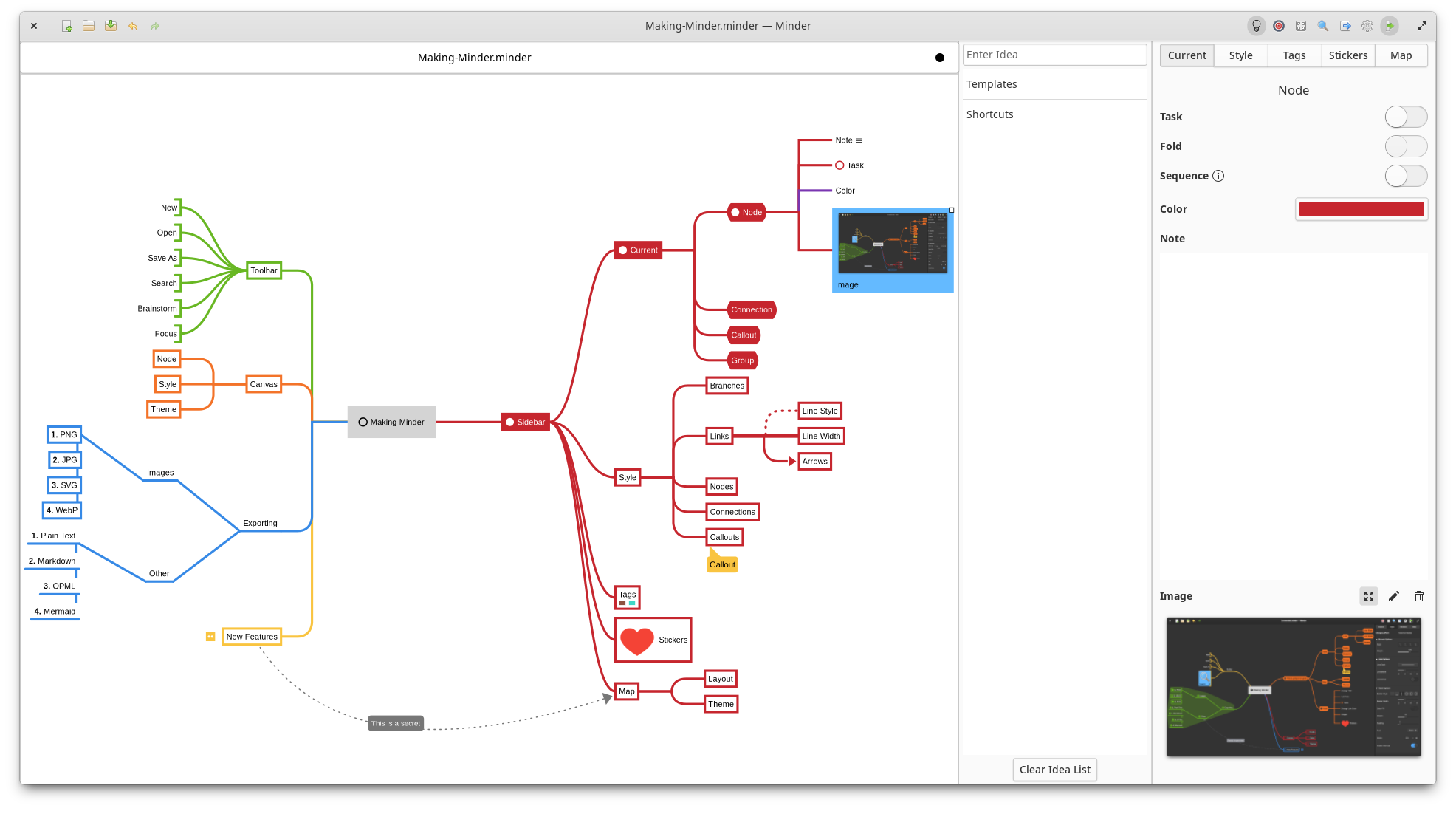
Overview
Use the power of mind-mapping to make your ideas come to life.
- Quickly create visual mind-maps using the keyboard and automatic layout.
- Choose from many tree layout choices.
- Support for Markdown formatting.
- Support for insertion of Unicode characters.
- Typeset inline LaTeX expressions to scalable SVG using
$...$or$$...$$delimiters. - Add notes, tasks, images, and editable tables to your nodes.
- Add node-to-node connections with optional text and notes.
- Stylize nodes, callouts, links and connections to add more meaning and improve readability.
- Save and reuse style settings within and across open mindmaps.
- Add stickers, tags, callouts and node groups to call out and visibly organize information.
- Quick search of node and connection titles and notes, including filtering options.
- Zoom in or enable focus mode to focus on certain ideas or zoom out to see the bigger picture.
- Enter focus mode to better view and understand portions of the map.
- Quickly brainstorm ideas with the brainstorming interface and worry about where those ideas belong in the mind map later.
- Unlimited undo/redo of any change.
- Automatically and manual saving supported.
- Colorized node branches.
- Open multiple mindmaps with the use of tabs.
- Built-in and customizable theming.
- Gorgeous animations.
- Import from OPML, FreeMind, Freeplane, PlainText/Markdown (formatted), Mermaid (mindmap), Outliner, Portable Minder, filesystem and XMind formats.
- Export to CSV, FreeMind, Freeplane, JPEG, BMP, SVG, WebP, Markdown, Mermaid, Mermaid Mindmap, OPML, Org-Mode, Outliner, PDF, PNG, PlainText, filesystem, XMind and yEd formats.
- Printer support.
Installation
You will need the following dependencies to build Minder:
- ninja-build
- python3-pip
- python3-setuptools
- meson
- valac
- debhelper
- libcairo2-dev
- libgranite-7-dev
- libgtk-4-dev
- libxml2-dev
- libgee-0.8-dev
- libarchive-dev
- libgtksourceview-5-dev
- libmarkdown2-dev
- librsvg2-dev
- libjson-glib-dev
- libwebp-dev
- webp-pixbuf-loader
- liblasem-0.6
Installing From Source
Before building and installing from source code, you will need to install the previous dependences. All dependencies should be available in your repo's package manager (i.e., apt, dnf, etc.) with the exception of liblasem which can be built and installed with the following commands (you will need to install the flex and bison packages to build):
git clone https://github.com/LasemProject/lasem.git
cd lasem
git checkout e657038b7f348a91fabd06da192aedef137bd2f2
meson setup build --prefix=/usr/local -Dintrospection=disabled -Dviewer=disabled -Ddocumentation=disabled
ninja -C build && sudo ninja -C build install && sudo ldconfig
After installing all required dependencies, run sudo ./app install and then run the application from your application launcher or from the command-line with ./app run. If you want to debug with gdb using this build, run ./app debug.
Alternatively, you can install the elementary OS Flatpak using ./app elementary or the Flathub Flatpak using ./app flathub. Once the Flatpak has been built, it can be run using ./app run-flatpak. To make this work, make sure that flatpak and flatpak-builder are installed on your system along with the required Sdk and Platform flatpaks.
Pre-Built Flatpaks
Minder is available as a Flatpak (recommended) via Flathub and elementary OS AppCenter.
Flathub
You can install the Flathub flatpak from:
https://flathub.org/apps/com.github.phase1geo.minder
elementary OS AppCenter
Search for "Minder" in AppCenter and install from there.
Distribution packages
The following distributions have Minder available in their own packaging formats. These versions may not be the latest versions of Minder, so install these at your own discretion. The Flatpak versions of Minder are officially supported by the developers of Minder.
Arch Linux
Minder is packaged in Arch Linux, install it with pacman:
$ sudo pacman -S minder
Void Linux
Minder is packaged in Void Linux, install it with xbps-install:
$ sudo xbps-install Minder
Fedora
For Fedora users, install the RPM package with:
$ sudo dnf install minder
Debian/Ubuntu
Debian/Ubuntu package is also available:
$ sudo apt install minder
Documentation
Minder documentation can be found here.
Explore related projects
codecrafters-io/build-your-own-x
Master programming by recreating your favorite technologies from scratch.
561,616 starspublic-apis/public-apis
A collective list of free APIs
497,934 starsmorluto/rea
Reverse engineer anything with agents, from app behavior down to native binaries.
449,932 starsopenclaw/openclaw
The AI that really does things. Any OS. Any Platform. The lobster way. 🦞
394,302 stars