
pgilad/leasot
pgilad/leasot has 815 GitHub stars and 61 forks. GitHot measured -1 stars in 24 hours and -1 in 7 days. Last checked 2026-11-09 23:09 UTC. Last push 2026-03-29.
Parse and output TODOs and FIXMEs from comments in your files
Measured star growth
- in 24h
- -1
- in 7 days
- -1
- in 15 days
- Update delayed
- in 1 month
- Update delayed
Net star changes over overlapping periods, not daily totals. Missing measurements are left blank. Stars measure attention, not software quality.
README.md
Original

Leasot
Intelligently parse and output TODOs and FIXMEs from comments in your files


Easily extract, collect and report TODOs and FIXMEs in your code. This project uses regex in order to extract your todos from comments.
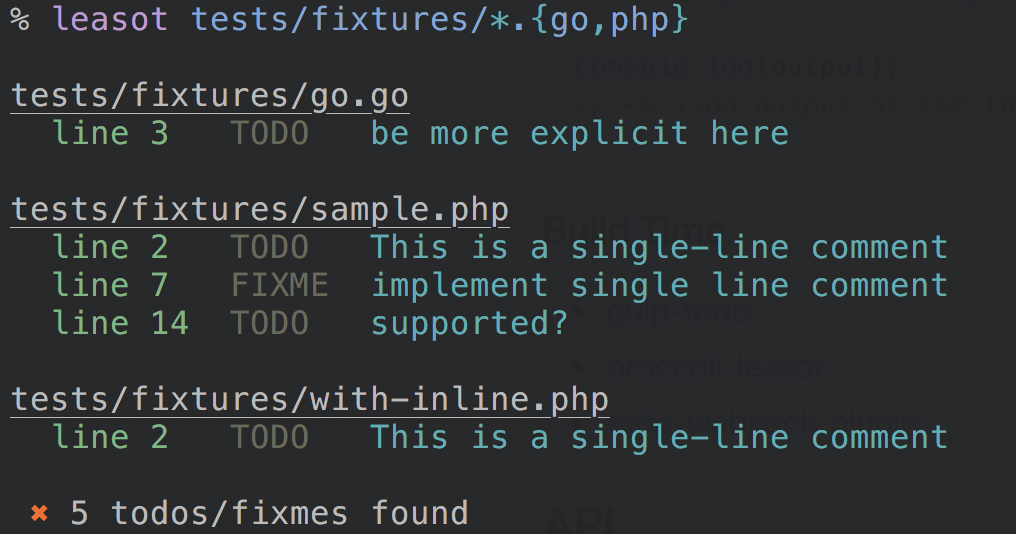
Comment format
TODO: add some info
- Spaces are optional.
- Colon is optional.
- Must be in a comment (line or block) in its own line (
some code(); //TODO: do somethingis not supported). - Can be prefixed with a @ (i.e. @TODO).
- Spaces are trimmed around comment text.
- Supported default types are
TODOandFIXME- case-insensitive. - Additional types can be added (using
tagsin cli andcustomTagsinleasot.parse) - New extensions can be associated with bundled parsers as many languages have overlapping syntax
- Supports both leading and trailing references. Examples:
// TODO(tregusti): Make this better// TODO: Text /tregusti
Supported languages
49+ languages are supported, pull requests for additional language support is most welcomed!
Usage in command line
npm install --global leasot
Command line help
$ leasot --help

Usage: leasot [options] <file ...>

Parse and output TODOs and FIXMEs from comments in your files

Options:
  -V, --version                        output the version number
  -A, --associate-parser [ext,parser]  associate unknown extensions with bundled parsers (parser optional / default: defaultParser) (default: {})
  -i, --ignore <patterns>              add ignore patterns (default: [])
  -I, --inline-files                   parse possible inline files (default: false)
  -r, --reporter [reporter]            use reporter (table|json|xml|markdown|vscode|gitlab|raw) (default: table) (default: "table")
  -S, --skip-unsupported               skip unsupported filetypes (default: false)
  -t, --filetype [filetype]            force the filetype to parse. Useful for streams (default: .js)
  -T, --tags <tags>                    add additional comment types to find (alongside todo & fixme) (default: [])
  -x, --exit-nicely                    exit with exit code 0 even if todos/fixmes are found (default: false)
  -h, --help                           output usage information

Examples:
    # Check a specific file
    $ leasot index.js

    # Check php files with glob
    $ leasot '**/*.php'

    # Check multiple different filetypes
    $ leasot 'app/**/*.js' test.rb

    # Use the json reporter
    $ leasot --reporter json index.js

    # Search for REVIEW comments as well
    $ leasot --tags review index.js

    # Add ignore pattern to filter matches
    $ leasot 'app/**/*.js' --ignore '**/custom.js'

    # Search for REVIEW comments as well
    $ leasot --tags review index.js

    # Check a stream specifying the filetype as coffee
    $ cat index.coffee | leasot --filetype .coffee

    # Report from leasot parsing and filter todos using `jq`
    $ leasot 'tests/**/*.styl' --reporter json | jq 'map(select(.tag == "TODO"))' | leasot-reporter

    # Associate a parser for an unknown extension`
    $ leasot -A '.svelte,twigParser' -A '.svelte,defaultParser' 'frontend/*.svelte'
Usage in NPM scripts
Use leasot -x in order to prevent exiting with a non-zero exit code. This is a good solution if you plan to
run leasot in a CI tool to generate todos.
{
    "scripts": {
        "todo": "leasot 'src/**/*.js'",
        "todo-ci": "leasot -x --reporter markdown 'src/**/*.js' > TODO.md"
    },
    "devDependencies": {
        "leasot": "^7.0.0"
    }
}
Programmatic Installation
npm install --save-dev leasot
Programmatic Examples
const fs = require('fs');
const leasot = require('leasot');

const contents = fs.readFileSync('./contents.js', 'utf8');
// get the filetype of the file, or force a special parser
const filetype = path.extname('./contents.js');
// add file for better reporting
const file = 'contents.js';
const todos = leasot.parse(contents, { extension: filetype, filename: file });

// -> todos now contains the array of todos/fixme parsed

const output = leasot.report(todos, 'json', { spacing: 2 });

console.log(output);
// -> json output of the todos
Leasot with build tools
API
const leasot = require('leasot');
Mainly, you should be using 2 functions:
Built-in Reporters
License
MIT © Gilad Peleg
Explore related projects
n8n-io/n8n
Fair-code workflow automation platform with native AI capabilities. Combine visual building with custom code, self-host or cloud, 400+ integrations.
210,031 starslanggenius/dify
Build Agentic workflows, RAG pipelines, with rich AI model and tool support on one collaborative workspace. Deploy on cloud, VPC, or self-hosted, so teams move from prototype to production without rebuilding the stack.
160,773 starsmicrosoft/PowerToys
Microsoft PowerToys is a collection of utilities that supercharge productivity and customization on Windows
140,833 starsstablyai/orca
Orca is the place for working with a fleet of agents (e.g. Grok Bot, Claude Code). Run any coding agent with your own subscription. Available on desktop, mobile and remote runtime.
121,550 stars