
petoncle/mousemaster
petoncle/mousemaster has 917 GitHub stars and 43 forks. GitHot measured 0 stars in 24 hours and 0 in 7 days. Last checked 2026-11-09 18:54 UTC. Last push 2026-11-08.
Mouseless mouse control and advanced keyboard customization for Windows and macOS.
What you can do
- Combos and key remapping: Define combos (key sequences, chords, timed holds, taps, tap-dances, and more) to trigger commands, switch modes, or remap keys. See the combo reference.
- Modes: Each mode has its own combos and its own overlay, indicator and zoom settings, and can inherit properties from other modes.
- Conditional property values: Any mode property can take a different value depending on the current state: which keys are held, which app is active, what the mouse is doing, which screen the cursor is on, and more.
- Continuous mouse movement: Move the cursor, click, scroll, and drag, all from the keyboard.
Measured star growth
- in 24h
- 0
- in 7 days
- 0
- in 15 days
- Collecting history
- in 1 month
- Collecting history
Net star changes over overlapping periods, not daily totals. Missing measurements are left blank. Stars measure attention, not software quality.
README.md
Originalmousemaster
- Control your mouse from the keyboard and remap your keys, on Windows and macOS
- Heavily inspired by warpd, mouseable, neru and kanata




Demo • Install on Windows • Install on macOS • Usage • Features • Contributing
Demo
Hint grid
https://github.com/user-attachments/assets/cfba2c70-7edd-44bf-b63e-ded1613368da
UI hints
https://github.com/user-attachments/assets/ec6c7d45-da1e-43d1-82ba-76cef25dad6f
Recursive hint grid
https://github.com/user-attachments/assets/9140b3be-6109-4a90-a842-0a22c7e0e562
Recursive grid
https://github.com/user-attachments/assets/b395505e-9a06-4ec8-b361-81323c7b3fb4
Continuous mouse movement
https://github.com/user-attachments/assets/7300bf36-6a02-4615-b068-30c38571fc24
Installation
Windows
- Download mousemaster.exe (a portable executable) from the Release page, or build it from source.
- In the same Release page, choose and download one of the existing configuration files:
- neo-mousekeys-ijkl.properties (recommended): an IJKL configuration (see documentation)
- neru.properties: a recursive hint configuration (see documentation)
- neo-mousekeys-wasd.properties: a WASD configuration (see documentation)
- warpd.properties: an HJKL configuration (see documentation)
- mouseable.properties: another HJKL configuration (see documentation)
- author.properties: an IJKL configuration designed to control everything with the right hand only (see documentation)
- Place the executable and the configuration file of your choice in the same directory.
- Rename the configuration file to mousemaster.properties.
- Run mousemaster.exe: make sure to run it as administrator if you want mousemaster to draw on top of everything else.
- Feel free to open a GitHub Issue or join the Discord if you need help creating your own configuration. If you have ideas for a better configuration that you would like to share, I'd love to hear from you.
macOS
macOS support is new and testers are wanted: if you try it, please report what does and does not work in an issue.
The setup below is more involved than it should be. mousemaster is not signed or notarized, which needs an Apple developer account I do not have, so macOS treats the app as unidentified and it has to be allowed by hand.
mousemaster reads the keyboard through the Karabiner virtual HID device, so that driver and a few permissions are needed.
- Install Karabiner-Elements, which installs the virtual HID device, and allow its system extension when macOS asks.
- Download and unzip mousemaster-macos.zip into /Applications:
Downloading it in a browser instead marks the app as quarantined, and macOS refuses to start a quarantined app that is not notarized. Clear it before the first run:curl -L -o mousemaster-macos.zip https://github.com/petoncle/mousemaster/releases/latest/download/mousemaster-macos.zip unzip mousemaster-macos.zip -d /Applications
Or let macOS refuse it once, then allow it under System Settings > Privacy & Security > Security, where an Open Anyway button appears for it.xattr -dr com.apple.quarantine /Applications/mousemaster.app - In the Release page, choose and download one of the configuration files listed above, place it in /Applications next to mousemaster.app, and rename it to mousemaster.properties.
- Run it from a terminal, as root, which the virtual HID device requires. The configuration is
read from the working directory, so start it from where you put it:
cd /Applications && sudo mousemaster.app/Contents/MacOS/mousemaster - Grant the permissions macOS asks for, under System Settings > Privacy & Security. They are
granted to the terminal you run mousemaster from rather than to mousemaster itself, so they
survive replacing mousemaster.app with a new build. Quit and reopen that terminal after
granting, then run mousemaster again.
- Input Monitoring, to read the keys you press. Always needed.
- Accessibility, only for UI hints (
overlay.type=ui-accessibility). - Screen Recording, only for zoom (
mode.zoom).
Usage
neo-mousekeys-ijkl configuration
- Activate: Press leftalt + e or leftalt + capslock
- Deactivate: Press q or p
- Mouse movement: Use i (up), j (left), k (down), l (right)
- Mouse buttons: ; (left), rightshift (middle), ' (right)
- Grid mode: Press g
- Hint mode: Press f
- Recursive hint mode: Press r
- UI Hint mode: Press leftalt + ;
- Screen selection: Press c
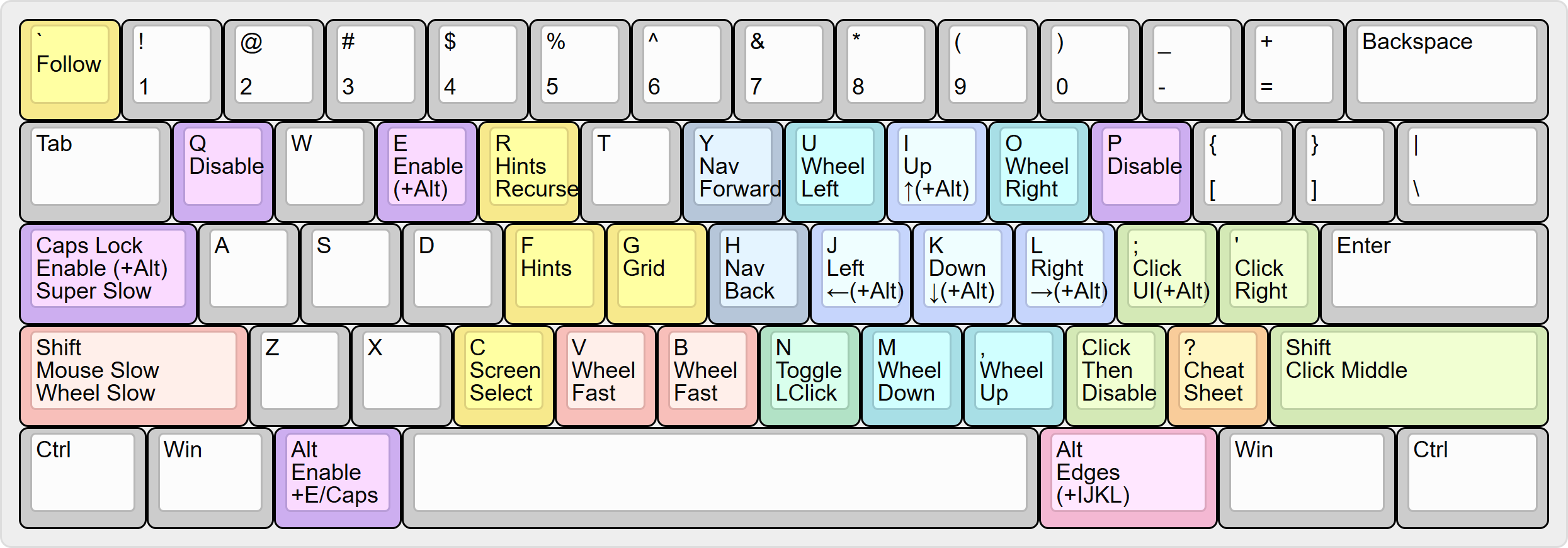
For a complete reference, see the neo-mousekeys-ijkl documentation. The other configurations are documented too: neru, neo-mousekeys-wasd, warpd, mouseable, author.
Features
- Combos and key remapping: Define combos (key sequences, chords, timed holds, taps, tap-dances, and more) to trigger commands, switch modes, or remap keys. See the combo reference.
- Modes: Each mode has its own combos and its own overlay, indicator and zoom settings, and can inherit properties from other modes.
- Conditional property values: Any mode property can take a different value depending on the current state: which keys are held, which app is active, what the mouse is doing, which screen the cursor is on, and more.
- Continuous mouse movement: Move the cursor, click, scroll, and drag, all from the keyboard.
- Hint navigation: Cover the screen with a grid of labeled hints, type a label to jump the cursor there.
- UI hint navigation: Label buttons, links, and text fields in the active window.
- Recursive grid navigation: Divide the screen into 2x2 sections, shrink with each key press or snap to the grid's edges to reach a precise position.
- Zoom.
- App-specific behavior: Restrict combos to specific apps, so the same keys behave differently depending on the focused app.
- Indicator: Layers of shapes and text that show the mode and the state of the mouse. A layer goes at the cursor, in a corner of the screen, on the target or on the hints. Each layer has its own fill, stroke and shadow, and keyframes animate it.
- Position history: Save cursor positions, jump back to them later. Keep several named histories, each with its own keys, and have a history hold a separate list of positions for each app.
- Live configuration: All configuration lives in a single file that is automatically reloaded when saved.
mousemaster provides low-level primitives (modes, combos, commands, macros, key aliases) that you compose to build the exact behavior you want. See the configuration reference.
Contributing
Contributions to mousemaster are welcome!
- Share a configuration: If you have ideas for a new or improved configuration that you would like to share, open an issue or join the Discord.
- Cross-platform support: mousemaster supports Windows and macOS.
If you're interested in helping extend mousemaster to Linux, your contributions are very welcome. Please open an issue or join the Discord to get involved.
If you enjoy mousemaster, consider making a donation or stop by the Discord to show your support!
Explore related projects
n8n-io/n8n
Fair-code workflow automation platform with native AI capabilities. Combine visual building with custom code, self-host or cloud, 400+ integrations.
209,927 starslanggenius/dify
Build Agentic workflows, RAG pipelines, with rich AI model and tool support on one collaborative workspace. Deploy on cloud, VPC, or self-hosted, so teams move from prototype to production without rebuilding the stack.
160,773 starsmicrosoft/PowerToys
Microsoft PowerToys is a collection of utilities that supercharge productivity and customization on Windows
140,755 starsstablyai/orca
Orca is the place for working with a fleet of agents (e.g. Grok Bot, Claude Code). Run any coding agent with your own subscription. Available on desktop, mobile and remote runtime.
120,306 stars