
pauloacs/OpenFOAM-ML-Solvers
pauloacs/OpenFOAM-ML-Solvers has 26 GitHub stars and 3 forks. GitHot measured 0 stars in 24 hours, 0 in 7 days, and 0 in 15 days. Last checked 2026-11-19 20:38 UTC. Last push 2026-11-15.
What you can do
- 🚀 Accelerated simulations: Up to 40% less iterations required to convergence when compared to standard OpenFOAM solvers
- 🧠 ML-powered: Machine Learning surrogate models enhance pressure Poisson solver
- 🌡️ Multiple physics: Supports isothermal and thermal flows
- 🔧 OpenFOAM compatible: Drop-in replacement for pisoFoam and buoyantPimpleFoam
Measured star growth
- in 24h
- 0
- in 7 days
- 0
- in 15 days
- 0
- in 1 month
- Collecting history
Net star changes over overlapping periods, not daily totals. Missing measurements are left blank. Stars measure attention, not software quality.
About
Machine Learning enhanced CFD solvers: isothermal & thermal fluid flow
Machine LearningREADME.md
OriginalDLpisoFoam, DLbuoyantPimpleFoam, and DLpimpleFoam_auto
Deep Learning-Enhanced CFD Solvers for Accelerated Fluid Flow Simulations
📋 Contents
- Introduction
- Surrogate Model Overview
- What This Repository Enables
- Key Features
- Publications
- Repository Structure
- Getting Started
- AUTO Workflow: Sampling, Training and Simulation
- Choose a Solver Workflow
- Available CFD Solvers
- Deprecated Solver Archive
- Citation
- Contact
- Acknowledgments
🎯 Introduction
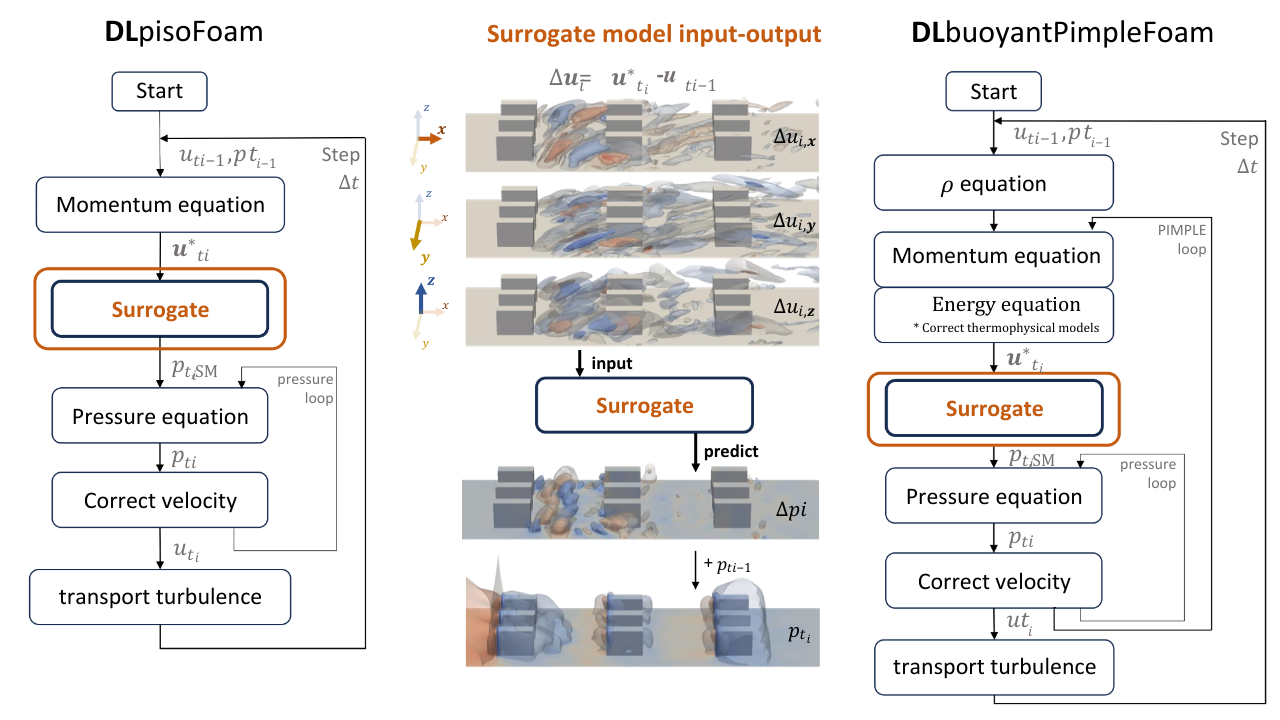
This repository contains machine learning-enhanced OpenFOAM solvers that accelerate computational fluid dynamics (CFD) simulations using deep learning estimates of pressure and pressure-velocity corrections. Solver sources, Python surrogate packages, and cases are grouped under classical/ and auto/ according to workflow. The oracle is a reference-field diagnostic, not a learned model. A thermal AUTO solver is not included in this checkout.
The tracked solver sources are DLpisoFoam, DLpisoFoam_2d, DLbuoyantPimpleFoam, DLpimpleFoam_auto, and DLpimpleFoam_oracle. The first three use offline-prepared surrogates, the AUTO solver trains during the CFD run, and the oracle replays reference fields for an integration comparison. A thermal AUTO implementation is not tracked in this checkout.
This is an all-in-one repository containing both surrogate models and CFD solvers, building upon the work from Solving-Poisson's-Equation-through-DL-for-CFD-applications.
Two Training Workflows
- Offline training and deployment: generate datasets, train a surrogate, then run a CFD case with its model artifacts. The existing guide below covers this workflow.
- AUTO training: run CFD to collect samples, train an initial surrogate, and activate it in the same simulation. See the AUTO quick start for the new isothermal PIMPLE examples.
Choose a Solver Workflow
“Classic” describes when the surrogate is prepared, not a different numerical method. Choose the solver family based on whether you already have a trained surrogate or want the solver to create one during the run.
| Workflow | Source folder | Sequence | Solvers |
|---|---|---|---|
| Classic/offline | classical/ |
Generate or collect CFD data, train the surrogate separately, configure its artifacts in a case, then run CFD with the trained model | DLpisoFoam, DLpisoFoam_2d, DLbuoyantPimpleFoam |
| AUTO | auto/ |
Configure sampling/training, then run CFD; the solver samples, trains an initial surrogate, and activates it in that run | DLpimpleFoam_auto |
| AUTO integration diagnostic | auto/source/DLpimpleFoam_oracle/ |
Replay reference pressure/velocity fields to measure possible AUTO integration gains; no surrogate training | DLpimpleFoam_oracle |
The oracle is grouped with AUTO because it is primarily used to study the reference-injection integration path. It remains a diagnostic: it consumes reference fields and does not train or load a learned surrogate. See the oracle examples.
Build from the repository root using the matching source path:
wmake classical/source/DLpisoFoam
wmake classical/source/DLpisoFoam_2d
wmake classical/source/DLbuoyantPimpleFoam
wmake auto/source/DLpimpleFoam_oracle
wmake auto/source/DLpimpleFoam_auto
For the classic workflow, training tools are grouped in
classical/gen_datasets/ and classical/train_SM/; solver sources and
packages are grouped in classical/source/ and classical/packages/. For
AUTO, start
with the sampling/training guide
and compact tutorials.
Surrogate Packages
The solver source grouping and Python package names describe different layers:
| Package | Used by | Status |
|---|---|---|
pressure_SM |
Classic/offline DLpisoFoam and DLbuoyantPimpleFoam cases |
Still required by those cases; provides the 2D/3D CFD_usable inference interfaces and offline training tools. It is not deprecated. |
pressure_SM_delta_delta |
Classic/offline workflows that need Tucker data compression | Retained 3D delta-delta training/inference stack. Tucker compression can still be useful when preparing compressed datasets/models for classic solvers; this package is deprecated for AUTO workflows. setup.py still exposes its train/eval commands. |
pressure_SM_gridded_shift |
Gridded AUTO shifter | Current AUTO backend for regular-lattice models. |
pressure_SM_mesh_graph |
Graph AUTO shifter | Current AUTO backend for mesh-graph models, including joint pressure/velocity modes. |
Thus, pressure_SM is the package to keep for the classic pretrained-model
workflow; it is not the backend selected by the current AUTO tutorials. The
classic tutorial modules demonstrate its imports under
classical/tutorials/DLpisoFoam/ and
classical/tutorials/DLbuoyantPimpleFoam/. pressure_SM_delta_delta is not the
former package name of pressure_SM_gridded_shift; the gridded shifter's
predecessor was the separate pressure_SM_delta_delta_shift package. The base
delta-delta package remains available for classic/offline Tucker-compression
workflows, but is not a dependency of the current AUTO backends.
Surrogate Model overview
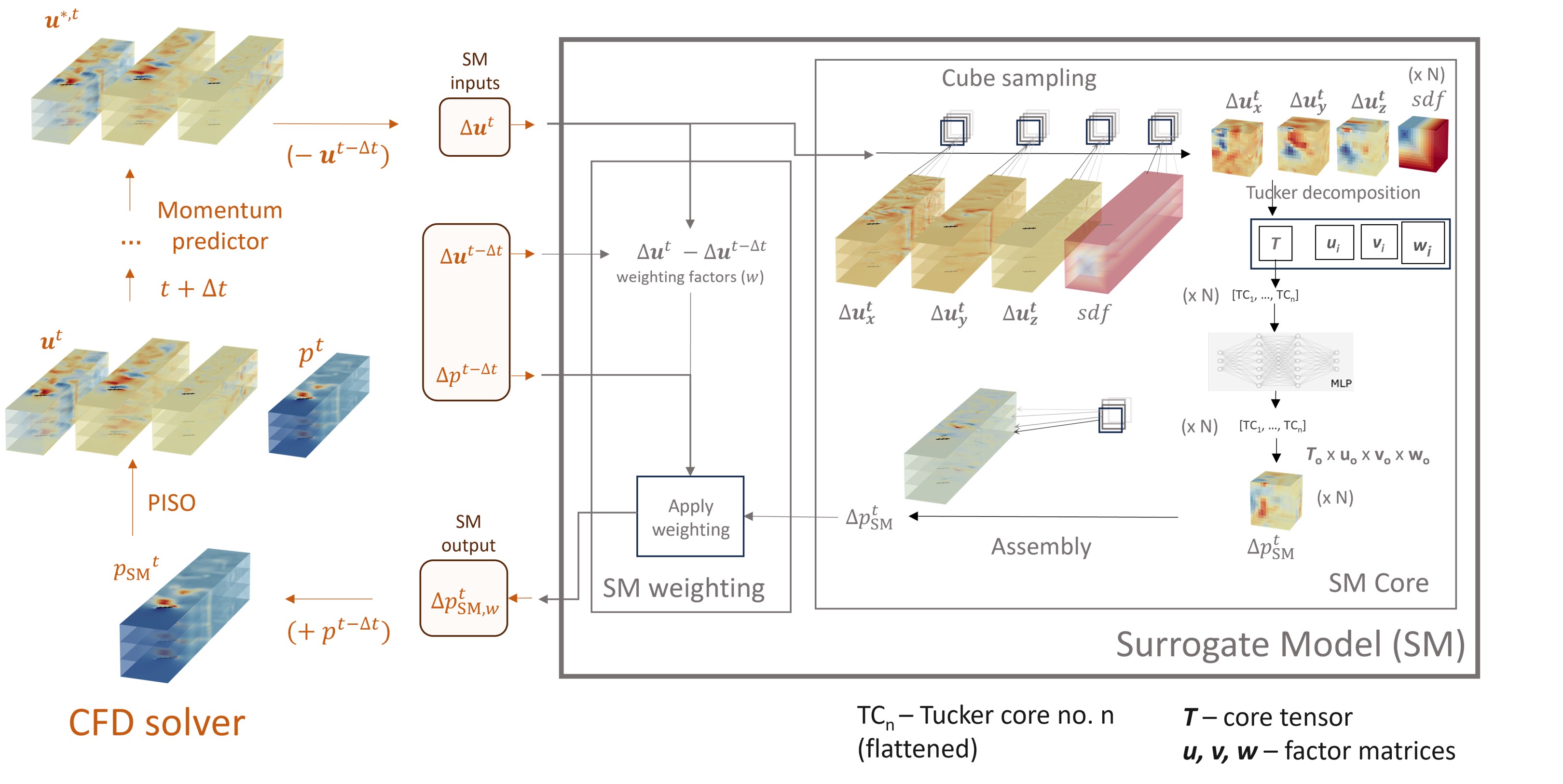
🎯 What This Repository Enables
This repository provides a complete workflow for accelerating CFD simulations with machine learning:
- Generate Training Data: Run CFD simulations to create datasets (examples in
classical/gen_datasets/) - Train Surrogate Models: Train pressure surrogates separately (tools in
classical/train_SM/) - Deploy in Production: Integrate trained models with custom OpenFOAM-based solvers for accelerated simulations (examples in
tutorials/)
Alternatively, sample, train and simulate in one AUTO run using DLpimpleFoam_auto. In the new PIMPLE integration, learned estimates initialize pressure and optionally velocity; conventional CFD correction and convergence checks remain in place.
✨ Key Features
- 🚀 Accelerated simulations: Up to 40% less iterations required to convergence when compared to standard OpenFOAM solvers
- 🧠 ML-powered: Machine Learning surrogate models enhance pressure Poisson solver
- 🌡️ Multiple physics: Supports isothermal and thermal flows
- 🔧 OpenFOAM compatible: Drop-in replacement for
pisoFoamandbuoyantPimpleFoam - 🤖 Self-training:
DLpimpleFoam_autotrains its surrogate model automatically during the simulation — no pre-trained model needed - Isothermal AUTO PIMPLE:
DLpimpleFoam_autosupports gridded CNN shifters and mesh-graph shifters, with pressure-only or supported joint pressure/velocity prediction - Controlled oracle comparisons:
DLpimpleFoam_oraclecompares conventional CFD with idealized reference-field injection to study the attainable integration benefit - 🐳 Docker ready: Pre-built containers for easy deployment
- 📊 2D & 3D: Surrogate models available for both 2D and 3D simulation cases
📚 Publications
1. Surrogate Model Development
Application of machine learning to model the pressure Poisson equation for fluid flow on generic geometries
Neural Computing and Applications (2024)
- Detailed description of the ML surrogate model architecture and training
2. DLpisoFoam Benchmark
Enhancing CFD solver with Machine Learning techniques
Computer Methods in Applied Mechanics and Engineering (2024)
- Performance benchmarks and validation of DLpisoFoam solver
3. Improved Pressure-Velocity Coupling
- Enhanced pressure surrogate model and integration methodology
4. 3D Extensions (Coming Soon)
- Extension to 3D surrogate models and complex geometries
📁 Repository Structure
DLpisoFoam/
├── classical/                     # Offline workflow assets
│   ├── gen_datasets/              # Data-generation tools and cases
│   ├── train_SM/                  # Offline training/evaluation
│   ├── tutorials/                 # DLpisoFoam and buoyant solver cases
│   ├── source/                    # DLpisoFoam, 2D, and buoyant OpenFOAM sources
│   └── packages/                  # pressure_SM and legacy Tucker delta-delta
│   └── README.md
├── auto/                          # Self-training workflow and oracle cases
│   ├── tutorials/                 # AUTO and reference-injection cases
│   ├── source/                    # AUTO PIMPLE and oracle OpenFOAM sources
│   ├── packages/                  # Gridded and mesh-graph Python backends
│   └── README.md
├── tutorials/                      # Cross-workflow tutorial index only
│   └── README.md
├── deprecated/
│   ├── README.md
│   ├── other_solvers_2d/           # Archived alg1/alg2/deltas implementations
│   └── tutorials/                  # Superseded delta-delta and thermal AUTO examples
├── Dockerfile                # Docker build configuration
└── env_311.yml               # Python environment specification
🚀 Getting Started
This guide will walk you through:
- Setting up your environment (Docker or local)
- Training a surrogate model (SM) from scratch
- Running CFD simulations with the trained model
For the self-training isothermal solver, complete environment setup and then skip the offline dataset/model preparation steps by following the AUTO quick start.
Prerequisites
- For Docker: Docker installed (Get Docker)
- For local install:
- OpenFOAM v8
- Conda or Miniconda
- Python 3.11
Part 1: Environment Setup
Option 1: Docker (Recommended)
Easiest method with automated setup and guaranteed reproducibility.
Pull pre-built image:
docker pull pauloacs/dlpisofoam:latest
Or build locally:
docker build -t dlpisofoam .
Run container:
docker run -it -v $(pwd):/home/repo --rm pauloacs/dlpisofoam bash
This mounts your current directory inside the container at /home/repo.
Option 2: Local Installation
Step 1: Create Python environment
conda env create -f env_311.yml
conda activate python311_solver
Step 2: Install surrogate model packages
python -m pip install -e .
Step 3: Set up OpenFOAM environment
source /opt/openfoam8/etc/bashrc  # Adjust path to your OpenFOAM installation
source prep_env311.sh             # Set Python/NumPy paths in the current shell
Note: You may need to modify prep_env311.sh with paths to your conda environment:
export PYTHON_INCLUDE_PATH=$CONDA_PREFIX/include/python3.11
export NUMPY_INCLUDE_PATH=$CONDA_PREFIX/lib/python3.11/site-packages/numpy/core/include
export PYTHON_LIB_PATH=$CONDA_PREFIX/lib
export PYTHON_LIB_NAME=lpython3.11
Step 4: Compile the solvers
For DLpisoFoam:
cd classical/source/DLpisoFoam
wclean
wmake
For DLbuoyantPimpleFoam:
cd classical/source/DLbuoyantPimpleFoam
wclean
wmake
Verify installations:
which DLpisoFoam
DLpisoFoam -help
which DLbuoyantPimpleFoam
DLbuoyantPimpleFoam -help
Part 2: Preparing Datasets & Training Your Surrogate Model
Part 2.1: Generate CFD Training Data
Use the scripts in classical/gen_datasets/ to generate training datasets from various flow scenarios:
- Confined flows over chip arrays: Electronics cooling simulations
- Flow around squared cylinders: Bluff body aerodynamics
- Flow over inclined plates: Boundary layer studies
The data-generation examples cover isothermal and thermal flows; choose a solver and surrogate integration supported by the corresponding case.
Modified versions of pisoFoam and buoyantPimpleFoam are included to extract the necessary flow field data for training. Depending on the simulation type, generation can be fully or semi-automatic.
Part 2.2: Train the Surrogate Model
Navigate to the appropriate subdirectory in classical/train_SM/ and use its training script:
cd classical/train_SM/train_and_eval_SM_2d/
# Edit the dataset path in run_train.sh for your generated data
./run_train.sh
Key Configuration:
- Required: Set
datasetPathto your training dataset location - Optional: Adjust hyperparameters (learning rate, batch size, dropout, etc.)
Training Outputs:
- Model file: HDF5 format TensorFlow model (e.g.,
model_MLP_small-std-drop0.1-lr0.0005-regNone-batch1024.h5) - Compression artifacts: Tucker factors (3D cases) or PCA vectors (2D cases) (required for CFD deployment)
These files are ready to use with the CFD solvers - the model weights/biases load automatically via TensorFlow.
Part 3: 🏃 Running Your First CFD Simulation with the Surrogate Model
Part 3.1: Run DLpisoFoam with the PRE-TRAINED Surrogate Model
# Navigate to a complete pretrained-model case
cd classical/tutorials/DLpisoFoam/array_of_cyls

# Build the case mesh and run the solver
bash run_sim.sh
# Open in ParaView
paraFoam

# Or use built-in post-processing
postProcess -func 'mag(U)'
Part 3.2: Run DLpisoFoam with YOUR trained Surrogate model
- Copy the example test case:
cp -r classical/tutorials/DLpisoFoam/array_of_cyls classical/tutorials/DLpisoFoam/my_custom_test
cd classical/tutorials/DLpisoFoam/my_custom_test
- Copy your trained surrogate model files:
# Copy your TensorFlow model
cp /path/to/your/model.h5 .

# Copy compression artifacts (Tucker factors (3D cases) or PCA vectors (2D cases))
cp /path/to/your/tucker_factors.pkl .

# Copy normalization files
cp /path/to/maxs .
cp /path/to/mean_std.npz .
AUTO Workflow: Sampling, Training and Simulation
DLpimpleFoam_auto starts with conventional CFD, writes selected training fields to HDF5, runs initial model training, and activates the surrogate without restarting the simulation. It can also reuse compatible trained artifacts with train=False.
Build and Run
From the repository root, after activating the Python environment and sourcing OpenFOAM:
source prep_env311.sh
python -m pip install -e '.[mesh_graph]' mpi4py
wmake auto/source/DLpimpleFoam_auto
wmake auto/source/DLpimpleFoam_oracle

cd auto/tutorials/DLpimpleFoam_auto/graph_shift/pressure_only
bash Allrun
Use the project's scientific Python environment from env_311.yml; the gridded framework also needs its pandas, SciPy, scikit-learn, numba, matplotlib and tensorly dependencies. Embedded Python and the training subprocess must use the same compatible environment. Build from the current sources; older container images may not contain the latest AUTO modes. The executable remains DLpimpleFoam_auto for both frameworks and prediction modes.
Frameworks and Examples
| Framework | Python Package | Compact Examples |
|---|---|---|
| Gridded shifter | pressure_SM_gridded_shift |
Pressure-only CNN |
| Graph shifter | pressure_SM_mesh_graph |
Pressure-only, joint pressure/velocity |
The gridded example transfers fields to one whole-domain regular lattice. The graph framework uses native CFD cell connectivity and face-connected aggregates instead of a lattice. Joint velocity prediction is currently demonstrated by the graph framework, not the gridded shifter.
Both support pressure increment/residual targets (dp or ddp) when configured consistently. The joint graph model can predict dU or ddU; it returns the total reconstructed velocity increment for the solver to apply once. Boundary conditions, flux updates and normal PIMPLE correction remain part of the CFD solver.
Case Controls
python_module.py: framework selection (training_backend='lattice'or'mesh_graph'), selected inputs, model size, target variables, training settings, output weights, andtrain=True/False.data_folderselects this surrogate's samples, model, normalization and diagnostics directory (defaultML_data); use a distinct OpenFOAM-valid path for each surrogate in a shared case.ML_data_folderremains a legacy alias.system/MLSamplingDict: warm-up, sampling cadence, initial training threshold, prediction integration, velocity extrapolation, and optional fixed-pressure reconstruction before normal PIMPLE.system/fvSolution: linear solvers, equation relaxation, and normal PIMPLE convergence controls. Oracle-compatible integration also uses its momentum equation relaxation for reconstruction.
train=False requires the case's matching model, normalization and geometry artifacts; it does not create a missing model. Changing the input set, target, graph coarsening or architecture requires compatible samples and retraining.
The graph AUTO workflow supports initial training and incremental retraining during the simulation. Run graph cases serially, not with mpirun. Training is synchronous: CFD pauses while the trainer runs, then reloads the selected weights before the next timestep.
To enable online updates, set train=True in the case Python module and configure system/MLSamplingDict, for example:
regularInterval       2;
retrainInterval       20;
windowFrames          40;
waitBeforeResampling  20;
After initial training, this waits 20 solver timesteps before resuming sampling, collects a sample every two timesteps, and triggers an update after 20 new samples. Each update uses the latest 40 available samples (windowFrames must be at least three). The original HDF5 samples are retained. The tutorial defaults still disable resampling with a very large waitBeforeResampling.
Optional Python settings retrain_epochs and retrain_lr override num_epochs and lr for updates only. Updates warm-start from saved weights, preserve the original normalization, and require the same mesh, features, targets and architecture. Existing weights are retained unless validation improves on the current window; this is not a guarantee of fewer CFD iterations or better accuracy on earlier flow states. The optimizer is restarted for each update.
Each update writes loss curves, validation diagnostics and a run.json to ML_data/training_plots/<pressure-target>/retrain_NNN/. retraining_index.csv summarizes every attempt, its sample window and validation/checkpoint outcome; an interrupted update remains marked running in its run record. Retraining always emits loss plots even when plot_training=False; the initial training outputs remain in the target directory root.
Held-out pressure validation also writes obstacle_pressure_error_by_distance.csv and obstacle_pressure_error_by_distance.png, with volume-weighted pressure RMSE/MAE grouped by distance from the obstacle in local cell widths. The first three validation frames get native-cell signed/absolute error maps with the sampled obstacle boundary overlaid. Distance is measured to sampled obstacle-face centers; these are diagnostics only and do not alter training or account for solver boundary-condition corrections.
Outputs and Interpretation
Allrun builds and checks the small example mesh before running the solver. Logs show sampling, training, surrogate activation, reconstruction, PIMPLE work and step timings. Generated models, normalization files and training diagnostics are placed in ML_data/. Use bash Allclean before a fresh tutorial run; it deletes generated outputs and trained artifacts while retaining initial fields.
The compact examples contain only small text inputs and train from scratch. They demonstrate integration, not mesh-independent accuracy or a guaranteed speedup. Evaluate total timestep cost, pressure iterations, outer iterations and physical errors at matched settings. The oracle uses reference information unavailable to a deployed model, so its results are an idealized diagnostic baseline, not an achieved ML performance claim.
See the tutorial index, the classic workflow guide, and the AUTO workflow guide. The oracle examples cover pressure-only and joint reference-injection comparisons.
🔧 Available CFD Solvers
DLpisoFoam
For incompressible, isothermal flows
- Based on OpenFOAM's
pisoFoam - Uses pressure surrogate model to accelerate PISO algorithm
- Ideal for: laminar/turbulent flows, external aerodynamics, internal flows
Example applications:
- Flow over cylinders
- Channel flows
DLpimpleFoam_auto
For incompressible, isothermal flows with self-training PIMPLE acceleration
- Collects selected CFD fields, trains an initial surrogate, and activates it during the same run
- Supports the
pressure_SM_gridded_shiftlattice framework andpressure_SM_mesh_graphgraph framework - Predicts pressure increments/corrections; the graph backend also supports joint velocity increments/corrections
- Applies learned estimates as initial guesses, with optional reconstruction and normal CFD convergence checks
- Can reuse compatible saved models with
train=False; initial graph training does not require pretrained weights
Start here: AUTO quick start and compact tutorials.
DLpimpleFoam_oracle
Diagnostic reference solver for studying pressure-velocity initialization
- Runs a conventional reference pass and a second pass using reference pressure and optional velocity increments
- Supports pressure-only and joint integration, with optional interpolation to assess transfer effects
- Measures potential reductions in pressure/PIMPLE work; it is not a deployable surrogate and does not train a model
Examples: pressure-only oracle and joint oracle.
DLbuoyantPimpleFoam
For thermal flows with buoyancy
- Based on OpenFOAM's
buoyantPimpleFoam - Handles natural/mixed convection
- Supports both incompressible and weakly-compressible flows
Example applications:
- Electronics cooling
- HVAC simulations
Thermal AUTO variant
Some historical documentation refers to DLbuoyantPimpleFoam_auto, but its
source is not tracked in this checkout. The available thermal source is
classical/source/DLbuoyantPimpleFoam, which uses the offline-trained-model
workflow. The active self-training implementation is the isothermal
auto/source/DLpimpleFoam_auto solver.
🏛️ Deprecated Solver Archive
Older standalone 2D solvers are archived in deprecated/other_solvers_2d/;
superseded delta-delta and thermal AUTO examples are in deprecated/tutorials/.
These predate the current classical/ and auto/ organization and
are retained for historical reproducibility. They are not part of the
supported root build/run instructions; consult their local documentation only
when reproducing those older experiments.
📖 Citation
If you use this work in your research, you can cite the papers that introduced it:
@article{firstPressureSM2024,
  author = {Sousa, Paulo and Afonso, Alexandre and Veiga Rodrigues, Carlos},
  year = {2024},
  month = {05},
  pages = {1-26},
  title = {Application of machine learning to model the pressure poisson equation for fluid flow on generic geometries},
  volume = {36},
  journal = {Neural Computing and Applications},
  doi = {10.1007/s00521-024-09935-0}
}
@article{dlpisofoam2024,
  title = {Enhancing CFD solver with Machine Learning techniques},
  author = {Sousa, Paulo and Rodrigues, Carlos Veiga and Afonso, Alexandre},
  journal = {Computer Methods in Applied Mechanics and Engineering},
  volume = {429},
  pages = {117133},
  year = {2024},
  issn = {0045-7825},
  doi = {10.1016/j.cma.2024.117133},
  url = {https://www.sciencedirect.com/science/article/pii/S004578252400389X},
  keywords = {CFD, Machine Learning, Incompressible flows, PISO, OpenFOAM}
}
@article{surrogateBasedPressureVelocity2026,
title = {Surrogate-based pressure–velocity coupling: Accelerating incompressible CFD flow solvers with machine learning},
journal = {Computers & Fluids},
volume = {318},
pages = {107216},
year = {2026},
issn = {0045-7930},
doi = {https://doi.org/10.1016/j.compfluid.2026.107216},
url = {https://www.sciencedirect.com/science/article/pii/S0045793026002586},
author = {Paulo Sousa and Alexandre Afonso and Carlos Veiga Rodrigues},
keywords = {Computational physics, CFD, Incompressible flows, PISO, Machine learning, Surrogate model},
}
📧 Contact
- Issues: GitHub Issues
- Email: [[email protected]]
- ResearchGate: (https://www.researchgate.net/profile/Paulo-Sousa-74?ev=hdr_xprf)
Acknowledgments
This work builds upon: