
parihaaraka/sqt has 35 GitHub stars and 10 forks. GitHot measured 0 in 7 days. Last checked 2026-11-09 22:18 UTC. Last push 2026-09-23.
sql query tool
What you can do
- Customizable objects tree and textual/tabular content view (see scripts/README.md) let you build you own tree with application-specific nodes;
- adjustable sql highlighting (see any existing hl.conf for more details);
- alternative sorting (e.g., sort table columns in original/alphabetical order);
- multiple selection to generate appropriate SQL code (e.g., select/insert/update commands with selected columns only);
Measured star growth
- in 24h
- Update delayed
- in 7 days
- 0
- in 15 days
- Update delayed
- in 1 month
- Update delayed
Net star changes over overlapping periods, not daily totals. Missing measurements are left blank. Stars measure attention, not software quality.
README.md
Originalsqt
sqt (sql query tool) is a cross-platform program to provide typical sql data source exploring and programming interface.
Overview
The subject was aimed to provide fast and convenient MS SQL query tool under linux. The only existing ODBC interface lead to support of any other ODBC data source. As a result of pgAdmin3 deprecation sqt was modified to have a native PostgreSQL support via libpq. Due to my current needs PostgreSQL support is in priority.
The main target audience are db programmers.
Feature highlights
- Customizable objects tree and textual/tabular content view (see scripts/README.md) let you build you own tree with application-specific nodes;
- adjustable sql highlighting (see any existing
hl.conffor more details); - alternative sorting (e.g., sort table columns in original/alphabetical order);
- multiple selection to generate appropriate SQL code (e.g., select/insert/update commands with selected columns only);
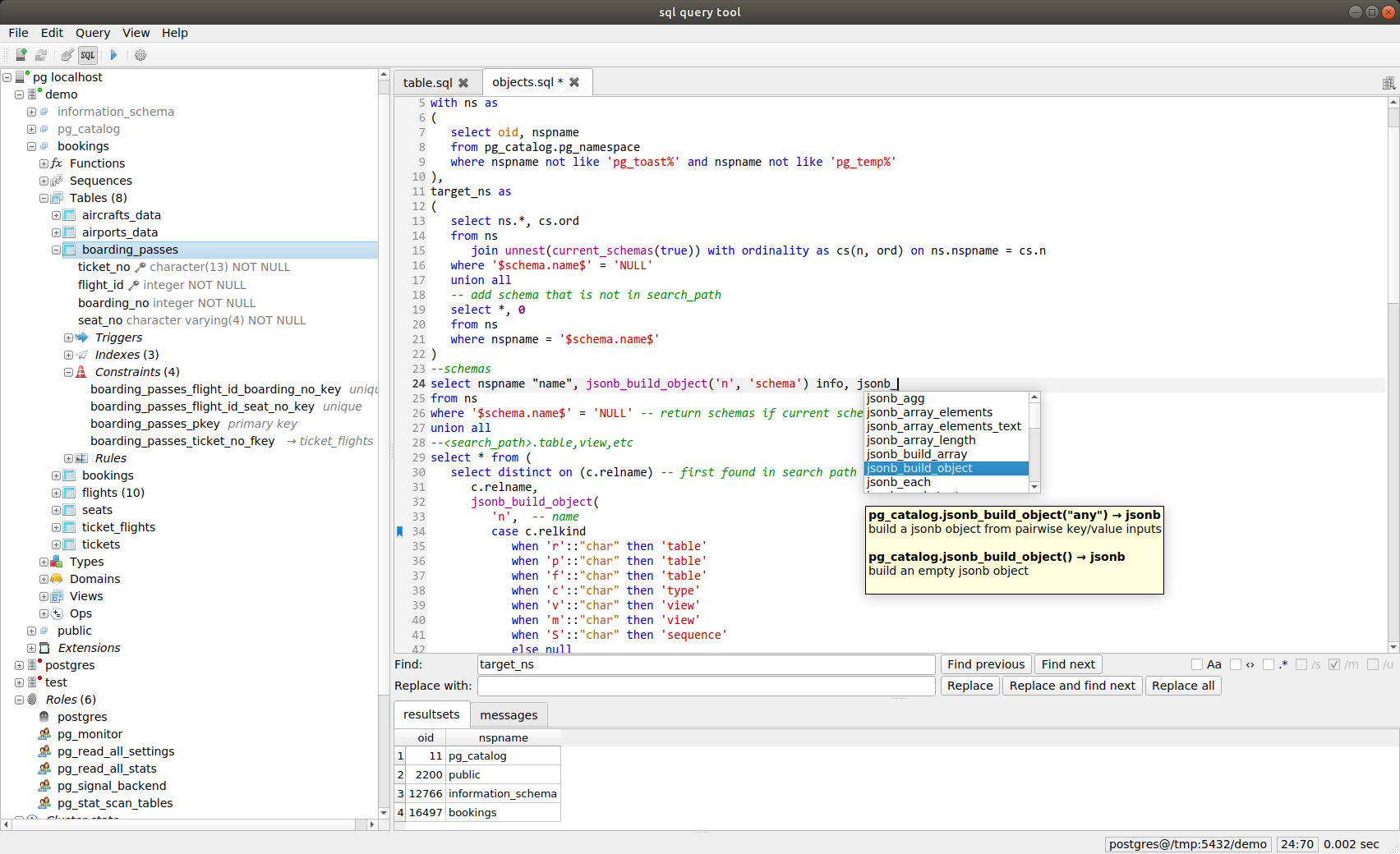
- convenient (Qt Creator-like) search/replace panel;
- multiple resultsets support;
- multicursor;
- search through a folder of sql scripts (
Ctrl+Shift+F,Ctrl+Shift+O- get back to the objects tree); - getting into an object script under the cursor (
F4); - running the statement at the caret only (
Ctrl+Enter), selecting it to see its bounds (Ctrl+Shift+A) - where the dialect allows the script to be cut on top-level;(statement_splitflag inhl.conf), otherwiseCtrl+Enterruns the whole tab; - bookmarks (mark:
Ctrl+M, previous:Ctrl+,, next:Ctrl+., last:Ctrl+L); - uppercase (
Ctrl+U), lowercase (Ctrl+Shift+U,Ctrl+Win+U) - code completion support (
Ctrl+Space); - json viewer with highlighting and extracting json from it's nested text value (
Ctrl+J); - totalling selected cells (
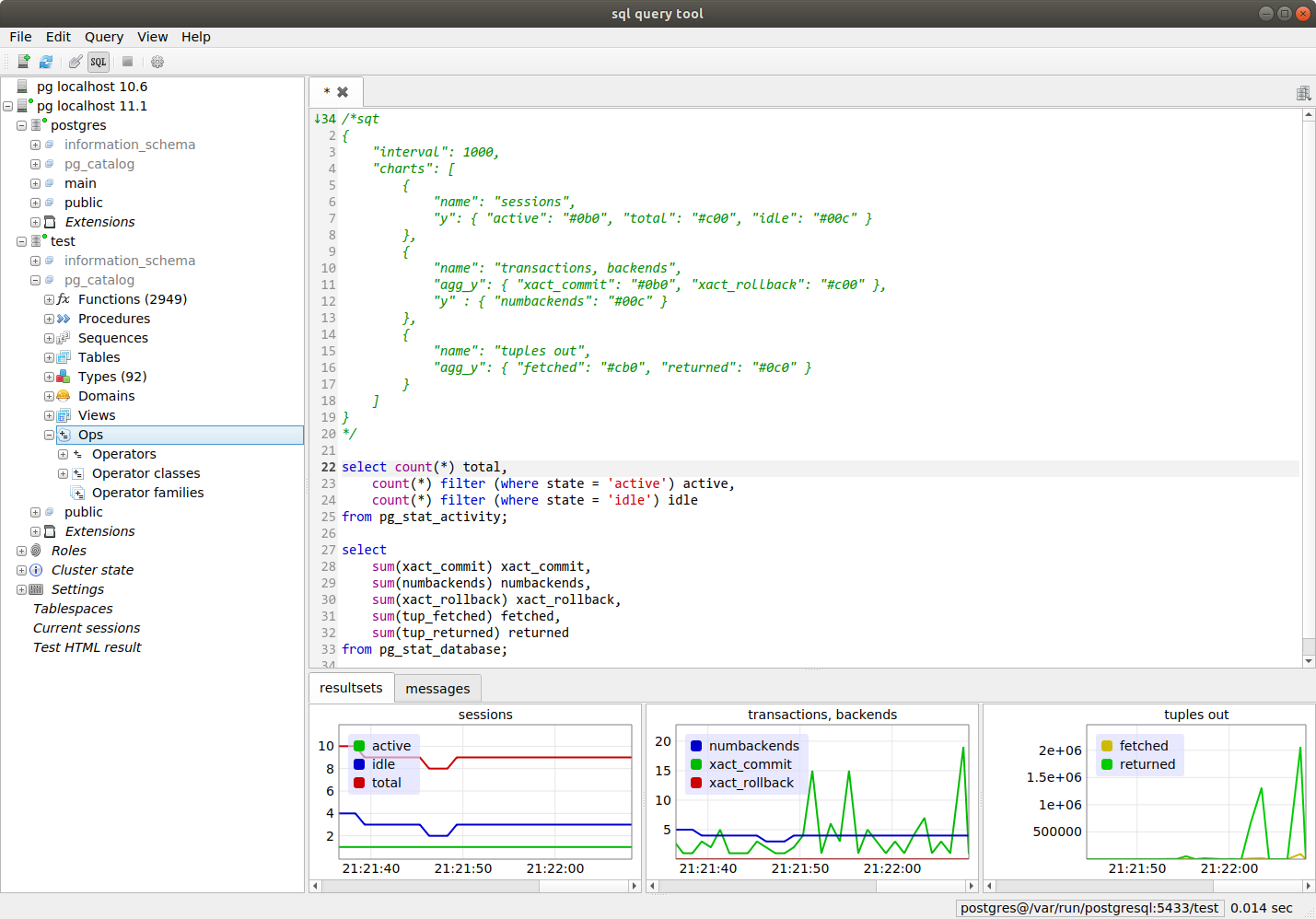
F6); - customizable time charts to display current or recorded statistics;
- resultsets structure textual output;
- pg: client-side COPY to file or log widget, COPY from file;
- pg: receiving notifications (
NOTIFY) and messages (RAISE).
Search in files
The connection used for highlighting and for the editor tab is the one that was
current when Ctrl+Shift+F was pressed. Its root folder is remembered per
connection: the scripts of a database live in their own repository, so coming
back to a connection brings its folder back with it.
COPY to/from local file via meta-comments (pg only)
Use COPY FROM STDIN and COPY TO STDOUT forms of the command with some magic in comments:
/*sqt { "copy_dst": ["/tmp/pg_stat_activity.csv", "/tmp/pg_stat_database.csv"] } */
copy (select * from pg_stat_activity) to stdout with (format csv, header);
copy (select * from pg_stat_database) to stdout with (format csv, header);
Specify an empty string instead of file name for output to the log widget:
/*sqt { "copy_dst": "" } */
copy (select * from pg_stat_activity) to stdout with (format csv, header);
- As you can see, the non-array form of
copy_dstmay be used in case of single source query.
create table tmp1 as select * from pg_stat_activity limit 0;
create table tmp2 as select * from pg_stat_database limit 0;

/*sqt { "copy_src": ["/tmp/pg_stat_activity.csv", "/tmp/pg_stat_database.csv"] } */
copy tmp1 from stdin with (format csv, header);
copy tmp2 from stdin with (format csv, header);
Charting via meta-comments
Timelines example:
/*sqt
{
    "interval": 1000,
    "charts": [
        {
            "name": "sessions",
            "y": { "active": "#0b0", "total": "#c00", "idle": "#00c" }
        },
        {
            "name": "transactions, backends",
            "agg_y": { "xact_commit": "#0b0", "xact_rollback": "#c00" },
            "y" : { "numbackends": "#00c" }
        },
        {
            "name": "tuples out",
            "agg_y": { "fetched": "#cb0", "returned": "#0c0" }
        }
    ]
}
*/
select count(*) total,
    count(*) filter (where state = 'active') active,
    count(*) filter (where state = 'idle') idle
from pg_stat_activity;

select
    sum(xact_commit) xact_commit,
    sum(numbackends) numbackends,
    sum(xact_rollback) xact_rollback,
    sum(tup_fetched) fetched,
    sum(tup_returned) returned
from pg_stat_database;
interval - interval to reexecute queries (milliseconds);
charts - list of charts with names and graphical paths description;
agg_y - cumulative values source.
Plot some source of (x,y) values
/*sqt
{
    "charts": [
        {
            "name": "tps_log",
            "x": "ts",
            "y": {
                "f1": "#0c0"
            }
        }
    ]
}
*/
select s.ts, 5 + 4*random() f1
from generate_series(now(), now() + '20min'::interval, '1sec'::interval) as s(ts)
Releases
Ready-made builds are attached to every release:
| file | platform | notes |
|---|---|---|
sqt_<version>_amd64.deb |
Debian 12, Ubuntu 22.04+ | sudo apt install ./sqt_<version>_amd64.deb; uses the distribution's Qt 6 |
sqt-<version>-x86_64.AppImage |
any x86_64 linux with glibc 2.35+ | chmod +x and run; Qt is inside, no root needed |
sqt-<version>-windows-x64.zip |
Windows 10 1809+ | unpack anywhere and run sqt.exe |
A release is made by pushing a tag - git tag v1.2.3 && git push origin v1.2.3 -
which is also where the version shown in the about box comes from. Builds of a
branch are not published anywhere: .github/workflows/ci.yml only compiles and
runs the tests.
Build instruction
The project is built with CMake (3.16+, C++17). You may open CMakeLists.txt in QtCreator, or execute the following from the project's root directory:
cmake -S . -B build -DCMAKE_BUILD_TYPE=RelWithDebInfo
cmake --build build -j
This produces build/sqt with decor and scripts placed next to it.
Qt toolchain must be installed and be available via PATH (it is located via qmake, so make sure the intended Qt version comes first). Besides Qt, the build requires libpq (PostgreSQL client library), an ODBC driver manager (unixODBC) and OpenSSL. On Debian/Ubuntu:
sudo apt install build-essential cmake libpq-dev unixodbc-dev libssl-dev
On Windows the dependencies are fetched via vcpkg automatically.
Unit tests are built along with the application and run with ctest --test-dir build.
Installation (linux)
cmake --install build --prefix /usr/local
The binary goes to bin, the scripts and the icons to share/sqt, plus a desktop
entry and an application icon. The portable layout keeps working as before: if
decor and scripts are next to the binary, they are used.
Where the scripts are looked up
The folders below are searched in order, and the first one holding the file wins. A copy of a single script therefore replaces just that script, while the rest of the bundle keeps coming from where it was:
$SQT_ASSETS_DIR- the assets directory setting (settings dialog, applied at once)
- next to the binary
- the data folder of the prefix the binary sits in,
<binary>/../share/sqtby default (this is what keeps an installed tree working after it has been moved) ~/.local/share/sqt- the folder the application was installed into
Todo
- Improve code completion, prepare scripts to fetch metadata from non-postgresql data sources;
- executing of JavaScript along with SQL to run automation tasks;
- new script types to extend objects tree interaction (modifying, administration tasks);
- enhance scripts to make
sqtas useful as possible (+provide scripts for different dbms, versions, generic odbc data source); - batch mode;
- reports.
Acknowledgment
Some icons by Yusuke Kamiyamane. All rights reserved.
Explore related projects
Asabeneh/30-Days-Of-Python
The 30 Days of Python programming challenge is a step-by-step guide to learn the Python programming language in 30 days. This challenge may take more than 100 days. Follow your own pace. These videos may help too: https://www.youtube.com/channel/UC7PNRuno1rzYPb1xLa4yktw
78,486 starsgrafana/grafana
The open and composable observability and data visualization platform. Visualize metrics, logs, and traces from multiple sources like Prometheus, Loki, Elasticsearch, InfluxDB, Postgres and many more.
77,790 starsredis/redis
For developers, who are building real-time data-driven applications, Redis is the preferred, fastest, and most feature-rich cache, data structure server, and document and vector query engine.
77,332 starsapache/superset
Apache Superset is a Data Visualization and Data Exploration Platform
75,455 stars