
pankajgarkoti/magi has 6 GitHub stars and 0 forks. GitHot measured 0 stars in 24 hours. Last checked 2026-11-15 17:10 UTC. Last push 2026-11-11.
Measured star growth
- in 24h
- 0
- in 7 days
- Collecting history
- in 15 days
- Collecting history
- in 1 month
- Collecting history
Net star changes over overlapping periods, not daily totals. Missing measurements are left blank. Stars measure attention, not software quality.
About
A Fedora/Hyprland setup built around LLM agents
AIREADME.md
OriginalMAGI
MAGI is a Fedora/Hyprland setup built around LLM agents. The main interface is an agent running in tmux. You speak or type to it. It starts other agents, operates the desktop, and asks you only for decisions. The desktop around it is Hyprland with three colour themes.
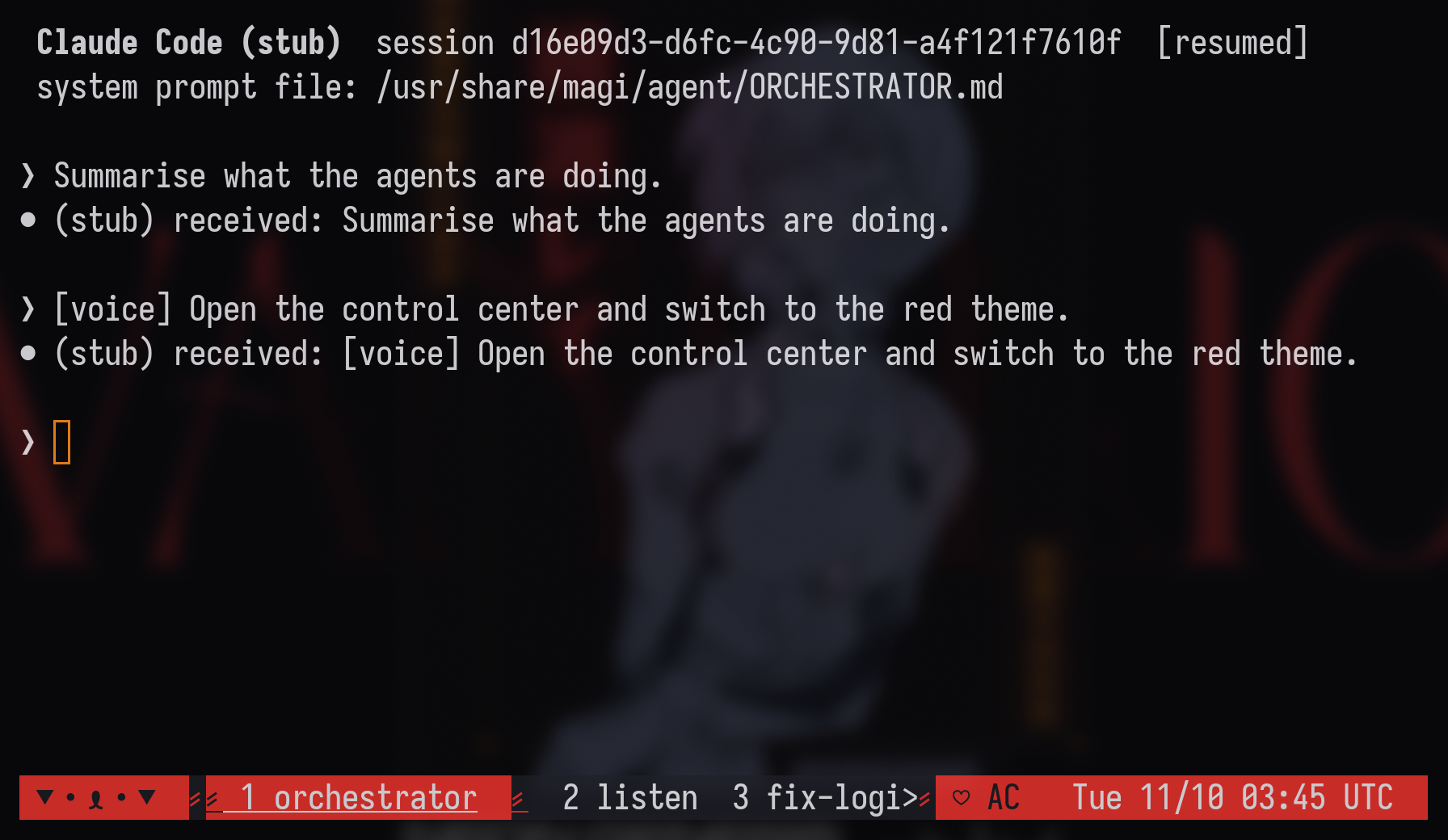
The orchestrator
- One agent in front. An orchestrator agent (Claude Code, opencode, Codex, or any terminal
agent) runs in tmux window 1 (session
magi) and starts at login. SUPER+drops its console over the desktop; the console also opens by itself at login. Other agents get their own tmux windows. The orchestrator starts them, checks their work, drives Hyprland throughhyprctl`, and brings you decisions. - Workers report back.
magi-agent spawnwatches each worker it starts. When a worker finishes, stops at a permission prompt, or exits, a[magi]message naming the window is typed into the orchestrator, so it doesn't have to poll or guess. - Local voice. A listener transcribes the microphone with faster-whisper (
base.en) and types the text into the orchestrator as[voice] …. Replies are spoken with Piper. Both models are part of the image, so speech works offline and no audio leaves the machine. There is no wake word. SUPER+SHIFT+M mutes it. - Visible state. The bar module next to the MAGI tag shows the orchestrator
(
IDLE,WORKING,ASKINGwhen a prompt waits,OFFLINE), the number of agents, and the listener. The control centre's AGENTS page lists every agent and has the switches. - Housekeeping. Agents idle for an hour are closed, with the resume command logged. After a reboot the tmux layout comes back with each session resumed. An agent with no resume command starts fresh.
- Opt-in, and not bundled. No agent is in the image. On first login, PILOT SETUP asks
which agent to use, runs that agent's official installer, you sign in with your own
account, and you pick a microphone. "Not now" leaves a plain desktop;
magi-agent offturns it off later. Without network, everything except the agent keeps working.
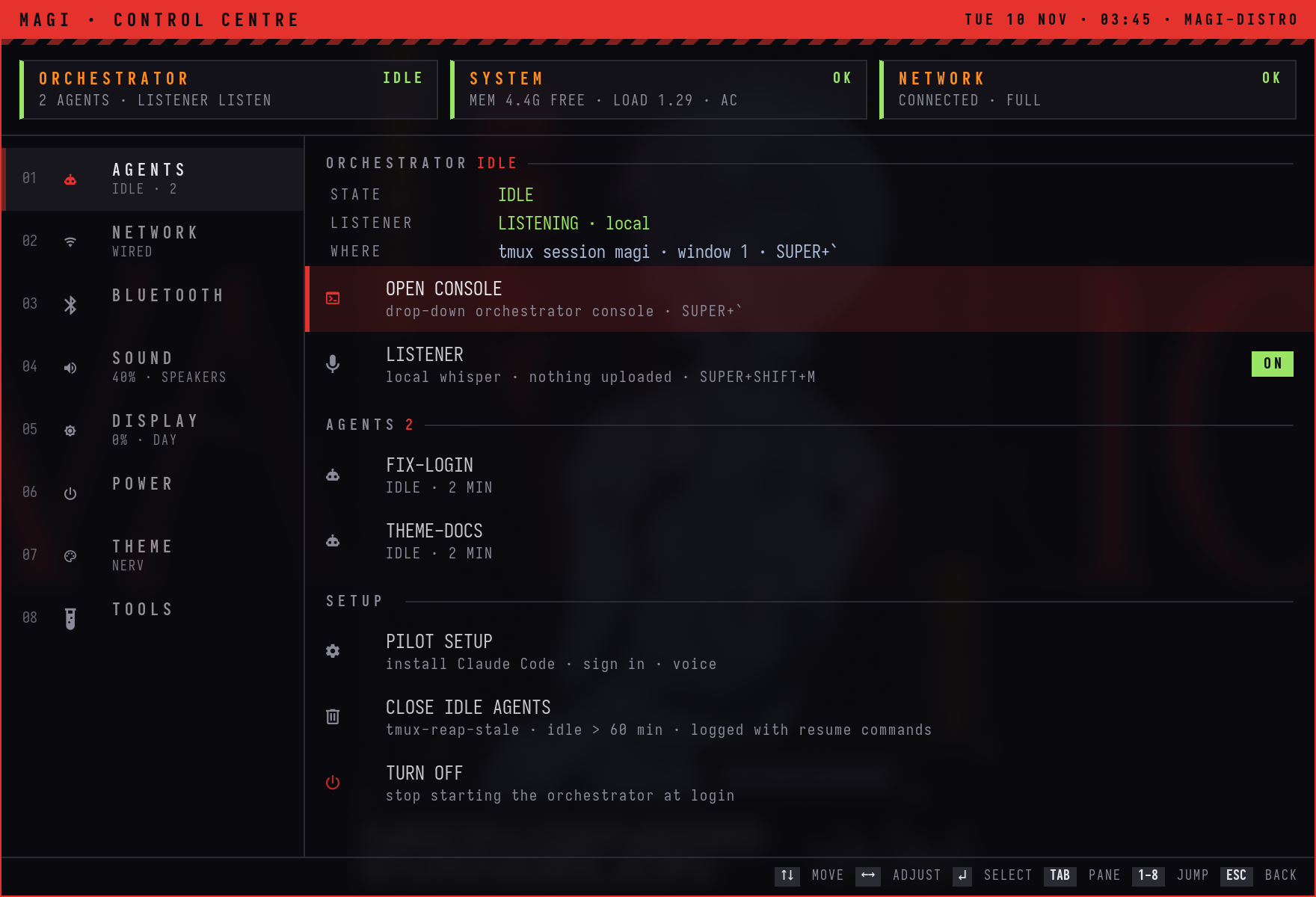 |
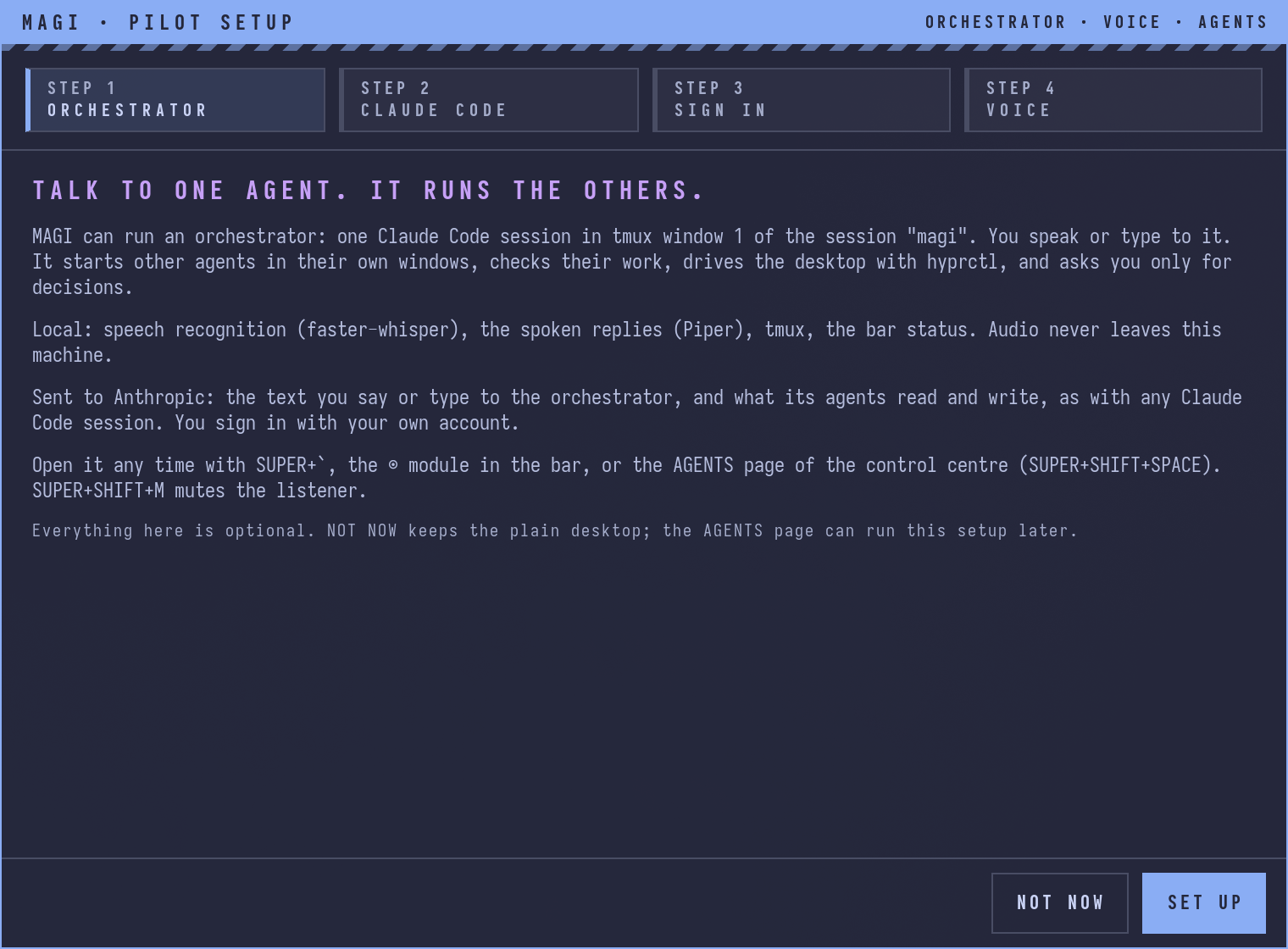 |

The orchestrator text in these screenshots comes from a test stand-in for the agent command; the VM was not signed in to any agent account. They were captured at 2× in the MAGI distro test VM, installed from the ISO.
Choosing the agent
tmux is the orchestration layer, so the orchestrator and its agents can be any terminal agent.
send-keys, capture-pane and the window layout work the same for all of them. What differs
per agent (installer, sign-in, launch, resume, how its state is read) is in
agent/lib/magi_agents.py.
| Agent | Installed by | Resume after reboot | State read from |
|---|---|---|---|
| Claude Code | curl -fsSL https://claude.ai/install.sh | bash |
claude --resume <id> |
~/.claude/sessions/<pid>.json |
| opencode | curl -fsSL https://opencode.ai/install | bash |
opencode --session <id> |
opencode's local server API |
| Codex | curl -fsSL https://chatgpt.com/codex/install.sh | sh |
codex resume <id> |
Codex's session rollout file |
| custom | your own command | starts fresh (or AGENT_RESUME) |
the tmux pane |
Approval and permission prompts are read from the pane for every agent. Change the agent in PILOT SETUP, or:
magi-agent use opencode                  # the orchestrator
magi-agent use --sub claude              # the agents it starts (default: same as the orchestrator)
magi-agent use custom aider --model sonnet
Settings live in ~/.config/magi/agent.conf (AGENT, SUBAGENT, AGENT_CMD, AGENT_ARGS).
Claude Code gets MAGI's instructions with --append-system-prompt-file. The others start in
~/.local/state/magi/orchestrator, whose AGENTS.md is MAGI's
ORCHESTRATOR.md. AGENT_ARGS passes extra flags to the
orchestrator, for example Codex's --sandbox: the orchestrator runs tmux and hyprctl, which
a tight sandbox may block. The orchestrator starts other agents with
magi-agent spawn <window> <dir> <brief>.
The desktop
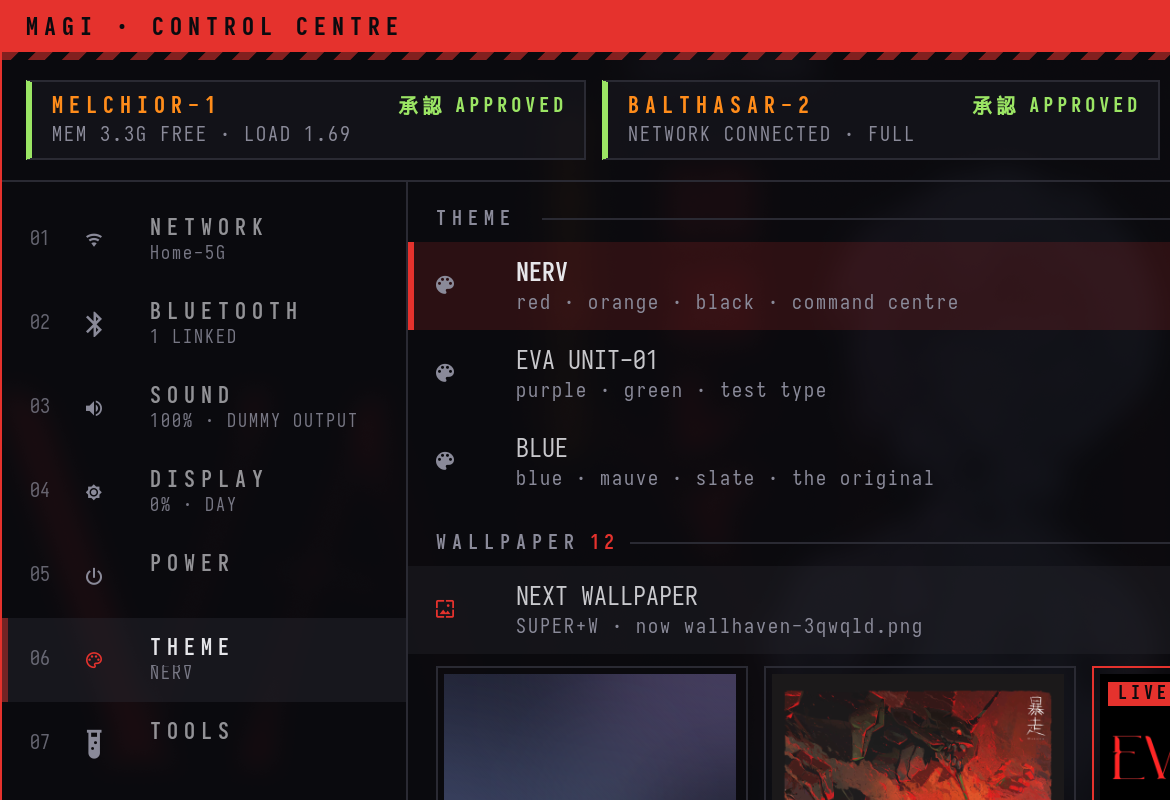
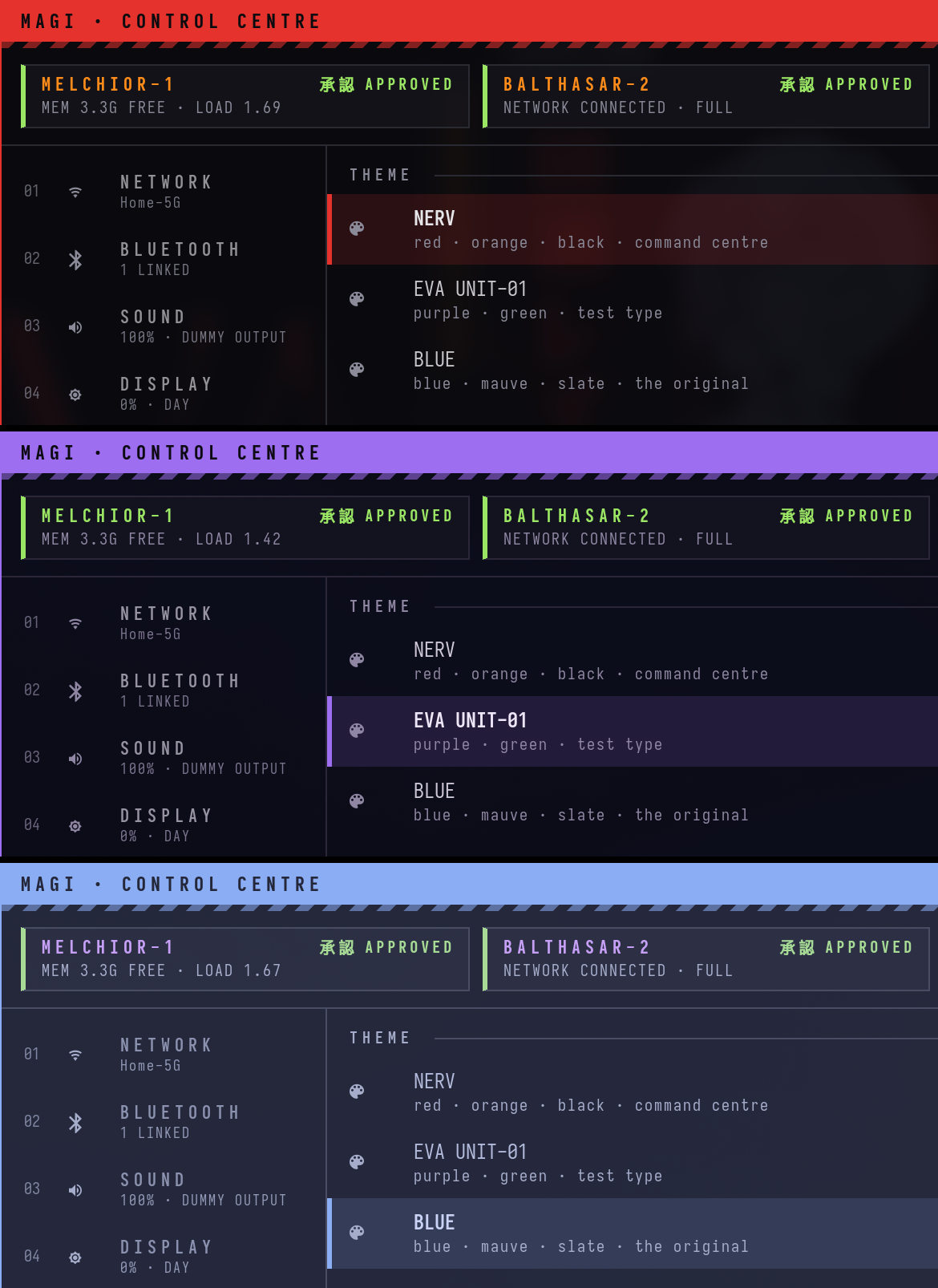
The control centre (SUPER + SHIFT + Space) in the NERV theme. More screenshots and short clips are below.
GNOME stays installed. MAGI (and plain Hyprland) are extra sessions on the login screen, so you can log out and pick GNOME again.
Get it
Install from the ISO (new machine or VM). Download magi-44-x86_64.iso (4.8 GB, hosted on the Internet Archive) and write it to a USB stick or boot it in a VM.
sha256 cf30def4367d2395558349c4becd1c6e29806f5f5b968bbaf01c664bb5e20ebb
The ISO is Fedora's netinstall boot media plus the MAGI image (installed offline from the ISO) and a kickstart. Anaconda asks for the disk; GNOME Initial Setup creates the user. The login screen defaults to the MAGI session.
Switch an existing Fedora Atomic system (Silverblue, Kinoite and other Atomic editions; not Workstation):
sudo bootc switch ghcr.io/pankajgarkoti/magi:latest
Updates are atomic: sudo bootc upgrade stages the next image, and sudo bootc rollback
returns to the previous one.
Build it yourself (podman only, no root):
podman build -f distro/Containerfile -t localhost/magi:latest .
distro/build-iso.sh --image localhost/magi:latest --out magi-44-x86_64.iso
See distro/ and the VM test in tests/vm/.
On an existing Fedora 44 Workstation: install.sh below sets up the same desktop, with
backups and an uninstall script. The orchestrator layer is a separate opt-in step:
agent/setup.sh (links the tools and units, builds the local voice runtime in
~/.local/share/magi-voice).
What's in it
- Hyprland 0.57 with the new Lua config, from the
sdegler/hyprlandCOPR. Also hyprlock, hypridle, hyprpaper, hyprsunset and hyprpolkitagent. - waybar, mako for notifications, wofi as the launcher, cliphist for clipboard history.
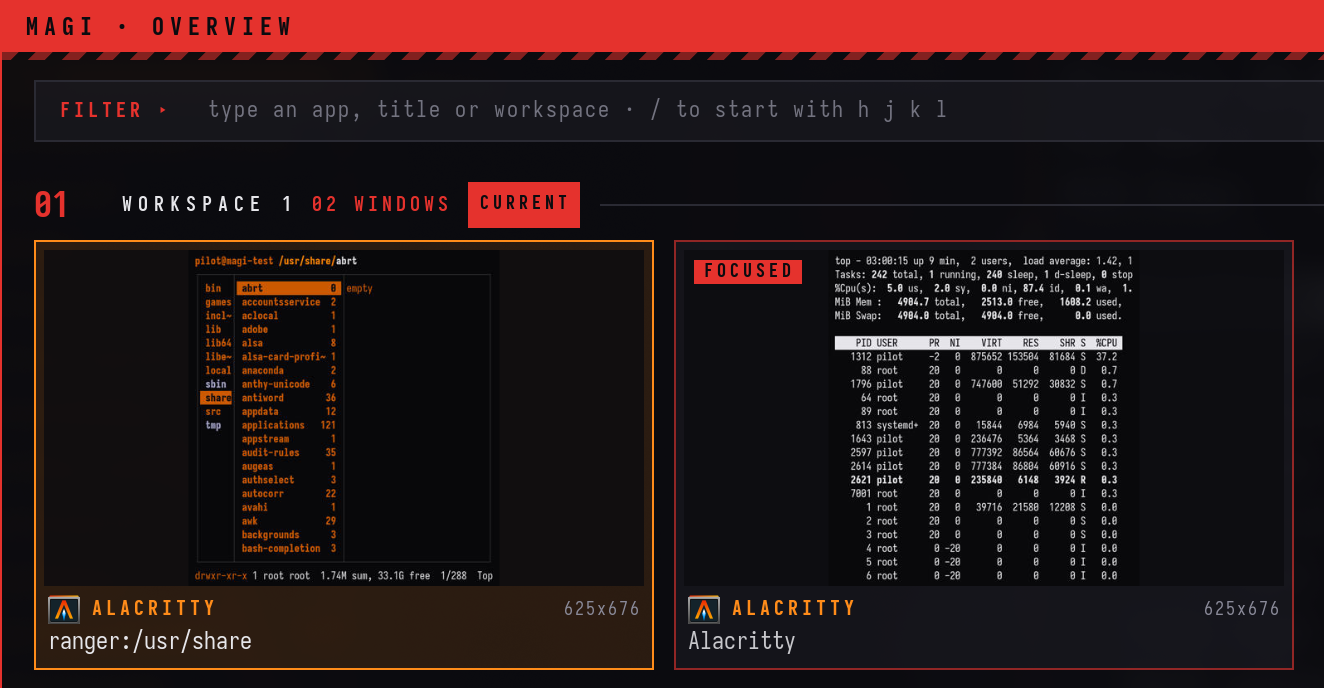
magi, a control centre that replaces GNOME's quick settings: network, Bluetooth, sound devices and volume, brightness and night light, power profiles, lock/suspend/reboot (each one asks twice), themes and wallpapers. It stays resident, so it opens in under 100 ms.magi-overview: all windows on all workspaces as live thumbnails. Type to filter, Enter jumps.eva-wifiandeva-bluetooth, small keyboard pickers for Wi-Fi and Bluetooth.- Three themes:
blue(Catppuccin Macchiato, the default),nerv(red and orange on black),unit01(purple and green). Switching one restyles the bar, terminal, tmux, GTK and libadwaita apps, icons, the polkit prompt and the lock screen, live. - Alacritty, tmux with a recoloured Dracula status bar, ranger, Nautilus, and the IosevkaTerm
Nerd Font everywhere. New terminals print a short MAGI status banner (orchestrator,
memory, network, power).
MAGI_NO_BANNER=1turns it off.
A look around
Everything here was captured in a throwaway Fedora 44 Workstation VM right after running the installer, at 2× scale, and cropped to one thing per image. The Wi-Fi networks and Bluetooth devices are simulated inside the VM.
Switching from NERV to Unit-01 on the control centre's THEME page. The few seconds the VM takes to apply a theme are cut. (MP4)
https://github.com/user-attachments/assets/c6d94bbf-9aad-4347-a9f7-353af367de6c
The three themes on the same page: nerv, unit01, blue.
Opening the control centre, then jumping to NETWORK, BLUETOOTH and SOUND. (Recorded before
the AGENTS page became section 1; those sections are now 2, 3, 4.)
(MP4)
https://github.com/user-attachments/assets/a23c4f63-8490-48f2-acb0-4f0d3b44d156
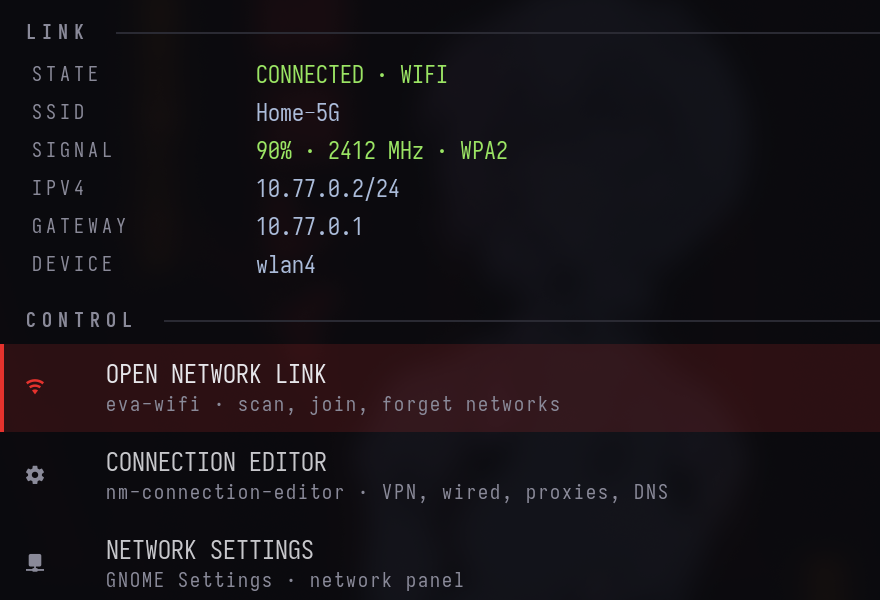
The NETWORK page: link details, then shortcuts to the Wi-Fi picker, the connection editor and GNOME's network settings.
magi-overview (SUPER + O): every window as a live thumbnail, grouped by workspace.
Typing naut filters to the Files window on workspace 2; Enter jumps there.
(MP4)
https://github.com/user-attachments/assets/49de09ae-e4ea-48fd-825a-d66681113a24
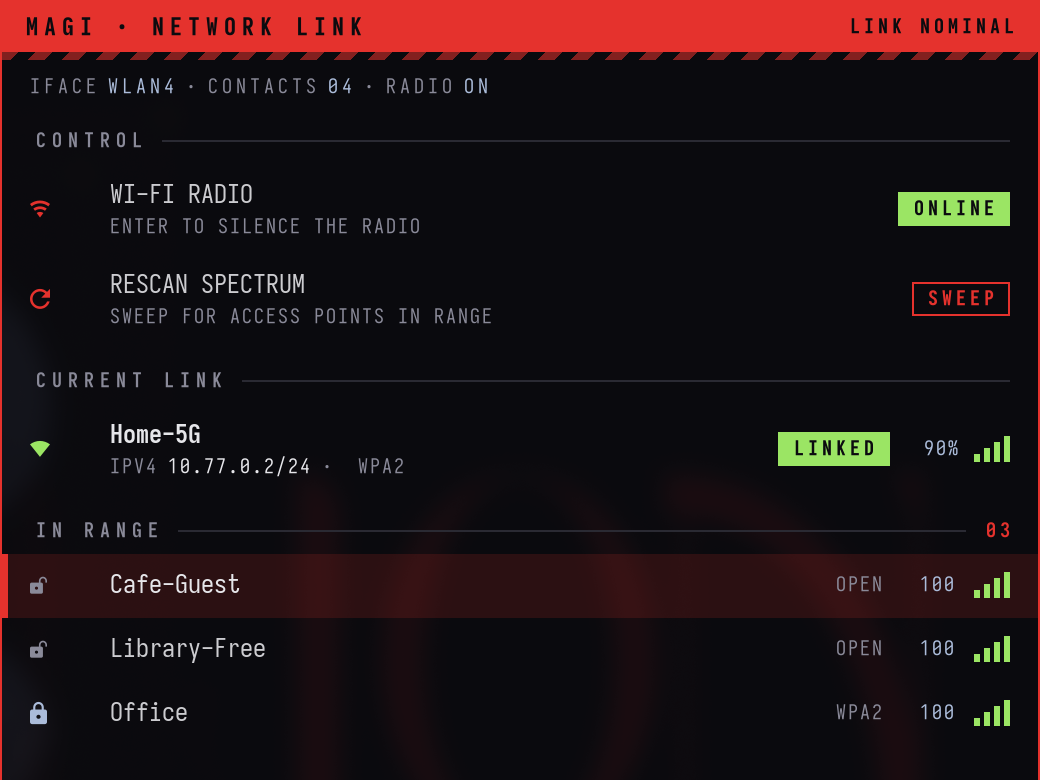
eva-wifi (SUPER + SHIFT + W): the current link and the networks in range, driven with j/k.
(MP4)
https://github.com/user-attachments/assets/878598bc-4d1c-4f88-95f9-749c6f9874f4
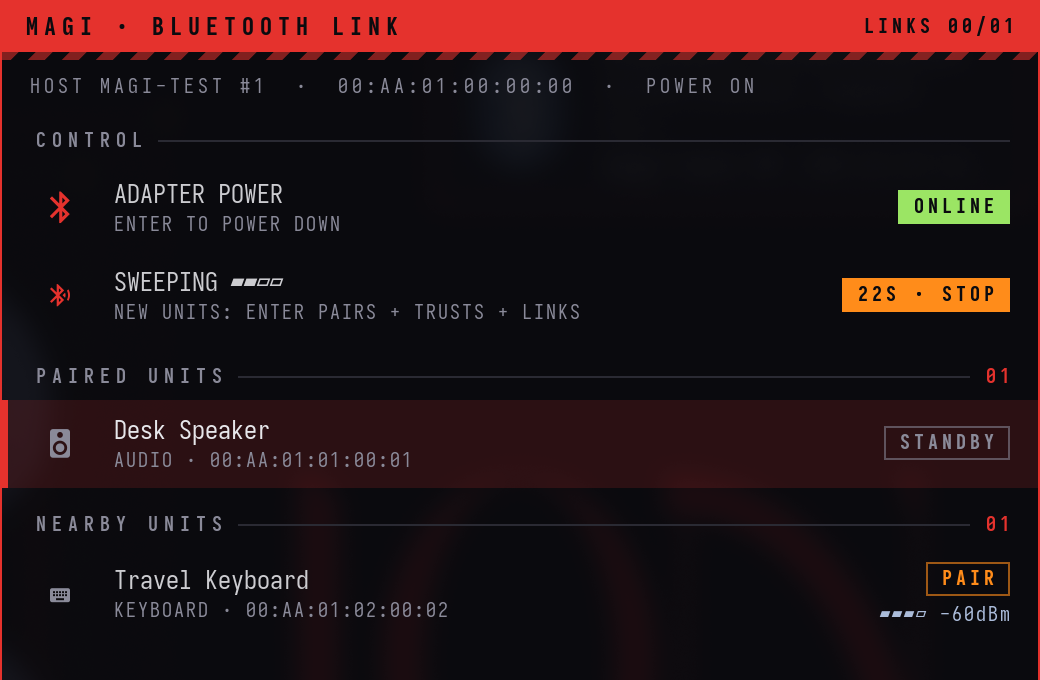
eva-bluetooth (SUPER + SHIFT + B) during a scan: one paired speaker, one keyboard in range.
Install
On a fresh Fedora 44 Workstation, as your normal user (not root):
bash <(curl -fsSL https://raw.githubusercontent.com/pankajgarkoti/magi/main/install.sh)
or from a checkout:
git clone https://github.com/pankajgarkoti/magi.git ~/.local/share/magi
~/.local/share/magi/install.sh            # add --dry-run to preview every step first
Then log out. On the login screen, pick your user, click the gear (⚙) in the corner and choose Hyprland, then log in.
What the installer does, in order (each step is skipped when it is already done, so it is safe to re-run):
- Checks that this is Fedora and that sudo works.
- Uses this checkout, or clones the repo to
~/.local/share/magi. - Enables COPR
sdegler/hyprland. - Installs the missing packages with
dnf(the list is at the top ofinstall.sh). - Downloads the IosevkaTerm Nerd Font from the official nerd-fonts release (checksum
verified) into
~/.local/share/fonts. - Moves any existing file that MAGI would replace to
~/.magi-backup/<timestamp>/, then links the configs with GNU stow (packages/*, linked file by file). - Hooks
~/.bashrc.d(Fedora's default.bashrcalready does) and fetches tmux-sensible. - Generates the blue wallpaper and downloads the EVA wallpapers listed in
wallpapers/manifest.tsv(sha256 checked). If you are offline they are skipped and the blue wallpaper is used until you re-run the installer. - Sets fonts and dark mode in gsettings and runs
eva-theme blue. - Verifies every link, generated file, package and the Hyprland config.
Options: --dry-run, --theme nerv|unit01|blue, --no-packages, --no-wallpapers.
Update
magi-update
git pulls the checkout, re-links the configs, installs any newly added packages, re-runs the
setup steps with your current theme, and reloads Hyprland, waybar and the MAGI panels.
Shortcuts
SUPER does window management. Alt is left alone because tmux uses it.
| Keys | Action |
|---|---|
| SUPER + Return | Terminal (Alacritty) |
| SUPER + Space | App launcher (wofi) |
| SUPER + SHIFT + Space | MAGI control centre |
| SUPER + O | Overview / window switcher |
| SUPER + SHIFT + W / SUPER + SHIFT + B | Wi-Fi picker / Bluetooth picker |
| SUPER + SHIFT + S | Sound settings |
| SUPER + E | Files (Nautilus) |
| SUPER + R | ranger (floating terminal file manager) |
| SUPER + B | Web browser (your default) |
| SUPER + Q | Close window |
| SUPER + F / V / P / S | Fullscreen / float / pseudo-tile / toggle split |
| SUPER + h j k l (or arrows) | Move focus |
| SUPER + SHIFT + h j k l | Move window |
| SUPER + CTRL + h j k l | Resize window |
| SUPER + 1…9 / SUPER + SHIFT + 1…9 | Go to workspace / send window to workspace |
| SUPER + Tab, or tap SUPER twice | Previous workspace |
| SUPER + ` | Orchestrator console (drop-down tmux session magi) |
| SUPER + SHIFT + M | Mute / unmute the listener |
| SUPER + SHIFT + ` | Send window to the scratchpad |
| SUPER + A | Window mode: plain h j k l focus, H J K L move, arrows resize, 1–9, f, v, q; Esc leaves |
| SUPER + W | Next wallpaper |
| SUPER + SHIFT + T | Cycle theme (nerv → unit01 → blue) |
| SUPER + SHIFT + V | Clipboard history |
| SUPER + Escape | Lock screen |
| SUPER + SHIFT + E | Exit Hyprland |
| Print / SHIFT + Print | Screenshot a region to the clipboard / the screen to ~/Pictures |
| SUPER + drag / SUPER + right-drag | Move / resize a window with the mouse |
| Volume, brightness, media keys | Work as labelled |
Inside the control centre: arrows or j k move, h l adjust, Enter acts, 1–8 jump to a
section, Esc goes back. In the overview, type to filter, Enter jumps, Shift+Enter brings the
window here. The waybar MAGI badge opens the control centre (right-click cycles the theme).
Themes
eva-theme blue      # Catppuccin Macchiato blue + mauve on slate (default)
eva-theme nerv      # NERV: red, orange, black
eva-theme unit01    # EVA Unit-01: purple and green
eva-theme toggle    # cycle (also SUPER + SHIFT + T, or the THEME page of the control centre)
A theme is a folder in packages/hypr/.config/hypr/themes/<name>/ (colors.css, palette,
theme.lua, alacritty.toml, tmux.conf). eva-theme points themes/current at it and
regenerates everything that cannot read colors.css directly. libadwaita apps (Settings,
Files) pick up a new theme the next time they start.
Uninstall / roll back
~/.local/share/magi/uninstall.sh # add --dry-run to preview
This removes MAGI's links and generated files, removes the ~/.bashrc loader if the
installer added one, and copies back everything from ~/.magi-backup/ (the state from
before the first install wins). Backups are never deleted; remove ~/.magi-backup yourself
when you are happy. Packages stay installed. To remove them too:
sudo dnf remove hyprland hyprlock hypridle hyprpaper hyprsunset hyprpolkitagent waybar
sudo dnf copr remove sdegler/hyprland
Then pick GNOME again on the login screen.
Layout
install.sh  uninstall.sh
agent/             the orchestrator layer: magi-agent, PILOT SETUP, listener, hud-say, tmux
                   snapshot/restore/reaper, user units, ORCHESTRATOR.md, voice runtime build,
                   agent adapters (lib/magi_agents.py)
distro/            Containerfile (bootc image), build-iso.sh, installer kickstart + branding
packages/          stow packages, linked into ~ file by file
  hypr/            Hyprland, waybar, mako, wofi, themes, the magi/eva-* tools (~/.local/bin)
  gtk/             EVA GTK 3/4 theme sources, libadwaita colours, generators
  ranger/ alacritty/ tmux/ shell/
wallpapers/        manifest.tsv (downloaded at install) and make-blue.py (generated)
tests/             container-test.sh (podman, Fedora 44) and the VM test notes
Credits
- Wallpapers are not part of this repository. The installer downloads them from Wallhaven; the manifest links each one's page. All rights stay with the original artists. Neon Genesis Evangelion is © khara / GAINAX; MAGI is an unofficial fan theme.
- tmux status bar: a lightly modified dracula/tmux (MIT),
plus tpm (MIT), both vendored under
packages/tmux. - Hyprland packages for Fedora: COPR sdegler/hyprland.
- Font: IosevkaTerm Nerd Font.
- MAGI is a Fedora remix: it is built from Fedora packages, but it is not Fedora and is not
produced or endorsed by the Fedora Project. Fedora's logos are replaced by
generic-logos. - Voice: faster-whisper (MIT) with the
base.enmodel, and Piper (GPL-3.0-or-later) with theen_US-ljspeech-mediumvoice (LJ Speech dataset, public domain). - The orchestrator can use Claude Code, opencode or Codex. MAGI does not include or redistribute any of them; each is installed from its publisher at first login and used under its publisher's terms.