
packetThrower/Baudrun
packetThrower/Baudrun has 38 GitHub stars and 1 forks. GitHot measured 0 stars in 24 hours. Last checked 2026-11-14 17:53 UTC. Last push 2026-11-10.
What you can do
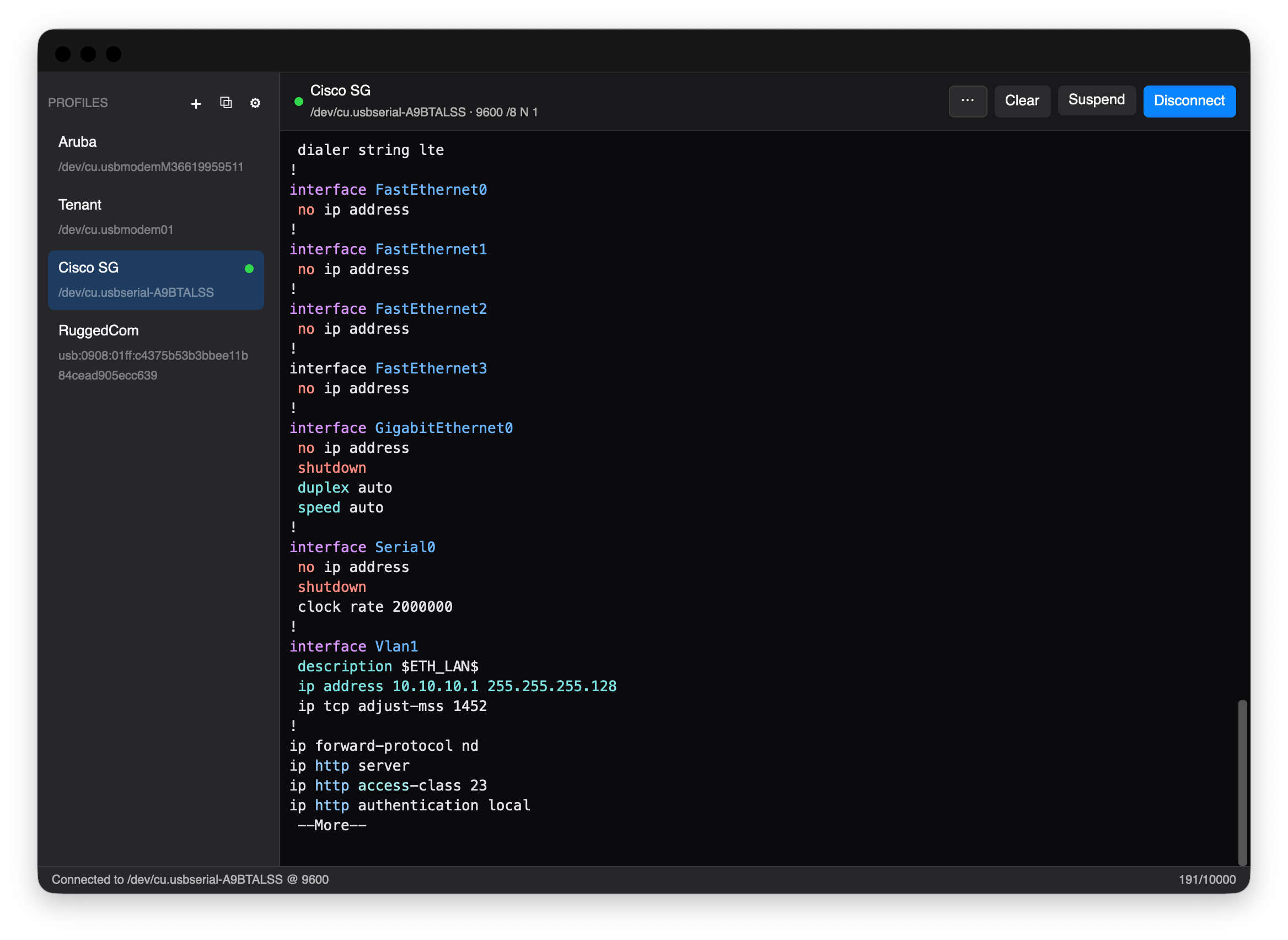
- Profiles. Each device gets a saved profile — its port, baud, framing, flow control, line ending, and control-line policy — stored as plain JSON. Drag rows in the sidebar to reorder them. See Profiles.
- USB chipset detection. A VID/PID lookup recognises CP210x, FTDI, PL2303, CH340, MCP2221, and others, and links to the vendor driver when one is missing. CDC-ACM USB-C consoles (HPE/Aruba, newer Cisco, RuggedCom RST2228) work with no driver at all.
- Auto-reconnect. When a USB adapter drops, the session comes back on its own and the scrollback survives the gap.
- Output formatting and capture. Per-line wall-clock timestamps, session-local line numbers, a hex-dump view of incoming bytes, and raw session recording to a file. Each is a per-profile toggle.
Measured star growth
- in 24h
- 0
- in 7 days
- Collecting history
- in 15 days
- Collecting history
- in 1 month
- Collecting history
Net star changes over overlapping periods, not daily totals. Missing measurements are left blank. Stars measure attention, not software quality.
About
Serial terminal app for connecting to serial devices with profiles.
Developer ToolsREADME.md
Original

Baudrun



Minimum OS versions
macOS (Apple Silicon and Intel)



Windows (x64 and ARM64)

Linux (amd64 and arm64)


Linux additionally needs a Vulkan-capable GPU with current Mesa drivers.
A cross-platform serial terminal for network devices. Built for switch consoles, router CLIs, and other serial-attached gear. Each device gets a saved profile with its port, baud rate, framing, flow control, line ending, and any send-on-connect sequences. One click connect.
Developed in close collaboration with Claude (Anthropic). See AI-USAGE.md for how that split works.
Documentation
Full reference docs live at packetthrower.github.io/Baudrun.
The site covers profiles, themes, skins, highlight-rule authoring, the regex
playground, file-transfer protocols, and accessibility. Markdown sources are
under docs-next/.
Sample JSON for authoring your own skins, themes, and highlight packs is on the website.
Highlights
- Profiles. Each device gets a saved profile — its port, baud, framing, flow control, line ending, and control-line policy — stored as plain JSON. Drag rows in the sidebar to reorder them. See Profiles.
- USB chipset detection. A VID/PID lookup recognises CP210x, FTDI, PL2303, CH340, MCP2221, and others, and links to the vendor driver when one is missing. CDC-ACM USB-C consoles (HPE/Aruba, newer Cisco, RuggedCom RST2228) work with no driver at all.
- Auto-reconnect. When a USB adapter drops, the session comes back on its own and the scrollback survives the gap.
- Output formatting and capture. Per-line wall-clock timestamps, session-local line numbers, a hex-dump view of incoming bytes, and raw session recording to a file. Each is a per-profile toggle.
- Send Break. A 300 ms TX-low pulse for Cisco ROMMON, Juniper diagnostic mode, and bootloader interrupts.
- File transfer. XMODEM, XMODEM-CRC, XMODEM-1K, and YMODEM, for pushing firmware to embedded bootloaders.
- Paste safety. A confirmation prompt before multi-line pastes, plus a slow-paste mode so UARTs with small buffers don't drop bytes.
- Suspend and resume. Step away from a live session without closing the port; the backlog is waiting when you come back.
- Multi-window. Drag a profile out of the sidebar — past any window edge or onto the terminal pane — and it opens in its own window at the drop point, already connected. Dragging the connected profile moves the live session: port, scrollback, and DTR/RTS state travel with it. Right-click menus do the same without the mouse gesture, and profile edits or reordering in one window show up in every other window immediately.
- Vendor-aware syntax highlighting. Bundled rule packs for Cisco IOS, Juniper Junos, Aruba AOS-CX, Arista EOS, and MikroTik RouterOS, plus a vendor-neutral default. Write your own and test them against real captures in the rule playground.
- 15 terminal themes, 17 app skins. Themes include Dracula, Solarized, Gruvbox, Nord, OneDark, Tokyo Night, and a Colorblind Safe palette built for red-green vision deficiency. Skins include macOS 26 (Liquid Glass), Sidebar Glass, Windows 11, GNOME, KDE, CRT, Cyberpunk, Blueprint, E-Ink, High Contrast, Foundry, and Tokyo Night. Skins and themes are chosen independently.
- Accessibility. Baudrun honours the OS reduce-motion setting, supports keyboard zoom, and keeps every action reachable from the keyboard through customisable shortcuts. A High Contrast skin and a Colorblind Safe theme ship with it. Screen-reader output for the terminal grid is still a gap; the accessibility page has the details.
- Relocatable config directory. Keep your profiles, themes, skins, and settings next to your dotfiles; set the location in Settings → Advanced.
Install
On macOS and Windows, the package managers track the latest stable tag and get you past the first-launch Gatekeeper and SmartScreen warnings. Homebrew, Scoop, and winget also bypass the SmartScreen prompt; winget is Microsoft's own and ships built-in on Windows 10 1809+ and Windows 11.
# macOS — Homebrew (6.0.0+ requires trusting the tap first)
brew tap packetThrower/tap
brew trust packetThrower/tap
brew install --cask baudrun                 # stable
brew install --cask baudrun@alpha           # pre-release

# Windows — winget (Microsoft's package manager, preinstalled)
winget install packetThrower.Baudrun        # or: winget install baudrun

# Windows — Scoop
scoop install git                           # if you don't already have git
scoop bucket add packetThrower https://github.com/packetThrower/scoop-bucket
scoop install baudrun                       # stable
scoop install baudrun-prerelease            # pre-release
The Homebrew and Scoop taps also hold related tools, and Scoop has a separate
manifest for the pre-release channel. winget only carries stable; for
pre-release builds on Windows, use Scoop or download from
Releases directly. Repos:
packetThrower/homebrew-tap,
packetThrower/scoop-bucket,
microsoft/winget-pkgs packetThrower/Baudrun.
Linux users grab the matching .deb / .rpm / .AppImage /
.pkg.tar.zst directly from the
Releases page. The packages
install a udev rule for /dev/ttyUSB* access, so there's no need to add yourself
to the dialout group. Arch users can install the .pkg.tar.zst with pacman -U.
To install by hand, download from
Releases and drag
Baudrun.app to /Applications on macOS, or run the NSIS installer on Windows.
The macOS builds are ad-hoc signed, so the first launch needs a right-click →
Open (or xattr -cr Baudrun.app); the Windows installer is unsigned, so
SmartScreen needs "More info" → "Run anyway". Notarized macOS builds and signed
Windows builds are both planned — see TODO.md.
Building from source
Single-crate Rust project at the repo root. The UI is
GPUI through GPUI Kit,
with alacritty_terminal as the VT parser.
git clone [email protected]:packetThrower/Baudrun.git
cd Baudrun
cargo run                                # dev launch (loopback mode if no port)
cargo run -- /dev/cu.usbserial-XXX       # dev launch attached to a port
cargo build --release                    # optimized binary at target/release/Baudrun
System libraries:
- macOS:
brew install libusb pkg-config - Debian / Ubuntu:
sudo apt install libusb-1.0-0-dev libudev-dev pkg-config - Fedora:
sudo dnf install libusb1-devel systemd-devel pkgconf-pkg-config - Arch:
sudo pacman -S libusb pkgconf - Windows: nothing extra; the gpui DirectX backend ships with Windows 10+.
Project layout
Baudrun/
├── Cargo.toml                # baudrun crate (binary name: Baudrun)
├── src/
│   ├── main.rs               # app entry, menubar / dock, window setup
│   ├── app_view/             # main window: sidebar, profile editor,
│   │                         #   session header, menus, Send File / transfer UI
│   ├── settings_view/        # Settings window (GPUI Kit Settings pages,
│   │                         #   shortcut recorder, theme preview)
│   ├── terminal_view.rs      # alacritty_terminal bridge + grid renderer
│   ├── terminal_grid.rs      # the cell grid the renderer paints from
│   ├── term_bridge.rs        # alacritty → gpui colour / attribute translation
│   ├── settings_bus.rs       # App-scoped settings entity + change broadcast
│   ├── profiles_bus.rs       # cross-window "profiles changed" broadcast
│   ├── skin_tokens.rs        # active-skin token cache (read by every render)
│   ├── highlight_runtime.rs  # line-buffered regex highlighter
│   ├── serial_io.rs          # serial-port read/write threads + write channel
│   ├── updater.rs            # launch-time GitHub Releases check
│   ├── i18n.rs               # locale detection + supported languages
│   └── data/                 # pure-Rust data layer (no UI deps)
│       ├── profiles.rs       # JSON-backed profile store + validation
│       ├── settings.rs       # global settings store
│       ├── themes/           # theme store + .itermcolors plist parser
│       ├── skins.rs          # skin store + CSS-var validation
│       ├── highlight.rs      # rule-pack store
│       ├── sanitize.rs       # session-log sanitizer
│       ├── transfer.rs       # XMODEM / YMODEM state machines
│       ├── hex.rs            # Send Hex input parser
│       ├── serial/           # port enumeration + chipset detection
│       ├── usbserial/        # libusb-direct backend (CP210x)
│       └── appdata.rs        # OS config-directory resolution
├── resources/                # bundled at compile time
│   ├── Info.plist            # macOS bundle metadata
│   ├── icons/                # .icns / .ico / .png set
│   ├── builtin_skins.json    # 16 built-in app skins
│   ├── builtin_themes.json   # 15 built-in terminal themes
│   ├── fonts/                # bundled JetBrains Mono
│   └── highlight/            # bundled vendor rule packs
├── locales/                  # UI strings (en, zh-CN); see locales/README.md
├── build/                    # icon source + Windows installer assets
├── packaging/                # Linux udev rule + .desktop file + Arch PKGBUILD
├── scripts/                  # dev tools (each its own Cargo workspace)
│   ├── virtual-serial/       # baud-paced virtual pty pair for testing
│   └── transfer-tests/       # headless harness for XMODEM / YMODEM / hex
├── test/                     # tracked fixtures for the test harness
│   ├── transfers/            # deterministic binary + hex payloads
│   └── json/                 # JSON packs for Settings → Import smoke tests
├── docs-next/                # Astro/Starlight docs site source
│   └── public/examples/      # sample skin / theme / highlight-pack JSON
└── .github/workflows/        # CI + release + docs deploy
CI (.github/workflows/ci.yml) runs cargo check / clippy / test across
macOS, Windows, and Linux on every push. Release
(.github/workflows/release.yml) builds .dmg / NSIS / .deb / .rpm /
.AppImage / .pkg.tar.zst bundles via cargo-packager on every tag and
attaches them to the GitHub Releases page. The docs workflow (docs.yml)
deploys the Astro site to GitHub Pages on changes under docs-next/.
Testing
Two complementary layers.
Unit tests (cargo test) cover pure-data invariants — JSON
round-trips, parser edge cases, protocol checksum / CRC, the
hex-input validator, the highlight runtime. Fast, no I/O, run on
every CI push.
Wire-level transfer tests drive Baudrun's actual XMODEM /
YMODEM / Send-Hex code paths against a baud-paced virtual pty
pair, then byte-diff what arrives at the other end against
deterministic fixtures. See
scripts/transfer-tests/ for the
harness and scripts/virtual-serial/TESTING.md
for the manual playbook the same fixtures back. Unix-only — pty
primitives don't exist on Windows.
# one-time setup
(cd scripts/virtual-serial  && cargo build --release)
(cd scripts/transfer-tests  && cargo build --release)

# run all 11 cases (~144 s wall) or pass --quick to skip T9 (~18 s)
./scripts/transfer-tests/target/release/transfer-tests
Last verified 2026-05-15 on macOS arm64 (Apple Silicon) against virtual-serial at the throttled baud rates shown:
| Test | What | Baud | Wall | Result |
|---|---|---|---|---|
| T1 | hex ASCII (Hello) |
9 600 | 0.01 s | ok |
| T3 | hex binary / non-printable (00 01 02 ff fe 7f) |
9 600 | 0.01 s | ok |
| T5 | hex 1 KiB random | 9 600 | 1.35 s | ok |
| T11 | YMODEM 512 B over slow link | 9 600 | 5.92 s | ok |
| T6 | YMODEM 4 KiB | 115 200 | 3.69 s | ok |
| T9 | YMODEM 1 MiB | 115 200 | 126.00 s | ok |
| T7c | XMODEM classic (128 B / checksum) | 115 200 | 1.56 s | ok |
| T7C | XMODEM-CRC (128 B / CRC-16) | 115 200 | 1.56 s | ok |
| T7k | XMODEM-1K (1024 B / CRC-16) | 115 200 | 1.55 s | ok |
| T8 | XMODEM single-block (SUB padding) | 115 200 | 1.08 s | ok |
| T10 | YMODEM cancel mid-transfer | 115 200 | 1.18 s | ok |
11 / 11 passed, 143.9 s wall. T9 dominates the run time; the other ten cases together finish in under 18 seconds. Each test maps to a section in TESTING.md — the harness exists so the same playbook can be run unattended.
The harness lifts src/data/transfer.rs
verbatim via #[path], so it exercises the same XMODEM / YMODEM
state machines Baudrun ships — protocol-level regressions surface
at the next cargo build of the harness without any manual sync
step. See
scripts/transfer-tests/README.md
for the full design and flag reference, and
test/transfers/ for the deterministic payload set.
License
GNU General Public License v3.0 or later. Forks are welcome; derivative works must stay open under the same license. Commercial use is permitted but can't close the source.