
open-ribbi/velocut
open-ribbi/velocut has 450 GitHub stars and 1 forks. GitHot measured 0 stars in 24 hours. Last checked 2026-11-10 04:39 UTC. Last push 2026-10-13.
AI-native, local-first video editor by Ribbi — runs entirely in the browser. Rust/WASM engine, WebGPU compositing, WebCodecs export; humans and LLM agents edit through the same JSON command protocol.
What you can do
- Video editing - Multiple tracks, split/trim, snapping, speed changes, track controls and transitions
- Video generation - Draw a timeline range, text or first-frame generation, durable provider jobs, preview and adopt candidates; atomic SDK/MCP/CodeAct APIs
- Titles and motion - Editable text, captions, transform keyframes, effects and declarative motion graphics
- 3D directing - Geometry, assemblies, GLB models, characters, materials, lights, physics and cameras
Measured star growth
- in 24h
- 0
- in 7 days
- Collecting history
- in 15 days
- Collecting history
- in 1 month
- Collecting history
Net star changes over overlapping periods, not daily totals. Missing measurements are left blank. Stars measure attention, not software quality.
README.md
OriginalEnglish · 简体中文
Velocut
A browser studio for editing video and directing 3D scenes with AI.


Download 0.0.2 · Connect Codex · Use the SDKs · Contribute
Velocut combines a multitrack video editor, an editable 3D Director and a programmable project runtime. Arrange a shot by hand or ask Codex to build it: both use the same editing services, project document and undo history.
Built by Ribbi. Media storage and rendering stay in your browser. AI observations and optional cloud features send the data needed by the model or provider you choose.
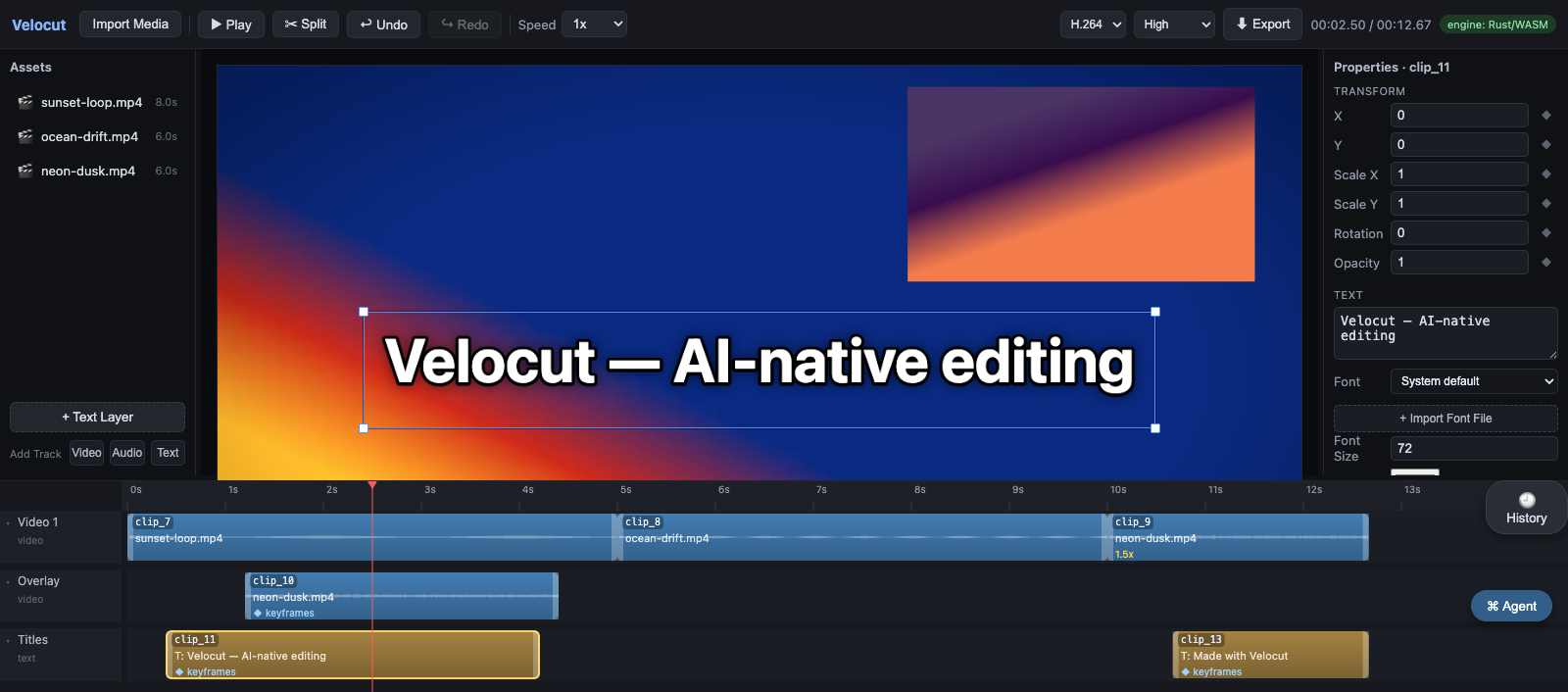
The current Studio UI, captured from a real project. The demo scene is made from editable geometry and furniture assemblies.
Start Studio
Run the prebuilt editor from npm:
npx @velocut/[email protected] studio
Or use the portable download:
Download the portable ZIP or TAR.GZ, extract it, then run inside the velocut-0.0.2 directory:
node start-studio.mjs
Studio opens in your browser. Keep the terminal running while you work. The portable bundle includes the editor, scene assets and a Codex plugin marketplace; no source checkout or npm install is required.
- Node.js 22.6+ and Chrome/Edge with WebGPU and WebCodecs are required. Safari and Firefox are not currently supported by the full editor.
- Projects live in browser IndexedDB/OPFS. Reuse the same browser profile, hostname and port to reopen them.
- Manual editing and the Codex integration need no additional model API key.
- The release includes SHA-256 checksums. The eight
@velocutpackages are also available from npm at version 0.0.2.
Connect Codex
Install the 0.0.2 plugin directly from the Git marketplace:
- In Codex, choose Add plugin marketplace, with source
open-ribbi/velocutand Git refv0.0.2. - Optionally use sparse paths
.agents/pluginsandplugins/velocut(one per line). - Install Velocut, start a new task, and ask Codex to open Velocut.
- The plugin runs the pinned npm MCP package. On first connect it starts or reuses the matching prebuilt Studio, and Codex opens the returned pairing URL.
Node.js 22.6+ and npm are required. No source checkout, build command or terminal session is needed for the Git plugin. MCP and CLI versions are pinned together. A portable release also supports automatic startup using its bundled Studio, without npm downloads.
Try a request such as:
Build a sunlit room with a wooden table, two chairs and a small sculpture. Keep everything editable, then compose a wide shot and a close-up.
The model runs in Codex. The plugin supplies tools for scene creation, object editing, GLB import, arrangement, camera control and visual inspection. It does not call a second LLM inside Velocut. Other MCP clients can use the same generic MCP server.
Connection and troubleshooting guide →
Build scenes in the Director
Create primitives, editable meshes and parametric tables, chairs or stairs. Import self-contained GLB models, adjust materials and lighting, pose characters, and direct camera shots. Animate visibility, per-axis scale and opacity; share curves across objects with individual time offsets. Transform gizmos, object properties and programmatic edits all work on the same scene data. Local and live surface anchors, persistent position/orientation bindings and numerical measurements let agents compose placement that follows source changes. Local face patches preserve unrelated attachments; repair previews expose proposed points and frames before an atomic rebind. See atomic animation channels.
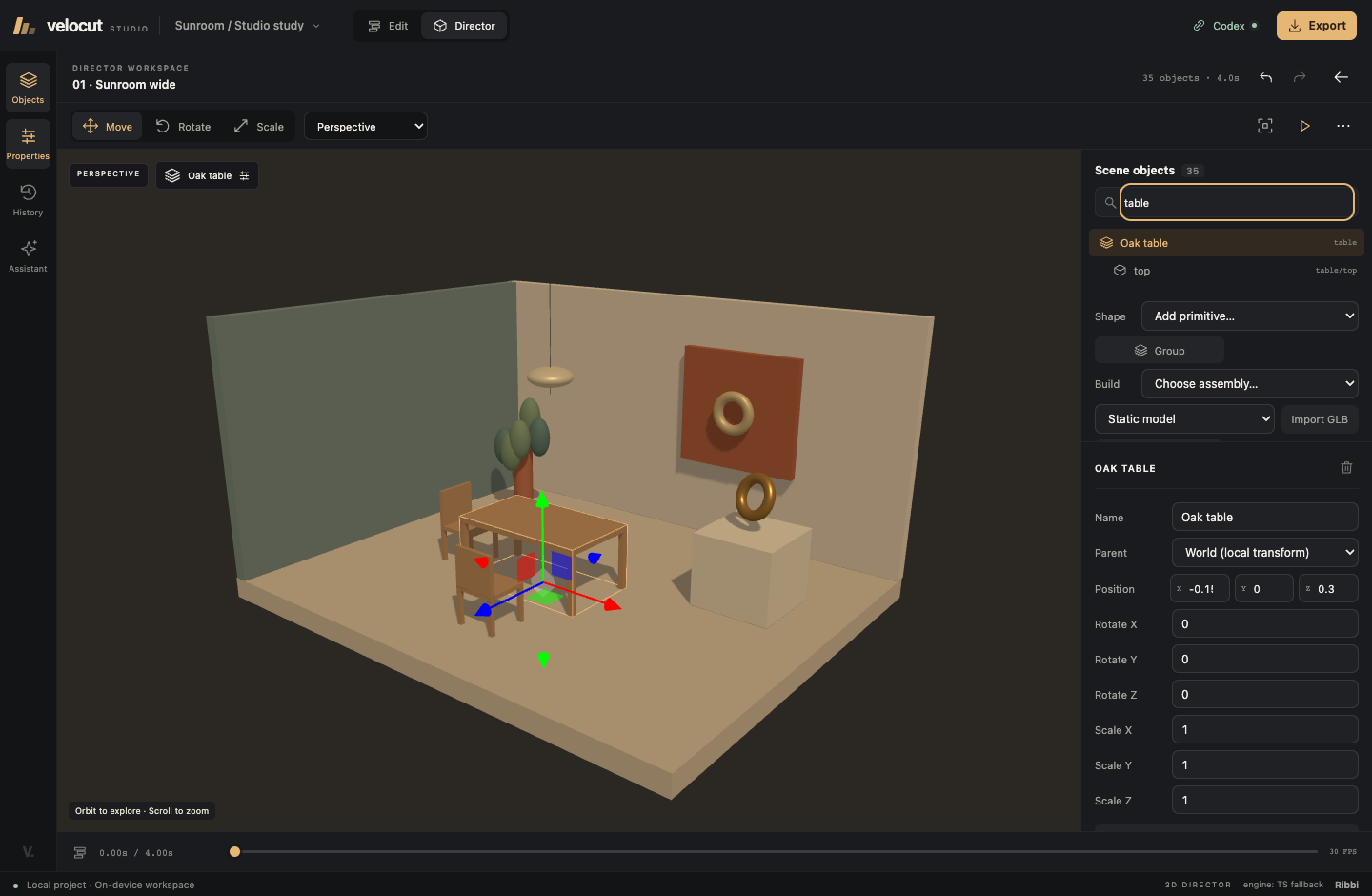
Export static GLB models through the Director, SDK and MCP; see the model export guide. Agents can batch-copy and arrange objects, adjust preview speed, and read multiple clips referenced from the timeline.
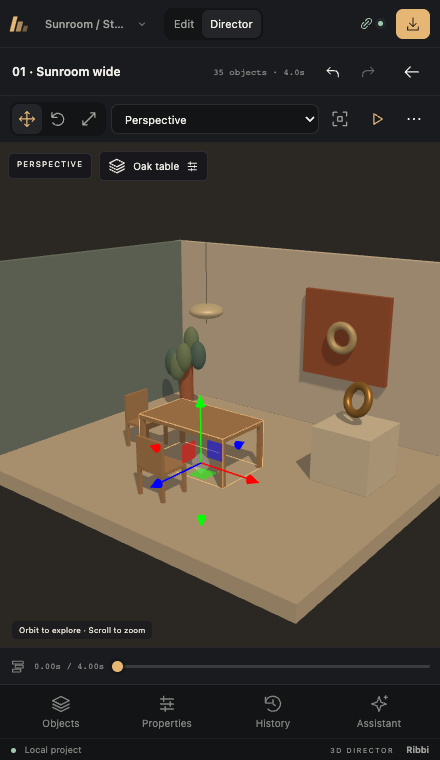
Keep the canvas usable in a small window
The workspace adapts to narrow browser panels alongside Codex. Bottom navigation opens the media/objects, properties, history and assistant panels as needed; the timeline can collapse to make room for the canvas. Media can be inserted by clicking, without dragging.
See what changed, then undo it
Edits are attributed in the branching history. Inspect a change, undo it, or return to an earlier state and continue from there. Revision checks reject stale AI edits when someone else has changed the scene.
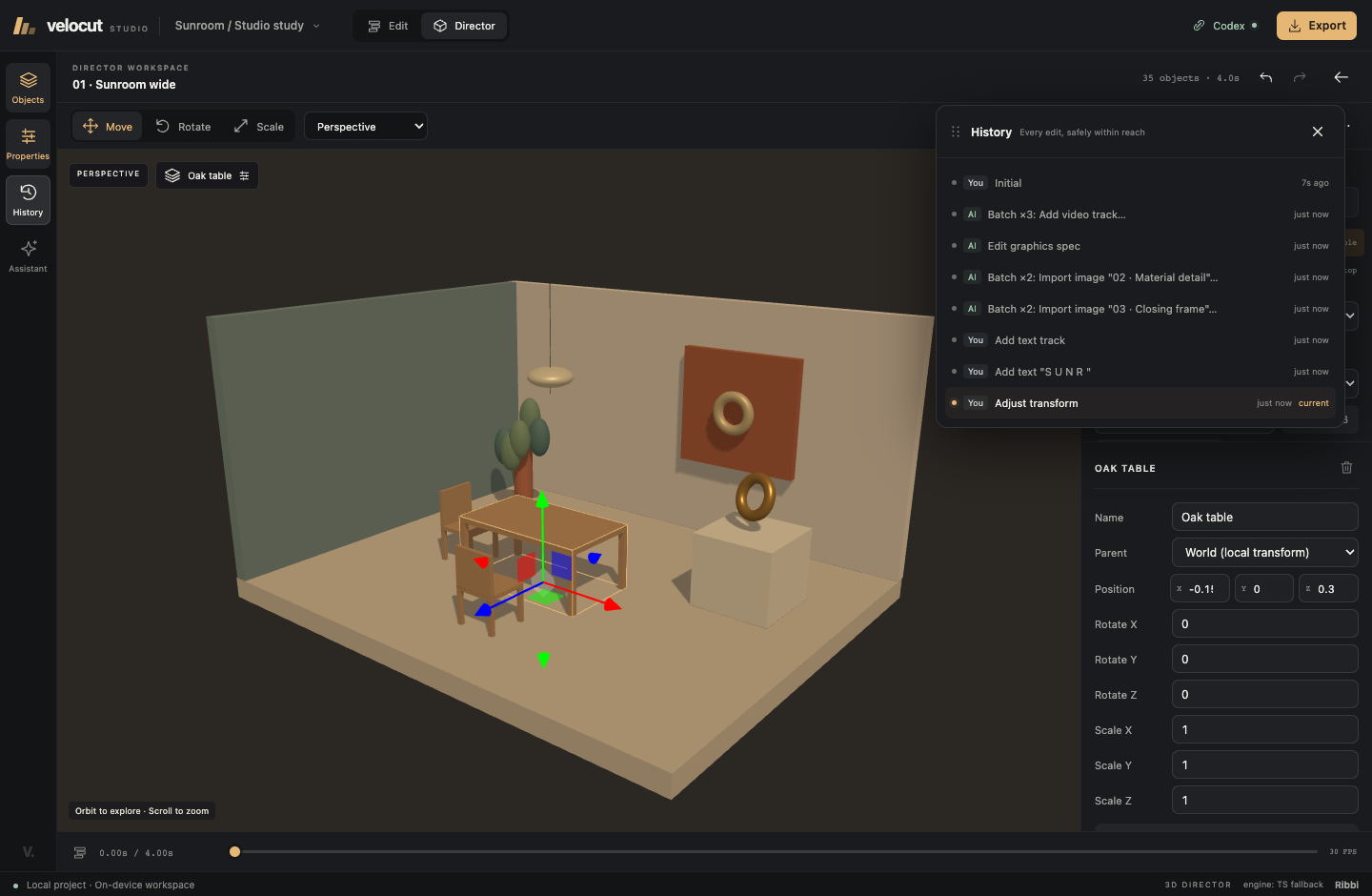
These screenshots use a reproducible documentation fixture driven through the real MCP bridge. No generated UI mockups or fabricated chat transcripts are shown.
What you can do
| Area | Capabilities |
|---|---|
| Video editing | Multiple tracks, split/trim, snapping, speed changes, track controls and transitions |
| Video generation | Draw a timeline range, text or first-frame generation, durable provider jobs, preview and adopt candidates; atomic SDK/MCP/CodeAct APIs |
| Titles and motion | Editable text, captions, transform keyframes, effects and declarative motion graphics |
| 3D directing | Geometry, assemblies, GLB models, characters, materials, lights, physics and cameras |
| Audio | Mixed playback, volume keyframes and optional transcription/narration providers |
| AI inspection | Rendered views, frame grabs, contact sheets, shot analysis and audio metrics; available tools depend on the host integration |
| Export | WebCodecs encoding and MP4 muxing, with codec availability determined by the browser |
| Local projects | Per-project storage, persisted history and same-origin multi-tab synchronization |
The built-in Assistant is a separate, optional integration. Configure an Anthropic-compatible provider there to use it. Browser-local Whisper/VITS and cloud generation services have their own dependencies or credentials; they are not required for editing or Codex. Development-only cloud relays are not included in the portable server. See the security and data-flow notes.
Configure your own models
Open Model settings in the toolbar. Import a YAML/JSON model definition or ask Codex to configure one from API documentation, then enter your Base URL and API Token. Templates cover Task API MiniMax H3 and Seedance, Ark content tasks, and native MiniMax video, speech and music. All templates use the same declarative executor as custom models; no per-model npm packages or source edits are required. Existing channel settings continue to work through these shared definitions.
Video channels feed the timeline generation panel. Speech and music can be previewed in the model dialog, recovered from saved generation history and kept in assets. Reference storage settings are available there too. Configuration checks are local; generation uses the selected service's credits. See the model configuration guide.
Generate into a timeline range
Choose Draw generation range in the timeline and drag a video interval, or use Set range… in a small panel. Enter a prompt, choose a configured video channel and model, then generate. Preview the result and Use for slot to place it in one undo step. You can continue editing while a job runs, retain several candidates, or keep a result only in assets. Reloading the original project resumes saved provider tasks without resubmission. First-frame conditioning uses an imported image or captured frame and your configured upload storage.
Video generation uses your provider account and its credits. Model durations and other constraints are configured per channel; the editor explains trimming and requires an explicit choice for short results. See the atomic generation API.
Use the SDKs
The editor and its integrations share a monorepo. Release 0.0.2 contains eight public packages, including the shared Provider SDK. Packages ship JavaScript and, for the SDKs, TypeScript declarations. GPU rendering remains a browser capability; an npm package does not imply a headless Node renderer.
| Package | Purpose |
|---|---|
@velocut/provider-sdk |
Provider/model/channel contracts, credential references and lifecycle APIs |
@velocut/protocol |
Document types, commands, validation and protocol compatibility |
@velocut/core-ts |
Pure timeline editing, evaluation and engine history |
@velocut/render-sdk |
WebGPU composition, media workers, audio and export; includes a Vite helper |
@velocut/scene-sdk |
Scene descriptions, geometry, models, physics, cameras and assets |
@velocut/runtime |
Shared project authoring, branching history and host interfaces |
@velocut/mcp |
Generic MCP server used by the Codex plugin and other clients |
@velocut/cli |
Prebuilt local Studio launcher |
The .tgz files are available in Release 0.0.2. Install SDKs directly with npm install @velocut/[email protected] @velocut/[email protected], or use the tarballs offline.
SDK integration examples and release workflow → · Build a Provider →
Develop from source
git clone https://github.com/open-ribbi/velocut.git
cd velocut/web
npm ci
npm run dev
The dev command builds the workspace SDKs first. The TypeScript engine works without Rust; the canonical Rust engine is optional and shares behavioral test vectors with it.
Build the optional Rust/WASM engine
Run from the repository root:
rustup target add wasm32-unknown-unknown
cargo install wasm-pack
wasm-pack build crates/velocut-wasm --target web --release \
  --out-dir ../../web/apps/editor/public/wasm
Restart the dev server. The status bar identifies the active engine. Portable builds use the TS engine by default; set VELOCUT_INCLUDE_WASM=1 during the release build to include freshly built WASM artifacts.
crates/                 Rust engine and WASM bindings
protocol/vectors/       Shared behavioral tests
web/apps/editor/        Studio UI and application wiring
web/packages/           SDKs, runtime, MCP and CLI
plugins/velocut/   Codex manifest and Director skill
web/scripts/            Builds, packaging, verification and documentation capture
Verify and contribute
# From web/
npm test
npm run e2e
npm run build:release
npm -w @velocut/cli test
npm run pack:release
npm run test:distribution
Run cargo test from the repository root for the Rust engine. Run build and browser checks sequentially: rebuilding SDKs can reload an active development page.
CI checks both engines, WASM compilation and editor journeys. The distribution workflow installs tarballs outside the checkout and verifies the CLI, MCP, workers and actual rendering on macOS, Windows and Linux.
Contributing · Architecture · Command protocol · Security
License
MIT © 2026 willbean. Bundled third-party code and scene assets retain their own licenses and attribution.
Explore related projects
affaan-m/ECC
The agent harness performance optimization system. Skills, instincts, memory, security, and research-first development for Claude Code, Codex, Opencode, Cursor and beyond.
300,313 starsNousResearch/hermes-agent
The agent that grows with you
262,134 starsmultica-ai/andrej-karpathy-skills
A single CLAUDE.md file to improve Claude Code behavior, derived from Andrej Karpathy's observations on LLM coding pitfalls.
231,460 starsfirecrawl/firecrawl
Supercharge your AI agents with data from the web and beyond. Building the library for superintelligence. 🔥
200,178 stars